[](https://pypi.python.org/pypi/datamodel-code-generator)
[](https://anaconda.org/conda-forge/datamodel-code-generator)
[](https://pepy.tech/projects/datamodel-code-generator)
[](https://pypi.python.org/pypi/datamodel-code-generator)
[](https://codecov.io/gh/datamodel-code-generator/datamodel-code-generator)

[](https://pydantic.dev)
---
## ✨ What it does
{ align=center }
{ align=center }
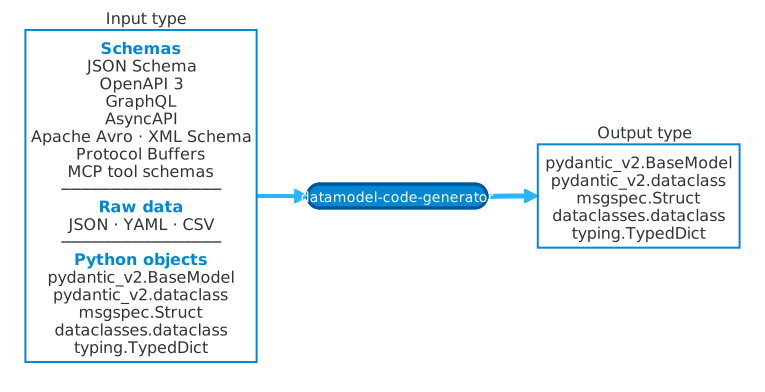
Pick any one of the supported inputs and pick the Python model style you want as output.
`--input-model path/to/file.py:ClassName` can even retarget an existing Pydantic, dataclass, or TypedDict class defined
in another Python file to a different output type.
- 📄 Converts **OpenAPI 3**, **AsyncAPI**, **JSON Schema**, **Apache Avro**, **XML Schema**, **Protocol Buffers/gRPC**, **GraphQL**, **MCP tool schemas**, and raw data (JSON/YAML/CSV) into Python models
- 🐍 Generates from **existing Python types** (Pydantic, dataclass, TypedDict) via `--input-model`
- 🎯 Generates **Pydantic v2**, **Pydantic v2 dataclass**, **dataclasses**, **TypedDict**, or **msgspec** output
- 🔗 Handles complex schemas: `$ref`, `allOf`, `oneOf`, `anyOf`, enums, and nested types
- ✅ Produces type-safe, validated code ready for your IDE and type checker
---
## 🧪 Try It In Your Browser
Generate models in your browser without installing anything.
!!! note "Playground privacy"
Generation runs locally in your browser with Pyodide. Your schema and options are not sent to a backend. Shared
repro URLs encode them in the URL fragment (`#state=...`), which browsers do not send to the server; the full URL
can still be stored in your browser history or wherever you share it.
---
## 🚀 Start Here
Install the CLI and generate your first model from [Getting Started](getting-started.md).
!!! note "Default output model"
When `--output-model-type` is omitted, datamodel-code-generator generates Pydantic v2 BaseModel output
(`pydantic_v2.BaseModel`). Use `--output-model-type` explicitly when you want dataclasses, TypedDict, or msgspec
output.
---
## 📥 Choose Your Input
| Input Type | File Types | Example |
|------------|------------|---------|
| 📘 [OpenAPI 3.0/3.1/3.2](openapi.md) | `.yaml`, `.json` | API specifications |
| 📡 [AsyncAPI](asyncapi.md) | `.yaml`, `.json` | Event-driven API specifications |
| 📋 [JSON Schema](jsonschema.md) | `.json`, `.yaml` | Data validation schemas |
| 🪶 [Apache Avro](avro.md) | `.avsc`, `.json` | Avro schemas |
| 🧾 [XML Schema](xmlschema.md) | `.xsd` | XML document schemas |
| 🧩 [Protocol Buffers / gRPC](protobuf.md) | `.proto` | Protobuf messages and service schemas |
| 🔷 [GraphQL](graphql.md) | `.graphql` | GraphQL type definitions |
| 🛠️ [MCP Tool Schemas](mcp-tools.md) | `.json`, `.yaml` | MCP tool input/output schemas |
| 📊 [JSON/YAML/CSV Data](jsondata.md) | `.json`, `.yaml`, `.csv` | Infer schema from data |
| 🐍 [Python Models](python-model.md) | `.py` | Pydantic, dataclass, TypedDict |
---
## ✅ Conformance Signals
CI exercises datamodel-code-generator against pinned external corpora for XML Schema, JSON Schema, AsyncAPI, Apache
Avro, and Protocol Buffers. See the [Conformance Dashboard](conformance.md) for the generated summary of runner scripts,
tox environments, CI jobs, expected corpus counts, and upstream sources.
---
## 📤 Choose Your Output
```bash
# 🆕 Pydantic v2 (recommended for new projects)
datamodel-codegen --output-model-type pydantic_v2.BaseModel ...
# 🏗️ Python dataclasses
datamodel-codegen --output-model-type dataclasses.dataclass ...
# 📝 TypedDict (for type hints without validation)
datamodel-codegen --output-model-type typing.TypedDict ...
# ⚡ msgspec (high-performance serialization)
datamodel-codegen --output-model-type msgspec.Struct ...
```
See [Supported Data Types](supported-data-types.md) for the full list.
---
## 🍳 Common Recipes
### CLI option quick starts
Use these starting points when combining options; each option links to the generated CLI reference for details and examples.
- **Generate a local schema file:** Pin the input type and destination when the source extension is ambiguous or generated output needs a stable path. Options: [`--input`](cli-reference/base-options.md#input), [`--input-file-type`](cli-reference/base-options.md#input-file-type), [`--output`](cli-reference/base-options.md#output).
- **Target Pydantic v2 on modern Python:** Set the output model family and Python/Pydantic compatibility targets together. Options: [`--output-model-type`](cli-reference/model-customization.md#output-model-type), [`--target-python-version`](cli-reference/model-customization.md#target-python-version), [`--target-pydantic-version`](cli-reference/model-customization.md#target-pydantic-version).
- **Use modern Python annotations:** Target a recent Python version and prefer built-in collection and union syntax in generated types. Options: [`--target-python-version`](cli-reference/model-customization.md#target-python-version), [`--use-union-operator`](cli-reference/typing-customization.md#use-union-operator), [`--use-standard-collections`](cli-reference/typing-customization.md#use-standard-collections).
- **Normalize incoming field names:** Convert source names to Python identifiers while preserving explicit alias data for runtime IO. Options: [`--snake-case-field`](cli-reference/field-customization.md#snake-case-field), [`--original-field-name-delimiter`](cli-reference/field-customization.md#original-field-name-delimiter), [`--aliases`](cli-reference/field-customization.md#aliases).
- **Generate operation-focused models:** Limit OpenAPI output to operation shapes and name models from operation IDs and status codes. Options: [`--openapi-scopes`](cli-reference/openapi-only-options.md#openapi-scopes), [`--use-operation-id-as-name`](cli-reference/openapi-only-options.md#use-operation-id-as-name), [`--use-status-code-in-response-name`](cli-reference/openapi-only-options.md#use-status-code-in-response-name).
- **Resolve remote references deliberately:** Enable remote `$ref` loading and configure request metadata, timeouts, or local ref roots. Options: [`--allow-remote-refs`](cli-reference/general-options.md#allow-remote-refs), [`--http-headers`](cli-reference/general-options.md#http-headers), [`--http-timeout`](cli-reference/general-options.md#http-timeout), [`--http-local-ref-path`](cli-reference/general-options.md#http-local-ref-path).
See the [CLI Reference](cli-reference/index.md) for the full option list and category-specific recipes.
### 🤖 Get CLI Help from LLMs
Generate a prompt to ask LLMs about CLI options:
```bash
datamodel-codegen --generate-prompt "Best options for Pydantic v2?" | claude -p
```
See [LLM Integration](llm-integration.md) for more examples.
### 🌐 Generate from URL {#http-extra-option}
```bash
pip install 'datamodel-code-generator[http]'
datamodel-codegen --url https://example.com/api/openapi.yaml --output model.py
```
The `http` extra is the stable, non-deprecated backend. For the experimental
HTTPX2 alternative, pass `--http-backend httpx2`; see
[HTTP backend selection](faq.md#http-backend-selection).
### ⚙️ Use with pyproject.toml
```toml title="pyproject.toml"
[tool.datamodel-codegen]
input = "schema.yaml"
output = "src/models.py"
output-model-type = "pydantic_v2.BaseModel"
```
Then simply run:
```bash
datamodel-codegen
```
See [pyproject.toml Configuration](pyproject_toml.md) for more options.
### 🔄 CI/CD Integration
Validate generated models in your CI pipeline:
```yaml title=".github/workflows/validate-models.yml"
# Replace vX.Y.Z with a released action version.
- uses: datamodel-code-generator/datamodel-code-generator@vX.Y.Z
with:
input: schemas/api.yaml
output: src/models/api.py
```
See [CI/CD Integration](ci-cd.md) for more options.
---
## 📚 Next Steps
- 🖥️ **[CLI Reference](cli-reference/index.md)** - All command-line options with examples
- 🧰 **[Presets](presets.md)** - Recommended immutable option bundles
- ⚙️ **[pyproject.toml Configuration](pyproject_toml.md)** - Configure via pyproject.toml
- 🚀 **[One-liner Usage](oneliner.md)** - uvx, pipx, clipboard integration
- 🔄 **[CI/CD Integration](ci-cd.md)** - GitHub Actions and CI validation
- ✅ **[Conformance Dashboard](conformance.md)** - External corpus and CI coverage signals
- 📈 **[Performance Benchmarks](performance-benchmarks.md)** - Release benchmark tables and interactive charts
- 🎨 **[Custom Templates](custom_template.md)** - Customize generated code with Jinja2
- 🖌️ **[Code Formatting](formatting.md)** - Configure black, isort, and ruff
- ❓ **[FAQ](faq.md)** - Common questions and troubleshooting
---
## 💖 Sponsors
---
# Supported Input Formats
Source: https://datamodel-code-generator.koxudaxi.dev/supported-data-types/
This code generator supports the following input formats:
- OpenAPI 3.0/3.1/3.2 (YAML/JSON, [OpenAPI Data Types](https://spec.openapis.org/oas/v3.2.0.html#data-types)); OpenAPI 2.0 (Swagger) has limited support.
- [AsyncAPI](asyncapi.md) 2.x/3.x (YAML/JSON).
- JSON Schema ([JSON Schema Core](https://json-schema.org/draft/2020-12/json-schema-core.html) / [JSON Schema Validation](https://json-schema.org/draft/2020-12/json-schema-validation.html)).
- Apache Avro schema (`.avsc`, [Apache Avro](avro.md)).
- [XML Schema](xmlschema.md) (XSD).
- Protocol Buffers / gRPC (`.proto`, [Protocol Buffers / gRPC](protobuf.md)).
- GraphQL schema ([GraphQL Schemas and Types](https://graphql.org/learn/schema/)).
- MCP tool schemas (`--input-file-type mcp-tools`, [MCP Tool Schemas](mcp-tools.md)).
- JSON / YAML / CSV data (converted to JSON Schema before model generation).
- Python dictionary (converted to JSON Schema before model generation).
- Existing Python types via [`--input-model`](python-model.md): Pydantic models, dataclasses, Pydantic dataclasses, TypedDict, and dict schemas.
Use `--input-file-type auto` (the default) for common files, or set an explicit
type when a file extension is ambiguous. For example, YAML can contain either an
OpenAPI/JSON Schema document or raw sample data, so use `jsonschema`, `openapi`,
or `yaml` depending on the intended input.
## Input Format Guide
### Input Format Guide (from code)
The tables below are generated from the input type enum, parser routing code, schema version enums, raw-data conversion rules, and parser type conversion maps.
#### Parser Routes and Version Flags
| Input format | Selector | Parser route | `--schema-version` | Auto detection |
| --- | --- | --- | --- | --- |
| JSON Schema | `jsonschema` | `JsonSchemaParser` | `draft-04`, `draft-06`, `draft-07`, `2019-09`, `2020-12`, `auto` | `$schema`, `type`, `properties`, or composition keywords |
| OpenAPI | `openapi` | `OpenAPIParser` | `3.0`, `3.1`, `3.2`, `auto` | `openapi` field |
| AsyncAPI | `asyncapi` | `AsyncAPIParser` | `2.0`, `3.0`, `auto` | `asyncapi` field |
| GraphQL schema | `graphql` | `GraphQLParser` | Not supported | Explicit only |
| XML Schema | `xmlschema` | `XMLSchemaParser` | `1.0`, `1.1`, `auto` | XML Schema namespace on the root element |
| Protocol Buffers | `protobuf` | `ProtobufParser` | `proto2`, `proto3`, `2023`, `auto` | Protocol Buffers syntax/message-like text |
| Apache Avro | `avro` | `AvroParser` | Not supported | Avro schema object, union, or primitive schema form |
| MCP tool schemas | `mcp-tools` | `JsonSchemaParser after MCP conversion` | Converted to JSON Schema; `draft-04`, `draft-06`, `draft-07`, `2019-09`, `2020-12`, `auto` | Explicit only |
| JSON data | `json` | `JsonSchemaParser after genson conversion` | Converted to JSON Schema; `draft-04`, `draft-06`, `draft-07`, `2019-09`, `2020-12`, `auto` | Mapping that is not a schema/OpenAPI/AsyncAPI/Avro document |
| YAML data | `yaml` | `JsonSchemaParser after genson conversion` | Converted to JSON Schema; `draft-04`, `draft-06`, `draft-07`, `2019-09`, `2020-12`, `auto` | Explicit for YAML sample data |
| CSV data | `csv` | `JsonSchemaParser after genson conversion` | Converted to JSON Schema; `draft-04`, `draft-06`, `draft-07`, `2019-09`, `2020-12`, `auto` | Detected from CSV-like text with consistent comma counts across non-empty lines or explicit `csv` |
| Python dictionary data | `dict` | `JsonSchemaParser after genson conversion` | Converted to JSON Schema; `draft-04`, `draft-06`, `draft-07`, `2019-09`, `2020-12`, `auto` | Explicit for mapping input |
| Python input model | `--input-model` | `JsonSchemaParser` after Python schema conversion | JSON Schema after conversion; dict input can select another explicit schema type | Explicit only |
#### Accepted Source Shapes
| Input format | Accepted source shape |
| --- | --- |
| JSON Schema | JSON Schema document as JSON/YAML, mapping, URL, or file |
| OpenAPI | OpenAPI document as JSON/YAML, mapping, URL, or file |
| AsyncAPI | AsyncAPI document as JSON/YAML, mapping, URL, or file |
| GraphQL schema | GraphQL SDL text, URL, or file |
| XML Schema | XSD XML text, URL, or file |
| Protocol Buffers | .proto text, file, directory, URL, or path list |
| Apache Avro | Avro schema JSON/YAML, mapping, list, URL, or file |
| MCP tool schemas | MCP tool list/profile as JSON/YAML, mapping, list, URL, or file |
| JSON data | JSON sample data text or file |
| YAML data | YAML sample data text or file |
| CSV data | CSV text or file with a header row and at least one data row |
| Python dictionary data | In-memory mapping or Python literal data |
| Python input model | `module:Object` or `path/to/file.py:Object` via `--input-model` |
#### Format Type Coverage
| Input family | Code-derived coverage | Guide |
| --- | --- | --- |
| JSON Schema | 7 schema types, 54 common formats | Uses JSON Schema type/format mappings and feature metadata below |
| OpenAPI | JSON Schema mappings plus 2 OpenAPI-only formats | Adds OpenAPI-specific schema features and formats |
| GraphQL | 6 GraphQL type kinds | Uses GraphQL SDL parser order and parser method map |
| XML Schema | 50 built-in XSD datatypes | Converts XSD built-ins to JSON Schema fragments |
| Protocol Buffers | 15 scalar field types, 17 well-known type mappings | Converts descriptors to JSON Schema definitions |
| Apache Avro | 8 primitives, 13 logical type mappings | Converts Avro schemas to JSON Schema while preserving Avro metadata |
| JSON/YAML/CSV/Dict data | 4 raw data selectors | Samples are converted to JSON Schema with genson before parsing |
| Python input model | 4 supported object kinds | Python objects are converted to schema data before normal generation |
#### GraphQL Type Kinds
| GraphQL kind | Parser method | Generated shape |
| --- | --- | --- |
| `scalar` | `parse_scalar` | Generates scalar aliases |
| `enum` | `parse_enum` | Generates enums or literals depending on enum options |
| `interface` | `parse_interface` | Generates model classes from interface fields |
| `object` | `parse_object` | Generates model classes except root Query/Mutation objects |
| `input_object` | `parse_input_object` | Generates model classes for input objects |
| `union` | `parse_union` | Generates union type aliases |
#### Apache Avro Primitive Types
| Avro primitive | JSON Schema mapping | Constraints |
| --- | --- | --- |
| `null` | `null` | - |
| `boolean` | `boolean` | - |
| `int` | `integer` + `int32` | - |
| `long` | `integer` + `int64` | - |
| `float` | `number` + `float` | - |
| `double` | `number` + `double` | - |
| `bytes` | `string` + `binary` | - |
| `string` | `string` | - |
#### Apache Avro Logical Types
| Avro logical type | Allowed Avro type | JSON Schema mapping |
| --- | --- | --- |
| `decimal` | `bytes`, `fixed` | `string` + `decimal` |
| `big-decimal` | `bytes` | `string` + `decimal` |
| `uuid` | `string`, `fixed` | `string` + `uuid` |
| `date` | `int` | `string` + `date` |
| `time-millis` | `int` | `string` + `time` |
| `time-micros` | `long` | `string` + `time` |
| `timestamp-millis` | `long` | `string` + `date-time` |
| `timestamp-micros` | `long` | `string` + `date-time` |
| `timestamp-nanos` | `long` | `string` + `date-time` |
| `local-timestamp-millis` | `long` | `string` + `date-time-local` |
| `local-timestamp-micros` | `long` | `string` + `date-time-local` |
| `local-timestamp-nanos` | `long` | `string` + `date-time-local` |
| `duration` | `fixed` | `string` + `duration` |
#### Protocol Buffers Scalar Types
| Protobuf scalar | JSON Schema mapping | Constraints |
| --- | --- | --- |
| `double` | `number` + `double` | - |
| `float` | `number` + `float` | - |
| `int64` | `integer` + `int64` | - |
| `uint64` | `integer` + `int64` | minimum=0, maximum=18446744073709551615 |
| `int32` | `integer` + `int32` | - |
| `uint32` | `integer` + `int32` | minimum=0, maximum=4294967295 |
| `sint32` | `integer` + `int32` | - |
| `sint64` | `integer` + `int64` | - |
| `fixed32` | `integer` + `int32` | minimum=0, maximum=4294967295 |
| `fixed64` | `integer` + `int64` | minimum=0, maximum=18446744073709551615 |
| `sfixed32` | `integer` + `int32` | - |
| `sfixed64` | `integer` + `int64` | - |
| `bool` | `boolean` | - |
| `string` | `string` | - |
| `bytes` | `string` + `binary` | - |
#### Protocol Buffers Well-Known Types
| Well-known type | JSON Schema mapping |
| --- | --- |
| `google.protobuf.Timestamp` | `string` + `date-time` |
| `google.protobuf.Duration` | `string` + `duration` |
| `google.protobuf.Struct` | `object` map |
| `google.protobuf.ListValue` | `array` |
| `google.protobuf.Value` | `null` \| `boolean` \| `number` \| `string` \| `object` map \| `array` |
| `google.protobuf.Any` | `object` map |
| `google.protobuf.Empty` | `object` |
| `google.protobuf.FieldMask` | `string` |
| `google.protobuf.DoubleValue` | `number` + `double` \| `null` |
| `google.protobuf.FloatValue` | `number` + `float` \| `null` |
| `google.protobuf.Int64Value` | `integer` + `int64` \| `null` |
| `google.protobuf.UInt64Value` | `integer` + `int64` \| `null` |
| `google.protobuf.Int32Value` | `integer` + `int32` \| `null` |
| `google.protobuf.UInt32Value` | `integer` + `int32` \| `null` |
| `google.protobuf.BoolValue` | `boolean` \| `null` |
| `google.protobuf.StringValue` | `string` \| `null` |
| `google.protobuf.BytesValue` | `string` + `binary` \| `null` |
#### XML Schema Built-In Type Groups
| JSON Schema mapping | XSD built-ins | Count |
| --- | --- | --- |
| `Any` | `anySimpleType`, `anyAtomicType`, `anyType` | 3 |
| `string` + `uri` | `anyURI` | 1 |
| `string` + `byte` | `base64Binary` | 1 |
| `boolean` | `boolean` | 1 |
| `integer` | `byte`, `int`, `integer`, `long`, `negativeInteger`, `nonNegativeInteger`, `nonPositiveInteger`, `positiveInteger`, +5 more | 13 |
| `string` + `date` | `date` | 1 |
| `string` + `date-time` | `dateTime`, `dateTimeStamp` | 2 |
| `number` + `decimal` | `decimal` | 1 |
| `number` | `double`, `float` | 2 |
| `string` | `duration`, `ENTITY`, `gDay`, `gMonth`, `gMonthDay`, `gYear`, `gYearMonth`, `hexBinary`, +12 more | 20 |
| `string` + `duration` | `dayTimeDuration` | 1 |
| `array` | `ENTITIES`, `IDREFS`, `NMTOKENS` | 3 |
| `string` + `time` | `time` | 1 |
#### Python Input Types
| Python input object | Conversion behavior |
| --- | --- |
| `dict` | Returned directly as the schema; `--input-file-type` is required |
| `Pydantic v2 BaseModel` | Converted with Pydantic `model_json_schema()` |
| `dataclass` | Converted with Pydantic `TypeAdapter`; includes stdlib and Pydantic dataclasses |
| `TypedDict` | Converted with Pydantic `TypeAdapter` |
| Multiple `--input-model` | Supported only for Pydantic v2 BaseModel classes |
## 📘 OpenAPI 3 and JSON Schema {#openapi-3-and-json-schema}
Below are the data types and features recognized by datamodel-code-generator for OpenAPI 3 and JSON Schema.
### Schema Feature Support (from code)
The JSON Schema and OpenAPI feature matrix below is generated from the same code metadata used by the schema version support page.
#### JSON Schema Features
| Feature | Introduced | Status | Description |
|---------|------------|--------|-------------|
| `Null in type array` | Draft 4 or earlier | ✅ Supported | Allows `type: ['string', 'null']` syntax for nullable types |
| `$defs` | 2019-09 | ✅ Supported | Uses `$defs` instead of `definitions` for schema definitions |
| `prefixItems` | 2020-12 | ✅ Supported | Tuple validation using `prefixItems` keyword |
| `Boolean schemas` | Draft 6 | ✅ Supported | Allows `true` and `false` as valid schemas |
| `$id` | Draft 6 | ✅ Supported | Schema identifier field (`id` in Draft 4, `$id` in Draft 6+) |
| `definitions/$defs` | Draft 4 | ✅ Supported | Key for reusable schema definitions |
| `exclusiveMinimum/Maximum as number` | Draft 6 | ✅ Supported | Numeric `exclusiveMinimum`/`exclusiveMaximum` (boolean in Draft 4) |
| `readOnly/writeOnly` | Draft 7 | ✅ Supported | Field visibility hints for read-only and write-only properties |
| `const` | Draft 6 | ✅ Supported | Single constant value constraint |
| `propertyNames` | Draft 6 | ✅ Supported | Dict key type constraints via pattern, enum, or $ref |
| `contains` | Draft 6 | ⚠️ Partial | Count constraints are modeled when contains matches every item; general schema-valued contains is not supported |
| `deprecated` | 2019-09 | ⚠️ Partial | Marks schema elements as deprecated |
| `if/then/else` | Draft 7 | ❌ Not Supported | Conditional schema validation |
| `contentMediaType/contentEncoding` | Draft 7 | ⚠️ Partial | Content type and encoding hints for strings |
| `contentSchema` | 2019-09 | ⚠️ Partial | Schema for decoded string content |
| `$anchor` | 2019-09 | ✅ Supported | Location-independent schema references |
| `$vocabulary` | 2019-09 | ❌ Not Supported | Vocabulary declarations for meta-schemas |
| `unevaluatedProperties` | 2019-09 | ⚠️ Partial | Additional properties not evaluated by subschemas |
| `unevaluatedItems` | 2019-09 | ⚠️ Partial | Additional items not evaluated by subschemas |
| `dependentRequired` | 2019-09 | ❌ Not Supported | Conditional property requirements |
| `dependentSchemas` | 2019-09 | ❌ Not Supported | Conditional schema application based on property presence |
| `$recursiveRef/$recursiveAnchor` | 2019-09 | ✅ Supported | Recursive reference resolution via anchors |
| `$dynamicRef/$dynamicAnchor` | 2020-12 | ✅ Supported | Dynamic reference resolution across schemas |
#### OpenAPI-Specific Features
| Feature | Introduced | Status | Description |
|---------|------------|--------|-------------|
| `nullable` | OAS 3.0 | ✅ Supported | Uses `nullable: true` for nullable types (deprecated in 3.1) |
| `discriminator` | OAS 3.0 | ✅ Supported | Polymorphism support via `discriminator` keyword |
| `webhooks` | OAS 3.1 | ✅ Supported | Top-level webhooks object for incoming events |
| `$ref with sibling keywords` | OAS 3.1 | ⚠️ Partial | $ref can coexist with description, summary (no allOf workaround) |
| `itemSchema` | OAS 3.2 | ✅ Supported | Media Type Object item schema for sequential media |
| `$self` | OAS 3.2 | ✅ Supported | Root document URI for relative and absolute reference resolution |
| `querystring` | OAS 3.2 | ✅ Supported | Query string parameter object without a parameter name |
| `xml` | OAS 3.0 | ⚠️ Partial | XML serialization metadata (name, namespace, prefix) |
| `externalDocs` | OAS 3.0 | ⚠️ Partial | Reference to external documentation |
| `links` | OAS 3.0 | ❌ Not Supported | Links between operations |
| `callbacks` | OAS 3.0 | ❌ Not Supported | Callback definitions for webhooks |
| `securitySchemes` | OAS 3.0 | ❌ Not Supported | API security mechanism definitions |
## ✅ Implemented data types and features
### Implemented Data Types and Formats
The schema type, format, and default Pydantic v2 type columns below are generated from the parser's schema format registry and the default Pydantic v2 type mapping; keyword and note columns document supplemental schema details.
#### Schema Data Types
| Schema Type | Default Pydantic v2 Type | Supported Keywords |
|-------------|--------------------------|--------------------|
| `integer` | `int` | maximum, exclusiveMaximum, minimum, exclusiveMinimum, multipleOf |
| `number` | `float` | maximum, exclusiveMaximum, minimum, exclusiveMinimum, multipleOf |
| `string` | `str` | pattern, minLength, maxLength |
| `boolean` | `bool` | - |
| `object` | `Dict[str, Any]` | properties, required, additionalProperties, patternProperties |
| `null` | `None` | - |
| `array` | `List[Any]` | items, prefixItems, minItems, maxItems, uniqueItems |
#### Common Formats (JSON Schema + OpenAPI)
| Schema Type | Format | Default Pydantic v2 Type | Notes |
|-------------|--------|--------------------------|-------|
| `integer` | `default` (no `format`) | `int` | - |
| `integer` | `int32` | `int` | - |
| `integer` | `int64` | `int` | - |
| `integer` | `date-time` | `AwareDatetime` | - |
| `integer` | `unix-time` | `int` | - |
| `integer` | `unixtime` | `int` | - |
| `number` | `default` (no `format`) | `float` | - |
| `number` | `float` | `float` | - |
| `number` | `double` | `float` | - |
| `number` | `decimal` | `Decimal` | - |
| `number` | `date-time` | `AwareDatetime` | - |
| `number` | `time` | `time` | - |
| `number` | `time-delta` | `timedelta` | - |
| `number` | `unixtime` | `int` | - |
| `string` | `default` (no `format`) | `str` | - |
| `string` | `byte` | `Base64Str` | Base64 encoded string |
| `string` | `date` | `date` | - |
| `string` | `date-time` | `AwareDatetime` | - |
| `string` | `timestamp with time zone` | `AwareDatetime` | - |
| `string` | `date-time-local` | `NaiveDatetime` | - |
| `string` | `duration` | `timedelta` | - |
| `string` | `time` | `time` | - |
| `string` | `time-local` | `time` | - |
| `string` | `path` | `Path` | - |
| `string` | `email` | `EmailStr` | Requires email-validator |
| `string` | `idn-email` | `EmailStr` | Requires email-validator |
| `string` | `idn-hostname` | `str` | - |
| `string` | `iri` | `str` | - |
| `string` | `iri-reference` | `str` | - |
| `string` | `uuid` | `UUID` | - |
| `string` | `uuid1` | `UUID1` | - |
| `string` | `uuid2` | `UUID` | - |
| `string` | `uuid3` | `UUID3` | - |
| `string` | `uuid4` | `UUID4` | - |
| `string` | `uuid5` | `UUID5` | - |
| `string` | `uri` | `AnyUrl` | - |
| `string` | `uri-reference` | `str` | - |
| `string` | `uri-template` | `str` | - |
| `string` | `json-pointer` | `str` | - |
| `string` | `relative-json-pointer` | `str` | - |
| `string` | `regex` | `str` | - |
| `string` | `hostname` | `str` | - |
| `string` | `ipv4` | `IPv4Address` | - |
| `string` | `ipv4-network` | `IPv4Network` | - |
| `string` | `ipv6` | `IPv6Address` | - |
| `string` | `ipv6-network` | `IPv6Network` | - |
| `string` | `decimal` | `Decimal` | - |
| `string` | `integer` | `int` | - |
| `string` | `unixtime` | `int` | - |
| `string` | `ulid` | `ULID` | Requires python-ulid |
| `boolean` | `default` (no `format`) | `bool` | - |
| `object` | `default` (no `format`) | `Dict[str, Any]` | - |
| `null` | `default` (no `format`) | `None` | - |
| `array` | `default` (no `format`) | `List[Any]` | - |
#### OpenAPI-Only Formats
| Schema Type | Format | Default Pydantic v2 Type | Notes |
|-------------|--------|--------------------------|-------|
| `string` | `binary` | `bytes` | File content |
| `string` | `password` | `SecretStr` | - |
### 🔗 Other schema
- enum (as enum.Enum or typing.Literal)
- allOf (as Multiple inheritance)
- anyOf (as typing.Union)
- oneOf (as typing.Union)
- $ref ([http extra](index.md#http-extra-option) is required when resolving $ref for remote files.)
- $id (for [JSONSchema](https://json-schema.org/understanding-json-schema/structuring.html#id))
---
# Schema Version Support
Source: https://datamodel-code-generator.koxudaxi.dev/supported_formats/
This document describes the JSON Schema, OpenAPI, AsyncAPI, Apache Avro, XML Schema, and Protocol Buffers versions supported by datamodel-code-generator.
## Overview
datamodel-code-generator supports multiple schema formats including JSON Schema, OpenAPI, AsyncAPI, Apache Avro, XML Schema, and Protocol Buffers. By default, the tool operates in **Lenient mode**, accepting all features regardless of version declarations for formats that carry version information. This ensures maximum compatibility with real-world schemas that often mix features from different versions.
## Input Format Guide
### Input Format Guide (from code)
The tables below are generated from the input type enum, parser routing code, schema version enums, raw-data conversion rules, and parser type conversion maps.
#### Parser Routes and Version Flags
| Input format | Selector | Parser route | `--schema-version` | Auto detection |
| --- | --- | --- | --- | --- |
| JSON Schema | `jsonschema` | `JsonSchemaParser` | `draft-04`, `draft-06`, `draft-07`, `2019-09`, `2020-12`, `auto` | `$schema`, `type`, `properties`, or composition keywords |
| OpenAPI | `openapi` | `OpenAPIParser` | `3.0`, `3.1`, `3.2`, `auto` | `openapi` field |
| AsyncAPI | `asyncapi` | `AsyncAPIParser` | `2.0`, `3.0`, `auto` | `asyncapi` field |
| GraphQL schema | `graphql` | `GraphQLParser` | Not supported | Explicit only |
| XML Schema | `xmlschema` | `XMLSchemaParser` | `1.0`, `1.1`, `auto` | XML Schema namespace on the root element |
| Protocol Buffers | `protobuf` | `ProtobufParser` | `proto2`, `proto3`, `2023`, `auto` | Protocol Buffers syntax/message-like text |
| Apache Avro | `avro` | `AvroParser` | Not supported | Avro schema object, union, or primitive schema form |
| MCP tool schemas | `mcp-tools` | `JsonSchemaParser after MCP conversion` | Converted to JSON Schema; `draft-04`, `draft-06`, `draft-07`, `2019-09`, `2020-12`, `auto` | Explicit only |
| JSON data | `json` | `JsonSchemaParser after genson conversion` | Converted to JSON Schema; `draft-04`, `draft-06`, `draft-07`, `2019-09`, `2020-12`, `auto` | Mapping that is not a schema/OpenAPI/AsyncAPI/Avro document |
| YAML data | `yaml` | `JsonSchemaParser after genson conversion` | Converted to JSON Schema; `draft-04`, `draft-06`, `draft-07`, `2019-09`, `2020-12`, `auto` | Explicit for YAML sample data |
| CSV data | `csv` | `JsonSchemaParser after genson conversion` | Converted to JSON Schema; `draft-04`, `draft-06`, `draft-07`, `2019-09`, `2020-12`, `auto` | Detected from CSV-like text with consistent comma counts across non-empty lines or explicit `csv` |
| Python dictionary data | `dict` | `JsonSchemaParser after genson conversion` | Converted to JSON Schema; `draft-04`, `draft-06`, `draft-07`, `2019-09`, `2020-12`, `auto` | Explicit for mapping input |
| Python input model | `--input-model` | `JsonSchemaParser` after Python schema conversion | JSON Schema after conversion; dict input can select another explicit schema type | Explicit only |
#### Accepted Source Shapes
| Input format | Accepted source shape |
| --- | --- |
| JSON Schema | JSON Schema document as JSON/YAML, mapping, URL, or file |
| OpenAPI | OpenAPI document as JSON/YAML, mapping, URL, or file |
| AsyncAPI | AsyncAPI document as JSON/YAML, mapping, URL, or file |
| GraphQL schema | GraphQL SDL text, URL, or file |
| XML Schema | XSD XML text, URL, or file |
| Protocol Buffers | .proto text, file, directory, URL, or path list |
| Apache Avro | Avro schema JSON/YAML, mapping, list, URL, or file |
| MCP tool schemas | MCP tool list/profile as JSON/YAML, mapping, list, URL, or file |
| JSON data | JSON sample data text or file |
| YAML data | YAML sample data text or file |
| CSV data | CSV text or file with a header row and at least one data row |
| Python dictionary data | In-memory mapping or Python literal data |
| Python input model | `module:Object` or `path/to/file.py:Object` via `--input-model` |
#### Format Type Coverage
| Input family | Code-derived coverage | Guide |
| --- | --- | --- |
| JSON Schema | 7 schema types, 54 common formats | Uses JSON Schema type/format mappings and feature metadata below |
| OpenAPI | JSON Schema mappings plus 2 OpenAPI-only formats | Adds OpenAPI-specific schema features and formats |
| GraphQL | 6 GraphQL type kinds | Uses GraphQL SDL parser order and parser method map |
| XML Schema | 50 built-in XSD datatypes | Converts XSD built-ins to JSON Schema fragments |
| Protocol Buffers | 15 scalar field types, 17 well-known type mappings | Converts descriptors to JSON Schema definitions |
| Apache Avro | 8 primitives, 13 logical type mappings | Converts Avro schemas to JSON Schema while preserving Avro metadata |
| JSON/YAML/CSV/Dict data | 4 raw data selectors | Samples are converted to JSON Schema with genson before parsing |
| Python input model | 4 supported object kinds | Python objects are converted to schema data before normal generation |
#### GraphQL Type Kinds
| GraphQL kind | Parser method | Generated shape |
| --- | --- | --- |
| `scalar` | `parse_scalar` | Generates scalar aliases |
| `enum` | `parse_enum` | Generates enums or literals depending on enum options |
| `interface` | `parse_interface` | Generates model classes from interface fields |
| `object` | `parse_object` | Generates model classes except root Query/Mutation objects |
| `input_object` | `parse_input_object` | Generates model classes for input objects |
| `union` | `parse_union` | Generates union type aliases |
#### Apache Avro Primitive Types
| Avro primitive | JSON Schema mapping | Constraints |
| --- | --- | --- |
| `null` | `null` | - |
| `boolean` | `boolean` | - |
| `int` | `integer` + `int32` | - |
| `long` | `integer` + `int64` | - |
| `float` | `number` + `float` | - |
| `double` | `number` + `double` | - |
| `bytes` | `string` + `binary` | - |
| `string` | `string` | - |
#### Apache Avro Logical Types
| Avro logical type | Allowed Avro type | JSON Schema mapping |
| --- | --- | --- |
| `decimal` | `bytes`, `fixed` | `string` + `decimal` |
| `big-decimal` | `bytes` | `string` + `decimal` |
| `uuid` | `string`, `fixed` | `string` + `uuid` |
| `date` | `int` | `string` + `date` |
| `time-millis` | `int` | `string` + `time` |
| `time-micros` | `long` | `string` + `time` |
| `timestamp-millis` | `long` | `string` + `date-time` |
| `timestamp-micros` | `long` | `string` + `date-time` |
| `timestamp-nanos` | `long` | `string` + `date-time` |
| `local-timestamp-millis` | `long` | `string` + `date-time-local` |
| `local-timestamp-micros` | `long` | `string` + `date-time-local` |
| `local-timestamp-nanos` | `long` | `string` + `date-time-local` |
| `duration` | `fixed` | `string` + `duration` |
#### Protocol Buffers Scalar Types
| Protobuf scalar | JSON Schema mapping | Constraints |
| --- | --- | --- |
| `double` | `number` + `double` | - |
| `float` | `number` + `float` | - |
| `int64` | `integer` + `int64` | - |
| `uint64` | `integer` + `int64` | minimum=0, maximum=18446744073709551615 |
| `int32` | `integer` + `int32` | - |
| `uint32` | `integer` + `int32` | minimum=0, maximum=4294967295 |
| `sint32` | `integer` + `int32` | - |
| `sint64` | `integer` + `int64` | - |
| `fixed32` | `integer` + `int32` | minimum=0, maximum=4294967295 |
| `fixed64` | `integer` + `int64` | minimum=0, maximum=18446744073709551615 |
| `sfixed32` | `integer` + `int32` | - |
| `sfixed64` | `integer` + `int64` | - |
| `bool` | `boolean` | - |
| `string` | `string` | - |
| `bytes` | `string` + `binary` | - |
#### Protocol Buffers Well-Known Types
| Well-known type | JSON Schema mapping |
| --- | --- |
| `google.protobuf.Timestamp` | `string` + `date-time` |
| `google.protobuf.Duration` | `string` + `duration` |
| `google.protobuf.Struct` | `object` map |
| `google.protobuf.ListValue` | `array` |
| `google.protobuf.Value` | `null` \| `boolean` \| `number` \| `string` \| `object` map \| `array` |
| `google.protobuf.Any` | `object` map |
| `google.protobuf.Empty` | `object` |
| `google.protobuf.FieldMask` | `string` |
| `google.protobuf.DoubleValue` | `number` + `double` \| `null` |
| `google.protobuf.FloatValue` | `number` + `float` \| `null` |
| `google.protobuf.Int64Value` | `integer` + `int64` \| `null` |
| `google.protobuf.UInt64Value` | `integer` + `int64` \| `null` |
| `google.protobuf.Int32Value` | `integer` + `int32` \| `null` |
| `google.protobuf.UInt32Value` | `integer` + `int32` \| `null` |
| `google.protobuf.BoolValue` | `boolean` \| `null` |
| `google.protobuf.StringValue` | `string` \| `null` |
| `google.protobuf.BytesValue` | `string` + `binary` \| `null` |
#### XML Schema Built-In Type Groups
| JSON Schema mapping | XSD built-ins | Count |
| --- | --- | --- |
| `Any` | `anySimpleType`, `anyAtomicType`, `anyType` | 3 |
| `string` + `uri` | `anyURI` | 1 |
| `string` + `byte` | `base64Binary` | 1 |
| `boolean` | `boolean` | 1 |
| `integer` | `byte`, `int`, `integer`, `long`, `negativeInteger`, `nonNegativeInteger`, `nonPositiveInteger`, `positiveInteger`, +5 more | 13 |
| `string` + `date` | `date` | 1 |
| `string` + `date-time` | `dateTime`, `dateTimeStamp` | 2 |
| `number` + `decimal` | `decimal` | 1 |
| `number` | `double`, `float` | 2 |
| `string` | `duration`, `ENTITY`, `gDay`, `gMonth`, `gMonthDay`, `gYear`, `gYearMonth`, `hexBinary`, +12 more | 20 |
| `string` + `duration` | `dayTimeDuration` | 1 |
| `array` | `ENTITIES`, `IDREFS`, `NMTOKENS` | 3 |
| `string` + `time` | `time` | 1 |
#### Python Input Types
| Python input object | Conversion behavior |
| --- | --- |
| `dict` | Returned directly as the schema; `--input-file-type` is required |
| `Pydantic v2 BaseModel` | Converted with Pydantic `model_json_schema()` |
| `dataclass` | Converted with Pydantic `TypeAdapter`; includes stdlib and Pydantic dataclasses |
| `TypedDict` | Converted with Pydantic `TypeAdapter` |
| Multiple `--input-model` | Supported only for Pydantic v2 BaseModel classes |
## JSON Schema Version Support
### Supported Versions
| Version | Spec URL | Notes |
|---------|----------|-------|
| Draft 4 | [json-schema.org/draft-04](https://json-schema.org/draft-04/json-schema-core) | `id`, `definitions` |
| Draft 6 | [json-schema.org/draft-06](https://json-schema.org/draft-06/json-schema-release-notes) | `$id`, const, boolean schemas |
| Draft 7 | [json-schema.org/draft-07](https://json-schema.org/draft-07/json-schema-release-notes) | if/then/else, readOnly/writeOnly |
| 2019-09 | [json-schema.org/draft/2019-09](https://json-schema.org/draft/2019-09/release-notes) | `$defs`, `$anchor`, `$recursiveRef`/`$recursiveAnchor` |
| 2020-12 | [json-schema.org/draft/2020-12](https://json-schema.org/draft/2020-12/release-notes) | `prefixItems`, `$dynamicRef`/`$dynamicAnchor` |
### Feature Compatibility Matrix
| Feature | Draft 4 | Draft 6 | Draft 7 | 2019-09 | 2020-12 |
|---------|---------|---------|---------|---------|---------|
| **ID/Reference** |
| ID field | `id` | `$id` | `$id` | `$id` | `$id` |
| Definitions key | `definitions` | `definitions` | `definitions` | `$defs`* | `$defs` |
| **Type Features** |
| Boolean schemas | - | Yes | Yes | Yes | Yes |
| Null in type array | Yes | Yes | Yes | Yes | Yes |
| const | - | Yes | Yes | Yes | Yes |
| **Numeric Constraints** |
| exclusiveMinimum (number) | - (boolean) | Yes | Yes | Yes | Yes |
| exclusiveMaximum (number) | - (boolean) | Yes | Yes | Yes | Yes |
| **Array Features** |
| prefixItems | - | - | - | - | Yes |
| items (as array/tuple) | Yes | Yes | Yes | Yes | - (single only) |
| contains | - | Yes | Yes | Yes | Yes |
| **Conditional** |
| if/then/else | - | - | Yes | Yes | Yes |
| **Recursive/Dynamic References** | | | | | |
| `$recursiveRef` / `$recursiveAnchor` | - | - | - | Yes | - |
| `$dynamicRef` / `$dynamicAnchor` | - | - | - | - | Yes |
| **Metadata** |
| readOnly | - | - | Yes | Yes | Yes |
| writeOnly | - | - | Yes | Yes | Yes |
*2019-09 supports both `definitions` and `$defs` for backward compatibility.
### Version Detection
datamodel-code-generator automatically detects the JSON Schema version:
1. **Explicit `$schema` field**: If present, the version is detected from the URL pattern
2. **Heuristics**: If no `$schema`, presence of `$defs` suggests 2020-12, `definitions` suggests Draft 7
3. **Fallback**: Draft 7 (backward-compatible default)
### Embedded Schema Resources
Nested `$id` declarations identify embedded schema resources. References to these resources resolve within the containing document before any file or HTTP lookup. Relative references inside each resource use its own URI as their base, and JSON pointers and anchors are scoped to that resource.
## OpenAPI Version Support
### Supported Versions
| Version | Spec URL | JSON Schema Base |
|---------|----------|------------------|
| 3.0.x | [spec.openapis.org/oas/v3.0.3](https://spec.openapis.org/oas/v3.0.3) | Draft 5 (subset) |
| 3.1.x | [spec.openapis.org/oas/v3.1.0](https://spec.openapis.org/oas/v3.1.0) | 2020-12 (full) |
| 3.2.x | [spec.openapis.org/oas/v3.2.0](https://spec.openapis.org/oas/v3.2.0) | 2020-12 (full) |
> **Note**: OpenAPI 2.0 (Swagger) support is limited. We recommend converting to OpenAPI 3.0+.
### Feature Compatibility Matrix
| Feature | OAS 3.0 | OAS 3.1 | OAS 3.2 |
|---------|---------|---------|---------|
| **Schema Base** | JSON Schema Draft 5 (subset) | JSON Schema 2020-12 (full) | JSON Schema 2020-12 (full) |
| **Definitions Path** | `#/components/schemas` | `#/components/schemas` | `#/components/schemas` |
| **Nullable** | | | |
| `nullable: true` keyword | Yes | Deprecated | Deprecated |
| Null in type array | - | Yes | Yes |
| Type as array | - | Yes | Yes |
| **Array Features** | | | |
| prefixItems | - | Yes | Yes |
| **Boolean Schemas** | - | Yes | Yes |
| **OpenAPI Specific** | | | |
| discriminator | Yes | Yes | Yes |
| binary format | Yes | Yes | Yes |
| password format | Yes | Yes | Yes |
| webhooks | - | Yes | Yes |
### Version Detection
datamodel-code-generator detects the OpenAPI version from the `openapi` field:
- `openapi: "3.0.x"` -> OpenAPI 3.0
- `openapi: "3.1.x"` -> OpenAPI 3.1
- `openapi: "3.2.x"` -> OpenAPI 3.2
- No `openapi` field -> Fallback to OpenAPI 3.1
## AsyncAPI Version Support
AsyncAPI documents are supported with `--input-file-type asyncapi`. The parser generates models from schema-bearing message payloads, headers, and reusable schemas.
### Supported Versions
| Version | Schema behavior |
|---------|-----------------|
| 2.x | Message `schemaFormat` is applied to `payload`; default schemas use OpenAPI 3.0-compatible features |
| 3.x | `payload`, `headers`, and `components.schemas` may use Schema Object, Reference Object, or Multi Format Schema Object; default schemas use OpenAPI 3.1-compatible features |
### Supported Schema Locations
| Location | Status | Notes |
|----------|--------|-------|
| `components.schemas` | ✅ Supported | Reusable schemas are generated even when not referenced |
| `components.messages[*].payload` / `headers` | ✅ Supported | Includes local and external references |
| Channel `publish` / `subscribe` messages | ✅ Supported | AsyncAPI 2.x channel operation messages |
| Channel `messages` | ✅ Supported | AsyncAPI 3.x channel messages |
| Operation `messages` / `reply.messages` | ✅ Supported | Includes reusable `components.operations` |
| Message trait `headers` | ✅ Supported | Used when the target message does not define `headers` |
| Protocol bindings | ⚠️ Tolerated | Binding configuration is transport metadata and is not emitted as models |
### Embedded Schema Formats
| `schemaFormat` family | Status | Notes |
|-----------------------|--------|-------|
| AsyncAPI Schema Object | ✅ Supported | Default when omitted |
| JSON Schema | ✅ Supported | `application/schema+json` and `application/schema+yaml` |
| OpenAPI Schema Object | ✅ Supported | `application/vnd.oai.openapi...` |
| Apache Avro | ✅ Supported | `application/vnd.apache.avro...` |
| Protocol Buffers | ✅ Supported | `application/vnd.google.protobuf`; inline source and local imports are resolved |
| XML Schema | ✅ Supported | `application/xml`, `text/xml`, `application/xsd+xml`, `application/xml+schema`, `application/xml-schema` |
| RAML and custom formats | ❌ Explicit error | Use a dedicated top-level input type where available |
### Version Detection
datamodel-code-generator detects the AsyncAPI version from the `asyncapi` field:
- `asyncapi: "2.x.y"` -> AsyncAPI 2.x
- `asyncapi: "3.x.y"` -> AsyncAPI 3.x
- Unknown versions fall back to the 3.x schema behavior unless `--schema-version` is set explicitly
## MCP Tool Schema Profile Support
MCP tool schema profile documents are supported with `--input-file-type mcp-tools`. This input type is experimental and converts MCP tool `inputSchema` and `outputSchema` entries into JSON Schema definitions before model generation.
Supported source shapes include:
- `tools/list` JSON-RPC responses with `result.tools`;
- MCP server definitions with a top-level `tools` array;
- single tool definitions or arrays of tool definitions;
- JSON Schema documents whose `$defs` or `definitions` values are tool definitions.
Each generated definition is named from the tool `name` plus `Input` or `Output`, for example `SearchInput`, `SearchOutput`, and `CreateIssueInput`.
## Protocol Buffers Version Support
### Supported Versions
| Version | Spec URL | Notes |
|---------|----------|-------|
| proto2 | [protobuf.dev/reference/protobuf/proto2-spec](https://protobuf.dev/reference/protobuf/proto2-spec/) | `required`, `optional`, `repeated`, defaults, extensions |
| proto3 | [protobuf.dev/reference/protobuf/proto3-spec](https://protobuf.dev/reference/protobuf/proto3-spec/) | implicit field defaults, `optional`, maps, services |
| edition 2023 | [protobuf.dev/editions](https://protobuf.dev/programming-guides/editions/) | Supported by the bundled `protoc` runtime |
### Version Detection
datamodel-code-generator detects Protocol Buffers syntax from each compiled `.proto` descriptor:
- `syntax = "proto3";` -> proto3
- `syntax = "proto2";` or no syntax declaration -> proto2
- `edition = "2023";` -> edition 2023
- `--schema-version proto2`, `--schema-version proto3`, or `--schema-version 2023` can override
auto-detection
## Apache Avro Schema Support
JSON-encoded Apache Avro schemas are supported with `--input-file-type avro`. The parser accepts `.avsc` files and Avro schema JSON.
### Supported Schema Forms
| Avro construct | Status | Notes |
|----------------|--------|-------|
| Primitive types | ✅ Supported | `null`, `boolean`, `int`, `long`, `float`, `double`, `bytes`, `string` |
| `record` | ✅ Supported | Generates Python model classes |
| `enum` | ✅ Supported | Generates enum classes |
| `array` | ✅ Supported | Generates list fields or root list models |
| `map` | ✅ Supported | Generates dict fields or root dict models |
| `fixed` | ✅ Supported | Generates fixed-length binary string models |
| `union` | ✅ Supported | Generates union types; nullable unions become optional fields |
| Named type resolution | ✅ Supported | Handles `name`, `namespace`, fullnames, nested named types, and references |
| Record field metadata | ✅ Supported | Preserves `doc`, `default`, `aliases`, and `order` where applicable |
| Logical types | ✅ Supported | Maps current Avro logical types to Python-friendly formats where possible |
### Logical Types
| Avro logical type | Python-oriented format |
|-------------------|------------------------|
| `decimal`, `big-decimal` | Decimal |
| `uuid` | UUID |
| `date` | Date |
| `time-millis`, `time-micros` | Time |
| `timestamp-millis`, `timestamp-micros`, `timestamp-nanos` | Date-time |
| `local-timestamp-millis`, `local-timestamp-micros`, `local-timestamp-nanos` | Local date-time |
| `duration` | Timedelta/duration |
### Version Detection
Apache Avro schemas do not include an in-schema version marker equivalent to JSON Schema's `$schema`, OpenAPI's `openapi`, or XML Schema versioning attributes. For that reason, `--schema-version` does not select an Avro specification version. The Avro parser follows the currently implemented Apache Avro schema rules and logical types.
### Avro Limitations
datamodel-code-generator generates Python model definitions from Avro schemas. It does not implement Avro runtime validation, binary encoding, decoding, or serialization.
### Supported Features (from code)
The following features are tracked in the codebase with their implementation status:
#### JSON Schema Features
| Feature | Introduced | Status | Description |
|---------|------------|--------|-------------|
| `Null in type array` | Draft 4 or earlier | ✅ Supported | Allows `type: ['string', 'null']` syntax for nullable types |
| `$defs` | 2019-09 | ✅ Supported | Uses `$defs` instead of `definitions` for schema definitions |
| `prefixItems` | 2020-12 | ✅ Supported | Tuple validation using `prefixItems` keyword |
| `Boolean schemas` | Draft 6 | ✅ Supported | Allows `true` and `false` as valid schemas |
| `$id` | Draft 6 | ✅ Supported | Schema identifier field (`id` in Draft 4, `$id` in Draft 6+) |
| `definitions/$defs` | Draft 4 | ✅ Supported | Key for reusable schema definitions |
| `exclusiveMinimum/Maximum as number` | Draft 6 | ✅ Supported | Numeric `exclusiveMinimum`/`exclusiveMaximum` (boolean in Draft 4) |
| `readOnly/writeOnly` | Draft 7 | ✅ Supported | Field visibility hints for read-only and write-only properties |
| `const` | Draft 6 | ✅ Supported | Single constant value constraint |
| `propertyNames` | Draft 6 | ✅ Supported | Dict key type constraints via pattern, enum, or $ref |
| `contains` | Draft 6 | ⚠️ Partial | Count constraints are modeled when contains matches every item; general schema-valued contains is not supported |
| `deprecated` | 2019-09 | ⚠️ Partial | Marks schema elements as deprecated |
| `if/then/else` | Draft 7 | ❌ Not Supported | Conditional schema validation |
| `contentMediaType/contentEncoding` | Draft 7 | ⚠️ Partial | Content type and encoding hints for strings |
| `contentSchema` | 2019-09 | ⚠️ Partial | Schema for decoded string content |
| `$anchor` | 2019-09 | ✅ Supported | Location-independent schema references |
| `$vocabulary` | 2019-09 | ❌ Not Supported | Vocabulary declarations for meta-schemas |
| `unevaluatedProperties` | 2019-09 | ⚠️ Partial | Additional properties not evaluated by subschemas |
| `unevaluatedItems` | 2019-09 | ⚠️ Partial | Additional items not evaluated by subschemas |
| `dependentRequired` | 2019-09 | ❌ Not Supported | Conditional property requirements |
| `dependentSchemas` | 2019-09 | ❌ Not Supported | Conditional schema application based on property presence |
| `$recursiveRef/$recursiveAnchor` | 2019-09 | ✅ Supported | Recursive reference resolution via anchors |
| `$dynamicRef/$dynamicAnchor` | 2020-12 | ✅ Supported | Dynamic reference resolution across schemas |
#### OpenAPI-Specific Features
| Feature | Introduced | Status | Description |
|---------|------------|--------|-------------|
| `nullable` | OAS 3.0 | ✅ Supported | Uses `nullable: true` for nullable types (deprecated in 3.1) |
| `discriminator` | OAS 3.0 | ✅ Supported | Polymorphism support via `discriminator` keyword |
| `webhooks` | OAS 3.1 | ✅ Supported | Top-level webhooks object for incoming events |
| `$ref with sibling keywords` | OAS 3.1 | ⚠️ Partial | $ref can coexist with description, summary (no allOf workaround) |
| `itemSchema` | OAS 3.2 | ✅ Supported | Media Type Object item schema for sequential media |
| `$self` | OAS 3.2 | ✅ Supported | Root document URI for relative and absolute reference resolution |
| `querystring` | OAS 3.2 | ✅ Supported | Query string parameter object without a parameter name |
| `xml` | OAS 3.0 | ⚠️ Partial | XML serialization metadata (name, namespace, prefix) |
| `externalDocs` | OAS 3.0 | ⚠️ Partial | Reference to external documentation |
| `links` | OAS 3.0 | ❌ Not Supported | Links between operations |
| `callbacks` | OAS 3.0 | ❌ Not Supported | Callback definitions for webhooks |
| `securitySchemes` | OAS 3.0 | ❌ Not Supported | API security mechanism definitions |
## Data Format Support
### Data Format Support
The schema type, format, and default Pydantic v2 type columns below are generated from the schema format registry and the default Pydantic v2 type mapping; notes document supplemental details.
#### Common Formats (JSON Schema + OpenAPI)
| Schema Type | Format | Default Pydantic v2 Type | Notes |
|-------------|--------|--------------------------|-------|
| `integer` | `default` (no `format`) | `int` | - |
| `integer` | `int32` | `int` | - |
| `integer` | `int64` | `int` | - |
| `integer` | `date-time` | `AwareDatetime` | - |
| `integer` | `unix-time` | `int` | - |
| `integer` | `unixtime` | `int` | - |
| `number` | `default` (no `format`) | `float` | - |
| `number` | `float` | `float` | - |
| `number` | `double` | `float` | - |
| `number` | `decimal` | `Decimal` | - |
| `number` | `date-time` | `AwareDatetime` | - |
| `number` | `time` | `time` | - |
| `number` | `time-delta` | `timedelta` | - |
| `number` | `unixtime` | `int` | - |
| `string` | `default` (no `format`) | `str` | - |
| `string` | `byte` | `Base64Str` | Base64 encoded string |
| `string` | `date` | `date` | - |
| `string` | `date-time` | `AwareDatetime` | - |
| `string` | `timestamp with time zone` | `AwareDatetime` | - |
| `string` | `date-time-local` | `NaiveDatetime` | - |
| `string` | `duration` | `timedelta` | - |
| `string` | `time` | `time` | - |
| `string` | `time-local` | `time` | - |
| `string` | `path` | `Path` | - |
| `string` | `email` | `EmailStr` | Requires email-validator |
| `string` | `idn-email` | `EmailStr` | Requires email-validator |
| `string` | `idn-hostname` | `str` | - |
| `string` | `iri` | `str` | - |
| `string` | `iri-reference` | `str` | - |
| `string` | `uuid` | `UUID` | - |
| `string` | `uuid1` | `UUID1` | - |
| `string` | `uuid2` | `UUID` | - |
| `string` | `uuid3` | `UUID3` | - |
| `string` | `uuid4` | `UUID4` | - |
| `string` | `uuid5` | `UUID5` | - |
| `string` | `uri` | `AnyUrl` | - |
| `string` | `uri-reference` | `str` | - |
| `string` | `uri-template` | `str` | - |
| `string` | `json-pointer` | `str` | - |
| `string` | `relative-json-pointer` | `str` | - |
| `string` | `regex` | `str` | - |
| `string` | `hostname` | `str` | - |
| `string` | `ipv4` | `IPv4Address` | - |
| `string` | `ipv4-network` | `IPv4Network` | - |
| `string` | `ipv6` | `IPv6Address` | - |
| `string` | `ipv6-network` | `IPv6Network` | - |
| `string` | `decimal` | `Decimal` | - |
| `string` | `integer` | `int` | - |
| `string` | `unixtime` | `int` | - |
| `string` | `ulid` | `ULID` | Requires python-ulid |
| `boolean` | `default` (no `format`) | `bool` | - |
| `object` | `default` (no `format`) | `Dict[str, Any]` | - |
| `null` | `default` (no `format`) | `None` | - |
| `array` | `default` (no `format`) | `List[Any]` | - |
#### OpenAPI-Only Formats
| Schema Type | Format | Default Pydantic v2 Type | Notes |
|-------------|--------|--------------------------|-------|
| `string` | `binary` | `bytes` | File content |
| `string` | `password` | `SecretStr` | - |
## Limitations and Known Issues
### JSON Schema - Unsupported Features
| Feature | Introduced | Status | Notes |
|---------|------------|--------|-------|
| `contains` | Draft 6 | ⚠️ Partial | Count constraints are modeled when `contains` matches every item |
| `unevaluatedProperties` | 2019-09 | ⚠️ Partial | Boolean values and schema-valued extra allowance are modeled |
| `unevaluatedItems` | 2019-09 | ⚠️ Partial | Boolean values and schema-valued array item types are modeled |
| `contentMediaType` | Draft 7 | ⚠️ Partial | Preserved as schema metadata |
| `contentEncoding` | Draft 7 | ⚠️ Partial | Preserved as schema metadata |
| `contentSchema` | 2019-09 | ⚠️ Partial | Preserved as schema metadata |
| `$vocabulary` | 2019-09 | ❌ Not supported | Vocabulary declarations ignored |
| `$comment` | Draft 7 | ⚠️ Ignored | Comments not preserved in output |
| `deprecated` | 2019-09 | ⚠️ Partial | Recognized but not enforced |
| `examples` (array) | Draft 6 | ⚠️ Partial | Only first example used for Field default |
| Recursive `$ref` | Draft 4+ | ⚠️ Partial | Supported with `ForwardRef`, may require manual adjustment |
| `propertyNames` | Draft 6 | ✅ Supported | Dict key type constraints via pattern, enum, or $ref |
| `dependentRequired` | 2019-09 | ❌ Not supported | Dependent requirements ignored |
| `dependentSchemas` | 2019-09 | ❌ Not supported | Dependent schemas ignored |
### OpenAPI - Unsupported Features
| Feature | Introduced | Status | Notes |
|---------|------------|--------|-------|
| OpenAPI 2.0 (Swagger) | OAS 2.0 | ⚠️ Limited | Recommend converting to 3.0+ |
| `$ref` sibling keywords | OAS 3.0 | ❌ Not supported | 3.0 spec limitation (fixed in 3.1) |
| `links` | OAS 3.0 | ❌ Not supported | Runtime linking not applicable |
| `callbacks` | OAS 3.0 | ❌ Not supported | Webhook callbacks ignored |
| `webhooks` | OAS 3.1 | ✅ Supported | Generated when included in `--openapi-scopes` |
| `security` definitions | OAS 2.0+ | ❌ Not supported | Security schemes not generated |
| `servers` | OAS 3.0 | ❌ Not supported | Server configuration ignored |
| `externalDocs` | OAS 2.0+ | ⚠️ Partial | Preserved as schema metadata |
| `xml` | OAS 2.0+ | ⚠️ Partial | Preserved as schema metadata |
| Request body `required` | OAS 3.0 | ⚠️ Partial | Affects field optionality |
| Header/Cookie parameters | OAS 3.0 | ⚠️ Partial | Generated but not validated |
### Apache Avro - Unsupported Features
| Feature | Status | Notes |
|---------|--------|-------|
| Runtime validation | ❌ Not supported | Generated models are Python models, not an Avro validator |
| Avro binary serialization | ❌ Not supported | Encoding and decoding are outside model generation scope |
| Avro container files | ❌ Not supported | Input is schema JSON / `.avsc`, not Avro data files |
### GraphQL - Unsupported Features
| Feature | Spec | Status | Notes |
|---------|------|--------|-------|
| Directives | Core | ❌ Not supported | Custom directives ignored |
| Subscriptions | Core | ❌ Not supported | Only Query/Mutation types |
| Custom scalars | Core | ⚠️ Partial | Mapped to `Any` by default |
| Interfaces inheritance | Core | ⚠️ Partial | Flattened to concrete types |
| Federation directives | Apollo | ❌ Not supported | Apollo Federation not supported |
| Input unions | Proposal | ❌ Not supported | Not yet in GraphQL spec |
### Legend
- ✅ Fully supported
- ⚠️ Partial support or limitations
- ❌ Not supported
### Mixed Version Schemas
Real-world schemas often mix features from different versions. datamodel-code-generator handles this in **Lenient mode** (default):
- Features from all versions are accepted
- No warnings for version mismatches
- Maximum compatibility with existing schemas
In **Strict mode** (`--schema-version-mode strict`), warnings are emitted for version-incompatible features.
## See Also
- [Supported Data Types](./supported-data-types.md) - Complete data type support
- [JSON Schema Guide](./jsonschema.md) - JSON Schema usage examples
- [OpenAPI Guide](./openapi.md) - OpenAPI usage examples
- [AsyncAPI Guide](./asyncapi.md) - AsyncAPI usage examples
- [Apache Avro Guide](./avro.md) - Avro schema usage examples
- [Protocol Buffers / gRPC Guide](./protobuf.md) - Protocol Buffers schema usage examples
---
# Generate from OpenAPI
Source: https://datamodel-code-generator.koxudaxi.dev/openapi/
Generate Pydantic models from OpenAPI 3 schema definitions.
This page covers OpenAPI input behavior and examples. For task-oriented OpenAPI options, see
[OpenAPI Options](openapi-options.md). For the generated option reference, see
[CLI Reference: OpenAPI-only Options](cli-reference/openapi-only-options.md).
## 🚀 Quick Start
```bash
datamodel-codegen --input api.yaml --input-file-type openapi --output model.py
```
## 📝 Example
api.yaml
```yaml
openapi: "3.0.0"
info:
version: 1.0.0
title: Swagger Petstore
license:
name: MIT
servers:
- url: http://petstore.swagger.io/v1
paths:
/pets:
get:
summary: List all pets
operationId: listPets
tags:
- pets
parameters:
- name: limit
in: query
description: How many items to return at one time (max 100)
required: false
schema:
type: integer
format: int32
responses:
'200':
description: A paged array of pets
headers:
x-next:
description: A link to the next page of responses
schema:
type: string
content:
application/json:
schema:
$ref: "#/components/schemas/Pets"
default:
description: unexpected error
content:
application/json:
schema:
$ref: "#/components/schemas/Error"
x-amazon-apigateway-integration:
uri:
Fn::Sub: arn:aws:apigateway:${AWS::Region}:lambda:path/2015-03-31/functions/${PythonVersionFunction.Arn}/invocations
passthroughBehavior: when_no_templates
httpMethod: POST
type: aws_proxy
post:
summary: Create a pet
operationId: createPets
tags:
- pets
responses:
'201':
description: Null response
default:
description: unexpected error
content:
application/json:
schema:
$ref: "#/components/schemas/Error"
x-amazon-apigateway-integration:
uri:
Fn::Sub: arn:aws:apigateway:${AWS::Region}:lambda:path/2015-03-31/functions/${PythonVersionFunction.Arn}/invocations
passthroughBehavior: when_no_templates
httpMethod: POST
type: aws_proxy
/pets/{petId}:
get:
summary: Info for a specific pet
operationId: showPetById
tags:
- pets
parameters:
- name: petId
in: path
required: true
description: The id of the pet to retrieve
schema:
type: string
responses:
'200':
description: Expected response to a valid request
content:
application/json:
schema:
$ref: "#/components/schemas/Pets"
default:
description: unexpected error
content:
application/json:
schema:
$ref: "#/components/schemas/Error"
x-amazon-apigateway-integration:
uri:
Fn::Sub: arn:aws:apigateway:${AWS::Region}:lambda:path/2015-03-31/functions/${PythonVersionFunction.Arn}/invocations
passthroughBehavior: when_no_templates
httpMethod: POST
type: aws_proxy
components:
schemas:
Pet:
required:
- id
- name
properties:
id:
type: integer
format: int64
default: 1
name:
type: string
tag:
type: string
Pets:
type: array
items:
$ref: "#/components/schemas/Pet"
Users:
type: array
items:
required:
- id
- name
properties:
id:
type: integer
format: int64
name:
type: string
tag:
type: string
Id:
type: string
Rules:
type: array
items:
type: string
Error:
description: error result
required:
- code
- message
properties:
code:
type: integer
format: int32
message:
type: string
apis:
type: array
items:
type: object
properties:
apiKey:
type: string
description: To be used as a dataset parameter value
apiVersionNumber:
type: string
description: To be used as a version parameter value
apiUrl:
type: string
format: uri
description: "The URL describing the dataset's fields"
apiDocumentationUrl:
type: string
format: uri
description: A URL to the API console for each API
Event:
type: object
description: Event object
properties:
name:
type: string
Result:
type: object
properties:
event:
$ref: '#/components/schemas/Event'
```
**✨ Generated model.py:**
```python
from __future__ import annotations
from pydantic import AnyUrl, BaseModel, Field, RootModel
class Pet(BaseModel):
id: int
name: str
tag: str | None = None
class Pets(RootModel[list[Pet]]):
root: list[Pet]
class User(BaseModel):
id: int
name: str
tag: str | None = None
class Users(RootModel[list[User]]):
root: list[User]
class Id(RootModel[str]):
root: str
class Rules(RootModel[list[str]]):
root: list[str]
class Error(BaseModel):
code: int
message: str
class Api(BaseModel):
apiKey: str | None = Field(
None, description='To be used as a dataset parameter value'
)
apiVersionNumber: str | None = Field(
None, description='To be used as a version parameter value'
)
apiUrl: AnyUrl | None = Field(
None, description="The URL describing the dataset's fields"
)
apiDocumentationUrl: AnyUrl | None = Field(
None, description='A URL to the API console for each API'
)
class Apis(RootModel[list[Api]]):
root: list[Api]
class Event(BaseModel):
name: str | None = None
class Result(BaseModel):
event: Event | None = None
```
---
## 📖 readOnly / writeOnly Properties
OpenAPI 3.x supports `readOnly` and `writeOnly` property annotations:
- 📤 **readOnly**: Property is only returned in responses (e.g., `id`, `created_at`)
- 📥 **writeOnly**: Property is only sent in requests (e.g., `password`)
### ⚙️ Option: `--read-only-write-only-model-type`
This option generates separate Request/Response models based on these annotations.
| Value | Description |
|-------|-------------|
| (not set) | Default. No special handling (backward compatible) |
| `request-response` | Generate only Request/Response models (no base model) |
| `all` | Generate base model + Request + Response models |
### 📋 Example Schema
```yaml
openapi: "3.0.0"
info:
title: Read Only Write Only Test API
version: "1.0"
paths: {}
components:
schemas:
User:
type: object
required:
- id
- name
- password
properties:
id:
type: integer
readOnly: true
name:
type: string
password:
type: string
writeOnly: true
created_at:
type: string
format: date-time
readOnly: true
secret_token:
type: string
writeOnly: true
```
### ✨ Generated Output
```bash
datamodel-codegen --input user.yaml --input-file-type openapi \
--output-model-type pydantic_v2.BaseModel \
--read-only-write-only-model-type all
```
```python
from __future__ import annotations
from pydantic import AwareDatetime, BaseModel
class UserRequest(BaseModel):
name: str
password: str
secret_token: str | None = None
class UserResponse(BaseModel):
id: int
name: str
created_at: AwareDatetime | None = None
class User(BaseModel):
id: int
name: str
password: str
created_at: AwareDatetime | None = None
secret_token: str | None = None
```
### 🎯 Usage Patterns
| Use Case | Recommended Option | Generated Models |
|----------|-------------------|------------------|
| API client validation | `request-response` | `UserRequest`, `UserResponse` |
| Database ORM mapping | (not set) | `User` |
| Both client & ORM | `all` | `User`, `UserRequest`, `UserResponse` |
### 🔗 Behavior with allOf Inheritance
When using `allOf` with `$ref`, fields from all referenced schemas are flattened into Request/Response models:
```yaml
openapi: "3.0.0"
info:
title: Read Only Write Only AllOf Test API
version: "1.0"
paths: {}
components:
schemas:
Timestamps:
type: object
properties:
created_at:
type: string
format: date-time
readOnly: true
updated_at:
type: string
format: date-time
readOnly: true
Credentials:
type: object
properties:
password:
type: string
writeOnly: true
api_key:
type: string
writeOnly: true
User:
allOf:
- $ref: "#/components/schemas/Timestamps"
- $ref: "#/components/schemas/Credentials"
- type: object
required:
- id
- name
properties:
id:
type: integer
readOnly: true
name:
type: string
email:
type: string
```
Generated `UserRequest` will exclude `created_at`, `updated_at`, and `id` because they are readOnly fields from the flattened Timestamps/User schemas. Generated `UserResponse` will exclude `password` and `api_key` because they are writeOnly fields from Credentials.
### ⚠️ Collision Handling
If a schema named `UserRequest` or `UserResponse` already exists, the generated model will be named `UserRequestModel` or `UserResponseModel` to avoid conflicts.
### 📤 Supported Output Formats
This option works with all output formats:
- `pydantic_v2.BaseModel`
- `pydantic_v2.dataclass`
- `dataclasses.dataclass`
- `typing.TypedDict`
- `msgspec.Struct`
### 🔗 Supported $ref Types
readOnly/writeOnly resolution works with local and file reference types:
| Reference Type | Example | Support |
|---------------|---------|---------|
| Local | `#/components/schemas/User` | ✅ Supported |
| File | `./common.yaml#/User` | ✅ Supported |
## Supported OpenAPI Features
| Feature | Generation behavior |
|---------|---------------------|
| `components.schemas` | Default model generation scope |
| `components.parameters` | Resolved when referenced by selected operations; no standalone models for unreferenced entries |
| `paths` operation schemas | Generated with `--openapi-scopes paths` |
| Operation query parameters | Included with `--openapi-scopes paths parameters`; add `--include-path-parameters` for URL path parameters |
| `readOnly` / `writeOnly` | Request/response variants with `--read-only-write-only-model-type` |
| Discriminators and combined schemas | Converted into Python unions and inheritance-aware models where possible |
| Local and file `$ref` | Resolved before model generation |
## Limitations
OpenAPI input is used for model generation. It does not generate HTTP clients, server handlers, route definitions, or
runtime request dispatch logic. Full OpenAPI document validation is outside the generation path unless you explicitly
enable validation-related options.
---
## 📖 See Also
- 🚀 [Getting Started](getting-started.md) - Installation and first model
- 🖥️ [CLI Reference: OpenAPI-only Options](cli-reference/openapi-only-options.md) - All OpenAPI-specific CLI options
- ⚙️ [CLI Reference: Base Options](cli-reference/base-options.md) - Input/output configuration options
---
# OpenAPI Options
Source: https://datamodel-code-generator.koxudaxi.dev/openapi-options/
# OpenAPI Options
When working with OpenAPI specifications, datamodel-code-generator provides several options to control how schemas, operations, and special properties are handled. This page explains when and how to use each option.
This page is a task-oriented guide for OpenAPI-specific generation behavior. For input format basics, see
[Generate from OpenAPI](openapi.md). For every flag, choice, and generated example, see
[CLI Reference: OpenAPI-only Options](cli-reference/openapi-only-options.md).
## Quick Overview
| Option | Description |
|--------|-------------|
| `--openapi-scopes` | Select which parts of the spec to generate models from |
| `--include-path-parameters` | Include path parameters in generated models |
| `--use-operation-id-as-name` | Name models using operation IDs |
| `--read-only-write-only-model-type` | Generate separate models for request/response contexts |
| `--validation` | Enable OpenAPI validation constraints (deprecated) |
---
## `--openapi-scopes`
Controls which sections of the OpenAPI specification to generate models from.
| Scope | Description |
|-------|-------------|
| `schemas` | Generate from `#/components/schemas` (default) |
| `parameters` | Include parameter models for operations selected by `paths` or `webhooks` |
| `paths` | Generate models from path operation request bodies and responses |
| `webhooks` | Generate models from webhook operation request bodies and responses |
### Default behavior (schemas only)
```bash
datamodel-codegen --input openapi.yaml --output models.py
```
Generates models only from `#/components/schemas`.
### Include operation schemas
```bash
datamodel-codegen --input openapi.yaml --output models.py \
--openapi-scopes schemas paths
```
Also generates models from operation request bodies and responses.
### Include operation parameter models
```bash
datamodel-codegen --input openapi.yaml --output models.py \
--openapi-scopes schemas parameters paths
```
Also generates a query parameter model for each operation that has query parameters.
Add `--include-path-parameters` to include URL path parameters in these models.
Parameters can be declared inline or referenced from `#/components/parameters`.
Unreferenced entries in `components.parameters` do not generate standalone models,
and the `parameters` scope alone does not select operations.
### When to use each scope
| Use Case | Recommended Scopes |
|----------|-------------------|
| Basic model generation | `schemas` (default) |
| Request and response models | `schemas paths` |
| Request, response, and query parameter models | `schemas paths parameters` |
---
## `--include-path-parameters`
Includes path parameters as fields in generated operation parameter models.
Use this with `--openapi-scopes paths parameters`.
### OpenAPI Example
```yaml
openapi: "3.0.3"
info:
title: Orders API
version: "1.0"
paths:
/users/{user_id}/orders/{order_id}:
get:
operationId: getOrder
parameters:
- name: user_id
in: path
required: true
schema:
type: string
- name: order_id
in: path
required: true
schema:
type: integer
responses:
'204':
description: No content
```
### Without `--include-path-parameters`
Only query parameters are included in operation parameter models. This example
has only path parameters, so it does not generate a parameter model without the flag.
### With `--include-path-parameters`
```bash
datamodel-codegen --input openapi.yaml --output models.py \
--openapi-scopes paths parameters --include-path-parameters --use-operation-id-as-name
```
```python
class GetOrderParameters(BaseModel):
user_id: str
order_id: int
```
### When to use
- Building request validation models that include URL parameters
- Grouping query and URL path parameters in one operation parameter model
---
## `--use-operation-id-as-name`
Uses the `operationId` from OpenAPI operations to name generated models instead of deriving names from paths.
### OpenAPI Example
```yaml
paths:
/users/{id}:
get:
operationId: getUserById
responses:
'200':
content:
application/json:
schema:
type: object
properties:
id: { type: integer }
name: { type: string }
```
### Without `--use-operation-id-as-name`
```python
class UsersIdGetResponse(BaseModel): # Derived from path
id: int
name: str
```
### With `--use-operation-id-as-name`
```bash
datamodel-codegen --input openapi.yaml --output models.py --use-operation-id-as-name
```
```python
class GetUserByIdResponse(BaseModel): # Uses operationId
id: int
name: str
```
### When to use
- When `operationId` values are well-designed and descriptive
- For consistency with generated API clients (e.g., OpenAPI Generator)
- When path-derived names are too verbose or unclear
---
## `--read-only-write-only-model-type`
Generates separate request/response model variants for properties marked as `readOnly` or `writeOnly` in OpenAPI.
See [CLI Reference: `--read-only-write-only-model-type`](cli-reference/openapi-only-options.md#read-only-write-only-model-type) for the full option reference.
### OpenAPI Example
```yaml
components:
schemas:
User:
type: object
properties:
id:
type: integer
readOnly: true # Only in responses
password:
type: string
writeOnly: true # Only in requests
name:
type: string # In both
```
### Without `--read-only-write-only-model-type`
```python
class User(BaseModel):
id: Optional[int] = None # Both included
password: Optional[str] = None
name: Optional[str] = None
```
### With `--read-only-write-only-model-type request-response`
```bash
datamodel-codegen --input openapi.yaml --output models.py \
--read-only-write-only-model-type request-response
```
```python
class UserRequest(BaseModel):
"""For requests - excludes readOnly fields."""
password: Optional[str] = None
name: Optional[str] = None
class UserResponse(BaseModel):
"""For responses - excludes writeOnly fields."""
id: Optional[int] = None
name: Optional[str] = None
```
Use `all` instead of `request-response` when you also need the base model with all fields.
### Values
| Value | Description |
|-------|-------------|
| `request-response` | Generate request and response variants |
| `all` | Generate the base model plus request and response variants |
### When to use
- APIs with distinct request/response schemas
- Strict type checking for API clients
- When `readOnly`/`writeOnly` properties are heavily used
---
## `--validation` (Deprecated)
!!! warning "Deprecated"
Use `--field-constraints` instead. The `--validation` option is maintained for backward compatibility.
Enables validation constraints from OpenAPI schemas.
```bash
# Deprecated
datamodel-codegen --input openapi.yaml --output models.py --validation
# Recommended
datamodel-codegen --input openapi.yaml --output models.py --field-constraints
```
See [Field Constraints](field-constraints.md) for details.
---
## Common Patterns
### Pattern 1: Basic API models
For simple APIs where you only need schema models:
```bash
datamodel-codegen --input openapi.yaml --output models.py
```
### Pattern 2: Full API client models
For generating complete models for an API client:
```bash
datamodel-codegen --input openapi.yaml --output models/ \
--openapi-scopes schemas parameters paths \
--use-operation-id-as-name \
--include-path-parameters
```
### Pattern 3: Strict request/response separation
For APIs with distinct input/output shapes:
```bash
datamodel-codegen --input openapi.yaml --output models/ \
--read-only-write-only-model-type request-response \
--field-constraints
```
### Pattern 4: Versioned API structure
For large APIs with versioned endpoints:
```bash
datamodel-codegen --input openapi.yaml --output models/ \
--treat-dot-as-module \
--use-operation-id-as-name \
--all-exports-scope recursive
```
---
## OpenAPI Version Support
| OpenAPI Version | Support |
|-----------------|---------|
| 3.0.x | Full support |
| 3.1.x | Full support |
| 3.2.x | Full support |
| 2.0 (Swagger) | Partial support |
---
## See Also
- [CLI Reference: OpenAPI-only Options](cli-reference/openapi-only-options.md)
- [Field Constraints](field-constraints.md)
- [Module Structure and Exports](module-exports.md)
- [OpenAPI Input Format](openapi.md)
---
# Generate from AsyncAPI
Source: https://datamodel-code-generator.koxudaxi.dev/asyncapi/
Generate Python models from AsyncAPI 2.x and 3.x documents.
!!! warning "Experimental"
AsyncAPI input support is experimental and may change as real-world usage is validated.
## 🚀 Quick Start
```bash
datamodel-codegen \
--input asyncapi.yaml \
--input-file-type asyncapi \
--output-model-type pydantic_v2.BaseModel \
--output model.py
```
## 📝 Example
**asyncapi.yaml**
```yaml
asyncapi: 3.0.0
info:
title: User events
version: 1.0.0
channels:
userSignedUp:
messages:
userSignedUp:
payload:
$ref: '#/components/schemas/UserSignedUp'
components:
schemas:
UserSignedUp:
type: object
required:
- id
- email
properties:
id:
type: string
email:
type: string
format: email
```
**✨ Generated model.py**
```python
from __future__ import annotations
from pydantic import BaseModel, EmailStr
class UserSignedUp(BaseModel):
id: str
email: EmailStr
```
## Supported AsyncAPI Versions
The AsyncAPI parser supports documents with `asyncapi` versions in the 2.x and 3.x families.
| Version | Schema behavior |
|---------|-----------------|
| 2.x | Message `schemaFormat` is applied to the message payload. AsyncAPI Schema Objects are handled with OpenAPI 3.0-compatible schema features. |
| 3.x | `payload`, `headers`, and `components.schemas` may be AsyncAPI Schema Objects, Reference Objects, or Multi Format Schema Objects. AsyncAPI Schema Objects are handled with OpenAPI 3.1-compatible schema features. |
Use `--schema-version auto` to detect the version from the `asyncapi` field, or pass
`--schema-version 2.0` / `--schema-version 3.0` to select a version explicitly.
## Model Generation Scope
datamodel-code-generator generates data models from schema-bearing fields. It does not generate clients, servers, protocol adapters, or runtime message validators.
The AsyncAPI parser extracts schemas from:
| AsyncAPI location | Generated models |
|-------------------|------------------|
| `components.schemas` | Reusable schema models |
| `components.messages[*].payload` and `headers` | Reusable message payload/header models |
| `components.messages[*].bindings` | Binding schemas for schema-bearing binding fields such as Kafka `key` and HTTP `headers` |
| `channels[*].publish.message`, `subscribe.message`, and `messages[*]` | Channel message payload/header models |
| `channels[*].parameters[*].schema` and `components.parameters[*].schema` | Channel parameter schema models |
| `channels[*].bindings` and `components.channels[*].bindings` | Binding schemas for schema-bearing binding fields such as WebSockets `query`/`headers` |
| `operations[*].messages` and `operations[*].reply.messages` | Operation request/reply message payload/header models |
| `components.operations[*].messages` and `reply.messages` | Reusable operation message payload/header models |
| `operations[*].bindings` and `components.operations[*].bindings` | Binding schemas for schema-bearing binding fields such as HTTP `query` and Kafka `groupId`/`clientId` |
| `components.replies[*].messages` | Reusable reply message payload/header models |
| `message.traits[*].headers` and `components.messageTraits[*].headers` | Header models when the message itself does not define `headers` |
| `message.traits[*].bindings` and `components.messageTraits[*].bindings` | Binding schemas supplied by message traits |
| `operation.traits[*].bindings` and `components.operationTraits[*].bindings` | Binding schemas supplied by operation traits |
| Local and external Reference Objects | Resolved before model generation |
Protocol binding configuration is treated as transport metadata unless the AsyncAPI binding
specification defines the field as a Schema Object or Reference Object. The parser currently
generates models for the schema-bearing binding fields used by the official bindings, including
`headers`, `query`, `key`, `groupId`, and `clientId`.
## Schema Formats
AsyncAPI 3.x Multi Format Schema Objects are unwrapped through `schemaFormat` before model generation.
AsyncAPI 2.x message-level `schemaFormat` is applied to the message payload.
Supported embedded schema formats are:
| `schemaFormat` family | Behavior |
|-----------------------|----------|
| `application/vnd.aai.asyncapi...` or omitted | Parsed as an AsyncAPI Schema Object |
| `application/schema+json` / `application/schema+yaml` | Parsed with the JSON Schema/OpenAPI schema stack |
| `application/vnd.oai.openapi...` | Parsed with the OpenAPI schema stack |
| `application/vnd.apache.avro...` | Converted with the Avro parser, then generated as Python models |
| `application/vnd.google.protobuf` | Converted with the Protocol Buffers parser, then generated as Python models |
| `application/xml`, `text/xml`, `application/xsd+xml`, `application/xml+schema`, `application/xml-schema` | Converted with the XML Schema parser, then generated as Python models |
RAML and custom embedded `schemaFormat` values inside an AsyncAPI document are rejected with an explicit error instead of producing partial or misleading models.
Embedded Protocol Buffers schemas support inline `.proto` source strings and local imports resolved relative to the AsyncAPI document. Embedded XML Schema supports inline XSD strings and local `xs:include` / `xs:import` / `xs:redefine` / `xs:override` locations resolved relative to the AsyncAPI document.
## Limitations
The AsyncAPI input type is for model generation from message payloads, headers, and reusable schemas. It does not:
- validate complete AsyncAPI documents;
- apply protocol binding runtime semantics;
- generate producer/consumer code;
- enforce runtime message validation;
- merge multiple traits that define the same `headers` property.
## 📖 See Also
- 🖥️ [CLI Reference](cli-reference/index.md) - Complete CLI options reference
- 📋 [Generate from JSON Schema](jsonschema.md) - JSON Schema input documentation
- 📘 [Generate from OpenAPI](openapi.md) - OpenAPI schema behavior
- 🪶 [Generate from Apache Avro Schema](avro.md) - Avro schema input documentation
---
# Generate from JSON Schema
Source: https://datamodel-code-generator.koxudaxi.dev/jsonschema/
Generate Pydantic models from JSON Schema definitions. See [Supported Data Types](./supported-data-types.md#openapi-3-and-json-schema) for supported JSON Schema features.
## 🚀 Quick Start
```bash
datamodel-codegen \
--input person.json \
--input-file-type jsonschema \
--output-model-type pydantic_v2.BaseModel \
--use-annotated \
--output model.py
```
## 📝 Example
**person.json**
```json
{
"$schema": "http://json-schema.org/draft-07/schema#",
"title": "Person",
"type": "object",
"properties": {
"firstName": {
"type": "string",
"description": "The person's first name."
},
"lastName": {
"type": "string",
"description": "The person's last name."
},
"age": {
"description": "Age in years which must be equal to or greater than zero.",
"type": "integer",
"minimum": 0
},
"friends": {
"type": "array"
},
"comment": {
"type": "null"
}
}
}
```
**✨ Generated model.py**
```python
# generated by datamodel-codegen:
# filename: person.json
# timestamp: 2020-04-27T16:12:27+00:00
from __future__ import annotations
from typing import Annotated, Any
from pydantic import BaseModel, Field
class Person(BaseModel):
firstName: Annotated[str | None, Field(description="The person's first name.")] = None
lastName: Annotated[str | None, Field(description="The person's last name.")] = None
age: Annotated[
int | None,
Field(
description='Age in years which must be equal to or greater than zero.',
ge=0,
),
] = None
friends: list[Any] | None = None
comment: Annotated[None, Field(None)] = None
```
## Tuple validation
JSON Schema's [`prefixItems`](https://json-schema.org/understanding-json-schema/reference/array.html#tuple-validation) syntax lets you describe heterogeneous arrays.
When:
- `prefixItems` is present
- no `items` are specified
- `minItems`/`maxItems` match the number of prefix entries
datamodel-code-generator emits precise tuple annotations.
### Example
```json
{
"$defs": {
"Span": {
"type": "object",
"properties": {
"value": { "type": "integer" }
},
"required": ["value"]
}
},
"title": "defaults",
"type": "object",
"properties": {
"a": {
"type": "array",
"prefixItems": [
{ "$ref": "#/$defs/Span" },
{ "type": "string" }
],
"minItems": 2,
"maxItems": 2
}
},
"required": ["a"]
}
```
```py
from pydantic import BaseModel
class Span(BaseModel):
value: int
class Defaults(BaseModel):
a: tuple[Span, str]
```
---
## Custom Base Class with `customBasePath`
You can specify custom base classes directly in your JSON Schema using the `customBasePath` extension. This allows you to define base classes at the schema level without using CLI options.
### Single Base Class
```json
{
"$schema": "http://json-schema.org/draft-07/schema#",
"title": "User",
"type": "object",
"customBasePath": "myapp.models.UserBase",
"properties": {
"name": {"type": "string"},
"email": {"type": "string"}
},
"required": ["name", "email"]
}
```
**Generated Output:**
```python
from __future__ import annotations
from myapp.models import UserBase
class User(UserBase):
name: str
email: str
```
### Multiple Base Classes (Mixins)
You can also specify multiple base classes as a list to implement mixin patterns:
```json
{
"$schema": "http://json-schema.org/draft-07/schema#",
"title": "User",
"type": "object",
"customBasePath": ["mixins.AuditMixin", "mixins.TimestampMixin"],
"properties": {
"name": {"type": "string"},
"email": {"type": "string"}
},
"required": ["name", "email"]
}
```
**Generated Output:**
```python
from __future__ import annotations
from mixins import AuditMixin, TimestampMixin
class User(AuditMixin, TimestampMixin):
name: str
email: str
```
!!! note "Mixin Usage"
When using multiple base classes, the specified classes are used directly without adding `BaseModel`.
Ensure your mixins inherit from `pydantic.BaseModel` if you need Pydantic model behavior.
### Priority Resolution
When multiple base class configurations are present, they are resolved in this order:
1. **`--base-class-map`** (CLI option) - Highest priority
2. **`customBasePath`** (JSON Schema extension)
3. **`--base-class`** (CLI option) - Lowest priority (default for all models)
This allows you to set a default base class with `--base-class`, override specific models in the schema with `customBasePath`, and further override at the CLI level with `--base-class-map`.
## Supported JSON Schema Features
| Feature | Generation behavior |
|---------|---------------------|
| Object properties and required fields | Generated as model fields |
| `$ref`, `$defs`, and `definitions` | Resolved before model generation |
| `oneOf`, `anyOf`, `allOf` | Converted into unions and composed models where possible |
| Scalar constraints | Generated as `Field(...)` metadata with `--field-constraints` / `--use-annotated` |
| `format` values | Mapped to Python/Pydantic types where supported |
| Custom extensions | `customBasePath` and related options can steer generated base classes |
## Limitations
JSON Schema input generates Python model definitions. It does not perform runtime validation by itself, and some
schema keywords are represented as type hints or field metadata rather than full JSON Schema validator behavior. See
[Schema Version Support](supported_formats.md) for version-specific coverage.
---
## 📖 See Also
- 🚀 [Getting Started](getting-started.md) - Installation and first model
- 🖥️ [CLI Reference](cli-reference/index.md) - Complete CLI options reference
- 🔧 [CLI Reference: Typing Customization](cli-reference/typing-customization.md) - Type annotation options
- 🏷️ [CLI Reference: Field Customization](cli-reference/field-customization.md) - Field naming and constraint options
- 📊 [Supported Data Types](supported-data-types.md) - JSON Schema data type support
- 🏗️ [CLI Reference: Model Customization](cli-reference/model-customization.md) - Base class and model customization options
---
# Generate from Apache Avro Schema
Source: https://datamodel-code-generator.koxudaxi.dev/avro/
Generate Python models from JSON-encoded Apache Avro schemas (`.avsc`).
!!! warning "Experimental"
Apache Avro schema input support is experimental and may change as real-world usage is validated.
## 🚀 Quick Start
```bash
datamodel-codegen \
--input user.avsc \
--input-file-type avro \
--output-model-type pydantic_v2.BaseModel \
--output model.py
```
## 📝 Example
**user.avsc**
```json
{
"type": "record",
"name": "User",
"namespace": "example.avro",
"doc": "A user record.",
"fields": [
{
"name": "id",
"type": {
"type": "string",
"logicalType": "uuid"
}
},
{
"name": "name",
"type": "string",
"doc": "Display name"
},
{
"name": "email",
"type": ["null", "string"],
"default": null
},
{
"name": "roles",
"type": {
"type": "array",
"items": {
"type": "enum",
"name": "Role",
"symbols": ["admin", "member"]
}
},
"default": []
}
]
}
```
**✨ Generated model.py**
```python
from __future__ import annotations
from enum import Enum
from typing import Optional
from uuid import UUID
from pydantic import BaseModel, Field
class Role(Enum):
admin = 'admin'
member = 'member'
class User(BaseModel):
id: UUID
name: str = Field(..., description='Display name')
email: Optional[str] = None
roles: list[Role] = []
```
## Supported Avro Schema Features
The Avro parser supports the schema constructs needed to generate Python models:
| Avro construct | Model generation behavior |
|----------------|---------------------------|
| `record` | Generates a Python model class with fields |
| `enum` | Generates an enum class |
| `array` | Generates a list field or root list model |
| `map` | Generates a dict field or root dict model |
| `fixed` | Generates a fixed-length binary string model |
| `union` | Generates union types; nullable unions such as `["null", "string"]` become optional fields |
| Named types | Resolves `name`, `namespace`, fullnames, nested named types, and references |
| Field metadata | Preserves `doc`, `default`, `aliases`, and `order` where applicable |
| Logical types | Maps Avro logical types to Python-friendly formats where possible |
Supported primitive types are `null`, `boolean`, `int`, `long`, `float`, `double`, `bytes`, and `string`.
## Logical Types
Avro logical types are mapped through the generator's normal type handling:
| Avro logical type | Typical generated Python type |
|-------------------|-------------------------------|
| `decimal`, `big-decimal` | `Decimal` |
| `uuid` | `UUID` |
| `date` | `date` |
| `time-millis`, `time-micros` | `time` |
| `timestamp-millis`, `timestamp-micros`, `timestamp-nanos` | `datetime` |
| `local-timestamp-millis`, `local-timestamp-micros`, `local-timestamp-nanos` | local date-time format |
| `duration` | `timedelta` |
Generated temporal defaults use Avro's day, millisecond, microsecond, or nanosecond units. Timestamp defaults use UTC; local timestamp and time defaults have no timezone. Backends that map these formats to strings receive ISO strings. Defaults outside Python's date/time range, or nanosecond defaults that cannot be represented exactly at microsecond precision, produce an error.
Decimal defaults decode the bytes or fixed value as a signed big-endian integer and apply the declared scale exactly. Generated `Decimal` values preserve trailing zeros and do not depend on the active decimal context's precision. A scale outside Python's Decimal range produces an error.
Duration defaults with zero months and zero days preserve the milliseconds component as `timedelta`. Nonzero calendar components produce an error because their meaning depends on the calendar and cannot be represented exactly by `timedelta`. Encoded duration defaults must contain exactly 12 bytes.
Avro-specific metadata is preserved in generated JSON Schema extensions such as `x-avro-fullname`, `x-avro-namespace`, `x-avro-aliases`, and `x-avro-logicalType` before model generation.
## Schema Version
Apache Avro schemas do not include an in-schema version marker equivalent to JSON Schema's `$schema`, OpenAPI's `openapi`, or XML Schema versioning attributes. For that reason, `--schema-version` does not select an Avro specification version. The Avro parser follows the currently implemented Apache Avro schema rules and logical types.
## Limitations
datamodel-code-generator uses Avro schemas to generate Python model definitions. It does not implement Avro runtime validation, binary encoding, decoding, or serialization.
## 📖 See Also
- 🖥️ [CLI Reference](cli-reference/index.md) - Complete CLI options reference
- 📊 [Supported Data Types](supported-data-types.md) - Data type support details
- 📋 [Generate from JSON Schema](jsonschema.md) - JSON Schema input documentation
---
# Generate from XML Schema
Source: https://datamodel-code-generator.koxudaxi.dev/xmlschema/
Generate Python models from W3C XML Schema documents (`.xsd`).
!!! warning "Experimental"
XML Schema input support is experimental and may change as real-world usage is validated.
## 🚀 Quick Start
```bash
datamodel-codegen \
--input purchase_order.xsd \
--input-file-type xmlschema \
--output-model-type pydantic_v2.BaseModel \
--output model.py
```
## 📝 Example
**purchase_order.xsd**
```xml
```
**✨ Generated model.py**
```python
from __future__ import annotations
from decimal import Decimal
from pydantic import BaseModel
class PurchaseOrder(BaseModel):
id: str
total: Decimal
```
## Supported XML Schema Versions
The XML Schema parser supports XML Schema 1.0 and selected XML Schema 1.1 constructs.
Use `--schema-version auto` to detect the version from versioning attributes and XSD
1.1 constructs, or pass `--schema-version 1.0` / `--schema-version 1.1` explicitly.
## Supported XML Schema Features
The XML Schema parser converts XSD into the JSON Schema shape used by the normal
model-generation pipeline. It supports the constructs needed to generate Python
model definitions:
| XSD construct | Model generation behavior |
|---------------|---------------------------|
| Built-in simple types | Maps XML Schema scalar types to Python scalar types |
| `xs:complexType` | Generates a Python model class |
| `xs:simpleType` restrictions | Generates constrained scalar fields where possible |
| `xs:sequence`, `xs:choice`, `xs:all` | Generates fields from model particles |
| `minOccurs`, `maxOccurs`, `nillable` | Preserves optionality, lists, and nullability |
| Attributes | Generates model fields for XML attributes |
| `xs:include`, `xs:import`, `xs:redefine`, `xs:override` | Resolves local schema composition |
| Namespaces | Uses namespace context to avoid name collisions |
| Substitution groups and wildcards | Generates compatible model shapes where possible |
## Limitations
The XML Schema input type is for generating Python model definitions. It does not
implement XML parsing, XML serialization, or runtime XML validation.
Generated Pydantic v2 `pattern` constraints that combine distinct facets in the same
restriction, or inherited and derived facets, require **Pydantic 2.8 or later in
the environment that runs the generated code**. These constraints use compiled
Python regular expressions to preserve full-value matching and inherited restrictions,
including when a generated type alias is used directly with `TypeAdapter`.
[Pydantic 2.8 added support for compiled patterns](https://pydantic.dev/articles/pydantic-v2-8-release#respect-regex-flags-in-constrained-string-validation).
This does not add generated validators or change the Pydantic requirement for other
XSD inputs or input formats. Upgrading only the environment that runs
datamodel-code-generator does not upgrade the generated code's runtime.
Python properties use XML local names. Generation fails when distinct XML names
would overwrite the same property, such as an element and attribute named `code`,
or elements named `code` in different namespaces. Repeated uses of the same XML
name remain supported.
## 📖 See Also
- 🖥️ [CLI Reference](cli-reference/index.md) - Complete CLI options reference
- 📊 [Supported Data Types](supported-data-types.md) - Data type support details
- 📋 [Generate from JSON Schema](jsonschema.md) - JSON Schema input documentation
---
# Generate from Protocol Buffers / gRPC
Source: https://datamodel-code-generator.koxudaxi.dev/protobuf/
Generate Python models from Protocol Buffers schema files (`.proto`), including message types referenced by gRPC service definitions.
!!! warning "Experimental"
Protocol Buffers input support is experimental and may change as real-world usage is validated.
## 🚀 Quick Start
Install the Protocol Buffers parser extra:
```bash
pip install 'datamodel-code-generator[protobuf]'
```
Generate models from a `.proto` file:
```bash
datamodel-codegen \
--input order.proto \
--input-file-type protobuf \
--output-model-type pydantic_v2.BaseModel \
--output model.py
```
## 📝 Example
**order.proto**
```proto
syntax = "proto3";
package example.shop.v1;
import "google/protobuf/timestamp.proto";
message Order {
// Unique order identifier.
string id = 1;
repeated string tags = 2;
google.protobuf.Timestamp created_at = 3;
oneof contact {
string email = 4;
string phone = 5;
}
}
message GetOrderRequest {
string id = 1;
}
message GetOrderResponse {
Order order = 1;
}
service OrderService {
rpc GetOrder(GetOrderRequest) returns (GetOrderResponse);
}
```
**✨ Generated model.py**
```python
from __future__ import annotations
from pydantic import AwareDatetime, BaseModel, Field
class ExampleShopV1Order(BaseModel):
id: str | None = Field('', description='Unique order identifier.')
tags: list[str] | None = []
created_at: AwareDatetime | None = None
email: str | None = Field(None, description='oneof: contact')
phone: str | None = Field(None, description='oneof: contact')
class ExampleShopV1GetOrderRequest(BaseModel):
id: str | None = ''
class ExampleShopV1GetOrderResponse(BaseModel):
order: ExampleShopV1Order | None = None
```
## Supported Protocol Buffers Features
The Protocol Buffers parser supports the schema constructs needed to generate Python model definitions:
| Protobuf construct | Model generation behavior |
|--------------------|---------------------------|
| Scalar fields | Maps protobuf scalar types to Python scalar types |
| `message` | Generates a Python model class |
| Nested `message` | Generates a named Python model class with package and parent context |
| `enum` | Generates an enum class |
| `repeated` | Generates a list field |
| `map` | Generates a dict field for protobuf-supported string, integer, and bool key types |
| `oneof` | Generates nullable fields and preserves oneof membership as field metadata |
| `optional`, `required`, singular | Preserves proto2/proto3 presence and requiredness where model generation can represent it |
| Defaults | Preserves explicit proto2 defaults and proto3 implicit defaults |
| Package names | Included in generated class names to avoid cross-file collisions |
| Imports | Resolves regular imports, public imports, weak imports, fully-qualified type references, and cross-file references |
| Services and RPCs | Keeps request and response message types reachable for unary and streaming RPCs |
| Comments | Preserved as field descriptions when field descriptions are enabled |
Supported scalar types are `double`, `float`, `int32`, `int64`, `uint32`, `uint64`, `sint32`, `sint64`, `fixed32`, `fixed64`, `sfixed32`, `sfixed64`, `bool`, `string`, and `bytes`.
## Well-Known Types
Common `google.protobuf` well-known types are mapped through the generator's normal type handling:
| Protobuf type | Typical generated Python type |
|---------------|-------------------------------|
| `Timestamp` | `AwareDatetime` |
| `Duration` | `timedelta` |
| `Struct` | `dict[str, Any]` |
| `Value` | `bool | float | str | dict[str, Any] | list[Any] | None` |
| `ListValue` | `list[Any]` |
| `Any` | `dict[str, Any]` |
| `FieldMask` | `str` |
| Wrapper types | Optional scalar fields |
Referenced standard types without a built-in mapping are generated from their
compiled descriptors; unrelated standard types remain omitted. This includes the
`NullValue` enum, represented by its `NULL_VALUE` member like other generated enums.
This enum representation does not implement ProtoJSON's special `null` serialization;
acceptance of `None` follows the selected output backend.
## Schema Version
Protocol Buffers syntax is detected from each compiled `.proto` descriptor:
- `syntax = "proto3";` -> proto3
- `syntax = "proto2";` or no syntax declaration -> proto2
- `edition = "2023";` -> edition 2023
Use `--schema-version proto2`, `--schema-version proto3`, or `--schema-version 2023` to override
auto-detection when needed.
## Multiple Files
Pass a directory as input to generate from a group of related `.proto` files:
```bash
datamodel-codegen \
--input ./protos \
--input-file-type protobuf \
--output ./models \
--module-split-mode single
```
The parser resolves imports relative to the input file or directory and emits importable Python modules when an output directory is used.
## Limitations
datamodel-code-generator uses Protocol Buffers schemas to generate Python model definitions. It does not implement protobuf runtime validation, oneof runtime exclusivity checks, wire serialization, or gRPC client/server code generation.
Some protobuf constructs are parsed only as needed for data model generation. Options, custom options, extensions, reserved declarations, and service streaming markers are tolerated where possible but are not emitted as runtime protobuf behavior.
## 📖 See Also
- 🖥️ [CLI Reference](cli-reference/index.md) - Complete CLI options reference
- 📊 [Supported Data Types](supported-data-types.md) - Data type support details
- 📋 [Generate from JSON Schema](jsonschema.md) - JSON Schema input documentation
---
# Generate from MCP Tool Schemas
Source: https://datamodel-code-generator.koxudaxi.dev/mcp-tools/
Generate Python models from Model Context Protocol (MCP) tool schema profiles.
!!! warning "Experimental"
MCP tool schema profile input support is experimental. The MCP specification and real-world tool schema shapes may
evolve, so generated behavior may change as compatibility is expanded.
## Quick Start
```bash
datamodel-codegen \
--input tools-list.json \
--input-file-type mcp-tools \
--output-model-type pydantic_v2.BaseModel \
--output model.py
```
## Supported Input Shapes
The `mcp-tools` input type accepts:
- a `tools/list` JSON-RPC response containing `result.tools`;
- an MCP server definition containing a top-level `tools` array;
- a single tool definition or an array of tool definitions;
- JSON Schema documents whose `$defs` or `definitions` values are tool definitions.
Each tool must define `name` and `inputSchema`. If `outputSchema` is present, it is generated too.
## Example
**tools-list.json**
```json
{
"jsonrpc": "2.0",
"id": 1,
"result": {
"tools": [
{
"name": "search",
"inputSchema": {
"type": "object",
"properties": {
"query": { "type": "string" }
},
"required": ["query"]
},
"outputSchema": {
"type": "object",
"properties": {
"results": {
"type": "array",
"items": { "type": "string" }
}
},
"required": ["results"]
}
}
]
}
}
```
**Generated model.py**
```python
from __future__ import annotations
from pydantic import BaseModel
class SearchInput(BaseModel):
query: str
class SearchOutput(BaseModel):
results: list[str]
```
## Naming
Tool names are converted to PascalCase and suffixed with `Input` or `Output`.
For example:
| Tool name | Generated input model | Generated output model |
|-----------|-----------------------|------------------------|
| `search` | `SearchInput` | `SearchOutput` |
| `create_issue` | `CreateIssueInput` | `CreateIssueOutput` |
## Notes
MCP `inputSchema` and `outputSchema` entries are converted into JSON Schema definitions before generation. Local
`$defs` and `definitions` entries inside a tool schema are hoisted and prefixed to avoid collisions between tools.
## Supported MCP Features
| Feature | Generation behavior |
|---------|---------------------|
| Tool `inputSchema` | Generated as `Input` |
| Tool `outputSchema` | Generated as `Output` when present |
| `tools/list` responses | Extracts `result.tools` |
| Server definitions | Extracts top-level `tools` arrays |
| Local `$defs` / `definitions` | Hoisted into generated JSON Schema definitions |
## Limitations
MCP tool schema input generates Python models from declared JSON Schemas. It does not connect to MCP servers, call
tools, validate tool runtime behavior, or infer schemas from tool implementations.
## See Also
- [Getting Started](getting-started.md)
- [MCP Tools specification](https://modelcontextprotocol.io/specification/2025-06-18/server/tools)
- [MCP Schema reference](https://modelcontextprotocol.io/specification/2025-06-18/schema)
- [Generate from JSON Schema](jsonschema.md)
---
# Generate from JSON / YAML / CSV Data
Source: https://datamodel-code-generator.koxudaxi.dev/jsondata/
Generate Pydantic models directly from raw JSON, YAML, or CSV data. Under the hood, the generator uses [GenSON](https://pypi.org/project/genson/) to infer a JSON Schema from JSON/YAML input, or infers a schema from CSV rows, then processes it the same way as [JSON Schema input](./jsonschema.md).
## 🚀 Quick Start
```bash
datamodel-codegen \
--input pets.json \
--input-file-type json \
--output-model-type pydantic_v2.BaseModel \
--output model.py
```
Use `--input-file-type yaml` for raw YAML sample data and `--input-file-type csv`
for CSV files. If a YAML file is a schema definition rather than sample data, use
`--input-file-type jsonschema`, `openapi`, or `asyncapi` instead.
## 📝 Example
**pets.json**
```json
{
"pets": [
{
"name": "dog",
"age": 2
},
{
"name": "cat",
"age": 1
},
{
"name": "snake",
"age": 3,
"nickname": "python"
}
],
"status": 200
}
```
**✨ Generated model.py**
```python
# generated by datamodel-codegen:
# filename: pets.json
# timestamp: 2020-04-27T16:08:21+00:00
from __future__ import annotations
from pydantic import BaseModel
class Pet(BaseModel):
name: str
age: int
nickname: str | None = None
class Model(BaseModel):
pets: list[Pet]
status: int
```
## Supported Input Shapes
| Input type | Generation behavior |
|------------|---------------------|
| JSON object/array samples | Infers JSON Schema with GenSON, then generates models |
| YAML sample data | Parsed as sample data, then inferred like JSON |
| CSV files | Infers columns from rows and generates a tabular model |
## Limitations
Raw data input is inference-based. Optionality, unions, numeric ranges, and exact constraints depend on the sample
values you provide, so small or incomplete samples may produce broader models than a hand-authored schema.
---
## 📖 See Also
- 🚀 [Getting Started](getting-started.md) - Installation and first model
- 📋 [Generate from JSON Schema](jsonschema.md) - JSON Schema input documentation
- 🖥️ [CLI Reference](cli-reference/index.md) - Complete CLI options reference
- 📊 [Supported Data Types](supported-data-types.md) - Data type support details
---
# Generate from GraphQL
Source: https://datamodel-code-generator.koxudaxi.dev/graphql/
Generate Pydantic models from GraphQL schema definitions.
## 🚀 Quick Start
```bash
datamodel-codegen \
--input schema.graphql \
--input-file-type graphql \
--output-model-type pydantic_v2.BaseModel \
--output model.py
```
!!! tip "Default output model"
When `--output-model-type` is omitted, datamodel-code-generator generates Pydantic v2 BaseModel output
(`pydantic_v2.BaseModel`). Pass `--output-model-type` explicitly when you want another model family.
!!! note "📦 Installation"
GraphQL support requires the `graphql` extra:
```bash
pip install 'datamodel-code-generator[graphql]'
```
## 📝 Simple Example
Let's consider a simple GraphQL schema (more details in [GraphQL Schemas and Types](https://graphql.org/learn/schema/)).
**schema.graphql**
```graphql
type Book {
id: ID!
title: String
author: Author
}
type Author {
id: ID!
name: String
books: [Book]
}
input BooksInput {
ids: [ID!]!
}
input AuthorBooksInput {
id: ID!
}
type Query {
getBooks(input: BooksInput): [Book]
getAuthorBooks(input: AuthorBooksInput): [Book]
}
```
**✨ Generated model.py**
```python
# generated by datamodel-codegen:
# filename: schema.graphql
# timestamp: 2023-11-20T17:04:42+00:00
from __future__ import annotations
from typing import TypeAlias
from pydantic import BaseModel, Field
from typing_extensions import Literal
# The `Boolean` scalar type represents `true` or `false`.
Boolean: TypeAlias = bool
# The `ID` scalar type represents a unique identifier, often used to refetch an object or as key for a cache. The ID type appears in a JSON response as a String; however, it is not intended to be human-readable. When expected as an input type, any string (such as `"4"`) or integer (such as `4`) input value will be accepted as an ID.
ID: TypeAlias = str
# The `String` scalar type represents textual data, represented as UTF-8 character sequences. The String type is most often used by GraphQL to represent free-form human-readable text.
String: TypeAlias = str
class Author(BaseModel):
books: list[Book | None] | None = Field(default_factory=list)
id: ID
name: String | None = None
typename__: Literal['Author'] | None = Field('Author', alias='__typename')
class Book(BaseModel):
author: Author | None = None
id: ID
title: String | None = None
typename__: Literal['Book'] | None = Field('Book', alias='__typename')
class AuthorBooksInput(BaseModel):
id: ID
typename__: Literal['AuthorBooksInput'] | None = Field(
'AuthorBooksInput', alias='__typename'
)
class BooksInput(BaseModel):
ids: list[ID]
typename__: Literal['BooksInput'] | None = Field(
'BooksInput', alias='__typename'
)
```
---
## 📤 Response Deserialization
For the following response of `getAuthorBooks` GraphQL query:
**response.json**
```json
{
"getAuthorBooks": [
{
"author": {
"id": "51341cdscwef14r13",
"name": "J. K. Rowling"
},
"id": "1321dfvrt211wdw",
"title": "Harry Potter and the Prisoner of Azkaban"
},
{
"author": {
"id": "51341cdscwef14r13",
"name": "J. K. Rowling"
},
"id": "dvsmu12e19xmqacqw9",
"title": "Fantastic Beasts: The Crimes of Grindelwald"
}
]
}
```
**main.py**
```python
from model import Book
response = {...}
books = [
Book.model_validate(book_raw) for book_raw in response["getAuthorBooks"]
]
print(books)
# [Book(author=Author(books=[], id='51341cdscwef14r13', name='J. K. Rowling', typename__='Author'), id='1321dfvrt211wdw', title='Harry Potter and the Prisoner of Azkaban', typename__='Book'), Book(author=Author(books=[], id='51341cdscwef14r13', name='J. K. Rowling', typename__='Author'), id='dvsmu12e19xmqacqw9', title='Fantastic Beasts: The Crimes of Grindelwald', typename__='Book')]
```
---
## 🎨 Custom Scalar Types
```bash
datamodel-codegen \
--input schema.graphql \
--input-file-type graphql \
--output-model-type pydantic_v2.BaseModel \
--extra-template-data data.json \
--output model.py
```
**schema.graphql**
```graphql
scalar Long
type A {
id: ID!
duration: Long!
}
```
**data.json**
```json
{
"Long": {
"py_type": "int"
}
}
```
**✨ Generated model.py**
```python
# generated by datamodel-codegen:
# filename: custom-scalar-types.graphql
# timestamp: 2019-07-26T00:00:00+00:00
from __future__ import annotations
from typing import Optional, TypeAlias
from pydantic import BaseModel, Field
from typing_extensions import Literal
# The `Boolean` scalar type represents `true` or `false`.
Boolean: TypeAlias = bool
# The `ID` scalar type represents a unique identifier, often used to refetch an object or as key for a cache. The ID type appears in a JSON response as a String; however, it is not intended to be human-readable. When expected as an input type, any string (such as `"4"`) or integer (such as `4`) input value will be accepted as an ID.
ID: TypeAlias = str
Long: TypeAlias = int
# The `String` scalar type represents textual data, represented as UTF-8 character sequences. The String type is most often used by GraphQL to represent free-form human-readable text.
String: TypeAlias = str
class A(BaseModel):
duration: Long
id: ID
typename__: Optional[Literal['A']] = Field('A', alias='__typename')
```
---
## 🚫 Excluding __typename Field
When using generated models for GraphQL mutations, the `__typename` field may cause issues
as GraphQL servers typically don't expect this field in input data.
Use the `--graphql-no-typename` option to exclude this field:
```bash
datamodel-codegen \
--input schema.graphql \
--input-file-type graphql \
--output-model-type pydantic_v2.BaseModel \
--graphql-no-typename \
--output model.py
```
**Before (default):**
```python
class Book(BaseModel):
id: ID
title: String | None = None
typename__: Literal['Book'] | None = Field('Book', alias='__typename')
```
**After (with --graphql-no-typename):**
```python
class Book(BaseModel):
id: ID
title: String | None = None
```
!!! warning "Union Type Discrimination"
If your schema uses GraphQL union types and you rely on `__typename` for type
discrimination during deserialization, excluding this field may break that functionality.
Consider using this option only for input types or schemas without unions.
## Supported GraphQL Features
| Feature | Generation behavior |
|---------|---------------------|
| Object and input object types | Generated as model classes |
| Enums | Generated as Python enum types |
| Scalars | Built-in scalars map to Python aliases; custom scalars can be configured |
| Lists and non-null markers | Converted into Python collection and optionality annotations |
| `__typename` | Included by default and removable with `--graphql-no-typename` |
## Limitations
GraphQL input generates data models from schema definitions. It does not generate query builders, clients, resolvers,
schema execution code, or runtime GraphQL validation.
---
## 📖 See Also
- 🚀 [Getting Started](getting-started.md) - Installation and first model
- 🖥️ [CLI Reference](cli-reference/index.md) - Complete CLI options reference
- 🔧 [CLI Reference: Typing Customization](cli-reference/typing-customization.md) - Type annotation options
- 🎨 [CLI Reference: `--extra-template-data`](cli-reference/template-customization.md#extra-template-data) - Custom scalar type mappings
---
# Generate from Python Models
Source: https://datamodel-code-generator.koxudaxi.dev/python-model/
Generate code from existing Python types: Pydantic models, dataclasses, TypedDict, or dict schemas. This is useful for converting between model types or generating from programmatically-defined schemas.
## 🚀 Quick Start {#quick-start}
```bash
datamodel-codegen --input-model ./mymodule.py:User --output model.py
```
## 🔄 Convert Between Python Model Styles {#convert-between-python-model-styles}
`--input-model` can retarget an existing Python model into another supported output model type. This is useful when
moving a codebase between model frameworks, or when one boundary needs validation models while another boundary needs
plain typed dictionaries.
```bash
# Pydantic BaseModel -> TypedDict
datamodel-codegen \
--input-model ./models.py:User \
--output-model-type typing.TypedDict \
--output user_types.py
# TypedDict -> Pydantic v2
datamodel-codegen \
--input-model ./types.py:User \
--output-model-type pydantic_v2.BaseModel \
--output user_model.py
```
## Format {#format}
```
--input-model :
```
Simply specify the **file path** and **object name** separated by `:`.
### Example {#format-example}
```
myproject/
├── src/
│ └── models/
│ └── user.py # class User(BaseModel): ...
└── schemas.py # USER_SCHEMA = {...}
```
```bash
# From file path (recommended - easy to copy-paste)
datamodel-codegen --input-model src/models/user.py:User --output model.py
datamodel-codegen --input-model ./schemas.py:USER_SCHEMA --input-file-type jsonschema
# Windows paths also work
datamodel-codegen --input-model src\models\user.py:User
```
!!! tip "Copy-paste friendly"
Just copy the file path from your editor or file explorer, add `:ClassName`, and you're done!
### Module format (alternative) {#module-format}
You can also use Python module notation with dots:
```bash
datamodel-codegen --input-model src.models.user:User
datamodel-codegen --input-model schemas:USER_SCHEMA --input-file-type jsonschema
```
!!! note "Current directory is auto-added to `sys.path`"
No `PYTHONPATH` configuration needed.
!!! tip "File and package name conflict"
If both `mymodule.py` and `mymodule/` directory exist, use `./` prefix:
```bash
datamodel-codegen --input-model ./mymodule.py:Model
```
---
## Supported Input Types {#supported-input-types}
| Type | Description | Requires |
|------|-------------|----------|
| Pydantic BaseModel | Pydantic v2 models with `model_json_schema()` | Pydantic v2 |
| dataclass | Standard library `@dataclass` | Pydantic v2 (for TypeAdapter) |
| Pydantic dataclass | `@pydantic.dataclasses.dataclass` | Pydantic v2 |
| TypedDict | `typing.TypedDict` subclasses | Pydantic v2 (for TypeAdapter) |
| dict | Dict containing JSON Schema or OpenAPI spec | - |
!!! note "Pydantic v2 Required"
All Python type inputs (except raw dict) require Pydantic v2 runtime to convert to JSON Schema.
---
## 📝 Examples {#examples}
### Pydantic BaseModel {#pydantic-basemodel}
**mymodule.py**
```python
from pydantic import BaseModel
class User(BaseModel):
name: str
age: int
```
```bash
datamodel-codegen --input-model ./mymodule.py:User --output model.py
```
**✨ Generated model.py**
```python
from __future__ import annotations
from pydantic import BaseModel
class User(BaseModel):
name: str
age: int
```
### Convert Pydantic to TypedDict {#convert-pydantic-to-typeddict}
```bash
datamodel-codegen --input-model ./mymodule.py:User --output-model-type typing.TypedDict --output model.py
```
**✨ Generated model.py**
```python
from __future__ import annotations
from typing import TypedDict
class User(TypedDict):
name: str
age: int
```
### Standard dataclass {#dataclass}
**mymodule.py**
```python
from dataclasses import dataclass
@dataclass
class User:
name: str
age: int
```
```bash
datamodel-codegen --input-model ./mymodule.py:User --output model.py
```
**✨ Generated model.py**
```python
from __future__ import annotations
from pydantic import BaseModel
class User(BaseModel):
name: str
age: int
```
### TypedDict {#typeddict}
**mymodule.py**
```python
from typing import TypedDict
class User(TypedDict):
name: str
age: int
```
```bash
datamodel-codegen --input-model ./mymodule.py:User --output model.py
```
**✨ Generated model.py**
```python
from __future__ import annotations
from pydantic import BaseModel, Field
class User(BaseModel):
name: str = Field(..., title='Name')
age: int = Field(..., title='Age')
```
### Dict Schema (JSON Schema) {#dict-jsonschema}
**mymodule.py**
```python
USER_SCHEMA = {
"type": "object",
"properties": {
"name": {"type": "string"},
"age": {"type": "integer"},
},
"required": ["name", "age"],
}
```
```bash
datamodel-codegen --input-model ./mymodule.py:USER_SCHEMA --input-file-type jsonschema --output model.py
```
**✨ Generated model.py**
```python
from __future__ import annotations
from pydantic import BaseModel
class Model(BaseModel):
name: str
age: int
```
!!! warning "Dict requires --input-file-type"
When using a dict schema, you must specify `--input-file-type` (e.g., `jsonschema`, `openapi`).
### Dict Schema (OpenAPI) {#dict-openapi}
**mymodule.py**
```python
OPENAPI_SPEC = {
"openapi": "3.0.0",
"info": {"title": "API", "version": "1.0.0"},
"paths": {},
"components": {
"schemas": {
"User": {
"type": "object",
"properties": {
"name": {"type": "string"},
"age": {"type": "integer"},
},
}
}
},
}
```
```bash
datamodel-codegen --input-model ./mymodule.py:OPENAPI_SPEC --input-file-type openapi --output model.py
```
**✨ Generated model.py**
```python
from __future__ import annotations
from pydantic import BaseModel
class User(BaseModel):
name: str | None = None
age: int | None = None
```
---
## Custom Python Types with x-python-type {#x-python-type}
When using `x-python-type` in JSON Schema (via `WithJsonSchema` in Pydantic), the generator automatically resolves and generates the required imports.
### Automatic Import Resolution {#import-resolution}
The generator supports many common Python types out of the box:
| Module | Supported Types |
|--------|-----------------|
| `typing` | `Any`, `Union`, `Optional`, `Literal`, `Final`, `ClassVar`, `Annotated`, `TypeVar`, `TypeAlias`, `Never`, `NoReturn`, `Self`, `LiteralString`, `TypeGuard`, `Type` |
| `collections` | `defaultdict`, `OrderedDict`, `Counter`, `deque`, `ChainMap` |
| `collections.abc` | `Callable`, `Iterable`, `Iterator`, `Generator`, `Awaitable`, `Coroutine`, `AsyncIterable`, `AsyncIterator`, `AsyncGenerator`, `Mapping`, `MutableMapping`, `Sequence`, `MutableSequence`, `Set`, `MutableSet`, `Collection`, `Reversible` |
| `pathlib` | `Path`, `PurePath` |
| `decimal` | `Decimal` |
| `uuid` | `UUID` |
| `datetime` | `datetime`, `date`, `time`, `timedelta` |
| `enum` | `Enum`, `IntEnum`, `StrEnum`, `Flag`, `IntFlag` |
| `re` | `Pattern`, `Match` |
For types not in this list, the generator dynamically searches common modules to resolve imports.
### Example {#x-python-type-example}
**mymodule.py**
```python
from collections import defaultdict
from typing import Any, Annotated
from pydantic import BaseModel, Field, WithJsonSchema
class Config(BaseModel):
data: Annotated[
defaultdict[str, Annotated[dict[str, Any], Field(default_factory=dict)]],
WithJsonSchema({'type': 'object', 'x-python-type': 'defaultdict[str, dict[str, Any]]'})
] | None = None
```
```bash
datamodel-codegen --input-model ./mymodule.py:Config --output-model-type typing.TypedDict
```
**✨ Generated output**
```python
from __future__ import annotations
from collections import defaultdict
from typing import Any, TypedDict
from typing_extensions import NotRequired
class Config(TypedDict):
data: NotRequired[defaultdict[str, dict[str, Any]] | None]
```
!!! tip "Fully Qualified Paths"
You can also use fully qualified paths in `x-python-type` (e.g., `collections.defaultdict`), which are always resolved correctly regardless of the static mapping.
---
## Mutual Exclusion {#mutual-exclusion}
`--input-model` cannot be used with:
- `--input` (file input)
- `--url` (URL input)
- `--watch` (file watching)
## Supported Python Model Features {#supported-python-model-features}
| Input type | Generation behavior |
|------------|---------------------|
| Pydantic v2 `BaseModel` | Uses `model_json_schema()` |
| Standard dataclasses | Uses Pydantic TypeAdapter to derive schema |
| Pydantic dataclasses | Uses Pydantic schema support |
| TypedDict | Uses Pydantic TypeAdapter to derive schema |
| Dict schemas | Treated as JSON Schema or OpenAPI based on `--input-file-type` |
## Limitations {#limitations}
Python model input imports and evaluates the specified object, so the target module must be importable and safe to
import in your environment. Raw dict input requires `--input-file-type` because the generator cannot infer whether the
dict is JSON Schema, OpenAPI, or another schema profile.
---
## 📖 See Also
- 🚀 [Getting Started](getting-started.md) - Installation and first model
- 🖥️ [CLI Reference](cli-reference/index.md) - Complete CLI options reference
- 📁 [CLI Reference: Base Options](cli-reference/base-options.md#input-model) - `--input-model` option details
- 📋 [Generate from JSON Schema](jsonschema.md) - JSON Schema input documentation
---
# Output Model Types
Source: https://datamodel-code-generator.koxudaxi.dev/output-model-types/
# Output Model Types
datamodel-code-generator supports multiple output model types. This page compares them to help you choose the right one for your project.
## Quick Comparison
| Model Type | Validation | Serialization | Performance | Use Case |
|------------|------------|---------------|-------------|----------|
| **Pydantic v2** | Runtime | Built-in | Fast | New projects, APIs, data validation |
| **Pydantic v2 dataclass** | Runtime | Built-in | Fast | Pydantic validation with dataclass syntax |
| **dataclasses** | None | Manual | Fastest | Simple data containers, no validation needed |
| **TypedDict** | Static only | Dict-compatible | N/A | Type hints for dicts, JSON APIs |
| **msgspec** | Runtime | Built-in | Fastest | High-performance serialization |
---
## Pydantic v2 (Recommended)
**Use `--output-model-type pydantic_v2.BaseModel`**
Pydantic v2 is recommended for new projects. It offers better performance and a modern API.
```bash
datamodel-codegen --input schema.json --output-model-type pydantic_v2.BaseModel --output model.py
```
```python
from pydantic import BaseModel, Field, RootModel
class Pet(BaseModel):
id: int = Field(..., ge=0)
name: str = Field(..., max_length=256)
tag: str | None = None
class Pets(RootModel[list[Pet]]):
root: list[Pet]
```
### When to use
- New projects requiring data validation
- APIs requiring data validation
- Projects needing JSON Schema generation from models
---
## Pydantic v2 dataclass
**Use `--output-model-type pydantic_v2.dataclass`**
Pydantic v2 dataclass combines the familiar dataclass syntax with Pydantic's validation capabilities.
```bash
datamodel-codegen --input schema.json --output-model-type pydantic_v2.dataclass --output model.py
```
```python
from pydantic.dataclasses import dataclass
from typing import Optional
@dataclass
class Pet:
id: int
name: str
tag: Optional[str] = None
```
### When to use
- Want to use dataclass syntax with Pydantic validation
- Migrating from dataclasses but need validation
- Prefer decorator-based class definition
---
## dataclasses
**Use `--output-model-type dataclasses.dataclass`**
Python's built-in dataclasses for simple data containers without runtime validation.
```bash
datamodel-codegen --input schema.json --output-model-type dataclasses.dataclass --output model.py
```
```python
from dataclasses import dataclass
from typing import Optional
@dataclass
class Pet:
id: int
name: str
tag: Optional[str] = None
```
### Options for dataclasses
| Option | Description |
|--------|-------------|
| `--frozen-dataclasses` | Generate immutable dataclasses (`frozen=True`) |
| `--keyword-only` | Require keyword arguments (`kw_only=True`, Python 3.10+) |
| `--dataclass-arguments` | Custom decorator arguments as JSON |
```bash
# Frozen, keyword-only dataclasses
datamodel-codegen --input schema.json --output-model-type dataclasses.dataclass \
--frozen-dataclasses --keyword-only --target-python-version 3.10
```
### When to use
- Simple data structures without validation needs
- Performance-critical code where validation overhead matters
- Interoperability with code expecting dataclasses
---
## TypedDict
**Use `--output-model-type typing.TypedDict`**
TypedDict provides static type checking for dictionary structures.
```bash
datamodel-codegen --input schema.json --output-model-type typing.TypedDict --output model.py
```
```python
from typing import TypedDict, NotRequired
class Pet(TypedDict):
id: int
name: str
tag: NotRequired[str]
```
### When to use
- Working with JSON APIs where data remains as dicts
- Static type checking without runtime overhead
- Gradual typing of existing dict-based code
### Boundary payloads and partial updates
TypedDict is a good fit for data at an HTTP boundary. A PATCH payload can
distinguish three cases:
- the key is missing, so the existing value should stay unchanged
- the key is present with `null`, so the value should be cleared
- the key is present with a value, so the value should be replaced
Use `--strict-nullable` when the difference between a missing key and a
nullable value matters:
```bash
datamodel-codegen --input user-patch.schema.json \
--output-model-type typing.TypedDict \
--strict-nullable \
--target-python-version 3.13 \
--output model.py
```
```json
{
"$schema": "https://json-schema.org/draft/2020-12/schema",
"title": "UserPatch",
"type": "object",
"required": ["id"],
"properties": {
"id": {"type": "string", "readOnly": true},
"nickname": {"type": ["string", "null"]},
"bio": {"type": "string"}
},
"additionalProperties": false
}
```
```python
from typing import NotRequired
from typing_extensions import TypedDict
class UserPatch(TypedDict, closed=True):
id: str
nickname: NotRequired[str | None]
bio: NotRequired[str]
```
Here `nickname: NotRequired[str | None]` means the key may be omitted, and
`None` is still a real value when the key is present. This follows
[PEP 655](https://peps.python.org/pep-0655/), which added `Required` and
`NotRequired` for per-key presence in TypedDict.
If the schema marks response-only fields with `readOnly`, combine this with
`--use-frozen-field` to generate `ReadOnly` for TypedDict output:
```bash
datamodel-codegen --input user-patch.schema.json \
--output-model-type typing.TypedDict \
--strict-nullable \
--use-frozen-field \
--target-python-version 3.13 \
--output model.py
```
```python
from typing import NotRequired, ReadOnly
from typing_extensions import TypedDict
class UserPatch(TypedDict, closed=True):
id: ReadOnly[str]
nickname: NotRequired[str | None]
bio: NotRequired[str]
```
`ReadOnly` comes from [PEP 705](https://peps.python.org/pep-0705/). The
`closed=True` output comes from [PEP 728](https://peps.python.org/pep-0728/)
and represents `additionalProperties: false` for type checkers that understand
closed TypedDicts.
!!! note "Background"
The distinction between missing keys, `None`, and unset update arguments is
covered in Koudai Aono's PyCon US 2026 talk
[Beyond Optional in Real-World Projects](https://github.com/koxudaxi/pyconus_2026/blob/main/slides.md).
In datamodel-code-generator today, TypedDict and msgspec preserve that
boundary shape most directly. Pydantic models and dataclasses are usually a
better fit after the boundary has been normalized into application data.
---
## msgspec
**Use `--output-model-type msgspec.Struct`**
[msgspec](https://github.com/jcrist/msgspec) offers high-performance serialization with validation.
```bash
pip install msgspec
datamodel-codegen --input schema.json --output-model-type msgspec.Struct --output model.py
```
```python
from msgspec import Struct, UNSET, UnsetType
class Pet(Struct):
id: int
name: str
tag: str | UnsetType = UNSET
```
### When to use
- High-performance JSON/MessagePack serialization
- Memory-efficient data structures
- APIs with strict performance requirements
---
## Choosing the Right Type
```mermaid
graph TD
A[Need runtime validation?] -->|Yes| B[Need best performance?]
A -->|No| C[Need type hints for dicts?]
B -->|Yes| D[msgspec.Struct]
B -->|No| G[Prefer dataclass syntax?]
G -->|Yes| H[pydantic_v2.dataclass]
G -->|No| I[pydantic_v2.BaseModel]
C -->|Yes| J[typing.TypedDict]
C -->|No| K[dataclasses.dataclass]
```
### Decision Guide
1. **API with validation** → Pydantic v2
2. **Validation with dataclass syntax** → Pydantic v2 dataclass
3. **High-performance serialization** → msgspec
4. **Simple data containers** → dataclasses
5. **Dict-based JSON handling** → TypedDict
---
## See Also
- [CLI Reference: `--output-model-type`](cli-reference/model-customization.md#output-model-type)
- [CLI Reference: `--strict-nullable`](cli-reference/model-customization.md#strict-nullable)
- [CLI Reference: `--use-frozen-field`](cli-reference/model-customization.md#use-frozen-field)
- [CLI Reference: Model Customization](cli-reference/model-customization.md)
- [Pydantic Documentation](https://docs.pydantic.dev/)
- [msgspec Documentation](https://jcristharif.com/msgspec/)
---
# Model Reuse and Deduplication
Source: https://datamodel-code-generator.koxudaxi.dev/model-reuse/
# Model Reuse and Deduplication
When generating models from schemas, you may encounter duplicate model definitions. datamodel-code-generator provides options to deduplicate models and share them across multiple files, improving output structure, reducing diff sizes, and enhancing performance.
## Quick Overview
| Option | Description |
|--------|-------------|
| `--reuse-model` | Deduplicate identical model/enum definitions |
| `--reuse-scope` | Control scope of deduplication (`root` or `tree`) |
| `--shared-module-name` | Name for shared module in multi-file output |
| `--collapse-root-models` | Inline root models instead of creating wrappers |
| `--use-type-alias` | Create TypeAlias for reusable field types (see [Reducing Duplicate Field Types](#reducing-duplicate-field-types)) |
---
## `--reuse-model`
The `--reuse-model` flag detects identical enum or model definitions and generates a single shared definition instead of duplicates.
### Without `--reuse-model`
```bash
datamodel-codegen --input schema.json --output model.py
```
```python
# Duplicate enums for animal and pet fields
class Animal(Enum):
dog = 'dog'
cat = 'cat'
class Pet(Enum): # Duplicate!
dog = 'dog'
cat = 'cat'
class User(BaseModel):
animal: Optional[Animal] = None
pet: Optional[Pet] = None
```
### With `--reuse-model`
```bash
datamodel-codegen --input schema.json --output model.py --reuse-model
```
```python
from __future__ import annotations
from enum import Enum
from pydantic import BaseModel, Field, RootModel
class Animal(Enum):
dog = 'dog'
cat = 'cat'
snake = 'snake'
class RedistributeEnum(Enum):
static = 'static'
connected = 'connected'
class User(BaseModel):
name: str | None = None
animal: Animal | None = 'dog'
pet: Animal | None = 'cat'
redistribute: list[RedistributeEnum] | None = None
class Redistribute(RootModel[list[RedistributeEnum]]):
root: list[RedistributeEnum] = Field(
..., description='Redistribute type for routes.'
)
```
### Benefits
- **Smaller output** - Less generated code
- **Cleaner diffs** - Changes to shared types only appear once
- **Better performance** - Faster generation for large schemas
- **Type consistency** - Same types are truly the same
---
## `--reuse-scope`
Controls the scope for model reuse detection when processing multiple input files.
| Value | Description |
|-------|-------------|
| `root` | Detect duplicates only within each input file (default) |
| `tree` | Detect duplicates across all input files |
### Single-file input
For single-file input, `--reuse-scope` has no effect. Use `--reuse-model` alone.
### Multi-file input with `tree` scope
When generating from multiple schema files to a directory:
```bash
datamodel-codegen --input schemas/ --output models/ --reuse-model --reuse-scope tree
```
**Input files:**
```text
schemas/
├── user.json # defines SharedModel
└── order.json # also defines identical SharedModel
```
**Output with `--reuse-scope tree`:**
```text
models/
|-- __init__.py
|-- schema_a.py
|-- schema_b.py
`-- shared.py
```
**models/__init__.py:**
_No code beyond the generated header._
**models/schema_a.py:**
```python
from __future__ import annotations
from pydantic import BaseModel
from .shared import SharedModel as SharedModel_1
class SharedModel(SharedModel_1):
pass
class Model(BaseModel):
data: SharedModel | None = None
```
**models/schema_b.py:**
```python
from __future__ import annotations
from pydantic import BaseModel
from . import shared
class Model(BaseModel):
info: shared.SharedModel | None = None
```
**models/shared.py:**
```python
from __future__ import annotations
from pydantic import BaseModel
class SharedModel(BaseModel):
id: int | None = None
name: str | None = None
```
---
## `--shared-module-name`
Customize the name of the shared module when using `--reuse-scope tree`.
```bash
datamodel-codegen --input schemas/ --output models/ \
--reuse-model --reuse-scope tree --shared-module-name common
```
**Output:**
```text
models/
├── __init__.py
├── user.py
├── order.py
└── common.py # Instead of shared.py
```
---
## `--collapse-root-models`
Inline root model definitions instead of creating separate wrapper classes.
### Without `--collapse-root-models`
```python
class UserId(BaseModel):
__root__: str
class User(BaseModel):
id: UserId
```
### With `--collapse-root-models`
```python
class User(BaseModel):
id: str # Inlined
```
### When to use
- Simpler output when wrapper classes aren't needed
- Reducing the number of generated classes
- When root models are just type aliases
---
## Combining Options
### Recommended for large multi-file projects
```bash
datamodel-codegen \
--input schemas/ \
--output models/ \
--reuse-model \
--reuse-scope tree \
--shared-module-name common \
--collapse-root-models
```
This produces:
- Deduplicated models across all files
- Shared types in a `common.py` module
- Inlined simple root models
- Minimal, clean output
### Recommended for single-file projects
```bash
datamodel-codegen \
--input schema.json \
--output model.py \
--reuse-model \
--collapse-root-models
```
---
## Performance Impact
For large schemas with many models:
| Scenario | Without reuse | With reuse |
|----------|---------------|------------|
| 100 schemas, 50% duplicates | 100 models | ~50 models |
| Generation time | Baseline | Faster (less to generate) |
| Output size | Large | Smaller |
| Git diff on type change | Multiple files | Single location |
!!! tip "Performance tip"
For very large schemas, combine `--reuse-model` with `--disable-warnings` to speed up generation:
```bash
datamodel-codegen --reuse-model --disable-warnings --input large-schema.json
```
---
## Output Structure Comparison
### Without deduplication
```text
models/
├── user.py # UserStatus enum
├── order.py # OrderStatus enum (duplicate of UserStatus!)
└── product.py # ProductStatus enum (duplicate!)
```
### With `--reuse-model --reuse-scope tree`
```text
models/
├── __init__.py
├── user.py # imports Status from shared
├── order.py # imports Status from shared
├── product.py # imports Status from shared
└── shared.py # Status enum defined once
```
---
## Reducing Duplicate Field Types
When multiple classes share the same field type with identical constraints or metadata, you can reduce duplication by defining the type once in `$defs` and referencing it with `$ref`. Combined with `--use-type-alias`, this creates a single TypeAlias that's reused across all classes.
### Problem: Duplicate Annotated Fields
Without using `$ref`, each class gets its own inline field definition:
```python
class ClassA(BaseModel):
place_name: Annotated[str, Field(alias='placeName')] # Duplicate!
class ClassB(BaseModel):
place_name: Annotated[str, Field(alias='placeName')] # Duplicate!
```
### Solution: Use `$defs` with `--use-type-alias`
**Step 1: Define the shared type in `$defs`**
```json
{
"$schema": "https://json-schema.org/draft/2020-12/schema",
"title": "Model",
"$defs": {
"PlaceName": {
"type": "string",
"title": "PlaceName",
"description": "A place name with alias",
"examples": ["Tokyo", "New York"]
},
"ClassA": {
"type": "object",
"title": "ClassA",
"properties": {
"place_name": {
"$ref": "#/$defs/PlaceName"
},
"other_field": {
"type": "integer"
}
},
"required": ["place_name"]
},
"ClassB": {
"type": "object",
"title": "ClassB",
"properties": {
"place_name": {
"$ref": "#/$defs/PlaceName"
},
"description": {
"type": "string"
}
},
"required": ["place_name"]
}
},
"anyOf": [
{"$ref": "#/$defs/ClassA"},
{"$ref": "#/$defs/ClassB"}
]
}
```
**Step 2: Generate with `--use-type-alias`**
```bash
datamodel-codegen \
--input schema.json \
--output model.py \
--use-type-alias
```
### Result: Single TypeAlias reused across classes
```python
from __future__ import annotations
from typing import Annotated
from pydantic import BaseModel, Field
from typing_extensions import TypeAliasType
PlaceName = TypeAliasType(
"PlaceName",
Annotated[
str,
Field(
...,
description='A place name with alias',
examples=['Tokyo', 'New York'],
title='PlaceName',
),
],
)
class ClassA(BaseModel):
place_name: PlaceName
other_field: int | None = None
class ClassB(BaseModel):
place_name: PlaceName
description: str | None = None
Model = TypeAliasType("Model", Annotated[ClassA | ClassB, Field(..., title='Model')])
```
### Benefits
- **Single source of truth** - Field type is defined once
- **Easier maintenance** - Change the type in one place
- **Cleaner generated code** - No redundant annotations
- **Type safety** - All fields share the exact same type
### When to Use This Pattern
This pattern is ideal when:
- Multiple classes share fields with the same constraints (e.g., `minLength`, `pattern`)
- Fields have identical metadata (e.g., `description`, `examples`)
- You want to ensure type consistency across your schema
---
## See Also
- [CLI Reference: `--reuse-model`](cli-reference/model-customization.md#reuse-model)
- [CLI Reference: `--reuse-scope`](cli-reference/model-customization.md#reuse-scope)
- [CLI Reference: `--collapse-root-models`](cli-reference/model-customization.md#collapse-root-models)
- [CLI Reference: `--use-type-alias`](cli-reference/typing-customization.md#use-type-alias)
- [Root Models and Type Aliases](root-model-and-type-alias.md)
- [FAQ: Performance](faq.md#-performance)
---
# Module Structure and Exports
Source: https://datamodel-code-generator.koxudaxi.dev/module-exports/
# Module Structure and Exports
When generating models to a directory structure, datamodel-code-generator can automatically create `__init__.py` files with `__all__` exports. This page explains how to control this behavior.
## Quick Overview
| Option | Description |
|--------|-------------|
| `--all-exports-scope` | Control which modules get `__all__` exports |
| `--all-exports-collision-strategy` | Handle name collisions in recursive exports |
| `--treat-dot-as-module` | Convert dots in names to nested modules |
| `--strict-dotted-module-names` | Restrict automatic dotted-name inference to canonical Python identifiers |
---
## `--all-exports-scope`
Controls the scope of `__all__` generation in `__init__.py` files.
| Value | Description |
|-------|-------------|
| `none` | No `__all__` generation (default) |
| `local` | Export only the module's own definitions |
| `recursive` | Export all definitions from child modules |
### Example: `none` (default)
```bash
datamodel-codegen --input schemas/ --output models/
```
```python
# models/__init__.py
# (empty or minimal imports)
```
### Example: `local`
```bash
datamodel-codegen --input schemas/ --output models/ --all-exports-scope children
```
```python
# models/__init__.py
from .user import User
from .order import Order
__all__ = ["User", "Order"]
```
### Example: `recursive`
```bash
datamodel-codegen --input schemas/ --output models/ --all-exports-scope recursive
```
```python
# models/__init__.py
from .user import User
from .order import Order
from .common.status import Status
from .common.types import ID, Timestamp
__all__ = ["User", "Order", "Status", "ID", "Timestamp"]
```
---
## `--all-exports-collision-strategy`
When using `--all-exports-scope recursive`, name collisions can occur if multiple modules define the same class name. This option controls how to handle them.
| Value | Description |
|-------|-------------|
| `minimal-prefix` | Add minimum module path prefix to disambiguate |
| `full-prefix` | Use complete module path for all exports |
### The Problem
```text
models/
├── user/
│ └── types.py # defines `ID`
└── order/
└── types.py # also defines `ID`
```
Both modules define `ID`, causing a collision when exporting recursively.
### Solution: `minimal-prefix`
```bash
datamodel-codegen --input schemas/ --output models/ \
--all-exports-scope recursive \
--all-exports-collision-strategy minimal-prefix
```
```python
# models/__init__.py
from .user.types import ID as user_ID
from .order.types import ID as order_ID
__all__ = ["user_ID", "order_ID"]
```
Only colliding names get prefixed.
### Solution: `full-prefix`
```bash
datamodel-codegen --input schemas/ --output models/ \
--all-exports-scope recursive \
--all-exports-collision-strategy full-prefix
```
```python
# models/__init__.py
from .user.types import ID as user_types_ID
from .order.types import ID as order_types_ID
__all__ = ["user_types_ID", "order_types_ID"]
```
All names use the full module path prefix.
---
## `--treat-dot-as-module`
Converts dots in schema names to nested module directories.
### Without `--treat-dot-as-module`
Schema with `title: "api.v1.User"` generates:
```python
# models.py
class ApiV1User(BaseModel):
...
```
### With `--treat-dot-as-module`
```bash
datamodel-codegen --input schema.json --output models/ --treat-dot-as-module
```
Schema with `title: "api.v1.User"` generates:
```text
models/
├── __init__.py
└── api/
├── __init__.py
└── v1/
├── __init__.py
└── user.py # contains class User
```
This is useful for:
- Organizing large schemas by namespace
- Mirroring API versioning structure
- Keeping related models together
When writing plain Python text to stdout with the standard renderer and without
an explicit `--treat-dot-as-module` setting, historical automatic module
inference is preserved whenever the final concatenated result remains usable. A
retry coalesces the stdout models into one flat namespace only when a
non-canonical inferred module boundary leaves conflicting generated
definitions, repeats a future import after generated code, hides a generated
model with a later import, or emits a relative import that cannot resolve in
standalone stdout. Existing root and canonical model names are reserved first.
Directory output, JSON output, schema runtime validator or generic-base
generation, custom rendering, and the Python API retain their existing default
inference. Use directory or JSON output when module paths must be preserved.
## `--strict-dotted-module-names`
By default, automatic inference retains the historical behavior of treating dots
as module separators. Enable `--strict-dotted-module-names` to infer a module path
only when every raw segment, including the model name, is a canonical Python
identifier. Hard keywords, numeric or empty segments, punctuation, and names that
change under NFKC normalization fall back to a flat model name.
```bash
datamodel-codegen \
--input schema.json \
--output models.py \
--strict-dotted-module-names
```
This option affects automatic inference only. Explicit
`--treat-dot-as-module` or `--no-treat-dot-as-module` takes precedence. The
negative form, `--no-strict-dotted-module-names`, can disable a value enabled in
`pyproject.toml`; it does not disable the narrow unusable-stdout repair described
above. Use explicit `--treat-dot-as-module` when module boundaries must be kept.
---
## Common Patterns
### Pattern 1: Flat directory output with child exports
Best for small to medium projects with a single generated package or simple directory structure.
```bash
datamodel-codegen --input schema.yaml --output models/ --all-exports-scope children
```
### Pattern 2: Hierarchical with recursive exports
Best for large projects with many schemas organized by domain.
```bash
datamodel-codegen --input schemas/ --output models/ \
--all-exports-scope recursive \
--all-exports-collision-strategy minimal-prefix \
--treat-dot-as-module
```
### Pattern 3: OpenAPI with module structure
Best for OpenAPI schemas with versioned endpoints.
```bash
datamodel-codegen --input openapi.yaml --output models/ \
--treat-dot-as-module \
--all-exports-scope recursive
```
---
## Troubleshooting
### Import errors after generation
If you see `ImportError: cannot import name 'X'`:
1. Check if `__all__` is generated correctly
2. Verify the module structure matches your imports
3. Try `--all-exports-scope children` first, then `recursive`
### Name collisions
If you see duplicate class names:
1. Use `--all-exports-collision-strategy minimal-prefix`
2. Or use `--all-exports-collision-strategy full-prefix` for maximum clarity
3. Consider restructuring your schemas to avoid collisions
### Circular imports
If you encounter circular import errors:
1. Check the generated `__init__.py` files
2. Consider using `--all-exports-scope children` instead of `recursive`
3. Use lazy imports in your application code
---
## See Also
- [CLI Reference: `--all-exports-scope`](cli-reference/general-options.md#all-exports-scope)
- [CLI Reference: `--all-exports-collision-strategy`](cli-reference/general-options.md#all-exports-collision-strategy)
- [CLI Reference: `--treat-dot-as-module`](cli-reference/template-customization.md#treat-dot-as-module)
- [CLI Reference: `--strict-dotted-module-names`](cli-reference/template-customization.md#strict-dotted-module-names)
- [Model Reuse and Deduplication](model-reuse.md)
---
# Type Mappings and Custom Types
Source: https://datamodel-code-generator.koxudaxi.dev/type-mappings/
# Type Mappings and Custom Types
datamodel-code-generator allows you to customize how schema types are mapped to Python types. This is essential for projects with specific type requirements, datetime handling preferences, or third-party library integrations.
## Quick Overview
| Option | Description |
|--------|-------------|
| `--type-mappings` | Map schema types to custom Python types |
| `--strict-types` | Use Pydantic strict types for validation |
| `--output-datetime-class` | Choose datetime output type |
| `--use-pendulum` | Use Pendulum library for datetime types |
| `--use-decimal-for-multiple-of` | Use Decimal for multipleOf constraints |
| `format: "email"` | Email validation (requires `email-validator`) |
| `format: "ulid"` | ULID type support (requires `python-ulid`) |
---
## `--type-mappings`
Maps schema type+format combinations to other format names. This allows you to override how specific formats are interpreted.
### Format
```bash
--type-mappings = [= ...]
```
### Basic Examples
```bash
# Map binary format to string (generates str instead of bytes)
datamodel-codegen --input schema.json --output models.py \
--type-mappings "binary=string"
# Map email format to string (generates str instead of EmailStr)
datamodel-codegen --input schema.json --output models.py \
--type-mappings "string+email=string"
# Multiple mappings
datamodel-codegen --input schema.json --output models.py \
--type-mappings "string+email=string" "string+uuid=string"
```
### Mapping Syntax
| Syntax | Description | Example |
|--------|-------------|---------|
| `format=target` | Map format (assumes string type) | `binary=string` |
| `type+format=target` | Map type with format | `string+email=string` |
### Avoiding Pydantic Optional Extras
Some Pydantic types require optional dependencies. Use `--type-mappings` to generate plain types instead:
```bash
# Avoid pydantic[email] dependency (EmailStr requires email-validator)
--type-mappings "string+email=string" "string+idn-email=string"
# Generate str instead of UUID for uuid format
--type-mappings "string+uuid=string"
```
### Available Target Formats
| Target | Generated Type |
|--------|----------------|
| `string` | `str` |
| `integer` | `int` |
| `number` | `float` |
| `boolean` | `bool` |
| `binary` | `bytes` |
| `date` | `datetime.date` |
| `date-time` | `datetime.datetime` |
| `uuid` | `UUID` |
| `email` | `EmailStr` |
| `uri` | `AnyUrl` |
### pyproject.toml Configuration
```toml
[tool.datamodel-codegen]
type-mappings = [
"string+email=string",
"string+idn-email=string",
"binary=string",
]
```
---
## `--strict-types`
Generates Pydantic strict types that don't perform type coercion during validation.
### Available Strict Types
| Value | Strict Type | Rejects |
|-------|-------------|---------|
| `str` | `StrictStr` | Integers, floats |
| `int` | `StrictInt` | Strings, floats |
| `float` | `StrictFloat` | Strings, integers |
| `bool` | `StrictBool` | Strings, integers |
| `bytes` | `StrictBytes` | Strings |
### Without `--strict-types`
```python
class User(BaseModel):
id: int # Accepts "123" and converts to 123
name: str # Accepts 123 and converts to "123"
active: bool # Accepts 1 and converts to True
```
### With `--strict-types`
```bash
datamodel-codegen --input schema.json --output models.py \
--strict-types str int bool
```
```python
from pydantic import StrictBool, StrictInt, StrictStr
class User(BaseModel):
id: StrictInt # Rejects "123", requires integer
name: StrictStr # Rejects 123, requires string
active: StrictBool # Rejects 1, requires boolean
```
### When to use
- API validation where type coercion is undesirable
- Data pipelines requiring exact types
- Security-sensitive applications
- Testing environments requiring strict type checking
---
## `--output-datetime-class`
Controls the Python type used for `date-time` formatted strings.
| Value | Output Type | Description |
|-------|-------------|-------------|
| `datetime` | `datetime.datetime` | Standard library datetime (default) |
| `AwareDatetime` | `pydantic.AwareDatetime` | Requires timezone info |
| `NaiveDatetime` | `pydantic.NaiveDatetime` | Rejects timezone info |
### Default behavior
```python
from datetime import datetime
class Event(BaseModel):
created_at: datetime # Accepts both aware and naive
```
### AwareDatetime (recommended for APIs)
```bash
datamodel-codegen --input schema.json --output models.py \
--output-datetime-class AwareDatetime
```
```python
from pydantic import AwareDatetime
class Event(BaseModel):
created_at: AwareDatetime # Requires timezone, e.g., 2024-01-01T00:00:00Z
```
### NaiveDatetime
```bash
datamodel-codegen --input schema.json --output models.py \
--output-datetime-class NaiveDatetime
```
```python
from pydantic import NaiveDatetime
class Event(BaseModel):
created_at: NaiveDatetime # Rejects timezone, e.g., 2024-01-01T00:00:00
```
### When to use each
| Use Case | Recommended Class |
|----------|-------------------|
| REST APIs | `AwareDatetime` |
| Database models | `datetime` or `NaiveDatetime` |
| Logs with UTC timestamps | `AwareDatetime` |
| Local time applications | `NaiveDatetime` |
---
## `--use-pendulum`
Uses [Pendulum](https://pendulum.eustace.io/) library types instead of standard library datetime.
```bash
pip install pendulum
datamodel-codegen --input schema.json --output models.py --use-pendulum
```
### Output
```python
import pendulum
class Event(BaseModel):
created_at: pendulum.DateTime
date: pendulum.Date
time: pendulum.Time
```
### Benefits of Pendulum
- Timezone handling is simpler and more intuitive
- Human-friendly datetime manipulation
- Better serialization defaults
- Immutable by default
### When to use
- Projects already using Pendulum
- Applications requiring complex datetime manipulation
- When timezone handling is a priority
---
## Email Format Support
The generator supports the `email` and `idn-email` string formats, which generate Pydantic's `EmailStr` type.
!!! warning "Required Dependency"
The `email` format requires the `email-validator` package to be installed:
```bash
pip install email-validator
```
Or install Pydantic with the email extra:
```bash
pip install pydantic[email]
```
### Schema Example
```json
{
"type": "object",
"properties": {
"email": {
"type": "string",
"format": "email"
}
}
}
```
### Output
```python
from pydantic import BaseModel, EmailStr
class MyModel(BaseModel):
email: EmailStr
```
### Avoiding the Dependency
If you don't want to install `email-validator`, you can map email formats to plain strings:
```bash
datamodel-codegen --input schema.json --output models.py \
--type-mappings "string+email=string" "string+idn-email=string"
```
This generates `str` instead of `EmailStr`.
---
## ULID Format Support
The generator supports the `ulid` string format, which generates [`python-ulid`](https://github.com/mdomke/python-ulid) types.
!!! warning "Required Dependency"
The `ulid` format requires the `python-ulid` package to be installed:
```bash
pip install python-ulid
```
For Pydantic integration, use:
```bash
pip install python-ulid[pydantic]
```
### Schema Example
```json
{
"type": "object",
"properties": {
"id": {
"type": "string",
"format": "ulid"
}
}
}
```
### Output
```python
from ulid import ULID
from pydantic import BaseModel
class MyModel(BaseModel):
id: ULID
```
### What is ULID?
ULID (Universally Unique Lexicographically Sortable Identifier) is an alternative to UUID that offers:
- **Lexicographic sorting** - ULIDs sort naturally by creation time
- **Compactness** - 26 characters vs 36 for UUID
- **URL-safe** - Uses Crockford's Base32 encoding
- **Timestamp encoded** - First 10 characters encode creation time
### When to use
- Distributed systems requiring time-ordered IDs
- Applications where database index performance matters
- When you need both uniqueness and sortability
---
## `--use-decimal-for-multiple-of`
Uses `Decimal` type for numbers with `multipleOf` constraints to avoid floating-point precision issues.
### The Problem
```yaml
properties:
price:
type: number
multipleOf: 0.01 # Currency precision
```
Without this option, floating-point arithmetic can cause validation issues:
```python
# 0.1 + 0.2 = 0.30000000000000004 in floating-point
price = 0.30000000000000004 # May fail multipleOf validation
```
### Solution
```bash
datamodel-codegen --input schema.json --output models.py \
--use-decimal-for-multiple-of
```
```python
from decimal import Decimal
class Product(BaseModel):
price: Decimal # Exact decimal arithmetic
```
### When to use
- Financial applications
- Scientific calculations requiring precision
- Any schema with `multipleOf` constraints
---
## Common Patterns
### Pattern 1: Minimal dependencies
Avoid optional Pydantic dependencies by mapping special formats to plain types:
```bash
datamodel-codegen --input schema.json --output models.py \
--type-mappings "string+email=string" "string+idn-email=string"
```
### Pattern 2: Strict API validation
```bash
datamodel-codegen --input schema.json --output models.py \
--strict-types str int float bool \
--output-datetime-class AwareDatetime \
--field-constraints
```
### Pattern 3: Financial application
```bash
datamodel-codegen --input schema.json --output models.py \
--use-decimal-for-multiple-of \
--strict-types str int
```
### Pattern 4: Pendulum datetime handling
```bash
datamodel-codegen --input schema.json --output models.py \
--use-pendulum \
--strict-types str int
```
---
## Type Mapping Reference
### Common Format Mappings
| Schema Format | Default Type | With `--type-mappings "format=string"` |
|---------------|--------------|----------------------------------------|
| `email` | `EmailStr` | `str` |
| `idn-email` | `EmailStr` | `str` |
| `uuid` | `UUID` | `str` |
| `ulid` | `ULID` (requires `python-ulid`) | `str` |
| `uri` | `AnyUrl` | `str` |
| `binary` | `bytes` | `str` |
!!! note "Other type customization options"
For datetime types, use `--output-datetime-class` or `--use-pendulum` instead of `--type-mappings`.
---
## See Also
- [CLI Reference: `--type-mappings`](cli-reference/typing-customization.md#type-mappings)
- [CLI Reference: `--strict-types`](cli-reference/typing-customization.md#strict-types)
- [CLI Reference: `--output-datetime-class`](cli-reference/typing-customization.md#output-datetime-class)
- [CLI Reference: `--use-pendulum`](cli-reference/typing-customization.md#use-pendulum)
- [Field Constraints](field-constraints.md)
- [Python Version Compatibility](python-version-compatibility.md)
---
# Python Version Compatibility
Source: https://datamodel-code-generator.koxudaxi.dev/python-version-compatibility/
# Python Version Compatibility
datamodel-code-generator can generate code compatible with different Python versions. This page explains how to control type annotation syntax and imports for your target environment.
## Quick Overview
| Option | Description |
|--------|-------------|
| `--target-python-version` | Set the minimum Python version for generated code |
| `--use-union-operator` | Use `X \| Y` instead of `Union[X, Y]` |
| `--use-standard-collections` | Use `list`, `dict` instead of `List`, `Dict` |
| `--use-annotated` | Use `Annotated` for field metadata |
| `--use-generic-container-types` | Use `Sequence`, `Mapping` instead of `list`, `dict` |
| `--disable-future-imports` | Don't add `from __future__ import annotations` |
---
## `--target-python-version`
Sets the minimum Python version for the generated code. This automatically adjusts type annotation syntax.
| Version | Union Syntax | Collection Syntax | Notes |
|---------|--------------|-------------------|-------|
| 3.10 | `X \| Y` | `list[T]`, `dict[K, V]` | Union operator available |
| 3.11 | `X \| Y` | `list[T]`, `dict[K, V]` | `Self` type available |
| 3.12+ | `X \| Y` | `list[T]`, `dict[K, V]` | `type` statement available |
### Example: Python 3.10+
```bash
datamodel-codegen --input schema.json --output models.py \
--target-python-version 3.10
```
```python
class User(BaseModel):
id: int
tags: list[str]
metadata: str | int | None = None
```
---
## `--use-union-operator`
Uses the `|` operator for union types instead of `Union[X, Y]`.
### Without `--use-union-operator`
```python
from typing import Union, Optional
class Item(BaseModel):
value: Union[str, int]
label: Optional[str] = None # Same as Union[str, None]
```
### With `--use-union-operator`
```bash
datamodel-codegen --input schema.json --output models.py --use-union-operator
```
```python
class Item(BaseModel):
value: str | int
label: str | None = None
```
### Compatibility Note
The union operator `|` requires:
- Python 3.10+ at runtime, OR
- `from __future__ import annotations` (Python 3.7+) for postponed evaluation
---
## `--use-standard-collections`
Uses built-in collection types instead of `typing` module generics.
### Without `--use-standard-collections`
```python
from typing import List, Dict, Set, Tuple
class Data(BaseModel):
items: List[str]
mapping: Dict[str, int]
unique: Set[str]
pair: Tuple[str, int]
```
### With `--use-standard-collections`
```bash
datamodel-codegen --input schema.json --output models.py --use-standard-collections
```
```python
class Data(BaseModel):
items: list[str]
mapping: dict[str, int]
unique: set[str]
pair: tuple[str, int]
```
### Compatibility Note
Built-in generic syntax requires:
- Python 3.10+ at runtime, OR
- `from __future__ import annotations`
---
## `--use-annotated`
Uses `typing.Annotated` to attach metadata to types, which is the modern approach for Pydantic v2.
### Without `--use-annotated`
```python
from pydantic import Field
class User(BaseModel):
name: str = Field(..., min_length=1, max_length=100)
age: int = Field(..., ge=0, le=150)
```
### With `--use-annotated`
```bash
datamodel-codegen --input schema.json --output models.py --use-annotated
```
```python
from typing import Annotated
from pydantic import Field
class User(BaseModel):
name: Annotated[str, Field(min_length=1, max_length=100)]
age: Annotated[int, Field(ge=0, le=150)]
```
### Benefits
- Cleaner separation of type and constraints
- Better IDE support
- More compatible with other tools that understand `Annotated`
- Required types are more explicit
---
## `--use-generic-container-types`
Uses abstract container types (`Sequence`, `Mapping`, `FrozenSet`) instead of concrete types (`list`, `dict`, `set`).
```bash
datamodel-codegen --input schema.json --output models.py --use-generic-container-types
```
```python
from typing import Mapping, Sequence
class Data(BaseModel):
items: Sequence[str]
mapping: Mapping[str, int]
```
If `--use-standard-collections` is also set, imports from `collections.abc` instead of `typing`.
This is useful when:
- You want to use abstract types for better type flexibility
- Maintaining compatibility with interfaces that accept any sequence/mapping
---
## `--disable-future-imports`
Prevents adding `from __future__ import annotations` to generated files.
### Default behavior (with future imports)
```python
from __future__ import annotations
class User(BaseModel):
friends: list[User] # Forward reference works due to PEP 563
```
### With `--disable-future-imports`
```bash
datamodel-codegen --input schema.json --output models.py --disable-future-imports
```
```python
from typing import List, TYPE_CHECKING
if TYPE_CHECKING:
from typing import ForwardRef
class User(BaseModel):
friends: List["User"] # String forward reference
```
### When to disable
- Compatibility with runtime annotation inspection
- Libraries that don't support `__future__.annotations`
- When using `get_type_hints()` at runtime
---
## Common Patterns
### Pattern 1: Modern Python (3.10+)
For projects targeting Python 3.10 or later:
```bash
datamodel-codegen --input schema.json --output models.py \
--target-python-version 3.10 \
--use-union-operator \
--use-standard-collections \
--use-annotated
```
Output:
```python
from typing import Annotated
from pydantic import BaseModel, Field
class User(BaseModel):
id: int
name: Annotated[str, Field(min_length=1)]
tags: list[str]
metadata: dict[str, str] | None = None
```
### Pattern 2: Minimum Supported Python (3.10)
For projects targeting Python 3.10 (minimum supported version):
```bash
datamodel-codegen --input schema.json --output models.py \
--target-python-version 3.10
```
Output:
```python
class User(BaseModel):
id: int
name: str
tags: list[str]
metadata: dict[str, str] | None = None
```
### Pattern 3: Maximum compatibility
For libraries that need to work across multiple Python versions (3.10+):
```bash
datamodel-codegen --input schema.json --output models.py \
--target-python-version 3.10
```
The generator will use modern Python 3.10+ syntax including union operators and built-in generic types.
### Pattern 4: CI/CD consistency
Pin the Python version in `pyproject.toml` to ensure consistent output:
```toml
[tool.datamodel-codegen]
target-python-version = "3.10"
use-union-operator = true
use-standard-collections = true
use-annotated = true
```
---
## Version Feature Matrix
| Feature | 3.10 | 3.11 | 3.12+ |
|---------|------|------|-------|
| `list[T]` syntax | native | native | native |
| `X \| Y` union | native | native | native |
| `Annotated` | native | native | native |
| `TypeAlias` | native | native | native |
| `Self` | `typing_extensions` | native | native |
| `type` statement | N/A | N/A | native |
---
## Troubleshooting
### TypeError: 'type' object is not subscriptable
This occurs when using `list[T]` syntax on older Python versions without `__future__` imports.
**Solution:** Ensure you are running Python 3.10+ or use `from __future__ import annotations`.
### Pydantic validation fails with forward references
This can happen when `__future__.annotations` interacts poorly with Pydantic's type resolution.
**Solution:** Try `--disable-future-imports` or update to Pydantic v2.
### Python 3.13 DeprecationWarning with `typing._eval_type`
When running on Python 3.13+ with `from __future__ import annotations`, you may see:
```text
DeprecationWarning: Failing to pass a value to the 'type_params' parameter
of 'typing._eval_type' is deprecated...
```
This occurs because Python 3.13 deprecated calling `typing._eval_type()` without the `type_params` parameter. Libraries that evaluate forward references (like older Pydantic versions) trigger this warning.
**Solutions:**
1. **Upgrade Pydantic** (recommended):
- Pydantic v2: Upgrade to the latest version
2. **Use `--disable-future-imports`** as a workaround:
```bash
datamodel-codegen --input schema.json --output models.py --disable-future-imports
```
3. **Suppress the warning** in pytest (temporary fix):
```toml
# pyproject.toml
[tool.pytest.ini_options]
filterwarnings = [
"ignore::DeprecationWarning:pydantic.typing",
]
```
!!! note
Python 3.14+ will use native deferred annotations (PEP 649), and the generator
will no longer add `from __future__ import annotations` for those versions.
### IDE shows type errors
Some IDEs don't fully understand `from __future__ import annotations`.
**Solution:** Configure your IDE's Python version or use explicit type syntax matching your runtime version.
---
## See Also
- [CLI Reference: `--target-python-version`](cli-reference/model-customization.md#target-python-version)
- [CLI Reference: `--use-union-operator`](cli-reference/typing-customization.md#use-union-operator)
- [CLI Reference: `--use-standard-collections`](cli-reference/typing-customization.md#use-standard-collections)
- [CLI Reference: `--use-annotated`](cli-reference/typing-customization.md#use-annotated)
- [Output Model Types](output-model-types.md)
- [Type Mappings and Custom Types](type-mappings.md)
- [CI/CD Integration](ci-cd.md)
---
# Root Models and Type Aliases
Source: https://datamodel-code-generator.koxudaxi.dev/root-model-and-type-alias/
# 📦 Root Models and Type Aliases
When a schema defines a simple type (not an object with properties), `datamodel-code-generator` creates a root model. If you don't want to introduce a new level of attribute access (`.root`) or want to use generated types as plain Python types in non-Pydantic code, you can use the `--use-type-alias` flag to generate type aliases instead of root models.
## ⚠️ Notes and Limitations
**This functionality is experimental!** Here are a few known issues:
- 📌 RootModel and type aliases do not fully support field-specific metadata (default, alias, etc). See [Named Type Aliases](https://docs.pydantic.dev/latest/concepts/types/#named-type-aliases) for details.
- 🚫 Type aliases do not support some RootModel features (e.g. `model_config`)
- 📄 A RootModel or type alias is also generated for the main schema, allowing you to define a single type alias from a schema file (e.g. `model.json` containing `{"title": "MyString", "type": "string"}`)
When `--use-root-model-type-alias` is enabled, roots with field constraints or
patterns that require Python regex configuration use a regular `RootModel` class
to preserve validation. Unconstrained roots and constraints already represented
in the alias type keep the alias form. This does not change `--use-type-alias`.
An existing custom `pydantic_v2/RootModelTypeAlias.jinja2` remains selected;
that template is responsible for preserving its root constraints.
## 📊 Type Alias Behavior by Output Type and Python Version
The type of type alias generated depends on the output model type and target Python version:
| Output Type | Python 3.12+ | Python 3.10-3.11 |
|-------------|--------------|------------------|
| **Pydantic v2** | `type` statement | `TypeAliasType` (typing_extensions) |
| **TypedDict** | `type` statement | `TypeAlias` |
| **dataclasses** | `type` statement | `TypeAlias` |
| **msgspec** | `type` statement | `TypeAlias` |
Use `--use-type-alias-type` to force `TypeAliasType` for TypedDict,
dataclass, and msgspec output targeting Python 3.10 or 3.11. This option
implies `--use-type-alias`, so the two flags do not need to be combined.
Python 3.12 and newer still use the native `type` statement.
### 🤔 Why the difference?
- **Pydantic v2** requires `TypeAliasType` because it cannot properly handle `TypeAlias` annotations
- **Other output types** (TypedDict, dataclasses, msgspec) use `TypeAlias` for better compatibility with libraries that may not expect `TypeAliasType` objects
- **`--use-type-alias-type`** opts into runtime `TypeAliasType` objects for those output types on Python 3.10-3.11
- **Python 3.12+** uses the native `type` statement for all output types
## 📝 Example
### model.json
```json
{
"$schema": "http://json-schema.org/draft-07/schema#",
"definitions": {
"UserId": {
"type": "string"
},
"Status": {
"anyOf": [
{"type": "string"},
{"type": "integer"}
]
},
"User": {
"type": "object",
"properties": {
"id": {"$ref": "#/definitions/UserId"},
"status": {"$ref": "#/definitions/Status"}
}
}
}
}
```
### 🔸 Pydantic v2
#### Generating RootModel
```bash
datamodel-codegen --input model.json --input-file-type jsonschema --output-model-type pydantic_v2.BaseModel --output model.py
```
### ✨ Generated model.py (Pydantic v2)
```python
# generated by datamodel-codegen:
# filename: model.json
from __future__ import annotations
from typing import Any, Optional, Union
from pydantic import BaseModel, RootModel
class Model(RootModel[Any]):
root: Any
class UserId(RootModel[str]):
root: str
class Status(RootModel[Union[str, int]]):
root: Union[str, int]
class User(BaseModel):
id: Optional[UserId] = None
status: Optional[Status] = None
```
#### Generating type statement (Python 3.12+)
```bash
datamodel-codegen --input model.json --input-file-type jsonschema --output-model-type pydantic_v2.BaseModel --use-type-alias --target-python-version 3.12 --output model.py
```
### ✨ Generated model.py (Python 3.12+ type statement)
```python
# generated by datamodel-codegen:
# filename: model.json
from __future__ import annotations
from typing import Any, Optional, Union
from pydantic import BaseModel
type Model = Any
type UserId = str
type Status = Union[str, int]
class User(BaseModel):
id: Optional[UserId] = None
status: Optional[Status] = None
```
---
## 📖 See Also
- 🖥️ [CLI Reference: `--use-type-alias`](cli-reference/typing-customization.md#use-type-alias) - Detailed CLI option documentation
- 🖥️ [CLI Reference: `--use-type-alias-type`](cli-reference/typing-customization.md#use-type-alias-type) - Force runtime type alias objects before Python 3.12
- 🎯 [CLI Reference: `--target-python-version`](cli-reference/model-customization.md#target-python-version) - Control Python version-specific syntax
---
# Field Constraints
Source: https://datamodel-code-generator.koxudaxi.dev/field-constraints/
# 🔒 Field Constraints
The `--field-constraints` option converts all `con*` annotations (like `conint`, `constr`) to `Field` constraint options.
## 🤔 Why use this?
Mypy may show errors for `con*` annotations on fields. The `--field-constraints` option resolves this problem by using standard `Field()` constraints instead.
## 📝 Example
Convert simple JSON Schema `model.json` to pydantic model `model.py`:
**model.json**
```json
{
"type": "object",
"properties": {
"name": {
"type": "string",
"maxLength": 64
}
},
"required": ["name"]
}
```
### ❌ Without `--field-constraints` option
```bash
datamodel-codegen --input model.json --input-file-type jsonschema --output-model-type pydantic_v2.BaseModel > model.py
```
**Generated model.py**
```python
# generated by datamodel-codegen:
# filename: model.json
# timestamp: 2020-07-20T15:37:56+00:00
from __future__ import annotations
from pydantic import BaseModel, constr
class Model(BaseModel):
name: constr(max_length=64)
```
**🔴 Run mypy...**
```bash
$ mypy model.py
model.py:3: error: Invalid type comment or annotation
model.py:3: note: Suggestion: use constr[...] instead of constr(...)
Found 1 error in 1 file (checked 1 source file)
```
mypy shows errors! 😱
---
### ✅ With `--field-constraints` option
```bash
datamodel-codegen \
--input model.json \
--input-file-type jsonschema \
--output-model-type pydantic_v2.BaseModel \
--use-annotated \
--field-constraints \
> model.py
```
**Generated model.py**
```python
# generated by datamodel-codegen:
# filename: model.json
# timestamp: 2020-07-20T15:47:21+00:00
from __future__ import annotations
from typing import Annotated
from pydantic import BaseModel, Field
class Model(BaseModel):
name: Annotated[str, Field(max_length=64)]
```
**🟢 Run mypy...**
```bash
$ mypy model.py
Success: no issues found in 1 source file
```
No errors! 🎉
---
## 📖 See Also
- 🖥️ [CLI Reference: `--field-constraints`](cli-reference/field-customization.md#field-constraints) - Detailed CLI option documentation with examples
- 🔁 [Type Mappings](type-mappings.md) - Override schema types before field constraints are applied
## 🔗 Related Issues
- [pydantic/pydantic#156](https://github.com/pydantic/pydantic/issues/156)
---
# Field Aliases
Source: https://datamodel-code-generator.koxudaxi.dev/aliases/
# 🏷️ Field Aliases
The `--aliases` option allows you to rename fields in the generated models. This is useful when you want to use different Python field names than those defined in the schema while preserving the original names as serialization aliases.
## 🚀 Basic Usage
```bash
datamodel-codegen \
--input schema.json \
--output-model-type pydantic_v2.BaseModel \
--output model.py \
--aliases aliases.json
```
You can also pass the same mapping inline:
```bash
datamodel-codegen \
--input schema.json \
--output-model-type pydantic_v2.BaseModel \
--output model.py \
--aliases '{"id": "id_", "type": "type_"}'
```
## 📋 Alias Format
The alias JSON maps original field names to their Python aliases. Pass it either inline or as a JSON file path.
### 📝 Flat Format (Traditional)
The simplest format applies aliases to all fields with the matching name, regardless of which class they belong to:
```json
{
"id": "id_",
"type": "type_",
"class": "class_"
}
```
This will rename all fields named `id` to `id_`, all fields named `type` to `type_`, etc.
### 🎯 Scoped Format (Class-Specific)
When you have the same field name in multiple classes but want different aliases for each, use the scoped format with `ClassName.field`:
```json
{
"User.name": "user_name",
"Address.name": "address_name",
"name": "default_name"
}
```
**⚡ Priority**: Scoped aliases take priority over flat aliases. In the example above:
- `User.name` will be renamed to `user_name`
- `Address.name` will be renamed to `address_name`
- Any other class with a `name` field will use `default_name`
## 📝 Example
### 📥 Input Schema
```json
{
"type": "object",
"title": "Root",
"properties": {
"name": {"type": "string"},
"user": {
"type": "object",
"title": "User",
"properties": {
"name": {"type": "string"},
"id": {"type": "integer"}
}
},
"address": {
"type": "object",
"title": "Address",
"properties": {
"name": {"type": "string"},
"city": {"type": "string"}
}
}
}
}
```
### 🏷️ Alias Mapping
```json
{
"Root.name": "root_name",
"User.name": "user_name",
"Address.name": "address_name"
}
```
### ✨ Generated Output
```python
from pydantic import BaseModel, Field
class User(BaseModel):
user_name: str | None = Field(None, alias='name')
id: int | None = None
class Address(BaseModel):
address_name: str | None = Field(None, alias='name')
city: str | None = None
class Root(BaseModel):
root_name: str | None = Field(None, alias='name')
user: User | None = None
address: Address | None = None
```
## 📌 Notes
- The `ClassName` in scoped format must match the generated Python class name (after title conversion)
- For `allOf` models, the final generated class name includes any configured prefix, suffix, or collision suffix. A matching final-name alias takes priority over a legacy alias using the original schema name; legacy aliases remain a fallback when no final-name alias is supplied.
- When using `--use-title-as-name`, the class name is derived from the `title` property in the schema
- Aliases are applied during code generation, so the original field names are preserved as Pydantic `alias` values for proper serialization/deserialization
---
## 📖 See Also
- 🖥️ [CLI Reference: `--aliases`](cli-reference/field-customization.md#aliases) - Detailed CLI option documentation with examples
---
# Field Validators
Source: https://datamodel-code-generator.koxudaxi.dev/validators/
# Field Validators
The `--validators` option allows you to add custom field validators to generated Pydantic v2 models. This enables you to inject validation logic into generated code without manually editing it.
## Basic Usage
```bash
datamodel-codegen --input schema.json --output model.py \
--validators validators.json \
--use-annotated \
--output-model-type pydantic_v2.BaseModel
```
You can also pass the same JSON object inline:
```bash
datamodel-codegen --input schema.json --output model.py \
--validators '{"User":{"validators":[{"field":"name","function":"myapp.validators.validate_name"}]}}' \
--use-annotated \
--output-model-type pydantic_v2.BaseModel
```
## Validators Format
The validators JSON maps model names to their validator definitions. Pass it either inline or as a JSON file path.
### Structure
```json
{
"ModelName": {
"validators": [
{
"field": "field_name",
"function": "module.path.to.validator_function",
"mode": "after"
}
]
}
}
```
### Fields
| Field | Description | Required |
|-------|-------------|----------|
| `field` | Single field name to validate | One of `field` or `fields` |
| `fields` | List of field names (for multi-field validators) | One of `field` or `fields` |
| `function` | Fully qualified path to the validator function | Yes |
| `mode` | Validator mode: `before`, `after`, `wrap`, or `plain` | No (default: `after`) |
## Validator Modes
Pydantic v2 supports different validator modes, each with its own signature:
### `before` / `after` Mode
Standard validators that run before or after Pydantic's own validation:
```python
def validate_name(v: Any, info: ValidationInfo) -> Any:
if not v:
raise ValueError("Name cannot be empty")
return v.strip()
```
### `wrap` Mode
Wrap validators receive a handler to call the next validator in the chain:
```python
from pydantic import ValidationInfo, ValidatorFunctionWrapHandler
def wrap_validate_name(
v: Any,
handler: ValidatorFunctionWrapHandler,
info: ValidationInfo
) -> Any:
# Pre-processing
v = v.strip() if isinstance(v, str) else v
# Call next validator
result = handler(v)
# Post-processing
return result.upper()
```
### `plain` Mode
Plain validators replace Pydantic's validation entirely:
```python
def plain_validate_name(v: Any) -> str:
if not isinstance(v, str):
raise TypeError("Expected string")
return v
```
## Example
### Input Schema
```json
{
"type": "object",
"title": "User",
"properties": {
"name": {"type": "string"},
"email": {"type": "string", "format": "email"},
"age": {"type": "integer", "minimum": 0}
},
"required": ["name", "email"]
}
```
### Validators File
```json
{
"User": {
"validators": [
{
"field": "name",
"function": "myapp.validators.validate_name",
"mode": "before"
},
{
"field": "email",
"function": "myapp.validators.validate_email",
"mode": "after"
},
{
"fields": ["name", "email"],
"function": "myapp.validators.validate_contact_info",
"mode": "after"
}
]
}
}
```
### Validator Functions (myapp/validators.py)
```python
from typing import Any
from pydantic import ValidationInfo
def validate_name(v: Any, info: ValidationInfo) -> Any:
if isinstance(v, str):
return v.strip()
return v
def validate_email(v: Any, info: ValidationInfo) -> Any:
if isinstance(v, str) and not v.endswith("@example.com"):
# Custom email domain validation
pass
return v
def validate_contact_info(v: Any, info: ValidationInfo) -> Any:
# This runs for both name and email fields
return v
```
### Generated Output
```python
from __future__ import annotations
from typing import Annotated, Any
from myapp.validators import validate_contact_info, validate_email, validate_name
from pydantic import BaseModel, EmailStr, Field, ValidationInfo, field_validator
class User(BaseModel):
name: str
email: EmailStr
age: Annotated[int | None, Field(ge=0)] = None
@field_validator('name', mode='before')
@classmethod
def validate_name_validator(cls, v: Any, info: ValidationInfo) -> Any:
return validate_name(v, info)
@field_validator('email', mode='after')
@classmethod
def validate_email_validator(cls, v: Any, info: ValidationInfo) -> Any:
return validate_email(v, info)
@field_validator('name', 'email', mode='after')
@classmethod
def validate_contact_info_validator(cls, v: Any, info: ValidationInfo) -> Any:
return validate_contact_info(v, info)
```
## Notes
- This feature only supports Pydantic v2 (`--output-model-type pydantic_v2.BaseModel`)
- The `ModelName` in the validators JSON must match the generated Python class name
- Validator functions are imported automatically based on the `function` path
- When validator method names collide with another validator, an existing field, or an inherited validator, an incrementing suffix (`_1`, `_2`, etc.) is added in registration order.
- Functions with the same name from different modules receive stable import aliases using the same suffix format. Repeated uses of the same function share its import binding; every validator registration is retained.
---
## See Also
- [CLI Reference: `--validators`](cli-reference/template-customization.md#validators) - CLI option documentation
- [Pydantic v2 Validators Documentation](https://docs.pydantic.dev/latest/concepts/validators/) - Official Pydantic documentation
---
# Custom Class Decorators
Source: https://datamodel-code-generator.koxudaxi.dev/class-decorators/
# Custom Class Decorators
The `--class-decorators` option adds custom decorators to all generated model classes. This is useful for integrating with serialization libraries like `dataclasses_json`, or adding custom behavior to your models.
## Why use this?
When using `dataclasses.dataclass` output with `--snake-case-field`, Python field names are snake_case but the original JSON keys may be camelCase. Libraries like `dataclasses_json` can handle this conversion automatically via decorators.
## Example: Using dataclasses_json
Convert a JSON Schema with camelCase properties to dataclasses with snake_case fields that serialize back to camelCase.
**schema.json**
```json
{
"type": "object",
"title": "User",
"properties": {
"firstName": { "type": "string" },
"lastName": { "type": "string" },
"emailAddress": { "type": "string" }
},
"required": ["firstName", "lastName"]
}
```
### Without `--class-decorators`
```bash
datamodel-codegen --input schema.json \
--output-model-type dataclasses.dataclass \
--snake-case-field
```
**Generated model.py**
```python
from __future__ import annotations
from dataclasses import dataclass
@dataclass
class User:
first_name: str
last_name: str
email_address: str | None = None
```
The field names are snake_case, but there's no way to map them back to the original camelCase JSON keys.
---
### With `--class-decorators`
```bash
datamodel-codegen --input schema.json \
--output-model-type dataclasses.dataclass \
--snake-case-field \
--class-decorators "@dataclass_json(letter_case=LetterCase.CAMEL)" \
--additional-imports "dataclasses_json.dataclass_json,dataclasses_json.LetterCase"
```
**Generated model.py**
```python
from __future__ import annotations
from dataclasses import dataclass
from dataclasses_json import LetterCase, dataclass_json
@dataclass_json(letter_case=LetterCase.CAMEL)
@dataclass
class User:
first_name: str
last_name: str
email_address: str | None = None
```
Now serialization automatically converts between snake_case and camelCase:
```python
user = User(first_name="John", last_name="Doe")
print(user.to_json())
# {"firstName": "John", "lastName": "Doe", "emailAddress": null}
```
## Usage Notes
- **Multiple decorators**: Use comma separation for multiple decorators:
```bash
--class-decorators "@decorator1,@decorator2"
```
- **@ prefix is optional**: Both `@dataclass_json` and `dataclass_json` work - the `@` is added automatically if missing.
- **Combine with `--additional-imports`**: Always add the required imports for your decorators using `--additional-imports`.
## Other Use Cases
The `--class-decorators` option works with any output model type:
- **Pydantic models**: Add custom validators or behavior
- **TypedDict**: Add runtime type-checking decorators
- **msgspec.Struct**: Add custom serialization hooks
## See Also
- [CLI Reference: `--class-decorators`](cli-reference/template-customization.md#class-decorators) - Detailed CLI option documentation
- [CLI Reference: `--additional-imports`](cli-reference/template-customization.md#additional-imports) - Adding custom imports
## Related Issues
- [#2358](https://github.com/datamodel-code-generator/datamodel-code-generator/issues/2358) - Feature request for dataclasses_json support
---
# Custom Templates
Source: https://datamodel-code-generator.koxudaxi.dev/custom_template/
# 🎨 Custom Templates
One of the powerful features of datamodel-code-generator is the ability to use custom templates with the `--custom-template-dir` option. This allows you to provide a directory containing Jinja2 templates for customizing the generated code.
## 🚀 Usage
Pass the directory path containing your custom templates:
```bash
datamodel-codegen --input {your_input_file} --output {your_output_file} --custom-template-dir {your_custom_template_directory}
```
## 📝 Example
Let's say you want to generate a custom Python data model from a JSON Schema file called `person.json`. You want the generated data model to include a custom comment at the top of the file.
### 1️⃣ Create the template directory
Create a directory structure matching the output model type:
```
custom_templates/
└── pydantic/
└── BaseModel.jinja2
```
### 2️⃣ Create the template
**custom_templates/pydantic/BaseModel.jinja2**
```jinja2
# This is a custom comment generated with custom_template!!
class {{ class_name }}({{ base_class }}):
{%- for field in fields %}
{{ field.name }}: {{ field.type_hint }}
{%- endfor -%}
```
This custom template includes the custom comment at the top and replicates the default rendering behavior of the `BaseModel.jinja2` template.
### 3️⃣ Run the generator
```bash
datamodel-codegen --input person.json --output person.py --custom-template-dir custom_templates
```
### ✨ Generated Output
**person.py**
```python
# generated by datamodel-codegen:
# filename: person.json
# timestamp: 2023-04-09T05:36:24+00:00
from __future__ import annotations
from typing import Optional
from pydantic import BaseModel
# This is a custom comment generated with custom_template!!
class Model(BaseModel):
name: Optional[str]
age: Optional[int]
```
## 📚 Template Reference
You can create more complex custom templates by copying [the default templates](https://github.com/datamodel-code-generator/datamodel-code-generator/tree/main/src/datamodel_code_generator/model/template). Use them as a reference for understanding the structure and available variables, and customize the code generation process according to your specific requirements.
---
## 🔧 Schema Extensions
OpenAPI and JSON Schema allow custom extension fields prefixed with `x-`. These schema extensions are automatically passed to templates via the `extensions` variable, enabling dynamic code generation based on your custom schema metadata.
### Example: Database Model Configuration
Suppose you want to add a `__collection__` class attribute based on a custom `x-database-model` extension in your OpenAPI schema:
**api.yaml**
```yaml
openapi: "3.0.0"
info:
version: 1.0.0
title: My API
paths: {}
components:
schemas:
User:
type: object
x-database-model:
collection: users
indexes:
- email
properties:
id:
type: string
email:
type: string
required:
- id
- email
```
**custom_templates/pydantic_v2/BaseModel.jinja2**
```jinja2
class {{ class_name }}({{ base_class }}):
{%- if extensions is defined and extensions.get('x-database-model') %}
__collection__ = "{{ extensions['x-database-model']['collection'] }}"
{%- endif %}
{%- for field in fields %}
{{ field.name }}: {{ field.type_hint }}
{%- endfor %}
```
**Run the generator**
```bash
datamodel-codegen --input api.yaml --output models.py \
--custom-template-dir custom_templates \
--output-model-type pydantic_v2.BaseModel
```
**Generated Output**
```python
from __future__ import annotations
from pydantic import BaseModel
class User(BaseModel):
__collection__ = "users"
id: str
email: str
```
### Available Extensions
Any field starting with `x-` in your schema will be available in the `extensions` dictionary:
| Schema Field | Template Access |
|--------------|-----------------|
| `x-database-model` | `extensions['x-database-model']` |
| `x-custom-flag` | `extensions['x-custom-flag']` |
| `x-my-extension` | `extensions['x-my-extension']` |
### Use Cases
- **Database mapping**: Add collection names, indexes, or ORM configurations
- **Validation rules**: Include custom validation logic based on schema metadata
- **Documentation**: Generate custom docstrings or comments from schema extensions
- **Framework integration**: Add framework-specific decorators or attributes
---
## 📖 See Also
- 🖥️ [CLI Reference: `--custom-template-dir`](cli-reference/template-customization.md#custom-template-dir) - Detailed CLI option documentation
- 📊 [CLI Reference: `--extra-template-data`](cli-reference/template-customization.md#extra-template-data) - Pass custom variables to templates
---
# Custom Code Formatters
Source: https://datamodel-code-generator.koxudaxi.dev/custom-formatters/
# 🎨 Custom Code Formatters
Create your own custom code formatters for specialized formatting needs.
## 🚀 Usage
Pass the module path containing your formatter class:
```bash
datamodel-codegen --input {your_input_file} --output {your_output_file} --custom-formatters "{path_to_your_module}.your_module"
```
## 📝 Example
### 1️⃣ Create your formatter
### your_module.py
```python
from datamodel_code_generator.format import CustomCodeFormatter
class CodeFormatter(CustomCodeFormatter):
def apply(self, code: str) -> str:
# Apply your custom formatting here
# For example, add a custom header comment:
header = "# This code was formatted by custom formatter\n"
return header + code
```
### 2️⃣ Use your formatter
```bash
datamodel-codegen --input schema.json --output model.py --custom-formatters "mypackage.your_module"
```
## 🔧 Passing Arguments
You can pass keyword arguments to your custom formatter using `--custom-formatters-kwargs`:
```bash
datamodel-codegen --input schema.json --output model.py \
--custom-formatters "mypackage.your_module" \
--custom-formatters-kwargs '{"line_length": 100}'
```
---
## 📖 See Also
- 🖥️ [CLI Reference: `--custom-formatters`](cli-reference/template-customization.md#custom-formatters) - Detailed CLI option documentation
- 🔧 [CLI Reference: `--custom-formatters-kwargs`](cli-reference/template-customization.md#custom-formatters-kwargs) - Pass arguments to custom formatters
- 🖌️ [Formatting](formatting.md) - Built-in code formatting with black and isort
---
# Code Formatting
Source: https://datamodel-code-generator.koxudaxi.dev/formatting/
# 🖌️ Code Formatting
Generated code is automatically formatted using code formatters. By default, `black` and `isort` are used to produce consistent, well-formatted output.
!!! warning "Experimental"
The built-in formatter (`--formatters builtin`) is experimental and may change as generated-output coverage is
expanded.
This page is a practical guide for choosing and configuring formatters. For the exact built-in formatter scope and
configuration precedence, see [Formatter Behavior](formatter-behavior.md).
## 🎯 Default Behavior
!!! warning "Future Change"
In a future version, builtin will become the default to reduce required installation dependencies and
version constraints. Black/isort remain the default and required dependencies today.
**CLI users**: Select `--formatters` or a new preset that supplies formatters to suppress the default-change warning, or use `--disable-warnings`.
**Library users**: Explicitly pass `formatters` or a preset that supplies formatters. Older presets retain the default-change warning.
```bash
datamodel-codegen \
--input schema.yaml \
--output-model-type pydantic_v2.BaseModel \
--output model.py
```
This runs the following formatters in order:
1. **isort** - Sorts and organizes imports
2. **black** - Formats code style
## 🛠️ Available Formatters
| Formatter | Description |
|-----------|-------------|
| `builtin` | Dependency-free formatter for generated code |
| `black` | Code formatting (PEP 8 style) |
| `isort` | Import sorting |
| `ruff-check` | Linting with auto-fix |
| `ruff-format` | Fast code formatting (black alternative) |
### Choose a formatter
Choose a formatter to match your project and generation priorities:
- **Projects using Ruff:** use `--formatters ruff-check ruff-format` to keep generated code consistent with the
project's formatting and lint policy. Install it with `pip install 'datamodel-code-generator[ruff]'`.
- **No Ruff, Black, or isort, or generation speed is the priority:** use `--formatters builtin` to avoid running
external formatters on standard generated model modules.
- **Projects using Black/isort:** keep `--formatters black isort` to preserve the project's formatting and existing
generated output.
The current default remains Black/isort, which are still required dependencies. Omitting formatter options continues
normal generation. The future builtin default is intended to reduce required installation dependencies and version
constraints; Ruff will still be recommended for projects that use Ruff. Formatters are never selected automatically
based on installed packages or Ruff configuration.
Custom templates can emit Python outside the standard generated model patterns covered by `builtin`, so
custom-template output is not exhaustively validated. If `--formatters builtin` produces invalid or poorly formatted
output with a custom template, please open an issue with a small reproducer.
### Using the built-in formatter
The built-in formatter is designed for code generated by this project. It does not require external formatter dependencies. It formats the leading import block and applies basic whitespace cleanup. It is not a full replacement for Black, isort, or Ruff on arbitrary Python code.
It is used as an alternative to external formatters. If `builtin` is passed together with `black`, `isort`, `ruff-check`, or `ruff-format`, the built-in formatter is ignored.
```bash
datamodel-codegen \
--formatters builtin \
--input schema.yaml \
--output-model-type pydantic_v2.BaseModel \
--output model.py
```
See [Formatter Behavior](formatter-behavior.md) for the exact built-in formatter scope and configuration precedence.
If you use `--custom-template-dir`, review the built-in formatter scope before selecting `builtin`. Custom templates can
generate Python outside the supported model patterns, so custom-template output is not exhaustively validated with the
built-in formatter. If `--formatters builtin` produces invalid or poorly formatted output with a custom template, please
open an issue with a small reproducer.
### ⚡ Using ruff instead of black
[Ruff](https://github.com/astral-sh/ruff) is a fast Python linter and formatter. To use it:
!!! note "Installation Required"
ruff is an optional dependency. Install it with:
```bash
pip install 'datamodel-code-generator[ruff]'
```
```bash
# Use ruff for both linting and formatting
datamodel-codegen \
--formatters ruff-check ruff-format \
--input schema.yaml \
--output-model-type pydantic_v2.BaseModel \
--output model.py
# Use ruff-format as a black replacement
datamodel-codegen \
--formatters isort ruff-format \
--input schema.yaml \
--output-model-type pydantic_v2.BaseModel \
--output model.py
```
### 🚫 Disable formatting
`datamodel-codegen` requires at least one formatter when using the CLI `--formatters` option.
To disable built-in formatting entirely, configure it via `pyproject.toml`:
```toml title="pyproject.toml"
[tool.datamodel-codegen]
formatters = []
```
## ⚙️ Configuration via pyproject.toml
Formatters read their configuration from `pyproject.toml`. The effective search path starts from the output path directory, or the current working directory when no output path is available, and then checks parent directories.
The built-in formatter uses line length for import wrapping and generated model statement wrapping. Its precedence is:
1. API `builtin_format_line_length`
2. `[tool.datamodel-codegen].builtin-format-line-length` or `[tool.datamodel-codegen].builtin_format_line_length`
3. `[tool.ruff].line-length`
4. `[tool.black].line-length`
5. `[tool.isort].line_length`
6. `88`
### 📝 Example Configuration
```toml title="pyproject.toml"
[tool.datamodel-codegen]
formatters = ["builtin"]
builtin-format-line-length = 100
[tool.black]
line-length = 100
skip-string-normalization = true
[tool.isort]
profile = "black"
line_length = 100
[tool.ruff]
line-length = 100
[tool.ruff.format]
quote-style = "single"
```
## 💬 String Quotes
By default, string quote style is determined by your formatter configuration. To force double quotes regardless of configuration:
```bash
datamodel-codegen \
--use-double-quotes \
--input schema.yaml \
--output-model-type pydantic_v2.BaseModel \
--output model.py
```
This overrides `skip_string_normalization` in black config.
When using `--formatters builtin` without `--use-double-quotes`, the built-in formatter also reads `[tool.black].skip-string-normalization`. Set it to `false` to normalize simple generated string literals to double quotes.
## 🎨 Custom Formatters
You can create custom formatters for specialized formatting needs. See [Custom Formatters](custom-formatters.md) for details.
---
## 📖 See Also
- 🖌️ [Formatter Behavior](formatter-behavior.md) - Built-in formatter scope and configuration precedence
- 🖥️ [CLI Reference: `--formatters`](cli-reference/template-customization.md#formatters) - Specify code formatters
- 💬 [CLI Reference: `--use-double-quotes`](cli-reference/template-customization.md#use-double-quotes) - Force double quotes
- 🎨 [Custom Formatters](custom-formatters.md) - Create your own formatters
- ⚙️ [pyproject.toml Configuration](pyproject_toml.md) - Configure datamodel-codegen options
## Dependency migration
See [Dependency migration notices](dependency-migration.md) for Black/isort extras, separate optional-installation
and old-version warnings, unchanged current requirements, and the distinction between DCG runtime Pydantic and
generated-code compatibility. Old presets without formatters retain the implicit-default warning.
---
# Formatter behavior
Source: https://datamodel-code-generator.koxudaxi.dev/formatter-behavior/
# Formatter behavior
`datamodel-codegen` formats generated Python code after model generation. The default formatter list is currently `black` and `isort`.
!!! warning "Experimental"
The built-in formatter (`--formatters builtin`) is experimental and may change as generated-output coverage is
expanded.
This page is the reference for the built-in formatter's exact scope and precedence. For a formatter selection guide,
see [Code Formatting](formatting.md).
This default will change in a future release. The default formatter will become `builtin`, and external formatter
dependencies will become opt-in so that generated output can be produced without installing formatter packages.
## Formatter selection
Use `--formatters` to select the formatter pipeline.
```bash
datamodel-codegen \
--input schema.yaml \
--output model.py \
--formatters builtin
```
Available formatter names are:
| Name | Behavior |
| ---- | -------- |
| `builtin` | Internal formatter for generated model modules. No external package is required. |
| `black` | Runs Black against generated code. |
| `isort` | Runs isort against generated imports. |
| `ruff-check` | Runs `ruff check --fix`. |
| `ruff-format` | Runs `ruff format`. |
`--formatters` selects which formatter integrations are enabled. It does not reorder the built-in integrations:
single-file output is processed as isort, built-in formatter, Black, then Ruff check/format when those formatters are
selected.
The built-in formatter is an alternative to external formatting, not a pre-formatter.
If `builtin` is passed together with `black`, `isort`, `ruff-check`, or `ruff-format`, `builtin` is ignored.
### Choose a formatter
Choose a formatter to match your project and generation priorities:
- **Projects using Ruff:** use `--formatters ruff-check ruff-format` to keep generated code consistent with the
project's formatting and lint policy. Install it with `pip install 'datamodel-code-generator[ruff]'`.
- **No Ruff, Black, or isort, or generation speed is the priority:** use `--formatters builtin` to avoid running
external formatters on standard generated model modules.
- **Projects using Black/isort:** keep `--formatters black isort` to preserve the project's formatting and existing
generated output.
The current default remains Black/isort, which are still required dependencies. Omitting formatter options continues
normal generation. The future builtin default is intended to reduce required installation dependencies and version
constraints; Ruff will still be recommended for projects that use Ruff. Formatters are never selected automatically
based on installed packages or Ruff configuration.
Custom templates can emit Python outside the standard generated model patterns covered by `builtin`, so
custom-template output is not exhaustively validated. If `--formatters builtin` produces invalid or poorly formatted
output with a custom template, please open an issue with a small reproducer.
## Built-in formatter scope
The built-in formatter is intentionally small. It is not a general Python formatter and is not expected to produce byte-for-byte identical output to the latest Black, isort, or Ruff for arbitrary Python files.
It covers the generated-code patterns that matter for model modules:
- Removes trailing whitespace and writes a final newline.
- Parses the module with `ast`.
- Sorts only the leading import block. It stops at the first non-import statement.
- Splits `import a, b` into separate `import` lines.
- Groups imports in this order: `__future__`, standard library, third-party, relative imports.
- Sorts `from ... import ...` names and merges imports from the same module.
- Wraps long `from ... import ...` statements with parentheses when they exceed the configured line length.
- Leaves commented import lines in place instead of dropping comments while sorting imports.
- Sorts imports inside a top-level `if TYPE_CHECKING:` block when that block contains only imports.
- Keeps two blank lines before a top-level `class`, `def`, or `async def` after the import block.
- Wraps generated model statements for common long `Field(...)`, `Annotated[...]`, and `ConfigDict(...)` lines.
- Normalizes simple generated string quotes to double quotes when `--use-double-quotes` is passed or `[tool.black].skip-string-normalization = false`.
If the generated code cannot be parsed as Python, the built-in formatter only applies whitespace cleanup and returns the code.
The built-in formatter does not currently format:
- General expressions inside classes or functions.
- List, dict, tuple, or arbitrary call argument layout outside the generated model patterns listed above.
- General quote style rewrites outside simple generated strings.
- String wrapping outside supported generated call arguments.
- Comment placement beyond preserving commented import lines.
- Import section rules beyond the simple groups listed above.
This scope matters when using `--custom-template-dir`. Custom templates can emit arbitrary Python code outside the
generated model patterns listed above, so custom-template output is not exhaustively validated with the built-in
formatter. If `--formatters builtin` produces invalid or poorly formatted output with a custom template, please open an
issue with a small reproducer.
For exact Black, isort, or Ruff behavior, continue to pass those formatters explicitly.
The built-in formatter is not run before external formatters.
## Line length
The built-in formatter uses line length for wrapping `from ... import ...` statements and the generated model
statements listed above.
Set it in `pyproject.toml`:
```toml
[tool.datamodel-codegen]
formatters = ["builtin"]
builtin-format-line-length = 100
```
The built-in formatter uses line length in this order:
1. API `builtin_format_line_length`
2. `[tool.datamodel-codegen].builtin-format-line-length` or `[tool.datamodel-codegen].builtin_format_line_length`
3. `[tool.ruff].line-length`
4. `[tool.black].line-length`
5. `[tool.isort].line_length`
6. `88`
The fallback formatter settings only read configuration values. They do not require Ruff, Black, or isort to be
installed.
## String normalization
The built-in formatter keeps single quotes by default. It normalizes simple generated string literals to double quotes when either condition is true:
1. `--use-double-quotes` is passed.
2. `[tool.black].skip-string-normalization = false` is set in `pyproject.toml`.
The built-in formatter only reads this Black setting when `builtin` is selected without an external formatter.
## API usage
Library users can pass the same setting through `generate()` or `GenerateConfig`.
```python
from pathlib import Path
from datamodel_code_generator import generate
from datamodel_code_generator.format import Formatter
generate(
input_=Path("schema.yaml"),
output=Path("model.py"),
formatters=[Formatter.BUILTIN],
builtin_format_line_length=100,
)
```
## Migration notes
To keep current output behavior, set the external formatters explicitly:
```bash
datamodel-codegen \
--input schema.yaml \
--output model.py \
--formatters black isort
```
To test the dependency-free path, use:
```bash
datamodel-codegen \
--input schema.yaml \
--output model.py \
--formatters builtin
```
Generated output may differ from Black or isort output in places outside the built-in formatter scope. Treat those differences as expected unless they change Python semantics or produce invalid code.
## Dependency migration
See [Dependency migration notices](dependency-migration.md) for Black/isort extras, separate optional-installation
and old-version warnings, unchanged current requirements, and the distinction between DCG runtime Pydantic and
generated-code compatibility. Old presets without formatters retain the implicit-default warning.
---
# One-liner Usage
Source: https://datamodel-code-generator.koxudaxi.dev/oneliner/
This guide covers how to use datamodel-code-generator with pipes and clipboard tools for quick, one-time code generation without permanent installation.
!!! note
The package name is `datamodel-code-generator`, and the CLI command is `datamodel-codegen`.
Because the names differ, pass the package explicitly with `uvx --from` or `pipx run --spec`.
---
## One-liner Execution with uvx/pipx
You don't need to install datamodel-code-generator permanently. Use `uvx` or `pipx run` to execute it directly.
### Using uvx (Recommended)
[uvx](https://docs.astral.sh/uv/guides/tools/) runs Python tools without installation:
```bash
# Basic usage
uvx --from datamodel-code-generator datamodel-codegen --input schema.json --output model.py
# With extras (e.g., HTTP support)
uvx --from 'datamodel-code-generator[http]' datamodel-codegen --url https://example.com/api.yaml --output model.py
# With GraphQL support
uvx --from 'datamodel-code-generator[graphql]' datamodel-codegen --input schema.graphql --output model.py
```
### Using pipx run
[pipx](https://pipx.pypa.io/) also supports one-shot execution:
```bash
pipx run --spec datamodel-code-generator datamodel-codegen --input schema.json --output model.py
```
---
## Reading from stdin
datamodel-code-generator can read schema input from stdin, enabling powerful pipeline workflows:
```bash
# Pipe JSON directly
echo '{"type": "object", "properties": {"name": {"type": "string"}}}' | \
uvx --from datamodel-code-generator datamodel-codegen --input-file-type jsonschema
# Pipe from another command
curl -s https://example.com/schema.json | \
uvx --from datamodel-code-generator datamodel-codegen --input-file-type jsonschema --output model.py
```
---
## Clipboard Integration
Combine stdin support with clipboard tools to quickly generate models from copied schema definitions.
### macOS (pbpaste/pbcopy)
```bash
# Generate from clipboard and print to stdout
pbpaste | uvx --from datamodel-code-generator datamodel-codegen --input-file-type jsonschema
# Generate from clipboard and save to file
pbpaste | uvx --from datamodel-code-generator datamodel-codegen --input-file-type jsonschema --output model.py
# Generate from clipboard and copy result back to clipboard
pbpaste | uvx --from datamodel-code-generator datamodel-codegen --input-file-type jsonschema | pbcopy
```
### Linux (xclip/xsel)
=== "xclip"
```bash
# Generate from clipboard and print to stdout
xclip -selection clipboard -o | uvx --from datamodel-code-generator datamodel-codegen --input-file-type jsonschema
# Generate and copy result to clipboard
xclip -selection clipboard -o | uvx --from datamodel-code-generator datamodel-codegen --input-file-type jsonschema | xclip -selection clipboard
```
=== "xsel"
```bash
# Generate from clipboard and print to stdout
xsel --clipboard --output | uvx --from datamodel-code-generator datamodel-codegen --input-file-type jsonschema
# Generate and copy result to clipboard
xsel --clipboard --output | uvx --from datamodel-code-generator datamodel-codegen --input-file-type jsonschema | xsel --clipboard --input
```
!!! tip "Installing clipboard tools on Linux"
```bash
# Debian/Ubuntu
sudo apt install xclip
# or
sudo apt install xsel
# Fedora
sudo dnf install xclip
# or
sudo dnf install xsel
```
### Windows (clip/PowerShell)
=== "PowerShell"
```powershell
# Generate from clipboard and print to stdout
Get-Clipboard | uvx --from datamodel-code-generator datamodel-codegen --input-file-type jsonschema
# Generate and copy result to clipboard
Get-Clipboard | uvx --from datamodel-code-generator datamodel-codegen --input-file-type jsonschema | Set-Clipboard
```
=== "Command Prompt"
```batch
REM Windows Command Prompt doesn't have a built-in paste command
REM Use PowerShell from cmd:
powershell -command "Get-Clipboard" | uvx --from datamodel-code-generator datamodel-codegen --input-file-type jsonschema
```
!!! note "Windows clip command"
The `clip` command on Windows only supports copying **to** the clipboard, not reading from it. Use PowerShell's `Get-Clipboard` and `Set-Clipboard` for full clipboard integration.
---
## Practical Examples
### Quick model generation workflow
1. Copy a JSON Schema from documentation or an API response
2. Run the generator from clipboard:
```bash
# macOS
pbpaste | uvx --from datamodel-code-generator datamodel-codegen --input-file-type jsonschema --output-model-type pydantic_v2.BaseModel
# Linux
xclip -selection clipboard -o | uvx --from datamodel-code-generator datamodel-codegen --input-file-type jsonschema --output-model-type pydantic_v2.BaseModel
# Windows PowerShell
Get-Clipboard | uvx --from datamodel-code-generator datamodel-codegen --input-file-type jsonschema --output-model-type pydantic_v2.BaseModel
```
### Generating from API documentation
```bash
# Fetch OpenAPI spec and generate models
curl -s https://petstore3.swagger.io/api/v3/openapi.json | \
uvx --from datamodel-code-generator datamodel-codegen --input-file-type openapi --output-model-type pydantic_v2.BaseModel --output petstore.py
```
### Generating from GitHub raw URLs
You can directly fetch schemas from GitHub repositories using raw URLs:
```bash
# Fetch JSON Schema from GitHub and generate models
curl -s https://raw.githubusercontent.com/OAI/OpenAPI-Specification/main/schemas/v3.0/schema.json | \
uvx --from datamodel-code-generator datamodel-codegen --input-file-type jsonschema --output-model-type pydantic_v2.BaseModel
# Fetch OpenAPI spec from a GitHub repository
curl -s https://raw.githubusercontent.com/github/rest-api-description/main/descriptions/api.github.com/api.github.com.json | \
uvx --from datamodel-code-generator datamodel-codegen --input-file-type openapi --output-model-type pydantic_v2.BaseModel --output github_api.py
```
!!! tip "Using the --url option"
If you have the `http` extra installed, you can use `--url` directly without curl:
```bash
uvx --from 'datamodel-code-generator[http]' datamodel-codegen \
--url https://raw.githubusercontent.com/OAI/OpenAPI-Specification/main/schemas/v3.0/schema.json \
--input-file-type jsonschema \
--output-model-type pydantic_v2.BaseModel
```
### Using with jq for JSON manipulation
```bash
# Extract a specific schema definition and generate a model
cat openapi.yaml | yq '.components.schemas.User' | \
uvx --from datamodel-code-generator datamodel-codegen --input-file-type jsonschema
```
---
## Comparison: Installation Methods
| Method | Command | Use Case |
|--------|---------|----------|
| **uvx** | `uvx --from datamodel-code-generator datamodel-codegen` | One-liner usage, no installation |
| **pipx run** | `pipx run --spec datamodel-code-generator datamodel-codegen` | One-liner usage, alternative to uvx |
| **uv tool install** | `uv tool install datamodel-code-generator` | Standalone CLI installation |
| **pipx install** | `pipx install datamodel-code-generator` | Global installation, frequent usage |
| **uv add --dev** | `uv add --dev datamodel-code-generator` | Pinned project/CI dependency |
| **pip install** | `pip install datamodel-code-generator` | Traditional installation |
!!! tip "When to use each method"
- **uvx/pipx run**: Quick one-liner generation, testing different versions
- **uv tool install/pipx install**: Frequent CLI usage across multiple projects
- **uv add --dev/pip install**: Project dependency, CI/CD pipelines, programmatic usage
---
# Using datamodel-code-generator as a Module
Source: https://datamodel-code-generator.koxudaxi.dev/using_as_module/
datamodel-code-generator is a CLI tool, but it can also be used as a Python module.
## 🚀 How to Use
You can generate models with `datamodel_code_generator.generate` using parameters that match the [CLI arguments](./index.md).
### 📦 Installation
The base package is sufficient when all inputs and references are local. To
load an HTTP(S) input or resolve a remote `$ref`, install the stable HTTP extra:
```bash
pip install 'datamodel-code-generator[http]'
```
The `http` extra uses HTTPX and is supported and not deprecated. The
experimental HTTPX2 backend is available separately:
```bash
pip install 'datamodel-code-generator[httpx2]'
```
The experimental extra is not included in `datamodel-code-generator[all]`.
The default `HTTPBackend.AUTO` policy selects stable HTTPX when its client
module is installed, including when both extras are installed, and selects
HTTPX2 only when that module is absent. Require HTTPX2 with
`--http-backend httpx2`, `http_backend = "httpx2"` under
`[tool.datamodel-codegen]`, or the public API:
```python
from urllib.parse import urlparse
from datamodel_code_generator import HTTPBackend, generate
result = generate(
urlparse("https://example.com/schema.json"),
http_backend=HTTPBackend.HTTPX2,
)
```
See [HTTP backend selection](faq.md#http-backend-selection) for the complete
automatic and explicit selection rules.
### 📝 Getting Generated Code as String
When the `output` parameter is omitted (or set to `None`), `generate()` returns the generated code directly as a string:
!!! note
`GenerateConfig` requires a Pydantic v2 environment.
```python
from datamodel_code_generator import InputFileType, generate, GenerateConfig, DataModelType
json_schema: str = """{
"type": "object",
"properties": {
"number": {"type": "number"},
"street_name": {"type": "string"},
"street_type": {"type": "string",
"enum": ["Street", "Avenue", "Boulevard"]
}
}
}"""
config = GenerateConfig(
input_file_type=InputFileType.JsonSchema,
input_filename="example.json",
output_model_type=DataModelType.PydanticV2BaseModel,
)
result = generate(json_schema, config=config)
print(result)
```
### 📝 Reading Input From a File
Pass a `Path` to `input_` for file input. Plain strings are treated as schema
text; if a string points to an existing file and parsing fails, `generate()`
warns and recommends using `Path`.
```python
from pathlib import Path
from datamodel_code_generator import InputFileType, generate
result = generate(
input_=Path("example.json"),
input_file_type=InputFileType.JsonSchema,
)
print(result)
```
### 📝 Multiple Module Output
When the schema generates multiple modules, `generate()` returns a `GeneratedModules` dictionary mapping module path tuples to generated code:
```python
from datamodel_code_generator import InputFileType, generate, GenerateConfig, GeneratedModules
# Your OpenAPI specification (string schema text, Path, or dict)
openapi_spec: str = "..." # Replace with your actual OpenAPI spec
# Schema that generates multiple modules (e.g., with $ref to other files)
config = GenerateConfig(
input_file_type=InputFileType.OpenAPI,
)
result: str | GeneratedModules = generate(openapi_spec, config=config)
if isinstance(result, dict):
for module_path, content in result.items():
print(f"Module: {'/'.join(module_path)}")
print(content)
print("---")
else:
print(result)
```
### 📝 Writing to Files
To write generated code to the file system, provide a `Path` to the `output` parameter in the config:
```python
from pathlib import Path
from tempfile import TemporaryDirectory
from datamodel_code_generator import InputFileType, generate, GenerateConfig, DataModelType
json_schema: str = """{
"type": "object",
"properties": {
"number": {"type": "number"},
"street_name": {"type": "string"},
"street_type": {"type": "string",
"enum": ["Street", "Avenue", "Boulevard"]
}
}
}"""
with TemporaryDirectory() as temporary_directory_name:
temporary_directory = Path(temporary_directory_name)
output = Path(temporary_directory / 'model.py')
config = GenerateConfig(
input_file_type=InputFileType.JsonSchema,
input_filename="example.json",
output=output,
# set up the output model types
output_model_type=DataModelType.PydanticV2BaseModel,
)
generate(json_schema, config=config)
model: str = output.read_text()
print(model)
```
**✨ Output:**
```python
# generated by datamodel-codegen:
# filename: example.json
# timestamp: 2020-12-21T08:01:06+00:00
from __future__ import annotations
from enum import Enum
from typing import Optional
from pydantic import BaseModel
class StreetType(Enum):
Street = 'Street'
Avenue = 'Avenue'
Boulevard = 'Boulevard'
class Model(BaseModel):
number: Optional[float] = None
street_name: Optional[str] = None
street_type: Optional[StreetType] = None
```
---
## 🔧 Using the Parser Directly
You can also call the parser directly for more control. Parser classes also support the `config` parameter similar to `generate()`.
### Using `config` Parameter (Recommended)
```python
from datamodel_code_generator import DataModelType, PythonVersion
from datamodel_code_generator.config import JSONSchemaParserConfig
from datamodel_code_generator.model import get_data_model_types
from datamodel_code_generator.parser.jsonschema import JsonSchemaParser
json_schema: str = """{
"type": "object",
"properties": {
"number": {"type": "number"},
"street_name": {"type": "string"},
"street_type": {"type": "string",
"enum": ["Street", "Avenue", "Boulevard"]
}
}
}"""
data_model_types = get_data_model_types(
DataModelType.PydanticV2BaseModel,
target_python_version=PythonVersion.PY_311
)
config = JSONSchemaParserConfig(
data_model_type=data_model_types.data_model,
data_model_root_type=data_model_types.root_model,
data_model_field_type=data_model_types.field_model,
data_type_manager_type=data_model_types.data_type_manager,
dump_resolve_reference_action=data_model_types.dump_resolve_reference_action,
)
parser = JsonSchemaParser(json_schema, config=config)
result = parser.parse()
print(result)
```
### Using Keyword Arguments (Backward Compatible)
```python
from datamodel_code_generator import DataModelType, PythonVersion
from datamodel_code_generator.model import get_data_model_types
from datamodel_code_generator.parser.jsonschema import JsonSchemaParser
json_schema: str = """{
"type": "object",
"properties": {
"number": {"type": "number"},
"street_name": {"type": "string"},
"street_type": {"type": "string",
"enum": ["Street", "Avenue", "Boulevard"]
}
}
}"""
data_model_types = get_data_model_types(
DataModelType.PydanticV2BaseModel,
target_python_version=PythonVersion.PY_311
)
parser = JsonSchemaParser(
json_schema,
data_model_type=data_model_types.data_model,
data_model_root_type=data_model_types.root_model,
data_model_field_type=data_model_types.field_model,
data_type_manager_type=data_model_types.data_type_manager,
dump_resolve_reference_action=data_model_types.dump_resolve_reference_action,
)
result = parser.parse()
print(result)
```
### Available Parser Config Classes
Each parser type has its own config class:
| Parser | Config Class |
|--------|-------------|
| `JsonSchemaParser` | `JSONSchemaParserConfig` |
| `OpenAPIParser` | `OpenAPIParserConfig` |
| `AvroParser` | `AvroParserConfig` |
| `GraphQLParser` | `GraphQLParserConfig` |
All config classes inherit from `ParserConfig` and include additional parser-specific options.
**✨ Output:**
```python
from __future__ import annotations
from enum import Enum
from typing import Optional
from pydantic import BaseModel
class StreetType(Enum):
Street = 'Street'
Avenue = 'Avenue'
Boulevard = 'Boulevard'
class Model(BaseModel):
number: Optional[float] = None
street_name: Optional[str] = None
street_type: Optional[StreetType] = None
```
---
## 📋 Return Value Summary
| `output` Parameter | Single Module | Multiple Modules |
|-------------------|---------------|------------------|
| `None` (default) | `str` | `GeneratedModules` (dict) |
| `Path` (file) | `None` | Error |
| `Path` (directory)| `None` | `None` |
📌 **Note:** When `output` is a file path and multiple modules would be generated, `generate()` raises a `datamodel_code_generator.Error` exception. Use a directory path instead.
---
## 📖 See Also
- [Dynamic Model Generation](dynamic-model-generation.md) - Generate Python classes at runtime
- [CLI Reference](cli-reference/index.md) - Complete CLI options (same parameters as module)
- [Generate from JSON Schema](jsonschema.md) - JSON Schema examples
---
# Dynamic Model Generation
Source: https://datamodel-code-generator.koxudaxi.dev/dynamic-model-generation/
Generate real Python model classes from JSON Schema or OpenAPI at runtime without writing files.
## Overview
While `generate()` produces source code as strings, `generate_dynamic_models()` creates actual Python classes that you can use immediately for validation and data processing. This is useful for:
- Runtime schema validation without code generation step
- Dynamic API clients that adapt to schema changes
- Testing and prototyping
- Plugin systems with dynamic schemas
## Quick Start
```python
from datamodel_code_generator import GenerateConfig, generate_dynamic_models
schema = {
"type": "object",
"properties": {
"name": {"type": "string"},
"age": {"type": "integer"}
},
"required": ["name"]
}
models = generate_dynamic_models(
schema,
config=GenerateConfig(class_name="User"),
target_model_names=["User"],
)
User = models["User"]
# Use the model for validation
user = User(name="Alice", age=30)
print(user.model_dump()) # {'name': 'Alice', 'age': 30}
# Validation errors are raised
try:
User(age="not a number") # Missing required 'name', wrong type for 'age'
except Exception as e:
print(e)
```
## API Reference
### `generate_dynamic_models()`
```python
def generate_dynamic_models(
input_: Mapping[str, Any],
*,
config: GenerateConfig | None = None,
cache_size: int = 128,
module_name: str | None = None,
target_model_names: Sequence[str] | None = None,
) -> dict[str, type]:
```
**Parameters:**
| Parameter | Type | Default | Description |
|-----------|------|---------|-------------|
| `input_` | `Mapping[str, Any]` | required | JSON Schema or OpenAPI schema as dict |
| `config` | `GenerateConfig \| None` | `None` | Generation options (same as `generate()`) |
| `cache_size` | `int` | `128` | Maximum cached schemas. Set to `0` to disable |
| `module_name` | `str \| None` | `None` | Optional module/package name to assign to generated classes |
| `target_model_names` | `Sequence[str] \| None` | `None` | Optional model names to include in the returned dictionary. Generation still produces all referenced models internally |
**Returns:** `dict[str, type]` - Dictionary mapping class names to model classes.
### `clear_dynamic_models_cache()`
```python
def clear_dynamic_models_cache() -> int:
```
Clears the internal cache and returns the number of entries cleared.
## Examples
### JSON Schema with Nested Models
```python
from datamodel_code_generator import generate_dynamic_models
schema = {
"$defs": {
"Address": {
"type": "object",
"properties": {
"street": {"type": "string"},
"city": {"type": "string"}
},
"required": ["street", "city"]
},
"Person": {
"type": "object",
"properties": {
"name": {"type": "string"},
"address": {"$ref": "#/$defs/Address"}
},
"required": ["name"]
}
},
"$ref": "#/$defs/Person"
}
models = generate_dynamic_models(schema)
# Both models are available
Person = models["Person"]
Address = models["Address"]
person = Person(
name="Bob",
address={"street": "123 Main St", "city": "NYC"}
)
print(person.model_dump())
# {'name': 'Bob', 'address': {'street': '123 Main St', 'city': 'NYC'}}
```
### OpenAPI Schema
OpenAPI schemas are auto-detected:
```python
from datamodel_code_generator import generate_dynamic_models
openapi_schema = {
"openapi": "3.0.0",
"info": {"title": "User API", "version": "1.0.0"},
"paths": {},
"components": {
"schemas": {
"User": {
"type": "object",
"properties": {
"id": {"type": "integer"},
"email": {"type": "string", "format": "email"}
},
"required": ["id", "email"]
}
}
}
}
models = generate_dynamic_models(openapi_schema)
User = models["User"]
user = User(id=1, email="alice@example.com")
```
### With Custom Configuration
```python
from datamodel_code_generator import generate_dynamic_models, GenerateConfig, DataModelType
schema = {"type": "object", "properties": {"name": {"type": "string"}}}
config = GenerateConfig(
class_name="Customer",
output_model_type=DataModelType.PydanticV2BaseModel,
)
models = generate_dynamic_models(schema, config=config, target_model_names=["Customer"])
Customer = models["Customer"]
```
### With a Runtime Module Name
```python
from datamodel_code_generator import GenerateConfig, generate_dynamic_models
schema = {"type": "object", "properties": {"name": {"type": "string"}}}
models = generate_dynamic_models(
schema,
config=GenerateConfig(class_name="Customer"),
module_name="runtime_models",
target_model_names=["Customer"],
)
Customer = models["Customer"]
assert Customer.__module__ == "runtime_models"
```
### Filtering Returned Models
`target_model_names` filters the returned dictionary without pruning generation. Referenced models are still generated
so validation and forward references continue to work.
```python
from datamodel_code_generator import generate_dynamic_models
models = generate_dynamic_models(schema, target_model_names=["User", "Order"])
User = models["User"]
Order = models["Order"]
```
### Enum Models
```python
from datamodel_code_generator import generate_dynamic_models
schema = {
"type": "object",
"properties": {
"status": {
"type": "string",
"enum": ["pending", "approved", "rejected"]
}
}
}
models = generate_dynamic_models(schema)
Model = models["Model"]
Status = models["Status"]
# Enum validation
item = Model(status="approved")
print(item.status) # Status.approved
print(item.status.value) # 'approved'
# Invalid enum value raises error
try:
Model(status="invalid")
except Exception as e:
print(e)
```
### Circular References
```python
from datamodel_code_generator import generate_dynamic_models
schema = {
"$defs": {
"Node": {
"type": "object",
"properties": {
"value": {"type": "string"},
"children": {
"type": "array",
"items": {"$ref": "#/$defs/Node"}
}
}
}
},
"$ref": "#/$defs/Node"
}
models = generate_dynamic_models(schema)
Node = models["Node"]
tree = Node(
value="root",
children=[
Node(value="child1", children=[]),
Node(value="child2", children=[
Node(value="grandchild", children=[])
])
]
)
```
## Caching
Models are cached by schema content, configuration, and `module_name` to avoid regeneration.
`target_model_names` only filters the returned dictionary, so it does not change the cache key:
```python
from datamodel_code_generator import generate_dynamic_models, clear_dynamic_models_cache
schema = {"type": "object", "properties": {"x": {"type": "integer"}}}
# First call generates models
models1 = generate_dynamic_models(schema)
# Second call returns cached models (same object)
models2 = generate_dynamic_models(schema)
assert models1 is models2 # True
# Disable caching for specific call
models3 = generate_dynamic_models(schema, cache_size=0)
assert models1 is not models3 # True
# Clear all cached models
cleared = clear_dynamic_models_cache()
print(f"Cleared {cleared} cached schemas")
```
## Thread Safety
`generate_dynamic_models()` is thread-safe. Multiple threads can safely call it concurrently:
```python
import threading
from datamodel_code_generator import generate_dynamic_models
schema = {"type": "object", "properties": {"x": {"type": "integer"}}}
results = []
def worker():
models = generate_dynamic_models(schema)
results.append(models)
threads = [threading.Thread(target=worker) for _ in range(10)]
for t in threads:
t.start()
for t in threads:
t.join()
# All threads get the same cached models
assert all(r is results[0] for r in results)
```
## Limitations
| Limitation | Details |
|------------|---------|
| Pydantic v2 only | Pydantic v2 is the only supported output |
| Not pickle-able | Use `model_dump()` to serialize instances |
| Dict input only | Schema must be a `dict`, not a file path or string |
## Comparison with `generate()`
| Feature | `generate()` | `generate_dynamic_models()` |
|---------|-------------|----------------------------|
| Output | Source code string | Actual Python classes |
| Use case | Code generation, file output | Runtime validation |
| Caching | No | Yes (configurable) |
| Thread-safe | Yes | Yes |
| Pydantic v2 | Yes | Yes |
## See Also
- [Using as Module](using_as_module.md) - `generate()` function reference
- [JSON Schema](jsonschema.md) - JSON Schema examples
- [OpenAPI](openapi.md) - OpenAPI examples
---
# pyproject.toml Configuration
Source: https://datamodel-code-generator.koxudaxi.dev/pyproject_toml/
# ⚙️ pyproject.toml Configuration
datamodel-code-generator can be configured using `pyproject.toml`. The tool automatically searches for `pyproject.toml` in the current directory and parent directories (stopping at the git repository root).
HTTP client selection uses the same values as `--http-backend`. For example,
the experimental HTTPX2 pair can be required explicitly:
```toml
[tool.datamodel-codegen]
http-backend = "httpx2"
```
The default is `"auto"`, which prefers stable HTTPX. See
[HTTP backend selection](faq.md#http-backend-selection).
## 🚀 Basic Usage
```toml
[tool.datamodel-codegen]
input = "schema.yaml"
output = "models.py"
target-python-version = "3.11"
snake-case-field = true
field-constraints = true
```
All CLI options can be used in `pyproject.toml` by converting them to kebab-case (e.g., `--snake-case-field` becomes `snake-case-field`).
## Formatter settings
Formatter selection is configured with the same keys as the CLI:
```toml
[tool.datamodel-codegen]
formatters = ["builtin"]
builtin-format-line-length = 100
```
`builtin-format-line-length` is used only by the built-in formatter. It controls wrapping for `from ... import ...` statements and generated model statements.
If it is not set, the built-in formatter reads existing formatter settings in this order:
1. `[tool.ruff].line-length`
2. `[tool.black].line-length`
3. `[tool.isort].line_length`
4. `88`
See [Formatter Behavior](formatter-behavior.md) for the full built-in formatter scope.
## 📋 Named Profiles
You can define multiple named profiles for different use cases within a single project:
```toml
[tool.datamodel-codegen]
target-python-version = "3.10"
[tool.datamodel-codegen.profiles.strict]
snake-case-field = true
use-annotated = true
[tool.datamodel-codegen.profiles.py311]
target-python-version = "3.11"
```
Base settings in `[tool.datamodel-codegen]` are used when no profile is specified, and also serve as defaults for profiles.
Use a profile with the `--profile` option:
```bash
datamodel-codegen --input schemas/api.yaml --output src/models/api.py --profile strict
datamodel-codegen --input schemas/db.json --output src/models/db.py --profile py311
```
## 🏃 Named Jobs (Experimental)
!!! warning "Experimental"
Named batch jobs are experimental; their configuration schema, batch output,
and transactional/watch execution contracts may change.
Profiles are reusable configuration fragments. A job is a runnable generation
that supplies its own `input` and `output` and can select one profile.
```toml
[tool.datamodel-codegen.jobs.api]
profile = "strict"
input = "schemas/api.yaml"
output = "src/models/api.py"
[tool.datamodel-codegen.jobs.database]
profile = "py311"
input = "schemas/db.json"
output = "src/models/db.py"
input-file-type = "jsonschema"
```
Run selected jobs or every job:
```bash
datamodel-codegen --job api
datamodel-codegen --job api --job database --check
datamodel-codegen --all-jobs
```
Jobs always run sequentially in their TOML declaration order. Before generation,
all selected jobs are validated: each must have an input and output, and output
or model-metadata paths cannot overlap. `--job` and `--all-jobs` are mutually
exclusive. Define job-specific input and output in TOML instead of combining
job selection with `--input`, `--url`, `--input-model`, `--output`, `--profile`,
`--diff-against`, or job-specific watch settings. Input comparison is a
single-profile/input operation and is rejected if it is inherited by any
selected job. `watch` and `watch-delay` may be set on the CLI or in the base
`[tool.datamodel-codegen]` table, but cannot be set in a job table or in the
selected profile. Batch watch observes the union of every selected job's local
dependencies plus `pyproject.toml`. Each event reloads the project, replans the
selection, and transactionally reruns the whole batch; it does not partially
rebuild individual jobs. A failed cycle keeps the last published outputs and
continues watching both prior and newly discovered dependencies for recovery.
## 🎯 Configuration Priority
Settings are applied in the following priority order (highest to lowest):
1. **🖥️ CLI arguments** - Always take precedence
2. **🏃 Job settings** - From `[tool.datamodel-codegen.jobs.]`
3. **📋 Profile settings** - From `[tool.datamodel-codegen.profiles.]`
4. **⚙️ Base settings** - From `[tool.datamodel-codegen]`
5. **🔧 Default values** - Built-in defaults
## 🔀 Merge Rules
When using profiles, settings are merged using **shallow merge**:
- Profile values **completely replace** base values (no deep merging)
- Settings not specified in the profile are inherited from the base configuration
- Lists and dictionaries are replaced entirely, not merged
### 📝 Example
```toml
[tool.datamodel-codegen]
strict-types = ["str", "int"]
http-headers = ["Authorization: Bearer token"]
[tool.datamodel-codegen.profiles.api]
strict-types = ["bytes"]
```
When using `--profile api`:
- `strict-types` becomes `["bytes"]` (completely replaces base, not merged)
- `http-headers` is inherited from base as `["Authorization: Bearer token"]`
## 🚫 Ignoring pyproject.toml
To ignore all `pyproject.toml` configuration and use only CLI arguments:
```bash
datamodel-codegen --ignore-pyproject --input schema.yaml --output models.py
```
## 🔧 Generating Configuration
Generate a `pyproject.toml` configuration section from CLI arguments:
```bash
datamodel-codegen --input schema.yaml --output models.py --snake-case-field --generate-pyproject-config
```
**✨ Output:**
```toml
[tool.datamodel-codegen]
input = "schema.yaml"
output = "models.py"
snake-case-field = true
```
Generate CLI command from existing `pyproject.toml`:
```bash
datamodel-codegen --generate-cli-command
```
With a specific profile:
```bash
datamodel-codegen --profile api --generate-cli-command
```
---
## 📖 See Also
- 🧰 [Presets](presets.md) - Recommended immutable option bundles for modern output
- 🖥️ [CLI Reference: `--ignore-pyproject`](cli-reference/general-options.md#ignore-pyproject) - Ignore pyproject.toml configuration
- 🔧 [CLI Reference: `--generate-pyproject-config`](cli-reference/general-options.md#generate-pyproject-config) - Generate pyproject.toml from CLI arguments
- 🖥️ [CLI Reference: `--generate-cli-command`](cli-reference/general-options.md#generate-cli-command) - Generate CLI command from pyproject.toml
---
# CI/CD Integration
Source: https://datamodel-code-generator.koxudaxi.dev/ci-cd/
# CI/CD Integration
This guide covers how to use datamodel-code-generator in CI/CD pipelines and development workflows to ensure generated code stays in sync with schemas.
!!! note
The package name is `datamodel-code-generator`, and the CLI command is `datamodel-codegen`.
---
## Official GitHub Action
The official GitHub Action provides a simple way to validate generated models in your CI pipeline.
### Basic Usage
```yaml
- uses: datamodel-code-generator/datamodel-code-generator@vX.Y.Z
with:
input: schema.yaml
output: src/models.py
input-file-type: openapi
output-model-type: pydantic_v2.BaseModel
```
Replace `vX.Y.Z` with the release tag you want to pin.
By default, the action runs in **check mode** (`--check`), which validates that the existing output file matches what would be generated. If they differ, the action fails.
### Inputs
| Input | Required | Default | Description |
|-------|----------|---------|-------------|
| `input` | Yes | - | Input schema file or directory |
| `output` | Yes | - | Output file or directory |
| `input-file-type` | Yes | - | Input file type (`openapi`, `asyncapi`, `jsonschema`, `mcp-tools`, `xmlschema`, `graphql`, `protobuf`, `avro`, `json`, `yaml`, `csv`) |
| `output-model-type` | Yes | - | Output model type (`pydantic_v2.BaseModel`, `pydantic_v2.dataclass`, `dataclasses.dataclass`, `typing.TypedDict`, `msgspec.Struct`) |
| `check` | No | `true` | Validate that existing output is up to date (no generation) |
| `working-directory` | No | `.` | Working directory (where `pyproject.toml` is located) |
| `profile` | No | - | Named profile from `pyproject.toml` |
| `extra-args` | No | - | Additional CLI arguments |
| `version` | No | - | Specific version to install (defaults to action's tag version) |
| `extras` | No | - | Optional extras to install (comma-separated: `graphql`, `http`, `validation`, `ruff`, `all`) |
### Example: Validate on Pull Request
```yaml title=".github/workflows/validate-models.yml"
name: Validate Generated Models
on:
pull_request:
paths:
- 'schemas/**'
- 'src/models/**'
jobs:
validate:
runs-on: ubuntu-latest
steps:
- uses: actions/checkout@v4
- uses: datamodel-code-generator/datamodel-code-generator@vX.Y.Z
with:
input: schemas/api.yaml
output: src/models/api.py
input-file-type: openapi
output-model-type: pydantic_v2.BaseModel
```
### Example: Monorepo with Multiple Schemas
```yaml title=".github/workflows/validate-models.yml"
jobs:
validate:
runs-on: ubuntu-latest
strategy:
matrix:
include:
- working-directory: packages/api
input: schemas/openapi.yaml
output: src/models.py
input-file-type: openapi
- working-directory: packages/admin
input: schemas/schema.json
output: src/models.py
input-file-type: jsonschema
steps:
- uses: actions/checkout@v4
- uses: datamodel-code-generator/datamodel-code-generator@vX.Y.Z
with:
input: ${{ matrix.input }}
output: ${{ matrix.output }}
input-file-type: ${{ matrix.input-file-type }}
output-model-type: pydantic_v2.BaseModel
working-directory: ${{ matrix.working-directory }}
```
### Example: Using Profiles
```yaml
- uses: datamodel-code-generator/datamodel-code-generator@vX.Y.Z
with:
input: schemas/api.yaml
output: src/models.py
input-file-type: openapi
output-model-type: pydantic_v2.BaseModel
profile: api
```
### Example: Generate Models (Instead of Validation)
Set `check: 'false'` to actually generate the models:
```yaml
- uses: datamodel-code-generator/datamodel-code-generator@vX.Y.Z
with:
input: schema.yaml
output: src/models.py
input-file-type: openapi
output-model-type: pydantic_v2.BaseModel
check: 'false'
```
### Example: GraphQL Schema
For GraphQL schemas, use the `extras` input to install the required dependency:
```yaml
- uses: datamodel-code-generator/datamodel-code-generator@vX.Y.Z
with:
input: schema.graphql
output: src/models.py
input-file-type: graphql
output-model-type: pydantic_v2.BaseModel
extras: 'graphql'
```
### Example: Apache Avro Schema
```yaml
- uses: datamodel-code-generator/datamodel-code-generator@vX.Y.Z
with:
input: schema.avsc
output: src/models.py
input-file-type: avro
output-model-type: pydantic_v2.BaseModel
```
### Example: Multiple Extras
You can install multiple extras with comma-separated values:
```yaml
- uses: datamodel-code-generator/datamodel-code-generator@vX.Y.Z
with:
input: schema.yaml
output: src/models.py
input-file-type: openapi
output-model-type: pydantic_v2.BaseModel
extras: 'http,validation,ruff'
```
### Example: Additional CLI Options
Use `extra-args` for CLI options not covered by the inputs:
```yaml
- uses: datamodel-code-generator/datamodel-code-generator@vX.Y.Z
with:
input: schema.yaml
output: src/models.py
input-file-type: openapi
output-model-type: pydantic_v2.BaseModel
extra-args: '--snake-case-field --field-constraints'
```
!!! tip "Version Pinning"
Always pin the action to a specific version tag (e.g., `@vX.Y.Z`) to ensure reproducible builds. The action installs the same version of `datamodel-code-generator` as the tag.
---
## The `--check` Flag
The `--check` flag verifies that generated code matches existing files without modifying them. If the output would differ, it exits with a non-zero status code.
```bash
datamodel-codegen --check
```
### Success (Exit code 0)
When generated code matches the existing file, the command exits silently with code 0:
```console
$ datamodel-codegen --check
$ echo $?
0
```
### Failure (Exit code 1)
When the schema has changed and the generated code would differ, a unified diff is shown and the command exits with code 1:
```console
$ datamodel-codegen --check
--- models.py
+++ models.py (expected)
@@ -12,3 +12,4 @@
name: Optional[str] = None
age: Optional[int] = None
email: Optional[str] = None
+ active: Optional[bool] = None
$ echo $?
1
```
!!! tip "Best Practice: Use pyproject.toml"
Instead of passing many CLI options, configure all settings in `pyproject.toml`. This keeps CI commands simple, ensures consistency between local development and CI, and makes configuration easier to maintain.
```toml title="pyproject.toml"
[tool.datamodel-codegen]
input = "schemas/api.yaml"
output = "src/models/api.py"
output-model-type = "pydantic_v2.BaseModel"
disable-timestamp = true
```
Then simply run:
```bash
datamodel-codegen --check
```
For projects with multiple schemas, use [named profiles](pyproject_toml.md#named-profiles) to organize configurations by purpose.
**Related:** [`--check`](cli-reference/general-options.md#check), [`--disable-timestamp`](cli-reference/template-customization.md#disable-timestamp), [pyproject.toml Configuration](pyproject_toml.md)
---
## GitHub Actions
### Basic Example
```yaml title=".github/workflows/ci.yml"
name: CI
on:
push:
branches: [main]
pull_request:
jobs:
check-generated-code:
runs-on: ubuntu-latest
steps:
- uses: actions/checkout@v4
- name: Set up Python
uses: actions/setup-python@v6
with:
python-version: "3.14"
- name: Install dependencies
run: pip install datamodel-code-generator
- name: Verify generated models are up-to-date
run: datamodel-codegen --check
```
### Using Profiles for Multiple Schemas
For projects with multiple schemas, use [named profiles](pyproject_toml.md#named-profiles) to organize configurations by purpose:
```toml title="pyproject.toml"
[tool.datamodel-codegen]
output-model-type = "pydantic_v2.BaseModel"
disable-timestamp = true
[tool.datamodel-codegen.profiles.api]
input = "schemas/openapi/api.yaml"
output = "src/models/api.py"
[tool.datamodel-codegen.profiles.events]
input = "schemas/jsonschema/events.json"
output = "src/models/events.py"
input-file-type = "jsonschema"
```
```yaml title=".github/workflows/ci.yml"
- name: Verify API models are up-to-date
run: datamodel-codegen --profile api --check
- name: Verify event models are up-to-date
run: datamodel-codegen --profile events --check
```
### Using uv
If your project uses [uv](https://github.com/astral-sh/uv), you can run the CLI via `uv run`. This example installs the tool ephemerally (no need to add it to your project dependencies):
```yaml title=".github/workflows/ci.yml"
- name: Install uv
uses: astral-sh/setup-uv@v4
- name: Verify generated models are up-to-date
run: uv run --with datamodel-code-generator datamodel-codegen --profile api --check
```
If you want the generator version pinned in your project lockfile, add it once with `uv add --dev datamodel-code-generator`
and run `uv run datamodel-codegen --profile api --check` in CI.
---
## Pre-commit Hook
You can use datamodel-code-generator as a [pre-commit](https://pre-commit.com/) hook to automatically check or regenerate models before commits.
!!! tip
Pin `rev` to a released tag (e.g., `vX.Y.Z`) to keep generated output stable and reproducible across developer machines and CI.
### With pyproject.toml (Recommended)
Configure settings in `pyproject.toml` and use a simple pre-commit hook:
```yaml title=".pre-commit-config.yaml"
repos:
- repo: https://github.com/datamodel-code-generator/datamodel-code-generator
rev: vX.Y.Z
hooks:
- id: datamodel-code-generator
args: [--check]
files: ^schemas/
```
### With Profiles
For projects with multiple schemas using [named profiles](pyproject_toml.md#named-profiles):
```yaml title=".pre-commit-config.yaml"
repos:
- repo: https://github.com/datamodel-code-generator/datamodel-code-generator
rev: vX.Y.Z
hooks:
- id: datamodel-code-generator
name: Check API models
args: [--profile, api, --check]
files: ^schemas/openapi/
- id: datamodel-code-generator
name: Check event models
args: [--profile, events, --check]
files: ^schemas/jsonschema/
```
### Auto-regenerate Mode
This configuration automatically regenerates models when schema files change:
```yaml title=".pre-commit-config.yaml"
repos:
- repo: https://github.com/datamodel-code-generator/datamodel-code-generator
rev: vX.Y.Z
hooks:
- id: datamodel-code-generator
files: ^schemas/
```
!!! note "Installing the hook"
Ensure `pre-commit` is installed, then install the hooks:
```bash
pip install pre-commit
pre-commit install
```
---
## GitLab CI
```yaml title=".gitlab-ci.yml"
check-generated-code:
image: python:3.14
script:
- pip install datamodel-code-generator
- datamodel-codegen --check
rules:
- changes:
- schemas/**/*
- src/models/**/*
```
---
## Makefile Integration
Add targets to your Makefile for easy generation and checking:
```makefile title="Makefile"
.PHONY: generate-models check-models
generate-models:
datamodel-codegen
check-models:
datamodel-codegen --check
```
Then use in CI:
```yaml title=".github/workflows/ci.yml"
- name: Check generated models
run: make check-models
```
For projects with multiple profiles:
```makefile title="Makefile"
.PHONY: generate-all check-all
generate-all:
datamodel-codegen --profile api
datamodel-codegen --profile events
check-all:
datamodel-codegen --profile api --check
datamodel-codegen --profile events --check
```
---
## Troubleshooting
### Check fails due to formatting differences
Ensure you're using the same formatters in CI as locally. Configure formatters in `pyproject.toml`:
```toml title="pyproject.toml"
[tool.datamodel-codegen]
formatters = ["ruff"]
```
See [Formatting](formatting.md) for details.
**Related:** [`--formatters`](cli-reference/template-customization.md#formatters)
### Check fails due to timestamp
Always use `disable-timestamp = true` in `pyproject.toml`:
```toml title="pyproject.toml"
[tool.datamodel-codegen]
disable-timestamp = true
```
**Related:** [`--disable-timestamp`](cli-reference/template-customization.md#disable-timestamp)
### Different Python versions produce different output
Some type annotations differ between Python versions. Pin the target version in `pyproject.toml` and ensure CI uses the same Python version as development:
```toml title="pyproject.toml"
[tool.datamodel-codegen]
target-python-version = "3.14"
```
**Related:** [`--target-python-version`](cli-reference/model-customization.md#target-python-version)
---
# LLM Integration
Source: https://datamodel-code-generator.koxudaxi.dev/llm-integration/
The `--generate-prompt` option generates a formatted prompt that you can use
to consult Large Language Models (LLMs) about datamodel-code-generator CLI options.
## Overview
When you're unsure which CLI options to use for your specific use case,
generate a prompt that includes the options already selected for the command,
the available options grouped by category, and the full help text. Give that
prompt to an LLM and ask it to propose the smallest command that satisfies your
schema and generation goal.
```bash
datamodel-codegen --generate-prompt "How do I generate strict Pydantic v2 models?"
```
The generated prompt includes:
- Your question (if provided)
- Current CLI options you've specified
- All options organized by category with descriptions
- Full help text for reference
## If You Are an LLM Agent
Use `--generate-prompt` as an option discovery step before you recommend or run
a final `datamodel-codegen` command.
1. Inspect the user's goal and the input schema when it is available.
2. Start from any options the user or existing project already selected.
3. Run `datamodel-codegen [known options] --generate-prompt ""`.
4. Preserve current options unless they conflict with the goal or another option.
5. Choose the minimal additional options needed for the requested output.
6. Return the final CLI command, reasons for each non-obvious option, rejected
alternatives, and a verification command.
Use current options in the prompt command so the generated prompt reflects the
real configuration you are improving:
```bash
datamodel-codegen \
--input openapi.yaml \
--input-file-type openapi \
--output models.py \
--output-model-type pydantic_v2.BaseModel \
--target-python-version 3.12 \
--generate-prompt "Find the minimal options for strict API response models."
```
A useful answer should keep the command runnable and explain tradeoffs:
- Final command to run
- Why each added or changed option is needed
- Current options that should remain unchanged
- Options considered but rejected, with a short reason
- Verification command, such as `datamodel-codegen ... --check` or a focused
generation command against a fixture schema
## Structured Output for Tools
Use `--output-format json` when an LLM agent or tool should consume structured option
metadata instead of Markdown:
```bash
datamodel-codegen --generate-prompt "How do I generate strict Pydantic v2 models?" --output-format json
```
The JSON payload includes the user question, current options, options grouped by
category, full option metadata from argparse, and help text without ANSI color
codes.
Use `--output-format-json-schema` when a tool or agent needs a JSON Schema before
it consumes command output:
```bash
datamodel-codegen --output-format-json-schema config
datamodel-codegen --output-format-json-schema generate-prompt
datamodel-codegen --output-format-json-schema generation
datamodel-codegen --output-format-json-schema structured-output
```
The schema targets are scoped:
- `config`: schema for JSON configuration options such as `--aliases`,
`--type-overrides`, and `--validators`
- `generate-prompt`: schema for `--generate-prompt --output-format json`
- `generation`: schema for normal generation with `--output-format json`
- `structured-output`: tagged union schema for all structured command outputs,
including prompt, generation, command metadata, and check result payloads
## CLI LLM Tools
Pipe the generated prompt directly to CLI-based LLM tools:
### Claude Code
[Claude Code](https://docs.anthropic.com/en/docs/claude-code) is Anthropic's official CLI tool.
Use `-p` flag for non-interactive (pipe) mode:
```bash
datamodel-codegen --generate-prompt "Best options for API response models?" | claude -p
```
### OpenAI Codex CLI
[Codex CLI](https://github.com/openai/codex) is OpenAI's CLI tool.
Use `exec` subcommand for non-interactive mode:
```bash
datamodel-codegen --generate-prompt "How to handle nullable fields?" | codex exec
```
For agents that can inspect structured input, prefer JSON:
```bash
datamodel-codegen --generate-prompt "How to handle nullable fields?" --output-format json | codex exec
```
### Other CLI Tools
Other popular LLM CLI tools that accept stdin:
| Tool | Command | Repository |
|------|---------|------------|
| llm | `\| llm` | [simonw/llm](https://github.com/simonw/llm) |
| aichat | `\| aichat` | [sigoden/aichat](https://github.com/sigoden/aichat) |
| sgpt | `\| sgpt` | [TheR1D/shell_gpt](https://github.com/TheR1D/shell_gpt) |
| mods | `\| mods` | [charmbracelet/mods](https://github.com/charmbracelet/mods) |
Check each tool's documentation for specific usage and options.
## Web LLM Chat Services
Copy the prompt to clipboard, then paste into your preferred web-based LLM chat:
### macOS
```bash
datamodel-codegen --generate-prompt | pbcopy
```
### Linux (X11)
```bash
datamodel-codegen --generate-prompt | xclip -selection clipboard
```
### Linux (Wayland)
```bash
datamodel-codegen --generate-prompt | wl-copy
```
### Windows (PowerShell)
```powershell
datamodel-codegen --generate-prompt | Set-Clipboard
```
### WSL2
```bash
datamodel-codegen --generate-prompt | clip.exe
```
## Usage Examples
### Basic Usage
Generate a prompt without a specific question:
```bash
datamodel-codegen --generate-prompt
```
### JSON Output
Generate structured option metadata for automated tools:
```bash
datamodel-codegen --generate-prompt "Find the minimal strict-model options." --output-format json
```
### With a Question
Include your specific question in the prompt:
```bash
datamodel-codegen --generate-prompt "What options should I use for GraphQL schema?"
```
### With Current Options
Show your current configuration and ask for improvements:
```bash
datamodel-codegen \
--input schema.json \
--output-model-type pydantic_v2.BaseModel \
--use-annotated \
--generate-prompt "Are there any other options I should consider?"
```
### Strict Pydantic v2 Models
```bash
datamodel-codegen \
--input openapi.yaml \
--input-file-type openapi \
--output models.py \
--output-model-type pydantic_v2.BaseModel \
--target-python-version 3.12 \
--strict-types str int float bool \
--generate-prompt "Which additional options should I use for strict API response models?" \
| claude -p
```
### Review an Existing Command
```bash
datamodel-codegen \
--input schema.json \
--output models.py \
--output-model-type pydantic_v2.BaseModel \
--target-python-version 3.11 \
--snake-case-field \
--generate-prompt "Review this command and suggest only necessary option changes." \
| codex exec
```
## Tips
1. **Be specific** - Include a clear question to get more relevant recommendations
2. **Show context** - Add your current options so the LLM understands your setup
3. **Keep options minimal** - Prefer the fewest options that satisfy the goal
4. **Verify output** - Run the final command against the target schema or fixture
---
# Using datamodel-code-generator with coding agents
Source: https://datamodel-code-generator.koxudaxi.dev/coding-agent-skill/
This repository includes an experimental Agent Skill for skills-compatible coding agents. The skill teaches an agent to run `datamodel-codegen` when a user asks for Python models from OpenAPI, AsyncAPI, JSON Schema, GraphQL, JSON/YAML/CSV sample data, MCP tool schemas, Protocol Buffers, XML Schema, Apache Avro, or existing Python model objects.
The skill is a directory with a `SKILL.md` entrypoint and supporting files under
`references/`. It is bundled with the CLI and can be installed without checking
out this repository.
Treat this skill as experimental. The workflow, trigger wording, and client-specific install guidance can change as Codex, Claude Code, and other skills-compatible agents evolve.
## Why agents should run the CLI
Agents should run `datamodel-codegen` instead of hand-writing generated models when a usable input artifact exists.
The CLI handles refs, enums, nested models, unions, `allOf`, `oneOf`, `anyOf`, and model reuse. It also produces output that can be imported and checked after generation.
Agents should also use the CLI for option discovery. `datamodel-codegen --help` links to this skill documentation, and `--generate-prompt` can produce either Markdown guidance or structured JSON for tool-aware agents.
```bash
datamodel-codegen [known options] --generate-prompt "Find the minimal options for this schema."
datamodel-codegen [known options] --generate-prompt "Find the minimal options for this schema." --output-format json
datamodel-codegen --output-format-json-schema structured-output
```
Use the generated prompt output before recommending a final command when the correct input type, output model type, strictness, aliasing, module layout, or verification flags are not obvious.
## Install for Claude Code
Claude Code project skills load from `.claude/skills/` in the starting directory and parent directories up to the repository root. Personal skills can be placed under `~/.claude/skills/`.
For a project skill, run:
```bash
datamodel-codegen --install-skill claude-code
```
For a personal skill, run:
```bash
datamodel-codegen --install-skill claude-code --skill-scope user
```
Claude Code can invoke a skill directly with `/datamodel-code-generator`, or load it automatically when the description matches the task. Existing top-level skill directories are watched for changes. If the top-level skills directory did not exist when the session started, restart Claude Code.
## Install for Codex
Codex reads project skills from `.agents/skills` in the current directory, parent directories, and the repository root. It reads personal skills from `$HOME/.agents/skills`.
For a project skill, run:
```bash
datamodel-codegen --install-skill codex
```
For a personal skill, run:
```bash
datamodel-codegen --install-skill codex --skill-scope user
```
Codex can invoke skills explicitly through `/skills` or `$` mention, or load them automatically when the description matches the task.
The installer preserves an existing skill directory by default. Use
`--overwrite-skill` only when you want to replace it; symlinks and
non-directory targets are never overwritten.
## Other agents
Other skills-compatible agents may support this directory format. Check the client documentation for its skill search path.
## Distribution paths
| Form | Install method | Best use |
| --- | --- | --- |
| Repository skill | Copy to `.agents/skills/` or `.claude/skills/` | OSS and internal repositories |
| Personal skill | Copy to `~/.agents/skills/` or `~/.claude/skills/` | Reuse across a user's projects |
| Codex local install | Use `$skill-installer` when appropriate | Codex local experiments |
| Codex plugin | Package separately as a plugin | Reusable Codex distribution |
| Claude plugin | Package separately as a plugin | Bundle skills with hooks, MCP, or agents |
Start with the repository skill. Consider Codex or Claude plugin packaging only as a separate distribution task.
## Example prompt
```text
Create Pydantic v2 models from openapi.yaml.
```
Expected agent behavior:
1. Runs `datamodel-codegen`.
2. Writes the generated file.
3. Imports the generated file.
4. Summarizes generated classes.
## Troubleshooting
- The CLI command is `datamodel-codegen`.
- The package name is `datamodel-code-generator`.
- Use extras for HTTP, GraphQL, and protobuf when needed. Install `msgspec` separately when targeting `msgspec.Struct`.
- If a JSON or YAML file is a schema, choose `openapi`, `asyncapi`, or `jsonschema` input type instead of raw sample data mode.
## References
- [Agent Skills specification](https://agentskills.io/specification)
- [Codex Agent Skills](https://developers.openai.com/codex/skills)
- [Claude Code skills](https://docs.anthropic.com/en/docs/claude-code/skills)
---
# CLI Reference
Source: https://datamodel-code-generator.koxudaxi.dev/cli-reference/
This documentation is auto-generated from test cases.
🔍 **[Quick Reference](quick-reference.md)** - All options on one page for Ctrl+F search
## 📂 Categories
| Category | Options | Description |
|----------|---------|-------------|
| 📁 [Base Options](base-options.md) | 13 | Input/output configuration |
| 🔧 [Typing Customization](typing-customization.md) | 34 | Type annotation and import behavior |
| 🏷️ [Field Customization](field-customization.md) | 29 | Field naming and docstring behavior |
| 🏗️ [Model Customization](model-customization.md) | 44 | Model generation behavior |
| 🎨 [Template Customization](template-customization.md) | 27 | Output formatting and custom rendering |
| 📘 [OpenAPI-only Options](openapi-only-options.md) | 8 | OpenAPI-specific features |
| 📋 [GraphQL-only Options](graphql-only-options.md) | 1 | |
| ⚙️ [General Options](general-options.md) | 24 | Utilities and meta options |
| 📝 [Utility Options](utility-options.md) | 15 | Help, version, debug options |
## 🎯 Focused Topics
Use these pages when you know the workflow area but not the exact option name.
| Topic | Options | Groups |
|-------|---------|--------|
| [Model Customization](topics/model-customization.md) | 23 | Model Naming, Model Reuse, Model Shape, Root Model |
| [Template Customization](topics/template-customization.md) | 21 | Custom Templates, Generated Output, Imports, Output Formatting |
| [Typing Customization](topics/typing-customization.md) | 23 | Imports, Collection Types, Type Alias, Type Mapping, Type Syntax |
| [OpenAPI](topics/openapi.md) | 7 | OpenAPI Naming, OpenAPI Paths, OpenAPI Scopes, Read Only Write Only |
## 🔗 Option Relationships
These links are generated from CLI option metadata and summarize options that imply, require, or conflict with other options.
| Source | Kind | Condition | Target | Note |
|--------|------|-----------|--------|------|
| [`--use-annotated`](typing-customization.md#use-annotated) | Implies | Always | [`--field-constraints`](field-customization.md#field-constraints) enabled | - |
| [`--use-specialized-enum`](typing-customization.md#use-specialized-enum) | Requires | Always | [`--target-python-version`](model-customization.md#target-python-version) = `3.11+` | `--use-specialized-enum` requires `--target-python-version` 3.11 or higher. |
| [`--use-type-alias-type`](typing-customization.md#use-type-alias-type) | Implies | Always | [`--use-type-alias`](typing-customization.md#use-type-alias) enabled | - |
| [`--original-field-name-delimiter`](field-customization.md#original-field-name-delimiter) | Requires | Always | [`--snake-case-field`](field-customization.md#snake-case-field) enabled | `--original-field-name-delimiter` can not be used without `--snake-case-field`. |
| [`--allow-extra-fields`](model-customization.md#allow-extra-fields) | Implies | Always | [`--extra-fields`](field-customization.md#extra-fields) = `allow` | - |
| [`--collapse-root-models-name-strategy`](model-customization.md#collapse-root-models-name-strategy) | Requires | Always | [`--collapse-root-models`](model-customization.md#collapse-root-models) enabled | `--collapse-root-models-name-strategy` requires `--collapse-root-models`. |
| [`--keyword-only`](model-customization.md#keyword-only) | Requires | Always | [`--target-python-version`](model-customization.md#target-python-version) = `3.10+` | `--keyword-only` requires `--target-python-version` 3.10 or higher for dataclasses. |
| [`--output-model-type`](model-customization.md#output-model-type) | Implies | `--output-model-type` = `msgspec.Struct` | [`--use-annotated`](typing-customization.md#use-annotated) enabled | - |
| [`--parent-scoped-naming`](model-customization.md#parent-scoped-naming) | Implies | Always | [`--naming-strategy`](model-customization.md#naming-strategy) = `parent-prefixed` | - |
| [`--reuse-scope`](model-customization.md#reuse-scope) | Requires | `--reuse-scope` = `tree` | [`--reuse-model`](model-customization.md#reuse-model) enabled | `--reuse-scope=tree` has no effect without `--reuse-model`. |
| [`--union-mode`](model-customization.md#union-mode) | Requires | Always | [`--output-model-type`](model-customization.md#output-model-type) = `pydantic_v2.BaseModel` | `--union-mode` is only supported for `--output-model-type pydantic_v2.BaseModel`. |
| [`--use-missing-sentinel`](model-customization.md#use-missing-sentinel) | Implies | Always | [`--target-pydantic-version`](model-customization.md#target-pydantic-version) = `2.12` | - |
| [`--use-missing-sentinel`](model-customization.md#use-missing-sentinel) | Requires | Always | [`--output-model-type`](model-customization.md#output-model-type) = `pydantic_v2.BaseModel` | `--use-missing-sentinel` is only supported for `--output-model-type pydantic_v2.BaseModel`. |
| [`--custom-file-header`](template-customization.md#custom-file-header) | Conflicts | Always | [`--custom-file-header-path`](template-customization.md#custom-file-header-path) | `--custom-file-header` can not be used with `--custom-file-header-path`. |
| [`--custom-file-header-path`](template-customization.md#custom-file-header-path) | Conflicts | Always | [`--custom-file-header`](template-customization.md#custom-file-header) | `--custom-file-header-path` can not be used with `--custom-file-header`. |
| [`--all-exports-collision-strategy`](general-options.md#all-exports-collision-strategy) | Requires | Always | [`--all-exports-scope`](general-options.md#all-exports-scope) = `recursive` | `--all-exports-collision-strategy` can only be used with `--all-exports-scope=recursive`. |
| [`--diff-against`](general-options.md#diff-against) | Requires | Always | [`--input`](base-options.md#input) | `--diff-against` requires --input with the current local schema path. |
| [`--diff-against`](general-options.md#diff-against) | Requires | Always | [`--output`](base-options.md#output) | `--diff-against` requires --output to select file or directory output layout. |
| [`--diff-against`](general-options.md#diff-against) | Conflicts | Always | [`--check`](general-options.md#check) | - |
| [`--diff-against`](general-options.md#diff-against) | Conflicts | Always | [`--watch`](general-options.md#watch) | - |
| [`--diff-against`](general-options.md#diff-against) | Conflicts | Always | [`--url`](base-options.md#url) | - |
| [`--diff-against`](general-options.md#diff-against) | Conflicts | Always | [`--input-model`](base-options.md#input-model) | - |
| [`--diff-against`](general-options.md#diff-against) | Conflicts | Always | [`--emit-model-metadata`](base-options.md#emit-model-metadata) | - |
| [`--diff-against`](general-options.md#diff-against) | Conflicts | Always | [`--fail-on-multi-module-stdout`](general-options.md#fail-on-multi-module-stdout) | - |
| [`--diff-against`](general-options.md#diff-against) | Conflicts | Always | `--job` | `--diff-against` compares one profile or input and cannot run named jobs. |
| [`--diff-against`](general-options.md#diff-against) | Conflicts | Always | `--all-jobs` | `--diff-against` compares one profile or input and cannot run named jobs. |
| [`--locked`](general-options.md#locked) | Conflicts | Always | [`--update-lock`](general-options.md#update-lock) | - |
| [`--update-lock`](general-options.md#update-lock) | Conflicts | Always | [`--locked`](general-options.md#locked) | - |
## All Options
**Jump to:** [A](#a) · [B](#b) · [C](#c) · [D](#d) · [E](#e) · [F](#f) · [G](#g) · [H](#h) · [I](#i) · [J](#j) · [K](#k) · [L](#l) · [M](#m) · [N](#n) · [O](#o) · [P](#p) · [R](#r) · [S](#s) · [T](#t) · [U](#u) · [V](#v) · [W](#w)
### A {#a}
- [`--additional-imports`](template-customization.md#additional-imports)
- [`--alias-generator`](model-customization.md#alias-generator)
- [`--aliases`](field-customization.md#aliases)
- [`--all-exports-collision-strategy`](general-options.md#all-exports-collision-strategy)
- [`--all-exports-scope`](general-options.md#all-exports-scope)
- [`--all-jobs`](utility-options.md#all-jobs)
- [`--allof-class-hierarchy`](typing-customization.md#allof-class-hierarchy)
- [`--allof-merge-mode`](typing-customization.md#allof-merge-mode)
- [`--allow-extra-fields`](model-customization.md#allow-extra-fields)
- [`--allow-leading-underscore-class-name`](model-customization.md#allow-leading-underscore-class-name)
- [`--allow-population-by-field-name`](model-customization.md#allow-population-by-field-name)
- [`--allow-private-network`](general-options.md#allow-private-network)
- [`--allow-remote-refs`](general-options.md#allow-remote-refs)
### B {#b}
- [`--base-class`](model-customization.md#base-class)
- [`--base-class-map`](model-customization.md#base-class-map)
### C {#c}
- [`--capitalize-enum-members`](field-customization.md#capitalize-enum-members)
- [`--check`](general-options.md#check)
- [`--class-decorators`](template-customization.md#class-decorators)
- [`--class-name`](model-customization.md#class-name)
- [`--class-name-affix-scope`](model-customization.md#class-name-affix-scope)
- [`--class-name-prefix`](model-customization.md#class-name-prefix)
- [`--class-name-suffix`](model-customization.md#class-name-suffix)
- [`--collapse-reuse-models`](model-customization.md#collapse-reuse-models)
- [`--collapse-root-models`](model-customization.md#collapse-root-models)
- [`--collapse-root-models-name-strategy`](model-customization.md#collapse-root-models-name-strategy)
- [`--custom-file-header`](template-customization.md#custom-file-header)
- [`--custom-file-header-mode`](template-customization.md#custom-file-header-mode)
- [`--custom-file-header-path`](template-customization.md#custom-file-header-path)
- [`--custom-formatters`](template-customization.md#custom-formatters)
- [`--custom-formatters-kwargs`](template-customization.md#custom-formatters-kwargs)
- [`--custom-template-dir`](template-customization.md#custom-template-dir)
### D {#d}
- [`--dataclass-arguments`](model-customization.md#dataclass-arguments)
- [`--debug`](utility-options.md#debug)
- [`--default-values`](field-customization.md#default-values)
- [`--deserialize-default-values`](field-customization.md#deserialize-default-values)
- [`--diff-against`](general-options.md#diff-against)
- [`--disable-appending-item-suffix`](template-customization.md#disable-appending-item-suffix)
- [`--disable-future-imports`](typing-customization.md#disable-future-imports)
- [`--disable-timestamp`](template-customization.md#disable-timestamp)
- [`--disable-warnings`](general-options.md#disable-warnings)
- [`--duplicate-name-suffix`](model-customization.md#duplicate-name-suffix)
### E {#e}
- [`--emit-model-metadata`](base-options.md#emit-model-metadata)
- [`--empty-enum-field-name`](field-customization.md#empty-enum-field-name)
- [`--enable-command-header`](template-customization.md#enable-command-header)
- [`--enable-faux-immutability`](model-customization.md#enable-faux-immutability)
- [`--enable-generated-header-marker`](template-customization.md#enable-generated-header-marker)
- [`--enable-version-header`](template-customization.md#enable-version-header)
- [`--encoding`](base-options.md#encoding)
- [`--enum-field-as-literal`](typing-customization.md#enum-field-as-literal)
- [`--enum-field-as-literal-map`](typing-customization.md#enum-field-as-literal-map)
- [`--external-ref-mapping`](base-options.md#external-ref-mapping)
- [`--extra-fields`](field-customization.md#extra-fields)
- [`--extra-template-data`](template-customization.md#extra-template-data)
### F {#f}
- [`--fail-on-multi-module-stdout`](general-options.md#fail-on-multi-module-stdout)
- [`--field-constraints`](field-customization.md#field-constraints)
- [`--field-extra-keys`](field-customization.md#field-extra-keys)
- [`--field-extra-keys-without-x-prefix`](field-customization.md#field-extra-keys-without-x-prefix)
- [`--field-include-all-keys`](field-customization.md#field-include-all-keys)
- [`--field-type-collision-strategy`](field-customization.md#field-type-collision-strategy)
- [`--force-optional`](model-customization.md#force-optional)
- [`--formatters`](template-customization.md#formatters)
- [`--frozen-dataclasses`](model-customization.md#frozen-dataclasses)
### G {#g}
- [`--generate-cli-command`](general-options.md#generate-cli-command)
- [`--generate-prompt`](utility-options.md#generate-prompt)
- [`--generate-pyproject-config`](general-options.md#generate-pyproject-config)
- [`--generate-schema-validators`](template-customization.md#generate-schema-validators)
- [`--graphql-no-typename`](graphql-only-options.md#graphql-no-typename)
### H {#h}
- [`--help`](utility-options.md#help)
- [`--http-backend`](base-options.md#http-backend)
- [`--http-headers`](general-options.md#http-headers)
- [`--http-ignore-tls`](general-options.md#http-ignore-tls)
- [`--http-local-ref-path`](general-options.md#http-local-ref-path)
- [`--http-query-parameters`](general-options.md#http-query-parameters)
- [`--http-timeout`](general-options.md#http-timeout)
### I {#i}
- [`--ignore-enum-constraints`](typing-customization.md#ignore-enum-constraints)
- [`--ignore-pyproject`](general-options.md#ignore-pyproject)
- [`--import-overrides`](typing-customization.md#import-overrides)
- [`--include-path-parameters`](openapi-only-options.md#include-path-parameters)
- [`--infer-union-variant-names`](field-customization.md#infer-union-variant-names)
- [`--input`](base-options.md#input)
- [`--input-file-type`](base-options.md#input-file-type)
- [`--input-model`](base-options.md#input-model)
- [`--input-model-ref-strategy`](base-options.md#input-model-ref-strategy)
- [`--install-skill`](utility-options.md#install-skill)
### J {#j}
- [`--job`](utility-options.md#job)
### K {#k}
- [`--keep-model-order`](model-customization.md#keep-model-order)
- [`--keyword-only`](model-customization.md#keyword-only)
### L {#l}
- [`--list-deprecations`](utility-options.md#list-deprecations)
- [`--list-experimental`](utility-options.md#list-experimental)
- [`--locked`](general-options.md#locked)
- [`--lockfile`](general-options.md#lockfile)
### M {#m}
- [`--model-extra-keys`](model-customization.md#model-extra-keys)
- [`--model-extra-keys-without-x-prefix`](model-customization.md#model-extra-keys-without-x-prefix)
- [`--model-name-map`](model-customization.md#model-name-map)
- [`--module-split-mode`](general-options.md#module-split-mode)
### N {#n}
- [`--naming-strategy`](model-customization.md#naming-strategy)
- [`--no-alias`](field-customization.md#no-alias)
- [`--no-color`](utility-options.md#no-color)
- [`--no-deserialize-default-values`](field-customization.md#no-deserialize-default-values)
- [`--no-treat-dot-as-module`](template-customization.md#no-treat-dot-as-module)
- [`--no-use-closed-typed-dict`](typing-customization.md#no-use-closed-typed-dict)
- [`--no-use-specialized-enum`](typing-customization.md#no-use-specialized-enum)
- [`--no-use-standard-collections`](typing-customization.md#no-use-standard-collections)
- [`--no-use-type-checking-imports`](template-customization.md#no-use-type-checking-imports)
- [`--no-use-union-operator`](typing-customization.md#no-use-union-operator)
### O {#o}
- [`--openapi-include-info-version`](openapi-only-options.md#openapi-include-info-version)
- [`--openapi-include-paths`](openapi-only-options.md#openapi-include-paths)
- [`--openapi-scopes`](openapi-only-options.md#openapi-scopes)
- [`--original-field-name-delimiter`](field-customization.md#original-field-name-delimiter)
- [`--output`](base-options.md#output)
- [`--output-date-class`](typing-customization.md#output-date-class)
- [`--output-datetime-class`](typing-customization.md#output-datetime-class)
- [`--output-format`](utility-options.md#output-format)
- [`--output-format-json-schema`](utility-options.md#output-format-json-schema)
- [`--output-model-type`](model-customization.md#output-model-type)
- [`--overwrite-skill`](utility-options.md#overwrite-skill)
### P {#p}
- [`--parent-scoped-naming`](model-customization.md#parent-scoped-naming)
- [`--preset`](base-options.md#preset)
- [`--profile`](utility-options.md#profile)
### R {#r}
- [`--read-only-write-only-model-type`](openapi-only-options.md#read-only-write-only-model-type)
- [`--remove-special-field-name-prefix`](field-customization.md#remove-special-field-name-prefix)
- [`--reuse-model`](model-customization.md#reuse-model)
- [`--reuse-scope`](model-customization.md#reuse-scope)
### S {#s}
- [`--schema-validator-base-class-name`](template-customization.md#schema-validator-base-class-name)
- [`--schema-validator-type`](template-customization.md#schema-validator-type)
- [`--schema-version`](base-options.md#schema-version)
- [`--schema-version-mode`](base-options.md#schema-version-mode)
- [`--serialization-aliases`](field-customization.md#serialization-aliases)
- [`--set-default-enum-member`](field-customization.md#set-default-enum-member)
- [`--shared-module-name`](general-options.md#shared-module-name)
- [`--skill-scope`](utility-options.md#skill-scope)
- [`--skip-root-model`](model-customization.md#skip-root-model)
- [`--snake-case-field`](field-customization.md#snake-case-field)
- [`--special-field-name-prefix`](field-customization.md#special-field-name-prefix)
- [`--strict-dotted-module-names`](template-customization.md#strict-dotted-module-names)
- [`--strict-nullable`](model-customization.md#strict-nullable)
- [`--strict-refs`](general-options.md#strict-refs)
- [`--strict-types`](typing-customization.md#strict-types)
- [`--strip-default-none`](model-customization.md#strip-default-none)
### T {#t}
- [`--target-pydantic-version`](model-customization.md#target-pydantic-version)
- [`--target-python-version`](model-customization.md#target-python-version)
- [`--treat-dot-as-module`](template-customization.md#treat-dot-as-module)
- [`--type-mappings`](typing-customization.md#type-mappings)
- [`--type-overrides`](typing-customization.md#type-overrides)
### U {#u}
- [`--union-mode`](model-customization.md#union-mode)
- [`--update-lock`](general-options.md#update-lock)
- [`--url`](base-options.md#url)
- [`--use-annotated`](typing-customization.md#use-annotated)
- [`--use-attribute-docstrings`](field-customization.md#use-attribute-docstrings)
- [`--use-closed-typed-dict`](typing-customization.md#use-closed-typed-dict)
- [`--use-decimal-for-multiple-of`](typing-customization.md#use-decimal-for-multiple-of)
- [`--use-default`](model-customization.md#use-default)
- [`--use-default-factory-for-optional-nested-models`](model-customization.md#use-default-factory-for-optional-nested-models)
- [`--use-default-kwarg`](model-customization.md#use-default-kwarg)
- [`--use-double-quotes`](template-customization.md#use-double-quotes)
- [`--use-enum-values-in-discriminator`](field-customization.md#use-enum-values-in-discriminator)
- [`--use-exact-imports`](template-customization.md#use-exact-imports)
- [`--use-field-description`](field-customization.md#use-field-description)
- [`--use-field-description-example`](field-customization.md#use-field-description-example)
- [`--use-frozen-field`](model-customization.md#use-frozen-field)
- [`--use-generic-base-class`](model-customization.md#use-generic-base-class)
- [`--use-generic-container-types`](typing-customization.md#use-generic-container-types)
- [`--use-inline-field-description`](field-customization.md#use-inline-field-description)
- [`--use-missing-sentinel`](model-customization.md#use-missing-sentinel)
- [`--use-non-positive-negative-number-constrained-types`](typing-customization.md#use-non-positive-negative-number-constrained-types)
- [`--use-object-type`](typing-customization.md#use-object-type)
- [`--use-one-literal-as-default`](model-customization.md#use-one-literal-as-default)
- [`--use-operation-id-as-name`](openapi-only-options.md#use-operation-id-as-name)
- [`--use-pendulum`](typing-customization.md#use-pendulum)
- [`--use-root-model-sequence-interface`](model-customization.md#use-root-model-sequence-interface)
- [`--use-root-model-type-alias`](typing-customization.md#use-root-model-type-alias)
- [`--use-schema-description`](field-customization.md#use-schema-description)
- [`--use-serialization-alias`](field-customization.md#use-serialization-alias)
- [`--use-serialize-as-any`](model-customization.md#use-serialize-as-any)
- [`--use-single-line-docstring`](field-customization.md#use-single-line-docstring)
- [`--use-specialized-enum`](typing-customization.md#use-specialized-enum)
- [`--use-standard-collections`](typing-customization.md#use-standard-collections)
- [`--use-standard-primitive-types`](typing-customization.md#use-standard-primitive-types)
- [`--use-status-code-in-response-name`](openapi-only-options.md#use-status-code-in-response-name)
- [`--use-subclass-enum`](model-customization.md#use-subclass-enum)
- [`--use-title-as-name`](field-customization.md#use-title-as-name)
- [`--use-total-false-for-typed-dict`](typing-customization.md#use-total-false-for-typed-dict)
- [`--use-tuple-for-fixed-items`](typing-customization.md#use-tuple-for-fixed-items)
- [`--use-tuple-for-fixed-length-arrays`](typing-customization.md#use-tuple-for-fixed-length-arrays)
- [`--use-type-alias`](typing-customization.md#use-type-alias)
- [`--use-type-alias-type`](typing-customization.md#use-type-alias-type)
- [`--use-type-checking-imports`](template-customization.md#use-type-checking-imports)
- [`--use-union-operator`](typing-customization.md#use-union-operator)
- [`--use-unique-items-as-set`](typing-customization.md#use-unique-items-as-set)
### V {#v}
- [`--validation`](openapi-only-options.md#validation)
- [`--validators`](template-customization.md#validators)
- [`--version`](utility-options.md#version)
### W {#w}
- [`--watch`](general-options.md#watch)
- [`--watch-delay`](general-options.md#watch-delay)
- [`--wrap-string-literal`](template-customization.md#wrap-string-literal)
---
# Base Options
Source: https://datamodel-code-generator.koxudaxi.dev/cli-reference/base-options/
## 📋 Options
| Option | Description |
|--------|-------------|
| [`--emit-model-metadata`](#emit-model-metadata) | Write a separate JSON map from source schema references to t... |
| [`--encoding`](#encoding) | Specify character encoding for input and output files. |
| [`--external-ref-mapping`](#external-ref-mapping) | Map external `$ref` files to Python packages. |
| [`--http-backend`](#http-backend) | Select the HTTP client backend for remote schemas. |
| [`--input`](#input) | Specify the input schema file path. |
| [`--input-file-type`](#input-file-type) | Specify the input file type for code generation. |
| [`--input-model`](#input-model) | Import a Python type or dict schema from a module or Python ... |
| [`--input-model-ref-strategy`](#input-model-ref-strategy) | Strategy for referenced types when using --input-model. |
| [`--output`](#output) | Specify the destination path for generated Python code. |
| [`--preset`](#preset) | Apply an immutable built-in option preset. |
| [`--schema-version`](#schema-version) | Schema version to use for parsing. |
| [`--schema-version-mode`](#schema-version-mode) | Schema version validation mode. |
| [`--url`](#url) | Fetch a schema from a URL with custom HTTP headers. |
---
## 🍳 Recipes
### Generate a local schema file
Pin the input type and destination when the source extension is ambiguous or generated output needs a stable path.
**Options:** [`--input`](#input), [`--input-file-type`](#input-file-type), [`--output`](#output)
### Fetch a protected remote schema
Use URL input together with HTTP request controls for schemas served behind headers or slower endpoints.
**Options:** [`--url`](#url), [`--http-headers`](general-options.md#http-headers), [`--http-timeout`](general-options.md#http-timeout)
---
## `--emit-model-metadata` {#emit-model-metadata}
Write a separate JSON map from source schema references to the final generated models, modules, fields, and type hints.
!!! tip "Usage"
```bash
datamodel-codegen --input schema.json --emit-model-metadata model-map.json --module-split-mode single --disable-timestamp # (1)!
```
1. :material-arrow-left: `--emit-model-metadata` - the option documented here
??? example "Examples"
**Input Schema:**
```json
{
"$schema": "https://json-schema.org/draft/2020-12/schema",
"title": "Root title",
"type": "object",
"properties": {
"method": {
"const": "thread/started"
},
"payload": {
"$ref": "#/$defs/MetadataPayload"
}
},
"required": ["method", "payload"],
"$defs": {
"MetadataPayload": {
"title": "Payload title",
"type": "object",
"properties": {
"id": {
"type": "integer"
}
},
"required": ["id"]
}
}
}
```
**Output:**
```python
# generated by datamodel-codegen:
# filename: model_metadata.json
from __future__ import annotations
from typing import Literal
from pydantic import BaseModel
from . import metadata_payload
class RootTitle(BaseModel):
method: Literal['thread/started']
payload: metadata_payload.MetadataPayload
```
**Generated metadata (`model-map.json`):**
```json
{
"version": 1,
"models": [
{
"class_name": "RootTitle",
"name": "RootTitle",
"module": "root_title",
"source_ref": "model_metadata.json#",
"source_path": [],
"title": "Root title",
"fields": [
{
"name": "method",
"alias": "method",
"original_name": "method",
"type": "Literal['thread/started']",
"required": true
},
{
"name": "payload",
"alias": "payload",
"original_name": "payload",
"type": "metadata_payload.MetadataPayload",
"required": true
}
]
},
{
"class_name": "MetadataPayload",
"name": "MetadataPayload",
"module": "metadata_payload",
"source_ref": "model_metadata.json#/$defs/MetadataPayload",
"source_path": [
"$defs",
"MetadataPayload"
],
"title": "Payload title",
"fields": [
{
"name": "id",
"alias": "id",
"original_name": "id",
"type": "int",
"required": true
}
]
}
]
}
```
---
## `--encoding` {#encoding}
Specify character encoding for input and output files.
The `--encoding` flag sets the character encoding used when reading
the schema file and writing the generated Python code. This is useful
for schemas containing non-ASCII characters (e.g., Japanese, Chinese).
Default is UTF-8, which is the standard encoding for JSON and most modern text files.
!!! tip "Usage"
```bash
datamodel-codegen --input schema.json --encoding utf-8 # (1)!
```
1. :material-arrow-left: `--encoding` - the option documented here
??? example "Examples"
**Input Schema:**
```json
{
"$schema": "http://json-schema.org/draft-07/schema#",
"title": "日本語Model",
"description": "モデルの説明文",
"type": "object",
"properties": {
"名前": {
"type": "string",
"description": "ユーザー名"
},
"年齢": {
"type": "integer"
}
}
}
```
**Output:**
```python
# generated by datamodel-codegen:
# filename: encoding_test.json
# timestamp: 2019-07-26T00:00:00+00:00
from __future__ import annotations
from pydantic import BaseModel, Field
class 日本語Model(BaseModel):
名前: str | None = Field(None, description='ユーザー名')
年齢: int | None = None
```
---
## `--external-ref-mapping` {#external-ref-mapping}
Map external `$ref` files to Python packages.
Use `--external-ref-mapping FILE_PATH=PYTHON_PACKAGE` to import referenced models from an existing package,
instead of generating duplicate classes from external schema files.
!!! tip "Usage"
```bash
datamodel-codegen --input schema.json --input-file-type openapi --external-ref-mapping common.yaml=mypackage.shared.models # (1)!
```
1. :material-arrow-left: `--external-ref-mapping` - the option documented here
??? example "Examples"
**Input Schema:**
```yaml
openapi: "3.0.3"
info:
title: API
version: "1.0.0"
paths: {}
components:
schemas:
UserResponse:
type: object
properties:
user:
$ref: "common.yaml#/components/schemas/User"
request_id:
type: string
required:
- user
- request_id
ErrorResponse:
type: object
properties:
error:
$ref: "common.yaml#/components/schemas/Error"
timestamp:
type: string
format: date-time
required:
- error
- timestamp
```
**Output:**
```python
# generated by datamodel-codegen:
# filename: api.yaml
# timestamp: 2019-07-26T00:00:00+00:00
from __future__ import annotations
from mypackage.shared.models import Error, User
from pydantic import AwareDatetime, BaseModel
class UserResponse(BaseModel):
user: User
request_id: str
class ErrorResponse(BaseModel):
error: Error
timestamp: AwareDatetime
```
---
## `--http-backend` {#http-backend}
Select the HTTP client backend for remote schemas.
`--http-backend auto` selects stable HTTPX when its client module is installed
and selects experimental HTTPX2 only when that module is absent. Explicit
`httpx` or `httpx2` selections require that exact backend. Explicit selections
and paired dependency errors do not fall back.
!!! tip "Usage"
```bash
datamodel-codegen --input schema.json --http-backend auto # (1)!
```
1. :material-arrow-left: `--http-backend` - the option documented here
??? example "Examples"
**Input Schema:**
```json
{
"$schema": "http://json-schema.org/draft-07/schema#",
"title": "Pet",
"type": "object",
"properties": {
"id": {
"type": "integer"
},
"name": {
"type": "string"
},
"tag": {
"type": "string"
}
}
}
```
**Output:**
```python
# generated by datamodel-codegen:
# filename: http://localhost/schema.json
from __future__ import annotations
from pydantic import BaseModel
class Pet(BaseModel):
id: int | None = None
name: str | None = None
tag: str | None = None
```
---
## `--input` {#input}
Specify the input schema file path.
The `--input` flag specifies the path to the schema file (JSON Schema,
OpenAPI, GraphQL, etc.). Multiple input files can be specified to merge
schemas. Required unless using `--url` to fetch schema from a URL.
!!! tip "Usage"
```bash
datamodel-codegen --input pet_simple.json --output output.py # (1)!
```
1. :material-arrow-left: `--input` - the option documented here
??? example "Examples"
**Input Schema:**
```json
{
"$schema": "http://json-schema.org/draft-07/schema#",
"title": "Pet",
"type": "object",
"properties": {
"id": {
"type": "integer"
},
"name": {
"type": "string"
},
"tag": {
"type": "string"
}
}
}
```
**Output:**
```python
# generated by datamodel-codegen:
# filename: pet_simple.json
# timestamp: 2019-07-26T00:00:00+00:00
from __future__ import annotations
from pydantic import BaseModel
class Pet(BaseModel):
id: int | None = None
name: str | None = None
tag: str | None = None
```
---
## `--input-file-type` {#input-file-type}
Specify the input file type for code generation.
The `--input-file-type` flag explicitly sets the input format.
**Important distinction:**
- Use `jsonschema`, `openapi`, `asyncapi`, `graphql`, `mcp-tools`, `xmlschema`,
`protobuf`, or `avro` for **schema definition files**
- Use `json`, `yaml`, or `csv` for **raw sample data** to automatically infer a schema
For example, if you have a JSON Schema written in YAML format, use `--input-file-type jsonschema`,
not `--input-file-type yaml`. The `yaml` type treats the file as raw data and infers a schema from it.
!!! tip "Usage"
```bash
datamodel-codegen --input schema.json --input-file-type json # (1)!
```
1. :material-arrow-left: `--input-file-type` - the option documented here
??? example "Examples"
=== "JSON"
**Input Schema:**
```json
{
"Pet": {
"name": "dog",
"age": 2
}
}
```
**Output:**
```python
# generated by datamodel-codegen:
# filename: pet.json
# timestamp: 2019-07-26T00:00:00+00:00
from __future__ import annotations
from pydantic import BaseModel, Field
class Pet(BaseModel):
name: str
age: int
class Model(BaseModel):
Pet_1: Pet = Field(..., alias='Pet')
```
=== "YAML"
**Input Schema:**
```yaml
Pet:
name: cat
age: 3
```
**Output:**
```python
# generated by datamodel-codegen:
# filename: pet.yaml
# timestamp: 2019-07-26T00:00:00+00:00
from __future__ import annotations
from pydantic import BaseModel, Field
class Pet(BaseModel):
name: str
age: int
class Model(BaseModel):
Pet_1: Pet = Field(..., alias='Pet')
```
---
## `--input-model` {#input-model}
Import a Python type or dict schema from a module or Python file.
Use the format `module:Object` or `path/to/file.py:Object` to specify the type.
!!! tip "Usage"
```bash
datamodel-codegen --input schema.json --input-model mymodule:MyModel # (1)!
```
1. :material-arrow-left: `--input-model` - the option documented here
??? example "Examples"
**Command:**
```bash
datamodel-codegen \
--input-model tests.data.python.input_model.typeddict_models:User \
--output model.py
```
**Input Model (`tests/data/python/input_model/typeddict_models.py`):**
```python
"""TypedDict models for --input-model tests."""
from typing_extensions import TypedDict
class User(TypedDict):
"""User TypedDict with basic fields."""
name: str
age: int
```
**Output:**
```python
from __future__ import annotations
from pydantic import BaseModel, Field
class User(BaseModel):
name: str = Field(..., title='Name')
age: int = Field(..., title='Age')
```
---
## `--input-model-ref-strategy` {#input-model-ref-strategy}
Strategy for referenced types when using --input-model.
The `--input-model-ref-strategy` option determines whether to regenerate or import
referenced types. Use `regenerate-all` (default) to regenerate all types,
`reuse-foreign` to import types from different families (like enums when generating
dataclasses) while regenerating same-family types, or `reuse-all` to import all
referenced types directly.
!!! tip "Usage"
```bash
datamodel-codegen --input schema.json --input-model-ref-strategy reuse-foreign # (1)!
```
1. :material-arrow-left: `--input-model-ref-strategy` - the option documented here
??? example "Examples"
**Output:**
---
## `--output` {#output}
Specify the destination path for generated Python code.
The `--output` flag specifies where to write the generated Python code.
It can be either a file path (single-file output) or a directory path
(multi-file output for modular schemas). If omitted, the generated code
is written to stdout.
!!! tip "Usage"
```bash
datamodel-codegen --input pet_simple.json --output output.py # (1)!
```
1. :material-arrow-left: `--output` - the option documented here
??? example "Examples"
**Input Schema:**
```json
{
"$schema": "http://json-schema.org/draft-07/schema#",
"title": "Pet",
"type": "object",
"properties": {
"id": {
"type": "integer"
},
"name": {
"type": "string"
},
"tag": {
"type": "string"
}
}
}
```
**Output:**
```python
# generated by datamodel-codegen:
# filename: pet_simple.json
# timestamp: 2019-07-26T00:00:00+00:00
from __future__ import annotations
from pydantic import BaseModel
class Pet(BaseModel):
id: int | None = None
name: str | None = None
tag: str | None = None
```
---
## `--preset` {#preset}
Apply an immutable built-in option preset.
The `standard-py312-20260619` preset enables the recommended modern Python output style for
new projects. The preset name pins generated Python syntax and backports.
**Related:** [`--target-python-version`](model-customization.md#target-python-version)
**See also:** [pyproject.toml Configuration](../pyproject_toml.md)
!!! tip "Usage"
```bash
datamodel-codegen --input schema.json --preset standard-py312-20260619 # (1)!
```
1. :material-arrow-left: `--preset` - the option documented here
??? example "Examples"
**Input Schema:**
```json
{
"$schema": "http://json-schema.org/draft-07/schema#",
"title": "Person",
"type": "object",
"properties": {
"firstName": {
"type": "string",
"description": "The person's first name."
},
"lastName": {
"type": ["string", "null"],
"description": "The person's last name."
},
"age": {
"description": "Age in years which must be equal to or greater than zero.",
"type": "integer",
"minimum": 0
},
"friends": {
"type": "array"
},
"comment": {
"type": "null"
}
}
}
```
**Output:**
```python
# generated by datamodel-codegen:
# filename: person.json
from __future__ import annotations
from typing import Annotated, Any
from pydantic import BaseModel, ConfigDict, Field
class Person(BaseModel):
model_config = ConfigDict(
populate_by_name=True,
)
first_name: Annotated[
str | None, Field(alias='firstName', description="The person's first name.")
] = None
last_name: Annotated[
str | None, Field(alias='lastName', description="The person's last name.")
] = None
age: Annotated[
int | None,
Field(
description='Age in years which must be equal to or greater than zero.',
ge=0,
),
] = None
friends: list[Any] | None = None
comment: Annotated[None, Field(None)] = None
```
---
## `--schema-version` {#schema-version}
Schema version to use for parsing.
The `--schema-version` option specifies the schema version to use instead of auto-detection.
Valid values depend on input type: JsonSchema (draft-04, draft-06, draft-07, 2019-09, 2020-12)
or OpenAPI (3.0, 3.1, 3.2). Default is 'auto' (detected from $schema or openapi field).
!!! tip "Usage"
```bash
datamodel-codegen --input schema.json --schema-version draft-07 # (1)!
```
1. :material-arrow-left: `--schema-version` - the option documented here
??? example "Examples"
=== "OpenAPI"
**Input Schema:**
```yaml
openapi: "3.0.0"
info:
version: 1.0.0
title: Swagger Petstore
license:
name: MIT
servers:
- url: http://petstore.swagger.io/v1
paths:
/pets:
get:
summary: List all pets
operationId: listPets
tags:
- pets
parameters:
- name: limit
in: query
description: How many items to return at one time (max 100)
required: false
schema:
type: integer
format: int32
responses:
'200':
description: A paged array of pets
headers:
x-next:
description: A link to the next page of responses
schema:
type: string
content:
application/json:
schema:
$ref: "#/components/schemas/Pets"
default:
description: unexpected error
content:
application/json:
schema:
$ref: "#/components/schemas/Error"
x-amazon-apigateway-integration:
uri:
Fn::Sub: arn:aws:apigateway:${AWS::Region}:lambda:path/2015-03-31/functions/${PythonVersionFunction.Arn}/invocations
passthroughBehavior: when_no_templates
httpMethod: POST
type: aws_proxy
post:
summary: Create a pet
operationId: createPets
tags:
- pets
responses:
'201':
description: Null response
default:
description: unexpected error
content:
application/json:
schema:
$ref: "#/components/schemas/Error"
x-amazon-apigateway-integration:
uri:
Fn::Sub: arn:aws:apigateway:${AWS::Region}:lambda:path/2015-03-31/functions/${PythonVersionFunction.Arn}/invocations
passthroughBehavior: when_no_templates
httpMethod: POST
type: aws_proxy
/pets/{petId}:
get:
summary: Info for a specific pet
operationId: showPetById
tags:
- pets
parameters:
- name: petId
in: path
required: true
description: The id of the pet to retrieve
schema:
type: string
responses:
'200':
description: Expected response to a valid request
content:
application/json:
schema:
$ref: "#/components/schemas/Pets"
default:
description: unexpected error
content:
application/json:
schema:
$ref: "#/components/schemas/Error"
x-amazon-apigateway-integration:
uri:
Fn::Sub: arn:aws:apigateway:${AWS::Region}:lambda:path/2015-03-31/functions/${PythonVersionFunction.Arn}/invocations
passthroughBehavior: when_no_templates
httpMethod: POST
type: aws_proxy
components:
schemas:
Pet:
required:
- id
- name
properties:
id:
type: integer
format: int64
default: 1
name:
type: string
tag:
type: string
Pets:
type: array
items:
$ref: "#/components/schemas/Pet"
Users:
type: array
items:
required:
- id
- name
properties:
id:
type: integer
format: int64
name:
type: string
tag:
type: string
Id:
type: string
Rules:
type: array
items:
type: string
Error:
description: error result
required:
- code
- message
properties:
code:
type: integer
format: int32
message:
type: string
apis:
type: array
items:
type: object
properties:
apiKey:
type: string
description: To be used as a dataset parameter value
apiVersionNumber:
type: string
description: To be used as a version parameter value
apiUrl:
type: string
format: uri
description: "The URL describing the dataset's fields"
apiDocumentationUrl:
type: string
format: uri
description: A URL to the API console for each API
Event:
type: object
description: Event object
properties:
name:
type: string
Result:
type: object
properties:
event:
$ref: '#/components/schemas/Event'
```
**Output:**
> **Error:** File not found: openapi/api.py
=== "JSON Schema"
**Input Schema:**
```json
{
"$schema": "http://json-schema.org/draft-07/schema",
"type": "object",
"properties": {"s": {"type": ["string"]}},
"required": ["s"]
}
```
**Output:**
```python
# generated by datamodel-codegen:
# filename: simple_string.json
from __future__ import annotations
from pydantic import BaseModel
class Model(BaseModel):
s: str
```
---
## `--schema-version-mode` {#schema-version-mode}
Schema version validation mode.
The `--schema-version-mode` option controls how schema version validation is performed.
'lenient' (default): accept all features regardless of version.
'strict': warn on features outside the declared/detected version.
!!! tip "Usage"
```bash
datamodel-codegen --input schema.json --schema-version-mode lenient # (1)!
```
1. :material-arrow-left: `--schema-version-mode` - the option documented here
??? example "Examples"
**Input Schema:**
```json
{
"$schema": "http://json-schema.org/draft-07/schema",
"type": "object",
"properties": {"s": {"type": ["string"]}},
"required": ["s"]
}
```
**Output:**
```python
# generated by datamodel-codegen:
# filename: simple_string.json
from __future__ import annotations
from pydantic import BaseModel
class Model(BaseModel):
s: str
```
---
## `--url` {#url}
Fetch a schema from a URL with custom HTTP headers.
The `--url` flag specifies a remote URL to fetch the schema from instead of
a local file. The `--http-headers` flag adds request headers in
`HeaderName:HeaderValue` format.
!!! tip "Usage"
```bash
datamodel-codegen --url https://api.example.com/schema.json --http-headers "Authorization:Bearer token" # (1)!
```
1. :material-arrow-left: `--url` - the option documented here
??? example "Examples"
**Input Schema:**
```json
{
"$schema": "http://json-schema.org/draft-07/schema#",
"title": "Pet",
"type": "object",
"properties": {
"id": {
"type": "integer"
},
"name": {
"type": "string"
},
"tag": {
"type": "string"
}
}
}
```
**Output:**
```python
# generated by datamodel-codegen:
# filename: https://api.example.com/schema.json
# timestamp: 2019-07-26T00:00:00+00:00
from __future__ import annotations
from pydantic import BaseModel
class Pet(BaseModel):
id: int | None = None
name: str | None = None
tag: str | None = None
```
---
---
# Model Customization
Source: https://datamodel-code-generator.koxudaxi.dev/cli-reference/model-customization/
## 📋 Options
| Option | Description |
|--------|-------------|
| [`--alias-generator`](#alias-generator) | Use a Pydantic v2 alias generator in model_config. |
| [`--allow-extra-fields`](#allow-extra-fields) | Allow extra fields in generated Pydantic models (extra='allo... |
| [`--allow-leading-underscore-class-name`](#allow-leading-underscore-class-name) | Allow an explicitly specified root class name to start with ... |
| [`--allow-population-by-field-name`](#allow-population-by-field-name) | Allow Pydantic model population by field name (not just alia... |
| [`--base-class`](#base-class) | Specify a custom base class for generated models. |
| [`--base-class-map`](#base-class-map) | Specify different base classes for specific models via JSON ... |
| [`--class-name`](#class-name) | Override the auto-generated class name with a custom name. |
| [`--class-name-affix-scope`](#class-name-affix-scope) | Control which classes receive the prefix/suffix. |
| [`--class-name-prefix`](#class-name-prefix) | Add a prefix to all generated class names. |
| [`--class-name-suffix`](#class-name-suffix) | Add a suffix to all generated class names. |
| [`--collapse-reuse-models`](#collapse-reuse-models) | Collapse duplicate models by replacing references instead of... |
| [`--collapse-root-models`](#collapse-root-models) | Inline root model definitions instead of creating separate w... |
| [`--collapse-root-models-name-strategy`](#collapse-root-models-name-strategy) | Select which name to keep when collapsing root models with o... |
| [`--dataclass-arguments`](#dataclass-arguments) | Customize dataclass decorator arguments via JSON dictionary. |
| [`--duplicate-name-suffix`](#duplicate-name-suffix) | Customize suffix for duplicate model names. |
| [`--enable-faux-immutability`](#enable-faux-immutability) | Enable faux immutability in Pydantic models (frozen=True). |
| [`--force-optional`](#force-optional) | Force all fields to be Optional regardless of required statu... |
| [`--frozen-dataclasses`](#frozen-dataclasses) | Generate frozen dataclasses with optional keyword-only field... |
| [`--keep-model-order`](#keep-model-order) | Keep generated model order deterministic while respecting de... |
| [`--keyword-only`](#keyword-only) | Generate dataclasses with keyword-only fields (Python 3.10+)... |
| [`--model-extra-keys`](#model-extra-keys) | Add model-level schema extensions to ConfigDict json_schema_... |
| [`--model-extra-keys-without-x-prefix`](#model-extra-keys-without-x-prefix) | Strip x- prefix from model-level schema extensions and add t... |
| [`--model-name-map`](#model-name-map) | Rename generated model classes from a JSON mapping. |
| [`--naming-strategy`](#naming-strategy) | Use parent-prefixed naming strategy for duplicate model name... |
| [`--output-model-type`](#output-model-type) | Select the output model type (Pydantic v2, Pydantic v2 datac... |
| [`--parent-scoped-naming`](#parent-scoped-naming) | Namespace models by their parent scope to avoid naming confl... |
| [`--reuse-model`](#reuse-model) | Reuse identical model definitions instead of generating dupl... |
| [`--reuse-scope`](#reuse-scope) | Scope for model reuse detection (root or tree). |
| [`--skip-root-model`](#skip-root-model) | Skip generation of root model when schema contains nested de... |
| [`--strict-nullable`](#strict-nullable) | Treat default field as a non-nullable field. |
| [`--strip-default-none`](#strip-default-none) | Remove fields with None as default value from generated mode... |
| [`--target-pydantic-version`](#target-pydantic-version) | Target Pydantic version for generated code compatibility. |
| [`--target-python-version`](#target-python-version) | Target Python version for generated code syntax and imports. |
| [`--union-mode`](#union-mode) | Union mode for combining anyOf/oneOf schemas (smart or left_... |
| [`--use-default`](#use-default) | Use default values from schema in generated models. |
| [`--use-default-factory-for-optional-nested-models`](#use-default-factory-for-optional-nested-models) | Generate default_factory for optional nested model fields. |
| [`--use-default-kwarg`](#use-default-kwarg) | Use default= keyword argument instead of positional argument... |
| [`--use-frozen-field`](#use-frozen-field) | Generate frozen (immutable) field definitions for readOnly p... |
| [`--use-generic-base-class`](#use-generic-base-class) | Generate a shared base class with model configuration to avo... |
| [`--use-missing-sentinel`](#use-missing-sentinel) | Use Pydantic's MISSING sentinel for optional fields without ... |
| [`--use-one-literal-as-default`](#use-one-literal-as-default) | Use single literal value as default when enum has only one o... |
| [`--use-root-model-sequence-interface`](#use-root-model-sequence-interface) | Make non-null sequence-like Pydantic v2 RootModel classes im... |
| [`--use-serialize-as-any`](#use-serialize-as-any) | Wrap fields with subtypes in Pydantic's SerializeAsAny. |
| [`--use-subclass-enum`](#use-subclass-enum) | Generate typed Enum subclasses for enums with specific field... |
---
## 🍳 Recipes
### Target Pydantic v2 on modern Python
Set the output model family and Python/Pydantic compatibility targets together.
**Options:** [`--output-model-type`](#output-model-type), [`--target-python-version`](#target-python-version), [`--target-pydantic-version`](#target-pydantic-version)
### Deduplicate reusable schemas
Reuse equivalent models and tune the scope or root-model behavior when schemas repeat.
**Options:** [`--reuse-model`](#reuse-model), [`--reuse-scope`](#reuse-scope), [`--collapse-root-models`](#collapse-root-models)
---
## `--alias-generator` {#alias-generator}
Use a Pydantic v2 alias generator in model_config.
The `--alias-generator` option emits a per-model ConfigDict alias generator for
Pydantic v2 BaseModel output and omits matching per-field aliases.
**Related:** [`--output-model-type`](#output-model-type), [`--snake-case-field`](field-customization.md#snake-case-field)
!!! tip "Usage"
```bash
datamodel-codegen --input schema.json --snake-case-field --alias-generator to_camel --output-model-type pydantic_v2.BaseModel # (1)!
```
1. :material-arrow-left: `--alias-generator` - the option documented here
??? example "Examples"
**Input Schema:**
```json
{
"$schema": "http://json-schema.org/draft-07/schema#",
"title": "AliasGeneratorModel",
"type": "object",
"properties": {
"firstName": {
"type": "string"
},
"lastName": {
"type": "string"
},
"foo_bar": {
"type": "string"
},
"weird-url": {
"type": "integer"
}
},
"required": ["firstName", "foo_bar", "weird-url"]
}
```
**Output:**
```python
# generated by datamodel-codegen:
# filename: alias_generator.json
# timestamp: 2019-07-26T00:00:00+00:00
from __future__ import annotations
from pydantic import BaseModel, ConfigDict, Field
from pydantic.alias_generators import to_camel
class AliasGeneratorModel(BaseModel):
model_config = ConfigDict(
populate_by_name=True,
alias_generator=to_camel,
)
first_name: str
last_name: str | None = None
foo_bar: str = Field(..., alias='foo_bar')
weird_url: int = Field(..., alias='weird-url')
```
---
## `--allow-extra-fields` {#allow-extra-fields}
Allow extra fields in generated Pydantic models (extra='allow').
The `--allow-extra-fields` flag configures the code generation behavior.
**Deprecated:** --allow-extra-fields is deprecated. Use --extra-fields=allow instead.
**Option relationships:**
- **Implies:** [`--extra-fields`](field-customization.md#extra-fields) = `allow`
!!! tip "Usage"
```bash
datamodel-codegen --input schema.json --allow-extra-fields # (1)!
```
1. :material-arrow-left: `--allow-extra-fields` - the option documented here
??? example "Examples"
**Input Schema:**
```yaml
openapi: "3.0.0"
info:
version: 1.0.0
title: Swagger Petstore
license:
name: MIT
servers:
- url: http://petstore.swagger.io/v1
paths:
/pets:
get:
summary: List all pets
operationId: listPets
tags:
- pets
parameters:
- name: limit
in: query
description: How many items to return at one time (max 100)
required: false
schema:
type: integer
format: int32
responses:
'200':
description: A paged array of pets
headers:
x-next:
description: A link to the next page of responses
schema:
type: string
content:
application/json:
schema:
$ref: "#/components/schemas/Pets"
default:
description: unexpected error
content:
application/json:
schema:
$ref: "#/components/schemas/Error"
x-amazon-apigateway-integration:
uri:
Fn::Sub: arn:aws:apigateway:${AWS::Region}:lambda:path/2015-03-31/functions/${PythonVersionFunction.Arn}/invocations
passthroughBehavior: when_no_templates
httpMethod: POST
type: aws_proxy
post:
summary: Create a pet
operationId: createPets
tags:
- pets
responses:
'201':
description: Null response
default:
description: unexpected error
content:
application/json:
schema:
$ref: "#/components/schemas/Error"
x-amazon-apigateway-integration:
uri:
Fn::Sub: arn:aws:apigateway:${AWS::Region}:lambda:path/2015-03-31/functions/${PythonVersionFunction.Arn}/invocations
passthroughBehavior: when_no_templates
httpMethod: POST
type: aws_proxy
/pets/{petId}:
get:
summary: Info for a specific pet
operationId: showPetById
tags:
- pets
parameters:
- name: petId
in: path
required: true
description: The id of the pet to retrieve
schema:
type: string
responses:
'200':
description: Expected response to a valid request
content:
application/json:
schema:
$ref: "#/components/schemas/Pets"
default:
description: unexpected error
content:
application/json:
schema:
$ref: "#/components/schemas/Error"
x-amazon-apigateway-integration:
uri:
Fn::Sub: arn:aws:apigateway:${AWS::Region}:lambda:path/2015-03-31/functions/${PythonVersionFunction.Arn}/invocations
passthroughBehavior: when_no_templates
httpMethod: POST
type: aws_proxy
components:
schemas:
Pet:
required:
- id
- name
properties:
id:
type: integer
format: int64
default: 1
name:
type: string
tag:
type: string
Pets:
type: array
items:
$ref: "#/components/schemas/Pet"
Users:
type: array
items:
required:
- id
- name
properties:
id:
type: integer
format: int64
name:
type: string
tag:
type: string
Id:
type: string
Rules:
type: array
items:
type: string
Error:
description: error result
required:
- code
- message
properties:
code:
type: integer
format: int32
message:
type: string
apis:
type: array
items:
type: object
properties:
apiKey:
type: string
description: To be used as a dataset parameter value
apiVersionNumber:
type: string
description: To be used as a version parameter value
apiUrl:
type: string
format: uri
description: "The URL describing the dataset's fields"
apiDocumentationUrl:
type: string
format: uri
description: A URL to the API console for each API
Event:
type: object
description: Event object
properties:
name:
type: string
Result:
type: object
properties:
event:
$ref: '#/components/schemas/Event'
```
**Output:**
=== "Pydantic v2"
```python
# generated by datamodel-codegen:
# filename: api.yaml
# timestamp: 2019-07-26T00:00:00+00:00
from __future__ import annotations
from pydantic import AnyUrl, BaseModel, ConfigDict, Field, RootModel
class Pet(BaseModel):
model_config = ConfigDict(
extra='allow',
)
id: int
name: str
tag: str | None = None
class Pets(RootModel[list[Pet]]):
root: list[Pet]
class User(BaseModel):
model_config = ConfigDict(
extra='allow',
)
id: int
name: str
tag: str | None = None
class Users(RootModel[list[User]]):
root: list[User]
class Id(RootModel[str]):
root: str
class Rules(RootModel[list[str]]):
root: list[str]
class Error(BaseModel):
model_config = ConfigDict(
extra='allow',
)
code: int
message: str
class Api(BaseModel):
model_config = ConfigDict(
extra='allow',
)
apiKey: str | None = Field(
None, description='To be used as a dataset parameter value'
)
apiVersionNumber: str | None = Field(
None, description='To be used as a version parameter value'
)
apiUrl: AnyUrl | None = Field(
None, description="The URL describing the dataset's fields"
)
apiDocumentationUrl: AnyUrl | None = Field(
None, description='A URL to the API console for each API'
)
class Apis(RootModel[list[Api]]):
root: list[Api]
class Event(BaseModel):
model_config = ConfigDict(
extra='allow',
)
name: str | None = None
class Result(BaseModel):
model_config = ConfigDict(
extra='allow',
)
event: Event | None = None
```
---
## `--allow-leading-underscore-class-name` {#allow-leading-underscore-class-name}
Allow an explicitly specified root class name to start with an underscore.
By default, leading underscores in class names are normalized to avoid private
model names. Use --allow-leading-underscore-class-name together with an explicit
--class-name when you need the generated root model to preserve that name
exactly.
**Related:** [`--class-name`](#class-name)
!!! tip "Usage"
```bash
datamodel-codegen --input schema.json --class-name __ParsedModel --allow-leading-underscore-class-name --disable-timestamp # (1)!
```
1. :material-arrow-left: `--allow-leading-underscore-class-name` - the option documented here
??? example "Examples"
**Input Schema:**
```json
{
"type": "object",
"properties": {
"status": {
"$ref": "#/$defs/Status"
},
"item": {
"$ref": "#/$defs/Item"
}
},
"$defs": {
"Status": {
"type": "string",
"enum": ["active", "inactive"]
},
"Item": {
"type": "object",
"properties": {
"id": {"type": "integer"},
"name": {"type": "string"}
}
}
}
}
```
**Output:**
```python
# generated by datamodel-codegen:
# filename: class_name_affix.json
from __future__ import annotations
from enum import Enum
from pydantic import BaseModel
class Status(Enum):
active = 'active'
inactive = 'inactive'
class Item(BaseModel):
id: int | None = None
name: str | None = None
class __ParsedModel(BaseModel):
status: Status | None = None
item: Item | None = None
```
---
## `--allow-population-by-field-name` {#allow-population-by-field-name}
Allow Pydantic model population by field name (not just alias).
The `--allow-population-by-field-name` flag configures the code generation behavior.
!!! tip "Usage"
```bash
datamodel-codegen --input schema.json --allow-population-by-field-name # (1)!
```
1. :material-arrow-left: `--allow-population-by-field-name` - the option documented here
??? example "Examples"
**Input Schema:**
```yaml
openapi: "3.0.0"
info:
version: 1.0.0
title: Swagger Petstore
license:
name: MIT
servers:
- url: http://petstore.swagger.io/v1
paths:
/pets:
get:
summary: List all pets
operationId: listPets
tags:
- pets
parameters:
- name: limit
in: query
description: How many items to return at one time (max 100)
required: false
schema:
type: integer
format: int32
responses:
'200':
description: A paged array of pets
headers:
x-next:
description: A link to the next page of responses
schema:
type: string
content:
application/json:
schema:
$ref: "#/components/schemas/Pets"
default:
description: unexpected error
content:
application/json:
schema:
$ref: "#/components/schemas/Error"
x-amazon-apigateway-integration:
uri:
Fn::Sub: arn:aws:apigateway:${AWS::Region}:lambda:path/2015-03-31/functions/${PythonVersionFunction.Arn}/invocations
passthroughBehavior: when_no_templates
httpMethod: POST
type: aws_proxy
post:
summary: Create a pet
operationId: createPets
tags:
- pets
responses:
'201':
description: Null response
default:
description: unexpected error
content:
application/json:
schema:
$ref: "#/components/schemas/Error"
x-amazon-apigateway-integration:
uri:
Fn::Sub: arn:aws:apigateway:${AWS::Region}:lambda:path/2015-03-31/functions/${PythonVersionFunction.Arn}/invocations
passthroughBehavior: when_no_templates
httpMethod: POST
type: aws_proxy
/pets/{petId}:
get:
summary: Info for a specific pet
operationId: showPetById
tags:
- pets
parameters:
- name: petId
in: path
required: true
description: The id of the pet to retrieve
schema:
type: string
responses:
'200':
description: Expected response to a valid request
content:
application/json:
schema:
$ref: "#/components/schemas/Pets"
default:
description: unexpected error
content:
application/json:
schema:
$ref: "#/components/schemas/Error"
x-amazon-apigateway-integration:
uri:
Fn::Sub: arn:aws:apigateway:${AWS::Region}:lambda:path/2015-03-31/functions/${PythonVersionFunction.Arn}/invocations
passthroughBehavior: when_no_templates
httpMethod: POST
type: aws_proxy
components:
schemas:
Pet:
required:
- id
- name
properties:
id:
type: integer
format: int64
default: 1
name:
type: string
tag:
type: string
Pets:
type: array
items:
$ref: "#/components/schemas/Pet"
Users:
type: array
items:
required:
- id
- name
properties:
id:
type: integer
format: int64
name:
type: string
tag:
type: string
Id:
type: string
Rules:
type: array
items:
type: string
Error:
description: error result
required:
- code
- message
properties:
code:
type: integer
format: int32
message:
type: string
apis:
type: array
items:
type: object
properties:
apiKey:
type: string
description: To be used as a dataset parameter value
apiVersionNumber:
type: string
description: To be used as a version parameter value
apiUrl:
type: string
format: uri
description: "The URL describing the dataset's fields"
apiDocumentationUrl:
type: string
format: uri
description: A URL to the API console for each API
Event:
type: object
description: Event object
properties:
name:
type: string
Result:
type: object
properties:
event:
$ref: '#/components/schemas/Event'
```
**Output:**
=== "Pydantic v2"
```python
# generated by datamodel-codegen:
# filename: api.yaml
# timestamp: 2019-07-26T00:00:00+00:00
from __future__ import annotations
from pydantic import AnyUrl, BaseModel, ConfigDict, Field, RootModel
class Pet(BaseModel):
model_config = ConfigDict(
populate_by_name=True,
)
id: int
name: str
tag: str | None = None
class Pets(RootModel[list[Pet]]):
root: list[Pet]
class User(BaseModel):
model_config = ConfigDict(
populate_by_name=True,
)
id: int
name: str
tag: str | None = None
class Users(RootModel[list[User]]):
root: list[User]
class Id(RootModel[str]):
root: str
class Rules(RootModel[list[str]]):
root: list[str]
class Error(BaseModel):
model_config = ConfigDict(
populate_by_name=True,
)
code: int
message: str
class Api(BaseModel):
model_config = ConfigDict(
populate_by_name=True,
)
apiKey: str | None = Field(
None, description='To be used as a dataset parameter value'
)
apiVersionNumber: str | None = Field(
None, description='To be used as a version parameter value'
)
apiUrl: AnyUrl | None = Field(
None, description="The URL describing the dataset's fields"
)
apiDocumentationUrl: AnyUrl | None = Field(
None, description='A URL to the API console for each API'
)
class Apis(RootModel[list[Api]]):
root: list[Api]
class Event(BaseModel):
model_config = ConfigDict(
populate_by_name=True,
)
name: str | None = None
class Result(BaseModel):
model_config = ConfigDict(
populate_by_name=True,
)
event: Event | None = None
```
---
## `--base-class` {#base-class}
Specify a custom base class for generated models.
The `--base-class` flag configures the code generation behavior.
!!! tip "Usage"
```bash
datamodel-codegen --input schema.json --base-class custom_module.Base # (1)!
```
1. :material-arrow-left: `--base-class` - the option documented here
??? example "Examples"
**Input Schema:**
```yaml
openapi: "3.0.0"
info:
version: 1.0.0
title: Swagger Petstore
license:
name: MIT
servers:
- url: http://petstore.swagger.io/v1
paths:
/pets:
get:
summary: List all pets
operationId: listPets
tags:
- pets
parameters:
- name: limit
in: query
description: How many items to return at one time (max 100)
required: false
schema:
type: integer
format: int32
responses:
'200':
description: A paged array of pets
headers:
x-next:
description: A link to the next page of responses
schema:
type: string
content:
application/json:
schema:
$ref: "#/components/schemas/Pets"
default:
description: unexpected error
content:
application/json:
schema:
$ref: "#/components/schemas/Error"
x-amazon-apigateway-integration:
uri:
Fn::Sub: arn:aws:apigateway:${AWS::Region}:lambda:path/2015-03-31/functions/${PythonVersionFunction.Arn}/invocations
passthroughBehavior: when_no_templates
httpMethod: POST
type: aws_proxy
post:
summary: Create a pet
operationId: createPets
tags:
- pets
responses:
'201':
description: Null response
default:
description: unexpected error
content:
application/json:
schema:
$ref: "#/components/schemas/Error"
x-amazon-apigateway-integration:
uri:
Fn::Sub: arn:aws:apigateway:${AWS::Region}:lambda:path/2015-03-31/functions/${PythonVersionFunction.Arn}/invocations
passthroughBehavior: when_no_templates
httpMethod: POST
type: aws_proxy
/pets/{petId}:
get:
summary: Info for a specific pet
operationId: showPetById
tags:
- pets
parameters:
- name: petId
in: path
required: true
description: The id of the pet to retrieve
schema:
type: string
responses:
'200':
description: Expected response to a valid request
content:
application/json:
schema:
$ref: "#/components/schemas/Pets"
default:
description: unexpected error
content:
application/json:
schema:
$ref: "#/components/schemas/Error"
x-amazon-apigateway-integration:
uri:
Fn::Sub: arn:aws:apigateway:${AWS::Region}:lambda:path/2015-03-31/functions/${PythonVersionFunction.Arn}/invocations
passthroughBehavior: when_no_templates
httpMethod: POST
type: aws_proxy
components:
schemas:
Pet:
required:
- id
- name
properties:
id:
type: integer
format: int64
default: 1
name:
type: string
tag:
type: string
Pets:
type: array
items:
$ref: "#/components/schemas/Pet"
Users:
type: array
items:
required:
- id
- name
properties:
id:
type: integer
format: int64
name:
type: string
tag:
type: string
Id:
type: string
Rules:
type: array
items:
type: string
Error:
description: error result
required:
- code
- message
properties:
code:
type: integer
format: int32
message:
type: string
apis:
type: array
items:
type: object
properties:
apiKey:
type: string
description: To be used as a dataset parameter value
apiVersionNumber:
type: string
description: To be used as a version parameter value
apiUrl:
type: string
format: uri
description: "The URL describing the dataset's fields"
apiDocumentationUrl:
type: string
format: uri
description: A URL to the API console for each API
Event:
type: object
description: Event object
properties:
name:
type: string
Result:
type: object
properties:
event:
$ref: '#/components/schemas/Event'
```
**Output:**
```python
# generated by datamodel-codegen:
# filename: api.yaml
# timestamp: 2019-07-26T00:00:00+00:00
from __future__ import annotations
from pydantic import AnyUrl, Field, RootModel
from custom_module import Base
class Pet(Base):
id: int
name: str
tag: str | None = None
class Pets(RootModel[list[Pet]]):
root: list[Pet]
class User(Base):
id: int
name: str
tag: str | None = None
class Users(RootModel[list[User]]):
root: list[User]
class Id(RootModel[str]):
root: str
class Rules(RootModel[list[str]]):
root: list[str]
class Error(Base):
code: int
message: str
class Api(Base):
apiKey: str | None = Field(
None, description='To be used as a dataset parameter value'
)
apiVersionNumber: str | None = Field(
None, description='To be used as a version parameter value'
)
apiUrl: AnyUrl | None = Field(
None, description="The URL describing the dataset's fields"
)
apiDocumentationUrl: AnyUrl | None = Field(
None, description='A URL to the API console for each API'
)
class Apis(RootModel[list[Api]]):
root: list[Api]
class Event(Base):
name: str | None = None
class Result(Base):
event: Event | None = None
```
---
## `--base-class-map` {#base-class-map}
Specify different base classes for specific models via JSON mapping.
The `--base-class-map` option allows you to assign different base classes
to specific models. This is useful when you want selective base class inheritance,
for example, applying custom base classes only to specific models while leaving
others with the default `BaseModel`.
Priority: `--base-class-map` > `customBasePath` (schema extension) > `--base-class`
You can specify either a single base class as a string, or multiple base classes
(mixins) as a list:
- Single: `{"Person": "custom.bases.PersonBase"}`
- Multiple: `{"User": ["mixins.AuditMixin", "mixins.TimestampMixin"]}`
You can pass the mapping either inline as JSON or as a path to a JSON file.
When using multiple base classes, the specified classes are used directly without
adding `BaseModel`. Ensure your mixins inherit from `BaseModel` if needed.
**Related:** [`--base-class`](#base-class)
!!! tip "Usage"
```bash
datamodel-codegen --input schema.json --base-class-map '{"Person": "custom.bases.PersonBase", "Animal": "custom.bases.AnimalBase"}' # (1)!
```
1. :material-arrow-left: `--base-class-map` - the option documented here
??? example "Examples"
**Input Schema:**
```json
{
"$schema": "http://json-schema.org/draft-07/schema#",
"definitions": {
"Person": {
"type": "object",
"properties": {
"name": {"type": "string"}
}
},
"Animal": {
"type": "object",
"properties": {
"species": {"type": "string"}
}
},
"Car": {
"type": "object",
"properties": {
"model": {"type": "string"}
}
}
}
}
```
**Output:**
```python
from __future__ import annotations
from typing import Any
from custom.bases import AnimalBase, PersonBase
from pydantic import BaseModel, RootModel
class Model(RootModel[Any]):
root: Any
class Person(PersonBase):
name: str | None = None
class Animal(AnimalBase):
species: str | None = None
class Car(BaseModel):
model: str | None = None
```
---
## `--class-name` {#class-name}
Override the auto-generated class name with a custom name.
The --class-name option allows you to specify a custom class name for the
generated model. This is useful when the schema title is invalid as a Python
class name (e.g., starts with a number) or when you want to use a different
naming convention than what's in the schema.
!!! tip "Usage"
```bash
datamodel-codegen --input schema.json --class-name ValidModelName # (1)!
```
1. :material-arrow-left: `--class-name` - the option documented here
??? example "Examples"
**Input Schema:**
```json
{
"$schema": "http://json-schema.org/draft-07/schema#",
"title": "1 xyz",
"type": "object",
"properties": {
"firstName": {
"type": "string",
"description": "The person's first name."
},
"lastName": {
"type": "string",
"description": "The person's last name."
},
"age": {
"description": "Age in years which must be equal to or greater than zero.",
"type": "integer",
"minimum": 0
},
"friends": {
"type": "array"
},
"comment": {
"type": "null"
}
}
}
```
**Output:**
```python
# generated by datamodel-codegen:
# filename: invalid_model_name.json
# timestamp: 2019-07-26T00:00:00+00:00
from __future__ import annotations
from typing import Any
from pydantic import BaseModel, Field, conint
class ValidModelName(BaseModel):
firstName: str | None = Field(None, description="The person's first name.")
lastName: str | None = Field(None, description="The person's last name.")
age: conint(ge=0) | None = Field(
None, description='Age in years which must be equal to or greater than zero.'
)
friends: list[Any] | None = None
comment: None = Field(None)
```
---
## `--class-name-affix-scope` {#class-name-affix-scope}
Control which classes receive the prefix/suffix.
The --class-name-affix-scope option controls which types of classes receive the
prefix or suffix specified by --class-name-prefix or --class-name-suffix:
- 'all': Apply to all classes (models and enums) - this is the default
- 'models': Apply only to model classes (BaseModel, dataclass, TypedDict, etc.)
- 'enums': Apply only to enum classes
**Related:** [`--class-name-prefix`](#class-name-prefix), [`--class-name-suffix`](#class-name-suffix)
!!! tip "Usage"
```bash
datamodel-codegen --input schema.json --class-name-suffix Schema --class-name-affix-scope models # (1)!
```
1. :material-arrow-left: `--class-name-affix-scope` - the option documented here
??? example "Examples"
**Input Schema:**
```json
{
"type": "object",
"properties": {
"status": {
"$ref": "#/$defs/Status"
},
"item": {
"$ref": "#/$defs/Item"
}
},
"$defs": {
"Status": {
"type": "string",
"enum": ["active", "inactive"]
},
"Item": {
"type": "object",
"properties": {
"id": {"type": "integer"},
"name": {"type": "string"}
}
}
}
}
```
**Output:**
```python
# generated by datamodel-codegen:
# filename: class_name_affix.json
# timestamp: 2019-07-26T00:00:00+00:00
from __future__ import annotations
from enum import Enum
from pydantic import BaseModel
class Status(Enum):
active = 'active'
inactive = 'inactive'
class ItemSchema(BaseModel):
id: int | None = None
name: str | None = None
class ModelSchemaSchema(BaseModel):
status: Status | None = None
item: ItemSchema | None = None
```
---
## `--class-name-prefix` {#class-name-prefix}
Add a prefix to all generated class names.
The --class-name-prefix option allows you to add a prefix to all generated class
names, including both models and enums. This is useful for namespacing generated
code or avoiding conflicts with existing classes.
**Related:** [`--class-name-affix-scope`](#class-name-affix-scope), [`--class-name-suffix`](#class-name-suffix)
!!! tip "Usage"
```bash
datamodel-codegen --input schema.json --class-name-prefix Api # (1)!
```
1. :material-arrow-left: `--class-name-prefix` - the option documented here
??? example "Examples"
**Input Schema:**
```json
{
"type": "object",
"properties": {
"status": {
"$ref": "#/$defs/Status"
},
"item": {
"$ref": "#/$defs/Item"
}
},
"$defs": {
"Status": {
"type": "string",
"enum": ["active", "inactive"]
},
"Item": {
"type": "object",
"properties": {
"id": {"type": "integer"},
"name": {"type": "string"}
}
}
}
}
```
**Output:**
```python
# generated by datamodel-codegen:
# filename: class_name_affix.json
# timestamp: 2019-07-26T00:00:00+00:00
from __future__ import annotations
from enum import Enum
from pydantic import BaseModel
class ApiStatus(Enum):
active = 'active'
inactive = 'inactive'
class ApiItem(BaseModel):
id: int | None = None
name: str | None = None
class ApiModel(BaseModel):
status: ApiStatus | None = None
item: ApiItem | None = None
```
---
## `--class-name-suffix` {#class-name-suffix}
Add a suffix to all generated class names.
The --class-name-suffix option allows you to add a suffix to all generated class
names, including both models and enums. This is useful for distinguishing generated
classes (e.g., adding 'Schema' or 'Model' suffix).
**Related:** [`--class-name-affix-scope`](#class-name-affix-scope), [`--class-name-prefix`](#class-name-prefix)
!!! tip "Usage"
```bash
datamodel-codegen --input schema.json --class-name-suffix Schema # (1)!
```
1. :material-arrow-left: `--class-name-suffix` - the option documented here
??? example "Examples"
**Input Schema:**
```json
{
"type": "object",
"properties": {
"status": {
"$ref": "#/$defs/Status"
},
"item": {
"$ref": "#/$defs/Item"
}
},
"$defs": {
"Status": {
"type": "string",
"enum": ["active", "inactive"]
},
"Item": {
"type": "object",
"properties": {
"id": {"type": "integer"},
"name": {"type": "string"}
}
}
}
}
```
**Output:**
```python
# generated by datamodel-codegen:
# filename: class_name_affix.json
# timestamp: 2019-07-26T00:00:00+00:00
from __future__ import annotations
from enum import Enum
from pydantic import BaseModel
class StatusSchema(Enum):
active = 'active'
inactive = 'inactive'
class ItemSchema(BaseModel):
id: int | None = None
name: str | None = None
class ModelSchema(BaseModel):
status: StatusSchema | None = None
item: ItemSchema | None = None
```
---
## `--collapse-reuse-models` {#collapse-reuse-models}
Collapse duplicate models by replacing references instead of inheritance.
The `--collapse-reuse-models` flag, when used with `--reuse-model`,
eliminates redundant empty subclasses (e.g., `class Foo(Bar): pass`)
by replacing all references to duplicate models with the canonical model.
**Related:** [`--reuse-model`](#reuse-model)
!!! tip "Usage"
```bash
datamodel-codegen --input schema.json --reuse-model --collapse-reuse-models # (1)!
```
1. :material-arrow-left: `--collapse-reuse-models` - the option documented here
??? example "Examples"
**Input Schema:**
```json
{
"Arm Right": {
"Joint 1": 5,
"Joint 2": 3,
"Joint 3": 66
},
"Arm Left": {
"Joint 1": 55,
"Joint 2": 13,
"Joint 3": 6
},
"Head": {
"Joint 1": 10
}
}
```
**Output:**
```python
# generated by datamodel-codegen:
# filename: duplicate_models.json
# timestamp: 2019-07-26T00:00:00+00:00
from __future__ import annotations
from pydantic import BaseModel, Field
class ArmRight(BaseModel):
Joint_1: int = Field(..., alias='Joint 1')
Joint_2: int = Field(..., alias='Joint 2')
Joint_3: int = Field(..., alias='Joint 3')
class Head(BaseModel):
Joint_1: int = Field(..., alias='Joint 1')
class Model(BaseModel):
Arm_Right: ArmRight = Field(..., alias='Arm Right')
Arm_Left: ArmRight = Field(..., alias='Arm Left')
Head_1: Head = Field(..., alias='Head')
```
---
## `--collapse-root-models` {#collapse-root-models}
Inline root model definitions instead of creating separate wrapper classes.
The `--collapse-root-models` option generates simpler output by inlining root models
directly instead of creating separate wrapper types. This shows how different output
model types (Pydantic v2, dataclass, TypedDict, msgspec) handle const fields.
**See also:** [Model Reuse and Deduplication](../model-reuse.md)
!!! tip "Usage"
```bash
datamodel-codegen --input schema.json --collapse-root-models # (1)!
```
1. :material-arrow-left: `--collapse-root-models` - the option documented here
??? example "Examples"
=== "OpenAPI"
**Input Schema:**
```yaml
openapi: '3.0.2'
components:
schemas:
ApiVersion:
description: The version of this API
type: string
const: v1
Api:
type: object
required:
- version
properties:
version:
$ref: "#/components/schemas/ApiVersion"
```
**Output:**
=== "Pydantic v2"
```python
# generated by datamodel-codegen:
# filename: const.yaml
# timestamp: 2019-07-26T00:00:00+00:00
from __future__ import annotations
from typing import Literal
from pydantic import BaseModel, Field
class Api(BaseModel):
version: Literal['v1'] = Field(..., description='The version of this API')
```
=== "dataclass"
```python
# generated by datamodel-codegen:
# filename: const.yaml
# timestamp: 2019-07-26T00:00:00+00:00
from __future__ import annotations
from dataclasses import dataclass
from typing import Literal
@dataclass
class Api:
version: Literal['v1']
```
=== "TypedDict"
```python
# generated by datamodel-codegen:
# filename: const.yaml
# timestamp: 2019-07-26T00:00:00+00:00
from __future__ import annotations
from typing import Literal, TypedDict
class Api(TypedDict):
version: Literal['v1']
```
=== "msgspec"
```python
# generated by datamodel-codegen:
# filename: const.yaml
# timestamp: 2019-07-26T00:00:00+00:00
from __future__ import annotations
from typing import Annotated, Literal
from msgspec import Meta, Struct
class Api(Struct):
version: Annotated[Literal['v1'], Meta(description='The version of this API')]
```
=== "Without Option (Baseline)"
```python
# generated by datamodel-codegen:
# filename: const.yaml
# timestamp: 2019-07-26T00:00:00+00:00
from __future__ import annotations
from pydantic import BaseModel, Field
class ApiVersion(BaseModel):
__root__: str = Field('v1', const=True, description='The version of this API')
class Api(BaseModel):
version: ApiVersion
```
=== "JSON Schema"
**Input Schema:**
```json
{
"$schema": "https://json-schema.org/draft/2020-12/schema",
"type": "object",
"properties": {
"field": {
"anyOf": [
{"$ref": "#/$defs/NullType1"},
{"$ref": "#/$defs/NullType2"}
]
}
},
"$defs": {
"NullType1": {
"type": "null"
},
"NullType2": {
"type": "null"
}
}
}
```
**Output:**
```python
# generated by datamodel-codegen:
# filename: collapse_root_models_empty_union.json
# timestamp: 2019-07-26T00:00:00+00:00
from __future__ import annotations
from typing import Any
from pydantic import BaseModel
class Model(BaseModel):
field: Any = None
```
---
## `--collapse-root-models-name-strategy` {#collapse-root-models-name-strategy}
Select which name to keep when collapsing root models with object references.
The --collapse-root-models-name-strategy option controls naming when collapsing
root models. 'child' keeps the inner model's name, 'parent' uses the wrapper's name.
**Related:** [`--collapse-root-models`](#collapse-root-models)
**Option relationships:**
- **Requires:** [`--collapse-root-models`](model-customization.md#collapse-root-models) enabled - `--collapse-root-models-name-strategy` requires `--collapse-root-models`.
!!! tip "Usage"
```bash
datamodel-codegen --input schema.json --collapse-root-models --collapse-root-models-name-strategy child # (1)!
```
1. :material-arrow-left: `--collapse-root-models-name-strategy` - the option documented here
??? example "Examples"
**Input Schema:**
```json
{
"$schema": "http://json-schema.org/draft-07/schema#",
"type": "object",
"properties": {
"metadata": {
"$ref": "#/$defs/ISectionBlockMetadata"
}
},
"$defs": {
"ISectionBlockMetadata": {
"$ref": "#/$defs/FieldType2"
},
"FieldType2": {
"type": "object",
"properties": {
"asText": {
"type": "string"
}
},
"required": ["asText"]
}
}
}
```
**Output:**
```python
# generated by datamodel-codegen:
# filename: collapse_root_models_name_strategy_child.json
# timestamp: 2019-07-26T00:00:00+00:00
from __future__ import annotations
from pydantic import BaseModel
class FieldType2(BaseModel):
asText: str
class Model(BaseModel):
metadata: FieldType2 | None = None
```
---
## `--dataclass-arguments` {#dataclass-arguments}
Customize dataclass decorator arguments via JSON dictionary.
The `--dataclass-arguments` flag accepts custom dataclass arguments as a JSON
dictionary (e.g., '{"frozen": true, "kw_only": true, "slots": true, "order": true}').
This overrides individual flags like --frozen-dataclasses and provides fine-grained
control over dataclass generation.
**Related:** [`--frozen-dataclasses`](#frozen-dataclasses), [`--keyword-only`](#keyword-only)
**See also:** [Output Model Types](../output-model-types.md)
!!! tip "Usage"
```bash
datamodel-codegen --input schema.json --output-model-type dataclasses.dataclass --dataclass-arguments '{"slots": true, "order": true}' # (1)!
```
1. :material-arrow-left: `--dataclass-arguments` - the option documented here
??? example "Examples"
**Input Schema:**
```graphql
type Person {
id: ID!
name: String!
height: Int
mass: Int
hair_color: String
skin_color: String
eye_color: String
birth_year: String
gender: String
# Relationships
homeworld_id: ID
homeworld: Planet
species: [Species!]!
species_ids: [ID!]!
films: [Film!]!
films_ids: [ID!]!
starships: [Starship!]!
starships_ids: [ID!]!
vehicles: [Vehicle!]!
vehicles_ids: [ID!]!
}
type Planet {
id: ID!
name: String!
rotation_period: String
orbital_period: String
diameter: String
climate: String
gravity: String
terrain: String
surface_water: String
population: String
# Relationships
residents: [Person!]!
residents_ids: [ID!]!
films: [Film!]!
films_ids: [ID!]!
}
type Species {
id: ID!
name: String!
classification: String
designation: String
average_height: String
skin_colors: String
hair_colors: String
eye_colors: String
average_lifespan: String
language: String
# Relationships
people: [Person!]!
people_ids: [ID!]!
films: [Film!]!
films_ids: [ID!]!
}
type Vehicle {
id: ID!
name: String!
model: String
manufacturer: String
cost_in_credits: String
length: String
max_atmosphering_speed: String
crew: String
passengers: String
cargo_capacity: String
consumables: String
vehicle_class: String
# Relationships
pilots: [Person!]!
pilots_ids: [ID!]!
films: [Film!]!
films_ids: [ID!]!
}
type Starship {
id: ID!
name: String!
model: String
manufacturer: String
cost_in_credits: String
length: String
max_atmosphering_speed: String
crew: String
passengers: String
cargo_capacity: String
consumables: String
hyperdrive_rating: String
MGLT: String
starship_class: String
# Relationships
pilots: [Person!]!
pilots_ids: [ID!]!
films: [Film!]!
films_ids: [ID!]!
}
type Film {
id: ID!
title: String!
episode_id: Int!
opening_crawl: String!
director: String!
producer: String
release_date: String!
# Relationships
characters: [Person!]!
characters_ids: [ID!]!
planets: [Planet!]!
planets_ids: [ID!]!
starships: [Starship!]!
starships_ids: [ID!]!
vehicles: [Vehicle!]!
vehicles_ids: [ID!]!
species: [Species!]!
species_ids: [ID!]!
}
type Query {
planet(id: ID!): Planet
listPlanets(page: Int): [Planet!]!
person(id: ID!): Person
listPeople(page: Int): [Person!]!
species(id: ID!): Species
listSpecies(page: Int): [Species!]!
film(id: ID!): Film
listFilms(page: Int): [Film!]!
starship(id: ID!): Starship
listStarships(page: Int): [Starship!]!
vehicle(id: ID!): Vehicle
listVehicles(page: Int): [Vehicle!]!
}
```
**Output:**
```python
# generated by datamodel-codegen:
# filename: simple-star-wars.graphql
# timestamp: 2019-07-26T00:00:00+00:00
from __future__ import annotations
from dataclasses import dataclass
from typing import Literal, TypeAlias
Boolean: TypeAlias = bool
"""
The `Boolean` scalar type represents `true` or `false`.
"""
ID: TypeAlias = str
"""
The `ID` scalar type represents a unique identifier, often used to refetch an object or as key for a cache. The ID type appears in a JSON response as a String; however, it is not intended to be human-readable. When expected as an input type, any string (such as `"4"`) or integer (such as `4`) input value will be accepted as an ID.
"""
Int: TypeAlias = int
"""
The `Int` scalar type represents non-fractional signed whole numeric values. Int can represent values between -(2^31) and 2^31 - 1.
"""
String: TypeAlias = str
"""
The `String` scalar type represents textual data, represented as UTF-8 character sequences. The String type is most often used by GraphQL to represent free-form human-readable text.
"""
@dataclass(order=True, slots=True)
class Film:
characters: list[Person]
characters_ids: list[ID]
director: String
episode_id: Int
id: ID
opening_crawl: String
planets: list[Planet]
planets_ids: list[ID]
release_date: String
species: list[Species]
species_ids: list[ID]
starships: list[Starship]
starships_ids: list[ID]
title: String
vehicles: list[Vehicle]
vehicles_ids: list[ID]
producer: String | None = None
typename__: Literal['Film'] | None = 'Film'
@dataclass(order=True, slots=True)
class Person:
films: list[Film]
films_ids: list[ID]
id: ID
name: String
species: list[Species]
species_ids: list[ID]
starships: list[Starship]
starships_ids: list[ID]
vehicles: list[Vehicle]
vehicles_ids: list[ID]
birth_year: String | None = None
eye_color: String | None = None
gender: String | None = None
hair_color: String | None = None
height: Int | None = None
homeworld: Planet | None = None
homeworld_id: ID | None = None
mass: Int | None = None
skin_color: String | None = None
typename__: Literal['Person'] | None = 'Person'
@dataclass(order=True, slots=True)
class Planet:
films: list[Film]
films_ids: list[ID]
id: ID
name: String
residents: list[Person]
residents_ids: list[ID]
climate: String | None = None
diameter: String | None = None
gravity: String | None = None
orbital_period: String | None = None
population: String | None = None
rotation_period: String | None = None
surface_water: String | None = None
terrain: String | None = None
typename__: Literal['Planet'] | None = 'Planet'
@dataclass(order=True, slots=True)
class Species:
films: list[Film]
films_ids: list[ID]
id: ID
name: String
people: list[Person]
people_ids: list[ID]
average_height: String | None = None
average_lifespan: String | None = None
classification: String | None = None
designation: String | None = None
eye_colors: String | None = None
hair_colors: String | None = None
language: String | None = None
skin_colors: String | None = None
typename__: Literal['Species'] | None = 'Species'
@dataclass(order=True, slots=True)
class Starship:
films: list[Film]
films_ids: list[ID]
id: ID
name: String
pilots: list[Person]
pilots_ids: list[ID]
MGLT: String | None = None
cargo_capacity: String | None = None
consumables: String | None = None
cost_in_credits: String | None = None
crew: String | None = None
hyperdrive_rating: String | None = None
length: String | None = None
manufacturer: String | None = None
max_atmosphering_speed: String | None = None
model: String | None = None
passengers: String | None = None
starship_class: String | None = None
typename__: Literal['Starship'] | None = 'Starship'
@dataclass(order=True, slots=True)
class Vehicle:
films: list[Film]
films_ids: list[ID]
id: ID
name: String
pilots: list[Person]
pilots_ids: list[ID]
cargo_capacity: String | None = None
consumables: String | None = None
cost_in_credits: String | None = None
crew: String | None = None
length: String | None = None
manufacturer: String | None = None
max_atmosphering_speed: String | None = None
model: String | None = None
passengers: String | None = None
vehicle_class: String | None = None
typename__: Literal['Vehicle'] | None = 'Vehicle'
```
---
## `--duplicate-name-suffix` {#duplicate-name-suffix}
Customize suffix for duplicate model names.
The `--duplicate-name-suffix` flag allows specifying custom suffixes for
resolving duplicate names by type. The value is a JSON mapping where keys
are type names ('model', 'enum', 'default') and values are suffix strings.
For example, `{"model": "Schema"}` changes `Item1` to `ItemSchema`.
**Related:** [`--naming-strategy`](#naming-strategy)
!!! tip "Usage"
```bash
datamodel-codegen --input schema.json --duplicate-name-suffix '{"model": "Schema"}' # (1)!
```
1. :material-arrow-left: `--duplicate-name-suffix` - the option documented here
??? example "Examples"
**Input Schema:**
```json
{
"$schema": "http://json-schema.org/draft-07/schema#",
"definitions": {
"Order": {
"type": "object",
"properties": {
"item": {
"type": "object",
"properties": {
"name": {"type": "string"}
}
}
}
},
"Cart": {
"type": "object",
"properties": {
"item": {
"type": "object",
"properties": {
"quantity": {"type": "integer"}
}
}
}
}
}
}
```
**Output:**
```python
# generated by datamodel-codegen:
# filename: input.json
# timestamp: 2019-07-26T00:00:00+00:00
from __future__ import annotations
from typing import Any
from pydantic import BaseModel, RootModel
class Model(RootModel[Any]):
root: Any
class Item(BaseModel):
name: str | None = None
class Order(BaseModel):
item: Item | None = None
class ItemSchema(BaseModel):
quantity: int | None = None
class Cart(BaseModel):
item: ItemSchema | None = None
```
---
## `--enable-faux-immutability` {#enable-faux-immutability}
Enable faux immutability in Pydantic models (frozen=True).
The `--enable-faux-immutability` flag configures the code generation behavior.
!!! tip "Usage"
```bash
datamodel-codegen --input schema.json --enable-faux-immutability # (1)!
```
1. :material-arrow-left: `--enable-faux-immutability` - the option documented here
??? example "Examples"
**Input Schema:**
```yaml
openapi: "3.0.0"
info:
version: 1.0.0
title: Swagger Petstore
license:
name: MIT
servers:
- url: http://petstore.swagger.io/v1
paths:
/pets:
get:
summary: List all pets
operationId: listPets
tags:
- pets
parameters:
- name: limit
in: query
description: How many items to return at one time (max 100)
required: false
schema:
type: integer
format: int32
responses:
'200':
description: A paged array of pets
headers:
x-next:
description: A link to the next page of responses
schema:
type: string
content:
application/json:
schema:
$ref: "#/components/schemas/Pets"
default:
description: unexpected error
content:
application/json:
schema:
$ref: "#/components/schemas/Error"
x-amazon-apigateway-integration:
uri:
Fn::Sub: arn:aws:apigateway:${AWS::Region}:lambda:path/2015-03-31/functions/${PythonVersionFunction.Arn}/invocations
passthroughBehavior: when_no_templates
httpMethod: POST
type: aws_proxy
post:
summary: Create a pet
operationId: createPets
tags:
- pets
responses:
'201':
description: Null response
default:
description: unexpected error
content:
application/json:
schema:
$ref: "#/components/schemas/Error"
x-amazon-apigateway-integration:
uri:
Fn::Sub: arn:aws:apigateway:${AWS::Region}:lambda:path/2015-03-31/functions/${PythonVersionFunction.Arn}/invocations
passthroughBehavior: when_no_templates
httpMethod: POST
type: aws_proxy
/pets/{petId}:
get:
summary: Info for a specific pet
operationId: showPetById
tags:
- pets
parameters:
- name: petId
in: path
required: true
description: The id of the pet to retrieve
schema:
type: string
responses:
'200':
description: Expected response to a valid request
content:
application/json:
schema:
$ref: "#/components/schemas/Pets"
default:
description: unexpected error
content:
application/json:
schema:
$ref: "#/components/schemas/Error"
x-amazon-apigateway-integration:
uri:
Fn::Sub: arn:aws:apigateway:${AWS::Region}:lambda:path/2015-03-31/functions/${PythonVersionFunction.Arn}/invocations
passthroughBehavior: when_no_templates
httpMethod: POST
type: aws_proxy
components:
schemas:
Pet:
required:
- id
- name
properties:
id:
type: integer
format: int64
default: 1
name:
type: string
tag:
type: string
Pets:
type: array
items:
$ref: "#/components/schemas/Pet"
Users:
type: array
items:
required:
- id
- name
properties:
id:
type: integer
format: int64
name:
type: string
tag:
type: string
Id:
type: string
Rules:
type: array
items:
type: string
Error:
description: error result
required:
- code
- message
properties:
code:
type: integer
format: int32
message:
type: string
apis:
type: array
items:
type: object
properties:
apiKey:
type: string
description: To be used as a dataset parameter value
apiVersionNumber:
type: string
description: To be used as a version parameter value
apiUrl:
type: string
format: uri
description: "The URL describing the dataset's fields"
apiDocumentationUrl:
type: string
format: uri
description: A URL to the API console for each API
Event:
type: object
description: Event object
properties:
name:
type: string
Result:
type: object
properties:
event:
$ref: '#/components/schemas/Event'
```
**Output:**
=== "Pydantic v2"
```python
# generated by datamodel-codegen:
# filename: api.yaml
# timestamp: 2019-07-26T00:00:00+00:00
from __future__ import annotations
from pydantic import AnyUrl, BaseModel, ConfigDict, Field, RootModel
class Pet(BaseModel):
model_config = ConfigDict(
frozen=True,
)
id: int
name: str
tag: str | None = None
class Pets(RootModel[list[Pet]]):
model_config = ConfigDict(
frozen=True,
)
root: list[Pet]
class User(BaseModel):
model_config = ConfigDict(
frozen=True,
)
id: int
name: str
tag: str | None = None
class Users(RootModel[list[User]]):
model_config = ConfigDict(
frozen=True,
)
root: list[User]
class Id(RootModel[str]):
model_config = ConfigDict(
frozen=True,
)
root: str
class Rules(RootModel[list[str]]):
model_config = ConfigDict(
frozen=True,
)
root: list[str]
class Error(BaseModel):
model_config = ConfigDict(
frozen=True,
)
code: int
message: str
class Api(BaseModel):
model_config = ConfigDict(
frozen=True,
)
apiKey: str | None = Field(
None, description='To be used as a dataset parameter value'
)
apiVersionNumber: str | None = Field(
None, description='To be used as a version parameter value'
)
apiUrl: AnyUrl | None = Field(
None, description="The URL describing the dataset's fields"
)
apiDocumentationUrl: AnyUrl | None = Field(
None, description='A URL to the API console for each API'
)
class Apis(RootModel[list[Api]]):
model_config = ConfigDict(
frozen=True,
)
root: list[Api]
class Event(BaseModel):
model_config = ConfigDict(
frozen=True,
)
name: str | None = None
class Result(BaseModel):
model_config = ConfigDict(
frozen=True,
)
event: Event | None = None
```
---
## `--force-optional` {#force-optional}
Force all fields to be Optional regardless of required status.
The `--force-optional` flag configures the code generation behavior.
!!! tip "Usage"
```bash
datamodel-codegen --input schema.json --force-optional # (1)!
```
1. :material-arrow-left: `--force-optional` - the option documented here
??? example "Examples"
**Input Schema:**
```yaml
openapi: "3.0.0"
info:
version: 1.0.0
title: Swagger Petstore
license:
name: MIT
servers:
- url: http://petstore.swagger.io/v1
paths:
/pets:
get:
summary: List all pets
operationId: listPets
tags:
- pets
parameters:
- name: limit
in: query
description: How many items to return at one time (max 100)
required: false
schema:
type: integer
format: int32
responses:
'200':
description: A paged array of pets
headers:
x-next:
description: A link to the next page of responses
schema:
type: string
content:
application/json:
schema:
$ref: "#/components/schemas/Pets"
default:
description: unexpected error
content:
application/json:
schema:
$ref: "#/components/schemas/Error"
x-amazon-apigateway-integration:
uri:
Fn::Sub: arn:aws:apigateway:${AWS::Region}:lambda:path/2015-03-31/functions/${PythonVersionFunction.Arn}/invocations
passthroughBehavior: when_no_templates
httpMethod: POST
type: aws_proxy
post:
summary: Create a pet
operationId: createPets
tags:
- pets
responses:
'201':
description: Null response
default:
description: unexpected error
content:
application/json:
schema:
$ref: "#/components/schemas/Error"
x-amazon-apigateway-integration:
uri:
Fn::Sub: arn:aws:apigateway:${AWS::Region}:lambda:path/2015-03-31/functions/${PythonVersionFunction.Arn}/invocations
passthroughBehavior: when_no_templates
httpMethod: POST
type: aws_proxy
/pets/{petId}:
get:
summary: Info for a specific pet
operationId: showPetById
tags:
- pets
parameters:
- name: petId
in: path
required: true
description: The id of the pet to retrieve
schema:
type: string
responses:
'200':
description: Expected response to a valid request
content:
application/json:
schema:
$ref: "#/components/schemas/Pets"
default:
description: unexpected error
content:
application/json:
schema:
$ref: "#/components/schemas/Error"
x-amazon-apigateway-integration:
uri:
Fn::Sub: arn:aws:apigateway:${AWS::Region}:lambda:path/2015-03-31/functions/${PythonVersionFunction.Arn}/invocations
passthroughBehavior: when_no_templates
httpMethod: POST
type: aws_proxy
components:
schemas:
Pet:
required:
- id
- name
properties:
id:
type: integer
format: int64
default: 1
name:
type: string
tag:
type: string
Pets:
type: array
items:
$ref: "#/components/schemas/Pet"
Users:
type: array
items:
required:
- id
- name
properties:
id:
type: integer
format: int64
name:
type: string
tag:
type: string
Id:
type: string
Rules:
type: array
items:
type: string
Error:
description: error result
required:
- code
- message
properties:
code:
type: integer
format: int32
message:
type: string
apis:
type: array
items:
type: object
properties:
apiKey:
type: string
description: To be used as a dataset parameter value
apiVersionNumber:
type: string
description: To be used as a version parameter value
apiUrl:
type: string
format: uri
description: "The URL describing the dataset's fields"
apiDocumentationUrl:
type: string
format: uri
description: A URL to the API console for each API
Event:
type: object
description: Event object
properties:
name:
type: string
Result:
type: object
properties:
event:
$ref: '#/components/schemas/Event'
```
**Output:**
```python
# generated by datamodel-codegen:
# filename: api.yaml
# timestamp: 2019-07-26T00:00:00+00:00
from __future__ import annotations
from pydantic import AnyUrl, BaseModel, Field, RootModel
class Pet(BaseModel):
id: int | None = 1
name: str | None = None
tag: str | None = None
class Pets(RootModel[list[Pet] | None]):
root: list[Pet] | None = None
class User(BaseModel):
id: int | None = None
name: str | None = None
tag: str | None = None
class Users(RootModel[list[User] | None]):
root: list[User] | None = None
class Id(RootModel[str | None]):
root: str | None = None
class Rules(RootModel[list[str] | None]):
root: list[str] | None = None
class Error(BaseModel):
code: int | None = None
message: str | None = None
class Api(BaseModel):
apiKey: str | None = Field(
None, description='To be used as a dataset parameter value'
)
apiVersionNumber: str | None = Field(
None, description='To be used as a version parameter value'
)
apiUrl: AnyUrl | None = Field(
None, description="The URL describing the dataset's fields"
)
apiDocumentationUrl: AnyUrl | None = Field(
None, description='A URL to the API console for each API'
)
class Apis(RootModel[list[Api] | None]):
root: list[Api] | None = None
class Event(BaseModel):
name: str | None = None
class Result(BaseModel):
event: Event | None = None
```
---
## `--frozen-dataclasses` {#frozen-dataclasses}
Generate frozen dataclasses with optional keyword-only fields.
The `--frozen-dataclasses` flag generates dataclass instances that are immutable
(frozen=True). Combined with `--keyword-only` (Python 3.10+), all fields become
keyword-only arguments.
**Related:** [`--keyword-only`](#keyword-only), [`--output-model-type`](#output-model-type)
**See also:** [Output Model Types](../output-model-types.md)
!!! tip "Usage"
```bash
datamodel-codegen --input schema.json --output-model-type dataclasses.dataclass --frozen-dataclasses # (1)!
```
1. :material-arrow-left: `--frozen-dataclasses` - the option documented here
??? example "Examples"
**Input Schema:**
```json
{
"$schema": "http://json-schema.org/draft-07/schema#",
"type": "object",
"title": "User",
"properties": {
"name": {
"type": "string"
},
"age": {
"type": "integer"
},
"email": {
"type": "string",
"format": "email"
}
},
"required": ["name", "age"]
}
```
**Output:**
```python
# generated by datamodel-codegen:
# filename: simple_frozen_test.json
# timestamp: 1985-10-26T08:21:00+00:00
from __future__ import annotations
from dataclasses import dataclass
@dataclass(frozen=True)
class User:
name: str
age: int
email: str | None = None
```
---
## `--keep-model-order` {#keep-model-order}
Keep generated model order deterministic while respecting dependency constraints.
The `--keep-model-order` flag produces a stable, deterministic output order. The
generator starts from class-name order and only moves models when required to
satisfy dependency or runtime constraints (for example, a base class must appear
before its subclass, and cyclic groups must stay together).
This option is not equivalent to preserving the raw definition order from the
input schema, and it does not guarantee a strict unconditional alphabetical
order either. Inheritance and other runtime ordering requirements can force a
non-alphabetical arrangement. The value of the flag is that repeated runs on the
same schema produce the same ordering, which keeps diffs stable.
**Related:** [`--collapse-root-models`](#collapse-root-models)
!!! tip "Usage"
```bash
datamodel-codegen --input schema.json --keep-model-order # (1)!
```
1. :material-arrow-left: `--keep-model-order` - the option documented here
??? example "Examples"
**Input Schema:**
```json
{
"title": "PersonsBestFriend",
"description": "This is the main model.",
"type": "object",
"properties": {
"people": {
"title": "People",
"type": "array",
"items": {
"$ref": "#/definitions/Person"
}
},
"dogs": {
"title": "Dogs",
"type": "array",
"items": {
"$ref": "#/definitions/Dog"
}
},
"dog_base": {
"$ref": "#/definitions/DogBase"
},
"dog_relationships": {
"$ref": "#/definitions/DogRelationships"
},
"person_base": {
"$ref": "#/definitions/PersonBase"
},
"person_relationships": {
"$ref": "#/definitions/PersonRelationships"
}
},
"definitions": {
"Person": {
"title": "Person",
"allOf": [
{"$ref": "#/definitions/PersonBase"},
{"$ref": "#/definitions/PersonRelationships"}
]
},
"Dog": {
"title": "Dog",
"allOf": [
{"$ref": "#/definitions/DogBase"},
{"$ref": "#/definitions/DogRelationships"}
]
},
"DogBase": {
"title": "DogBase",
"type": "object",
"properties": {
"name": {
"title": "Name",
"type": "string"
},
"woof": {
"title": "Woof",
"default": true,
"type": "boolean"
}
}
},
"DogRelationships": {
"title": "DogRelationships",
"type": "object",
"properties": {
"people": {
"title": "People",
"type": "array",
"items": {
"$ref": "#/definitions/Person"
}
}
}
},
"PersonBase": {
"title": "PersonBase",
"type": "object",
"properties": {
"name": {
"title": "Name",
"type": "string"
}
}
},
"PersonRelationships": {
"title": "PersonRelationships",
"type": "object",
"properties": {
"people": {
"title": "People",
"type": "array",
"items": {
"$ref": "#/definitions/Person"
}
}
}
}
}
}
```
**Output:**
```python
# generated by datamodel-codegen:
# filename: inheritance_forward_ref.json
# timestamp: 2019-07-26T00:00:00+00:00
from __future__ import annotations
from pydantic import BaseModel, Field
class DogBase(BaseModel):
name: str | None = Field(None, title='Name')
woof: bool | None = Field(True, title='Woof')
class DogRelationships(BaseModel):
people: list[Person] | None = Field(None, title='People')
class Dog(DogBase, DogRelationships):
pass
class PersonBase(BaseModel):
name: str | None = Field(None, title='Name')
class PersonRelationships(BaseModel):
people: list[Person] | None = Field(None, title='People')
class Person(PersonBase, PersonRelationships):
pass
class PersonsBestFriend(BaseModel):
people: list[Person] | None = Field(None, title='People')
dogs: list[Dog] | None = Field(None, title='Dogs')
dog_base: DogBase | None = None
dog_relationships: DogRelationships | None = None
person_base: PersonBase | None = None
person_relationships: PersonRelationships | None = None
DogRelationships.model_rebuild()
Dog.model_rebuild()
PersonRelationships.model_rebuild()
Person.model_rebuild()
```
---
## `--keyword-only` {#keyword-only}
Generate dataclasses with keyword-only fields (Python 3.10+).
The `--keyword-only` flag generates dataclasses where all fields must be
specified as keyword arguments (kw_only=True). This is only available for
Python 3.10+. When combined with `--frozen-dataclasses`, it creates immutable
dataclasses with keyword-only arguments, improving code clarity and preventing
positional argument errors.
**Related:** [`--frozen-dataclasses`](#frozen-dataclasses), [`--output-model-type`](#output-model-type), [`--target-python-version`](#target-python-version)
**See also:** [Output Model Types](../output-model-types.md)
**Option relationships:**
- **Requires:** [`--target-python-version`](model-customization.md#target-python-version) = `3.10+` - `--keyword-only` requires `--target-python-version` 3.10 or higher for dataclasses.
!!! tip "Usage"
```bash
datamodel-codegen --input schema.json --output-model-type dataclasses.dataclass --frozen-dataclasses --keyword-only --target-python-version 3.10 # (1)!
```
1. :material-arrow-left: `--keyword-only` - the option documented here
??? example "Examples"
=== "JSON Schema"
**Input Schema:**
```json
{
"$schema": "http://json-schema.org/draft-07/schema#",
"title": "Person",
"type": "object",
"properties": {
"firstName": {
"type": "string",
"description": "The person's first name."
},
"lastName": {
"type": ["string", "null"],
"description": "The person's last name."
},
"age": {
"description": "Age in years which must be equal to or greater than zero.",
"type": "integer",
"minimum": 0
},
"friends": {
"type": "array"
},
"comment": {
"type": "null"
}
}
}
```
**Output:**
```python
# generated by datamodel-codegen:
# filename: person.json
# timestamp: 2019-07-26T00:00:00+00:00
from __future__ import annotations
from dataclasses import dataclass
from typing import Any
@dataclass(frozen=True, kw_only=True)
class Person:
firstName: str | None = None
lastName: str | None = None
age: int | None = None
friends: list[Any] | None = None
comment: None = None
```
=== "GraphQL"
**Input Schema:**
```graphql
type Person {
id: ID!
name: String!
height: Int
mass: Int
hair_color: String
skin_color: String
eye_color: String
birth_year: String
gender: String
# Relationships
homeworld_id: ID
homeworld: Planet
species: [Species!]!
species_ids: [ID!]!
films: [Film!]!
films_ids: [ID!]!
starships: [Starship!]!
starships_ids: [ID!]!
vehicles: [Vehicle!]!
vehicles_ids: [ID!]!
}
type Planet {
id: ID!
name: String!
rotation_period: String
orbital_period: String
diameter: String
climate: String
gravity: String
terrain: String
surface_water: String
population: String
# Relationships
residents: [Person!]!
residents_ids: [ID!]!
films: [Film!]!
films_ids: [ID!]!
}
type Species {
id: ID!
name: String!
classification: String
designation: String
average_height: String
skin_colors: String
hair_colors: String
eye_colors: String
average_lifespan: String
language: String
# Relationships
people: [Person!]!
people_ids: [ID!]!
films: [Film!]!
films_ids: [ID!]!
}
type Vehicle {
id: ID!
name: String!
model: String
manufacturer: String
cost_in_credits: String
length: String
max_atmosphering_speed: String
crew: String
passengers: String
cargo_capacity: String
consumables: String
vehicle_class: String
# Relationships
pilots: [Person!]!
pilots_ids: [ID!]!
films: [Film!]!
films_ids: [ID!]!
}
type Starship {
id: ID!
name: String!
model: String
manufacturer: String
cost_in_credits: String
length: String
max_atmosphering_speed: String
crew: String
passengers: String
cargo_capacity: String
consumables: String
hyperdrive_rating: String
MGLT: String
starship_class: String
# Relationships
pilots: [Person!]!
pilots_ids: [ID!]!
films: [Film!]!
films_ids: [ID!]!
}
type Film {
id: ID!
title: String!
episode_id: Int!
opening_crawl: String!
director: String!
producer: String
release_date: String!
# Relationships
characters: [Person!]!
characters_ids: [ID!]!
planets: [Planet!]!
planets_ids: [ID!]!
starships: [Starship!]!
starships_ids: [ID!]!
vehicles: [Vehicle!]!
vehicles_ids: [ID!]!
species: [Species!]!
species_ids: [ID!]!
}
type Query {
planet(id: ID!): Planet
listPlanets(page: Int): [Planet!]!
person(id: ID!): Person
listPeople(page: Int): [Person!]!
species(id: ID!): Species
listSpecies(page: Int): [Species!]!
film(id: ID!): Film
listFilms(page: Int): [Film!]!
starship(id: ID!): Starship
listStarships(page: Int): [Starship!]!
vehicle(id: ID!): Vehicle
listVehicles(page: Int): [Vehicle!]!
}
```
**Output:**
```python
# generated by datamodel-codegen:
# filename: simple-star-wars.graphql
# timestamp: 2019-07-26T00:00:00+00:00
from __future__ import annotations
from dataclasses import dataclass
from typing import Literal, TypeAlias
Boolean: TypeAlias = bool
"""
The `Boolean` scalar type represents `true` or `false`.
"""
ID: TypeAlias = str
"""
The `ID` scalar type represents a unique identifier, often used to refetch an object or as key for a cache. The ID type appears in a JSON response as a String; however, it is not intended to be human-readable. When expected as an input type, any string (such as `"4"`) or integer (such as `4`) input value will be accepted as an ID.
"""
Int: TypeAlias = int
"""
The `Int` scalar type represents non-fractional signed whole numeric values. Int can represent values between -(2^31) and 2^31 - 1.
"""
String: TypeAlias = str
"""
The `String` scalar type represents textual data, represented as UTF-8 character sequences. The String type is most often used by GraphQL to represent free-form human-readable text.
"""
@dataclass(frozen=True, kw_only=True)
class Film:
characters: list[Person]
characters_ids: list[ID]
director: String
episode_id: Int
id: ID
opening_crawl: String
planets: list[Planet]
planets_ids: list[ID]
release_date: String
species: list[Species]
species_ids: list[ID]
starships: list[Starship]
starships_ids: list[ID]
title: String
vehicles: list[Vehicle]
vehicles_ids: list[ID]
producer: String | None = None
typename__: Literal['Film'] | None = 'Film'
@dataclass(frozen=True, kw_only=True)
class Person:
films: list[Film]
films_ids: list[ID]
id: ID
name: String
species: list[Species]
species_ids: list[ID]
starships: list[Starship]
starships_ids: list[ID]
vehicles: list[Vehicle]
vehicles_ids: list[ID]
birth_year: String | None = None
eye_color: String | None = None
gender: String | None = None
hair_color: String | None = None
height: Int | None = None
homeworld: Planet | None = None
homeworld_id: ID | None = None
mass: Int | None = None
skin_color: String | None = None
typename__: Literal['Person'] | None = 'Person'
@dataclass(frozen=True, kw_only=True)
class Planet:
films: list[Film]
films_ids: list[ID]
id: ID
name: String
residents: list[Person]
residents_ids: list[ID]
climate: String | None = None
diameter: String | None = None
gravity: String | None = None
orbital_period: String | None = None
population: String | None = None
rotation_period: String | None = None
surface_water: String | None = None
terrain: String | None = None
typename__: Literal['Planet'] | None = 'Planet'
@dataclass(frozen=True, kw_only=True)
class Species:
films: list[Film]
films_ids: list[ID]
id: ID
name: String
people: list[Person]
people_ids: list[ID]
average_height: String | None = None
average_lifespan: String | None = None
classification: String | None = None
designation: String | None = None
eye_colors: String | None = None
hair_colors: String | None = None
language: String | None = None
skin_colors: String | None = None
typename__: Literal['Species'] | None = 'Species'
@dataclass(frozen=True, kw_only=True)
class Starship:
films: list[Film]
films_ids: list[ID]
id: ID
name: String
pilots: list[Person]
pilots_ids: list[ID]
MGLT: String | None = None
cargo_capacity: String | None = None
consumables: String | None = None
cost_in_credits: String | None = None
crew: String | None = None
hyperdrive_rating: String | None = None
length: String | None = None
manufacturer: String | None = None
max_atmosphering_speed: String | None = None
model: String | None = None
passengers: String | None = None
starship_class: String | None = None
typename__: Literal['Starship'] | None = 'Starship'
@dataclass(frozen=True, kw_only=True)
class Vehicle:
films: list[Film]
films_ids: list[ID]
id: ID
name: String
pilots: list[Person]
pilots_ids: list[ID]
cargo_capacity: String | None = None
consumables: String | None = None
cost_in_credits: String | None = None
crew: String | None = None
length: String | None = None
manufacturer: String | None = None
max_atmosphering_speed: String | None = None
model: String | None = None
passengers: String | None = None
vehicle_class: String | None = None
typename__: Literal['Vehicle'] | None = 'Vehicle'
```
---
## `--model-extra-keys` {#model-extra-keys}
Add model-level schema extensions to ConfigDict json_schema_extra.
The `--model-extra-keys` flag adds specified x-* extensions from the schema
to the model's ConfigDict json_schema_extra.
!!! tip "Usage"
```bash
datamodel-codegen --input schema.json --model-extra-keys x-custom-metadata # (1)!
```
1. :material-arrow-left: `--model-extra-keys` - the option documented here
??? example "Examples"
**Input Schema:**
```json
{
"$schema": "http://json-schema.org/draft-07/schema#",
"title": "ModelExtras",
"type": "object",
"x-custom-metadata": {"key1": "value1"},
"x-version": 1,
"properties": {
"name": {"type": "string"}
}
}
```
**Output:**
=== "Pydantic v2"
```python
# generated by datamodel-codegen:
# filename: model_extras.json
# timestamp: 2019-07-26T00:00:00+00:00
from __future__ import annotations
from pydantic import BaseModel, ConfigDict
class ModelExtras(BaseModel):
model_config = ConfigDict(
json_schema_extra={'x-custom-metadata': {'key1': 'value1'}},
)
name: str | None = None
```
---
## `--model-extra-keys-without-x-prefix` {#model-extra-keys-without-x-prefix}
Strip x- prefix from model-level schema extensions and add to ConfigDict json_schema_extra.
The `--model-extra-keys-without-x-prefix` flag adds specified x-* extensions
from the schema to the model's ConfigDict json_schema_extra with the x- prefix stripped.
!!! tip "Usage"
```bash
datamodel-codegen --input schema.json --model-extra-keys-without-x-prefix x-custom-metadata x-version # (1)!
```
1. :material-arrow-left: `--model-extra-keys-without-x-prefix` - the option documented here
??? example "Examples"
**Input Schema:**
```json
{
"$schema": "http://json-schema.org/draft-07/schema#",
"title": "ModelExtras",
"type": "object",
"x-custom-metadata": {"key1": "value1"},
"x-version": 1,
"properties": {
"name": {"type": "string"}
}
}
```
**Output:**
=== "Pydantic v2"
```python
# generated by datamodel-codegen:
# filename: model_extras.json
# timestamp: 2019-07-26T00:00:00+00:00
from __future__ import annotations
from pydantic import BaseModel, ConfigDict
class ModelExtras(BaseModel):
model_config = ConfigDict(
json_schema_extra={'custom-metadata': {'key1': 'value1'}, 'version': 1},
)
name: str | None = None
```
---
## `--model-name-map` {#model-name-map}
Rename generated model classes from a JSON mapping.
The `--model-name-map` option applies explicit class names to generated models.
Mapping keys can be canonical schema refs such as `#/definitions/Foo` or the
current generated class name such as `Foo1`. Values are final Python class names.
This is useful when a schema cannot be edited but generated model names must be
stable for public APIs or downstream code. Colliding mapped names fail instead
of being silently suffixed.
**Related:** [`--naming-strategy`](#naming-strategy), [`--use-title-as-name`](field-customization.md#use-title-as-name)
!!! tip "Usage"
```bash
datamodel-codegen --input schema.json --model-name-map '{"#/definitions/Foo": "RenamedFoo", "Bar": "RenamedBar", "model-name": "OriginalMapped"}' # (1)!
```
1. :material-arrow-left: `--model-name-map` - the option documented here
??? example "Examples"
**Input Schema:**
```json
{
"$schema": "http://json-schema.org/draft-07/schema#",
"type": "object",
"properties": {
"item": {
"$ref": "#/definitions/Foo"
},
"related": {
"$ref": "#/definitions/Bar"
},
"original": {
"$ref": "#/definitions/model-name"
}
},
"definitions": {
"Foo": {
"type": "object",
"properties": {
"value": {
"type": "string"
}
}
},
"Bar": {
"type": "object",
"properties": {
"foo": {
"$ref": "#/definitions/Foo"
}
}
},
"model-name": {
"type": "object",
"properties": {
"bar": {
"$ref": "#/definitions/Bar"
}
}
}
}
}
```
**Output:**
```python
# generated by datamodel-codegen:
# filename: model_name_map.json
# timestamp: 2019-07-26T00:00:00+00:00
from __future__ import annotations
from pydantic import BaseModel
class RenamedFoo(BaseModel):
value: str | None = None
class RenamedBar(BaseModel):
foo: RenamedFoo | None = None
class OriginalMapped(BaseModel):
bar: RenamedBar | None = None
class Model(BaseModel):
item: RenamedFoo | None = None
related: RenamedBar | None = None
original: OriginalMapped | None = None
```
---
## `--naming-strategy` {#naming-strategy}
Use parent-prefixed naming strategy for duplicate model names.
The `--naming-strategy parent-prefixed` flag prefixes model names with their
parent model name when duplicates occur. For example, if both `Order` and
`Cart` have an inline `Item` definition, they become `OrderItem` and `CartItem`.
**Related:** [`--duplicate-name-suffix`](#duplicate-name-suffix), [`--parent-scoped-naming`](#parent-scoped-naming)
!!! tip "Usage"
```bash
datamodel-codegen --input schema.json --naming-strategy parent-prefixed # (1)!
```
1. :material-arrow-left: `--naming-strategy` - the option documented here
??? example "Examples"
**Input Schema:**
```json
{
"$schema": "http://json-schema.org/draft-07/schema#",
"definitions": {
"Order": {
"type": "object",
"properties": {
"item": {
"type": "object",
"properties": {
"name": {"type": "string"}
}
}
}
},
"Cart": {
"type": "object",
"properties": {
"item": {
"type": "object",
"properties": {
"quantity": {"type": "integer"}
}
}
}
}
}
}
```
**Output:**
```python
# generated by datamodel-codegen:
# filename: input.json
# timestamp: 2019-07-26T00:00:00+00:00
from __future__ import annotations
from typing import Any
from pydantic import BaseModel, RootModel
class Model(RootModel[Any]):
root: Any
class ModelOrderItem(BaseModel):
name: str | None = None
class ModelOrder(BaseModel):
item: ModelOrderItem | None = None
class ModelCartItem(BaseModel):
quantity: int | None = None
class ModelCart(BaseModel):
item: ModelCartItem | None = None
```
---
## `--output-model-type` {#output-model-type}
Select the output model type (Pydantic v2, Pydantic v2 dataclass,
dataclasses, TypedDict, msgspec).
The `--output-model-type` flag specifies which Python data model framework to use
for the generated code. Supported values include `pydantic_v2.BaseModel`,
`pydantic_v2.dataclass`, `dataclasses.dataclass`, `typing.TypedDict`, and `msgspec.Struct`.
**See also:** [Output Model Types](../output-model-types.md)
**Option relationships:**
- **Implies:** When `--output-model-type=msgspec.Struct`, [`--use-annotated`](typing-customization.md#use-annotated) enabled
!!! tip "Usage"
```bash
datamodel-codegen --input schema.json --output-model-type pydantic_v2.BaseModel # (1)!
```
1. :material-arrow-left: `--output-model-type` - the option documented here
??? example "Examples"
=== "JSON Schema"
**Input Schema:**
```json
{
"$schema": "http://json-schema.org/schema#",
"type": "object",
"properties": {
"my_obj": {
"type": "array",
"items": {
"type": "object",
"properties": {
"items": {
"type": [
"array",
"null"
]
}
},
"required": [
"items"
]
}
}
},
"required": [
"my_obj"
]
}
```
**Output:**
=== "Pydantic v2"
```python
# generated by datamodel-codegen:
# filename: null_and_array.json
# timestamp: 2019-07-26T00:00:00+00:00
from __future__ import annotations
from typing import Any
from pydantic import BaseModel
class MyObjItem(BaseModel):
items: list[Any] | None
class Model(BaseModel):
my_obj: list[MyObjItem]
```
=== "GraphQL"
**Input Schema:**
```graphql
type Person {
id: ID!
name: String!
height: Int
mass: Int
hair_color: String
skin_color: String
eye_color: String
birth_year: String
gender: String
# Relationships
homeworld_id: ID
homeworld: Planet
species: [Species!]!
species_ids: [ID!]!
films: [Film!]!
films_ids: [ID!]!
starships: [Starship!]!
starships_ids: [ID!]!
vehicles: [Vehicle!]!
vehicles_ids: [ID!]!
}
type Planet {
id: ID!
name: String!
rotation_period: String
orbital_period: String
diameter: String
climate: String
gravity: String
terrain: String
surface_water: String
population: String
# Relationships
residents: [Person!]!
residents_ids: [ID!]!
films: [Film!]!
films_ids: [ID!]!
}
type Species {
id: ID!
name: String!
classification: String
designation: String
average_height: String
skin_colors: String
hair_colors: String
eye_colors: String
average_lifespan: String
language: String
# Relationships
people: [Person!]!
people_ids: [ID!]!
films: [Film!]!
films_ids: [ID!]!
}
type Vehicle {
id: ID!
name: String!
model: String
manufacturer: String
cost_in_credits: String
length: String
max_atmosphering_speed: String
crew: String
passengers: String
cargo_capacity: String
consumables: String
vehicle_class: String
# Relationships
pilots: [Person!]!
pilots_ids: [ID!]!
films: [Film!]!
films_ids: [ID!]!
}
type Starship {
id: ID!
name: String!
model: String
manufacturer: String
cost_in_credits: String
length: String
max_atmosphering_speed: String
crew: String
passengers: String
cargo_capacity: String
consumables: String
hyperdrive_rating: String
MGLT: String
starship_class: String
# Relationships
pilots: [Person!]!
pilots_ids: [ID!]!
films: [Film!]!
films_ids: [ID!]!
}
type Film {
id: ID!
title: String!
episode_id: Int!
opening_crawl: String!
director: String!
producer: String
release_date: String!
# Relationships
characters: [Person!]!
characters_ids: [ID!]!
planets: [Planet!]!
planets_ids: [ID!]!
starships: [Starship!]!
starships_ids: [ID!]!
vehicles: [Vehicle!]!
vehicles_ids: [ID!]!
species: [Species!]!
species_ids: [ID!]!
}
type Query {
planet(id: ID!): Planet
listPlanets(page: Int): [Planet!]!
person(id: ID!): Person
listPeople(page: Int): [Person!]!
species(id: ID!): Species
listSpecies(page: Int): [Species!]!
film(id: ID!): Film
listFilms(page: Int): [Film!]!
starship(id: ID!): Starship
listStarships(page: Int): [Starship!]!
vehicle(id: ID!): Vehicle
listVehicles(page: Int): [Vehicle!]!
}
```
**Output:**
=== "Pydantic v2"
```python
# generated by datamodel-codegen:
# filename: simple-star-wars.graphql
# timestamp: 2019-07-26T00:00:00+00:00
from __future__ import annotations
from typing import Literal
from pydantic import BaseModel, Field
from typing_extensions import TypeAliasType
Boolean = TypeAliasType("Boolean", bool)
"""
The `Boolean` scalar type represents `true` or `false`.
"""
ID = TypeAliasType("ID", str)
"""
The `ID` scalar type represents a unique identifier, often used to refetch an object or as key for a cache. The ID type appears in a JSON response as a String; however, it is not intended to be human-readable. When expected as an input type, any string (such as `"4"`) or integer (such as `4`) input value will be accepted as an ID.
"""
Int = TypeAliasType("Int", int)
"""
The `Int` scalar type represents non-fractional signed whole numeric values. Int can represent values between -(2^31) and 2^31 - 1.
"""
String = TypeAliasType("String", str)
"""
The `String` scalar type represents textual data, represented as UTF-8 character sequences. The String type is most often used by GraphQL to represent free-form human-readable text.
"""
class Film(BaseModel):
characters: list[Person]
characters_ids: list[ID]
director: String
episode_id: Int
id: ID
opening_crawl: String
planets: list[Planet]
planets_ids: list[ID]
producer: String | None = None
release_date: String
species: list[Species]
species_ids: list[ID]
starships: list[Starship]
starships_ids: list[ID]
title: String
vehicles: list[Vehicle]
vehicles_ids: list[ID]
typename__: Literal['Film'] | None = Field('Film', alias='__typename')
class Person(BaseModel):
birth_year: String | None = None
eye_color: String | None = None
films: list[Film]
films_ids: list[ID]
gender: String | None = None
hair_color: String | None = None
height: Int | None = None
homeworld: Planet | None = None
homeworld_id: ID | None = None
id: ID
mass: Int | None = None
name: String
skin_color: String | None = None
species: list[Species]
species_ids: list[ID]
starships: list[Starship]
starships_ids: list[ID]
vehicles: list[Vehicle]
vehicles_ids: list[ID]
typename__: Literal['Person'] | None = Field('Person', alias='__typename')
class Planet(BaseModel):
climate: String | None = None
diameter: String | None = None
films: list[Film]
films_ids: list[ID]
gravity: String | None = None
id: ID
name: String
orbital_period: String | None = None
population: String | None = None
residents: list[Person]
residents_ids: list[ID]
rotation_period: String | None = None
surface_water: String | None = None
terrain: String | None = None
typename__: Literal['Planet'] | None = Field('Planet', alias='__typename')
class Species(BaseModel):
average_height: String | None = None
average_lifespan: String | None = None
classification: String | None = None
designation: String | None = None
eye_colors: String | None = None
films: list[Film]
films_ids: list[ID]
hair_colors: String | None = None
id: ID
language: String | None = None
name: String
people: list[Person]
people_ids: list[ID]
skin_colors: String | None = None
typename__: Literal['Species'] | None = Field('Species', alias='__typename')
class Starship(BaseModel):
MGLT: String | None = None
cargo_capacity: String | None = None
consumables: String | None = None
cost_in_credits: String | None = None
crew: String | None = None
films: list[Film]
films_ids: list[ID]
hyperdrive_rating: String | None = None
id: ID
length: String | None = None
manufacturer: String | None = None
max_atmosphering_speed: String | None = None
model: String | None = None
name: String
passengers: String | None = None
pilots: list[Person]
pilots_ids: list[ID]
starship_class: String | None = None
typename__: Literal['Starship'] | None = Field('Starship', alias='__typename')
class Vehicle(BaseModel):
cargo_capacity: String | None = None
consumables: String | None = None
cost_in_credits: String | None = None
crew: String | None = None
films: list[Film]
films_ids: list[ID]
id: ID
length: String | None = None
manufacturer: String | None = None
max_atmosphering_speed: String | None = None
model: String | None = None
name: String
passengers: String | None = None
pilots: list[Person]
pilots_ids: list[ID]
vehicle_class: String | None = None
typename__: Literal['Vehicle'] | None = Field('Vehicle', alias='__typename')
Film.model_rebuild()
Person.model_rebuild()
```
=== "dataclass"
```python
# generated by datamodel-codegen:
# filename: simple-star-wars.graphql
# timestamp: 2019-07-26T00:00:00+00:00
from __future__ import annotations
from dataclasses import dataclass
from typing import Literal, TypeAlias
Boolean: TypeAlias = bool
"""
The `Boolean` scalar type represents `true` or `false`.
"""
ID: TypeAlias = str
"""
The `ID` scalar type represents a unique identifier, often used to refetch an object or as key for a cache. The ID type appears in a JSON response as a String; however, it is not intended to be human-readable. When expected as an input type, any string (such as `"4"`) or integer (such as `4`) input value will be accepted as an ID.
"""
Int: TypeAlias = int
"""
The `Int` scalar type represents non-fractional signed whole numeric values. Int can represent values between -(2^31) and 2^31 - 1.
"""
String: TypeAlias = str
"""
The `String` scalar type represents textual data, represented as UTF-8 character sequences. The String type is most often used by GraphQL to represent free-form human-readable text.
"""
@dataclass
class Film:
characters: list[Person]
characters_ids: list[ID]
director: String
episode_id: Int
id: ID
opening_crawl: String
planets: list[Planet]
planets_ids: list[ID]
release_date: String
species: list[Species]
species_ids: list[ID]
starships: list[Starship]
starships_ids: list[ID]
title: String
vehicles: list[Vehicle]
vehicles_ids: list[ID]
producer: String | None = None
typename__: Literal['Film'] | None = 'Film'
@dataclass
class Person:
films: list[Film]
films_ids: list[ID]
id: ID
name: String
species: list[Species]
species_ids: list[ID]
starships: list[Starship]
starships_ids: list[ID]
vehicles: list[Vehicle]
vehicles_ids: list[ID]
birth_year: String | None = None
eye_color: String | None = None
gender: String | None = None
hair_color: String | None = None
height: Int | None = None
homeworld: Planet | None = None
homeworld_id: ID | None = None
mass: Int | None = None
skin_color: String | None = None
typename__: Literal['Person'] | None = 'Person'
@dataclass
class Planet:
films: list[Film]
films_ids: list[ID]
id: ID
name: String
residents: list[Person]
residents_ids: list[ID]
climate: String | None = None
diameter: String | None = None
gravity: String | None = None
orbital_period: String | None = None
population: String | None = None
rotation_period: String | None = None
surface_water: String | None = None
terrain: String | None = None
typename__: Literal['Planet'] | None = 'Planet'
@dataclass
class Species:
films: list[Film]
films_ids: list[ID]
id: ID
name: String
people: list[Person]
people_ids: list[ID]
average_height: String | None = None
average_lifespan: String | None = None
classification: String | None = None
designation: String | None = None
eye_colors: String | None = None
hair_colors: String | None = None
language: String | None = None
skin_colors: String | None = None
typename__: Literal['Species'] | None = 'Species'
@dataclass
class Starship:
films: list[Film]
films_ids: list[ID]
id: ID
name: String
pilots: list[Person]
pilots_ids: list[ID]
MGLT: String | None = None
cargo_capacity: String | None = None
consumables: String | None = None
cost_in_credits: String | None = None
crew: String | None = None
hyperdrive_rating: String | None = None
length: String | None = None
manufacturer: String | None = None
max_atmosphering_speed: String | None = None
model: String | None = None
passengers: String | None = None
starship_class: String | None = None
typename__: Literal['Starship'] | None = 'Starship'
@dataclass
class Vehicle:
films: list[Film]
films_ids: list[ID]
id: ID
name: String
pilots: list[Person]
pilots_ids: list[ID]
cargo_capacity: String | None = None
consumables: String | None = None
cost_in_credits: String | None = None
crew: String | None = None
length: String | None = None
manufacturer: String | None = None
max_atmosphering_speed: String | None = None
model: String | None = None
passengers: String | None = None
vehicle_class: String | None = None
typename__: Literal['Vehicle'] | None = 'Vehicle'
```
---
## `--parent-scoped-naming` {#parent-scoped-naming}
Namespace models by their parent scope to avoid naming conflicts.
The `--parent-scoped-naming` flag prefixes model names with their parent scope
(operation/path/parameter) to prevent name collisions when the same model name
appears in different contexts within an OpenAPI specification.
**Deprecated:** --parent-scoped-naming is deprecated. Use --naming-strategy parent-prefixed instead.
**Option relationships:**
- **Implies:** [`--naming-strategy`](model-customization.md#naming-strategy) = `parent-prefixed`
!!! tip "Usage"
```bash
datamodel-codegen --input schema.json --parent-scoped-naming --use-operation-id-as-name --openapi-scopes paths schemas parameters # (1)!
```
1. :material-arrow-left: `--parent-scoped-naming` - the option documented here
??? example "Examples"
**Input Schema:**
```yaml
openapi: "3.0.0"
info:
version: 1.0.0
title: Swagger Petstore
license:
name: MIT
servers:
- url: http://petstore.swagger.io/v1
paths:
/pets:
get:
summary: Get pet
operationId: getPets
responses:
'200':
content:
application/json:
schema:
$ref: "#/components/schemas/Pet"
/cars:
get:
summary: Get car
operationId: getCar
responses:
'200':
content:
application/json:
schema:
$ref: "#/components/schemas/Cars"
components:
schemas:
Pet:
required:
- id
- name
- type
properties:
id:
type: integer
format: int64
name:
type: string
tag:
type: string
type:
type: string
enum: [ 'pet' ]
details:
type: object
properties:
race: { type: string }
Car:
required:
- id
- name
- type
properties:
id:
type: integer
format: int64
name:
type: string
tag:
type: string
type:
type: string
enum: [ 'car' ]
details:
type: object
properties:
brand: { type: string }
```
**Output:**
```python
# generated by datamodel-codegen:
# filename: duplicate_models2.yaml
# timestamp: 2019-07-26T00:00:00+00:00
from __future__ import annotations
from enum import Enum
from typing import Any
from pydantic import BaseModel, RootModel
class PetType(Enum):
pet = 'pet'
class PetDetails(BaseModel):
race: str | None = None
class Pet(BaseModel):
id: int
name: str
tag: str | None = None
type: PetType
details: PetDetails | None = None
class CarType(Enum):
car = 'car'
class CarDetails(BaseModel):
brand: str | None = None
class Car(BaseModel):
id: int
name: str
tag: str | None = None
type: CarType
details: CarDetails | None = None
class Cars(RootModel[Any]):
root: Any
```
---
## `--reuse-model` {#reuse-model}
Reuse identical model definitions instead of generating duplicates.
The `--reuse-model` flag detects identical enum or model definitions
across the schema and generates a single shared definition, reducing
code duplication in the output.
**Related:** [`--collapse-root-models`](#collapse-root-models)
**See also:** [Model Reuse and Deduplication](../model-reuse.md)
!!! tip "Usage"
```bash
datamodel-codegen --input schema.json --reuse-model # (1)!
```
1. :material-arrow-left: `--reuse-model` - the option documented here
??? example "Examples"
**Input Schema:**
```json
{
"$schema": "http://json-schema.org/draft-07/schema",
"title": "User",
"type": "object",
"properties": {
"name": {
"type": "string"
},
"animal": {
"type": "string",
"enum": [
"dog",
"cat",
"snake"
],
"default": "dog"
},
"pet": {
"type": "string",
"enum": [
"dog",
"cat",
"snake"
],
"default": "cat"
},
"redistribute": {
"type": "array",
"items": {
"type": "string",
"enum": [
"static",
"connected"
]
}
}
},
"definitions": {
"redistribute": {
"type": "array",
"items": {
"type": "string",
"enum": [
"static",
"connected"
]
},
"description": "Redistribute type for routes."
}
}
}
```
**Output:**
```python
# generated by datamodel-codegen:
# filename: duplicate_enum.json
# timestamp: 2019-07-26T00:00:00+00:00
from __future__ import annotations
from enum import Enum
from pydantic import BaseModel, Field, RootModel
class Animal(Enum):
dog = 'dog'
cat = 'cat'
snake = 'snake'
class RedistributeEnum(Enum):
static = 'static'
connected = 'connected'
class User(BaseModel):
name: str | None = None
animal: Animal | None = 'dog'
pet: Animal | None = 'cat'
redistribute: list[RedistributeEnum] | None = None
class Redistribute(RootModel[list[RedistributeEnum]]):
root: list[RedistributeEnum] = Field(
..., description='Redistribute type for routes.'
)
```
---
## `--reuse-scope` {#reuse-scope}
Scope for model reuse detection (root or tree).
The `--reuse-scope` flag configures the code generation behavior.
**See also:** [Model Reuse and Deduplication](../model-reuse.md)
**Option relationships:**
- **Requires:** When `--reuse-scope=tree`, [`--reuse-model`](model-customization.md#reuse-model) enabled - `--reuse-scope=tree` has no effect without `--reuse-model`.
!!! tip "Usage"
```bash
datamodel-codegen --input schema.json --reuse-model --reuse-scope tree # (1)!
```
1. :material-arrow-left: `--reuse-scope` - the option documented here
??? example "Examples"
**Input Schema:**
```json
# schema_a.json
{
"type": "object",
"properties": {
"data": { "$ref": "#/$defs/SharedModel" }
},
"$defs": {
"SharedModel": {
"type": "object",
"properties": {
"id": { "type": "integer" },
"name": { "type": "string" }
}
}
}
}
# schema_b.json
{
"type": "object",
"properties": {
"info": { "$ref": "#/$defs/SharedModel" }
},
"$defs": {
"SharedModel": {
"type": "object",
"properties": {
"id": { "type": "integer" },
"name": { "type": "string" }
}
}
}
}
```
**Output:**
```python
# __init__.py
# generated by datamodel-codegen:
# filename: reuse_scope_tree
# timestamp: 2019-07-26T00:00:00+00:00
# schema_a.py
# generated by datamodel-codegen:
# filename: reuse_scope_tree
# timestamp: 2019-07-26T00:00:00+00:00
from __future__ import annotations
from pydantic import BaseModel
from .shared import SharedModel as SharedModel_1
class SharedModel(SharedModel_1):
pass
class Model(BaseModel):
data: SharedModel | None = None
# schema_b.py
# generated by datamodel-codegen:
# filename: schema_b.json
# timestamp: 2019-07-26T00:00:00+00:00
from __future__ import annotations
from pydantic import BaseModel
from . import shared
class Model(BaseModel):
info: shared.SharedModel | None = None
# shared.py
# generated by datamodel-codegen:
# filename: shared.py
# timestamp: 2019-07-26T00:00:00+00:00
from __future__ import annotations
from pydantic import BaseModel
class SharedModel(BaseModel):
id: int | None = None
name: str | None = None
```
---
## `--skip-root-model` {#skip-root-model}
Skip generation of root model when schema contains nested definitions.
The `--skip-root-model` flag prevents generating a model for the root schema object
when the schema primarily contains reusable definitions. This is useful when the root
object is just a container for $defs and not a meaningful model itself.
!!! tip "Usage"
```bash
datamodel-codegen --input schema.json --output-model-type pydantic_v2.BaseModel --skip-root-model # (1)!
```
1. :material-arrow-left: `--skip-root-model` - the option documented here
??? example "Examples"
**Input Schema:**
```json
{
"$schema": "http://json-schema.org/draft-07/schema#",
"title": "_Placeholder",
"type": "null",
"$defs": {
"Person": {
"type": "object",
"properties": {
"name": {"type": "string"},
"age": {"type": "integer"}
},
"required": ["name"]
}
}
}
```
**Output:**
```python
# generated by datamodel-codegen:
# filename: skip_root_model_test.json
# timestamp: 2019-07-26T00:00:00+00:00
from __future__ import annotations
from pydantic import BaseModel
class Person(BaseModel):
name: str
age: int | None = None
```
---
## `--strict-nullable` {#strict-nullable}
Treat default field as a non-nullable field.
The `--strict-nullable` flag ensures that fields with default values are generated
with their exact schema type (non-nullable), rather than being made nullable.
This is particularly useful when combined with `--use-default` to generate models
where optional fields have defaults but cannot accept `None` values.
**Related:** [`--use-default`](#use-default)
!!! tip "Usage"
```bash
datamodel-codegen --input schema.json --strict-nullable # (1)!
```
1. :material-arrow-left: `--strict-nullable` - the option documented here
??? example "Examples"
**Input Schema:**
```yaml
openapi: 3.0.3
info:
version: 1.0.0
title: testapi
license:
name: proprietary
servers: []
paths: {}
components:
schemas:
TopLevel:
type: object
properties:
cursors:
type: object
properties:
prev:
type: string
nullable: true
next:
type: string
default: last
index:
type: number
tag:
type: string
required:
- prev
- index
required:
- cursors
User:
type: object
properties:
info:
type: object
properties:
name:
type: string
required:
- name
required:
- info
apis:
type: array
nullable: true
items:
type: object
properties:
apiKey:
type: string
description: To be used as a dataset parameter value
apiVersionNumber:
type: string
description: To be used as a version parameter value
apiUrl:
type: string
format: uri
description: "The URL describing the dataset's fields"
nullable: true
apiDocumentationUrl:
type: string
format: uri
description: A URL to the API console for each API
nullable: true
email:
type: array
items:
type: object
properties:
author:
type: string
address:
type: string
description: email address
description:
type: string
default: empty
tag:
type: string
required:
- author
- address
id:
type: integer
default: 1
description:
type: string
nullable: true
default: example
name:
type: string
nullable: true
tag:
type: string
notes:
type: object
properties:
comments:
type: array
items:
type: string
default_factory: list
nullable: false
options:
type: object
properties:
comments:
type: array
items:
type: string
nullable: true
oneOfComments:
type: array
items:
oneOf:
- type: string
- type: number
nullable: true
simpleUnion:
oneOf:
- type: string
- type: number
required:
- comments
- oneOfComments
```
**Output:**
```python
# generated by datamodel-codegen:
# filename: nullable.yaml
# timestamp: 2019-07-26T00:00:00+00:00
from __future__ import annotations
from pydantic import AnyUrl, BaseModel, Field, RootModel
class Cursors(BaseModel):
prev: str | None = Field(...)
next: str = 'last'
index: float
tag: str | None = None
class TopLevel(BaseModel):
cursors: Cursors
class Info(BaseModel):
name: str
class User(BaseModel):
info: Info
class Api(BaseModel):
apiKey: str | None = Field(
None, description='To be used as a dataset parameter value'
)
apiVersionNumber: str | None = Field(
None, description='To be used as a version parameter value'
)
apiUrl: AnyUrl | None = Field(
None, description="The URL describing the dataset's fields"
)
apiDocumentationUrl: AnyUrl | None = Field(
None, description='A URL to the API console for each API'
)
class Apis(RootModel[list[Api] | None]):
root: list[Api] | None = Field(...)
class EmailItem(BaseModel):
author: str
address: str = Field(..., description='email address')
description: str = 'empty'
tag: str | None = None
class Email(RootModel[list[EmailItem]]):
root: list[EmailItem]
class Id(RootModel[int]):
root: int = 1
class Description(RootModel[str | None]):
root: str | None = 'example'
class Name(RootModel[str | None]):
root: str | None = None
class Tag(RootModel[str]):
root: str
class Notes(BaseModel):
comments: list[str] = Field(default_factory=list)
class Options(BaseModel):
comments: list[str | None]
oneOfComments: list[str | float | None]
simpleUnion: str | float | None = None
```
---
## `--strip-default-none` {#strip-default-none}
Remove fields with None as default value from generated models.
The `--strip-default-none` option removes fields that have None as their default value from the
generated models. This results in cleaner model definitions by excluding optional fields that
default to None.
!!! tip "Usage"
```bash
datamodel-codegen --input schema.json --strip-default-none # (1)!
```
1. :material-arrow-left: `--strip-default-none` - the option documented here
??? example "Examples"
**Input Schema:**
```yaml
openapi: "3.0.0"
info:
version: 1.0.0
title: Swagger Petstore
license:
name: MIT
servers:
- url: http://petstore.swagger.io/v1
paths:
/pets:
get:
summary: List all pets
operationId: listPets
tags:
- pets
parameters:
- name: limit
in: query
description: How many items to return at one time (max 100)
required: false
schema:
type: integer
format: int32
responses:
'200':
description: A paged array of pets
headers:
x-next:
description: A link to the next page of responses
schema:
type: string
content:
application/json:
schema:
$ref: "#/components/schemas/Pets"
default:
description: unexpected error
content:
application/json:
schema:
$ref: "#/components/schemas/Error"
x-amazon-apigateway-integration:
uri:
Fn::Sub: arn:aws:apigateway:${AWS::Region}:lambda:path/2015-03-31/functions/${PythonVersionFunction.Arn}/invocations
passthroughBehavior: when_no_templates
httpMethod: POST
type: aws_proxy
post:
summary: Create a pet
operationId: createPets
tags:
- pets
responses:
'201':
description: Null response
default:
description: unexpected error
content:
application/json:
schema:
$ref: "#/components/schemas/Error"
x-amazon-apigateway-integration:
uri:
Fn::Sub: arn:aws:apigateway:${AWS::Region}:lambda:path/2015-03-31/functions/${PythonVersionFunction.Arn}/invocations
passthroughBehavior: when_no_templates
httpMethod: POST
type: aws_proxy
/pets/{petId}:
get:
summary: Info for a specific pet
operationId: showPetById
tags:
- pets
parameters:
- name: petId
in: path
required: true
description: The id of the pet to retrieve
schema:
type: string
responses:
'200':
description: Expected response to a valid request
content:
application/json:
schema:
$ref: "#/components/schemas/Pets"
default:
description: unexpected error
content:
application/json:
schema:
$ref: "#/components/schemas/Error"
x-amazon-apigateway-integration:
uri:
Fn::Sub: arn:aws:apigateway:${AWS::Region}:lambda:path/2015-03-31/functions/${PythonVersionFunction.Arn}/invocations
passthroughBehavior: when_no_templates
httpMethod: POST
type: aws_proxy
components:
schemas:
Pet:
required:
- id
- name
properties:
id:
type: integer
format: int64
default: 1
name:
type: string
tag:
type: string
Pets:
type: array
items:
$ref: "#/components/schemas/Pet"
Users:
type: array
items:
required:
- id
- name
properties:
id:
type: integer
format: int64
name:
type: string
tag:
type: string
Id:
type: string
Rules:
type: array
items:
type: string
Error:
description: error result
required:
- code
- message
properties:
code:
type: integer
format: int32
message:
type: string
apis:
type: array
items:
type: object
properties:
apiKey:
type: string
description: To be used as a dataset parameter value
apiVersionNumber:
type: string
description: To be used as a version parameter value
apiUrl:
type: string
format: uri
description: "The URL describing the dataset's fields"
apiDocumentationUrl:
type: string
format: uri
description: A URL to the API console for each API
Event:
type: object
description: Event object
properties:
name:
type: string
Result:
type: object
properties:
event:
$ref: '#/components/schemas/Event'
```
**Output:**
```python
# generated by datamodel-codegen:
# filename: api.yaml
# timestamp: 2019-07-26T00:00:00+00:00
from __future__ import annotations
from pydantic import AnyUrl, BaseModel, Field, RootModel
class Pet(BaseModel):
id: int
name: str
tag: str | None
class Pets(RootModel[list[Pet]]):
root: list[Pet]
class User(BaseModel):
id: int
name: str
tag: str | None
class Users(RootModel[list[User]]):
root: list[User]
class Id(RootModel[str]):
root: str
class Rules(RootModel[list[str]]):
root: list[str]
class Error(BaseModel):
code: int
message: str
class Api(BaseModel):
apiKey: str | None = Field(description='To be used as a dataset parameter value')
apiVersionNumber: str | None = Field(
description='To be used as a version parameter value'
)
apiUrl: AnyUrl | None = Field(description="The URL describing the dataset's fields")
apiDocumentationUrl: AnyUrl | None = Field(
description='A URL to the API console for each API'
)
class Apis(RootModel[list[Api]]):
root: list[Api]
class Event(BaseModel):
name: str | None
class Result(BaseModel):
event: Event | None
```
---
## `--target-pydantic-version` {#target-pydantic-version}
Target Pydantic version for generated code compatibility.
The `--target-pydantic-version` flag controls Pydantic version-specific config:
- **2**: Uses `populate_by_name=True` (compatible with Pydantic 2.0-2.10)
- **2.11**: Uses `validate_by_name=True` (for Pydantic 2.11+)
- **2.12**: Uses `validate_by_name=True` and allows features that require Pydantic 2.12+
This prevents breaking changes when generated code is used on older Pydantic versions.
!!! tip "Usage"
```bash
datamodel-codegen --input schema.json --target-pydantic-version 2.11 --allow-population-by-field-name --output-model-type pydantic_v2.BaseModel # (1)!
```
1. :material-arrow-left: `--target-pydantic-version` - the option documented here
??? example "Examples"
**Input Schema:**
```json
{
"$schema": "http://json-schema.org/draft-07/schema#",
"title": "Person",
"type": "object",
"properties": {
"firstName": {
"type": "string",
"description": "The person's first name."
},
"lastName": {
"type": ["string", "null"],
"description": "The person's last name."
},
"age": {
"description": "Age in years which must be equal to or greater than zero.",
"type": "integer",
"minimum": 0
},
"friends": {
"type": "array"
},
"comment": {
"type": "null"
}
}
}
```
**Output:**
```python
# generated by datamodel-codegen:
# filename: person.json
# timestamp: 2019-07-26T00:00:00+00:00
from __future__ import annotations
from typing import Any
from pydantic import BaseModel, ConfigDict, Field, conint
class Person(BaseModel):
model_config = ConfigDict(
validate_by_name=True,
)
firstName: str | None = Field(None, description="The person's first name.")
lastName: str | None = Field(None, description="The person's last name.")
age: conint(ge=0) | None = Field(
None, description='Age in years which must be equal to or greater than zero.'
)
friends: list[Any] | None = None
comment: None = Field(None)
```
---
## `--target-python-version` {#target-python-version}
Target Python version for generated code syntax and imports.
The `--target-python-version` flag controls Python version-specific syntax:
- **Python 3.10-3.11**: Uses `X | None` union operator, `TypeAlias` annotation
- **Python 3.12+**: Uses `type` statement for type aliases
This affects import statements and type annotation syntax in generated code.
**See also:** [CI/CD Integration](../ci-cd.md), [Output Model Types](../output-model-types.md), [Python Version Compatibility](../python-version-compatibility.md), [Root Models and Type Aliases](../root-model-and-type-alias.md)
!!! tip "Usage"
```bash
datamodel-codegen --input schema.json --target-python-version 3.10 --use-standard-collections # (1)!
```
1. :material-arrow-left: `--target-python-version` - the option documented here
??? example "Examples"
**Input Schema:**
```json
{
"$schema": "http://json-schema.org/draft-07/schema#",
"title": "Person",
"type": "object",
"properties": {
"firstName": {
"type": "string",
"description": "The person's first name."
},
"lastName": {
"type": ["string", "null"],
"description": "The person's last name."
},
"age": {
"description": "Age in years which must be equal to or greater than zero.",
"type": "integer",
"minimum": 0
},
"friends": {
"type": "array"
},
"comment": {
"type": "null"
}
}
}
```
**Output:**
=== "Python 3.10"
```python
# generated by datamodel-codegen:
# filename: person.json
# timestamp: 2019-07-26T00:00:00+00:00
from __future__ import annotations
from typing import Any
from pydantic import BaseModel, Field, conint
class Person(BaseModel):
firstName: str | None = Field(None, description="The person's first name.")
lastName: str | None = Field(None, description="The person's last name.")
age: conint(ge=0) | None = Field(
None, description='Age in years which must be equal to or greater than zero.'
)
friends: list[Any] | None = None
comment: None = Field(None)
```
---
## `--union-mode` {#union-mode}
Union mode for combining anyOf/oneOf schemas (smart or left_to_right).
The `--union-mode` flag configures the code generation behavior.
**Option relationships:**
- **Requires:** [`--output-model-type`](model-customization.md#output-model-type) = `pydantic_v2.BaseModel` - `--union-mode` is only supported for `--output-model-type pydantic_v2.BaseModel`.
!!! tip "Usage"
```bash
datamodel-codegen --input schema.json --union-mode left_to_right --output-model-type pydantic_v2.BaseModel # (1)!
```
1. :material-arrow-left: `--union-mode` - the option documented here
??? example "Examples"
**Input Schema:**
```json
{
"$schema": "http://json-schema.org/draft-04/schema#",
"type": "object",
"title": "My schema",
"additionalProperties": true,
"properties": {
"AddressLine1": { "type": "string" },
"AddressLine2": { "type": "string" },
"City": { "type": "string" }
},
"required": [ "AddressLine1" ],
"anyOf": [
{
"type": "object",
"properties": {
"State": { "type": "string" },
"ZipCode": { "type": "string" }
},
"required": [ "ZipCode" ]
},
{
"type": "object",
"properties": {
"County": { "type": "string" },
"PostCode": { "type": "string" }
},
"required": [ "PostCode" ]
},
{ "$ref": "#/definitions/US" }
],
"definitions": {
"US": {
"type": "object",
"properties": {
"County": { "type": "string" },
"PostCode": { "type": "string" }
},
"required": [ "PostCode" ]
}
}
}
```
**Output:**
```python
# generated by datamodel-codegen:
# filename: combine_any_of_object.json
# timestamp: 2019-07-26T00:00:00+00:00
from __future__ import annotations
from pydantic import BaseModel, ConfigDict, Field, RootModel
class MySchema1(BaseModel):
model_config = ConfigDict(
extra='allow',
)
AddressLine1: str
AddressLine2: str | None = None
City: str | None = None
State: str | None = None
ZipCode: str
class MySchema2(BaseModel):
model_config = ConfigDict(
extra='allow',
)
AddressLine1: str
AddressLine2: str | None = None
City: str | None = None
County: str | None = None
PostCode: str
class US(BaseModel):
County: str | None = None
PostCode: str
class MySchema3(US):
model_config = ConfigDict(
extra='allow',
)
AddressLine1: str
AddressLine2: str | None = None
City: str | None = None
class MySchema(RootModel[MySchema1 | MySchema2 | MySchema3]):
root: MySchema1 | MySchema2 | MySchema3 = Field(
..., title='My schema', union_mode='left_to_right'
)
```
---
## `--use-default` {#use-default}
Use default values from schema in generated models.
The `--use-default` flag allows required fields with default values to be generated
with their defaults, making them optional to provide when instantiating the model.
When `--strict-nullable` is enabled, the field type still follows the schema's
nullability. For example, a required string field with a default is generated
as `str = 'value'`, not `str | None = 'value'`, unless the schema allows null.
**Related:** [`--strict-nullable`](#strict-nullable)
!!! tip "Usage"
```bash
datamodel-codegen --input schema.json --output-model-type pydantic_v2.BaseModel --use-default # (1)!
```
1. :material-arrow-left: `--use-default` - the option documented here
??? example "Examples"
**Input Schema:**
```json
{
"$schema": "http://json-schema.org/draft-07/schema#",
"type": "object",
"title": "Use default with const",
"properties": {
"foo": {
"const": "foo"
},
"bool_default": {
"type": "boolean",
"const": true,
"default": false
},
"int_default": {
"type": "integer",
"const": 3,
"default": 0
},
"str_default": {
"type": "string",
"const": "fast",
"default": ""
}
}
}
```
**Output:**
```python
# generated by datamodel-codegen:
# filename: use_default_with_const.json
# timestamp: 2019-07-26T00:00:00+00:00
from __future__ import annotations
from typing import Literal
from pydantic import BaseModel
class UseDefaultWithConst(BaseModel):
foo: Literal['foo'] | None = None
bool_default: Literal[True] = False
int_default: Literal[3] = 0
str_default: Literal['fast'] = ''
```
---
## `--use-default-factory-for-optional-nested-models` {#use-default-factory-for-optional-nested-models}
Generate default_factory for optional nested model fields.
The `--use-default-factory-for-optional-nested-models` flag generates default_factory
for optional nested model fields instead of None default:
- Dataclasses: `field: Model | None = field(default_factory=Model)`
- Pydantic: `field: Model | None = Field(default_factory=Model)`
- msgspec: `field: Model | UnsetType = field(default_factory=Model)`
When a built-in generated child has required constructor fields, including inherited fields,
the field keeps its usual `None` or `UNSET` default. The child's required fields
remain required. With `--strip-default-none`, the usual omission behavior can instead
require the parent field to be supplied explicitly. Existing defaults enabled by
`--use-default` and fields excluded
from the constructor are respected. Custom root templates, decorators, and opaque
base classes keep their existing factory behavior. Constructors and validators are
not executed to determine whether a factory is usable.
!!! tip "Usage"
```bash
datamodel-codegen --input schema.json --use-default-factory-for-optional-nested-models # (1)!
```
1. :material-arrow-left: `--use-default-factory-for-optional-nested-models` - the option documented here
??? example "Examples"
**Input Schema:**
```json
{
"$schema": "http://json-schema.org/draft-07/schema#",
"type": "object",
"properties": {
"name": {"type": "string"},
"address": {"$ref": "#/$defs/Address"},
"contact": {"$ref": "#/$defs/Contact"}
},
"required": ["name"],
"$defs": {
"Address": {
"type": "object",
"properties": {
"street": {"type": "string"},
"city": {"type": "string"}
}
},
"Contact": {
"type": "object",
"properties": {
"email": {"type": "string"},
"phone": {"type": "string"}
}
}
}
}
```
**Output:**
=== "Pydantic v2"
```python
# generated by datamodel-codegen:
# filename: default_factory_nested_model.json
# timestamp: 2019-07-26T00:00:00+00:00
from __future__ import annotations
from pydantic import BaseModel, Field
class Address(BaseModel):
street: str | None = None
city: str | None = None
class Contact(BaseModel):
email: str | None = None
phone: str | None = None
class Model(BaseModel):
name: str
address: Address | None = Field(default_factory=Address)
contact: Contact | None = Field(default_factory=Contact)
```
=== "dataclass"
```python
# generated by datamodel-codegen:
# filename: default_factory_nested_model.json
# timestamp: 2019-07-26T00:00:00+00:00
from __future__ import annotations
from dataclasses import dataclass, field
@dataclass
class Address:
street: str | None = None
city: str | None = None
@dataclass
class Contact:
email: str | None = None
phone: str | None = None
@dataclass
class Model:
name: str
address: Address | None = field(default_factory=Address)
contact: Contact | None = field(default_factory=Contact)
```
=== "msgspec"
```python
# generated by datamodel-codegen:
# filename: default_factory_nested_model.json
# timestamp: 2019-07-26T00:00:00+00:00
from __future__ import annotations
from msgspec import UNSET, Struct, UnsetType, field
class Address(Struct):
street: str | UnsetType = UNSET
city: str | UnsetType = UNSET
class Contact(Struct):
email: str | UnsetType = UNSET
phone: str | UnsetType = UNSET
class Model(Struct):
name: str
address: Address | UnsetType = field(default_factory=Address)
contact: Contact | UnsetType = field(default_factory=Contact)
```
---
## `--use-default-kwarg` {#use-default-kwarg}
Use default= keyword argument instead of positional argument for fields with defaults.
The `--use-default-kwarg` flag generates Field() declarations using `default=`
as a keyword argument instead of a positional argument for fields that have
default values.
!!! tip "Usage"
```bash
datamodel-codegen --input schema.json --use-default-kwarg # (1)!
```
1. :material-arrow-left: `--use-default-kwarg` - the option documented here
??? example "Examples"
**Input Schema:**
```graphql
type A {
field: String!
optionalField: String
listField: [String!]!
listOptionalField: [String]!
optionalListField: [String!]
optionalListOptionalField: [String]
listListField:[[String!]!]!
}
```
**Output:**
```python
# generated by datamodel-codegen:
# filename: annotated.graphql
# timestamp: 2019-07-26T00:00:00+00:00
from __future__ import annotations
from typing import Literal
from pydantic import BaseModel, Field
from typing_extensions import TypeAliasType
Boolean = TypeAliasType("Boolean", bool)
"""
The `Boolean` scalar type represents `true` or `false`.
"""
String = TypeAliasType("String", str)
"""
The `String` scalar type represents textual data, represented as UTF-8 character sequences. The String type is most often used by GraphQL to represent free-form human-readable text.
"""
class A(BaseModel):
field: String
listField: list[String]
listListField: list[list[String]]
listOptionalField: list[String | None]
optionalField: String | None = None
optionalListField: list[String] | None = None
optionalListOptionalField: list[String | None] | None = None
typename__: Literal['A'] | None = Field(default='A', alias='__typename')
```
---
## `--use-frozen-field` {#use-frozen-field}
Generate frozen (immutable) field definitions for readOnly properties.
The `--use-frozen-field` flag generates frozen field definitions:
- Pydantic v2: `Field(frozen=True)`
- Dataclasses: silently ignored (no frozen fields generated)
!!! tip "Usage"
```bash
datamodel-codegen --input schema.json --use-frozen-field # (1)!
```
1. :material-arrow-left: `--use-frozen-field` - the option documented here
??? example "Examples"
**Input Schema:**
```json
{
"$schema": "http://json-schema.org/draft-07/schema#",
"title": "User",
"type": "object",
"required": ["id", "name", "password"],
"properties": {
"id": {
"type": "integer",
"description": "Server-generated ID",
"readOnly": true
},
"name": {
"type": "string"
},
"password": {
"type": "string",
"description": "User password",
"writeOnly": true
},
"created_at": {
"type": "string",
"format": "date-time",
"readOnly": true
}
}
}
```
**Output:**
=== "Pydantic v2"
```python
# generated by datamodel-codegen:
# filename: use_frozen_field.json
# timestamp: 2019-07-26T00:00:00+00:00
from __future__ import annotations
from pydantic import AwareDatetime, BaseModel, Field
class User(BaseModel):
id: int = Field(..., description='Server-generated ID', frozen=True)
name: str
password: str = Field(..., description='User password')
created_at: AwareDatetime | None = Field(None, frozen=True)
```
=== "dataclass"
```python
# generated by datamodel-codegen:
# filename: use_frozen_field.json
# timestamp: 2019-07-26T00:00:00+00:00
from __future__ import annotations
from dataclasses import dataclass
@dataclass
class User:
id: int
name: str
password: str
created_at: str | None = None
```
---
## `--use-generic-base-class` {#use-generic-base-class}
Generate a shared base class with model configuration to avoid repetition (DRY).
!!! tip "Usage"
```bash
datamodel-codegen --input schema.json --extra-fields forbid --output-model-type pydantic_v2.BaseModel --use-generic-base-class # (1)!
```
1. :material-arrow-left: `--use-generic-base-class` - the option documented here
??? example "Examples"
**Input Schema:**
```json
{
"title": "Test",
"type": "object",
"required": [
"foo"
],
"properties": {
"foo": {
"type": "object",
"properties": {
"x": {
"type": "integer"
}
},
"additionalProperties": true
},
"bar": {
"type": "object",
"properties": {
"y": {
"type": "integer"
}
},
"additionalProperties": false
},
"baz": {
"type": "object",
"properties": {
"z": {
"type": "integer"
}
}
}
},
"additionalProperties": false
}
```
**Output:**
```python
# generated by datamodel-codegen:
# filename: extra_fields.json
# timestamp: 2019-07-26T00:00:00+00:00
from __future__ import annotations
from pydantic import BaseModel as _BaseModel
from pydantic import ConfigDict
class BaseModel(_BaseModel):
model_config = ConfigDict(
extra='forbid',
)
class Foo(BaseModel):
model_config = ConfigDict(
extra='allow',
)
x: int | None = None
class Bar(BaseModel):
model_config = ConfigDict(
extra='forbid',
)
y: int | None = None
class Baz(BaseModel):
z: int | None = None
class Test(BaseModel):
model_config = ConfigDict(
extra='forbid',
)
foo: Foo
bar: Bar | None = None
baz: Baz | None = None
```
---
## `--use-missing-sentinel` {#use-missing-sentinel}
Use Pydantic's MISSING sentinel for optional fields without defaults.
The `--use-missing-sentinel` flag generates `MISSING` as the default for optional
Pydantic v2 fields that do not define a schema default. This preserves the
difference between an omitted field and a nullable field set to `None`.
**Related:** [`--strict-nullable`](#strict-nullable), [`--target-pydantic-version`](#target-pydantic-version)
**Option relationships:**
- **Implies:** [`--target-pydantic-version`](model-customization.md#target-pydantic-version) = `2.12`
- **Requires:** [`--output-model-type`](model-customization.md#output-model-type) = `pydantic_v2.BaseModel` - `--use-missing-sentinel` is only supported for `--output-model-type pydantic_v2.BaseModel`.
!!! tip "Usage"
```bash
datamodel-codegen --input schema.json --output-model-type pydantic_v2.BaseModel --use-missing-sentinel # (1)!
```
1. :material-arrow-left: `--use-missing-sentinel` - the option documented here
??? example "Examples"
**Input Schema:**
```json
{
"$schema": "http://json-schema.org/draft-07/schema#",
"title": "MissingSentinel",
"type": "object",
"required": ["required", "requiredNullable"],
"properties": {
"required": {
"type": "integer"
},
"requiredNullable": {
"type": ["integer", "null"]
},
"unrequired": {
"type": "integer"
},
"nullableUnrequired": {
"type": ["integer", "null"]
},
"withDefault": {
"type": "integer",
"default": 1
},
"nullDefault": {
"type": ["integer", "null"],
"default": null
},
"aliased-field": {
"type": "string"
}
}
}
```
**Output:**
```python
# generated by datamodel-codegen:
# filename: missing_sentinel.json
# timestamp: 2019-07-26T00:00:00+00:00
from __future__ import annotations
from pydantic import BaseModel, Field
from pydantic.experimental.missing_sentinel import MISSING
class MissingSentinel(BaseModel):
required: int
requiredNullable: int | None
unrequired: int | MISSING = MISSING
nullableUnrequired: int | None | MISSING = MISSING
withDefault: int | None = 1
nullDefault: int | None = None
aliased_field: str | MISSING = Field(MISSING, alias='aliased-field')
```
---
## `--use-one-literal-as-default` {#use-one-literal-as-default}
Use single literal value as default when enum has only one option.
The `--use-one-literal-as-default` flag configures the code generation behavior.
!!! tip "Usage"
```bash
datamodel-codegen --input schema.json --use-one-literal-as-default --enum-field-as-literal one # (1)!
```
1. :material-arrow-left: `--use-one-literal-as-default` - the option documented here
??? example "Examples"
**Input Schema:**
```yaml
openapi: "3.0.0"
info:
version: 1.0.0
title: Swagger Petstore
license:
name: MIT
servers:
- url: http://petstore.swagger.io/v1
paths:
/pets:
get:
summary: List all pets
operationId: listPets
tags:
- pets
parameters:
- name: limit
in: query
description: How many items to return at one time (max 100)
required: false
schema:
type: integer
format: int32
responses:
'200':
description: A paged array of pets
headers:
x-next:
description: A link to the next page of responses
schema:
type: string
content:
application/json:
schema:
$ref: "#/components/schemas/Pets"
default:
description: unexpected error
content:
application/json:
schema:
$ref: "#/components/schemas/Error"
x-amazon-apigateway-integration:
uri:
Fn::Sub: arn:aws:apigateway:${AWS::Region}:lambda:path/2015-03-31/functions/${PythonVersionFunction.Arn}/invocations
passthroughBehavior: when_no_templates
httpMethod: POST
type: aws_proxy
components:
schemas:
Pet:
required:
- id
- name
- number
- boolean
properties:
id:
type: integer
format: int64
name:
type: string
tag:
type: string
kind:
type: string
enum: ['dog', 'cat']
type:
type: string
enum: [ 'animal' ]
number:
type: integer
enum: [ 1 ]
boolean:
type: boolean
enum: [ true ]
Pets:
type: array
items:
$ref: "#/components/schemas/Pet"
animal:
type: object
properties:
kind:
type: string
enum: ['snake', 'rabbit']
Error:
required:
- code
- message
properties:
code:
type: integer
format: int32
message:
type: string
EnumObject:
type: object
properties:
type:
enum: ['a', 'b']
type: string
EnumRoot:
enum: ['a', 'b']
type: string
IntEnum:
enum: [1,2]
type: number
AliasEnum:
enum: [1,2,3]
type: number
x-enum-varnames: ['a', 'b', 'c']
MultipleTypeEnum:
enum: [ "red", "amber", "green", null, 42 ]
singleEnum:
enum: [ "pet" ]
type: string
arrayEnum:
type: array
items: [
{ enum: [ "cat" ] },
{ enum: [ "dog"]}
]
nestedNullableEnum:
type: object
properties:
nested_version:
type: string
nullable: true
default: RC1
description: nullable enum
example: RC2
enum:
- RC1
- RC1N
- RC2
- RC2N
- RC3
- RC4
- null
version:
type: string
nullable: true
default: RC1
description: nullable enum
example: RC2
enum:
- RC1
- RC1N
- RC2
- RC2N
- RC3
- RC4
- null
```
**Output:**
```python
# generated by datamodel-codegen:
# filename: enum_models.yaml
# timestamp: 2019-07-26T00:00:00+00:00
from __future__ import annotations
from enum import Enum
from typing import Literal
from pydantic import BaseModel, Field, RootModel
class Kind(Enum):
dog = 'dog'
cat = 'cat'
class Pet(BaseModel):
id: int
name: str
tag: str | None = None
kind: Kind | None = None
type: Literal['animal'] | None = None
number: Literal[1] = 1
boolean: Literal[True] = True
class Pets(RootModel[list[Pet]]):
root: list[Pet]
class Kind1(Enum):
snake = 'snake'
rabbit = 'rabbit'
class Animal(BaseModel):
kind: Kind1 | None = None
class Error(BaseModel):
code: int
message: str
class Type(Enum):
a = 'a'
b = 'b'
class EnumObject(BaseModel):
type: Type | None = None
class EnumRoot(Enum):
a = 'a'
b = 'b'
class IntEnum(Enum):
number_1 = 1
number_2 = 2
class AliasEnum(Enum):
a = 1
b = 2
c = 3
class MultipleTypeEnum(Enum):
red = 'red'
amber = 'amber'
green = 'green'
NoneType_None = None
int_42 = 42
class SingleEnum(RootModel[Literal['pet']]):
root: Literal['pet'] = 'pet'
class ArrayEnum(RootModel[list[Literal['cat'] | Literal['dog']]]):
root: list[Literal['cat'] | Literal['dog']]
class NestedVersionEnum(Enum):
RC1 = 'RC1'
RC1N = 'RC1N'
RC2 = 'RC2'
RC2N = 'RC2N'
RC3 = 'RC3'
RC4 = 'RC4'
class NestedVersion(RootModel[NestedVersionEnum | None]):
root: NestedVersionEnum | None = Field(
'RC1', description='nullable enum', examples=['RC2']
)
class NestedNullableEnum(BaseModel):
nested_version: NestedVersion | None = Field(
'RC1', description='nullable enum', examples=['RC2'], validate_default=True
)
class VersionEnum(Enum):
RC1 = 'RC1'
RC1N = 'RC1N'
RC2 = 'RC2'
RC2N = 'RC2N'
RC3 = 'RC3'
RC4 = 'RC4'
class Version(RootModel[VersionEnum | None]):
root: VersionEnum | None = Field(
'RC1', description='nullable enum', examples=['RC2']
)
```
---
## `--use-root-model-sequence-interface` {#use-root-model-sequence-interface}
Make non-null sequence-like Pydantic v2 RootModel classes implement collections.abc.Sequence.
When enabled, a RootModel whose root is list[T] or Sequence[T] inherits from Sequence[T]
and includes __iter__, __getitem__, and __len__ methods that delegate to the wrapped root value.
Scalar, optional, nullable, and RootModel type-alias outputs are unchanged.
This makes generated RootModel wrappers convenient to use anywhere a typed sequence is expected,
without unpacking `.root` at every call site:
```python
from collections.abc import Sequence
pets = Pets(root=[Pet(name="dog")])
first_pet: Pet = pets[0]
selected_pets: list[Pet] = pets[:1]
pet_names = [pet.name for pet in pets]
def render_pet_names(pets: Sequence[Pet]) -> list[str]:
return [pet.name for pet in pets]
render_pet_names(pets)
```
When used with `--custom-template-dir`, a custom `pydantic_v2/RootModel.jinja2` template must render both
`sequence_base_class` and the helper methods using `sequence_item_type` and `sequence_slice_type`. If the custom
RootModel template does not render the sequence base class and helper methods, generation fails with an error
instead of silently ignoring this option.
!!! tip "Usage"
```bash
datamodel-codegen --input schema.json --output-model-type pydantic_v2.BaseModel --use-root-model-sequence-interface --class-name Pets # (1)!
```
1. :material-arrow-left: `--use-root-model-sequence-interface` - the option documented here
??? example "Examples"
**Input Schema:**
```json
{
"$schema": "http://json-schema.org/draft-07/schema#",
"type": "array",
"items": {
"$ref": "#/definitions/Pet"
},
"definitions": {
"Pet": {
"type": "object",
"required": [
"name"
],
"properties": {
"name": {
"type": "string"
}
}
}
}
}
```
**Output:**
```python
# generated by datamodel-codegen:
# filename: root_model_sequence_interface.json
from __future__ import annotations
from collections.abc import Iterator, Sequence
from typing import SupportsIndex, overload
from pydantic import BaseModel, RootModel
class Pet(BaseModel):
name: str
class Pets(RootModel[list[Pet]], Sequence[Pet]):
root: list[Pet]
def __iter__(self) -> Iterator[Pet]:
return iter(self.root)
@overload
def __getitem__(self, index: SupportsIndex) -> Pet:
pass
@overload
def __getitem__(self, index: slice) -> list[Pet]:
pass
def __getitem__(self, index: SupportsIndex | slice) -> Pet | list[Pet]:
return self.root[index]
def __len__(self) -> int:
return len(self.root)
```
---
## `--use-serialize-as-any` {#use-serialize-as-any}
Wrap fields with subtypes in Pydantic's SerializeAsAny.
The `--use-serialize-as-any` flag applies Pydantic v2's SerializeAsAny wrapper
to fields that have subtype relationships, ensuring proper serialization of
polymorphic types and inheritance hierarchies.
!!! tip "Usage"
```bash
datamodel-codegen --input schema.json --use-serialize-as-any # (1)!
```
1. :material-arrow-left: `--use-serialize-as-any` - the option documented here
??? example "Examples"
**Input Schema:**
```yaml
openapi: "3.0.0"
info:
version: 1.0.0
title: SerializeAsAny Test
description: Test schema for SerializeAsAny annotation on types with subtypes
paths: {}
components:
schemas:
User:
type: object
description: Base user model
properties:
name:
type: string
description: User's name
required:
- name
AdminUser:
allOf:
- $ref: '#/components/schemas/User'
- type: object
description: Admin user with additional permissions
properties:
admin_level:
type: integer
description: Admin permission level
required:
- admin_level
Container:
type: object
description: Container that holds user references
properties:
admin_user_field:
$ref: '#/components/schemas/AdminUser'
description: Field that should not use SerializeAsAny
user_field:
$ref: '#/components/schemas/User'
description: Field that should use SerializeAsAny
user_list:
type: array
description: List of users that should use SerializeAsAny
items:
$ref: '#/components/schemas/User'
required:
- user_field
- user_list
- admin_user_field
```
**Output:**
```python
# generated by datamodel-codegen:
# filename: serialize_as_any.yaml
# timestamp: 2019-07-26T00:00:00+00:00
from __future__ import annotations
from pydantic import BaseModel, Field, SerializeAsAny
class User(BaseModel):
name: str = Field(..., description="User's name")
class AdminUser(User):
admin_level: int = Field(..., description='Admin permission level')
class Container(BaseModel):
admin_user_field: AdminUser = Field(
..., description='Field that should not use SerializeAsAny'
)
user_field: SerializeAsAny[User] = Field(
..., description='Field that should use SerializeAsAny'
)
user_list: list[SerializeAsAny[User]] = Field(
..., description='List of users that should use SerializeAsAny'
)
```
---
## `--use-subclass-enum` {#use-subclass-enum}
Generate typed Enum subclasses for enums with specific field types.
The `--use-subclass-enum` flag generates Enum classes as subclasses of the
appropriate field type (int, float, bytes, str) when an enum has a specific
type, providing better type safety and IDE support.
!!! tip "Usage"
```bash
datamodel-codegen --input schema.json --use-subclass-enum # (1)!
```
1. :material-arrow-left: `--use-subclass-enum` - the option documented here
??? example "Examples"
**Input Schema:**
```graphql
"Employee shift status"
enum EmployeeShiftStatus {
"not on shift"
NOT_ON_SHIFT
"on shift"
ON_SHIFT
}
enum Color {
RED
GREEN
BLUE
}
enum EnumWithOneField {
FIELD
}
```
**Output:**
```python
# generated by datamodel-codegen:
# filename: enums.graphql
# timestamp: 2019-07-26T00:00:00+00:00
from __future__ import annotations
from enum import Enum
from typing_extensions import TypeAliasType
Boolean = TypeAliasType("Boolean", bool)
"""
The `Boolean` scalar type represents `true` or `false`.
"""
String = TypeAliasType("String", str)
"""
The `String` scalar type represents textual data, represented as UTF-8 character sequences. The String type is most often used by GraphQL to represent free-form human-readable text.
"""
class Color(str, Enum):
BLUE = 'BLUE'
GREEN = 'GREEN'
RED = 'RED'
class EmployeeShiftStatus(str, Enum):
"""
Employee shift status
"""
NOT_ON_SHIFT = 'NOT_ON_SHIFT'
ON_SHIFT = 'ON_SHIFT'
class EnumWithOneField(str, Enum):
FIELD = 'FIELD'
```
---
---
# Field Customization
Source: https://datamodel-code-generator.koxudaxi.dev/cli-reference/field-customization/
## 📋 Options
| Option | Description |
|--------|-------------|
| [`--aliases`](#aliases) | Apply custom field and class name aliases via inline JSON or... |
| [`--capitalize-enum-members`](#capitalize-enum-members) | Capitalize enum member names to UPPER_CASE format. |
| [`--default-values`](#default-values) | Override field default values via inline JSON or a JSON file... |
| [`--deserialize-default-values`](#deserialize-default-values) | Deserialize selected direct scalar field defaults into their... |
| [`--empty-enum-field-name`](#empty-enum-field-name) | Name for empty string enum field values. |
| [`--extra-fields`](#extra-fields) | Configure how generated models handle extra fields not defin... |
| [`--field-constraints`](#field-constraints) | Generate Field() with validation constraints from schema. |
| [`--field-extra-keys`](#field-extra-keys) | Include specific extra keys in Field() definitions. |
| [`--field-extra-keys-without-x-prefix`](#field-extra-keys-without-x-prefix) | Include schema extension keys in Field() without requiring '... |
| [`--field-include-all-keys`](#field-include-all-keys) | Include all schema keys in Field() json_schema_extra. |
| [`--field-type-collision-strategy`](#field-type-collision-strategy) | Rename type class instead of field when names collide (Pydan... |
| [`--infer-union-variant-names`](#infer-union-variant-names) | Infer names for inline oneOf/anyOf object variants from lite... |
| [`--no-alias`](#no-alias) | Disable Field alias generation for non-Python-safe property ... |
| [`--no-deserialize-default-values`](#no-deserialize-default-values) | Keep serialized schema defaults instead of deserializing sel... |
| [`--original-field-name-delimiter`](#original-field-name-delimiter) | Specify delimiter for original field names when using snake-... |
| [`--remove-special-field-name-prefix`](#remove-special-field-name-prefix) | Remove the special prefix from field names. |
| [`--serialization-aliases`](#serialization-aliases) | Apply custom Pydantic v2 serialization aliases via inline JS... |
| [`--set-default-enum-member`](#set-default-enum-member) | Use the legacy flag for deserializing enum defaults. |
| [`--snake-case-field`](#snake-case-field) | Convert field names to snake_case format. |
| [`--special-field-name-prefix`](#special-field-name-prefix) | Prefix to add to special field names (like reserved keywords... |
| [`--use-attribute-docstrings`](#use-attribute-docstrings) | Generate field descriptions as attribute docstrings instead ... |
| [`--use-enum-values-in-discriminator`](#use-enum-values-in-discriminator) | Use enum values in discriminator mappings for union types. |
| [`--use-field-description`](#use-field-description) | Include schema descriptions as Field docstrings. |
| [`--use-field-description-example`](#use-field-description-example) | Add field examples to docstrings. |
| [`--use-inline-field-description`](#use-inline-field-description) | Add field descriptions as inline comments. |
| [`--use-schema-description`](#use-schema-description) | Use schema description as class docstring. |
| [`--use-serialization-alias`](#use-serialization-alias) | Use serialization_alias instead of alias for field aliasing ... |
| [`--use-single-line-docstring`](#use-single-line-docstring) | Emit short docstrings on a single line. |
| [`--use-title-as-name`](#use-title-as-name) | Use schema title as the generated class name. |
---
## 🍳 Recipes
### Normalize incoming field names
Convert source names to Python identifiers while preserving explicit alias data for runtime IO.
**Options:** [`--snake-case-field`](#snake-case-field), [`--original-field-name-delimiter`](#original-field-name-delimiter), [`--aliases`](#aliases)
### Carry schema documentation into models
Promote schema and field descriptions into generated docstrings or field metadata.
**Options:** [`--use-schema-description`](#use-schema-description), [`--use-field-description`](#use-field-description), [`--use-field-description-example`](#use-field-description-example)
---
## `--aliases` {#aliases}
Apply custom field and class name aliases via inline JSON or a JSON file path.
The `--aliases` option allows renaming fields and classes via an inline JSON object or JSON mapping file,
providing fine-grained control over generated names independent of schema definitions.
**See also:** [Field Aliases](../aliases.md)
!!! tip "Usage"
```bash
datamodel-codegen --input schema.json --aliases openapi/aliases.json --target-python-version 3.10 # (1)!
```
1. :material-arrow-left: `--aliases` - the option documented here
??? example "Examples"
=== "OpenAPI"
**Input Schema:**
```yaml
openapi: "3.0.0"
info:
version: 1.0.0
title: Swagger Petstore
license:
name: MIT
servers:
- url: http://petstore.swagger.io/v1
paths:
/pets:
get:
summary: List all pets
operationId: listPets
tags:
- pets
parameters:
- name: limit
in: query
description: How many items to return at one time (max 100)
required: false
schema:
type: integer
format: int32
responses:
'200':
description: A paged array of pets
headers:
x-next:
description: A link to the next page of responses
schema:
type: string
content:
application/json:
schema:
$ref: "#/components/schemas/Pets"
default:
description: unexpected error
content:
application/json:
schema:
$ref: "#/components/schemas/Error"
x-amazon-apigateway-integration:
uri:
Fn::Sub: arn:aws:apigateway:${AWS::Region}:lambda:path/2015-03-31/functions/${PythonVersionFunction.Arn}/invocations
passthroughBehavior: when_no_templates
httpMethod: POST
type: aws_proxy
post:
summary: Create a pet
operationId: createPets
tags:
- pets
responses:
'201':
description: Null response
default:
description: unexpected error
content:
application/json:
schema:
$ref: "#/components/schemas/Error"
x-amazon-apigateway-integration:
uri:
Fn::Sub: arn:aws:apigateway:${AWS::Region}:lambda:path/2015-03-31/functions/${PythonVersionFunction.Arn}/invocations
passthroughBehavior: when_no_templates
httpMethod: POST
type: aws_proxy
/pets/{petId}:
get:
summary: Info for a specific pet
operationId: showPetById
tags:
- pets
parameters:
- name: petId
in: path
required: true
description: The id of the pet to retrieve
schema:
type: string
responses:
'200':
description: Expected response to a valid request
content:
application/json:
schema:
$ref: "#/components/schemas/Pets"
default:
description: unexpected error
content:
application/json:
schema:
$ref: "#/components/schemas/Error"
x-amazon-apigateway-integration:
uri:
Fn::Sub: arn:aws:apigateway:${AWS::Region}:lambda:path/2015-03-31/functions/${PythonVersionFunction.Arn}/invocations
passthroughBehavior: when_no_templates
httpMethod: POST
type: aws_proxy
components:
schemas:
Pet:
required:
- id
- name
properties:
id:
type: integer
format: int64
default: 1
name:
type: string
tag:
type: string
Pets:
type: array
items:
$ref: "#/components/schemas/Pet"
Users:
type: array
items:
required:
- id
- name
properties:
id:
type: integer
format: int64
name:
type: string
tag:
type: string
Id:
type: string
Rules:
type: array
items:
type: string
Error:
description: error result
required:
- code
- message
properties:
code:
type: integer
format: int32
message:
type: string
apis:
type: array
items:
type: object
properties:
apiKey:
type: string
description: To be used as a dataset parameter value
apiVersionNumber:
type: string
description: To be used as a version parameter value
apiUrl:
type: string
format: uri
description: "The URL describing the dataset's fields"
apiDocumentationUrl:
type: string
format: uri
description: A URL to the API console for each API
Event:
type: object
description: Event object
properties:
name:
type: string
Result:
type: object
properties:
event:
$ref: '#/components/schemas/Event'
```
**Output:**
=== "msgspec"
```python
# generated by datamodel-codegen:
# filename: api.yaml
# timestamp: 2019-07-26T00:00:00+00:00
from __future__ import annotations
from typing import Annotated, TypeAlias
from msgspec import UNSET, Meta, Struct, UnsetType, field
class Pet(Struct):
id_: int = field(name='id')
name_: str = field(name='name')
tag: str | UnsetType = UNSET
Pets: TypeAlias = list[Pet]
class User(Struct):
id_: int = field(name='id')
name_: str = field(name='name')
tag: str | UnsetType = UNSET
Users: TypeAlias = list[User]
Id: TypeAlias = str
Rules: TypeAlias = list[str]
class Error(Struct):
code: int
message: str
class Api(Struct):
apiKey: (
Annotated[str, Meta(description='To be used as a dataset parameter value')]
| UnsetType
) = UNSET
apiVersionNumber: (
Annotated[str, Meta(description='To be used as a version parameter value')]
| UnsetType
) = UNSET
apiUrl: (
Annotated[str, Meta(description="The URL describing the dataset's fields")]
| UnsetType
) = UNSET
apiDocumentationUrl: (
Annotated[str, Meta(description='A URL to the API console for each API')]
| UnsetType
) = UNSET
Apis: TypeAlias = list[Api]
class Event(Struct):
name_: str | UnsetType = field(name='name', default=UNSET)
class Result(Struct):
event: Event | UnsetType = UNSET
```
=== "JSON Schema"
**Input Schema:**
```json
{
"$schema": "http://json-schema.org/draft-07/schema#",
"type": "object",
"title": "Root",
"properties": {
"name": {
"type": "string"
},
"user": {
"type": "object",
"title": "User",
"properties": {
"name": {
"type": "string"
},
"id": {
"type": "integer"
}
}
},
"address": {
"type": "object",
"title": "Address",
"properties": {
"name": {
"type": "string"
},
"city": {
"type": "string"
}
}
}
}
}
```
**Output:**
```python
# generated by datamodel-codegen:
# filename: hierarchical_aliases.json
# timestamp: 2019-07-26T00:00:00+00:00
from __future__ import annotations
from pydantic import BaseModel, Field
class User(BaseModel):
user_name: str | None = Field(None, alias='name')
id: int | None = None
class Address(BaseModel):
address_name: str | None = Field(None, alias='name')
city: str | None = None
class Root(BaseModel):
root_name: str | None = Field(None, alias='name')
user: User | None = Field(None, title='User')
address: Address | None = Field(None, title='Address')
```
=== "GraphQL"
**Input Schema:**
```graphql
scalar DateTime
type DateTimePeriod {
from: DateTime!
to: DateTime!
}
```
**Output:**
```python
# generated by datamodel-codegen:
# filename: field-aliases.graphql
# timestamp: 2019-07-26T00:00:00+00:00
from __future__ import annotations
from typing import Literal
from pydantic import BaseModel, Field
from typing_extensions import TypeAliasType
Boolean = TypeAliasType("Boolean", bool)
"""
The `Boolean` scalar type represents `true` or `false`.
"""
DateTime = TypeAliasType("DateTime", str)
String = TypeAliasType("String", str)
"""
The `String` scalar type represents textual data, represented as UTF-8 character sequences. The String type is most often used by GraphQL to represent free-form human-readable text.
"""
class DateTimePeriod(BaseModel):
periodFrom: DateTime = Field(..., alias='from')
periodTo: DateTime = Field(..., alias='to')
typename__: Literal['DateTimePeriod'] | None = Field(
'DateTimePeriod', alias='__typename'
)
```
---
## `--capitalize-enum-members` {#capitalize-enum-members}
Capitalize enum member names to UPPER_CASE format.
The `--capitalize-enum-members` flag converts enum member names to
UPPER_CASE format (e.g., `active` becomes `ACTIVE`), following Python
naming conventions for constants.
**Aliases:** `--capitalise-enum-members` | **Related:** [`--snake-case-field`](#snake-case-field)
!!! tip "Usage"
```bash
datamodel-codegen --input schema.json --capitalize-enum-members # (1)!
```
1. :material-arrow-left: `--capitalize-enum-members` - the option documented here
??? example "Examples"
**Input Schema:**
```json
{
"$schema": "http://json-schema.org/draft-07/schema#",
"type": "string",
"enum": [
"snake_case",
"CAP_CASE",
"CamelCase",
"UPPERCASE"
]
}
```
**Output:**
```python
# generated by datamodel-codegen:
# filename: many_case_enum.json
# timestamp: 2019-07-26T00:00:00+00:00
from __future__ import annotations
from enum import Enum
class Model(Enum):
SNAKE_CASE = 'snake_case'
CAP_CASE = 'CAP_CASE'
CAMEL_CASE = 'CamelCase'
UPPERCASE = 'UPPERCASE'
```
---
## `--default-values` {#default-values}
Override field default values via inline JSON or a JSON file path.
The `--default-values` option allows specifying default values for fields via an inline JSON object or JSON file.
Supports scoped format (ClassName.field) for hierarchical overrides.
!!! tip "Usage"
```bash
datamodel-codegen --input schema.json --default-values default_values/scoped_defaults.json # (1)!
```
1. :material-arrow-left: `--default-values` - the option documented here
??? example "Examples"
**Input Schema:**
```json
{
"$schema": "http://json-schema.org/draft-07/schema#",
"definitions": {
"User": {
"type": "object",
"properties": {
"name": {
"type": "string"
},
"status": {
"type": "string"
},
"page": {
"type": "integer"
}
},
"required": ["name"]
}
}
}
```
**Output:**
```python
# generated by datamodel-codegen:
# filename: default_values_override.json
# timestamp: 2019-07-26T00:00:00+00:00
from __future__ import annotations
from typing import Any
from pydantic import BaseModel, RootModel
class Model(RootModel[Any]):
root: Any
class User(BaseModel):
name: str
status: str | None = 'active'
page: int | None = 1
```
---
## `--deserialize-default-values` {#deserialize-default-values}
Deserialize selected direct scalar field defaults into their generated Python types.
The `--deserialize-default-values` option accepts an explicit list of generated value types. For example,
`--deserialize-default-values decimal` emits a direct Decimal field's valid string default as a `Decimal` value,
while `--deserialize-default-values enum` emits matching scalar and list defaults as enum members. Defaults that
cannot be deserialized remain serialized so the generated module stays importable.
!!! tip "Usage"
```bash
datamodel-codegen --input schema.json --deserialize-default-values decimal --target-python-version 3.10 # (1)!
```
1. :material-arrow-left: `--deserialize-default-values` - the option documented here
??? example "Examples"
**Input Schema:**
```json
{
"$schema": "http://json-schema.org/draft-07/schema#",
"title": "Invoice",
"type": "object",
"properties": {
"amount": {
"type": "string",
"format": "decimal",
"default": "12.340"
},
"invalid_amount": {
"type": "string",
"format": "decimal",
"default": "not-a-decimal"
},
"nullable_amount": {
"type": ["string", "null"],
"format": "decimal",
"default": null
},
"label": {
"type": "string",
"default": "retail"
}
}
}
```
**Output:**
=== "Pydantic v2"
```python
# generated by datamodel-codegen:
# filename: serialized_decimal_defaults.json
from __future__ import annotations
from decimal import Decimal
from pydantic import BaseModel
class Invoice(BaseModel):
amount: Decimal | None = Decimal('12.340')
invalid_amount: Decimal | None = 'not-a-decimal'
nullable_amount: Decimal | None = None
label: str | None = 'retail'
```
=== "Pydantic v2 dataclass"
```python
# generated by datamodel-codegen:
# filename: serialized_decimal_defaults.json
from __future__ import annotations
from decimal import Decimal
from pydantic.dataclasses import dataclass
@dataclass
class Invoice:
amount: Decimal | None = Decimal('12.340')
invalid_amount: Decimal | None = 'not-a-decimal'
nullable_amount: Decimal | None = None
label: str | None = 'retail'
```
=== "dataclass"
```python
# generated by datamodel-codegen:
# filename: serialized_decimal_defaults.json
from __future__ import annotations
from dataclasses import dataclass
from decimal import Decimal
@dataclass
class Invoice:
amount: Decimal | None = Decimal('12.340')
invalid_amount: Decimal | None = 'not-a-decimal'
nullable_amount: Decimal | None = None
label: str | None = 'retail'
```
=== "TypedDict"
```python
# generated by datamodel-codegen:
# filename: serialized_decimal_defaults.json
from __future__ import annotations
from decimal import Decimal
from typing import TypedDict
from typing_extensions import NotRequired
class Invoice(TypedDict):
amount: NotRequired[Decimal]
invalid_amount: NotRequired[Decimal]
nullable_amount: NotRequired[Decimal | None]
label: NotRequired[str]
```
=== "msgspec"
```python
# generated by datamodel-codegen:
# filename: serialized_decimal_defaults.json
from __future__ import annotations
from decimal import Decimal
from msgspec import UNSET, Struct, UnsetType
class Invoice(Struct):
amount: Decimal | UnsetType = Decimal('12.340')
invalid_amount: Decimal | UnsetType = 'not-a-decimal'
nullable_amount: Decimal | None | UnsetType = UNSET
label: str | UnsetType = 'retail'
```
---
## `--empty-enum-field-name` {#empty-enum-field-name}
Name for empty string enum field values.
The `--empty-enum-field-name` flag configures the code generation behavior.
!!! tip "Usage"
```bash
datamodel-codegen --input schema.json --empty-enum-field-name empty # (1)!
```
1. :material-arrow-left: `--empty-enum-field-name` - the option documented here
??? example "Examples"
**Input Schema:**
```json
{
"$schema": "http://json-schema.org/draft-07/schema#",
"type": "string",
"enum": [
true,
false,
"",
"\n",
"\r\n",
"\t",
"\\x08",
null,
"\\"
]
}
```
**Output:**
```python
# generated by datamodel-codegen:
# filename: special_enum.json
# timestamp: 2019-07-26T00:00:00+00:00
from __future__ import annotations
from enum import Enum
from pydantic import RootModel
class ModelEnum(Enum):
True_ = True
False_ = False
empty = ''
field_ = '\n'
field__ = '\r\n'
field__1 = '\t'
field_x08 = '\\x08'
field__2 = '\\'
class Model(RootModel[ModelEnum | None]):
root: ModelEnum | None = None
```
---
## `--extra-fields` {#extra-fields}
Configure how generated models handle extra fields not defined in schema.
The `--extra-fields` flag sets the generated models to allow, forbid, or
ignore extra fields. With `--extra-fields allow`, models will accept and
store fields not defined in the schema. Options: allow, ignore, forbid.
!!! tip "Usage"
```bash
datamodel-codegen --input schema.json --extra-fields allow # (1)!
```
1. :material-arrow-left: `--extra-fields` - the option documented here
??? example "Examples"
**Input Schema:**
```graphql
type Person {
id: ID!
name: String!
height: Int
mass: Int
hair_color: String
skin_color: String
eye_color: String
birth_year: String
gender: String
# Relationships
homeworld_id: ID
homeworld: Planet
species: [Species!]!
species_ids: [ID!]!
films: [Film!]!
films_ids: [ID!]!
starships: [Starship!]!
starships_ids: [ID!]!
vehicles: [Vehicle!]!
vehicles_ids: [ID!]!
}
type Planet {
id: ID!
name: String!
rotation_period: String
orbital_period: String
diameter: String
climate: String
gravity: String
terrain: String
surface_water: String
population: String
# Relationships
residents: [Person!]!
residents_ids: [ID!]!
films: [Film!]!
films_ids: [ID!]!
}
type Species {
id: ID!
name: String!
classification: String
designation: String
average_height: String
skin_colors: String
hair_colors: String
eye_colors: String
average_lifespan: String
language: String
# Relationships
people: [Person!]!
people_ids: [ID!]!
films: [Film!]!
films_ids: [ID!]!
}
type Vehicle {
id: ID!
name: String!
model: String
manufacturer: String
cost_in_credits: String
length: String
max_atmosphering_speed: String
crew: String
passengers: String
cargo_capacity: String
consumables: String
vehicle_class: String
# Relationships
pilots: [Person!]!
pilots_ids: [ID!]!
films: [Film!]!
films_ids: [ID!]!
}
type Starship {
id: ID!
name: String!
model: String
manufacturer: String
cost_in_credits: String
length: String
max_atmosphering_speed: String
crew: String
passengers: String
cargo_capacity: String
consumables: String
hyperdrive_rating: String
MGLT: String
starship_class: String
# Relationships
pilots: [Person!]!
pilots_ids: [ID!]!
films: [Film!]!
films_ids: [ID!]!
}
type Film {
id: ID!
title: String!
episode_id: Int!
opening_crawl: String!
director: String!
producer: String
release_date: String!
# Relationships
characters: [Person!]!
characters_ids: [ID!]!
planets: [Planet!]!
planets_ids: [ID!]!
starships: [Starship!]!
starships_ids: [ID!]!
vehicles: [Vehicle!]!
vehicles_ids: [ID!]!
species: [Species!]!
species_ids: [ID!]!
}
type Query {
planet(id: ID!): Planet
listPlanets(page: Int): [Planet!]!
person(id: ID!): Person
listPeople(page: Int): [Person!]!
species(id: ID!): Species
listSpecies(page: Int): [Species!]!
film(id: ID!): Film
listFilms(page: Int): [Film!]!
starship(id: ID!): Starship
listStarships(page: Int): [Starship!]!
vehicle(id: ID!): Vehicle
listVehicles(page: Int): [Vehicle!]!
}
```
**Output:**
```python
# generated by datamodel-codegen:
# filename: simple-star-wars.graphql
# timestamp: 2019-07-26T00:00:00+00:00
from __future__ import annotations
from typing import Literal
from pydantic import BaseModel, ConfigDict, Field
from typing_extensions import TypeAliasType
Boolean = TypeAliasType("Boolean", bool)
"""
The `Boolean` scalar type represents `true` or `false`.
"""
ID = TypeAliasType("ID", str)
"""
The `ID` scalar type represents a unique identifier, often used to refetch an object or as key for a cache. The ID type appears in a JSON response as a String; however, it is not intended to be human-readable. When expected as an input type, any string (such as `"4"`) or integer (such as `4`) input value will be accepted as an ID.
"""
Int = TypeAliasType("Int", int)
"""
The `Int` scalar type represents non-fractional signed whole numeric values. Int can represent values between -(2^31) and 2^31 - 1.
"""
String = TypeAliasType("String", str)
"""
The `String` scalar type represents textual data, represented as UTF-8 character sequences. The String type is most often used by GraphQL to represent free-form human-readable text.
"""
class Film(BaseModel):
model_config = ConfigDict(
extra='allow',
)
characters: list[Person]
characters_ids: list[ID]
director: String
episode_id: Int
id: ID
opening_crawl: String
planets: list[Planet]
planets_ids: list[ID]
producer: String | None = None
release_date: String
species: list[Species]
species_ids: list[ID]
starships: list[Starship]
starships_ids: list[ID]
title: String
vehicles: list[Vehicle]
vehicles_ids: list[ID]
typename__: Literal['Film'] | None = Field('Film', alias='__typename')
class Person(BaseModel):
model_config = ConfigDict(
extra='allow',
)
birth_year: String | None = None
eye_color: String | None = None
films: list[Film]
films_ids: list[ID]
gender: String | None = None
hair_color: String | None = None
height: Int | None = None
homeworld: Planet | None = None
homeworld_id: ID | None = None
id: ID
mass: Int | None = None
name: String
skin_color: String | None = None
species: list[Species]
species_ids: list[ID]
starships: list[Starship]
starships_ids: list[ID]
vehicles: list[Vehicle]
vehicles_ids: list[ID]
typename__: Literal['Person'] | None = Field('Person', alias='__typename')
class Planet(BaseModel):
model_config = ConfigDict(
extra='allow',
)
climate: String | None = None
diameter: String | None = None
films: list[Film]
films_ids: list[ID]
gravity: String | None = None
id: ID
name: String
orbital_period: String | None = None
population: String | None = None
residents: list[Person]
residents_ids: list[ID]
rotation_period: String | None = None
surface_water: String | None = None
terrain: String | None = None
typename__: Literal['Planet'] | None = Field('Planet', alias='__typename')
class Species(BaseModel):
model_config = ConfigDict(
extra='allow',
)
average_height: String | None = None
average_lifespan: String | None = None
classification: String | None = None
designation: String | None = None
eye_colors: String | None = None
films: list[Film]
films_ids: list[ID]
hair_colors: String | None = None
id: ID
language: String | None = None
name: String
people: list[Person]
people_ids: list[ID]
skin_colors: String | None = None
typename__: Literal['Species'] | None = Field('Species', alias='__typename')
class Starship(BaseModel):
model_config = ConfigDict(
extra='allow',
)
MGLT: String | None = None
cargo_capacity: String | None = None
consumables: String | None = None
cost_in_credits: String | None = None
crew: String | None = None
films: list[Film]
films_ids: list[ID]
hyperdrive_rating: String | None = None
id: ID
length: String | None = None
manufacturer: String | None = None
max_atmosphering_speed: String | None = None
model: String | None = None
name: String
passengers: String | None = None
pilots: list[Person]
pilots_ids: list[ID]
starship_class: String | None = None
typename__: Literal['Starship'] | None = Field('Starship', alias='__typename')
class Vehicle(BaseModel):
model_config = ConfigDict(
extra='allow',
)
cargo_capacity: String | None = None
consumables: String | None = None
cost_in_credits: String | None = None
crew: String | None = None
films: list[Film]
films_ids: list[ID]
id: ID
length: String | None = None
manufacturer: String | None = None
max_atmosphering_speed: String | None = None
model: String | None = None
name: String
passengers: String | None = None
pilots: list[Person]
pilots_ids: list[ID]
vehicle_class: String | None = None
typename__: Literal['Vehicle'] | None = Field('Vehicle', alias='__typename')
Film.model_rebuild()
Person.model_rebuild()
```
---
## `--field-constraints` {#field-constraints}
Generate Field() with validation constraints from schema.
The `--field-constraints` flag generates Pydantic Field() definitions with
validation constraints (min/max length, pattern, etc.) from the schema.
**Related:** [`--strict-types`](typing-customization.md#strict-types)
**See also:** [Field Constraints](../field-constraints.md)
!!! tip "Usage"
```bash
datamodel-codegen --input schema.json --field-constraints # (1)!
```
1. :material-arrow-left: `--field-constraints` - the option documented here
??? example "Examples"
=== "OpenAPI"
**Input Schema:**
```yaml
openapi: "3.0.0"
info:
version: 1.0.0
title: Swagger Petstore
license:
name: MIT
servers:
- url: http://petstore.swagger.io/v1
paths:
/pets:
get:
summary: List all pets
operationId: listPets
tags:
- pets
parameters:
- name: limit
in: query
description: How many items to return at one time (max 100)
required: false
schema:
type: integer
format: int32
minimum: 0
maximum: 100
responses:
'200':
description: A paged array of pets
headers:
x-next:
description: A link to the next page of responses
schema:
type: string
content:
application/json:
schema:
$ref: "#/components/schemas/Pets"
default:
description: unexpected error
content:
application/json:
schema:
$ref: "#/components/schemas/Error"
x-amazon-apigateway-integration:
uri:
Fn::Sub: arn:aws:apigateway:${AWS::Region}:lambda:path/2015-03-31/functions/${PythonVersionFunction.Arn}/invocations
passthroughBehavior: when_no_templates
httpMethod: POST
type: aws_proxy
post:
summary: Create a pet
operationId: createPets
tags:
- pets
responses:
'201':
description: Null response
default:
description: unexpected error
content:
application/json:
schema:
$ref: "#/components/schemas/Error"
x-amazon-apigateway-integration:
uri:
Fn::Sub: arn:aws:apigateway:${AWS::Region}:lambda:path/2015-03-31/functions/${PythonVersionFunction.Arn}/invocations
passthroughBehavior: when_no_templates
httpMethod: POST
type: aws_proxy
/pets/{petId}:
get:
summary: Info for a specific pet
operationId: showPetById
tags:
- pets
parameters:
- name: petId
in: path
required: true
description: The id of the pet to retrieve
schema:
type: string
responses:
'200':
description: Expected response to a valid request
content:
application/json:
schema:
$ref: "#/components/schemas/Pets"
default:
description: unexpected error
content:
application/json:
schema:
$ref: "#/components/schemas/Error"
x-amazon-apigateway-integration:
uri:
Fn::Sub: arn:aws:apigateway:${AWS::Region}:lambda:path/2015-03-31/functions/${PythonVersionFunction.Arn}/invocations
passthroughBehavior: when_no_templates
httpMethod: POST
type: aws_proxy
components:
schemas:
Pet:
required:
- id
- name
properties:
id:
type: integer
format: int64
minimum: 0
maximum: 9223372036854775807
name:
type: string
maxLength: 256
tag:
type: string
maxLength: 64
Pets:
type: array
items:
$ref: "#/components/schemas/Pet"
maxItems: 10
minItems: 1
uniqueItems: true
UID:
type: integer
minimum: 0
Users:
type: array
items:
required:
- id
- name
- uid
properties:
id:
type: integer
format: int64
minimum: 0
name:
type: string
maxLength: 256
tag:
type: string
maxLength: 64
uid:
$ref: '#/components/schemas/UID'
phones:
type: array
items:
type: string
minLength: 3
maxItems: 10
fax:
type: array
items:
type: string
minLength: 3
height:
type:
- integer
- number
minimum: 1
maximum: 300
weight:
type:
- number
- integer
minimum: 1.0
maximum: 1000.0
age:
type: integer
minimum: 0.0
maximum: 200.0
exclusiveMinimum: true
rating:
type: number
minimum: 0
exclusiveMinimum: true
maximum: 5
Id:
type: string
Rules:
type: array
items:
type: string
Error:
required:
- code
- message
properties:
code:
type: integer
format: int32
message:
type: string
apis:
type: array
items:
type: object
properties:
apiKey:
type: string
description: To be used as a dataset parameter value
apiVersionNumber:
type: string
description: To be used as a version parameter value
apiUrl:
type: string
format: uri
minLength: 1
description: "The URL describing the dataset's fields"
apiDocumentationUrl:
type: string
format: uri
description: A URL to the API console for each API
Event:
type: object
properties:
name:
type: string
Result:
type: object
properties:
event:
$ref: '#/components/schemas/Event'
```
**Output:**
=== "Pydantic v2"
```python
# generated by datamodel-codegen:
# filename: api_constrained.yaml
# timestamp: 2019-07-26T00:00:00+00:00
from __future__ import annotations
from pydantic import AnyUrl, BaseModel, Field, RootModel
class Pet(BaseModel):
id: int = Field(..., ge=0, le=9223372036854775807)
name: str = Field(..., max_length=256)
tag: str | None = Field(None, max_length=64)
class Pets(RootModel[list[Pet]]):
root: list[Pet] = Field(..., max_length=10, min_length=1)
class UID(RootModel[int]):
root: int = Field(..., ge=0)
class Phone(RootModel[str]):
root: str = Field(..., min_length=3)
class FaxItem(RootModel[str]):
root: str = Field(..., min_length=3)
class User(BaseModel):
id: int = Field(..., ge=0)
name: str = Field(..., max_length=256)
tag: str | None = Field(None, max_length=64)
uid: UID
phones: list[Phone] | None = Field(None, max_length=10)
fax: list[FaxItem] | None = None
height: int | float | None = Field(None, ge=1.0, le=300.0)
weight: float | int | None = Field(None, ge=1.0, le=1000.0)
age: int | None = Field(None, gt=0, le=200)
rating: float | None = Field(None, gt=0.0, le=5.0)
class Users(RootModel[list[User]]):
root: list[User]
class Id(RootModel[str]):
root: str
class Rules(RootModel[list[str]]):
root: list[str]
class Error(BaseModel):
code: int
message: str
class Api(BaseModel):
apiKey: str | None = Field(
None, description='To be used as a dataset parameter value'
)
apiVersionNumber: str | None = Field(
None, description='To be used as a version parameter value'
)
apiUrl: AnyUrl | None = Field(
None, description="The URL describing the dataset's fields"
)
apiDocumentationUrl: AnyUrl | None = Field(
None, description='A URL to the API console for each API'
)
class Apis(RootModel[list[Api]]):
root: list[Api]
class Event(BaseModel):
name: str | None = None
class Result(BaseModel):
event: Event | None = None
```
=== "JSON Schema"
**Input Schema:**
```json
{
"$schema": "http://json-schema.org/draft-07/schema#",
"title": "User",
"type": "object",
"properties": {
"name": {
"type": "string",
"example": "ken"
},
"age": {
"type": "integer"
},
"salary": {
"type": "integer",
"minimum": 0
},
"debt" : {
"type": "integer",
"maximum": 0
},
"loan" : {
"type": "number",
"maximum": 0
},
"tel": {
"type": "string",
"pattern": "^(\\([0-9]{3}\\))?[0-9]{3}-[0-9]{4}$"
},
"height": {
"type": "number",
"minimum": 0
},
"weight": {
"type": "number",
"minimum": 0
},
"score": {
"type": "number",
"minimum": 1e-08
},
"active": {
"type": "boolean"
},
"photo": {
"type": "string",
"format": "binary",
"minLength": 100
}
}
}
```
**Output:**
```python
# generated by datamodel-codegen:
# filename: strict_types.json
# timestamp: 2019-07-26T00:00:00+00:00
from __future__ import annotations
from pydantic import (
BaseModel,
Field,
StrictBool,
StrictBytes,
StrictFloat,
StrictInt,
StrictStr,
)
class User(BaseModel):
name: StrictStr | None = Field(None, examples=['ken'])
age: StrictInt | None = None
salary: StrictInt | None = Field(None, ge=0)
debt: StrictInt | None = Field(None, le=0)
loan: StrictFloat | None = Field(None, le=0.0)
tel: StrictStr | None = Field(None, pattern='^(\\([0-9]{3}\\))?[0-9]{3}-[0-9]{4}$')
height: StrictFloat | None = Field(None, ge=0.0)
weight: StrictFloat | None = Field(None, ge=0.0)
score: StrictFloat | None = Field(None, ge=1e-08)
active: StrictBool | None = None
photo: StrictBytes | None = Field(None, min_length=100)
```
---
## `--field-extra-keys` {#field-extra-keys}
Include specific extra keys in Field() definitions.
The `--field-extra-keys` flag configures the code generation behavior.
!!! tip "Usage"
```bash
datamodel-codegen --input schema.json --field-extra-keys key2 --field-extra-keys-without-x-prefix x-repr # (1)!
```
1. :material-arrow-left: `--field-extra-keys` - the option documented here
??? example "Examples"
**Input Schema:**
```json
{
"$schema": "http://json-schema.org/draft-07/schema#",
"title": "Extras",
"type": "object",
"properties": {
"name": {
"type": "string",
"description": "normal key",
"key1": 123,
"key2": 456,
"$exclude": 123,
"invalid-key-1": "abc",
"-invalid+key_2": "efg",
"$comment": "comment",
"$id": "#name",
"register": "hij",
"schema": "klm",
"x-repr": true,
"x-abc": true,
"example": "example",
"readOnly": true
},
"age": {
"type": "integer",
"example": 12,
"writeOnly": true,
"examples": [
13,
20
]
},
"status": {
"type": "string",
"examples": [
"active"
]
}
}
}
```
**Output:**
=== "Pydantic v2"
```python
# generated by datamodel-codegen:
# filename: extras.json
# timestamp: 2019-07-26T00:00:00+00:00
from __future__ import annotations
from pydantic import BaseModel, Field
class Extras(BaseModel):
name: str | None = Field(
None,
description='normal key',
examples=['example'],
json_schema_extra={'key2': 456, 'invalid-key-1': 'abc'},
repr=True,
)
age: int | None = Field(None, examples=[13, 20], json_schema_extra={'example': 12})
status: str | None = Field(None, examples=['active'])
```
---
## `--field-extra-keys-without-x-prefix` {#field-extra-keys-without-x-prefix}
Include schema extension keys in Field() without requiring 'x-' prefix.
The --field-extra-keys-without-x-prefix option allows you to specify custom
schema extension keys that should be included in Pydantic Field() extras without
the 'x-' prefix requirement. For example, 'x-repr' in the schema becomes 'repr'
in Field(). This is useful for custom schema extensions and vendor-specific metadata.
!!! tip "Usage"
```bash
datamodel-codegen --input schema.json --field-include-all-keys --field-extra-keys-without-x-prefix x-repr # (1)!
```
1. :material-arrow-left: `--field-extra-keys-without-x-prefix` - the option documented here
??? example "Examples"
**Input Schema:**
```json
{
"$schema": "http://json-schema.org/draft-07/schema#",
"title": "Extras",
"type": "object",
"properties": {
"name": {
"type": "string",
"description": "normal key",
"key1": 123,
"key2": 456,
"$exclude": 123,
"invalid-key-1": "abc",
"-invalid+key_2": "efg",
"$comment": "comment",
"$id": "#name",
"register": "hij",
"schema": "klm",
"x-repr": true,
"x-abc": true,
"example": "example",
"readOnly": true
},
"age": {
"type": "integer",
"example": 12,
"writeOnly": true,
"examples": [
13,
20
]
},
"status": {
"type": "string",
"examples": [
"active"
]
}
}
}
```
**Output:**
=== "Pydantic v2"
```python
# generated by datamodel-codegen:
# filename: extras.json
# timestamp: 2019-07-26T00:00:00+00:00
from __future__ import annotations
from pydantic import BaseModel, Field
class Extras(BaseModel):
name: str | None = Field(
None,
description='normal key',
examples=['example'],
json_schema_extra={
'key1': 123,
'key2': 456,
'$exclude': 123,
'invalid-key-1': 'abc',
'-invalid+key_2': 'efg',
'$comment': 'comment',
'register': 'hij',
'schema': 'klm',
'x-abc': True,
'readOnly': True,
},
repr=True,
)
age: int | None = Field(
None, examples=[13, 20], json_schema_extra={'example': 12, 'writeOnly': True}
)
status: str | None = Field(None, examples=['active'])
```
---
## `--field-include-all-keys` {#field-include-all-keys}
Include all schema keys in Field() json_schema_extra.
The `--field-include-all-keys` flag configures the code generation behavior.
!!! tip "Usage"
```bash
datamodel-codegen --input schema.json --field-include-all-keys # (1)!
```
1. :material-arrow-left: `--field-include-all-keys` - the option documented here
??? example "Examples"
**Input Schema:**
```json
{
"$schema": "http://json-schema.org/draft-07/schema#",
"title": "Person",
"type": "object",
"properties": {
"firstName": {
"type": "string",
"description": "The person's first name."
},
"lastName": {
"type": ["string", "null"],
"description": "The person's last name."
},
"age": {
"description": "Age in years which must be equal to or greater than zero.",
"type": "integer",
"minimum": 0
},
"friends": {
"type": "array"
},
"comment": {
"type": "null"
}
}
}
```
**Output:**
```python
# generated by datamodel-codegen:
# filename: person.json
# timestamp: 2019-07-26T00:00:00+00:00
from __future__ import annotations
from typing import Any
from pydantic import BaseModel, Field, conint
class Person(BaseModel):
firstName: str | None = Field(None, description="The person's first name.")
lastName: str | None = Field(None, description="The person's last name.")
age: conint(ge=0) | None = Field(
None, description='Age in years which must be equal to or greater than zero.'
)
friends: list[Any] | None = None
comment: None = Field(None)
```
---
## `--field-type-collision-strategy` {#field-type-collision-strategy}
Rename type class instead of field when names collide (Pydantic v2 only).
The `--field-type-collision-strategy` flag controls how field name and type name
collisions are resolved. With `rename-type`, the type class is renamed with a suffix
to preserve the original field name, instead of renaming the field and adding an alias.
!!! tip "Usage"
```bash
datamodel-codegen --input schema.json --output-model-type pydantic_v2.BaseModel --field-type-collision-strategy rename-type # (1)!
```
1. :material-arrow-left: `--field-type-collision-strategy` - the option documented here
??? example "Examples"
**Input Schema:**
```json
{
"title": "Test",
"type": "object",
"properties": {
"TestObject": {
"title": "TestObject",
"type": "object",
"properties": {
"test_string": {
"type": "string"
}
}
}
}
}
```
**Output:**
```python
# generated by datamodel-codegen:
# filename: field_has_same_name.json
# timestamp: 2019-07-26T00:00:00+00:00
from __future__ import annotations
from pydantic import BaseModel, Field
class TestObject_1(BaseModel):
test_string: str | None = None
class Test(BaseModel):
TestObject: TestObject_1 | None = Field(None, title='TestObject')
```
---
## `--infer-union-variant-names` {#infer-union-variant-names}
Infer names for inline oneOf/anyOf object variants from literal fields.
The `--infer-union-variant-names` flag uses branch-local `const` values or
single-value enums on a shared discriminator-style property to name generated
inline union models. This is useful when inline union branches would otherwise
receive position-based names such as `Event` and `Event1`.
The literal value can also come from a single-value enum or an internal `$ref`.
Existing generated output is preserved unless this option is enabled.
**Related:** [`--use-title-as-name`](#use-title-as-name)
!!! tip "Usage"
```bash
datamodel-codegen --input schema.json --infer-union-variant-names # (1)!
```
1. :material-arrow-left: `--infer-union-variant-names` - the option documented here
??? example "Examples"
**Input Schema:**
```json
{
"$schema": "http://json-schema.org/draft-07/schema#",
"title": "WebhookEnvelope",
"type": "object",
"required": ["event"],
"properties": {
"event": {
"oneOf": [
{
"type": "object",
"required": ["type", "id"],
"properties": {
"type": {"const": "message.created"},
"id": {"type": "string"}
}
},
{
"type": "object",
"required": ["type", "reason"],
"properties": {
"type": {"const": "message.failed"},
"reason": {"type": "string"}
}
}
]
}
}
}
```
**Output:**
=== "With Option"
```python
# generated by datamodel-codegen:
# filename: infer_union_variant_names.json
# timestamp: 2019-07-26T00:00:00+00:00
from __future__ import annotations
from typing import Literal
from pydantic import BaseModel
class EventMessageCreated(BaseModel):
type: Literal['message.created']
id: str
class EventMessageFailed(BaseModel):
type: Literal['message.failed']
reason: str
class WebhookEnvelope(BaseModel):
event: EventMessageCreated | EventMessageFailed
```
=== "Without Option"
```python
# generated by datamodel-codegen:
# filename: infer_union_variant_names.json
# timestamp: 2019-07-26T00:00:00+00:00
from __future__ import annotations
from typing import Literal
from pydantic import BaseModel
class Event(BaseModel):
type: Literal['message.created']
id: str
class Event1(BaseModel):
type: Literal['message.failed']
reason: str
class WebhookEnvelope(BaseModel):
event: Event | Event1
```
---
## `--no-alias` {#no-alias}
Disable Field alias generation for non-Python-safe property names.
The `--no-alias` flag disables automatic alias generation when JSON property
names contain characters invalid in Python (like hyphens). Without this flag,
fields are renamed to Python-safe names with `Field(alias='original-name')`.
With this flag, only Python-safe names are used without aliases.
**See also:** [Field Aliases](../aliases.md)
!!! tip "Usage"
```bash
datamodel-codegen --input schema.json --no-alias # (1)!
```
1. :material-arrow-left: `--no-alias` - the option documented here
??? example "Examples"
**Input Schema:**
```json
{
"$schema": "http://json-schema.org/draft-07/schema#",
"title": "Person",
"type": "object",
"properties": {
"first-name": {
"type": "string"
},
"last-name": {
"type": "string"
},
"email_address": {
"type": "string"
}
},
"required": ["first-name", "last-name"]
}
```
**Output:**
=== "With Option"
```python
# generated by datamodel-codegen:
# filename: no_alias.json
# timestamp: 2019-07-26T00:00:00+00:00
from __future__ import annotations
from pydantic import BaseModel
class Person(BaseModel):
first_name: str
last_name: str
email_address: str | None = None
```
=== "Without Option"
```python
# generated by datamodel-codegen:
# filename: no_alias.json
# timestamp: 2019-07-26T00:00:00+00:00
from __future__ import annotations
from pydantic import BaseModel, Field
class Person(BaseModel):
first_name: str = Field(..., alias='first-name')
last_name: str = Field(..., alias='last-name')
email_address: str | None = None
```
---
## `--no-deserialize-default-values` {#no-deserialize-default-values}
Keep serialized schema defaults instead of deserializing selected types.
The `--no-deserialize-default-values` flag explicitly disables default-value deserialization, including when a
preset enables it. Compatibility warnings still identify direct scalar defaults whose serialized form does not
match the generated Python type.
**Related:** [`--deserialize-default-values`](#deserialize-default-values), [`--preset`](base-options.md#preset)
!!! tip "Usage"
```bash
datamodel-codegen --input schema.json --preset standard-py310-20260826 --no-deserialize-default-values --disable-timestamp --formatters builtin # (1)!
```
1. :material-arrow-left: `--no-deserialize-default-values` - the option documented here
??? example "Examples"
**Input Schema:**
```json
{
"$schema": "http://json-schema.org/draft-07/schema#",
"title": "Invoice",
"type": "object",
"properties": {
"amount": {
"type": "string",
"format": "decimal",
"default": "12.340"
},
"invalid_amount": {
"type": "string",
"format": "decimal",
"default": "not-a-decimal"
},
"nullable_amount": {
"type": ["string", "null"],
"format": "decimal",
"default": null
},
"label": {
"type": "string",
"default": "retail"
}
}
}
```
**Output:**
```python
# generated by datamodel-codegen:
# filename: serialized_decimal_defaults.json
from __future__ import annotations
from decimal import Decimal
from pydantic import BaseModel, ConfigDict
class Invoice(BaseModel):
model_config = ConfigDict(
populate_by_name=True,
)
amount: Decimal = '12.340'
invalid_amount: Decimal = 'not-a-decimal'
nullable_amount: Decimal | None = None
label: str = 'retail'
```
---
## `--original-field-name-delimiter` {#original-field-name-delimiter}
Specify delimiter for original field names when using snake-case conversion.
The `--original-field-name-delimiter` option works with `--snake-case-field` to specify
the delimiter used in original field names. This is useful when field names contain
delimiters like spaces or hyphens that should be treated as word boundaries during
snake_case conversion.
**Option relationships:**
- **Requires:** [`--snake-case-field`](field-customization.md#snake-case-field) enabled - `--original-field-name-delimiter` can not be used without `--snake-case-field`.
!!! tip "Usage"
```bash
datamodel-codegen --input schema.json --snake-case-field --original-field-name-delimiter " " # (1)!
```
1. :material-arrow-left: `--original-field-name-delimiter` - the option documented here
??? example "Examples"
**Input Schema:**
```json
{
"$schema": "http://json-schema.org/draft-07/schema#",
"type": "object",
"properties": {
"SpaceIF": {
"$ref": "#/definitions/SpaceIF"
}
},
"definitions": {
"SpaceIF": {
"type": "string",
"enum": [
"Space Field"
]
}
}
}
```
**Output:**
```python
# generated by datamodel-codegen:
# filename: space_field_enum.json
# timestamp: 2019-07-26T00:00:00+00:00
from __future__ import annotations
from enum import Enum
from pydantic import BaseModel, Field
class SpaceIF(Enum):
space_field = 'Space Field'
class Model(BaseModel):
space_if: SpaceIF | None = Field(None, alias='SpaceIF')
```
---
## `--remove-special-field-name-prefix` {#remove-special-field-name-prefix}
Remove the special prefix from field names.
The `--remove-special-field-name-prefix` flag configures the code generation behavior.
!!! tip "Usage"
```bash
datamodel-codegen --input schema.json --remove-special-field-name-prefix # (1)!
```
1. :material-arrow-left: `--remove-special-field-name-prefix` - the option documented here
??? example "Examples"
**Input Schema:**
```json
{
"$id": "schema_v2.json",
"$schema": "http://json-schema.org/schema#",
"type": "object",
"properties": {
"@id": {
"type": "string",
"format": "uri",
"pattern": "^http.*$",
"title": "Id must be presesnt and must be a URI"
},
"@type": { "type": "string" },
"@+!type": { "type": "string" },
"@-!type": { "type": "string" },
"profile": { "type": "string" }
},
"required": ["@id", "@type"]
}
```
**Output:**
```python
# generated by datamodel-codegen:
# filename: special_prefix_model.json
# timestamp: 2019-07-26T00:00:00+00:00
from __future__ import annotations
from pydantic import AnyUrl, BaseModel, Field
class Model(BaseModel):
id: AnyUrl = Field(..., alias='@id', title='Id must be presesnt and must be a URI')
type: str = Field(..., alias='@type')
type_1: str | None = Field(None, alias='@+!type')
type_2: str | None = Field(None, alias='@-!type')
profile: str | None = None
```
---
## `--serialization-aliases` {#serialization-aliases}
Apply custom Pydantic v2 serialization aliases via inline JSON or a JSON file path.
The `--serialization-aliases` option lets Pydantic v2 models keep input aliases
or validation aliases while using separate output-only names for serialization.
!!! tip "Usage"
```bash
datamodel-codegen --input schema.json --aliases aliases/serialization_aliases.json --serialization-aliases aliases/serialization_aliases_output.json --output-model-type pydantic_v2.BaseModel # (1)!
```
1. :material-arrow-left: `--serialization-aliases` - the option documented here
??? example "Examples"
**Input Schema:**
```json
{
"$schema": "http://json-schema.org/draft-07/schema#",
"title": "Messaging",
"type": "object",
"definitions": {
"SendMessageV2": {
"type": "object",
"properties": {
"textMessage": {
"type": "string"
}
},
"required": ["textMessage"]
},
"OtherMessage": {
"type": "object",
"properties": {
"other-name": {
"type": "string"
}
},
"required": ["other-name"]
},
"SameNameMessage": {
"type": "object",
"properties": {
"same-name": {
"type": "string"
}
},
"required": ["same-name"]
},
"RequiredOnlyMessage": {
"type": "object",
"allOf": [
{
"type": "object",
"properties": {
"known-name": {
"type": "string"
}
},
"required": [
"known-name",
"missing-required",
"plain-missing",
"allof-unmapped"
]
}
],
"required": [
"known-name",
"missing-required",
"plain-missing",
"allof-unmapped"
]
},
"RequiredOnlyGrandBase": {
"type": "object",
"properties": {
"grand-name": {
"type": "integer"
},
"bare-name": {}
},
"required": ["grand-name", "bare-name"]
},
"RequiredOnlyBase": {
"type": "object",
"properties": {
"base-name": {
"type": "string"
}
},
"allOf": [
{
"$ref": "#/definitions/RequiredOnlyGrandBase"
}
],
"required": ["base-name"]
},
"RequiredOnlyRefMessage": {
"type": "object",
"properties": {
"own-name": {
"type": "string"
}
},
"allOf": [
{
"$ref": "#/definitions/RequiredOnlyBase"
}
],
"required": [
"own-name",
"grand-name",
"bare-name",
"ignored-missing",
"ref-missing-required",
"ref-plain-missing"
]
},
"RequiredOnlyEmptyAllOfBase": {
"type": "object",
"allOf": [
{
"type": "object"
}
]
},
"RequiredOnlyEmptyAllOfMessage": {
"type": "object",
"allOf": [
{
"$ref": "#/definitions/RequiredOnlyEmptyAllOfBase"
}
],
"required": ["empty-missing"]
},
"RequiredOnlyRecursiveEmptyGrandBase": {
"type": "object",
"properties": {
"unrelated-name": {
"type": "string"
}
}
},
"RequiredOnlyRecursiveEmptyBase": {
"type": "object",
"allOf": [
{
"$ref": "#/definitions/RequiredOnlyRecursiveEmptyGrandBase"
}
]
},
"RequiredOnlyRecursiveEmptyMessage": {
"type": "object",
"allOf": [
{
"$ref": "#/definitions/RequiredOnlyRecursiveEmptyBase"
}
],
"required": ["recursive-missing"]
}
},
"properties": {
"send": {
"$ref": "#/definitions/SendMessageV2"
},
"other": {
"$ref": "#/definitions/OtherMessage"
},
"same": {
"$ref": "#/definitions/SameNameMessage"
},
"requiredOnly": {
"$ref": "#/definitions/RequiredOnlyMessage"
},
"requiredOnlyRef": {
"$ref": "#/definitions/RequiredOnlyRefMessage"
},
"requiredOnlyEmptyAllOf": {
"$ref": "#/definitions/RequiredOnlyEmptyAllOfMessage"
},
"requiredOnlyRecursiveEmpty": {
"$ref": "#/definitions/RequiredOnlyRecursiveEmptyMessage"
}
}
}
```
**Output:**
```python
# generated by datamodel-codegen:
# filename: serialization_aliases.json
# timestamp: 2019-07-26T00:00:00+00:00
from __future__ import annotations
from typing import Any
from pydantic import AliasChoices, BaseModel, Field
class SendMessageV2(BaseModel):
message: str = Field(
...,
serialization_alias='messageText',
validation_alias=AliasChoices('textMessage', 'message', 'text'),
)
class OtherMessage(BaseModel):
other_name: str = Field(..., alias='other-name', serialization_alias='otherName')
class SameNameMessage(BaseModel):
same_name: str = Field(..., alias='same-name', serialization_alias='same_name')
class RequiredOnlyMessage(BaseModel):
known_name: str = Field(..., alias='known-name')
missingRequiredInput: Any = Field(
...,
serialization_alias='missingRequired',
validation_alias=AliasChoices('missing-required', 'missingRequiredInput'),
)
plainMissingInput: Any = Field(
..., alias='plain-missing', serialization_alias='plainMissing'
)
allof_unmapped: Any = Field(..., alias='allof-unmapped')
class RequiredOnlyGrandBase(BaseModel):
grand_name: int = Field(..., alias='grand-name')
bare_name: Any = Field(..., alias='bare-name')
class RequiredOnlyBase(RequiredOnlyGrandBase):
base_name: str = Field(..., alias='base-name')
class RequiredOnlyRefMessage(RequiredOnlyBase):
own_name: str = Field(..., alias='own-name')
grand_name: int = Field(
...,
serialization_alias='grandName',
validation_alias=AliasChoices('grand-name', 'grandInput'),
)
bare_name: Any = Field(..., alias='bare-name', serialization_alias='bareName')
ignored_missing: Any = Field(..., alias='ignored-missing')
refMissingInput: Any = Field(
...,
serialization_alias='refMissingRequired',
validation_alias=AliasChoices('ref-missing-required', 'refMissingInput'),
)
refPlainMissingInput: Any = Field(
..., alias='ref-plain-missing', serialization_alias='refPlainMissing'
)
class RequiredOnlyEmptyAllOfBase(BaseModel):
pass
class RequiredOnlyEmptyAllOfMessage(RequiredOnlyEmptyAllOfBase):
emptyMissingInput: Any = Field(
...,
serialization_alias='emptyMissing',
validation_alias=AliasChoices('empty-missing', 'emptyMissingInput'),
)
class RequiredOnlyRecursiveEmptyGrandBase(BaseModel):
unrelated_name: str | None = Field(None, alias='unrelated-name')
class RequiredOnlyRecursiveEmptyBase(RequiredOnlyRecursiveEmptyGrandBase):
pass
class RequiredOnlyRecursiveEmptyMessage(RequiredOnlyRecursiveEmptyBase):
recursiveMissingInput: Any = Field(
..., alias='recursive-missing', serialization_alias='recursiveMissing'
)
class Messaging(BaseModel):
send: SendMessageV2 | None = None
other: OtherMessage | None = None
same: SameNameMessage | None = None
requiredOnly: RequiredOnlyMessage | None = None
requiredOnlyRef: RequiredOnlyRefMessage | None = None
requiredOnlyEmptyAllOf: RequiredOnlyEmptyAllOfMessage | None = None
requiredOnlyRecursiveEmpty: RequiredOnlyRecursiveEmptyMessage | None = None
```
---
## `--set-default-enum-member` {#set-default-enum-member}
Use the legacy flag for deserializing enum defaults.
The `--set-default-enum-member` flag is deprecated. Use `--deserialize-default-values enum` instead.
**Deprecated:** --set-default-enum-member is deprecated. Use --deserialize-default-values enum instead.
!!! tip "Usage"
```bash
datamodel-codegen --input schema.json --reuse-model --set-default-enum-member # (1)!
```
1. :material-arrow-left: `--set-default-enum-member` - the option documented here
??? example "Examples"
**Input Schema:**
```json
{
"$schema": "http://json-schema.org/draft-07/schema",
"title": "User",
"type": "object",
"properties": {
"name": {
"type": "string"
},
"animal": {
"type": "string",
"enum": [
"dog",
"cat",
"snake"
],
"default": "dog"
},
"pet": {
"type": "string",
"enum": [
"dog",
"cat",
"snake"
],
"default": "cat"
},
"redistribute": {
"type": "array",
"items": {
"type": "string",
"enum": [
"static",
"connected"
]
}
}
},
"definitions": {
"redistribute": {
"type": "array",
"items": {
"type": "string",
"enum": [
"static",
"connected"
]
},
"description": "Redistribute type for routes."
}
}
}
```
**Output:**
```python
# generated by datamodel-codegen:
# filename: duplicate_enum.json
# timestamp: 2019-07-26T00:00:00+00:00
from __future__ import annotations
from enum import Enum
from pydantic import BaseModel, Field, RootModel
class Animal(Enum):
dog = 'dog'
cat = 'cat'
snake = 'snake'
class RedistributeEnum(Enum):
static = 'static'
connected = 'connected'
class User(BaseModel):
name: str | None = None
animal: Animal | None = Animal.dog
pet: Animal | None = Animal.cat
redistribute: list[RedistributeEnum] | None = None
class Redistribute(RootModel[list[RedistributeEnum]]):
root: list[RedistributeEnum] = Field(
..., description='Redistribute type for routes.'
)
```
---
## `--snake-case-field` {#snake-case-field}
Convert field names to snake_case format.
The `--snake-case-field` flag converts camelCase or PascalCase field names
to snake_case format in the generated Python code, following Python naming
conventions (PEP 8).
**Related:** [`--capitalize-enum-members`](#capitalize-enum-members)
!!! tip "Usage"
```bash
datamodel-codegen --input schema.json --snake-case-field # (1)!
```
1. :material-arrow-left: `--snake-case-field` - the option documented here
??? example "Examples"
**Input Schema:**
```json
{
"$schema": "http://json-schema.org/draft-07/schema#",
"title": "InvalidEnum",
"type": "string",
"enum": [
"1 value",
" space",
"*- special",
"schema",
"MRO",
"mro"
]
}
```
**Output:**
```python
# generated by datamodel-codegen:
# filename: invalid_enum_name.json
# timestamp: 2019-07-26T00:00:00+00:00
from __future__ import annotations
from enum import Enum
class InvalidEnum(Enum):
field_1_value = '1 value'
field_space = ' space'
field___special = '*- special'
schema = 'schema'
mro_1 = 'MRO'
mro_ = 'mro'
```
---
## `--special-field-name-prefix` {#special-field-name-prefix}
Prefix to add to special field names (like reserved keywords).
The `--special-field-name-prefix` flag configures the code generation behavior.
!!! tip "Usage"
```bash
datamodel-codegen --input schema.json --special-field-name-prefix special # (1)!
```
1. :material-arrow-left: `--special-field-name-prefix` - the option documented here
??? example "Examples"
**Input Schema:**
```json
{
"$schema": "http://json-schema.org/draft-07/schema#",
"type": "string",
"enum": [
true,
false,
"",
"\n",
"\r\n",
"\t",
"\\x08",
null,
"\\"
]
}
```
**Output:**
```python
# generated by datamodel-codegen:
# filename: special_enum.json
# timestamp: 2019-07-26T00:00:00+00:00
from __future__ import annotations
from enum import Enum
from pydantic import RootModel
class ModelEnum(Enum):
True_ = True
False_ = False
special_ = ''
special__1 = '\n'
special__ = '\r\n'
special__2 = '\t'
special_x08 = '\\x08'
special__3 = '\\'
class Model(RootModel[ModelEnum | None]):
root: ModelEnum | None = None
```
---
## `--use-attribute-docstrings` {#use-attribute-docstrings}
Generate field descriptions as attribute docstrings instead of Field descriptions.
The `--use-attribute-docstrings` flag places field descriptions in Python docstring
format (PEP 224 attribute docstrings) rather than in Field(..., description=...).
This provides better IDE support for hovering over attributes. Requires
`--use-field-description` to be enabled.
**Related:** [`--use-field-description`](#use-field-description)
!!! tip "Usage"
```bash
datamodel-codegen --input schema.json --output-model-type pydantic_v2.BaseModel --use-field-description --use-attribute-docstrings # (1)!
```
1. :material-arrow-left: `--use-attribute-docstrings` - the option documented here
??? example "Examples"
**Input Schema:**
```json
{
"$schema": "http://json-schema.org/draft-07/schema#",
"type": "object",
"title": "Person",
"properties": {
"name": {
"type": "string",
"description": "The person's full name"
},
"age": {
"type": "integer",
"description": "The person's age in years"
}
},
"required": ["name"]
}
```
**Output:**
```python
# generated by datamodel-codegen:
# filename: use_attribute_docstrings_test.json
# timestamp: 1985-10-26T08:21:00+00:00
from __future__ import annotations
from pydantic import BaseModel, ConfigDict
class Person(BaseModel):
model_config = ConfigDict(
use_attribute_docstrings=True,
)
name: str
"""
The person's full name
"""
age: int | None = None
"""
The person's age in years
"""
```
---
## `--use-enum-values-in-discriminator` {#use-enum-values-in-discriminator}
Use enum values in discriminator mappings for union types.
The `--use-enum-values-in-discriminator` flag configures the code generation behavior.
!!! tip "Usage"
```bash
datamodel-codegen --input schema.json --use-enum-values-in-discriminator --output-model-type pydantic_v2.BaseModel # (1)!
```
1. :material-arrow-left: `--use-enum-values-in-discriminator` - the option documented here
??? example "Examples"
**Input Schema:**
```yaml
openapi: "3.0.0"
components:
schemas:
Request:
oneOf:
- $ref: '#/components/schemas/RequestV1'
- $ref: '#/components/schemas/RequestV2'
discriminator:
propertyName: version
mapping:
v1: '#/components/schemas/RequestV1'
v2: '#/components/schemas/RequestV2'
RequestVersionEnum:
type: string
description: this is not included!
title: no title!
enum:
- v1
- v2
RequestBase:
properties:
version:
$ref: '#/components/schemas/RequestVersionEnum'
required:
- version
RequestV1:
allOf:
- $ref: '#/components/schemas/RequestBase'
properties:
request_id:
type: string
title: test title
description: there is description
required:
- request_id
RequestV2:
allOf:
- $ref: '#/components/schemas/RequestBase'
```
**Output:**
```python
# generated by datamodel-codegen:
# filename: discriminator_enum.yaml
# timestamp: 2019-07-26T00:00:00+00:00
from __future__ import annotations
from enum import Enum
from typing import Literal
from pydantic import BaseModel, Field, RootModel
class RequestVersionEnum(Enum):
v1 = 'v1'
v2 = 'v2'
class RequestBase(BaseModel):
version: RequestVersionEnum
class RequestV1(RequestBase):
request_id: str = Field(..., description='there is description', title='test title')
version: Literal[RequestVersionEnum.v1]
class RequestV2(RequestBase):
version: Literal[RequestVersionEnum.v2]
class Request(RootModel[RequestV1 | RequestV2]):
root: RequestV1 | RequestV2 = Field(..., discriminator='version')
```
---
## `--use-field-description` {#use-field-description}
Include schema descriptions as Field docstrings.
The `--use-field-description` flag extracts the `description` property from
schema fields and includes them as docstrings or Field descriptions in the
generated models, preserving documentation from the original schema.
**Related:** [`--use-inline-field-description`](#use-inline-field-description), [`--use-schema-description`](#use-schema-description)
!!! tip "Usage"
```bash
datamodel-codegen --input schema.json --use-type-alias --use-field-description # (1)!
```
1. :material-arrow-left: `--use-field-description` - the option documented here
??? example "Examples"
=== "OpenAPI"
**Input Schema:**
```yaml
openapi: "3.0.0"
info:
version: 1.0.0
title: Swagger Petstore
license:
name: MIT
servers:
- url: http://petstore.swagger.io/v1
paths:
/pets:
get:
summary: List all pets
operationId: listPets
tags:
- pets
parameters:
- name: limit
in: query
description: How many items to return at one time (max 100)
required: false
schema:
type: integer
format: int32
responses:
'200':
description: A paged array of pets
headers:
x-next:
description: A link to the next page of responses
schema:
type: string
content:
application/json:
schema:
$ref: "#/components/schemas/Pets"
default:
description: unexpected error
content:
application/json:
schema:
$ref: "#/components/schemas/Error"
x-amazon-apigateway-integration:
uri:
Fn::Sub: arn:aws:apigateway:${AWS::Region}:lambda:path/2015-03-31/functions/${PythonVersionFunction.Arn}/invocations
passthroughBehavior: when_no_templates
httpMethod: POST
type: aws_proxy
post:
summary: Create a pet
operationId: createPets
tags:
- pets
responses:
'201':
description: Null response
default:
description: unexpected error
content:
application/json:
schema:
$ref: "#/components/schemas/Error"
x-amazon-apigateway-integration:
uri:
Fn::Sub: arn:aws:apigateway:${AWS::Region}:lambda:path/2015-03-31/functions/${PythonVersionFunction.Arn}/invocations
passthroughBehavior: when_no_templates
httpMethod: POST
type: aws_proxy
/pets/{petId}:
get:
summary: Info for a specific pet
operationId: showPetById
tags:
- pets
parameters:
- name: petId
in: path
required: true
description: The id of the pet to retrieve
schema:
type: string
responses:
'200':
description: Expected response to a valid request
content:
application/json:
schema:
$ref: "#/components/schemas/Pets"
default:
description: unexpected error
content:
application/json:
schema:
$ref: "#/components/schemas/Error"
x-amazon-apigateway-integration:
uri:
Fn::Sub: arn:aws:apigateway:${AWS::Region}:lambda:path/2015-03-31/functions/${PythonVersionFunction.Arn}/invocations
passthroughBehavior: when_no_templates
httpMethod: POST
type: aws_proxy
components:
schemas:
Pet:
required:
- id
- name
properties:
id:
type: integer
format: int64
default: 1
name:
type: string
tag:
type: string
Pets:
type: array
items:
$ref: "#/components/schemas/Pet"
Users:
type: array
items:
required:
- id
- name
properties:
id:
type: integer
format: int64
name:
type: string
tag:
type: string
Id:
type: string
Rules:
type: array
items:
type: string
Error:
description: "error result.\nNow with multi-line docstrings."
required:
- code
- message
properties:
code:
type: integer
format: int32
message:
type: string
apis:
type: array
items:
type: object
properties:
apiKey:
type: string
description: "To be used as a dataset parameter value.\nNow also with multi-line docstrings."
apiVersionNumber:
type: string
description: To be used as a version parameter value
apiUrl:
type: string
format: uri
description: "The URL describing the dataset's fields"
apiDocumentationUrl:
type: string
format: uri
description: A URL to the API console for each API
Event:
type: object
description: Event object
properties:
name:
type: string
Result:
type: object
properties:
event:
$ref: '#/components/schemas/Event'
```
**Output:**
```python
# generated by datamodel-codegen:
# filename: api_multiline_docstrings.yaml
# timestamp: 2022-11-11T00:00:00+00:00
from __future__ import annotations
from pydantic import AnyUrl, BaseModel, RootModel
class Pet(BaseModel):
id: int
name: str
tag: str | None = None
class Pets(RootModel[list[Pet]]):
root: list[Pet]
class User(BaseModel):
id: int
name: str
tag: str | None = None
class Users(RootModel[list[User]]):
root: list[User]
class Id(RootModel[str]):
root: str
class Rules(RootModel[list[str]]):
root: list[str]
class Error(BaseModel):
code: int
message: str
class Api(BaseModel):
apiKey: str | None = None
"""
To be used as a dataset parameter value.
Now also with multi-line docstrings.
"""
apiVersionNumber: str | None = None
"""
To be used as a version parameter value
"""
apiUrl: AnyUrl | None = None
"""
The URL describing the dataset's fields
"""
apiDocumentationUrl: AnyUrl | None = None
"""
A URL to the API console for each API
"""
class Apis(RootModel[list[Api]]):
root: list[Api]
class Event(BaseModel):
name: str | None = None
class Result(BaseModel):
event: Event | None = None
```
=== "JSON Schema"
**Input Schema:**
```json
{
"$schema": "http://json-schema.org/draft-07/schema#",
"definitions": {
"SimpleString": {
"type": "string"
},
"UnionType": {
"anyOf": [
{"type": "string"},
{"type": "integer"}
]
},
"ArrayType": {
"type": "array",
"items": {"type": "string"}
},
"AnnotatedType": {
"title": "MyAnnotatedType",
"description": "An annotated union type",
"anyOf": [
{"type": "string"},
{"type": "boolean"}
]
},
"ModelWithTypeAliasField": {
"type": "object",
"properties": {
"simple_field": {"$ref": "#/definitions/SimpleString"},
"union_field": {"$ref": "#/definitions/UnionType"},
"array_field": {"$ref": "#/definitions/ArrayType"},
"annotated_field": {"$ref": "#/definitions/AnnotatedType"}
}
}
}
}
```
**Output:**
```python
# generated by datamodel-codegen:
# filename: type_alias.json
# timestamp: 2019-07-26T00:00:00+00:00
from __future__ import annotations
from typing import Annotated, Any
from pydantic import BaseModel, Field
from typing_extensions import TypeAliasType
Model = TypeAliasType("Model", Any)
SimpleString = TypeAliasType("SimpleString", str)
UnionType = TypeAliasType("UnionType", str | int)
ArrayType = TypeAliasType("ArrayType", list[str])
AnnotatedType = TypeAliasType(
"AnnotatedType", Annotated[str | bool, Field(..., title='MyAnnotatedType')]
)
"""
An annotated union type
"""
class ModelWithTypeAliasField(BaseModel):
simple_field: SimpleString | None = None
union_field: UnionType | None = None
array_field: ArrayType | None = None
annotated_field: AnnotatedType | None = None
```
---
## `--use-field-description-example` {#use-field-description-example}
Add field examples to docstrings.
The `--use-field-description-example` flag adds the `example` or `examples`
property from schema fields as docstrings. This provides documentation that
is visible in IDE intellisense.
**Related:** [`--use-field-description`](#use-field-description), [`--use-inline-field-description`](#use-inline-field-description)
!!! tip "Usage"
```bash
datamodel-codegen --input schema.json --use-field-description-example # (1)!
```
1. :material-arrow-left: `--use-field-description-example` - the option documented here
??? example "Examples"
**Input Schema:**
```json
{
"$schema": "http://json-schema.org/draft-07/schema#",
"title": "Extras",
"type": "object",
"properties": {
"name": {
"type": "string",
"description": "normal key",
"key1": 123,
"key2": 456,
"$exclude": 123,
"invalid-key-1": "abc",
"-invalid+key_2": "efg",
"$comment": "comment",
"$id": "#name",
"register": "hij",
"schema": "klm",
"x-repr": true,
"x-abc": true,
"example": "example",
"readOnly": true
},
"age": {
"type": "integer",
"example": 12,
"writeOnly": true,
"examples": [
13,
20
]
},
"status": {
"type": "string",
"examples": [
"active"
]
}
}
}
```
**Output:**
```python
# generated by datamodel-codegen:
# filename: extras.json
# timestamp: 2022-11-11T00:00:00+00:00
from __future__ import annotations
from pydantic import BaseModel, Field
class Extras(BaseModel):
name: str | None = Field(None, description='normal key', examples=['example'])
"""
Example: 'example'
"""
age: int | None = Field(None, examples=[13, 20], json_schema_extra={'example': 12})
"""
Examples:
- 13
- 20
"""
status: str | None = Field(None, examples=['active'])
"""
Example: 'active'
"""
```
---
## `--use-inline-field-description` {#use-inline-field-description}
Add field descriptions as inline comments.
The `--use-inline-field-description` flag adds the `description` property from
schema fields as inline comments after each field definition. This provides
documentation without using Field() wrappers.
**Related:** [`--use-field-description`](#use-field-description), [`--use-schema-description`](#use-schema-description)
!!! tip "Usage"
```bash
datamodel-codegen --input schema.json --use-inline-field-description # (1)!
```
1. :material-arrow-left: `--use-inline-field-description` - the option documented here
??? example "Examples"
=== "OpenAPI"
**Input Schema:**
```yaml
openapi: "3.0.0"
info:
version: 1.0.0
title: Swagger Petstore
license:
name: MIT
servers:
- url: http://petstore.swagger.io/v1
paths:
/pets:
get:
summary: List all pets
operationId: listPets
tags:
- pets
parameters:
- name: limit
in: query
description: How many items to return at one time (max 100)
required: false
schema:
type: integer
format: int32
responses:
'200':
description: A paged array of pets
headers:
x-next:
description: A link to the next page of responses
schema:
type: string
content:
application/json:
schema:
$ref: "#/components/schemas/Pets"
default:
description: unexpected error
content:
application/json:
schema:
$ref: "#/components/schemas/Error"
x-amazon-apigateway-integration:
uri:
Fn::Sub: arn:aws:apigateway:${AWS::Region}:lambda:path/2015-03-31/functions/${PythonVersionFunction.Arn}/invocations
passthroughBehavior: when_no_templates
httpMethod: POST
type: aws_proxy
post:
summary: Create a pet
operationId: createPets
tags:
- pets
responses:
'201':
description: Null response
default:
description: unexpected error
content:
application/json:
schema:
$ref: "#/components/schemas/Error"
x-amazon-apigateway-integration:
uri:
Fn::Sub: arn:aws:apigateway:${AWS::Region}:lambda:path/2015-03-31/functions/${PythonVersionFunction.Arn}/invocations
passthroughBehavior: when_no_templates
httpMethod: POST
type: aws_proxy
/pets/{petId}:
get:
summary: Info for a specific pet
operationId: showPetById
tags:
- pets
parameters:
- name: petId
in: path
required: true
description: The id of the pet to retrieve
schema:
type: string
responses:
'200':
description: Expected response to a valid request
content:
application/json:
schema:
$ref: "#/components/schemas/Pets"
default:
description: unexpected error
content:
application/json:
schema:
$ref: "#/components/schemas/Error"
x-amazon-apigateway-integration:
uri:
Fn::Sub: arn:aws:apigateway:${AWS::Region}:lambda:path/2015-03-31/functions/${PythonVersionFunction.Arn}/invocations
passthroughBehavior: when_no_templates
httpMethod: POST
type: aws_proxy
components:
schemas:
Pet:
required:
- id
- name
properties:
id:
type: integer
format: int64
default: 1
name:
type: string
tag:
type: string
Pets:
type: array
items:
$ref: "#/components/schemas/Pet"
Users:
type: array
items:
required:
- id
- name
properties:
id:
type: integer
format: int64
name:
type: string
tag:
type: string
Id:
type: string
Rules:
type: array
items:
type: string
Error:
description: "error result.\nNow with multi-line docstrings."
required:
- code
- message
properties:
code:
type: integer
format: int32
message:
type: string
apis:
type: array
items:
type: object
properties:
apiKey:
type: string
description: "To be used as a dataset parameter value.\nNow also with multi-line docstrings."
apiVersionNumber:
type: string
description: To be used as a version parameter value
apiUrl:
type: string
format: uri
description: "The URL describing the dataset's fields"
apiDocumentationUrl:
type: string
format: uri
description: A URL to the API console for each API
Event:
type: object
description: Event object
properties:
name:
type: string
Result:
type: object
properties:
event:
$ref: '#/components/schemas/Event'
```
**Output:**
```python
# generated by datamodel-codegen:
# filename: api_multiline_docstrings.yaml
# timestamp: 2022-11-11T00:00:00+00:00
from __future__ import annotations
from pydantic import AnyUrl, BaseModel, Field, RootModel
class Pet(BaseModel):
id: int
name: str
tag: str | None = None
class Pets(RootModel[list[Pet]]):
root: list[Pet]
class User(BaseModel):
id: int
name: str
tag: str | None = None
class Users(RootModel[list[User]]):
root: list[User]
class Id(RootModel[str]):
root: str
class Rules(RootModel[list[str]]):
root: list[str]
class Error(BaseModel):
code: int
message: str
class Api(BaseModel):
apiKey: str | None = Field(
None,
description='To be used as a dataset parameter value.\nNow also with multi-line docstrings.',
)
"""
To be used as a dataset parameter value.
Now also with multi-line docstrings.
"""
apiVersionNumber: str | None = Field(
None, description='To be used as a version parameter value'
)
"""To be used as a version parameter value"""
apiUrl: AnyUrl | None = Field(
None, description="The URL describing the dataset's fields"
)
"""The URL describing the dataset's fields"""
apiDocumentationUrl: AnyUrl | None = Field(
None, description='A URL to the API console for each API'
)
"""A URL to the API console for each API"""
class Apis(RootModel[list[Api]]):
root: list[Api]
class Event(BaseModel):
name: str | None = None
class Result(BaseModel):
event: Event | None = None
```
=== "JSON Schema"
**Input Schema:**
```json
{
"$schema": "http://json-schema.org/draft-07/schema#",
"title": "MultilineDescriptionWithExample",
"type": "object",
"properties": {
"name": {
"type": "string",
"description": "User name.\nThis is a multi-line description.",
"example": "John Doe"
}
}
}
```
**Output:**
```python
# generated by datamodel-codegen:
# filename: multiline_description_with_example.json
# timestamp: 2022-11-11T00:00:00+00:00
from __future__ import annotations
from pydantic import BaseModel, Field
class MultilineDescriptionWithExample(BaseModel):
name: str | None = Field(
None,
description='User name.\nThis is a multi-line description.',
examples=['John Doe'],
)
"""
User name.
This is a multi-line description.
Example: 'John Doe'
"""
```
---
## `--use-schema-description` {#use-schema-description}
Use schema description as class docstring.
The `--use-schema-description` flag extracts the `description` property from
schema definitions and adds it as a docstring to the generated class. This is
useful for preserving documentation from your schema in the generated code.
**Related:** [`--use-field-description`](#use-field-description), [`--use-inline-field-description`](#use-inline-field-description)
!!! tip "Usage"
```bash
datamodel-codegen --input schema.json --use-schema-description # (1)!
```
1. :material-arrow-left: `--use-schema-description` - the option documented here
??? example "Examples"
**Input Schema:**
```yaml
openapi: "3.0.0"
info:
version: 1.0.0
title: Swagger Petstore
license:
name: MIT
servers:
- url: http://petstore.swagger.io/v1
paths:
/pets:
get:
summary: List all pets
operationId: listPets
tags:
- pets
parameters:
- name: limit
in: query
description: How many items to return at one time (max 100)
required: false
schema:
type: integer
format: int32
responses:
'200':
description: A paged array of pets
headers:
x-next:
description: A link to the next page of responses
schema:
type: string
content:
application/json:
schema:
$ref: "#/components/schemas/Pets"
default:
description: unexpected error
content:
application/json:
schema:
$ref: "#/components/schemas/Error"
x-amazon-apigateway-integration:
uri:
Fn::Sub: arn:aws:apigateway:${AWS::Region}:lambda:path/2015-03-31/functions/${PythonVersionFunction.Arn}/invocations
passthroughBehavior: when_no_templates
httpMethod: POST
type: aws_proxy
post:
summary: Create a pet
operationId: createPets
tags:
- pets
responses:
'201':
description: Null response
default:
description: unexpected error
content:
application/json:
schema:
$ref: "#/components/schemas/Error"
x-amazon-apigateway-integration:
uri:
Fn::Sub: arn:aws:apigateway:${AWS::Region}:lambda:path/2015-03-31/functions/${PythonVersionFunction.Arn}/invocations
passthroughBehavior: when_no_templates
httpMethod: POST
type: aws_proxy
/pets/{petId}:
get:
summary: Info for a specific pet
operationId: showPetById
tags:
- pets
parameters:
- name: petId
in: path
required: true
description: The id of the pet to retrieve
schema:
type: string
responses:
'200':
description: Expected response to a valid request
content:
application/json:
schema:
$ref: "#/components/schemas/Pets"
default:
description: unexpected error
content:
application/json:
schema:
$ref: "#/components/schemas/Error"
x-amazon-apigateway-integration:
uri:
Fn::Sub: arn:aws:apigateway:${AWS::Region}:lambda:path/2015-03-31/functions/${PythonVersionFunction.Arn}/invocations
passthroughBehavior: when_no_templates
httpMethod: POST
type: aws_proxy
components:
schemas:
Pet:
required:
- id
- name
properties:
id:
type: integer
format: int64
default: 1
name:
type: string
tag:
type: string
Pets:
type: array
items:
$ref: "#/components/schemas/Pet"
Users:
type: array
items:
required:
- id
- name
properties:
id:
type: integer
format: int64
name:
type: string
tag:
type: string
Id:
type: string
Rules:
type: array
items:
type: string
Error:
description: "error result.\nNow with multi-line docstrings."
required:
- code
- message
properties:
code:
type: integer
format: int32
message:
type: string
apis:
type: array
items:
type: object
properties:
apiKey:
type: string
description: "To be used as a dataset parameter value.\nNow also with multi-line docstrings."
apiVersionNumber:
type: string
description: To be used as a version parameter value
apiUrl:
type: string
format: uri
description: "The URL describing the dataset's fields"
apiDocumentationUrl:
type: string
format: uri
description: A URL to the API console for each API
Event:
type: object
description: Event object
properties:
name:
type: string
Result:
type: object
properties:
event:
$ref: '#/components/schemas/Event'
```
**Output:**
```python
# generated by datamodel-codegen:
# filename: api_multiline_docstrings.yaml
# timestamp: 2019-07-26T00:00:00+00:00
from __future__ import annotations
from pydantic import AnyUrl, BaseModel, Field, RootModel
class Pet(BaseModel):
id: int
name: str
tag: str | None = None
class Pets(RootModel[list[Pet]]):
root: list[Pet]
class User(BaseModel):
id: int
name: str
tag: str | None = None
class Users(RootModel[list[User]]):
root: list[User]
class Id(RootModel[str]):
root: str
class Rules(RootModel[list[str]]):
root: list[str]
class Error(BaseModel):
"""
error result.
Now with multi-line docstrings.
"""
code: int
message: str
class Api(BaseModel):
apiKey: str | None = Field(
None,
description='To be used as a dataset parameter value.\nNow also with multi-line docstrings.',
)
apiVersionNumber: str | None = Field(
None, description='To be used as a version parameter value'
)
apiUrl: AnyUrl | None = Field(
None, description="The URL describing the dataset's fields"
)
apiDocumentationUrl: AnyUrl | None = Field(
None, description='A URL to the API console for each API'
)
class Apis(RootModel[list[Api]]):
root: list[Api]
class Event(BaseModel):
"""
Event object
"""
name: str | None = None
class Result(BaseModel):
event: Event | None = None
```
---
## `--use-serialization-alias` {#use-serialization-alias}
Use serialization_alias instead of alias for field aliasing (Pydantic v2 only).
The `--use-serialization-alias` flag changes field aliasing to use `serialization_alias`
instead of `alias`. This allows setting values using the Pythonic field name while
serializing to the original JSON property name.
!!! tip "Usage"
```bash
datamodel-codegen --input schema.json --use-serialization-alias --output-model-type pydantic_v2.BaseModel # (1)!
```
1. :material-arrow-left: `--use-serialization-alias` - the option documented here
??? example "Examples"
**Input Schema:**
```json
{
"$schema": "http://json-schema.org/draft-07/schema#",
"title": "Person",
"type": "object",
"properties": {
"first-name": {
"type": "string"
},
"last-name": {
"type": "string"
},
"email_address": {
"type": "string"
}
},
"required": ["first-name", "last-name"]
}
```
**Output:**
=== "With Option"
```python
# generated by datamodel-codegen:
# filename: no_alias.json
# timestamp: 2019-07-26T00:00:00+00:00
from __future__ import annotations
from pydantic import BaseModel, Field
class Person(BaseModel):
first_name: str = Field(..., serialization_alias='first-name')
last_name: str = Field(..., serialization_alias='last-name')
email_address: str | None = None
```
=== "Without Option"
```python
# generated by datamodel-codegen:
# filename: no_alias.json
# timestamp: 2019-07-26T00:00:00+00:00
from __future__ import annotations
from pydantic import BaseModel, Field
class Person(BaseModel):
first_name: str = Field(..., alias='first-name')
last_name: str = Field(..., alias='last-name')
email_address: str | None = None
```
---
## `--use-single-line-docstring` {#use-single-line-docstring}
Emit short docstrings on a single line.
The `--use-single-line-docstring` flag formats docstrings that fit on one line
as compact single-line docstrings while keeping the historical multi-line
format as the default.
**Related:** [`--use-field-description`](#use-field-description), [`--use-schema-description`](#use-schema-description)
!!! tip "Usage"
```bash
datamodel-codegen --input schema.json --use-field-description --use-single-line-docstring # (1)!
```
1. :material-arrow-left: `--use-single-line-docstring` - the option documented here
??? example "Examples"
**Input Schema:**
```json
{
"$schema": "http://json-schema.org/draft-07/schema#",
"title": "Person",
"type": "object",
"properties": {
"firstName": {
"type": "string",
"description": "The person's first name."
},
"lastName": {
"type": ["string", "null"],
"description": "The person's last name."
},
"age": {
"description": "Age in years which must be equal to or greater than zero.",
"type": "integer",
"minimum": 0
},
"friends": {
"type": "array"
},
"comment": {
"type": "null"
}
}
}
```
**Output:**
```python
# generated by datamodel-codegen:
# filename: person.json
# timestamp: 2019-07-26T00:00:00+00:00
from __future__ import annotations
from typing import Any
from pydantic import BaseModel, Field, conint
class Person(BaseModel):
firstName: str | None = None
"""The person's first name."""
lastName: str | None = None
"""The person's last name."""
age: conint(ge=0) | None = None
"""Age in years which must be equal to or greater than zero."""
friends: list[Any] | None = None
comment: None = Field(None)
```
---
## `--use-title-as-name` {#use-title-as-name}
Use schema title as the generated class name.
The `--use-title-as-name` flag uses the `title` property from the schema
as the class name instead of deriving it from the property name or path.
This is useful when schemas have descriptive titles that should be preserved.
**Related:** [`--class-name`](model-customization.md#class-name)
!!! tip "Usage"
```bash
datamodel-codegen --input schema.json --use-title-as-name # (1)!
```
1. :material-arrow-left: `--use-title-as-name` - the option documented here
??? example "Examples"
**Input Schema:**
```json
{
"$schema": "http://json-schema.org/draft-07/schema#",
"definitions": {
"ProcessingStatus": {
"title": "Processing Status Title",
"enum": [
"COMPLETED",
"PENDING",
"FAILED"
],
"type": "string",
"description": "The processing status"
},
"kind": {
"type": "string"
},
"ExtendedProcessingTask": {
"title": "Extended Processing Task Title",
"oneOf": [
{
"$ref": "#"
},
{
"type": "object",
"title": "NestedCommentTitle",
"properties": {
"comment": {
"type": "string"
}
}
}
]
},
"ExtendedProcessingTasks": {
"title": "Extended Processing Tasks Title",
"type": "array",
"items": [
{
"$ref": "#/definitions/ExtendedProcessingTask"
}
]
},
"ProcessingTask": {
"title": "Processing Task Title",
"type": "object",
"properties": {
"processing_status_union": {
"title": "Processing Status Union Title",
"oneOf": [
{
"title": "Processing Status Detail",
"type": "object",
"properties": {
"id": {
"type": "integer"
},
"description": {
"type": "string"
}
}
},
{
"$ref": "#/definitions/ExtendedProcessingTask"
},
{
"$ref": "#/definitions/ProcessingStatus"
}
],
"default": "COMPLETED"
},
"processing_status": {
"$ref": "#/definitions/ProcessingStatus",
"default": "COMPLETED"
},
"name": {
"type": "string"
},
"kind": {
"$ref": "#/definitions/kind"
}
}
}
},
"title": "Processing Tasks Title",
"type": "array",
"items": [
{
"$ref": "#/definitions/ProcessingTask"
}
]
}
```
**Output:**
```python
# generated by datamodel-codegen:
# filename: titles.json
# timestamp: 2019-07-26T00:00:00+00:00
from __future__ import annotations
from enum import Enum
from pydantic import BaseModel, Field, RootModel
class ProcessingStatusTitle(Enum):
COMPLETED = 'COMPLETED'
PENDING = 'PENDING'
FAILED = 'FAILED'
class Kind(RootModel[str]):
root: str
class NestedCommentTitle(BaseModel):
comment: str | None = None
class ProcessingStatusDetail(BaseModel):
id: int | None = None
description: str | None = None
class ProcessingTaskTitle(BaseModel):
processing_status_union: ProcessingStatusUnionTitle | None = Field(
'COMPLETED', title='Processing Status Union Title', validate_default=True
)
processing_status: ProcessingStatusTitle | None = 'COMPLETED'
name: str | None = None
kind: Kind | None = None
class ProcessingTasksTitle(RootModel[list[ProcessingTaskTitle]]):
root: list[ProcessingTaskTitle] = Field(..., title='Processing Tasks Title')
class ExtendedProcessingTask(RootModel[ProcessingTasksTitle | NestedCommentTitle]):
root: ProcessingTasksTitle | NestedCommentTitle = Field(
..., title='Extended Processing Task Title'
)
class ExtendedProcessingTasksTitle(RootModel[list[ExtendedProcessingTask]]):
root: list[ExtendedProcessingTask] = Field(
..., title='Extended Processing Tasks Title'
)
class ProcessingStatusUnionTitle(
RootModel[ProcessingStatusDetail | ExtendedProcessingTask | ProcessingStatusTitle]
):
root: ProcessingStatusDetail | ExtendedProcessingTask | ProcessingStatusTitle = (
Field('COMPLETED', title='Processing Status Union Title', validate_default=True)
)
ProcessingTaskTitle.model_rebuild()
```
---
---
# Typing Customization
Source: https://datamodel-code-generator.koxudaxi.dev/cli-reference/typing-customization/
## 📋 Options
| Option | Description |
|--------|-------------|
| [`--allof-class-hierarchy`](#allof-class-hierarchy) | Controls how allOf schemas are represented in the generated ... |
| [`--allof-merge-mode`](#allof-merge-mode) | Merge constraints from root model references in allOf schema... |
| [`--disable-future-imports`](#disable-future-imports) | Prevent automatic addition of __future__ imports in generate... |
| [`--enum-field-as-literal`](#enum-field-as-literal) | Convert all enum fields to Literal types instead of Enum cla... |
| [`--enum-field-as-literal-map`](#enum-field-as-literal-map) | Override enum/literal generation per-field via JSON mapping. |
| [`--ignore-enum-constraints`](#ignore-enum-constraints) | Ignore enum constraints and use base string type instead of ... |
| [`--import-overrides`](#import-overrides) | Override modules for generated imports by symbol name. |
| [`--no-use-closed-typed-dict`](#no-use-closed-typed-dict) | Disable PEP 728 TypedDict closed/extra_items generation. |
| [`--no-use-specialized-enum`](#no-use-specialized-enum) | Disable specialized Enum classes for Python 3.11+ code gener... |
| [`--no-use-standard-collections`](#no-use-standard-collections) | Use typing.Dict/List instead of built-in dict/list for conta... |
| [`--no-use-union-operator`](#no-use-union-operator) | Use Union[X, Y] / Optional[X] instead of X | Y union operato... |
| [`--output-date-class`](#output-date-class) | Specify date class type for date schema fields. |
| [`--output-datetime-class`](#output-datetime-class) | Specify datetime class type for date-time schema fields. |
| [`--strict-types`](#strict-types) | Enable strict type validation for specified Python types. |
| [`--type-mappings`](#type-mappings) | Override default type mappings for schema formats. |
| [`--type-overrides`](#type-overrides) | Replace schema model types with custom Python types via JSON... |
| [`--use-annotated`](#use-annotated) | Use typing.Annotated for Field() with constraints. |
| [`--use-closed-typed-dict`](#use-closed-typed-dict) | Generate TypedDict with PEP 728 closed/extra_items (default:... |
| [`--use-decimal-for-multiple-of`](#use-decimal-for-multiple-of) | Generate Decimal types for fields with multipleOf constraint... |
| [`--use-generic-container-types`](#use-generic-container-types) | Use generic container types (Sequence, Mapping) for type hin... |
| [`--use-non-positive-negative-number-constrained-types`](#use-non-positive-negative-number-constrained-types) | Use NonPositive/NonNegative types for number constraints. |
| [`--use-object-type`](#use-object-type) | Use object instead of Any for unspecified object and array v... |
| [`--use-pendulum`](#use-pendulum) | Use pendulum types for date, time, and duration fields. |
| [`--use-root-model-type-alias`](#use-root-model-type-alias) | Generate RootModel as type alias format for better mypy supp... |
| [`--use-specialized-enum`](#use-specialized-enum) | Generate StrEnum/IntEnum for string/integer enums (Python 3.... |
| [`--use-standard-collections`](#use-standard-collections) | Use built-in dict/list instead of typing.Dict/List. |
| [`--use-standard-primitive-types`](#use-standard-primitive-types) | Use Python standard library types for string formats instead... |
| [`--use-total-false-for-typed-dict`](#use-total-false-for-typed-dict) | Generate TypedDict declarations with `total=False`. |
| [`--use-tuple-for-fixed-items`](#use-tuple-for-fixed-items) | Generate tuple types for arrays with items array syntax. |
| [`--use-tuple-for-fixed-length-arrays`](#use-tuple-for-fixed-length-arrays) | Generate tuple types for homogeneous fixed-length arrays. |
| [`--use-type-alias`](#use-type-alias) | Use TypeAlias instead of root models for type definitions (e... |
| [`--use-type-alias-type`](#use-type-alias-type) | Use runtime TypeAliasType objects for aliases before Python ... |
| [`--use-union-operator`](#use-union-operator) | Use | operator for Union types (PEP 604). |
| [`--use-unique-items-as-set`](#use-unique-items-as-set) | Generate set types for arrays with uniqueItems constraint. |
---
## 🍳 Recipes
### Use modern Python annotations
Target a recent Python version and prefer built-in collection and union syntax in generated types.
**Options:** [`--target-python-version`](model-customization.md#target-python-version), [`--use-union-operator`](#use-union-operator), [`--use-standard-collections`](#use-standard-collections)
### Keep validation constraints in type hints
Combine Annotated hints with strict scalar handling when downstream tooling reads type metadata.
**Options:** [`--use-annotated`](#use-annotated), [`--field-constraints`](field-customization.md#field-constraints), [`--strict-types`](#strict-types)
---
## `--allof-class-hierarchy` {#allof-class-hierarchy}
Controls how allOf schemas are represented in the generated class hierarchy.
`--allof-class-hierarchy if-no-conflict` (default) creates parent classes for allOf schemas
only when there are no property conflicts between parent schemas. Otherwise, properties are merged into the child class
which is then decoupled from the parent classes and no longer inherits from them.
`--allof-class-hierarchy always` keeps class hierarchy for allOf schemas,
even in multiple inheritance scenarios where two parent schemas define the same property.
!!! tip "Usage"
```bash
datamodel-codegen --input schema.json --allof-class-hierarchy always # (1)!
```
1. :material-arrow-left: `--allof-class-hierarchy` - the option documented here
??? example "Examples"
**Input Schema:**
```json
{
"$schema": "http://json-schema.org/draft-07/schema#",
"definitions": {
"StringDatatype": {
"description": "A base string type.",
"type": "string",
"pattern": "^\\S(.*\\S)?$"
},
"ConstrainedStringDatatype": {
"description": "A constrained string.",
"allOf": [
{ "$ref": "#/definitions/StringDatatype" },
{ "type": "string", "minLength": 1, "pattern": "^[A-Z].*" }
]
},
"IntegerDatatype": {
"description": "A whole number.",
"type": "integer"
},
"NonNegativeIntegerDatatype": {
"description": "Non-negative integer.",
"allOf": [
{ "$ref": "#/definitions/IntegerDatatype" },
{ "minimum": 0 }
]
},
"BoundedIntegerDatatype": {
"description": "Integer between 0 and 100.",
"allOf": [
{ "$ref": "#/definitions/IntegerDatatype" },
{ "minimum": 0, "maximum": 100 }
]
},
"EmailDatatype": {
"description": "Email with format.",
"allOf": [
{ "$ref": "#/definitions/StringDatatype" },
{ "format": "email" }
]
},
"FormattedStringDatatype": {
"description": "A string with email format.",
"type": "string",
"format": "email"
},
"ObjectBase": {
"type": "object",
"properties": {
"id": { "type": "integer" }
}
},
"ObjectWithAllOf": {
"description": "Object inheritance - not a root model.",
"allOf": [
{ "$ref": "#/definitions/ObjectBase" },
{ "type": "object", "properties": { "name": { "type": "string" } } }
]
},
"MultiRefAllOf": {
"description": "Multiple refs - not handled by new code.",
"allOf": [
{ "$ref": "#/definitions/StringDatatype" },
{ "$ref": "#/definitions/IntegerDatatype" }
]
},
"NoConstraintAllOf": {
"description": "No constraints added.",
"allOf": [
{ "$ref": "#/definitions/StringDatatype" }
]
},
"IncompatibleTypeAllOf": {
"description": "Incompatible types.",
"allOf": [
{ "$ref": "#/definitions/StringDatatype" },
{ "type": "boolean" }
]
},
"ConstraintWithProperties": {
"description": "Constraint item has properties.",
"allOf": [
{ "$ref": "#/definitions/StringDatatype" },
{ "properties": { "extra": { "type": "string" } } }
]
},
"ConstraintWithItems": {
"description": "Constraint item has items.",
"allOf": [
{ "$ref": "#/definitions/StringDatatype" },
{ "items": { "type": "string" } }
]
},
"NumberIntegerCompatible": {
"description": "Number and integer are compatible.",
"allOf": [
{ "$ref": "#/definitions/IntegerDatatype" },
{ "type": "number", "minimum": 0 }
]
},
"RefWithSchemaKeywords": {
"description": "Ref with additional schema keywords.",
"allOf": [
{ "$ref": "#/definitions/StringDatatype", "minLength": 5 },
{ "maxLength": 100 }
]
},
"ArrayDatatype": {
"type": "array",
"items": { "type": "string" }
},
"RefToArrayAllOf": {
"description": "Ref to array - not a root model.",
"allOf": [
{ "$ref": "#/definitions/ArrayDatatype" },
{ "minItems": 1 }
]
},
"ObjectNoPropsDatatype": {
"type": "object"
},
"RefToObjectNoPropsAllOf": {
"description": "Ref to object without properties - not a root model.",
"allOf": [
{ "$ref": "#/definitions/ObjectNoPropsDatatype" },
{ "minProperties": 1 }
]
},
"PatternPropsDatatype": {
"patternProperties": {
"^S_": { "type": "string" }
}
},
"RefToPatternPropsAllOf": {
"description": "Ref to patternProperties - not a root model.",
"allOf": [
{ "$ref": "#/definitions/PatternPropsDatatype" },
{ "minProperties": 1 }
]
},
"NestedAllOfDatatype": {
"allOf": [
{ "type": "string" },
{ "minLength": 1 }
]
},
"RefToNestedAllOfAllOf": {
"description": "Ref to nested allOf - not a root model.",
"allOf": [
{ "$ref": "#/definitions/NestedAllOfDatatype" },
{ "maxLength": 100 }
]
},
"ConstraintsOnlyDatatype": {
"description": "Constraints only, no type.",
"minLength": 1,
"pattern": "^[A-Z]"
},
"RefToConstraintsOnlyAllOf": {
"description": "Ref to constraints-only schema.",
"allOf": [
{ "$ref": "#/definitions/ConstraintsOnlyDatatype" },
{ "maxLength": 100 }
]
},
"NoDescriptionAllOf": {
"allOf": [
{ "$ref": "#/definitions/StringDatatype" },
{ "minLength": 5 }
]
},
"EmptyConstraintItemAllOf": {
"description": "AllOf with empty constraint item.",
"allOf": [
{ "$ref": "#/definitions/StringDatatype" },
{},
{ "maxLength": 50 }
]
},
"ConflictingFormatAllOf": {
"description": "Conflicting formats - falls back to existing behavior.",
"allOf": [
{ "$ref": "#/definitions/FormattedStringDatatype" },
{ "format": "date-time" }
]
}
},
"type": "object",
"properties": {
"name": { "$ref": "#/definitions/ConstrainedStringDatatype" },
"count": { "$ref": "#/definitions/NonNegativeIntegerDatatype" },
"percentage": { "$ref": "#/definitions/BoundedIntegerDatatype" },
"email": { "$ref": "#/definitions/EmailDatatype" },
"obj": { "$ref": "#/definitions/ObjectWithAllOf" },
"multi": { "$ref": "#/definitions/MultiRefAllOf" },
"noconstraint": { "$ref": "#/definitions/NoConstraintAllOf" },
"incompatible": { "$ref": "#/definitions/IncompatibleTypeAllOf" },
"withprops": { "$ref": "#/definitions/ConstraintWithProperties" },
"withitems": { "$ref": "#/definitions/ConstraintWithItems" },
"numint": { "$ref": "#/definitions/NumberIntegerCompatible" },
"refwithkw": { "$ref": "#/definitions/RefWithSchemaKeywords" },
"refarr": { "$ref": "#/definitions/RefToArrayAllOf" },
"refobjnoprops": { "$ref": "#/definitions/RefToObjectNoPropsAllOf" },
"refpatternprops": { "$ref": "#/definitions/RefToPatternPropsAllOf" },
"refnestedallof": { "$ref": "#/definitions/RefToNestedAllOfAllOf" },
"refconstraintsonly": { "$ref": "#/definitions/RefToConstraintsOnlyAllOf" },
"nodescription": { "$ref": "#/definitions/NoDescriptionAllOf" },
"emptyconstraint": { "$ref": "#/definitions/EmptyConstraintItemAllOf" },
"conflictingformat": { "$ref": "#/definitions/ConflictingFormatAllOf" }
}
}
```
**Output:**
=== "With Option"
```python
# generated by datamodel-codegen:
# filename: allof_class_hierarchy.json
# timestamp: 2019-07-26T00:00:00+00:00
from __future__ import annotations
from pydantic import BaseModel, Field, constr
class Entity(BaseModel):
type: str
type_list: list[str] | None = ['playground:Entity']
class Entity2(BaseModel):
type: str
type_list: list[str]
class Thing(Entity):
type: str
type_list: list[str] | None = ['playground:Thing']
name: constr(min_length=1) = Field(..., description='The things name')
class Location(Entity2):
type: str
type_list: list[str]
address: constr(min_length=5) = Field(
..., description='The address of the location'
)
class Person(Thing, Location):
name: constr(min_length=1) = Field(..., description="The person's name")
type: str
type_list: list[str]
```
=== "Without Option"
```python
# generated by datamodel-codegen:
# filename: allof_class_hierarchy.json
# timestamp: 2019-07-26T00:00:00+00:00
from __future__ import annotations
from typing import Any
from pydantic import BaseModel, Field, constr
class Person(BaseModel):
name: constr(min_length=1) = Field(..., description='The things name')
type: Any | None = 'playground:Location'
type_list: list[Any] | None = [
'playground:Person',
'playground:Thing',
'playground:Location',
]
address: constr(min_length=5) = Field(
..., description='The address of the location'
)
class Entity(BaseModel):
type: str
type_list: list[str] | None = ['playground:Entity']
class Entity2(BaseModel):
type: str
type_list: list[str]
class Thing(Entity):
type: str | None = 'playground:Thing'
type_list: list[str] | None = ['playground:Thing']
name: constr(min_length=1) = Field(..., description='The things name')
class Location(Entity2):
type: str | None = 'playground:Location'
type_list: list[str] | None = ['playground:Location']
address: constr(min_length=5) = Field(
..., description='The address of the location'
)
```
---
## `--allof-merge-mode` {#allof-merge-mode}
Merge constraints from root model references in allOf schemas.
The `--allof-merge-mode constraints` merges only constraint properties
(minLength, maximum, etc.) from parent schemas referenced in allOf.
This ensures child schemas inherit validation constraints while keeping
other properties separate.
!!! tip "Usage"
```bash
datamodel-codegen --input schema.json --allof-merge-mode constraints # (1)!
```
1. :material-arrow-left: `--allof-merge-mode` - the option documented here
??? example "Examples"
=== "OpenAPI"
**Input Schema:**
```yaml
openapi: "3.0.0"
info:
title: Test materialize allOf defaults
version: "1.0.0"
components:
schemas:
Parent:
type: object
properties:
name:
type: string
default: "parent_default"
minLength: 1
count:
type: integer
default: 10
minimum: 0
Child:
allOf:
- $ref: "#/components/schemas/Parent"
- type: object
properties:
name:
maxLength: 100
count:
maximum: 1000
```
**Output:**
```python
# generated by datamodel-codegen:
# filename: allof_materialize_defaults.yaml
# timestamp: 2019-07-26T00:00:00+00:00
from __future__ import annotations
from pydantic import BaseModel, conint, constr
class Parent(BaseModel):
name: constr(min_length=1) | None = 'parent_default'
count: conint(ge=0) | None = 10
class Child(Parent):
name: constr(min_length=1, max_length=100) | None = 'parent_default'
count: conint(ge=0, le=1000) | None = 10
```
=== "JSON Schema"
**Input Schema:**
```json
{
"$schema": "http://json-schema.org/draft-07/schema#",
"definitions": {
"StringDatatype": {
"description": "A base string type.",
"type": "string",
"pattern": "^\\S(.*\\S)?$"
},
"ConstrainedStringDatatype": {
"description": "A constrained string.",
"allOf": [
{ "$ref": "#/definitions/StringDatatype" },
{ "type": "string", "minLength": 1, "pattern": "^[A-Z].*" }
]
},
"IntegerDatatype": {
"description": "A whole number.",
"type": "integer"
},
"NonNegativeIntegerDatatype": {
"description": "Non-negative integer.",
"allOf": [
{ "$ref": "#/definitions/IntegerDatatype" },
{ "minimum": 0 }
]
},
"BoundedIntegerDatatype": {
"description": "Integer between 0 and 100.",
"allOf": [
{ "$ref": "#/definitions/IntegerDatatype" },
{ "minimum": 0, "maximum": 100 }
]
},
"EmailDatatype": {
"description": "Email with format.",
"allOf": [
{ "$ref": "#/definitions/StringDatatype" },
{ "format": "email" }
]
},
"FormattedStringDatatype": {
"description": "A string with email format.",
"type": "string",
"format": "email"
},
"ObjectBase": {
"type": "object",
"properties": {
"id": { "type": "integer" }
}
},
"ObjectWithAllOf": {
"description": "Object inheritance - not a root model.",
"allOf": [
{ "$ref": "#/definitions/ObjectBase" },
{ "type": "object", "properties": { "name": { "type": "string" } } }
]
},
"MultiRefAllOf": {
"description": "Multiple refs - not handled by new code.",
"allOf": [
{ "$ref": "#/definitions/StringDatatype" },
{ "$ref": "#/definitions/IntegerDatatype" }
]
},
"NoConstraintAllOf": {
"description": "No constraints added.",
"allOf": [
{ "$ref": "#/definitions/StringDatatype" }
]
},
"IncompatibleTypeAllOf": {
"description": "Incompatible types.",
"allOf": [
{ "$ref": "#/definitions/StringDatatype" },
{ "type": "boolean" }
]
},
"ConstraintWithProperties": {
"description": "Constraint item has properties.",
"allOf": [
{ "$ref": "#/definitions/StringDatatype" },
{ "properties": { "extra": { "type": "string" } } }
]
},
"ConstraintWithItems": {
"description": "Constraint item has items.",
"allOf": [
{ "$ref": "#/definitions/StringDatatype" },
{ "items": { "type": "string" } }
]
},
"NumberIntegerCompatible": {
"description": "Number and integer are compatible.",
"allOf": [
{ "$ref": "#/definitions/IntegerDatatype" },
{ "type": "number", "minimum": 0 }
]
},
"RefWithSchemaKeywords": {
"description": "Ref with additional schema keywords.",
"allOf": [
{ "$ref": "#/definitions/StringDatatype", "minLength": 5 },
{ "maxLength": 100 }
]
},
"ArrayDatatype": {
"type": "array",
"items": { "type": "string" }
},
"RefToArrayAllOf": {
"description": "Ref to array - not a root model.",
"allOf": [
{ "$ref": "#/definitions/ArrayDatatype" },
{ "minItems": 1 }
]
},
"ObjectNoPropsDatatype": {
"type": "object"
},
"RefToObjectNoPropsAllOf": {
"description": "Ref to object without properties - not a root model.",
"allOf": [
{ "$ref": "#/definitions/ObjectNoPropsDatatype" },
{ "minProperties": 1 }
]
},
"PatternPropsDatatype": {
"patternProperties": {
"^S_": { "type": "string" }
}
},
"RefToPatternPropsAllOf": {
"description": "Ref to patternProperties - not a root model.",
"allOf": [
{ "$ref": "#/definitions/PatternPropsDatatype" },
{ "minProperties": 1 }
]
},
"NestedAllOfDatatype": {
"allOf": [
{ "type": "string" },
{ "minLength": 1 }
]
},
"RefToNestedAllOfAllOf": {
"description": "Ref to nested allOf - not a root model.",
"allOf": [
{ "$ref": "#/definitions/NestedAllOfDatatype" },
{ "maxLength": 100 }
]
},
"ConstraintsOnlyDatatype": {
"description": "Constraints only, no type.",
"minLength": 1,
"pattern": "^[A-Z]"
},
"RefToConstraintsOnlyAllOf": {
"description": "Ref to constraints-only schema.",
"allOf": [
{ "$ref": "#/definitions/ConstraintsOnlyDatatype" },
{ "maxLength": 100 }
]
},
"NoDescriptionAllOf": {
"allOf": [
{ "$ref": "#/definitions/StringDatatype" },
{ "minLength": 5 }
]
},
"EmptyConstraintItemAllOf": {
"description": "AllOf with empty constraint item.",
"allOf": [
{ "$ref": "#/definitions/StringDatatype" },
{},
{ "maxLength": 50 }
]
},
"ConflictingFormatAllOf": {
"description": "Conflicting formats - falls back to existing behavior.",
"allOf": [
{ "$ref": "#/definitions/FormattedStringDatatype" },
{ "format": "date-time" }
]
}
},
"type": "object",
"properties": {
"name": { "$ref": "#/definitions/ConstrainedStringDatatype" },
"count": { "$ref": "#/definitions/NonNegativeIntegerDatatype" },
"percentage": { "$ref": "#/definitions/BoundedIntegerDatatype" },
"email": { "$ref": "#/definitions/EmailDatatype" },
"obj": { "$ref": "#/definitions/ObjectWithAllOf" },
"multi": { "$ref": "#/definitions/MultiRefAllOf" },
"noconstraint": { "$ref": "#/definitions/NoConstraintAllOf" },
"incompatible": { "$ref": "#/definitions/IncompatibleTypeAllOf" },
"withprops": { "$ref": "#/definitions/ConstraintWithProperties" },
"withitems": { "$ref": "#/definitions/ConstraintWithItems" },
"numint": { "$ref": "#/definitions/NumberIntegerCompatible" },
"refwithkw": { "$ref": "#/definitions/RefWithSchemaKeywords" },
"refarr": { "$ref": "#/definitions/RefToArrayAllOf" },
"refobjnoprops": { "$ref": "#/definitions/RefToObjectNoPropsAllOf" },
"refpatternprops": { "$ref": "#/definitions/RefToPatternPropsAllOf" },
"refnestedallof": { "$ref": "#/definitions/RefToNestedAllOfAllOf" },
"refconstraintsonly": { "$ref": "#/definitions/RefToConstraintsOnlyAllOf" },
"nodescription": { "$ref": "#/definitions/NoDescriptionAllOf" },
"emptyconstraint": { "$ref": "#/definitions/EmptyConstraintItemAllOf" },
"conflictingformat": { "$ref": "#/definitions/ConflictingFormatAllOf" }
}
}
```
**Output:**
=== "With Option"
```python
# generated by datamodel-codegen:
# filename: allof_root_model_constraints.json
# timestamp: 2019-07-26T00:00:00+00:00
from __future__ import annotations
from typing import Any
from pydantic import BaseModel, ConfigDict, EmailStr, Field, RootModel, conint, constr
class StringDatatype(RootModel[constr(pattern=r'^\S(.*\S)?$')]):
root: constr(pattern=r'^\S(.*\S)?$') = Field(..., description='A base string type.')
class ConstrainedStringDatatype(RootModel[str]):
model_config = ConfigDict(
regex_engine="python-re",
)
root: constr(pattern=r'(?=^\S(.*\S)?$)(?=^[A-Z].*)', min_length=1) = Field(
..., description='A constrained string.'
)
class IntegerDatatype(RootModel[int]):
root: int = Field(..., description='A whole number.')
class NonNegativeIntegerDatatype(RootModel[conint(ge=0)]):
root: conint(ge=0) = Field(..., description='Non-negative integer.')
class BoundedIntegerDatatype(RootModel[conint(ge=0, le=100)]):
root: conint(ge=0, le=100) = Field(..., description='Integer between 0 and 100.')
class EmailDatatype(RootModel[EmailStr]):
root: EmailStr = Field(..., description='Email with format.')
class FormattedStringDatatype(RootModel[EmailStr]):
root: EmailStr = Field(..., description='A string with email format.')
class ObjectBase(BaseModel):
id: int | None = None
class ObjectWithAllOf(ObjectBase):
name: str | None = None
class MultiRefAllOf(BaseModel):
pass
class NoConstraintAllOf(RootModel[StringDatatype]):
root: StringDatatype = Field(..., description='No constraints added.')
class IncompatibleTypeAllOf(BaseModel):
pass
class ConstraintWithProperties(BaseModel):
extra: str | None = None
class ConstraintWithItems(BaseModel):
pass
class NumberIntegerCompatible(RootModel[conint(ge=0)]):
root: conint(ge=0) = Field(..., description='Number and integer are compatible.')
class RefWithSchemaKeywords(
RootModel[constr(pattern=r'^\S(.*\S)?$', min_length=5, max_length=100)]
):
root: constr(pattern=r'^\S(.*\S)?$', min_length=5, max_length=100) = Field(
..., description='Ref with additional schema keywords.'
)
class ArrayDatatype(RootModel[list[str]]):
root: list[str]
class RefToArrayAllOf(BaseModel):
pass
class ObjectNoPropsDatatype(BaseModel):
pass
class RefToObjectNoPropsAllOf(ObjectNoPropsDatatype):
pass
class PatternPropsDatatype(RootModel[dict[constr(pattern=r'^S_'), str]]):
root: dict[constr(pattern=r'^S_'), str]
class RefToPatternPropsAllOf(BaseModel):
pass
class NestedAllOfDatatype(BaseModel):
pass
class RefToNestedAllOfAllOf(NestedAllOfDatatype):
pass
class ConstraintsOnlyDatatype(RootModel[Any]):
root: Any = Field(..., description='Constraints only, no type.')
class RefToConstraintsOnlyAllOf(RootModel[Any]):
root: Any = Field(..., description='Ref to constraints-only schema.')
class NoDescriptionAllOf(RootModel[constr(pattern=r'^\S(.*\S)?$', min_length=5)]):
root: constr(pattern=r'^\S(.*\S)?$', min_length=5) = Field(
..., description='A base string type.'
)
class EmptyConstraintItemAllOf(
RootModel[constr(pattern=r'^\S(.*\S)?$', max_length=50)]
):
root: constr(pattern=r'^\S(.*\S)?$', max_length=50) = Field(
..., description='AllOf with empty constraint item.'
)
class ConflictingFormatAllOf(BaseModel):
pass
class Model(BaseModel):
name: ConstrainedStringDatatype | None = None
count: NonNegativeIntegerDatatype | None = None
percentage: BoundedIntegerDatatype | None = None
email: EmailDatatype | None = None
obj: ObjectWithAllOf | None = None
multi: MultiRefAllOf | None = None
noconstraint: NoConstraintAllOf | None = None
incompatible: IncompatibleTypeAllOf | None = None
withprops: ConstraintWithProperties | None = None
withitems: ConstraintWithItems | None = None
numint: NumberIntegerCompatible | None = None
refwithkw: RefWithSchemaKeywords | None = None
refarr: RefToArrayAllOf | None = None
refobjnoprops: RefToObjectNoPropsAllOf | None = None
refpatternprops: RefToPatternPropsAllOf | None = None
refnestedallof: RefToNestedAllOfAllOf | None = None
refconstraintsonly: RefToConstraintsOnlyAllOf | None = None
nodescription: NoDescriptionAllOf | None = None
emptyconstraint: EmptyConstraintItemAllOf | None = None
conflictingformat: ConflictingFormatAllOf | None = None
```
=== "Without Option"
```python
# generated by datamodel-codegen:
# filename: allof_root_model_constraints.json
# timestamp: 2019-07-26T00:00:00+00:00
from __future__ import annotations
from typing import Any
from pydantic import BaseModel, EmailStr, Field, RootModel, conint, constr
class StringDatatype(RootModel[constr(pattern=r'^\S(.*\S)?$')]):
root: constr(pattern=r'^\S(.*\S)?$') = Field(..., description='A base string type.')
class ConstrainedStringDatatype(RootModel[constr(pattern=r'^[A-Z].*', min_length=1)]):
root: constr(pattern=r'^[A-Z].*', min_length=1) = Field(
..., description='A constrained string.'
)
class IntegerDatatype(RootModel[int]):
root: int = Field(..., description='A whole number.')
class NonNegativeIntegerDatatype(RootModel[conint(ge=0)]):
root: conint(ge=0) = Field(..., description='Non-negative integer.')
class BoundedIntegerDatatype(RootModel[conint(ge=0, le=100)]):
root: conint(ge=0, le=100) = Field(..., description='Integer between 0 and 100.')
class EmailDatatype(RootModel[EmailStr]):
root: EmailStr = Field(..., description='Email with format.')
class FormattedStringDatatype(RootModel[EmailStr]):
root: EmailStr = Field(..., description='A string with email format.')
class ObjectBase(BaseModel):
id: int | None = None
class ObjectWithAllOf(ObjectBase):
name: str | None = None
class MultiRefAllOf(BaseModel):
pass
class NoConstraintAllOf(RootModel[StringDatatype]):
root: StringDatatype = Field(..., description='No constraints added.')
class IncompatibleTypeAllOf(BaseModel):
pass
class ConstraintWithProperties(BaseModel):
extra: str | None = None
class ConstraintWithItems(BaseModel):
pass
class NumberIntegerCompatible(RootModel[conint(ge=0)]):
root: conint(ge=0) = Field(..., description='Number and integer are compatible.')
class RefWithSchemaKeywords(
RootModel[constr(pattern=r'^\S(.*\S)?$', min_length=5, max_length=100)]
):
root: constr(pattern=r'^\S(.*\S)?$', min_length=5, max_length=100) = Field(
..., description='Ref with additional schema keywords.'
)
class ArrayDatatype(RootModel[list[str]]):
root: list[str]
class RefToArrayAllOf(BaseModel):
pass
class ObjectNoPropsDatatype(BaseModel):
pass
class RefToObjectNoPropsAllOf(ObjectNoPropsDatatype):
pass
class PatternPropsDatatype(RootModel[dict[constr(pattern=r'^S_'), str]]):
root: dict[constr(pattern=r'^S_'), str]
class RefToPatternPropsAllOf(BaseModel):
pass
class NestedAllOfDatatype(BaseModel):
pass
class RefToNestedAllOfAllOf(NestedAllOfDatatype):
pass
class ConstraintsOnlyDatatype(RootModel[Any]):
root: Any = Field(..., description='Constraints only, no type.')
class RefToConstraintsOnlyAllOf(RootModel[Any]):
root: Any = Field(..., description='Ref to constraints-only schema.')
class NoDescriptionAllOf(RootModel[constr(pattern=r'^\S(.*\S)?$', min_length=5)]):
root: constr(pattern=r'^\S(.*\S)?$', min_length=5) = Field(
..., description='A base string type.'
)
class EmptyConstraintItemAllOf(
RootModel[constr(pattern=r'^\S(.*\S)?$', max_length=50)]
):
root: constr(pattern=r'^\S(.*\S)?$', max_length=50) = Field(
..., description='AllOf with empty constraint item.'
)
class ConflictingFormatAllOf(BaseModel):
pass
class Model(BaseModel):
name: ConstrainedStringDatatype | None = None
count: NonNegativeIntegerDatatype | None = None
percentage: BoundedIntegerDatatype | None = None
email: EmailDatatype | None = None
obj: ObjectWithAllOf | None = None
multi: MultiRefAllOf | None = None
noconstraint: NoConstraintAllOf | None = None
incompatible: IncompatibleTypeAllOf | None = None
withprops: ConstraintWithProperties | None = None
withitems: ConstraintWithItems | None = None
numint: NumberIntegerCompatible | None = None
refwithkw: RefWithSchemaKeywords | None = None
refarr: RefToArrayAllOf | None = None
refobjnoprops: RefToObjectNoPropsAllOf | None = None
refpatternprops: RefToPatternPropsAllOf | None = None
refnestedallof: RefToNestedAllOfAllOf | None = None
refconstraintsonly: RefToConstraintsOnlyAllOf | None = None
nodescription: NoDescriptionAllOf | None = None
emptyconstraint: EmptyConstraintItemAllOf | None = None
conflictingformat: ConflictingFormatAllOf | None = None
```
---
## `--disable-future-imports` {#disable-future-imports}
Prevent automatic addition of __future__ imports in generated code.
The --disable-future-imports option stops the generator from adding
'from __future__ import annotations' to the output. This is useful when
you need compatibility with tools or environments that don't support
postponed evaluation of annotations (PEP 563).
**See also:** [Python Version Compatibility](../python-version-compatibility.md)
!!! tip "Usage"
```bash
datamodel-codegen --input schema.json --disable-future-imports --target-python-version 3.10 # (1)!
```
1. :material-arrow-left: `--disable-future-imports` - the option documented here
??? example "Examples"
**Input Schema:**
```json
{
"$schema": "http://json-schema.org/draft-07/schema#",
"title": "DescriptionType",
"type": "object",
"properties": {
"metadata": {
"type": "array",
"items": {
"$ref": "#/definitions/Metadata"
}
}
},
"definitions": {
"Metadata": {
"title": "Metadata",
"type": "object",
"properties": {
"title": {
"type": "string"
}
}
}
}
}
```
**Output:**
```python
# generated by datamodel-codegen:
# filename: keep_model_order_field_references.json
# timestamp: 2019-07-26T00:00:00+00:00
from pydantic import BaseModel
class Metadata(BaseModel):
title: str | None = None
class DescriptionType(BaseModel):
metadata: list[Metadata] | None = None
```
---
## `--enum-field-as-literal` {#enum-field-as-literal}
Convert all enum fields to Literal types instead of Enum classes.
The `--enum-field-as-literal all` flag converts all enum types to Literal
type annotations. This is useful when you want string literal types instead
of Enum classes for all enumerations.
!!! tip "Usage"
```bash
datamodel-codegen --input schema.json --enum-field-as-literal all # (1)!
```
1. :material-arrow-left: `--enum-field-as-literal` - the option documented here
??? example "Examples"
=== "OpenAPI"
**Input Schema:**
```yaml
openapi: "3.0.0"
info:
version: 1.0.0
title: Swagger Petstore
license:
name: MIT
servers:
- url: http://petstore.swagger.io/v1
paths:
/pets:
get:
summary: List all pets
operationId: listPets
tags:
- pets
parameters:
- name: limit
in: query
description: How many items to return at one time (max 100)
required: false
schema:
type: integer
format: int32
responses:
'200':
description: A paged array of pets
headers:
x-next:
description: A link to the next page of responses
schema:
type: string
content:
application/json:
schema:
$ref: "#/components/schemas/Pets"
default:
description: unexpected error
content:
application/json:
schema:
$ref: "#/components/schemas/Error"
x-amazon-apigateway-integration:
uri:
Fn::Sub: arn:aws:apigateway:${AWS::Region}:lambda:path/2015-03-31/functions/${PythonVersionFunction.Arn}/invocations
passthroughBehavior: when_no_templates
httpMethod: POST
type: aws_proxy
components:
schemas:
Pet:
required:
- id
- name
- number
- boolean
properties:
id:
type: integer
format: int64
name:
type: string
tag:
type: string
kind:
type: string
enum: ['dog', 'cat']
type:
type: string
enum: [ 'animal' ]
number:
type: integer
enum: [ 1 ]
boolean:
type: boolean
enum: [ true ]
Pets:
type: array
items:
$ref: "#/components/schemas/Pet"
animal:
type: object
properties:
kind:
type: string
enum: ['snake', 'rabbit']
Error:
required:
- code
- message
properties:
code:
type: integer
format: int32
message:
type: string
EnumObject:
type: object
properties:
type:
enum: ['a', 'b']
type: string
EnumRoot:
enum: ['a', 'b']
type: string
IntEnum:
enum: [1,2]
type: number
AliasEnum:
enum: [1,2,3]
type: number
x-enum-varnames: ['a', 'b', 'c']
MultipleTypeEnum:
enum: [ "red", "amber", "green", null, 42 ]
singleEnum:
enum: [ "pet" ]
type: string
arrayEnum:
type: array
items: [
{ enum: [ "cat" ] },
{ enum: [ "dog"]}
]
nestedNullableEnum:
type: object
properties:
nested_version:
type: string
nullable: true
default: RC1
description: nullable enum
example: RC2
enum:
- RC1
- RC1N
- RC2
- RC2N
- RC3
- RC4
- null
version:
type: string
nullable: true
default: RC1
description: nullable enum
example: RC2
enum:
- RC1
- RC1N
- RC2
- RC2N
- RC3
- RC4
- null
```
**Output:**
```python
# generated by datamodel-codegen:
# filename: enum_models.yaml
# timestamp: 2019-07-26T00:00:00+00:00
from __future__ import annotations
from enum import Enum
from typing import Literal
from pydantic import BaseModel, Field, RootModel
class Kind(Enum):
dog = 'dog'
cat = 'cat'
class Pet(BaseModel):
id: int
name: str
tag: str | None = None
kind: Kind | None = None
type: Literal['animal'] | None = None
number: Literal[1]
boolean: Literal[True]
class Pets(RootModel[list[Pet]]):
root: list[Pet]
class Kind1(Enum):
snake = 'snake'
rabbit = 'rabbit'
class Animal(BaseModel):
kind: Kind1 | None = None
class Error(BaseModel):
code: int
message: str
class Type(Enum):
a = 'a'
b = 'b'
class EnumObject(BaseModel):
type: Type | None = None
class EnumRoot(Enum):
a = 'a'
b = 'b'
class IntEnum(Enum):
number_1 = 1
number_2 = 2
class AliasEnum(Enum):
a = 1
b = 2
c = 3
class MultipleTypeEnum(Enum):
red = 'red'
amber = 'amber'
green = 'green'
NoneType_None = None
int_42 = 42
class SingleEnum(RootModel[Literal['pet']]):
root: Literal['pet']
class ArrayEnum(RootModel[list[Literal['cat'] | Literal['dog']]]):
root: list[Literal['cat'] | Literal['dog']]
class NestedVersionEnum(Enum):
RC1 = 'RC1'
RC1N = 'RC1N'
RC2 = 'RC2'
RC2N = 'RC2N'
RC3 = 'RC3'
RC4 = 'RC4'
class NestedVersion(RootModel[NestedVersionEnum | None]):
root: NestedVersionEnum | None = Field(
'RC1', description='nullable enum', examples=['RC2']
)
class NestedNullableEnum(BaseModel):
nested_version: NestedVersion | None = Field(
'RC1', description='nullable enum', examples=['RC2'], validate_default=True
)
class VersionEnum(Enum):
RC1 = 'RC1'
RC1N = 'RC1N'
RC2 = 'RC2'
RC2N = 'RC2N'
RC3 = 'RC3'
RC4 = 'RC4'
class Version(RootModel[VersionEnum | None]):
root: VersionEnum | None = Field(
'RC1', description='nullable enum', examples=['RC2']
)
```
=== "JSON Schema"
**Input Schema:**
```yaml
$schema: http://json-schema.org/draft-07/schema#
type: object
title: Config
properties:
mode:
title: Mode
type: string
oneOf:
- title: fast
const: fast
- title: slow
const: slow
modes:
type: array
items:
type: string
oneOf:
- const: a
- const: b
```
**Output:**
```python
# generated by datamodel-codegen:
# filename: oneof_const_enum_nested.yaml
# timestamp: 2019-07-26T00:00:00+00:00
from __future__ import annotations
from typing import Literal
from pydantic import BaseModel, Field
class Config(BaseModel):
mode: Literal['fast', 'slow'] | None = Field(None, title='Mode')
modes: list[Literal['a', 'b']] | None = None
```
=== "GraphQL"
**Input Schema:**
```graphql
"Employee shift status"
enum EmployeeShiftStatus {
"not on shift"
NOT_ON_SHIFT
"on shift"
ON_SHIFT
}
enum Color {
RED
GREEN
BLUE
}
enum EnumWithOneField {
FIELD
}
```
**Output:**
=== "With Option"
```python
# generated by datamodel-codegen:
# filename: enums.graphql
# timestamp: 2019-07-26T00:00:00+00:00
from __future__ import annotations
from typing import Literal
from pydantic import RootModel
from typing_extensions import TypeAliasType
Boolean = TypeAliasType("Boolean", bool)
"""
The `Boolean` scalar type represents `true` or `false`.
"""
String = TypeAliasType("String", str)
"""
The `String` scalar type represents textual data, represented as UTF-8 character sequences. The String type is most often used by GraphQL to represent free-form human-readable text.
"""
class Color(RootModel[Literal['BLUE', 'GREEN', 'RED']]):
root: Literal['BLUE', 'GREEN', 'RED']
class EmployeeShiftStatus(RootModel[Literal['NOT_ON_SHIFT', 'ON_SHIFT']]):
"""
Employee shift status
"""
root: Literal['NOT_ON_SHIFT', 'ON_SHIFT']
class EnumWithOneField(RootModel[Literal['FIELD']]):
root: Literal['FIELD']
```
=== "Without Option"
```python
# generated by datamodel-codegen:
# filename: enums.graphql
# timestamp: 2019-07-26T00:00:00+00:00
from __future__ import annotations
from enum import Enum
from typing_extensions import TypeAliasType
Boolean = TypeAliasType("Boolean", bool)
"""
The `Boolean` scalar type represents `true` or `false`.
"""
String = TypeAliasType("String", str)
"""
The `String` scalar type represents textual data, represented as UTF-8 character sequences. The String type is most often used by GraphQL to represent free-form human-readable text.
"""
class Color(Enum):
BLUE = 'BLUE'
GREEN = 'GREEN'
RED = 'RED'
class EmployeeShiftStatus(Enum):
"""
Employee shift status
"""
NOT_ON_SHIFT = 'NOT_ON_SHIFT'
ON_SHIFT = 'ON_SHIFT'
class EnumWithOneField(Enum):
FIELD = 'FIELD'
```
---
## `--enum-field-as-literal-map` {#enum-field-as-literal-map}
Override enum/literal generation per-field via JSON mapping.
The `--enum-field-as-literal-map` option allows per-field control over whether
to generate Literal types or Enum classes. Overrides `--enum-field-as-literal`.
You can pass the mapping either inline as JSON or as a path to a JSON file.
!!! tip "Usage"
```bash
datamodel-codegen --input schema.json --enum-field-as-literal-map '{"status": "literal"}' # (1)!
```
1. :material-arrow-left: `--enum-field-as-literal-map` - the option documented here
??? example "Examples"
**Input Schema:**
```json
{
"$schema": "http://json-schema.org/draft-07/schema#",
"title": "EnumFieldAsLiteralMap",
"type": "object",
"properties": {
"status": {
"title": "Status",
"type": "string",
"enum": ["active", "inactive", "pending"]
},
"priority": {
"title": "Priority",
"type": "string",
"enum": ["high", "medium", "low"]
},
"category": {
"title": "Category",
"type": "string",
"enum": ["a", "b", "c"]
}
}
}
```
**Output:**
```python
# generated by datamodel-codegen:
# filename: enum_field_as_literal_map.json
# timestamp: 2019-07-26T00:00:00+00:00
from __future__ import annotations
from enum import Enum
from typing import Literal
from pydantic import BaseModel, Field
class Priority(Enum):
high = 'high'
medium = 'medium'
low = 'low'
class Category(Enum):
a = 'a'
b = 'b'
c = 'c'
class EnumFieldAsLiteralMap(BaseModel):
status: Literal['active', 'inactive', 'pending'] | None = Field(
None, title='Status'
)
priority: Priority | None = Field(None, title='Priority')
category: Category | None = Field(None, title='Category')
```
---
## `--ignore-enum-constraints` {#ignore-enum-constraints}
Ignore enum constraints and use base string type instead of Enum classes.
The `--ignore-enum-constraints` flag ignores enum constraints and uses
the base type (str) instead of generating Enum classes. This is useful
when you need flexibility in the values a field can accept beyond the
defined enum members.
!!! tip "Usage"
```bash
datamodel-codegen --input schema.json --ignore-enum-constraints # (1)!
```
1. :material-arrow-left: `--ignore-enum-constraints` - the option documented here
??? example "Examples"
**Input Schema:**
```graphql
"Employee shift status"
enum EmployeeShiftStatus {
"not on shift"
NOT_ON_SHIFT
"on shift"
ON_SHIFT
}
enum Color {
RED
GREEN
BLUE
}
enum EnumWithOneField {
FIELD
}
```
**Output:**
=== "With Option"
```python
# generated by datamodel-codegen:
# filename: enums.graphql
# timestamp: 2019-07-26T00:00:00+00:00
from __future__ import annotations
from pydantic import RootModel
from typing_extensions import TypeAliasType
Boolean = TypeAliasType("Boolean", bool)
"""
The `Boolean` scalar type represents `true` or `false`.
"""
String = TypeAliasType("String", str)
"""
The `String` scalar type represents textual data, represented as UTF-8 character sequences. The String type is most often used by GraphQL to represent free-form human-readable text.
"""
class Color(RootModel[str]):
root: str
class EmployeeShiftStatus(RootModel[str]):
"""
Employee shift status
"""
root: str
class EnumWithOneField(RootModel[str]):
root: str
```
=== "Without Option"
```python
# generated by datamodel-codegen:
# filename: enums.graphql
# timestamp: 2019-07-26T00:00:00+00:00
from __future__ import annotations
from enum import Enum
from typing_extensions import TypeAliasType
Boolean = TypeAliasType("Boolean", bool)
"""
The `Boolean` scalar type represents `true` or `false`.
"""
String = TypeAliasType("String", str)
"""
The `String` scalar type represents textual data, represented as UTF-8 character sequences. The String type is most often used by GraphQL to represent free-form human-readable text.
"""
class Color(Enum):
BLUE = 'BLUE'
GREEN = 'GREEN'
RED = 'RED'
class EmployeeShiftStatus(Enum):
"""
Employee shift status
"""
NOT_ON_SHIFT = 'NOT_ON_SHIFT'
ON_SHIFT = 'ON_SHIFT'
class EnumWithOneField(Enum):
FIELD = 'FIELD'
```
---
## `--import-overrides` {#import-overrides}
Override modules for generated imports by symbol name.
The mapping applies to imports in generated output regardless of their original module, except for
`__future__` imports. This is useful for routing typing helpers through a project compatibility module
across Python target versions.
!!! tip "Usage"
```bash
datamodel-codegen --input schema.json --output-model-type typing.TypedDict --target-python-version 3.10 --import-overrides '{"TypedDict": "my_project.typing_compat", "NotRequired": "my_project.typing_compat"}' # (1)!
```
1. :material-arrow-left: `--import-overrides` - the option documented here
??? example "Examples"
**Input Schema:**
```json
{
"$schema": "http://json-schema.org/draft-07/schema#",
"definitions": {
"User": {
"type": "object",
"properties": {
"name": {
"type": "string",
"example": "ken"
},
"birthDay": {
"type": "string",
"format": "date-time",
"example": "2016-08-29T09:12:33.001Z"
}
}
}
}
}
```
**Output:**
```python
# generated by datamodel-codegen:
# filename: datetime.json
# timestamp: 1985-10-26T08:21:00+00:00
from __future__ import annotations
from typing import Any, TypeAlias
from my_project.typing_compat import NotRequired, TypedDict
Model: TypeAlias = Any
class User(TypedDict):
name: NotRequired[str]
birthDay: NotRequired[str]
```
---
## `--no-use-closed-typed-dict` {#no-use-closed-typed-dict}
Disable PEP 728 TypedDict closed/extra_items generation.
Use this option for compatibility with type checkers that don't yet support PEP 728
(e.g., mypy). TypedDict will be generated without `closed=True` or `extra_items`.
!!! tip "Usage"
```bash
datamodel-codegen --input schema.json --output-model-type typing.TypedDict --no-use-closed-typed-dict # (1)!
```
1. :material-arrow-left: `--no-use-closed-typed-dict` - the option documented here
??? example "Examples"
**Input Schema:**
```json
{
"$schema": "http://json-schema.org/draft-07/schema#",
"type": "object",
"title": "ClosedModel",
"properties": {
"name": {"type": "string"},
"age": {"type": "integer"}
},
"required": ["name"],
"additionalProperties": false
}
```
**Output:**
```python
# generated by datamodel-codegen:
# filename: typed_dict_closed.json
# timestamp: 2019-07-26T00:00:00+00:00
from __future__ import annotations
from typing import TypedDict
from typing_extensions import NotRequired
class ClosedModel(TypedDict):
name: str
age: NotRequired[int]
```
---
## `--no-use-specialized-enum` {#no-use-specialized-enum}
Disable specialized Enum classes for Python 3.11+ code generation.
The `--no-use-specialized-enum` flag prevents the generator from using
specialized Enum classes (StrEnum, IntEnum) when generating code for
Python 3.11+, falling back to standard Enum classes instead.
**Related:** [`--target-python-version`](model-customization.md#target-python-version), [`--use-specialized-enum`](#use-specialized-enum), [`--use-subclass-enum`](model-customization.md#use-subclass-enum)
!!! tip "Usage"
```bash
datamodel-codegen --input schema.json --target-python-version 3.11 --no-use-specialized-enum # (1)!
```
1. :material-arrow-left: `--no-use-specialized-enum` - the option documented here
??? example "Examples"
=== "OpenAPI"
**Input Schema:**
```json
{
"openapi": "3.0.2",
"components": {
"schemas": {
"ProcessingStatus": {
"title": "ProcessingStatus",
"enum": [
"COMPLETED",
"PENDING",
"FAILED"
],
"type": "string",
"description": "The processing status"
},
"ProcessingTask": {
"title": "ProcessingTask",
"type": "object",
"properties": {
"processing_status": {
"title": "Status of the task",
"allOf": [
{
"$ref": "#/components/schemas/ProcessingStatus"
}
],
"default": "COMPLETED"
}
}
},
}
},
"info": {
"title": "",
"version": ""
},
"paths": {}
}
```
**Output:**
```python
# generated by datamodel-codegen:
# filename: subclass_enum.json
# timestamp: 2019-07-26T00:00:00+00:00
from __future__ import annotations
from enum import Enum
from pydantic import BaseModel, Field
class ProcessingStatus(Enum):
COMPLETED = 'COMPLETED'
PENDING = 'PENDING'
FAILED = 'FAILED'
class ProcessingTask(BaseModel):
processing_status: ProcessingStatus | None = Field(
'COMPLETED', title='Status of the task'
)
```
=== "JSON Schema"
**Input Schema:**
```json
{
"$schema": "http://json-schema.org/draft-07/schema#",
"type": "object",
"properties": {
"IntEnum": {
"type": "integer",
"enum": [
1,
2,
3
]
},
"FloatEnum": {
"type": "number",
"enum": [
1.1,
2.1,
3.1
]
},
"StrEnum": {
"type": "string",
"enum": [
"1",
"2",
"3"
]
},
"NonTypedEnum": {
"enum": [
"1",
"2",
"3"
]
},
"BooleanEnum": {
"type": "boolean",
"enum": [
true,
false
]
},
"UnknownEnum": {
"type": "unknown",
"enum": [
"a",
"b"
]
}
}
}
```
**Output:**
```python
# generated by datamodel-codegen:
# filename: subclass_enum.json
# timestamp: 2019-07-26T00:00:00+00:00
from __future__ import annotations
from enum import Enum
from pydantic import BaseModel, Field
class IntEnum(Enum):
integer_1 = 1
integer_2 = 2
integer_3 = 3
class FloatEnum(Enum):
number_1_1 = 1.1
number_2_1 = 2.1
number_3_1 = 3.1
class StrEnum(Enum):
field_1 = '1'
field_2 = '2'
field_3 = '3'
class NonTypedEnum(Enum):
field_1 = '1'
field_2 = '2'
field_3 = '3'
class BooleanEnum(Enum):
boolean_True = True
boolean_False = False
class UnknownEnum(Enum):
a = 'a'
b = 'b'
class Model(BaseModel):
IntEnum_1: IntEnum | None = Field(None, alias='IntEnum')
FloatEnum_1: FloatEnum | None = Field(None, alias='FloatEnum')
StrEnum_1: StrEnum | None = Field(None, alias='StrEnum')
NonTypedEnum_1: NonTypedEnum | None = Field(None, alias='NonTypedEnum')
BooleanEnum_1: BooleanEnum | None = Field(None, alias='BooleanEnum')
UnknownEnum_1: UnknownEnum | None = Field(None, alias='UnknownEnum')
```
=== "GraphQL"
**Input Schema:**
```graphql
"Employee shift status"
enum EmployeeShiftStatus {
"not on shift"
NOT_ON_SHIFT
"on shift"
ON_SHIFT
}
enum Color {
RED
GREEN
BLUE
}
enum EnumWithOneField {
FIELD
}
```
**Output:**
```python
# generated by datamodel-codegen:
# filename: enums.graphql
# timestamp: 2019-07-26T00:00:00+00:00
from __future__ import annotations
from enum import Enum
from typing_extensions import TypeAliasType
Boolean = TypeAliasType("Boolean", bool)
"""
The `Boolean` scalar type represents `true` or `false`.
"""
String = TypeAliasType("String", str)
"""
The `String` scalar type represents textual data, represented as UTF-8 character sequences. The String type is most often used by GraphQL to represent free-form human-readable text.
"""
class Color(Enum):
BLUE = 'BLUE'
GREEN = 'GREEN'
RED = 'RED'
class EmployeeShiftStatus(Enum):
"""
Employee shift status
"""
NOT_ON_SHIFT = 'NOT_ON_SHIFT'
ON_SHIFT = 'ON_SHIFT'
class EnumWithOneField(Enum):
FIELD = 'FIELD'
```
---
## `--no-use-standard-collections` {#no-use-standard-collections}
Use typing.Dict/List instead of built-in dict/list for container types.
The `--no-use-standard-collections` flag generates typing module containers
(Dict, List) instead of built-in types. This is useful for older Python
versions or when explicit typing imports are preferred.
**Related:** [`--use-standard-collections`](#use-standard-collections)
!!! tip "Usage"
```bash
datamodel-codegen --input schema.json --no-use-standard-collections # (1)!
```
1. :material-arrow-left: `--no-use-standard-collections` - the option documented here
??? example "Examples"
**Input Schema:**
```json
{
"$schema": "http://json-schema.org/draft-07/schema#",
"$id": "test.json",
"description": "test",
"type": "object",
"required": [
"test_id",
"test_ip",
"result",
"nested_object_result",
"nested_enum_result"
],
"properties": {
"test_id": {
"type": "string",
"description": "test ID"
},
"test_ip": {
"type": "string",
"description": "test IP"
},
"result": {
"type": "object",
"additionalProperties": {
"type": "integer"
}
},
"nested_object_result": {
"type": "object",
"additionalProperties": {
"type": "object",
"properties": {
"status":{
"type": "integer"
}
},
"required": ["status"]
}
},
"nested_enum_result": {
"type": "object",
"additionalProperties": {
"enum": ["red", "green"]
}
},
"all_of_result" :{
"type" : "object",
"additionalProperties" :
{
"allOf" : [
{ "$ref" : "#/definitions/User" },
{ "type" : "object",
"properties": {
"description": {"type" : "string" }
}
}
]
}
},
"one_of_result" :{
"type" : "object",
"additionalProperties" :
{
"oneOf" : [
{ "$ref" : "#/definitions/User" },
{ "type" : "object",
"properties": {
"description": {"type" : "string" }
}
}
]
}
},
"any_of_result" :{
"type" : "object",
"additionalProperties" :
{
"anyOf" : [
{ "$ref" : "#/definitions/User" },
{ "type" : "object",
"properties": {
"description": {"type" : "string" }
}
}
]
}
},
"all_of_with_unknown_object" :{
"type" : "object",
"additionalProperties" :
{
"allOf" : [
{ "$ref" : "#/definitions/User" },
{ "description": "TODO" }
]
}
},
"objectRef": {
"type": "object",
"additionalProperties": {
"$ref": "#/definitions/User"
}
},
"deepNestedObjectRef": {
"type": "object",
"additionalProperties": {
"type": "object",
"additionalProperties": {
"type": "object",
"additionalProperties": {
"$ref": "#/definitions/User"
}
}
}
}
},
"definitions": {
"User": {
"type": "object",
"properties": {
"name": {
"type": "string"
}
}
}
}
}
```
**Output:**
```python
# generated by datamodel-codegen:
# filename: root_model_with_additional_properties.json
# timestamp: 2019-07-26T00:00:00+00:00
from __future__ import annotations
from enum import Enum
from typing import Dict
from pydantic import BaseModel, Field
class NestedObjectResult(BaseModel):
status: int
class NestedEnumResult(Enum):
red = 'red'
green = 'green'
class OneOfResult(BaseModel):
description: str | None = None
class AnyOfResult(BaseModel):
description: str | None = None
class User(BaseModel):
name: str | None = None
class AllOfResult(User):
description: str | None = None
class Model(BaseModel):
test_id: str = Field(..., description='test ID')
test_ip: str = Field(..., description='test IP')
result: Dict[str, int]
nested_object_result: Dict[str, NestedObjectResult]
nested_enum_result: Dict[str, NestedEnumResult]
all_of_result: Dict[str, AllOfResult] | None = None
one_of_result: Dict[str, User | OneOfResult] | None = None
any_of_result: Dict[str, User | AnyOfResult] | None = None
all_of_with_unknown_object: Dict[str, User] | None = None
objectRef: Dict[str, User] | None = None
deepNestedObjectRef: Dict[str, Dict[str, Dict[str, User]]] | None = None
```
---
## `--no-use-union-operator` {#no-use-union-operator}
Use Union[X, Y] / Optional[X] instead of X | Y union operator.
The `--no-use-union-operator` flag generates union types using typing.Union
and typing.Optional instead of the | operator (PEP 604). This is useful
for older Python versions or when explicit typing imports are preferred.
**Related:** [`--use-union-operator`](#use-union-operator)
!!! tip "Usage"
```bash
datamodel-codegen --input schema.json --no-use-union-operator # (1)!
```
1. :material-arrow-left: `--no-use-union-operator` - the option documented here
??? example "Examples"
**Input Schema:**
```json
{
"$schema": "http://json-schema.org/draft-07/schema#",
"$id": "test.json",
"description": "test",
"type": "object",
"required": [
"test_id",
"test_ip",
"result",
"nested_object_result",
"nested_enum_result"
],
"properties": {
"test_id": {
"type": "string",
"description": "test ID"
},
"test_ip": {
"type": "string",
"description": "test IP"
},
"result": {
"type": "object",
"additionalProperties": {
"type": "integer"
}
},
"nested_object_result": {
"type": "object",
"additionalProperties": {
"type": "object",
"properties": {
"status":{
"type": "integer"
}
},
"required": ["status"]
}
},
"nested_enum_result": {
"type": "object",
"additionalProperties": {
"enum": ["red", "green"]
}
},
"all_of_result" :{
"type" : "object",
"additionalProperties" :
{
"allOf" : [
{ "$ref" : "#/definitions/User" },
{ "type" : "object",
"properties": {
"description": {"type" : "string" }
}
}
]
}
},
"one_of_result" :{
"type" : "object",
"additionalProperties" :
{
"oneOf" : [
{ "$ref" : "#/definitions/User" },
{ "type" : "object",
"properties": {
"description": {"type" : "string" }
}
}
]
}
},
"any_of_result" :{
"type" : "object",
"additionalProperties" :
{
"anyOf" : [
{ "$ref" : "#/definitions/User" },
{ "type" : "object",
"properties": {
"description": {"type" : "string" }
}
}
]
}
},
"all_of_with_unknown_object" :{
"type" : "object",
"additionalProperties" :
{
"allOf" : [
{ "$ref" : "#/definitions/User" },
{ "description": "TODO" }
]
}
},
"objectRef": {
"type": "object",
"additionalProperties": {
"$ref": "#/definitions/User"
}
},
"deepNestedObjectRef": {
"type": "object",
"additionalProperties": {
"type": "object",
"additionalProperties": {
"type": "object",
"additionalProperties": {
"$ref": "#/definitions/User"
}
}
}
}
},
"definitions": {
"User": {
"type": "object",
"properties": {
"name": {
"type": "string"
}
}
}
}
}
```
**Output:**
```python
# generated by datamodel-codegen:
# filename: root_model_with_additional_properties.json
# timestamp: 2019-07-26T00:00:00+00:00
from __future__ import annotations
from enum import Enum
from typing import Optional, Union
from pydantic import BaseModel, Field
class NestedObjectResult(BaseModel):
status: int
class NestedEnumResult(Enum):
red = 'red'
green = 'green'
class OneOfResult(BaseModel):
description: Optional[str] = None
class AnyOfResult(BaseModel):
description: Optional[str] = None
class User(BaseModel):
name: Optional[str] = None
class AllOfResult(User):
description: Optional[str] = None
class Model(BaseModel):
test_id: str = Field(..., description='test ID')
test_ip: str = Field(..., description='test IP')
result: dict[str, int]
nested_object_result: dict[str, NestedObjectResult]
nested_enum_result: dict[str, NestedEnumResult]
all_of_result: Optional[dict[str, AllOfResult]] = None
one_of_result: Optional[dict[str, Union[User, OneOfResult]]] = None
any_of_result: Optional[dict[str, Union[User, AnyOfResult]]] = None
all_of_with_unknown_object: Optional[dict[str, User]] = None
objectRef: Optional[dict[str, User]] = None
deepNestedObjectRef: Optional[dict[str, dict[str, dict[str, User]]]] = None
```
---
## `--output-date-class` {#output-date-class}
Specify date class type for date schema fields.
The `--output-date-class` flag controls which date type to use for fields
with date format. Options include 'PastDate' for past dates only
or 'FutureDate' for future dates only. This is a Pydantic v2 only feature.
!!! tip "Usage"
```bash
datamodel-codegen --input schema.json --output-date-class PastDate # (1)!
```
1. :material-arrow-left: `--output-date-class` - the option documented here
??? example "Examples"
**Input Schema:**
```yaml
openapi: "3.0.0"
components:
schemas:
Event:
type: object
required:
- eventDate
properties:
eventDate:
type: string
format: date
example: 2023-12-25
```
**Output:**
```python
# generated by datamodel-codegen:
# filename: date_class.yaml
# timestamp: 1985-10-26T08:21:00+00:00
from __future__ import annotations
from pydantic import BaseModel, Field, PastDate
class Event(BaseModel):
eventDate: PastDate = Field(..., examples=['2023-12-25'])
```
---
## `--output-datetime-class` {#output-datetime-class}
Specify datetime class type for date-time schema fields.
The `--output-datetime-class` flag controls which datetime type to use for fields
with date-time format. Options include 'AwareDatetime' for timezone-aware datetimes
or 'datetime' for standard Python datetime objects.
**See also:** [Type Mappings and Custom Types](../type-mappings.md)
!!! tip "Usage"
```bash
datamodel-codegen --input schema.json --output-datetime-class AwareDatetime # (1)!
```
1. :material-arrow-left: `--output-datetime-class` - the option documented here
??? example "Examples"
**Input Schema:**
```yaml
openapi: "3.0.0"
components:
schemas:
InventoryItem:
required:
# - id
# - name
- releaseDate
type: object
properties:
# id:
# type: string
# format: uuid
# example: d290f1ee-6c54-4b01-90e6-d701748f0851
# name:
# type: string
# example: Widget Adapter
releaseDate:
type: string
format: date-time
example: 2016-08-29T09:12:33.001Z
```
**Output:**
```python
# generated by datamodel-codegen:
# filename: datetime.yaml
# timestamp: 2019-07-26T00:00:00+00:00
from __future__ import annotations
from pydantic import AwareDatetime, BaseModel, Field
class InventoryItem(BaseModel):
releaseDate: AwareDatetime = Field(..., examples=['2016-08-29T09:12:33.001Z'])
```
---
## `--strict-types` {#strict-types}
Enable strict type validation for specified Python types.
The --strict-types option enforces stricter type checking by preventing implicit
type coercion for the specified types (str, bytes, int, float, bool). This
generates StrictStr, StrictBytes, StrictInt, StrictFloat, and StrictBool types
in Pydantic models, ensuring values match exactly without automatic conversion.
**See also:** [Type Mappings and Custom Types](../type-mappings.md)
!!! tip "Usage"
```bash
datamodel-codegen --input schema.json --strict-types str bytes int float bool # (1)!
```
1. :material-arrow-left: `--strict-types` - the option documented here
??? example "Examples"
**Input Schema:**
```json
{
"$schema": "http://json-schema.org/draft-07/schema#",
"title": "User",
"type": "object",
"properties": {
"name": {
"type": "string",
"example": "ken"
},
"age": {
"type": "integer"
},
"salary": {
"type": "integer",
"minimum": 0
},
"debt" : {
"type": "integer",
"maximum": 0
},
"loan" : {
"type": "number",
"maximum": 0
},
"tel": {
"type": "string",
"pattern": "^(\\([0-9]{3}\\))?[0-9]{3}-[0-9]{4}$"
},
"height": {
"type": "number",
"minimum": 0
},
"weight": {
"type": "number",
"minimum": 0
},
"score": {
"type": "number",
"minimum": 1e-08
},
"active": {
"type": "boolean"
},
"photo": {
"type": "string",
"format": "binary",
"minLength": 100
}
}
}
```
**Output:**
```python
# generated by datamodel-codegen:
# filename: strict_types.json
# timestamp: 2019-07-26T00:00:00+00:00
from __future__ import annotations
from pydantic import (
BaseModel,
Field,
StrictBool,
StrictBytes,
StrictInt,
StrictStr,
confloat,
conint,
constr,
)
class User(BaseModel):
name: StrictStr | None = Field(None, examples=['ken'])
age: StrictInt | None = None
salary: conint(ge=0, strict=True) | None = None
debt: conint(le=0, strict=True) | None = None
loan: confloat(le=0.0, strict=True) | None = None
tel: constr(
pattern=r'^(\([0-9]{3}\))?[0-9]{3}-[0-9]{4}$', strict=True
) | None = None
height: confloat(ge=0.0, strict=True) | None = None
weight: confloat(ge=0.0, strict=True) | None = None
score: confloat(ge=1e-08, strict=True) | None = None
active: StrictBool | None = None
photo: StrictBytes | None = None
```
---
## `--type-mappings` {#type-mappings}
Override default type mappings for schema formats.
The `--type-mappings` flag configures the code generation behavior.
**See also:** [Type Mappings and Custom Types](../type-mappings.md)
!!! tip "Usage"
```bash
datamodel-codegen --input schema.json --output-model-type pydantic_v2.BaseModel --type-mappings binary=string # (1)!
```
1. :material-arrow-left: `--type-mappings` - the option documented here
??? example "Examples"
**Input Schema:**
```json
{
"$schema": "http://json-schema.org/draft-07/schema#",
"title": "BlobModel",
"type": "object",
"properties": {
"content": {
"type": "string",
"format": "binary",
"description": "Binary content that should be mapped to string"
},
"data": {
"type": "string",
"format": "byte",
"description": "Base64 encoded data"
},
"name": {
"type": "string",
"description": "Regular string field"
}
},
"required": ["content", "data", "name"]
}
```
**Output:**
```python
# generated by datamodel-codegen:
# filename: type_mappings.json
# timestamp: 2019-07-26T00:00:00+00:00
from __future__ import annotations
from pydantic import Base64Str, BaseModel, Field
class BlobModel(BaseModel):
content: str = Field(
..., description='Binary content that should be mapped to string'
)
data: Base64Str = Field(..., description='Base64 encoded data')
name: str = Field(..., description='Regular string field')
```
---
## `--type-overrides` {#type-overrides}
Replace schema model types with custom Python types via JSON mapping.
This option is useful for importing models from external libraries (like `geojson-pydantic`)
instead of generating them.
**Override Formats:**
| Format | Description |
|--------|-------------|
| `{"ModelName": "package.Type"}` | Model-level: Skip generation; replace field and inheritance refs |
| `{"Model.field": "package.Type"}` | Scoped: Override only specific field in specific model |
**Common Use Cases:**
| Use Case | Example Override |
|----------|------------------|
| GeoJSON types | `{"Feature": "geojson_pydantic.Feature"}` |
| Custom datetime | `{"Timestamp": "pendulum.DateTime"}` |
| MongoDB ObjectId | `{"ObjectId": "bson.ObjectId"}` |
| Custom validators | `{"Email": "my_app.types.ValidatedEmail"}` |
!!! tip "Usage"
```bash
datamodel-codegen --input schema.json --type-overrides '{"CustomType": "my_app.types.CustomType"}' # (1)!
```
1. :material-arrow-left: `--type-overrides` - the option documented here
!!! note "Model-level overrides skip generation"
When you specify a model-level override (without a dot in the key), the generator will
**skip generating that model entirely** and import it from the specified package instead.
References to that model are replaced in field annotations and `allOf` inheritance base classes.
??? example "Examples"
**Input Schema:**
```json
{
"$schema": "http://json-schema.org/draft-07/schema#",
"definitions": {
"CustomType": {"type": "string"},
"User": {
"type": "object",
"properties": {
"id": {"type": "integer"},
"custom": {"$ref": "#/definitions/CustomType"}
}
}
}
}
```
**Output:**
```python
# generated by datamodel-codegen:
# filename: type_overrides_test.json
# timestamp: 1985-10-26T08:21:00+00:00
from __future__ import annotations
from typing import Any
from my_app.types import CustomType
from pydantic import BaseModel, RootModel
class Model(RootModel[Any]):
root: Any
class User(BaseModel):
id: int | None = None
custom: CustomType | None = None
```
---
## `--use-annotated` {#use-annotated}
Use typing.Annotated for Field() with constraints.
The `--use-annotated` flag generates Field definitions using typing.Annotated
syntax instead of default values. This also enables `--field-constraints`.
`--use-annotated` alone does not preserve `uniqueItems: true` as set semantics.
Use [`--use-unique-items-as-set`](#use-unique-items-as-set) when you need the
generated type to enforce uniqueness for array schemas.
**Related:** [`--field-constraints`](field-customization.md#field-constraints)
**See also:** [Python Version Compatibility](../python-version-compatibility.md)
**Option relationships:**
- **Implies:** [`--field-constraints`](field-customization.md#field-constraints) enabled
!!! tip "Usage"
```bash
datamodel-codegen --input schema.json --output-model-type pydantic_v2.BaseModel --use-annotated # (1)!
```
1. :material-arrow-left: `--use-annotated` - the option documented here
??? example "Examples"
=== "OpenAPI"
**Input Schema:**
```yaml
openapi: "3.0.0"
info:
version: 1.0.0
title: Swagger Petstore
license:
name: MIT
servers:
- url: http://petstore.swagger.io/v1
paths:
/pets:
get:
summary: List all pets
operationId: listPets
tags:
- pets
parameters:
- name: limit
in: query
description: How many items to return at one time (max 100)
required: false
schema:
type: integer
format: int32
minimum: 0
maximum: 100
responses:
'200':
description: A paged array of pets
headers:
x-next:
description: A link to the next page of responses
schema:
type: string
content:
application/json:
schema:
$ref: "#/components/schemas/Pets"
default:
description: unexpected error
content:
application/json:
schema:
$ref: "#/components/schemas/Error"
x-amazon-apigateway-integration:
uri:
Fn::Sub: arn:aws:apigateway:${AWS::Region}:lambda:path/2015-03-31/functions/${PythonVersionFunction.Arn}/invocations
passthroughBehavior: when_no_templates
httpMethod: POST
type: aws_proxy
post:
summary: Create a pet
operationId: createPets
tags:
- pets
responses:
'201':
description: Null response
default:
description: unexpected error
content:
application/json:
schema:
$ref: "#/components/schemas/Error"
x-amazon-apigateway-integration:
uri:
Fn::Sub: arn:aws:apigateway:${AWS::Region}:lambda:path/2015-03-31/functions/${PythonVersionFunction.Arn}/invocations
passthroughBehavior: when_no_templates
httpMethod: POST
type: aws_proxy
/pets/{petId}:
get:
summary: Info for a specific pet
operationId: showPetById
tags:
- pets
parameters:
- name: petId
in: path
required: true
description: The id of the pet to retrieve
schema:
type: string
responses:
'200':
description: Expected response to a valid request
content:
application/json:
schema:
$ref: "#/components/schemas/Pets"
default:
description: unexpected error
content:
application/json:
schema:
$ref: "#/components/schemas/Error"
x-amazon-apigateway-integration:
uri:
Fn::Sub: arn:aws:apigateway:${AWS::Region}:lambda:path/2015-03-31/functions/${PythonVersionFunction.Arn}/invocations
passthroughBehavior: when_no_templates
httpMethod: POST
type: aws_proxy
components:
schemas:
Pet:
required:
- id
- name
properties:
id:
type: integer
format: int64
minimum: 0
maximum: 9223372036854775807
name:
type: string
maxLength: 256
tag:
type: string
maxLength: 64
Pets:
type: array
items:
$ref: "#/components/schemas/Pet"
maxItems: 10
minItems: 1
uniqueItems: true
UID:
type: integer
minimum: 0
Users:
type: array
items:
required:
- id
- name
- uid
properties:
id:
type: integer
format: int64
minimum: 0
name:
type: string
maxLength: 256
tag:
type: string
maxLength: 64
uid:
$ref: '#/components/schemas/UID'
phones:
type: array
items:
type: string
minLength: 3
maxItems: 10
fax:
type: array
items:
type: string
minLength: 3
height:
type:
- integer
- number
minimum: 1
maximum: 300
weight:
type:
- number
- integer
minimum: 1.0
maximum: 1000.0
age:
type: integer
minimum: 0.0
maximum: 200.0
exclusiveMinimum: true
rating:
type: number
minimum: 0
exclusiveMinimum: true
maximum: 5
Id:
type: string
Rules:
type: array
items:
type: string
Error:
required:
- code
- message
properties:
code:
type: integer
format: int32
message:
type: string
apis:
type: array
items:
type: object
properties:
apiKey:
type: string
description: To be used as a dataset parameter value
apiVersionNumber:
type: string
description: To be used as a version parameter value
apiUrl:
type: string
format: uri
minLength: 1
description: "The URL describing the dataset's fields"
apiDocumentationUrl:
type: string
format: uri
description: A URL to the API console for each API
Event:
type: object
properties:
name:
type: string
Result:
type: object
properties:
event:
$ref: '#/components/schemas/Event'
```
**Output:**
```python
# generated by datamodel-codegen:
# filename: api_constrained.yaml
# timestamp: 2019-07-26T00:00:00+00:00
from __future__ import annotations
from typing import Annotated
from pydantic import AnyUrl, BaseModel, Field, RootModel
class Pet(BaseModel):
id: Annotated[int, Field(ge=0, le=9223372036854775807)]
name: Annotated[str, Field(max_length=256)]
tag: Annotated[str | None, Field(max_length=64)] = None
class Pets(RootModel[list[Pet]]):
root: Annotated[list[Pet], Field(max_length=10, min_length=1)]
class UID(RootModel[int]):
root: Annotated[int, Field(ge=0)]
class Phone(RootModel[str]):
root: Annotated[str, Field(min_length=3)]
class FaxItem(RootModel[str]):
root: Annotated[str, Field(min_length=3)]
class User(BaseModel):
id: Annotated[int, Field(ge=0)]
name: Annotated[str, Field(max_length=256)]
tag: Annotated[str | None, Field(max_length=64)] = None
uid: UID
phones: Annotated[list[Phone] | None, Field(max_length=10)] = None
fax: list[FaxItem] | None = None
height: Annotated[int | float | None, Field(ge=1.0, le=300.0)] = None
weight: Annotated[float | int | None, Field(ge=1.0, le=1000.0)] = None
age: Annotated[int | None, Field(gt=0, le=200)] = None
rating: Annotated[float | None, Field(gt=0.0, le=5.0)] = None
class Users(RootModel[list[User]]):
root: list[User]
class Id(RootModel[str]):
root: str
class Rules(RootModel[list[str]]):
root: list[str]
class Error(BaseModel):
code: int
message: str
class Api(BaseModel):
apiKey: Annotated[
str | None, Field(description='To be used as a dataset parameter value')
] = None
apiVersionNumber: Annotated[
str | None, Field(description='To be used as a version parameter value')
] = None
apiUrl: Annotated[
AnyUrl | None, Field(description="The URL describing the dataset's fields")
] = None
apiDocumentationUrl: Annotated[
AnyUrl | None, Field(description='A URL to the API console for each API')
] = None
class Apis(RootModel[list[Api]]):
root: list[Api]
class Event(BaseModel):
name: str | None = None
class Result(BaseModel):
event: Event | None = None
```
=== "GraphQL"
**Input Schema:**
```graphql
type A {
field: String!
optionalField: String
listField: [String!]!
listOptionalField: [String]!
optionalListField: [String!]
optionalListOptionalField: [String]
listListField:[[String!]!]!
}
```
**Output:**
```python
# generated by datamodel-codegen:
# filename: annotated.graphql
# timestamp: 2019-07-26T00:00:00+00:00
from __future__ import annotations
from typing import Annotated, Literal
from pydantic import BaseModel, Field
from typing_extensions import TypeAliasType
Boolean = TypeAliasType("Boolean", bool)
"""
The `Boolean` scalar type represents `true` or `false`.
"""
String = TypeAliasType("String", str)
"""
The `String` scalar type represents textual data, represented as UTF-8 character sequences. The String type is most often used by GraphQL to represent free-form human-readable text.
"""
class A(BaseModel):
field: String
listField: list[String]
listListField: list[list[String]]
listOptionalField: list[String | None]
optionalField: String | None = None
optionalListField: list[String] | None = None
optionalListOptionalField: list[String | None] | None = None
typename__: Annotated[Literal['A'] | None, Field(alias='__typename')] = 'A'
```
---
## `--use-closed-typed-dict` {#use-closed-typed-dict}
Generate TypedDict with PEP 728 closed/extra_items (default: enabled).
When enabled (default), generates TypedDict with PEP 728 `closed=True` or `extra_items`
parameters based on `additionalProperties` constraints in the schema.
!!! tip "Usage"
```bash
datamodel-codegen --input schema.json --output-model-type typing.TypedDict --use-closed-typed-dict # (1)!
```
1. :material-arrow-left: `--use-closed-typed-dict` - the option documented here
??? example "Examples"
**Input Schema:**
```json
{
"$schema": "http://json-schema.org/draft-07/schema#",
"type": "object",
"title": "ClosedModel",
"properties": {
"name": {"type": "string"},
"age": {"type": "integer"}
},
"required": ["name"],
"additionalProperties": false
}
```
**Output:**
```python
from __future__ import annotations
from typing_extensions import NotRequired, TypedDict
class ClosedModel(TypedDict, closed=True):
name: str
age: NotRequired[int]
```
---
## `--use-decimal-for-multiple-of` {#use-decimal-for-multiple-of}
Generate Decimal types for fields with multipleOf constraint.
The `--use-decimal-for-multiple-of` flag generates `condecimal` or `Decimal`
types for numeric fields that have a `multipleOf` constraint. This ensures
precise decimal arithmetic when validating values against the constraint.
**See also:** [Type Mappings and Custom Types](../type-mappings.md)
!!! tip "Usage"
```bash
datamodel-codegen --input schema.json --use-decimal-for-multiple-of # (1)!
```
1. :material-arrow-left: `--use-decimal-for-multiple-of` - the option documented here
??? example "Examples"
**Input Schema:**
```json
{
"type": "object",
"properties": {
"price": {
"type": "number",
"multipleOf": 0.01,
"minimum": 0,
"maximum": 99999.99
},
"quantity": {
"type": "number",
"multipleOf": 0.1
},
"rate": {
"type": "number",
"multipleOf": 0.001,
"exclusiveMinimum": 0,
"exclusiveMaximum": 1
},
"simple_float": {
"type": "number",
"minimum": 0,
"maximum": 100
}
}
}
```
**Output:**
```python
# generated by datamodel-codegen:
# filename: use_decimal_for_multiple_of.json
# timestamp: 2019-07-26T00:00:00+00:00
from __future__ import annotations
from decimal import Decimal
from pydantic import BaseModel, condecimal, confloat
class Model(BaseModel):
price: (
condecimal(ge=Decimal('0'), le=Decimal('99999.99'), multiple_of=Decimal('0.01'))
| None
) = None
quantity: condecimal(multiple_of=Decimal('0.1')) | None = None
rate: (
condecimal(multiple_of=Decimal('0.001'), lt=Decimal('1.0'), gt=Decimal('0.0'))
| None
) = None
simple_float: confloat(ge=0.0, le=100.0) | None = None
```
---
## `--use-generic-container-types` {#use-generic-container-types}
Use generic container types (Sequence, Mapping) for type hinting.
The `--use-generic-container-types` flag generates abstract container types
(Sequence, Mapping, FrozenSet) instead of concrete types (list, dict, set).
If `--use-standard-collections` is set, imports from `collections.abc`;
otherwise imports from `typing`.
**Related:** [`--use-standard-collections`](#use-standard-collections)
**See also:** [Python Version Compatibility](../python-version-compatibility.md)
!!! tip "Usage"
```bash
datamodel-codegen --input schema.json --use-generic-container-types # (1)!
```
1. :material-arrow-left: `--use-generic-container-types` - the option documented here
??? example "Examples"
**Input Schema:**
```json
{
"$schema": "http://json-schema.org/draft-07/schema#",
"$id": "test.json",
"description": "test",
"type": "object",
"required": [
"test_id",
"test_ip",
"result",
"nested_object_result",
"nested_enum_result"
],
"properties": {
"test_id": {
"type": "string",
"description": "test ID"
},
"test_ip": {
"type": "string",
"description": "test IP"
},
"result": {
"type": "object",
"additionalProperties": {
"type": "integer"
}
},
"nested_object_result": {
"type": "object",
"additionalProperties": {
"type": "object",
"properties": {
"status":{
"type": "integer"
}
},
"required": ["status"]
}
},
"nested_enum_result": {
"type": "object",
"additionalProperties": {
"enum": ["red", "green"]
}
},
"all_of_result" :{
"type" : "object",
"additionalProperties" :
{
"allOf" : [
{ "$ref" : "#/definitions/User" },
{ "type" : "object",
"properties": {
"description": {"type" : "string" }
}
}
]
}
},
"one_of_result" :{
"type" : "object",
"additionalProperties" :
{
"oneOf" : [
{ "$ref" : "#/definitions/User" },
{ "type" : "object",
"properties": {
"description": {"type" : "string" }
}
}
]
}
},
"any_of_result" :{
"type" : "object",
"additionalProperties" :
{
"anyOf" : [
{ "$ref" : "#/definitions/User" },
{ "type" : "object",
"properties": {
"description": {"type" : "string" }
}
}
]
}
},
"all_of_with_unknown_object" :{
"type" : "object",
"additionalProperties" :
{
"allOf" : [
{ "$ref" : "#/definitions/User" },
{ "description": "TODO" }
]
}
},
"objectRef": {
"type": "object",
"additionalProperties": {
"$ref": "#/definitions/User"
}
},
"deepNestedObjectRef": {
"type": "object",
"additionalProperties": {
"type": "object",
"additionalProperties": {
"type": "object",
"additionalProperties": {
"$ref": "#/definitions/User"
}
}
}
}
},
"definitions": {
"User": {
"type": "object",
"properties": {
"name": {
"type": "string"
}
}
}
}
}
```
**Output:**
```python
# generated by datamodel-codegen:
# filename: root_model_with_additional_properties.json
# timestamp: 2019-07-26T00:00:00+00:00
from __future__ import annotations
from collections.abc import Mapping
from enum import Enum
from pydantic import BaseModel, Field
class NestedObjectResult(BaseModel):
status: int
class NestedEnumResult(Enum):
red = 'red'
green = 'green'
class OneOfResult(BaseModel):
description: str | None = None
class AnyOfResult(BaseModel):
description: str | None = None
class User(BaseModel):
name: str | None = None
class AllOfResult(User):
description: str | None = None
class Model(BaseModel):
test_id: str = Field(..., description='test ID')
test_ip: str = Field(..., description='test IP')
result: Mapping[str, int]
nested_object_result: Mapping[str, NestedObjectResult]
nested_enum_result: Mapping[str, NestedEnumResult]
all_of_result: Mapping[str, AllOfResult] | None = None
one_of_result: Mapping[str, User | OneOfResult] | None = None
any_of_result: Mapping[str, User | AnyOfResult] | None = None
all_of_with_unknown_object: Mapping[str, User] | None = None
objectRef: Mapping[str, User] | None = None
deepNestedObjectRef: Mapping[str, Mapping[str, Mapping[str, User]]] | None = None
```
---
## `--use-non-positive-negative-number-constrained-types` {#use-non-positive-negative-number-constrained-types}
Use NonPositive/NonNegative types for number constraints.
The `--use-non-positive-negative-number-constrained-types` flag generates
Pydantic's NonPositiveInt, NonNegativeInt, NonPositiveFloat, and NonNegativeFloat
types for fields with minimum: 0 or maximum: 0 constraints, instead of using
conint/confloat with ge/le parameters.
!!! tip "Usage"
```bash
datamodel-codegen --input schema.json --use-non-positive-negative-number-constrained-types # (1)!
```
1. :material-arrow-left: `--use-non-positive-negative-number-constrained-types` - the option documented here
??? example "Examples"
**Input Schema:**
```json
{
"$schema": "http://json-schema.org/draft-07/schema#",
"title": "NumberConstraints",
"type": "object",
"properties": {
"non_negative_int": {
"type": "integer",
"minimum": 0,
"description": "NonNegativeInt: minimum=0 only"
},
"non_positive_int": {
"type": "integer",
"maximum": 0,
"description": "NonPositiveInt: maximum=0 only"
},
"non_negative_float": {
"type": "number",
"minimum": 0,
"description": "NonNegativeFloat: minimum=0 only"
},
"non_positive_float": {
"type": "number",
"maximum": 0,
"description": "NonPositiveFloat: maximum=0 only"
},
"positive_int": {
"type": "integer",
"exclusiveMinimum": 0,
"description": "PositiveInt: exclusiveMinimum=0"
},
"negative_int": {
"type": "integer",
"exclusiveMaximum": 0,
"description": "NegativeInt: exclusiveMaximum=0"
},
"positive_float": {
"type": "number",
"exclusiveMinimum": 0,
"description": "PositiveFloat: exclusiveMinimum=0"
},
"negative_float": {
"type": "number",
"exclusiveMaximum": 0,
"description": "NegativeFloat: exclusiveMaximum=0"
},
"bounded_non_negative_int": {
"type": "integer",
"minimum": 0,
"maximum": 100,
"description": "NonNegativeInt with additional upper bound"
},
"bounded_non_positive_int": {
"type": "integer",
"maximum": 0,
"minimum": -100,
"description": "NonPositiveInt with additional lower bound"
},
"bounded_non_negative_float": {
"type": "number",
"minimum": 0,
"maximum": 1.0,
"description": "NonNegativeFloat with additional upper bound"
},
"bounded_non_positive_float": {
"type": "number",
"maximum": 0,
"minimum": -1.0,
"description": "NonPositiveFloat with additional lower bound"
},
"plain_constrained_int": {
"type": "integer",
"minimum": 5,
"maximum": 100,
"description": "No zero bound: should remain conint/Field"
}
}
}
```
**Output:**
```python
# generated by datamodel-codegen:
# filename: use_non_positive_negative.json
# timestamp: 2019-07-26T00:00:00+00:00
from __future__ import annotations
from pydantic import (
BaseModel,
Field,
NegativeFloat,
NegativeInt,
NonNegativeFloat,
NonNegativeInt,
NonPositiveFloat,
NonPositiveInt,
PositiveFloat,
PositiveInt,
confloat,
conint,
)
class NumberConstraints(BaseModel):
non_negative_int: NonNegativeInt | None = Field(
None, description='NonNegativeInt: minimum=0 only'
)
non_positive_int: NonPositiveInt | None = Field(
None, description='NonPositiveInt: maximum=0 only'
)
non_negative_float: NonNegativeFloat | None = Field(
None, description='NonNegativeFloat: minimum=0 only'
)
non_positive_float: NonPositiveFloat | None = Field(
None, description='NonPositiveFloat: maximum=0 only'
)
positive_int: PositiveInt | None = Field(
None, description='PositiveInt: exclusiveMinimum=0'
)
negative_int: NegativeInt | None = Field(
None, description='NegativeInt: exclusiveMaximum=0'
)
positive_float: PositiveFloat | None = Field(
None, description='PositiveFloat: exclusiveMinimum=0'
)
negative_float: NegativeFloat | None = Field(
None, description='NegativeFloat: exclusiveMaximum=0'
)
bounded_non_negative_int: conint(ge=0, le=100) | None = Field(
None, description='NonNegativeInt with additional upper bound'
)
bounded_non_positive_int: conint(ge=-100, le=0) | None = Field(
None, description='NonPositiveInt with additional lower bound'
)
bounded_non_negative_float: confloat(ge=0.0, le=1.0) | None = Field(
None, description='NonNegativeFloat with additional upper bound'
)
bounded_non_positive_float: confloat(ge=-1.0, le=0.0) | None = Field(
None, description='NonPositiveFloat with additional lower bound'
)
plain_constrained_int: conint(ge=5, le=100) | None = Field(
None, description='No zero bound: should remain conint/Field'
)
```
---
## `--use-object-type` {#use-object-type}
Use object instead of Any for unspecified object and array values.
The `--use-object-type` flag configures the code generation to use `object`
instead of `Any` when JSON Schema does not define object properties or array
item schemas. This helps generate stricter type hints for unstructured values.
**Related:** [`--output-model-type`](model-customization.md#output-model-type), [`--target-python-version`](model-customization.md#target-python-version)
!!! tip "Usage"
```bash
datamodel-codegen --input schema.json --output-model-type typing.TypedDict --target-python-version 3.10 --use-object-type # (1)!
```
1. :material-arrow-left: `--use-object-type` - the option documented here
??? example "Examples"
**Input Schema:**
```json
{
"$schema": "https://json-schema.org/draft/2020-12/schema",
"title": "Payload",
"type": "object",
"properties": {
"metadata": {
"type": "object"
},
"items": {
"type": "array"
},
"nested": {
"type": "array",
"items": {
"type": "object"
}
}
},
"required": ["metadata", "items", "nested"]
}
```
**Output:**
```python
# generated by datamodel-codegen:
# filename: use_object_type.json
# timestamp: 2019-07-26T00:00:00+00:00
from __future__ import annotations
from typing import TypedDict
class Payload(TypedDict):
metadata: dict[str, object]
items: list[object]
nested: list[dict[str, object]]
```
---
## `--use-pendulum` {#use-pendulum}
Use pendulum types for date, time, and duration fields.
The `--use-pendulum` flag maps schema `date`, `time`, and `duration` values to
Pendulum types such as `pendulum.Date`, `pendulum.Time`, and `pendulum.Duration`.
`date-time` fields continue to use `pydantic.AwareDatetime`.
If you need a different datetime class for `date-time` fields, use
[`--output-datetime-class`](#output-datetime-class).
**See also:** [Type Mappings and Custom Types](../type-mappings.md)
!!! tip "Usage"
```bash
datamodel-codegen --input schema.json --use-pendulum # (1)!
```
1. :material-arrow-left: `--use-pendulum` - the option documented here
??? example "Examples"
**Input Schema:**
```json
{
"$schema": "http://json-schema.org/draft-07/schema#",
"title": "Event",
"type": "object",
"properties": {
"name": {
"type": "string"
},
"created_at": {
"type": "string",
"format": "date-time"
},
"event_date": {
"type": "string",
"format": "date"
},
"duration": {
"type": "string",
"format": "duration"
}
},
"required": ["name", "created_at"]
}
```
**Output:**
```python
# generated by datamodel-codegen:
# filename: use_pendulum.json
# timestamp: 2019-07-26T00:00:00+00:00
from __future__ import annotations
from pendulum import Date, Duration
from pydantic import AwareDatetime, BaseModel
class Event(BaseModel):
name: str
created_at: AwareDatetime
event_date: Date | None = None
duration: Duration | None = None
```
---
## `--use-root-model-type-alias` {#use-root-model-type-alias}
Generate RootModel as type alias format for better mypy support.
When enabled, root models with simple types are generated as type aliases
instead of class definitions, improving mypy type inference.
!!! tip "Usage"
```bash
datamodel-codegen --input schema.json --use-root-model-type-alias --output-model-type pydantic_v2.BaseModel # (1)!
```
1. :material-arrow-left: `--use-root-model-type-alias` - the option documented here
??? example "Examples"
**Input Schema:**
```json
{
"$schema": "http://json-schema.org/draft-07/schema#",
"definitions": {
"Pet": {
"type": "object",
"properties": {
"name": {"type": "string"}
}
},
"Pets": {
"oneOf": [
{"$ref": "#/definitions/Pet"},
{"type": "array", "items": {"$ref": "#/definitions/Pet"}}
]
}
}
}
```
**Output:**
```python
# generated by datamodel-codegen:
# filename: root_model_type_alias.json
# timestamp: 2019-07-26T00:00:00+00:00
from __future__ import annotations
from typing import Any
from pydantic import BaseModel, RootModel
Model = RootModel[Any]
class Pet(BaseModel):
name: str | None = None
Pets = RootModel[Pet | list[Pet]]
```
---
## `--use-specialized-enum` {#use-specialized-enum}
Generate StrEnum/IntEnum for string/integer enums (Python 3.11+).
The `--use-specialized-enum` flag generates specialized enum types:
- `StrEnum` for string enums
- `IntEnum` for integer enums
This is the default behavior for Python 3.11+ targets.
**Related:** [`--no-use-specialized-enum`](#no-use-specialized-enum), [`--use-subclass-enum`](model-customization.md#use-subclass-enum)
**Option relationships:**
- **Requires:** [`--target-python-version`](model-customization.md#target-python-version) = `3.11+` - `--use-specialized-enum` requires `--target-python-version` 3.11 or higher.
!!! tip "Usage"
```bash
datamodel-codegen --input schema.json --target-python-version 3.11 --use-specialized-enum # (1)!
```
1. :material-arrow-left: `--use-specialized-enum` - the option documented here
??? example "Examples"
**Input Schema:**
```json
{
"$schema": "http://json-schema.org/draft-07/schema#",
"type": "object",
"properties": {
"IntEnum": {
"type": "integer",
"enum": [
1,
2,
3
]
},
"FloatEnum": {
"type": "number",
"enum": [
1.1,
2.1,
3.1
]
},
"StrEnum": {
"type": "string",
"enum": [
"1",
"2",
"3"
]
},
"NonTypedEnum": {
"enum": [
"1",
"2",
"3"
]
},
"BooleanEnum": {
"type": "boolean",
"enum": [
true,
false
]
},
"UnknownEnum": {
"type": "unknown",
"enum": [
"a",
"b"
]
}
}
}
```
**Output:**
```python
# generated by datamodel-codegen:
# filename: subclass_enum.json
# timestamp: 2019-07-26T00:00:00+00:00
from __future__ import annotations
from enum import Enum, IntEnum, StrEnum
from pydantic import BaseModel, Field
class IntEnumModel(IntEnum):
integer_1 = 1
integer_2 = 2
integer_3 = 3
class FloatEnum(Enum):
number_1_1 = 1.1
number_2_1 = 2.1
number_3_1 = 3.1
class StrEnumModel(StrEnum):
field_1 = '1'
field_2 = '2'
field_3 = '3'
class NonTypedEnum(Enum):
field_1 = '1'
field_2 = '2'
field_3 = '3'
class BooleanEnum(Enum):
boolean_True = True
boolean_False = False
class UnknownEnum(Enum):
a = 'a'
b = 'b'
class Model(BaseModel):
IntEnum: IntEnumModel | None = None
FloatEnum_1: FloatEnum | None = Field(None, alias='FloatEnum')
StrEnum: StrEnumModel | None = None
NonTypedEnum_1: NonTypedEnum | None = Field(None, alias='NonTypedEnum')
BooleanEnum_1: BooleanEnum | None = Field(None, alias='BooleanEnum')
UnknownEnum_1: UnknownEnum | None = Field(None, alias='UnknownEnum')
```
---
## `--use-standard-collections` {#use-standard-collections}
Use built-in dict/list instead of typing.Dict/List.
The `--use-standard-collections` flag generates built-in container types
(dict, list) instead of typing module equivalents. This produces cleaner
code for Python 3.10+ where built-in types support subscripting.
**Related:** [`--use-generic-container-types`](#use-generic-container-types)
**See also:** [Python Version Compatibility](../python-version-compatibility.md)
!!! tip "Usage"
```bash
datamodel-codegen --input schema.json --use-standard-collections # (1)!
```
1. :material-arrow-left: `--use-standard-collections` - the option documented here
??? example "Examples"
**Input Schema:**
```json
{
"$schema": "http://json-schema.org/draft-07/schema#",
"$id": "test.json",
"description": "test",
"type": "object",
"required": [
"test_id",
"test_ip",
"result",
"nested_object_result",
"nested_enum_result"
],
"properties": {
"test_id": {
"type": "string",
"description": "test ID"
},
"test_ip": {
"type": "string",
"description": "test IP"
},
"result": {
"type": "object",
"additionalProperties": {
"type": "integer"
}
},
"nested_object_result": {
"type": "object",
"additionalProperties": {
"type": "object",
"properties": {
"status":{
"type": "integer"
}
},
"required": ["status"]
}
},
"nested_enum_result": {
"type": "object",
"additionalProperties": {
"enum": ["red", "green"]
}
},
"all_of_result" :{
"type" : "object",
"additionalProperties" :
{
"allOf" : [
{ "$ref" : "#/definitions/User" },
{ "type" : "object",
"properties": {
"description": {"type" : "string" }
}
}
]
}
},
"one_of_result" :{
"type" : "object",
"additionalProperties" :
{
"oneOf" : [
{ "$ref" : "#/definitions/User" },
{ "type" : "object",
"properties": {
"description": {"type" : "string" }
}
}
]
}
},
"any_of_result" :{
"type" : "object",
"additionalProperties" :
{
"anyOf" : [
{ "$ref" : "#/definitions/User" },
{ "type" : "object",
"properties": {
"description": {"type" : "string" }
}
}
]
}
},
"all_of_with_unknown_object" :{
"type" : "object",
"additionalProperties" :
{
"allOf" : [
{ "$ref" : "#/definitions/User" },
{ "description": "TODO" }
]
}
},
"objectRef": {
"type": "object",
"additionalProperties": {
"$ref": "#/definitions/User"
}
},
"deepNestedObjectRef": {
"type": "object",
"additionalProperties": {
"type": "object",
"additionalProperties": {
"type": "object",
"additionalProperties": {
"$ref": "#/definitions/User"
}
}
}
}
},
"definitions": {
"User": {
"type": "object",
"properties": {
"name": {
"type": "string"
}
}
}
}
}
```
**Output:**
```python
# generated by datamodel-codegen:
# filename: root_model_with_additional_properties.json
# timestamp: 2019-07-26T00:00:00+00:00
from __future__ import annotations
from enum import Enum
from pydantic import BaseModel, Field
class NestedObjectResult(BaseModel):
status: int
class NestedEnumResult(Enum):
red = 'red'
green = 'green'
class OneOfResult(BaseModel):
description: str | None = None
class AnyOfResult(BaseModel):
description: str | None = None
class User(BaseModel):
name: str | None = None
class AllOfResult(User):
description: str | None = None
class Model(BaseModel):
test_id: str = Field(..., description='test ID')
test_ip: str = Field(..., description='test IP')
result: dict[str, int]
nested_object_result: dict[str, NestedObjectResult]
nested_enum_result: dict[str, NestedEnumResult]
all_of_result: dict[str, AllOfResult] | None = None
one_of_result: dict[str, User | OneOfResult] | None = None
any_of_result: dict[str, User | AnyOfResult] | None = None
all_of_with_unknown_object: dict[str, User] | None = None
objectRef: dict[str, User] | None = None
deepNestedObjectRef: dict[str, dict[str, dict[str, User]]] | None = None
```
---
## `--use-standard-primitive-types` {#use-standard-primitive-types}
Use Python standard library types for string formats instead of str.
The `--use-standard-primitive-types` flag configures the code generation to use
Python standard library types (UUID, IPv4Address, IPv6Address, Path) for corresponding
string formats instead of plain str. This affects dataclass, msgspec, and TypedDict
output types. Pydantic already uses these types by default.
**Related:** [`--output-datetime-class`](#output-datetime-class), [`--output-model-type`](model-customization.md#output-model-type)
!!! tip "Usage"
```bash
datamodel-codegen --input schema.json --output-model-type dataclasses.dataclass --use-standard-primitive-types # (1)!
```
1. :material-arrow-left: `--use-standard-primitive-types` - the option documented here
??? example "Examples"
**Input Schema:**
```json
{
"$schema": "http://json-schema.org/draft-07/schema#",
"type": "object",
"properties": {
"id": {
"type": "string",
"format": "uuid"
},
"ip_address": {
"type": "string",
"format": "ipv4"
},
"config_path": {
"type": "string",
"format": "path"
}
}
}
```
**Output:**
```python
# generated by datamodel-codegen:
# filename: use_standard_primitive_types.json
from __future__ import annotations
from dataclasses import dataclass
from ipaddress import IPv4Address
from pathlib import Path
from uuid import UUID
@dataclass
class Model:
id: UUID | None = None
ip_address: IPv4Address | None = None
config_path: Path | None = None
```
---
## `--use-total-false-for-typed-dict` {#use-total-false-for-typed-dict}
Generate TypedDict declarations with `total=False`.
Optional fields are left unwrapped, while required fields are marked with
`Required[...]`. This can substantially reduce generated code when most fields
are optional.
!!! tip "Usage"
```bash
datamodel-codegen --input schema.json --output-model-type typing.TypedDict --use-total-false-for-typed-dict --use-frozen-field # (1)!
```
1. :material-arrow-left: `--use-total-false-for-typed-dict` - the option documented here
??? example "Examples"
**Input Schema:**
```json
{
"$schema": "https://json-schema.org/draft/2020-12/schema",
"$defs": {
"ClassModel": {
"type": "object",
"properties": {
"required_value": {
"type": "string"
},
"optional_value": {
"type": "integer"
},
"required_read_only": {
"type": "boolean",
"readOnly": true
},
"optional_read_only": {
"type": "number",
"readOnly": true
}
},
"required": [
"required_value",
"required_read_only"
]
},
"BaseModel": {
"type": "object",
"properties": {
"base_required": {
"type": "string"
},
"base_optional": {
"type": "integer"
}
},
"required": [
"base_required"
]
},
"FunctionalModel": {
"allOf": [
{
"$ref": "#/$defs/BaseModel"
},
{
"type": "object",
"properties": {
"invalid-key": {
"type": "string"
},
"child_optional": {
"type": "boolean"
}
},
"required": [
"invalid-key"
]
}
]
},
"ClosedModel": {
"type": "object",
"additionalProperties": false,
"properties": {
"closed_required": {
"type": "string"
},
"closed_optional": {
"type": "integer"
}
},
"required": [
"closed_required"
]
},
"ExtraItemsModel": {
"type": "object",
"additionalProperties": {
"type": "integer"
},
"properties": {
"extra_required": {
"type": "string"
},
"extra_optional": {
"type": "boolean"
}
},
"required": [
"extra_required"
]
}
},
"type": "object",
"properties": {
"class_model": {
"$ref": "#/$defs/ClassModel"
},
"functional_model": {
"$ref": "#/$defs/FunctionalModel"
},
"closed_model": {
"$ref": "#/$defs/ClosedModel"
},
"extra_items_model": {
"$ref": "#/$defs/ExtraItemsModel"
}
},
"required": [
"class_model"
]
}
```
**Output:**
=== "Python 3.10"
```python
# generated by datamodel-codegen:
# filename: use_total_false_for_typed_dict.json
# timestamp: 2019-07-26T00:00:00+00:00
from __future__ import annotations
from typing_extensions import ReadOnly, Required, TypedDict
class ClassModel(TypedDict, total=False):
required_value: Required[str]
optional_value: int
required_read_only: Required[ReadOnly[bool]]
optional_read_only: ReadOnly[float]
class BaseModel(TypedDict, total=False):
base_required: Required[str]
base_optional: int
FunctionalModel = TypedDict(
'FunctionalModel',
{
'base_required': Required[str],
'base_optional': int,
'invalid-key': Required[str],
'child_optional': bool,
},
total=False,
)
class ClosedModel(TypedDict, total=False, closed=True):
closed_required: Required[str]
closed_optional: int
class ExtraItemsModel(TypedDict, total=False, extra_items=int):
extra_required: Required[str]
extra_optional: bool
class Model(TypedDict, total=False):
class_model: Required[ClassModel]
functional_model: FunctionalModel
closed_model: ClosedModel
extra_items_model: ExtraItemsModel
```
=== "Python 3.11"
```python
# generated by datamodel-codegen:
# filename: use_total_false_for_typed_dict.json
# timestamp: 2019-07-26T00:00:00+00:00
from __future__ import annotations
from typing import Required
from typing_extensions import ReadOnly, TypedDict
class ClassModel(TypedDict, total=False):
required_value: Required[str]
optional_value: int
required_read_only: Required[ReadOnly[bool]]
optional_read_only: ReadOnly[float]
class BaseModel(TypedDict, total=False):
base_required: Required[str]
base_optional: int
FunctionalModel = TypedDict(
'FunctionalModel',
{
'base_required': Required[str],
'base_optional': int,
'invalid-key': Required[str],
'child_optional': bool,
},
total=False,
)
class ClosedModel(TypedDict, total=False, closed=True):
closed_required: Required[str]
closed_optional: int
class ExtraItemsModel(TypedDict, total=False, extra_items=int):
extra_required: Required[str]
extra_optional: bool
class Model(TypedDict, total=False):
class_model: Required[ClassModel]
functional_model: FunctionalModel
closed_model: ClosedModel
extra_items_model: ExtraItemsModel
```
---
## `--use-tuple-for-fixed-items` {#use-tuple-for-fixed-items}
Generate tuple types for arrays with items array syntax.
When `--use-tuple-for-fixed-items` is enabled and an array has `items` as an array
with `minItems == maxItems == len(items)`, generate a tuple type instead of a list.
!!! tip "Usage"
```bash
datamodel-codegen --input schema.json --use-tuple-for-fixed-items # (1)!
```
1. :material-arrow-left: `--use-tuple-for-fixed-items` - the option documented here
??? example "Examples"
**Input Schema:**
```json
{
"$schema": "https://json-schema.org/draft-07/schema",
"type": "object",
"properties": {
"point": {
"type": "array",
"items": [{"type": "number"}, {"type": "number"}],
"minItems": 2,
"maxItems": 2
}
},
"required": ["point"]
}
```
**Output:**
```python
# generated by datamodel-codegen:
# filename: items_array_tuple.json
# timestamp: 2019-07-26T00:00:00+00:00
from __future__ import annotations
from pydantic import BaseModel
class Model(BaseModel):
point: tuple[float, float]
```
---
## `--use-tuple-for-fixed-length-arrays` {#use-tuple-for-fixed-length-arrays}
Generate tuple types for homogeneous fixed-length arrays.
When `--use-tuple-for-fixed-length-arrays` is enabled and an array has one
`items` schema with `minItems == maxItems`, generate a tuple type instead of a
list. An empty fixed-length array becomes `tuple[()]`.
!!! tip "Usage"
```bash
datamodel-codegen --input schema.json --use-tuple-for-fixed-length-arrays --output-model-type pydantic_v2.BaseModel # (1)!
```
1. :material-arrow-left: `--use-tuple-for-fixed-length-arrays` - the option documented here
??? example "Examples"
**Input Schema:**
```yaml
openapi: 3.0.3
info:
title: Fixed length array tuples
version: 1.0.0
paths: {}
components:
schemas:
FixedLengthArrayTuples:
type: object
required:
- vector
- allOfVector
- allOfEmpty
- empty
- inlineObject
- refValues
- range
- minimumOnly
properties:
vector:
type: array
minItems: 3
maxItems: 3
items:
type: number
format: double
allOfVector:
allOf:
- type: array
minItems: 2
maxItems: 2
items:
type: string
allOfEmpty:
allOf:
- type: array
minItems: 0
maxItems: 0
items:
type: string
empty:
type: array
minItems: 0
maxItems: 0
items:
type: number
format: double
inlineObject:
type: array
minItems: 2
maxItems: 2
items:
type: object
required:
- value
properties:
value:
type: string
refValues:
type: array
minItems: 3
maxItems: 3
items:
$ref: '#/components/schemas/RefValue'
range:
type: array
minItems: 2
maxItems: 4
items:
type: integer
minimumOnly:
type: array
minItems: 3
items:
type: string
RefValue:
type: object
required:
- id
properties:
id:
type: integer
```
**Output:**
```python
# generated by datamodel-codegen:
# filename: fixed_length_array_tuples.yaml
# timestamp: 2019-07-26T00:00:00+00:00
from __future__ import annotations
from pydantic import BaseModel, Field, RootModel
class AllOfVector(RootModel[tuple[str, str]]):
root: tuple[str, str]
class AllOfEmpty(RootModel[tuple[()]]):
root: tuple[()]
class InlineObjectItem(BaseModel):
value: str
class RefValue(BaseModel):
id: int
class FixedLengthArrayTuples(BaseModel):
vector: tuple[float, float, float]
allOfVector: AllOfVector
allOfEmpty: AllOfEmpty
empty: tuple[()]
inlineObject: tuple[InlineObjectItem, InlineObjectItem]
refValues: tuple[RefValue, RefValue, RefValue]
range: list[int] = Field(..., max_length=4, min_length=2)
minimumOnly: list[str] = Field(..., min_length=3)
```
---
## `--use-type-alias` {#use-type-alias}
Use TypeAlias instead of root models for type definitions (experimental).
The `--use-type-alias` flag generates TypeAlias declarations instead of
root model classes for certain type definitions. For Python 3.10-3.11, it
generates TypeAliasType, and for Python 3.12+, it uses the 'type' statement
syntax. This feature is experimental.
**Related:** [`--target-python-version`](model-customization.md#target-python-version)
**See also:** [Model Reuse and Deduplication](../model-reuse.md), [Root Models and Type Aliases](../root-model-and-type-alias.md)
!!! tip "Usage"
```bash
datamodel-codegen --input schema.json --use-type-alias # (1)!
```
1. :material-arrow-left: `--use-type-alias` - the option documented here
??? example "Examples"
=== "JSON Schema"
**Input Schema:**
```json
{
"$schema": "http://json-schema.org/draft-07/schema#",
"definitions": {
"SimpleString": {
"type": "string"
},
"UnionType": {
"anyOf": [
{"type": "string"},
{"type": "integer"}
]
},
"ArrayType": {
"type": "array",
"items": {"type": "string"}
},
"AnnotatedType": {
"title": "MyAnnotatedType",
"description": "An annotated union type",
"anyOf": [
{"type": "string"},
{"type": "boolean"}
]
},
"ModelWithTypeAliasField": {
"type": "object",
"properties": {
"simple_field": {"$ref": "#/definitions/SimpleString"},
"union_field": {"$ref": "#/definitions/UnionType"},
"array_field": {"$ref": "#/definitions/ArrayType"},
"annotated_field": {"$ref": "#/definitions/AnnotatedType"}
}
}
}
}
```
**Output:**
```python
# generated by datamodel-codegen:
# filename: type_alias.json
# timestamp: 2019-07-26T00:00:00+00:00
from __future__ import annotations
from typing import Annotated, Any
from pydantic import BaseModel, Field
from typing_extensions import TypeAliasType
Model = TypeAliasType("Model", Any)
SimpleString = TypeAliasType("SimpleString", str)
UnionType = TypeAliasType("UnionType", str | int)
ArrayType = TypeAliasType("ArrayType", list[str])
AnnotatedType = TypeAliasType(
"AnnotatedType",
Annotated[
str | bool,
Field(..., description='An annotated union type', title='MyAnnotatedType'),
],
)
class ModelWithTypeAliasField(BaseModel):
simple_field: SimpleString | None = None
union_field: UnionType | None = None
array_field: ArrayType | None = None
annotated_field: AnnotatedType | None = None
```
=== "GraphQL"
**Input Schema:**
```graphql
scalar SimpleString
type Person {
name: String!
age: Int!
}
type Pet {
name: String!
type: String!
}
union UnionType = Person | Pet
type ModelWithTypeAliasField {
simple_field: SimpleString
union_field: UnionType
string_field: String
}
```
**Output:**
```python
# generated by datamodel-codegen:
# filename: type_alias.graphql
# timestamp: 2019-07-26T00:00:00+00:00
from __future__ import annotations
from typing import Literal, Union
from pydantic import BaseModel, Field
from typing_extensions import TypeAliasType
Boolean = TypeAliasType("Boolean", bool)
"""
The `Boolean` scalar type represents `true` or `false`.
"""
Int = TypeAliasType("Int", int)
"""
The `Int` scalar type represents non-fractional signed whole numeric values. Int can represent values between -(2^31) and 2^31 - 1.
"""
SimpleString = TypeAliasType("SimpleString", str)
String = TypeAliasType("String", str)
"""
The `String` scalar type represents textual data, represented as UTF-8 character sequences. The String type is most often used by GraphQL to represent free-form human-readable text.
"""
class Person(BaseModel):
age: Int
name: String
typename__: Literal['Person'] | None = Field('Person', alias='__typename')
class Pet(BaseModel):
name: String
type: String
typename__: Literal['Pet'] | None = Field('Pet', alias='__typename')
UnionType = TypeAliasType(
"UnionType",
Union[
'Person',
'Pet',
],
)
class ModelWithTypeAliasField(BaseModel):
simple_field: SimpleString | None = None
string_field: String | None = None
union_field: UnionType | None = None
typename__: Literal['ModelWithTypeAliasField'] | None = Field(
'ModelWithTypeAliasField', alias='__typename'
)
```
---
## `--use-type-alias-type` {#use-type-alias-type}
Use runtime TypeAliasType objects for aliases before Python 3.12 (experimental).
The `--use-type-alias-type` flag implies `--use-type-alias` and forces
`TypeAliasType` for every output model type on Python 3.10-3.11. Python 3.12+
continues to use native `type` statements.
**See also:** [Root Models and Type Aliases](../root-model-and-type-alias.md)
**Option relationships:**
- **Implies:** [`--use-type-alias`](typing-customization.md#use-type-alias) enabled
!!! tip "Usage"
```bash
datamodel-codegen --input schema.json --output-model-type typing.TypedDict --use-type-alias-type --target-python-version 3.10 # (1)!
```
1. :material-arrow-left: `--use-type-alias-type` - the option documented here
??? example "Examples"
**Input Schema:**
```json
{
"$schema": "http://json-schema.org/draft-07/schema#",
"definitions": {
"SimpleString": {
"type": "string"
},
"UnionType": {
"anyOf": [
{"type": "string"},
{"type": "integer"}
]
},
"ArrayType": {
"type": "array",
"items": {"type": "string"}
},
"AnnotatedType": {
"title": "MyAnnotatedType",
"description": "An annotated union type",
"anyOf": [
{"type": "string"},
{"type": "boolean"}
]
},
"ModelWithTypeAliasField": {
"type": "object",
"properties": {
"simple_field": {"$ref": "#/definitions/SimpleString"},
"union_field": {"$ref": "#/definitions/UnionType"},
"array_field": {"$ref": "#/definitions/ArrayType"},
"annotated_field": {"$ref": "#/definitions/AnnotatedType"}
}
}
}
}
```
**Output:**
=== "Python 3.10"
```python
# generated by datamodel-codegen:
# filename: type_alias.json
# timestamp: 2019-07-26T00:00:00+00:00
from __future__ import annotations
from typing import Any, TypedDict
from typing_extensions import NotRequired, TypeAliasType
Model = TypeAliasType("Model", Any)
SimpleString = TypeAliasType("SimpleString", str)
UnionType = TypeAliasType("UnionType", str | int)
ArrayType = TypeAliasType("ArrayType", list[str])
AnnotatedType = TypeAliasType("AnnotatedType", str | bool)
class ModelWithTypeAliasField(TypedDict):
simple_field: NotRequired[SimpleString]
union_field: NotRequired[UnionType]
array_field: NotRequired[ArrayType]
annotated_field: NotRequired[AnnotatedType]
```
=== "Python 3.12"
```python
# generated by datamodel-codegen:
# filename: type_alias.json
# timestamp: 2019-07-26T00:00:00+00:00
from __future__ import annotations
from typing import Any, NotRequired, TypedDict
type Model = Any
type SimpleString = str
type UnionType = str | int
type ArrayType = list[str]
type AnnotatedType = str | bool
class ModelWithTypeAliasField(TypedDict):
simple_field: NotRequired[SimpleString]
union_field: NotRequired[UnionType]
array_field: NotRequired[ArrayType]
annotated_field: NotRequired[AnnotatedType]
```
---
## `--use-union-operator` {#use-union-operator}
Use | operator for Union types (PEP 604).
The `--use-union-operator` flag generates union types using the | operator
(e.g., `str | None`) instead of `Union[str, None]` or `Optional[str]`.
This is the default behavior.
**Related:** [`--no-use-union-operator`](#no-use-union-operator)
**See also:** [Python Version Compatibility](../python-version-compatibility.md)
!!! tip "Usage"
```bash
datamodel-codegen --input schema.json --output-model-type pydantic_v2.BaseModel --use-annotated --use-union-operator # (1)!
```
1. :material-arrow-left: `--use-union-operator` - the option documented here
??? example "Examples"
**Input Schema:**
```graphql
type A {
field: String!
optionalField: String
listField: [String!]!
listOptionalField: [String]!
optionalListField: [String!]
optionalListOptionalField: [String]
listListField:[[String!]!]!
}
```
**Output:**
```python
# generated by datamodel-codegen:
# filename: annotated.graphql
# timestamp: 2019-07-26T00:00:00+00:00
from __future__ import annotations
from typing import Annotated, Literal
from pydantic import BaseModel, Field
from typing_extensions import TypeAliasType
Boolean = TypeAliasType("Boolean", bool)
"""
The `Boolean` scalar type represents `true` or `false`.
"""
String = TypeAliasType("String", str)
"""
The `String` scalar type represents textual data, represented as UTF-8 character sequences. The String type is most often used by GraphQL to represent free-form human-readable text.
"""
class A(BaseModel):
field: String
listField: list[String]
listListField: list[list[String]]
listOptionalField: list[String | None]
optionalField: String | None = None
optionalListField: list[String] | None = None
optionalListOptionalField: list[String | None] | None = None
typename__: Annotated[Literal['A'] | None, Field(alias='__typename')] = 'A'
```
---
## `--use-unique-items-as-set` {#use-unique-items-as-set}
Generate set types for arrays with uniqueItems constraint.
The `--use-unique-items-as-set` flag generates Python set types instead of
list types for JSON Schema arrays that have the uniqueItems constraint set
to true, enforcing uniqueness at the type level.
!!! tip "Usage"
```bash
datamodel-codegen --input schema.json --use-unique-items-as-set --field-constraints # (1)!
```
1. :material-arrow-left: `--use-unique-items-as-set` - the option documented here
??? example "Examples"
**Input Schema:**
```yaml
openapi: "3.0.0"
info:
version: 1.0.0
title: Swagger Petstore
license:
name: MIT
servers:
- url: http://petstore.swagger.io/v1
paths:
/pets:
get:
summary: List all pets
operationId: listPets
tags:
- pets
parameters:
- name: limit
in: query
description: How many items to return at one time (max 100)
required: false
schema:
type: integer
format: int32
minimum: 0
maximum: 100
responses:
'200':
description: A paged array of pets
headers:
x-next:
description: A link to the next page of responses
schema:
type: string
content:
application/json:
schema:
$ref: "#/components/schemas/Pets"
default:
description: unexpected error
content:
application/json:
schema:
$ref: "#/components/schemas/Error"
x-amazon-apigateway-integration:
uri:
Fn::Sub: arn:aws:apigateway:${AWS::Region}:lambda:path/2015-03-31/functions/${PythonVersionFunction.Arn}/invocations
passthroughBehavior: when_no_templates
httpMethod: POST
type: aws_proxy
post:
summary: Create a pet
operationId: createPets
tags:
- pets
responses:
'201':
description: Null response
default:
description: unexpected error
content:
application/json:
schema:
$ref: "#/components/schemas/Error"
x-amazon-apigateway-integration:
uri:
Fn::Sub: arn:aws:apigateway:${AWS::Region}:lambda:path/2015-03-31/functions/${PythonVersionFunction.Arn}/invocations
passthroughBehavior: when_no_templates
httpMethod: POST
type: aws_proxy
/pets/{petId}:
get:
summary: Info for a specific pet
operationId: showPetById
tags:
- pets
parameters:
- name: petId
in: path
required: true
description: The id of the pet to retrieve
schema:
type: string
responses:
'200':
description: Expected response to a valid request
content:
application/json:
schema:
$ref: "#/components/schemas/Pets"
default:
description: unexpected error
content:
application/json:
schema:
$ref: "#/components/schemas/Error"
x-amazon-apigateway-integration:
uri:
Fn::Sub: arn:aws:apigateway:${AWS::Region}:lambda:path/2015-03-31/functions/${PythonVersionFunction.Arn}/invocations
passthroughBehavior: when_no_templates
httpMethod: POST
type: aws_proxy
components:
schemas:
Pet:
required:
- id
- name
properties:
id:
type: integer
format: int64
minimum: 0
maximum: 9223372036854775807
name:
type: string
maxLength: 256
tag:
type: string
maxLength: 64
Pets:
type: array
items:
$ref: "#/components/schemas/Pet"
maxItems: 10
minItems: 1
uniqueItems: true
UID:
type: integer
minimum: 0
Users:
type: array
items:
required:
- id
- name
- uid
properties:
id:
type: integer
format: int64
minimum: 0
name:
type: string
maxLength: 256
tag:
type: string
maxLength: 64
uid:
$ref: '#/components/schemas/UID'
phones:
type: array
items:
type: string
minLength: 3
maxItems: 10
fax:
type: array
items:
type: string
minLength: 3
height:
type:
- integer
- number
minimum: 1
maximum: 300
weight:
type:
- number
- integer
minimum: 1.0
maximum: 1000.0
age:
type: integer
minimum: 0.0
maximum: 200.0
exclusiveMinimum: true
rating:
type: number
minimum: 0
exclusiveMinimum: true
maximum: 5
Id:
type: string
Rules:
type: array
items:
type: string
Error:
required:
- code
- message
properties:
code:
type: integer
format: int32
message:
type: string
apis:
type: array
items:
type: object
properties:
apiKey:
type: string
description: To be used as a dataset parameter value
apiVersionNumber:
type: string
description: To be used as a version parameter value
apiUrl:
type: string
format: uri
minLength: 1
description: "The URL describing the dataset's fields"
apiDocumentationUrl:
type: string
format: uri
description: A URL to the API console for each API
Event:
type: object
properties:
name:
type: string
Result:
type: object
properties:
event:
$ref: '#/components/schemas/Event'
```
**Output:**
```python
# generated by datamodel-codegen:
# filename: api_constrained.yaml
# timestamp: 2019-07-26T00:00:00+00:00
from __future__ import annotations
from pydantic import AnyUrl, BaseModel, Field
class Pet(BaseModel):
id: int = Field(..., ge=0, le=9223372036854775807)
name: str = Field(..., max_length=256)
tag: str | None = Field(None, max_length=64)
class Pets(BaseModel):
__root__: set[Pet] = Field(..., max_items=10, min_items=1, unique_items=True)
class UID(BaseModel):
__root__: int = Field(..., ge=0)
class Phone(BaseModel):
__root__: str = Field(..., min_length=3)
class FaxItem(BaseModel):
__root__: str = Field(..., min_length=3)
class User(BaseModel):
id: int = Field(..., ge=0)
name: str = Field(..., max_length=256)
tag: str | None = Field(None, max_length=64)
uid: UID
phones: list[Phone] | None = Field(None, max_items=10)
fax: list[FaxItem] | None = None
height: int | float | None = Field(None, ge=1.0, le=300.0)
weight: float | int | None = Field(None, ge=1.0, le=1000.0)
age: int | None = Field(None, gt=0, le=200)
rating: float | None = Field(None, gt=0.0, le=5.0)
class Users(BaseModel):
__root__: list[User]
class Id(BaseModel):
__root__: str
class Rules(BaseModel):
__root__: list[str]
class Error(BaseModel):
code: int
message: str
class Api(BaseModel):
apiKey: str | None = Field(
None, description='To be used as a dataset parameter value'
)
apiVersionNumber: str | None = Field(
None, description='To be used as a version parameter value'
)
apiUrl: AnyUrl | None = Field(
None, description="The URL describing the dataset's fields"
)
apiDocumentationUrl: AnyUrl | None = Field(
None, description='A URL to the API console for each API'
)
class Apis(BaseModel):
__root__: list[Api]
class Event(BaseModel):
name: str | None = None
class Result(BaseModel):
event: Event | None = None
```
---
---
# Template Customization
Source: https://datamodel-code-generator.koxudaxi.dev/cli-reference/template-customization/
## 📋 Options
| Option | Description |
|--------|-------------|
| [`--additional-imports`](#additional-imports) | Add custom imports to generated output files. |
| [`--class-decorators`](#class-decorators) | Add custom decorators to generated model classes. |
| [`--custom-file-header`](#custom-file-header) | Add custom header text to the generated file. |
| [`--custom-file-header-mode`](#custom-file-header-mode) | Choose how a custom file header combines with generated prov... |
| [`--custom-file-header-path`](#custom-file-header-path) | Add custom header content from file to generated code. |
| [`--custom-formatters`](#custom-formatters) | Apply custom Python code formatters to generated output. |
| [`--custom-formatters-kwargs`](#custom-formatters-kwargs) | Pass custom arguments to custom formatters via inline JSON o... |
| [`--custom-template-dir`](#custom-template-dir) | Use custom Jinja2 templates for model generation. |
| [`--disable-appending-item-suffix`](#disable-appending-item-suffix) | Disable appending 'Item' suffix to array item types. |
| [`--disable-timestamp`](#disable-timestamp) | Disable timestamp in generated file header for reproducible ... |
| [`--enable-command-header`](#enable-command-header) | Include command-line options in file header for reproducibil... |
| [`--enable-generated-header-marker`](#enable-generated-header-marker) | Include the @generated marker in file header for generated-c... |
| [`--enable-version-header`](#enable-version-header) | Include tool version information in file header. |
| [`--extra-template-data`](#extra-template-data) | Pass custom template variables via inline JSON or a JSON fil... |
| [`--formatters`](#formatters) | Specify code formatters to apply to generated output. |
| [`--generate-schema-validators`](#generate-schema-validators) | Generate experimental Pydantic v2 model validators for JSON ... |
| [`--no-treat-dot-as-module`](#no-treat-dot-as-module) | Keep dots in schema names as underscores for flat output. |
| [`--no-use-type-checking-imports`](#no-use-type-checking-imports) | Keep generated model imports available at runtime when using... |
| [`--schema-validator-base-class-name`](#schema-validator-base-class-name) | Set the generated shared Pydantic v2 schema runtime validato... |
| [`--schema-validator-type`](#schema-validator-type) | Select the schema-derived runtime validator backend. |
| [`--strict-dotted-module-names`](#strict-dotted-module-names) | Require canonical Python identifiers when inferring dotted m... |
| [`--treat-dot-as-module`](#treat-dot-as-module) | Treat dots in schema names as module separators. |
| [`--use-double-quotes`](#use-double-quotes) | Use double quotes for string literals in generated code. |
| [`--use-exact-imports`](#use-exact-imports) | Import exact types instead of modules. |
| [`--use-type-checking-imports`](#use-type-checking-imports) | Allow Ruff to move typing-only imports into TYPE_CHECKING bl... |
| [`--validators`](#validators) | Add custom field validators to generated Pydantic v2 models. |
| [`--wrap-string-literal`](#wrap-string-literal) | Wrap long string literals across multiple lines. |
---
## 🍳 Recipes
### Control generated file headers
Choose a header source and remove volatile timestamp content for reproducible output.
**Options:** [`--custom-file-header`](#custom-file-header), [`--custom-file-header-path`](#custom-file-header-path), [`--disable-timestamp`](#disable-timestamp)
### Inject project-specific code
Add imports, decorators, or custom templates when generated classes must fit local framework conventions.
**Options:** [`--additional-imports`](#additional-imports), [`--class-decorators`](#class-decorators), [`--custom-template-dir`](#custom-template-dir)
---
## `--additional-imports` {#additional-imports}
Add custom imports to generated output files.
The `--additional-imports` flag allows you to specify custom imports as a
comma-delimited list that will be added to the generated output file. This
is useful when using custom types defined in external modules (e.g.,
"datetime.datetime,datetime.date,mymodule.myclass.MyCustomPythonClass").
**See also:** [Custom Class Decorators](../class-decorators.md)
!!! tip "Usage"
```bash
datamodel-codegen --input schema.json --additional-imports datetime.datetime,datetime.date,mymodule.myclass.MyCustomPythonClass # (1)!
```
1. :material-arrow-left: `--additional-imports` - the option documented here
??? example "Examples"
**Input Schema:**
```graphql
scalar Date
"DateTime (ISO8601, example: 2020-01-01T10:11:12+00:00)"
scalar DateTime
scalar MyCustomClass
type A {
a: Date!
b: DateTime!
c: MyCustomClass!
}
```
**Output:**
```python
# generated by datamodel-codegen:
# filename: additional-imports.graphql
# timestamp: 2019-07-26T00:00:00+00:00
from __future__ import annotations
from datetime import date, datetime
from typing import Literal
from mymodule.myclass import MyCustomPythonClass
from pydantic import BaseModel, Field
from typing_extensions import TypeAliasType
Boolean = TypeAliasType("Boolean", bool)
"""
The `Boolean` scalar type represents `true` or `false`.
"""
Date = TypeAliasType("Date", date)
DateTime = TypeAliasType("DateTime", datetime)
"""
DateTime (ISO8601, example: 2020-01-01T10:11:12+00:00)
"""
MyCustomClass = TypeAliasType("MyCustomClass", MyCustomPythonClass)
String = TypeAliasType("String", str)
"""
The `String` scalar type represents textual data, represented as UTF-8 character sequences. The String type is most often used by GraphQL to represent free-form human-readable text.
"""
class A(BaseModel):
a: Date
b: DateTime
c: MyCustomClass
typename__: Literal['A'] | None = Field('A', alias='__typename')
```
---
## `--class-decorators` {#class-decorators}
Add custom decorators to generated model classes.
The `--class-decorators` option adds custom decorators to all generated model classes.
This is useful for integrating with serialization libraries like `dataclasses_json`.
Use with `--additional-imports` to add the required imports for the decorators.
The `@` prefix is optional and will be added automatically if missing.
**Related:** [`--additional-imports`](#additional-imports), [`--output-model-type`](model-customization.md#output-model-type)
**See also:** [Custom Class Decorators](../class-decorators.md)
!!! tip "Usage"
```bash
datamodel-codegen --input schema.json --output-model-type dataclasses.dataclass --class-decorators @dataclass_json --additional-imports dataclasses_json.dataclass_json # (1)!
```
1. :material-arrow-left: `--class-decorators` - the option documented here
??? example "Examples"
**Input Schema:**
```json
{
"$schema": "http://json-schema.org/draft-07/schema#",
"type": "object",
"title": "User",
"properties": {
"name": {
"type": "string"
},
"age": {
"type": "integer"
},
"email": {
"type": "string",
"format": "email"
}
},
"required": ["name", "age"]
}
```
**Output:**
```python
# generated by datamodel-codegen:
# filename: simple_frozen_test.json
# timestamp: 1985-10-26T08:21:00+00:00
from __future__ import annotations
from dataclasses import dataclass
from dataclasses_json import dataclass_json
@dataclass_json
@dataclass
class User:
name: str
age: int
email: str | None = None
```
---
## `--custom-file-header` {#custom-file-header}
Add custom header text to the generated file.
The `--custom-file-header` flag replaces the default "generated by datamodel-codegen"
header with custom text. This is useful for adding copyright notices, license
headers, or other metadata to generated files.
**Option relationships:**
- **Conflicts:** [`--custom-file-header-path`](template-customization.md#custom-file-header-path) - `--custom-file-header` can not be used with `--custom-file-header-path`.
!!! tip "Usage"
```bash
datamodel-codegen --input schema.json --custom-file-header "# Copyright 2024 MyCompany" # (1)!
```
1. :material-arrow-left: `--custom-file-header` - the option documented here
??? example "Examples"
**Input Schema:**
```json
{
"$schema": "http://json-schema.org/draft-07/schema#",
"title": "Person",
"type": "object",
"properties": {
"first-name": {
"type": "string"
},
"last-name": {
"type": "string"
},
"email_address": {
"type": "string"
}
},
"required": ["first-name", "last-name"]
}
```
**Output:**
=== "With Option"
```python
# Copyright 2024 MyCompany
from __future__ import annotations
from pydantic import BaseModel, Field
class Person(BaseModel):
first_name: str = Field(..., alias='first-name')
last_name: str = Field(..., alias='last-name')
email_address: str | None = None
```
=== "Without Option"
```python
# generated by datamodel-codegen:
# filename: no_alias.json
# timestamp: 2019-07-26T00:00:00+00:00
from __future__ import annotations
from pydantic import BaseModel, Field
class Person(BaseModel):
first_name: str = Field(..., alias='first-name')
last_name: str = Field(..., alias='last-name')
email_address: str | None = None
```
---
## `--custom-file-header-mode` {#custom-file-header-mode}
Choose how a custom file header combines with generated provenance.
The `prepend` mode places a license or copyright header before the generated filename,
timestamp, version, and command metadata. The default `replace` mode preserves existing behavior.
**Related:** [`--custom-file-header`](#custom-file-header), [`--custom-file-header-path`](#custom-file-header-path), [`--enable-version-header`](#enable-version-header)
!!! tip "Usage"
```bash
datamodel-codegen --input schema.json --custom-file-header "# Copyright {year}" --custom-file-header-mode prepend --disable-timestamp --enable-version-header # (1)!
```
1. :material-arrow-left: `--custom-file-header-mode` - the option documented here
??? example "Examples"
**Input Schema:**
```json
{
"$schema": "http://json-schema.org/draft-07/schema",
"type": "object",
"properties": {"s": {"type": ["string"]}},
"required": ["s"]
}
```
**Output:**
```python
# Copyright {year}
#
# generated by datamodel-codegen:
# filename: simple_string.json
# version: 0.0.0
from __future__ import annotations
from pydantic import BaseModel
class Model(BaseModel):
s: str
```
---
## `--custom-file-header-path` {#custom-file-header-path}
Add custom header content from file to generated code.
The `--custom-file-header-path` flag allows you to specify a file containing
custom header content (like copyright notices, linting directives, or module docstrings)
to be inserted at the top of generated Python files.
**Option relationships:**
- **Conflicts:** [`--custom-file-header`](template-customization.md#custom-file-header) - `--custom-file-header-path` can not be used with `--custom-file-header`.
!!! tip "Usage"
```bash
datamodel-codegen --input schema.json --custom-file-header-path custom_file_header.txt # (1)!
```
1. :material-arrow-left: `--custom-file-header-path` - the option documented here
??? example "Examples"
**Input Schema:**
```yaml
openapi: "3.0.0"
info:
version: 1.0.0
title: Swagger Petstore
license:
name: MIT
servers:
- url: http://petstore.swagger.io/v1
paths:
/pets:
get:
summary: List all pets
operationId: listPets
tags:
- pets
parameters:
- name: limit
in: query
description: How many items to return at one time (max 100)
required: false
schema:
type: integer
format: int32
responses:
'200':
description: A paged array of pets
headers:
x-next:
description: A link to the next page of responses
schema:
type: string
content:
application/json:
schema:
$ref: "#/components/schemas/Pets"
default:
description: unexpected error
content:
application/json:
schema:
$ref: "#/components/schemas/Error"
x-amazon-apigateway-integration:
uri:
Fn::Sub: arn:aws:apigateway:${AWS::Region}:lambda:path/2015-03-31/functions/${PythonVersionFunction.Arn}/invocations
passthroughBehavior: when_no_templates
httpMethod: POST
type: aws_proxy
post:
summary: Create a pet
operationId: createPets
tags:
- pets
responses:
'201':
description: Null response
default:
description: unexpected error
content:
application/json:
schema:
$ref: "#/components/schemas/Error"
x-amazon-apigateway-integration:
uri:
Fn::Sub: arn:aws:apigateway:${AWS::Region}:lambda:path/2015-03-31/functions/${PythonVersionFunction.Arn}/invocations
passthroughBehavior: when_no_templates
httpMethod: POST
type: aws_proxy
/pets/{petId}:
get:
summary: Info for a specific pet
operationId: showPetById
tags:
- pets
parameters:
- name: petId
in: path
required: true
description: The id of the pet to retrieve
schema:
type: string
responses:
'200':
description: Expected response to a valid request
content:
application/json:
schema:
$ref: "#/components/schemas/Pets"
default:
description: unexpected error
content:
application/json:
schema:
$ref: "#/components/schemas/Error"
x-amazon-apigateway-integration:
uri:
Fn::Sub: arn:aws:apigateway:${AWS::Region}:lambda:path/2015-03-31/functions/${PythonVersionFunction.Arn}/invocations
passthroughBehavior: when_no_templates
httpMethod: POST
type: aws_proxy
components:
schemas:
Pet:
required:
- id
- name
properties:
id:
type: integer
format: int64
default: 1
name:
type: string
tag:
type: string
Pets:
type: array
items:
$ref: "#/components/schemas/Pet"
Users:
type: array
items:
required:
- id
- name
properties:
id:
type: integer
format: int64
name:
type: string
tag:
type: string
Id:
type: string
Rules:
type: array
items:
type: string
Error:
description: error result
required:
- code
- message
properties:
code:
type: integer
format: int32
message:
type: string
apis:
type: array
items:
type: object
properties:
apiKey:
type: string
description: To be used as a dataset parameter value
apiVersionNumber:
type: string
description: To be used as a version parameter value
apiUrl:
type: string
format: uri
description: "The URL describing the dataset's fields"
apiDocumentationUrl:
type: string
format: uri
description: A URL to the API console for each API
Event:
type: object
description: Event object
properties:
name:
type: string
Result:
type: object
properties:
event:
$ref: '#/components/schemas/Event'
```
**Output:**
```python
# multiline custom ;
# header ;
# file ;
from __future__ import annotations
from pydantic import AnyUrl, BaseModel, Field, RootModel
class Pet(BaseModel):
id: int
name: str
tag: str | None = None
class Pets(RootModel[list[Pet]]):
root: list[Pet]
class User(BaseModel):
id: int
name: str
tag: str | None = None
class Users(RootModel[list[User]]):
root: list[User]
class Id(RootModel[str]):
root: str
class Rules(RootModel[list[str]]):
root: list[str]
class Error(BaseModel):
code: int
message: str
class Api(BaseModel):
apiKey: str | None = Field(
None, description='To be used as a dataset parameter value'
)
apiVersionNumber: str | None = Field(
None, description='To be used as a version parameter value'
)
apiUrl: AnyUrl | None = Field(
None, description="The URL describing the dataset's fields"
)
apiDocumentationUrl: AnyUrl | None = Field(
None, description='A URL to the API console for each API'
)
class Apis(RootModel[list[Api]]):
root: list[Api]
class Event(BaseModel):
name: str | None = None
class Result(BaseModel):
event: Event | None = None
```
---
## `--custom-formatters` {#custom-formatters}
Apply custom Python code formatters to generated output.
The `--custom-formatters` flag allows you to specify custom Python functions
that will be applied to format the generated code. The formatter is specified
as a module path (e.g., "mymodule.formatter_function"). This is useful for
adding custom comments, modifying code structure, or applying project-specific
formatting rules beyond what black/isort provide.
**See also:** [Custom Code Formatters](../custom-formatters.md)
!!! tip "Usage"
```bash
datamodel-codegen --input schema.json --custom-formatters tests.data.python.custom_formatters.add_comment # (1)!
```
1. :material-arrow-left: `--custom-formatters` - the option documented here
??? example "Examples"
**Input Schema:**
```graphql
scalar Long
type A {
id: ID!
duration: Long!
}
```
**Output:**
```python
# generated by datamodel-codegen:
# filename: custom-scalar-types.graphql
# timestamp: 2019-07-26T00:00:00+00:00
# a comment
from __future__ import annotations
from typing import Literal
from pydantic import BaseModel, Field
from typing_extensions import TypeAliasType
Boolean = TypeAliasType("Boolean", bool)
"""
The `Boolean` scalar type represents `true` or `false`.
"""
ID = TypeAliasType("ID", str)
"""
The `ID` scalar type represents a unique identifier, often used to refetch an object or as key for a cache. The ID type appears in a JSON response as a String; however, it is not intended to be human-readable. When expected as an input type, any string (such as `"4"`) or integer (such as `4`) input value will be accepted as an ID.
"""
Long = TypeAliasType("Long", str)
String = TypeAliasType("String", str)
"""
The `String` scalar type represents textual data, represented as UTF-8 character sequences. The String type is most often used by GraphQL to represent free-form human-readable text.
"""
class A(BaseModel):
duration: Long
id: ID
typename__: Literal['A'] | None = Field('A', alias='__typename')
```
---
## `--custom-formatters-kwargs` {#custom-formatters-kwargs}
Pass custom arguments to custom formatters via inline JSON or a JSON file path.
The `--custom-formatters-kwargs` flag accepts an inline JSON object or a path to a JSON file containing
custom configuration for custom formatters (used with --custom-formatters).
The file should contain a JSON object mapping formatter names to their kwargs.
Note: This option is primarily used with --custom-formatters to pass
configuration to user-defined formatter modules.
**See also:** [Custom Code Formatters](../custom-formatters.md)
!!! tip "Usage"
```bash
datamodel-codegen --input schema.json --custom-formatters-kwargs formatter_kwargs.json # (1)!
```
1. :material-arrow-left: `--custom-formatters-kwargs` - the option documented here
??? example "Examples"
**Input Schema:**
```json
{
"$schema": "http://json-schema.org/draft-07/schema#",
"title": "Pet",
"type": "object",
"properties": {
"id": {
"type": "integer"
},
"name": {
"type": "string"
},
"tag": {
"type": "string"
}
}
}
```
**Output:**
```python
# generated by datamodel-codegen:
# filename: pet_simple.json
# timestamp: 2019-07-26T00:00:00+00:00
from __future__ import annotations
from pydantic import BaseModel
class Pet(BaseModel):
id: int | None = None
name: str | None = None
tag: str | None = None
```
---
## `--custom-template-dir` {#custom-template-dir}
Use custom Jinja2 templates for model generation.
The `--custom-template-dir` option allows you to specify a directory containing custom Jinja2 templates
to override the default templates used for generating data models. This enables full customization of
the generated code structure and formatting. Use with `--extra-template-data` to pass additional data
to the templates.
**See also:** [Custom Templates](../custom_template.md)
!!! tip "Usage"
```bash
datamodel-codegen --input schema.json --custom-template-dir templates --extra-template-data openapi/extra_data.json # (1)!
```
1. :material-arrow-left: `--custom-template-dir` - the option documented here
??? example "Examples"
**Input Schema (`api.yaml`):**
```yaml
openapi: "3.0.0"
info:
version: 1.0.0
title: Swagger Petstore
license:
name: MIT
servers:
- url: http://petstore.swagger.io/v1
paths:
/pets:
get:
summary: List all pets
operationId: listPets
tags:
- pets
parameters:
- name: limit
in: query
description: How many items to return at one time (max 100)
required: false
schema:
type: integer
format: int32
responses:
'200':
description: A paged array of pets
headers:
x-next:
description: A link to the next page of responses
schema:
type: string
content:
application/json:
schema:
$ref: "#/components/schemas/Pets"
default:
description: unexpected error
content:
application/json:
schema:
$ref: "#/components/schemas/Error"
x-amazon-apigateway-integration:
uri:
Fn::Sub: arn:aws:apigateway:${AWS::Region}:lambda:path/2015-03-31/functions/${PythonVersionFunction.Arn}/invocations
passthroughBehavior: when_no_templates
httpMethod: POST
type: aws_proxy
post:
summary: Create a pet
operationId: createPets
tags:
- pets
responses:
'201':
description: Null response
default:
description: unexpected error
content:
application/json:
schema:
$ref: "#/components/schemas/Error"
x-amazon-apigateway-integration:
uri:
Fn::Sub: arn:aws:apigateway:${AWS::Region}:lambda:path/2015-03-31/functions/${PythonVersionFunction.Arn}/invocations
passthroughBehavior: when_no_templates
httpMethod: POST
type: aws_proxy
/pets/{petId}:
get:
summary: Info for a specific pet
operationId: showPetById
tags:
- pets
parameters:
- name: petId
in: path
required: true
description: The id of the pet to retrieve
schema:
type: string
responses:
'200':
description: Expected response to a valid request
content:
application/json:
schema:
$ref: "#/components/schemas/Pets"
default:
description: unexpected error
content:
application/json:
schema:
$ref: "#/components/schemas/Error"
x-amazon-apigateway-integration:
uri:
Fn::Sub: arn:aws:apigateway:${AWS::Region}:lambda:path/2015-03-31/functions/${PythonVersionFunction.Arn}/invocations
passthroughBehavior: when_no_templates
httpMethod: POST
type: aws_proxy
components:
schemas:
Pet:
required:
- id
- name
properties:
id:
type: integer
format: int64
default: 1
name:
type: string
tag:
type: string
Pets:
type: array
items:
$ref: "#/components/schemas/Pet"
Users:
type: array
items:
required:
- id
- name
properties:
id:
type: integer
format: int64
name:
type: string
tag:
type: string
Id:
type: string
Rules:
type: array
items:
type: string
Error:
description: error result
required:
- code
- message
properties:
code:
type: integer
format: int32
message:
type: string
apis:
type: array
items:
type: object
properties:
apiKey:
type: string
description: To be used as a dataset parameter value
apiVersionNumber:
type: string
description: To be used as a version parameter value
apiUrl:
type: string
format: uri
description: "The URL describing the dataset's fields"
apiDocumentationUrl:
type: string
format: uri
description: A URL to the API console for each API
Event:
type: object
description: Event object
properties:
name:
type: string
Result:
type: object
properties:
event:
$ref: '#/components/schemas/Event'
```
**Template (`templates/pydantic/BaseModel.jinja2`):**
```jinja2
{% for decorator in decorators -%}
{{ decorator }}
{% endfor -%}
class {{ class_name }}({{ base_class }}):{% if comment is defined %} # {{ comment }}{% endif %}
{%- if not fields %}
pass
{%- endif %}
{%- for field in fields -%}
{%- if field.required %}
{{ field.name }}: {{ field.type_hint }}
{%- else %}
{{ field.name }}: {{ field.type_hint }} = {{ field.default }}
{%- endif %}
{%- if field.docstring %}
"""
{{ field.docstring }}
"""
{%- endif %}
{%- endfor -%}
```
**Extra Template Data (`openapi/extra_data.json`):**
```json
{
"Pet": {
"comment": "1 2, 1 2, this is just a pet",
"config":{
"arbitrary_types_allowed": "True",
"coerce_numbers_to_str": "True"}
}
}
```
**Output:**
```python
from __future__ import annotations
from pydantic import AnyUrl, BaseModel, ConfigDict, Field, RootModel
class Pet(BaseModel): # 1 2, 1 2, this is just a pet
model_config = ConfigDict(
arbitrary_types_allowed=True,
coerce_numbers_to_str=True,
)
id: int
name: str
tag: str | None = None
class Pets(RootModel[list[Pet]]):
root: list[Pet]
class User(BaseModel):
id: int
name: str
tag: str | None = None
class Users(RootModel[list[User]]):
root: list[User]
class Id(RootModel[str]):
root: str
class Rules(RootModel[list[str]]):
root: list[str]
class Error(BaseModel):
code: int
message: str
class Api(BaseModel):
apiKey: str | None = Field(
None, description='To be used as a dataset parameter value'
)
apiVersionNumber: str | None = Field(
None, description='To be used as a version parameter value'
)
apiUrl: AnyUrl | None = Field(
None, description="The URL describing the dataset's fields"
)
apiDocumentationUrl: AnyUrl | None = Field(
None, description='A URL to the API console for each API'
)
class Apis(RootModel[list[Api]]):
root: list[Api]
class Event(BaseModel):
name: str | None = None
class Result(BaseModel):
event: Event | None = None
```
---
## `--disable-appending-item-suffix` {#disable-appending-item-suffix}
Disable appending 'Item' suffix to array item types.
The `--disable-appending-item-suffix` flag configures the code generation behavior.
!!! tip "Usage"
```bash
datamodel-codegen --input schema.json --disable-appending-item-suffix --field-constraints # (1)!
```
1. :material-arrow-left: `--disable-appending-item-suffix` - the option documented here
??? example "Examples"
**Input Schema:**
```yaml
openapi: "3.0.0"
info:
version: 1.0.0
title: Swagger Petstore
license:
name: MIT
servers:
- url: http://petstore.swagger.io/v1
paths:
/pets:
get:
summary: List all pets
operationId: listPets
tags:
- pets
parameters:
- name: limit
in: query
description: How many items to return at one time (max 100)
required: false
schema:
type: integer
format: int32
minimum: 0
maximum: 100
responses:
'200':
description: A paged array of pets
headers:
x-next:
description: A link to the next page of responses
schema:
type: string
content:
application/json:
schema:
$ref: "#/components/schemas/Pets"
default:
description: unexpected error
content:
application/json:
schema:
$ref: "#/components/schemas/Error"
x-amazon-apigateway-integration:
uri:
Fn::Sub: arn:aws:apigateway:${AWS::Region}:lambda:path/2015-03-31/functions/${PythonVersionFunction.Arn}/invocations
passthroughBehavior: when_no_templates
httpMethod: POST
type: aws_proxy
post:
summary: Create a pet
operationId: createPets
tags:
- pets
responses:
'201':
description: Null response
default:
description: unexpected error
content:
application/json:
schema:
$ref: "#/components/schemas/Error"
x-amazon-apigateway-integration:
uri:
Fn::Sub: arn:aws:apigateway:${AWS::Region}:lambda:path/2015-03-31/functions/${PythonVersionFunction.Arn}/invocations
passthroughBehavior: when_no_templates
httpMethod: POST
type: aws_proxy
/pets/{petId}:
get:
summary: Info for a specific pet
operationId: showPetById
tags:
- pets
parameters:
- name: petId
in: path
required: true
description: The id of the pet to retrieve
schema:
type: string
responses:
'200':
description: Expected response to a valid request
content:
application/json:
schema:
$ref: "#/components/schemas/Pets"
default:
description: unexpected error
content:
application/json:
schema:
$ref: "#/components/schemas/Error"
x-amazon-apigateway-integration:
uri:
Fn::Sub: arn:aws:apigateway:${AWS::Region}:lambda:path/2015-03-31/functions/${PythonVersionFunction.Arn}/invocations
passthroughBehavior: when_no_templates
httpMethod: POST
type: aws_proxy
components:
schemas:
Pet:
required:
- id
- name
properties:
id:
type: integer
format: int64
minimum: 0
maximum: 9223372036854775807
name:
type: string
maxLength: 256
tag:
type: string
maxLength: 64
Pets:
type: array
items:
$ref: "#/components/schemas/Pet"
maxItems: 10
minItems: 1
uniqueItems: true
UID:
type: integer
minimum: 0
Users:
type: array
items:
required:
- id
- name
- uid
properties:
id:
type: integer
format: int64
minimum: 0
name:
type: string
maxLength: 256
tag:
type: string
maxLength: 64
uid:
$ref: '#/components/schemas/UID'
phones:
type: array
items:
type: string
minLength: 3
maxItems: 10
fax:
type: array
items:
type: string
minLength: 3
height:
type:
- integer
- number
minimum: 1
maximum: 300
weight:
type:
- number
- integer
minimum: 1.0
maximum: 1000.0
age:
type: integer
minimum: 0.0
maximum: 200.0
exclusiveMinimum: true
rating:
type: number
minimum: 0
exclusiveMinimum: true
maximum: 5
Id:
type: string
Rules:
type: array
items:
type: string
Error:
required:
- code
- message
properties:
code:
type: integer
format: int32
message:
type: string
apis:
type: array
items:
type: object
properties:
apiKey:
type: string
description: To be used as a dataset parameter value
apiVersionNumber:
type: string
description: To be used as a version parameter value
apiUrl:
type: string
format: uri
minLength: 1
description: "The URL describing the dataset's fields"
apiDocumentationUrl:
type: string
format: uri
description: A URL to the API console for each API
Event:
type: object
properties:
name:
type: string
Result:
type: object
properties:
event:
$ref: '#/components/schemas/Event'
```
**Output:**
```python
# generated by datamodel-codegen:
# filename: api_constrained.yaml
# timestamp: 2019-07-26T00:00:00+00:00
from __future__ import annotations
from pydantic import AnyUrl, BaseModel, Field, RootModel
class Pet(BaseModel):
id: int = Field(..., ge=0, le=9223372036854775807)
name: str = Field(..., max_length=256)
tag: str | None = Field(None, max_length=64)
class Pets(RootModel[list[Pet]]):
root: list[Pet] = Field(..., max_length=10, min_length=1)
class UID(RootModel[int]):
root: int = Field(..., ge=0)
class Phone(RootModel[str]):
root: str = Field(..., min_length=3)
class Fax(RootModel[str]):
root: str = Field(..., min_length=3)
class User(BaseModel):
id: int = Field(..., ge=0)
name: str = Field(..., max_length=256)
tag: str | None = Field(None, max_length=64)
uid: UID
phones: list[Phone] | None = Field(None, max_length=10)
fax: list[Fax] | None = None
height: int | float | None = Field(None, ge=1.0, le=300.0)
weight: float | int | None = Field(None, ge=1.0, le=1000.0)
age: int | None = Field(None, gt=0, le=200)
rating: float | None = Field(None, gt=0.0, le=5.0)
class Users(RootModel[list[User]]):
root: list[User]
class Id(RootModel[str]):
root: str
class Rules(RootModel[list[str]]):
root: list[str]
class Error(BaseModel):
code: int
message: str
class Api(BaseModel):
apiKey: str | None = Field(
None, description='To be used as a dataset parameter value'
)
apiVersionNumber: str | None = Field(
None, description='To be used as a version parameter value'
)
apiUrl: AnyUrl | None = Field(
None, description="The URL describing the dataset's fields"
)
apiDocumentationUrl: AnyUrl | None = Field(
None, description='A URL to the API console for each API'
)
class Apis(RootModel[list[Api]]):
root: list[Api]
class Event(BaseModel):
name: str | None = None
class Result(BaseModel):
event: Event | None = None
```
---
## `--disable-timestamp` {#disable-timestamp}
Disable timestamp in generated file header for reproducible output.
The `--disable-timestamp` flag configures the code generation behavior.
**See also:** [CI/CD Integration](../ci-cd.md)
!!! tip "Usage"
```bash
datamodel-codegen --input schema.json --disable-timestamp # (1)!
```
1. :material-arrow-left: `--disable-timestamp` - the option documented here
??? example "Examples"
**Input Schema:**
```json
{
"$schema": "http://json-schema.org/draft-07/schema#",
"title": "Info",
"type": "object",
"properties": {
"hostName": {
"type": "string",
"format": "hostname"
},
"arn": {
"type": "string",
"pattern": "(^arn:([^:]*):([^:]*):([^:]*):(|\\*|[\\d]{12}):(.+)$)|^\\*$"
},
"tel": {
"type": "string",
"pattern": "^(\\([0-9]{3}\\))?[0-9]{3}-[0-9]{4}$"
},
"comment": {
"type": "string",
"pattern": "[^\\x08\\f\\n\\r\\t\\\\a+.?'\"|()]+$"
}
}
}
```
**Output:**
```python
# generated by datamodel-codegen:
# filename: pattern.json
from __future__ import annotations
from pydantic import BaseModel, constr
class Info(BaseModel):
hostName: (
constr(
pattern=r'^(([a-zA-Z0-9]|[a-zA-Z0-9][a-zA-Z0-9\-]{0,61}[a-zA-Z0-9])\.)*([A-Za-z0-9]|[A-Za-z0-9][A-Za-z0-9\-]{0,61}[A-Za-z0-9])$'
)
| None
) = None
arn: (
constr(pattern=r'(^arn:([^:]*):([^:]*):([^:]*):(|\*|[\d]{12}):(.+)$)|^\*$')
| None
) = None
tel: constr(pattern=r'^(\([0-9]{3}\))?[0-9]{3}-[0-9]{4}$') | None = None
comment: constr(pattern=r'[^\x08\f\n\r\t\\a+.?\'"|()]+$') | None = None
```
---
## `--enable-command-header` {#enable-command-header}
Include command-line options in file header for reproducibility.
The `--enable-command-header` flag adds the full command-line used to generate
the file to the header, making it easy to reproduce the generation.
!!! tip "Usage"
```bash
datamodel-codegen --input schema.json --enable-command-header # (1)!
```
1. :material-arrow-left: `--enable-command-header` - the option documented here
??? example "Examples"
**Input Schema:**
```yaml
openapi: "3.0.0"
info:
version: 1.0.0
title: Swagger Petstore
license:
name: MIT
servers:
- url: http://petstore.swagger.io/v1
paths:
/pets:
get:
summary: List all pets
operationId: listPets
tags:
- pets
parameters:
- name: limit
in: query
description: How many items to return at one time (max 100)
required: false
schema:
type: integer
format: int32
responses:
'200':
description: A paged array of pets
headers:
x-next:
description: A link to the next page of responses
schema:
type: string
content:
application/json:
schema:
$ref: "#/components/schemas/Pets"
default:
description: unexpected error
content:
application/json:
schema:
$ref: "#/components/schemas/Error"
x-amazon-apigateway-integration:
uri:
Fn::Sub: arn:aws:apigateway:${AWS::Region}:lambda:path/2015-03-31/functions/${PythonVersionFunction.Arn}/invocations
passthroughBehavior: when_no_templates
httpMethod: POST
type: aws_proxy
post:
summary: Create a pet
operationId: createPets
tags:
- pets
responses:
'201':
description: Null response
default:
description: unexpected error
content:
application/json:
schema:
$ref: "#/components/schemas/Error"
x-amazon-apigateway-integration:
uri:
Fn::Sub: arn:aws:apigateway:${AWS::Region}:lambda:path/2015-03-31/functions/${PythonVersionFunction.Arn}/invocations
passthroughBehavior: when_no_templates
httpMethod: POST
type: aws_proxy
/pets/{petId}:
get:
summary: Info for a specific pet
operationId: showPetById
tags:
- pets
parameters:
- name: petId
in: path
required: true
description: The id of the pet to retrieve
schema:
type: string
responses:
'200':
description: Expected response to a valid request
content:
application/json:
schema:
$ref: "#/components/schemas/Pets"
default:
description: unexpected error
content:
application/json:
schema:
$ref: "#/components/schemas/Error"
x-amazon-apigateway-integration:
uri:
Fn::Sub: arn:aws:apigateway:${AWS::Region}:lambda:path/2015-03-31/functions/${PythonVersionFunction.Arn}/invocations
passthroughBehavior: when_no_templates
httpMethod: POST
type: aws_proxy
components:
schemas:
Pet:
required:
- id
- name
properties:
id:
type: integer
format: int64
default: 1
name:
type: string
tag:
type: string
Pets:
type: array
items:
$ref: "#/components/schemas/Pet"
Users:
type: array
items:
required:
- id
- name
properties:
id:
type: integer
format: int64
name:
type: string
tag:
type: string
Id:
type: string
Rules:
type: array
items:
type: string
Error:
description: error result
required:
- code
- message
properties:
code:
type: integer
format: int32
message:
type: string
apis:
type: array
items:
type: object
properties:
apiKey:
type: string
description: To be used as a dataset parameter value
apiVersionNumber:
type: string
description: To be used as a version parameter value
apiUrl:
type: string
format: uri
description: "The URL describing the dataset's fields"
apiDocumentationUrl:
type: string
format: uri
description: A URL to the API console for each API
Event:
type: object
description: Event object
properties:
name:
type: string
Result:
type: object
properties:
event:
$ref: '#/components/schemas/Event'
```
**Output:**
```python
# generated by datamodel-codegen:
# filename: api.yaml
# timestamp: 2019-07-26T00:00:00+00:00
# command: datamodel-codegen [COMMAND]
from __future__ import annotations
from pydantic import AnyUrl, BaseModel, Field, RootModel
class Pet(BaseModel):
id: int
name: str
tag: str | None = None
class Pets(RootModel[list[Pet]]):
root: list[Pet]
class User(BaseModel):
id: int
name: str
tag: str | None = None
class Users(RootModel[list[User]]):
root: list[User]
class Id(RootModel[str]):
root: str
class Rules(RootModel[list[str]]):
root: list[str]
class Error(BaseModel):
code: int
message: str
class Api(BaseModel):
apiKey: str | None = Field(
None, description='To be used as a dataset parameter value'
)
apiVersionNumber: str | None = Field(
None, description='To be used as a version parameter value'
)
apiUrl: AnyUrl | None = Field(
None, description="The URL describing the dataset's fields"
)
apiDocumentationUrl: AnyUrl | None = Field(
None, description='A URL to the API console for each API'
)
class Apis(RootModel[list[Api]]):
root: list[Api]
class Event(BaseModel):
name: str | None = None
class Result(BaseModel):
event: Event | None = None
```
---
## `--enable-generated-header-marker` {#enable-generated-header-marker}
Include the @generated marker in file header for generated-code tooling.
The `--enable-generated-header-marker` flag marks generated output for tools that
recognize the `@generated` marker.
!!! tip "Usage"
```bash
datamodel-codegen --input schema.json --enable-generated-header-marker # (1)!
```
1. :material-arrow-left: `--enable-generated-header-marker` - the option documented here
??? example "Examples"
**Input Schema:**
```yaml
openapi: "3.0.0"
info:
version: 1.0.0
title: Swagger Petstore
license:
name: MIT
servers:
- url: http://petstore.swagger.io/v1
paths:
/pets:
get:
summary: List all pets
operationId: listPets
tags:
- pets
parameters:
- name: limit
in: query
description: How many items to return at one time (max 100)
required: false
schema:
type: integer
format: int32
responses:
'200':
description: A paged array of pets
headers:
x-next:
description: A link to the next page of responses
schema:
type: string
content:
application/json:
schema:
$ref: "#/components/schemas/Pets"
default:
description: unexpected error
content:
application/json:
schema:
$ref: "#/components/schemas/Error"
x-amazon-apigateway-integration:
uri:
Fn::Sub: arn:aws:apigateway:${AWS::Region}:lambda:path/2015-03-31/functions/${PythonVersionFunction.Arn}/invocations
passthroughBehavior: when_no_templates
httpMethod: POST
type: aws_proxy
post:
summary: Create a pet
operationId: createPets
tags:
- pets
responses:
'201':
description: Null response
default:
description: unexpected error
content:
application/json:
schema:
$ref: "#/components/schemas/Error"
x-amazon-apigateway-integration:
uri:
Fn::Sub: arn:aws:apigateway:${AWS::Region}:lambda:path/2015-03-31/functions/${PythonVersionFunction.Arn}/invocations
passthroughBehavior: when_no_templates
httpMethod: POST
type: aws_proxy
/pets/{petId}:
get:
summary: Info for a specific pet
operationId: showPetById
tags:
- pets
parameters:
- name: petId
in: path
required: true
description: The id of the pet to retrieve
schema:
type: string
responses:
'200':
description: Expected response to a valid request
content:
application/json:
schema:
$ref: "#/components/schemas/Pets"
default:
description: unexpected error
content:
application/json:
schema:
$ref: "#/components/schemas/Error"
x-amazon-apigateway-integration:
uri:
Fn::Sub: arn:aws:apigateway:${AWS::Region}:lambda:path/2015-03-31/functions/${PythonVersionFunction.Arn}/invocations
passthroughBehavior: when_no_templates
httpMethod: POST
type: aws_proxy
components:
schemas:
Pet:
required:
- id
- name
properties:
id:
type: integer
format: int64
default: 1
name:
type: string
tag:
type: string
Pets:
type: array
items:
$ref: "#/components/schemas/Pet"
Users:
type: array
items:
required:
- id
- name
properties:
id:
type: integer
format: int64
name:
type: string
tag:
type: string
Id:
type: string
Rules:
type: array
items:
type: string
Error:
description: error result
required:
- code
- message
properties:
code:
type: integer
format: int32
message:
type: string
apis:
type: array
items:
type: object
properties:
apiKey:
type: string
description: To be used as a dataset parameter value
apiVersionNumber:
type: string
description: To be used as a version parameter value
apiUrl:
type: string
format: uri
description: "The URL describing the dataset's fields"
apiDocumentationUrl:
type: string
format: uri
description: A URL to the API console for each API
Event:
type: object
description: Event object
properties:
name:
type: string
Result:
type: object
properties:
event:
$ref: '#/components/schemas/Event'
```
**Output:**
```python
# @generated by datamodel-codegen:
# filename: api.yaml
# timestamp: 2019-07-26T00:00:00+00:00
from __future__ import annotations
from pydantic import AnyUrl, BaseModel, Field, RootModel
class Pet(BaseModel):
id: int
name: str
tag: str | None = None
class Pets(RootModel[list[Pet]]):
root: list[Pet]
class User(BaseModel):
id: int
name: str
tag: str | None = None
class Users(RootModel[list[User]]):
root: list[User]
class Id(RootModel[str]):
root: str
class Rules(RootModel[list[str]]):
root: list[str]
class Error(BaseModel):
code: int
message: str
class Api(BaseModel):
apiKey: str | None = Field(
None, description='To be used as a dataset parameter value'
)
apiVersionNumber: str | None = Field(
None, description='To be used as a version parameter value'
)
apiUrl: AnyUrl | None = Field(
None, description="The URL describing the dataset's fields"
)
apiDocumentationUrl: AnyUrl | None = Field(
None, description='A URL to the API console for each API'
)
class Apis(RootModel[list[Api]]):
root: list[Api]
class Event(BaseModel):
name: str | None = None
class Result(BaseModel):
event: Event | None = None
```
---
## `--enable-version-header` {#enable-version-header}
Include tool version information in file header.
The `--enable-version-header` flag configures the code generation behavior.
!!! tip "Usage"
```bash
datamodel-codegen --input schema.json --enable-version-header # (1)!
```
1. :material-arrow-left: `--enable-version-header` - the option documented here
??? example "Examples"
**Input Schema:**
```yaml
openapi: "3.0.0"
info:
version: 1.0.0
title: Swagger Petstore
license:
name: MIT
servers:
- url: http://petstore.swagger.io/v1
paths:
/pets:
get:
summary: List all pets
operationId: listPets
tags:
- pets
parameters:
- name: limit
in: query
description: How many items to return at one time (max 100)
required: false
schema:
type: integer
format: int32
responses:
'200':
description: A paged array of pets
headers:
x-next:
description: A link to the next page of responses
schema:
type: string
content:
application/json:
schema:
$ref: "#/components/schemas/Pets"
default:
description: unexpected error
content:
application/json:
schema:
$ref: "#/components/schemas/Error"
x-amazon-apigateway-integration:
uri:
Fn::Sub: arn:aws:apigateway:${AWS::Region}:lambda:path/2015-03-31/functions/${PythonVersionFunction.Arn}/invocations
passthroughBehavior: when_no_templates
httpMethod: POST
type: aws_proxy
post:
summary: Create a pet
operationId: createPets
tags:
- pets
responses:
'201':
description: Null response
default:
description: unexpected error
content:
application/json:
schema:
$ref: "#/components/schemas/Error"
x-amazon-apigateway-integration:
uri:
Fn::Sub: arn:aws:apigateway:${AWS::Region}:lambda:path/2015-03-31/functions/${PythonVersionFunction.Arn}/invocations
passthroughBehavior: when_no_templates
httpMethod: POST
type: aws_proxy
/pets/{petId}:
get:
summary: Info for a specific pet
operationId: showPetById
tags:
- pets
parameters:
- name: petId
in: path
required: true
description: The id of the pet to retrieve
schema:
type: string
responses:
'200':
description: Expected response to a valid request
content:
application/json:
schema:
$ref: "#/components/schemas/Pets"
default:
description: unexpected error
content:
application/json:
schema:
$ref: "#/components/schemas/Error"
x-amazon-apigateway-integration:
uri:
Fn::Sub: arn:aws:apigateway:${AWS::Region}:lambda:path/2015-03-31/functions/${PythonVersionFunction.Arn}/invocations
passthroughBehavior: when_no_templates
httpMethod: POST
type: aws_proxy
components:
schemas:
Pet:
required:
- id
- name
properties:
id:
type: integer
format: int64
default: 1
name:
type: string
tag:
type: string
Pets:
type: array
items:
$ref: "#/components/schemas/Pet"
Users:
type: array
items:
required:
- id
- name
properties:
id:
type: integer
format: int64
name:
type: string
tag:
type: string
Id:
type: string
Rules:
type: array
items:
type: string
Error:
description: error result
required:
- code
- message
properties:
code:
type: integer
format: int32
message:
type: string
apis:
type: array
items:
type: object
properties:
apiKey:
type: string
description: To be used as a dataset parameter value
apiVersionNumber:
type: string
description: To be used as a version parameter value
apiUrl:
type: string
format: uri
description: "The URL describing the dataset's fields"
apiDocumentationUrl:
type: string
format: uri
description: A URL to the API console for each API
Event:
type: object
description: Event object
properties:
name:
type: string
Result:
type: object
properties:
event:
$ref: '#/components/schemas/Event'
```
**Output:**
```python
# generated by datamodel-codegen:
# filename: api.yaml
# timestamp: 2019-07-26T00:00:00+00:00
# version: 0.0.0
from __future__ import annotations
from pydantic import AnyUrl, BaseModel, Field, RootModel
class Pet(BaseModel):
id: int
name: str
tag: str | None = None
class Pets(RootModel[list[Pet]]):
root: list[Pet]
class User(BaseModel):
id: int
name: str
tag: str | None = None
class Users(RootModel[list[User]]):
root: list[User]
class Id(RootModel[str]):
root: str
class Rules(RootModel[list[str]]):
root: list[str]
class Error(BaseModel):
code: int
message: str
class Api(BaseModel):
apiKey: str | None = Field(
None, description='To be used as a dataset parameter value'
)
apiVersionNumber: str | None = Field(
None, description='To be used as a version parameter value'
)
apiUrl: AnyUrl | None = Field(
None, description="The URL describing the dataset's fields"
)
apiDocumentationUrl: AnyUrl | None = Field(
None, description='A URL to the API console for each API'
)
class Apis(RootModel[list[Api]]):
root: list[Api]
class Event(BaseModel):
name: str | None = None
class Result(BaseModel):
event: Event | None = None
```
---
## `--extra-template-data` {#extra-template-data}
Pass custom template variables via inline JSON or a JSON file path.
The `--extra-template-data` flag allows you to provide additional variables
from an inline JSON object or JSON file that can be used in custom templates to configure generated
model settings like Config classes, enabling customization beyond standard options.
**See also:** [Custom Templates](../custom_template.md)
!!! tip "Usage"
```bash
datamodel-codegen --input schema.json --extra-template-data openapi/extra_data.json # (1)!
```
1. :material-arrow-left: `--extra-template-data` - the option documented here
??? example "Examples"
**Input Schema:**
```yaml
openapi: "3.0.0"
info:
version: 1.0.0
title: Swagger Petstore
license:
name: MIT
servers:
- url: http://petstore.swagger.io/v1
paths:
/pets:
get:
summary: List all pets
operationId: listPets
tags:
- pets
parameters:
- name: limit
in: query
description: How many items to return at one time (max 100)
required: false
schema:
type: integer
format: int32
responses:
'200':
description: A paged array of pets
headers:
x-next:
description: A link to the next page of responses
schema:
type: string
content:
application/json:
schema:
$ref: "#/components/schemas/Pets"
default:
description: unexpected error
content:
application/json:
schema:
$ref: "#/components/schemas/Error"
x-amazon-apigateway-integration:
uri:
Fn::Sub: arn:aws:apigateway:${AWS::Region}:lambda:path/2015-03-31/functions/${PythonVersionFunction.Arn}/invocations
passthroughBehavior: when_no_templates
httpMethod: POST
type: aws_proxy
post:
summary: Create a pet
operationId: createPets
tags:
- pets
responses:
'201':
description: Null response
default:
description: unexpected error
content:
application/json:
schema:
$ref: "#/components/schemas/Error"
x-amazon-apigateway-integration:
uri:
Fn::Sub: arn:aws:apigateway:${AWS::Region}:lambda:path/2015-03-31/functions/${PythonVersionFunction.Arn}/invocations
passthroughBehavior: when_no_templates
httpMethod: POST
type: aws_proxy
/pets/{petId}:
get:
summary: Info for a specific pet
operationId: showPetById
tags:
- pets
parameters:
- name: petId
in: path
required: true
description: The id of the pet to retrieve
schema:
type: string
responses:
'200':
description: Expected response to a valid request
content:
application/json:
schema:
$ref: "#/components/schemas/Pets"
default:
description: unexpected error
content:
application/json:
schema:
$ref: "#/components/schemas/Error"
x-amazon-apigateway-integration:
uri:
Fn::Sub: arn:aws:apigateway:${AWS::Region}:lambda:path/2015-03-31/functions/${PythonVersionFunction.Arn}/invocations
passthroughBehavior: when_no_templates
httpMethod: POST
type: aws_proxy
components:
schemas:
Pet:
required:
- id
- name
properties:
id:
type: integer
format: int64
default: 1
name:
type: string
tag:
type: string
Pets:
type: array
items:
$ref: "#/components/schemas/Pet"
Users:
type: array
items:
required:
- id
- name
properties:
id:
type: integer
format: int64
name:
type: string
tag:
type: string
Id:
type: string
Rules:
type: array
items:
type: string
Error:
description: error result
required:
- code
- message
properties:
code:
type: integer
format: int32
message:
type: string
apis:
type: array
items:
type: object
properties:
apiKey:
type: string
description: To be used as a dataset parameter value
apiVersionNumber:
type: string
description: To be used as a version parameter value
apiUrl:
type: string
format: uri
description: "The URL describing the dataset's fields"
apiDocumentationUrl:
type: string
format: uri
description: A URL to the API console for each API
Event:
type: object
description: Event object
properties:
name:
type: string
Result:
type: object
properties:
event:
$ref: '#/components/schemas/Event'
```
**Output:**
=== "Pydantic v2"
```python
# generated by datamodel-codegen:
# filename: api.yaml
# timestamp: 1985-10-26T08:21:00+00:00
from __future__ import annotations
from pydantic import AnyUrl, BaseModel, ConfigDict, Field, RootModel
class Pet(BaseModel): # 1 2, 1 2, this is just a pet
model_config = ConfigDict(
arbitrary_types_allowed=True,
coerce_numbers_to_str=True,
)
id: int
name: str
tag: str | None = None
class Pets(RootModel[list[Pet]]):
root: list[Pet]
class User(BaseModel):
id: int
name: str
tag: str | None = None
class Users(RootModel[list[User]]):
root: list[User]
class Id(RootModel[str]):
root: str
class Rules(RootModel[list[str]]):
root: list[str]
class Error(BaseModel):
code: int
message: str
class Api(BaseModel):
apiKey: str | None = Field(
None, description='To be used as a dataset parameter value'
)
apiVersionNumber: str | None = Field(
None, description='To be used as a version parameter value'
)
apiUrl: AnyUrl | None = Field(
None, description="The URL describing the dataset's fields"
)
apiDocumentationUrl: AnyUrl | None = Field(
None, description='A URL to the API console for each API'
)
class Apis(RootModel[list[Api]]):
root: list[Api]
class Event(BaseModel):
name: str | None = None
class Result(BaseModel):
event: Event | None = None
```
---
## `--formatters` {#formatters}
Specify code formatters to apply to generated output.
The `--formatters` flag specifies which code formatters to apply to
the generated Python code. Available formatters are: builtin, black,
isort, ruff-check, ruff-format. The current default is [black, isort].
For projects using Ruff, select --formatters ruff-check ruff-format to match project lint and formatting settings.
Use --formatters builtin when you use no external formatter or prioritize generation speed.
Keep --formatters black isort to preserve existing formatting. Explicit formatters override presets.
The future builtin default reduces installation dependencies and version constraints; Black/isort remain required today.
See the formatter guides for installation and custom-template limitations.
**See also:** [CI/CD Integration](../ci-cd.md), [Formatter behavior](../formatter-behavior.md), [Code Formatting](../formatting.md)
!!! tip "Usage"
```bash
datamodel-codegen --input schema.json --formatters isort # (1)!
```
1. :material-arrow-left: `--formatters` - the option documented here
??? example "Examples"
**Input Schema:**
```json
{
"$schema": "http://json-schema.org/draft-07/schema#",
"title": "Pet",
"type": "object",
"properties": {
"id": {
"type": "integer"
},
"name": {
"type": "string"
},
"tag": {
"type": "string"
}
}
}
```
**Output:**
```python
# generated by datamodel-codegen:
# filename: pet_simple.json
# timestamp: 2019-07-26T00:00:00+00:00
from __future__ import annotations
from pydantic import BaseModel
class Pet(BaseModel):
id: int | None = None
name: str | None = None
tag: str | None = None
```
---
## `--generate-schema-validators` {#generate-schema-validators}
Generate experimental Pydantic v2 model validators for JSON Schema runtime rules.
The `--generate-schema-validators` option emits schema-derived model validators
for object constraints that cannot be represented as type hints alone, including
minProperties/maxProperties on named object models, patternProperties on
composed object models, required-only oneOf/anyOf groups, simple
if/then/else required-property conditions, and uniqueItems array validation.
This feature is experimental and may change as JSON Schema coverage is expanded.
With standard models and templates, required names absent from generated fields
are checked against the raw object input. This also preserves required names
that are not declared in `properties` when validating overlapping open object
patterns. `--force-optional` retains its existing behavior. Custom base classes,
custom templates, and extra template data retain their previous handling of
undeclared required names.
When generating uniqueItems validation, do not override
`pydantic_v2/schema_runtime_validation_helpers.jinja2`; custom helper overrides
are unsupported and generation fails fast.
!!! tip "Usage"
```bash
datamodel-codegen --input schema.json --generate-schema-validators --output-model-type pydantic_v2.BaseModel --disable-timestamp # (1)!
```
1. :material-arrow-left: `--generate-schema-validators` - the option documented here
??? example "Examples"
**Input Schema:**
```json
{
"$schema": "http://json-schema.org/draft-07/schema#",
"$defs": {
"First": {
"type": "object",
"properties": {
"first": {
"type": "string"
}
},
"required": ["first"]
},
"Second": {
"type": "object",
"properties": {
"second": {
"type": "string"
}
},
"required": ["second"]
},
"PatternBag": {
"type": "object",
"patternProperties": {
"^[A-Z][A-Za-z0-9_]*$": {
"$ref": "#/$defs/Second"
}
},
"additionalProperties": false
},
"PatternTarget": {
"allOf": [
{
"$ref": "#/$defs/First"
},
{
"$ref": "#/$defs/PatternBag"
}
]
},
"DirectPatternBag": {
"type": "object",
"patternProperties": {
"^item_[0-9]+$": {
"type": "integer"
}
},
"additionalProperties": false
},
"ValidatorOnlyChild": {
"allOf": [
{
"$ref": "#/$defs/First"
},
{
"type": "object",
"patternProperties": {
"^extra_[A-Za-z]+$": {
"type": "integer"
}
},
"additionalProperties": false
}
]
},
"ValidatorOnlyPatternRef": {
"allOf": [
{
"$ref": "#/$defs/First"
}
],
"patternProperties": {
"^ref_extra_[A-Za-z]+$": {
"type": "integer"
}
},
"additionalProperties": false
},
"OneOfContact": {
"type": "object",
"properties": {
"email": {
"type": "string"
},
"phone": {
"type": "string"
}
},
"oneOf": [
{
"required": ["email"]
},
{
"required": ["phone"]
}
]
},
"AnyOfContact": {
"type": "object",
"properties": {
"email": {
"type": "string"
},
"phone": {
"type": "string"
}
},
"anyOf": [
{
"required": ["email"]
},
{
"required": ["phone"]
}
]
},
"ConditionalPayload": {
"type": "object",
"properties": {
"kind": {
"type": "string"
}
},
"if": {
"properties": {
"kind": {
"const": "metric"
}
},
"required": ["kind"]
},
"then": {
"properties": {
"metric": {
"type": "integer"
}
},
"required": ["metric"]
},
"else": {
"properties": {
"note": {
"type": "string"
}
},
"required": ["note"]
}
},
"RequiredOnlyGuard": {
"type": "object",
"properties": {
"flag": {
"type": "string"
}
},
"oneOf": [
{},
{
"required": []
}
]
}
},
"$ref": "#/$defs/PatternTarget"
}
```
**Output:**
```python
# generated by datamodel-codegen:
# filename: schema_validators.json
from __future__ import annotations
import re
from collections.abc import Mapping as _Mapping
from typing import Any, ClassVar
from pydantic import BaseModel, ConfigDict, RootModel, TypeAdapter, model_validator
class _JsonSchemaRuntimeValidationBase(BaseModel):
__json_schema_pattern_properties__: ClassVar[tuple[Any, ...]] = ()
__json_schema_one_of_required_groups__: ClassVar[tuple[Any, ...]] = ()
__json_schema_any_of_required_groups__: ClassVar[tuple[Any, ...]] = ()
__json_schema_conditional_required__: ClassVar[tuple[Any, ...]] = ()
@model_validator(mode='before')
@classmethod
def _validate_json_schema_runtime_rules(cls, data: Any) -> Any:
data = cls._validate_json_schema_pattern_properties(data)
data = cls._validate_json_schema_required_groups(
data,
required_group_rules=cls.__json_schema_one_of_required_groups__,
require_exactly_one=True,
)
data = cls._validate_json_schema_required_groups(
data,
required_group_rules=cls.__json_schema_any_of_required_groups__,
require_exactly_one=False,
)
data = cls._validate_json_schema_conditional_required(data)
return data
@classmethod
def _validate_json_schema_pattern_properties(cls, data: Any) -> Any:
if not (isinstance(data, dict) or isinstance(data, _Mapping)):
return data
values = data
for rule in cls.__json_schema_pattern_properties__:
pattern_adapters = None
additional_adapter = None
for key, value in data.items():
if key in rule['declared_properties']:
continue
if any(
re.search(pattern, key) for pattern in rule['rejected_patterns']
):
raise ValueError(
f'Property {key!r} is not allowed by patternProperties'
)
matched = False
for index, (pattern, value_type) in enumerate(
rule['pattern_properties'],
):
if not re.search(pattern, key):
continue
matched = True
if pattern_adapters is None:
pattern_adapters = {}
if (adapter := pattern_adapters.get(index)) is None:
adapter = TypeAdapter(value_type)
pattern_adapters[index] = adapter
value = adapter.validate_python(value)
if matched:
if values is data:
values = dict(data)
values[key] = value
continue
if rule['additional_property_type'] is not None:
if additional_adapter is None:
additional_adapter = TypeAdapter(
rule['additional_property_type'],
)
if values is data:
values = dict(data)
values[key] = additional_adapter.validate_python(value)
continue
if not rule['allow_unmatched']:
raise ValueError(f'Unexpected property {key!r}')
return values
@classmethod
def _validate_json_schema_required_groups(
cls,
data: Any,
*,
required_group_rules: tuple[Any, ...],
require_exactly_one: bool,
) -> Any:
if not required_group_rules:
return data
if not (isinstance(data, dict) or isinstance(data, _Mapping)):
return data
for required_groups in required_group_rules:
matches = sum(
all(any(name in data for name in names) for names in group)
for group in required_groups
)
if require_exactly_one:
if matches != 1:
raise ValueError(
'Expected exactly one required property group to be present'
)
elif matches == 0:
raise ValueError(
'Expected at least one required property group to be present'
)
return data
@classmethod
def _validate_json_schema_conditional_required(cls, data: Any) -> Any:
if not (isinstance(data, dict) or isinstance(data, _Mapping)):
return data
for rule in cls.__json_schema_conditional_required__:
condition_matches = all(
any(name in data and data[name] in expected for name in names)
for names, expected in rule['condition']
)
required_groups = (
rule['then_required_groups']
if condition_matches
else rule['else_required_groups']
)
for group in required_groups:
if all(any(name in data for name in names) for names in group):
continue
raise ValueError('Conditional required properties are missing')
return data
class First(BaseModel):
first: str
class Second(BaseModel):
second: str
class PatternBag(_JsonSchemaRuntimeValidationBase):
model_config = ConfigDict(
extra='allow',
)
__json_schema_pattern_properties__: ClassVar[tuple[Any, ...]] = (
{
'declared_properties': (),
'rejected_patterns': (),
'pattern_properties': (('^[A-Z][A-Za-z0-9_]*$', Second),),
'additional_property_type': None,
'allow_unmatched': False,
},
)
class PatternTarget(First, PatternBag):
model_config = ConfigDict(
extra='allow',
)
__json_schema_pattern_properties__: ClassVar[tuple[Any, ...]] = (
{
'declared_properties': ('first',),
'rejected_patterns': (),
'pattern_properties': (('^[A-Z][A-Za-z0-9_]*$', Second),),
'additional_property_type': None,
'allow_unmatched': False,
},
)
class DirectPatternBag(_JsonSchemaRuntimeValidationBase):
model_config = ConfigDict(
extra='allow',
)
__json_schema_pattern_properties__: ClassVar[tuple[Any, ...]] = (
{
'declared_properties': (),
'rejected_patterns': (),
'pattern_properties': (('^item_[0-9]+$', int),),
'additional_property_type': None,
'allow_unmatched': False,
},
)
class ValidatorOnlyChild(_JsonSchemaRuntimeValidationBase, First):
model_config = ConfigDict(
extra='allow',
)
__json_schema_pattern_properties__: ClassVar[tuple[Any, ...]] = (
{
'declared_properties': ('first',),
'rejected_patterns': (),
'pattern_properties': (('^extra_[A-Za-z]+$', int),),
'additional_property_type': None,
'allow_unmatched': False,
},
)
class ValidatorOnlyPatternRef(_JsonSchemaRuntimeValidationBase, First):
model_config = ConfigDict(
extra='allow',
)
__json_schema_pattern_properties__: ClassVar[tuple[Any, ...]] = (
{
'declared_properties': ('first',),
'rejected_patterns': (),
'pattern_properties': (('^ref_extra_[A-Za-z]+$', int),),
'additional_property_type': None,
'allow_unmatched': False,
},
)
class OneOfContact(_JsonSchemaRuntimeValidationBase):
__json_schema_one_of_required_groups__: ClassVar[tuple[Any, ...]] = (
((('email',),), (('phone',),)),
)
email: str | None = None
phone: str | None = None
class AnyOfContact(_JsonSchemaRuntimeValidationBase):
__json_schema_any_of_required_groups__: ClassVar[tuple[Any, ...]] = (
((('email',),), (('phone',),)),
)
email: str | None = None
phone: str | None = None
class ConditionalPayload(_JsonSchemaRuntimeValidationBase):
__json_schema_conditional_required__: ClassVar[tuple[Any, ...]] = (
{
'condition': ((('kind',), ('metric',)),),
'then_required_groups': ((('metric',),),),
'else_required_groups': ((('note',),),),
},
)
kind: str | None = None
metric: int | None = None
note: str | None = None
class RequiredOnlyGuard1(BaseModel):
flag: str | None = None
class RequiredOnlyGuard(RootModel[RequiredOnlyGuard1]):
root: RequiredOnlyGuard1
class Model(RootModel[PatternTarget]):
root: PatternTarget
```
---
## `--no-treat-dot-as-module` {#no-treat-dot-as-module}
Keep dots in schema names as underscores for flat output.
The `--no-treat-dot-as-module` flag prevents splitting dotted schema names.
!!! tip "Usage"
```bash
datamodel-codegen --input schema.json --no-treat-dot-as-module # (1)!
```
1. :material-arrow-left: `--no-treat-dot-as-module` - the option documented here
??? example "Examples"
**Input Schema:**
```json
# model.schema.json
{
"$schema": "http://json-schema.org/draft-07/schema#",
"title": "User",
"type": "object",
"properties": {
"name": {
"type": "string"
},
"age": {
"type": "integer"
}
},
"required": ["name"]
}
```
**Output:**
```python
# __init__.py
# generated by datamodel-codegen:
# filename: treat_dot_as_module_single
# timestamp: 2019-07-26T00:00:00+00:00
# model_schema.py
# generated by datamodel-codegen:
# filename: model.schema.json
# timestamp: 2019-07-26T00:00:00+00:00
from __future__ import annotations
from pydantic import BaseModel
class User(BaseModel):
name: str
age: int | None = None
```
---
## `--no-use-type-checking-imports` {#no-use-type-checking-imports}
Keep generated model imports available at runtime when using Ruff fixes.
The `--no-use-type-checking-imports` flag prevents Ruff from moving generated model imports
into `TYPE_CHECKING` blocks. This is useful for modular Pydantic output where referenced
models need to be importable at runtime without calling `model_rebuild()` manually.
In the multi-module Pydantic + `ruff-check` case, runtime imports are preserved by default.
`--use-type-checking-imports` opts back into the old TYPE_CHECKING-only behavior, which can
require manual `model_rebuild()` calls for cross-module runtime references.
**Related:** [`--formatters`](#formatters), [`--use-exact-imports`](#use-exact-imports), [`--use-type-checking-imports`](#use-type-checking-imports)
!!! tip "Usage"
```bash
datamodel-codegen --input schema.json --output-model-type pydantic_v2.BaseModel --formatters ruff-check ruff-format --no-use-type-checking-imports --disable-timestamp # (1)!
```
1. :material-arrow-left: `--no-use-type-checking-imports` - the option documented here
??? example "Examples"
**Input Schema:**
```yaml
openapi: "3.0.0"
info:
version: 1.0.0
title: Modular Swagger Petstore
license:
name: MIT
servers:
- url: http://petstore.swagger.io/v1
paths:
/pets:
get:
summary: List all pets
operationId: listPets
tags:
- pets
parameters:
- name: limit
in: query
description: How many items to return at one time (max 100)
required: false
schema:
type: integer
format: int32
responses:
'200':
description: A paged array of pets
headers:
x-next:
description: A link to the next page of responses
schema:
type: string
content:
application/json:
schema:
$ref: "#/components/schemas/collections.Pets"
default:
description: unexpected error
content:
application/json:
schema:
$ref: "#/components/schemas/Error"
x-amazon-apigateway-integration:
uri:
Fn::Sub: arn:aws:apigateway:${AWS::Region}:lambda:path/2015-03-31/functions/${PythonVersionFunction.Arn}/invocations
passthroughBehavior: when_no_templates
httpMethod: POST
type: aws_proxy
post:
summary: Create a pet
operationId: createPets
tags:
- pets
responses:
'201':
description: Null response
default:
description: unexpected error
content:
application/json:
schema:
$ref: "#/components/schemas/Error"
x-amazon-apigateway-integration:
uri:
Fn::Sub: arn:aws:apigateway:${AWS::Region}:lambda:path/2015-03-31/functions/${PythonVersionFunction.Arn}/invocations
passthroughBehavior: when_no_templates
httpMethod: POST
type: aws_proxy
/pets/{petId}:
get:
summary: Info for a specific pet
operationId: showPetById
tags:
- pets
parameters:
- name: petId
in: path
required: true
description: The id of the pet to retrieve
schema:
type: string
responses:
'200':
description: Expected response to a valid request
content:
application/json:
schema:
$ref: "#/components/schemas/collections.Pets"
default:
description: unexpected error
content:
application/json:
schema:
$ref: "#/components/schemas/Error"
x-amazon-apigateway-integration:
uri:
Fn::Sub: arn:aws:apigateway:${AWS::Region}:lambda:path/2015-03-31/functions/${PythonVersionFunction.Arn}/invocations
passthroughBehavior: when_no_templates
httpMethod: POST
type: aws_proxy
components:
schemas:
models.Species:
type: string
enum:
- dog
- cat
- snake
models.Pet:
required:
- id
- name
properties:
id:
type: integer
format: int64
name:
type: string
tag:
type: string
species:
$ref: '#/components/schemas/models.Species'
models.User:
required:
- id
- name
properties:
id:
type: integer
format: int64
name:
type: string
tag:
type: string
collections.Pets:
type: array
items:
$ref: "#/components/schemas/models.Pet"
collections.Users:
type: array
items:
$ref: "#/components/schemas/models.User"
optional:
type: string
Id:
type: string
collections.Rules:
type: array
items:
type: string
Error:
required:
- code
- message
properties:
code:
type: integer
format: int32
message:
type: string
collections.apis:
type: array
items:
type: object
properties:
apiKey:
type: string
description: To be used as a dataset parameter value
apiVersionNumber:
type: string
description: To be used as a version parameter value
apiUrl:
type: string
format: uri
description: "The URL describing the dataset's fields"
apiDocumentationUrl:
type: string
format: uri
description: A URL to the API console for each API
stage:
type: string
enum: [
"test",
"dev",
"stg",
"prod"
]
models.Event:
type: object
properties:
name:
anyOf:
- type: string
- type: number
- type: integer
- type: boolean
- type: object
- type: array
items:
type: string
Result:
type: object
properties:
event:
$ref: '#/components/schemas/models.Event'
foo.bar.Thing:
properties:
attributes:
type: object
foo.bar.Thang:
properties:
attributes:
type: array
items:
type: object
foo.bar.Clone:
allOf:
- $ref: '#/components/schemas/foo.bar.Thing'
- type: object
properties:
others:
type: object
properties:
name:
type: string
foo.Tea:
properties:
flavour:
type: string
id:
$ref: '#/components/schemas/Id'
Source:
properties:
country:
type: string
foo.Cocoa:
properties:
quality:
type: integer
bar.Field:
type: string
example: green
woo.boo.Chocolate:
properties:
flavour:
type: string
source:
$ref: '#/components/schemas/Source'
cocoa:
$ref: '#/components/schemas/foo.Cocoa'
field:
$ref: '#/components/schemas/bar.Field'
differentTea:
type: object
properties:
foo:
$ref: '#/components/schemas/foo.Tea'
nested:
$ref: '#/components/schemas/nested.foo.Tea'
nested.foo.Tea:
properties:
flavour:
type: string
id:
$ref: '#/components/schemas/Id'
self:
$ref: '#/components/schemas/nested.foo.Tea'
optional:
type: array
items:
$ref: '#/components/schemas/optional'
nested.foo.TeaClone:
properties:
flavour:
type: string
id:
$ref: '#/components/schemas/Id'
self:
$ref: '#/components/schemas/nested.foo.Tea'
optional:
type: array
items:
$ref: '#/components/schemas/optional'
nested.foo.List:
type: array
items:
$ref: '#/components/schemas/nested.foo.Tea'
```
**Output:**
```python
# generated by datamodel-codegen:
# filename: _internal
from __future__ import annotations
from pydantic import BaseModel, RootModel
from . import models
class Optional(RootModel[str]):
root: str
class Id(RootModel[str]):
root: str
class Error(BaseModel):
code: int
message: str
class Result(BaseModel):
event: models.Event | None = None
class Source(BaseModel):
country: str | None = None
class DifferentTea(BaseModel):
foo: Tea | None = None
nested: Tea_1 | None = None
class Tea(BaseModel):
flavour: str | None = None
id: Id | None = None
class Cocoa(BaseModel):
quality: int | None = None
class Tea_1(BaseModel):
flavour: str | None = None
id: Id | None = None
self: Tea_1 | None = None
optional: list[Optional] | None = None
class TeaClone(BaseModel):
flavour: str | None = None
id: Id | None = None
self: Tea_1 | None = None
optional: list[Optional] | None = None
class List(RootModel[list[Tea_1]]):
root: list[Tea_1]
Tea_1.model_rebuild()
```
---
## `--schema-validator-base-class-name` {#schema-validator-base-class-name}
Set the generated shared Pydantic v2 schema runtime validator base class name.
The `--schema-validator-base-class-name` option changes the name of the generated
shared base class that owns schema-derived runtime validators. It is only used when
`--generate-schema-validators` emits shared validator code.
**Related:** [`--generate-schema-validators`](#generate-schema-validators)
!!! tip "Usage"
```bash
datamodel-codegen --input schema.json --generate-schema-validators --schema-validator-base-class-name SharedSchemaValidatorBase --output-model-type pydantic_v2.BaseModel --disable-timestamp # (1)!
```
1. :material-arrow-left: `--schema-validator-base-class-name` - the option documented here
??? example "Examples"
**Input Schema:**
```json
{
"title": "CustomBaseClassName",
"type": "object",
"patternProperties": {
"^item_[0-9]+$": {
"type": "integer"
}
},
"additionalProperties": false
}
```
**Output:**
```python
# generated by datamodel-codegen:
# filename: schema_validators_custom_base_class_name.json
from __future__ import annotations
import re
from collections.abc import Mapping as _Mapping
from typing import Any, ClassVar
from pydantic import BaseModel, ConfigDict, TypeAdapter, model_validator
class SharedSchemaValidatorBase(BaseModel):
__json_schema_pattern_properties__: ClassVar[tuple[Any, ...]] = ()
@model_validator(mode='before')
@classmethod
def _validate_json_schema_runtime_rules(cls, data: Any) -> Any:
data = cls._validate_json_schema_pattern_properties(data)
return data
@classmethod
def _validate_json_schema_pattern_properties(cls, data: Any) -> Any:
if not (isinstance(data, dict) or isinstance(data, _Mapping)):
return data
values = data
for rule in cls.__json_schema_pattern_properties__:
pattern_adapters = None
additional_adapter = None
for key, value in data.items():
if key in rule['declared_properties']:
continue
if any(
re.search(pattern, key) for pattern in rule['rejected_patterns']
):
raise ValueError(
f'Property {key!r} is not allowed by patternProperties'
)
matched = False
for index, (pattern, value_type) in enumerate(
rule['pattern_properties'],
):
if not re.search(pattern, key):
continue
matched = True
if pattern_adapters is None:
pattern_adapters = {}
if (adapter := pattern_adapters.get(index)) is None:
adapter = TypeAdapter(value_type)
pattern_adapters[index] = adapter
value = adapter.validate_python(value)
if matched:
if values is data:
values = dict(data)
values[key] = value
continue
if rule['additional_property_type'] is not None:
if additional_adapter is None:
additional_adapter = TypeAdapter(
rule['additional_property_type'],
)
if values is data:
values = dict(data)
values[key] = additional_adapter.validate_python(value)
continue
if not rule['allow_unmatched']:
raise ValueError(f'Unexpected property {key!r}')
return values
class CustomBaseClassName(SharedSchemaValidatorBase):
model_config = ConfigDict(
extra='allow',
)
__json_schema_pattern_properties__: ClassVar[tuple[Any, ...]] = (
{
'declared_properties': (),
'rejected_patterns': (),
'pattern_properties': (('^item_[0-9]+$', int),),
'additional_property_type': None,
'allow_unmatched': False,
},
)
```
---
## `--schema-validator-type` {#schema-validator-type}
Select the schema-derived runtime validator backend.
The `--schema-validator-type pydantic-v2` option enables the current generated
Pydantic v2 model-validator backend for JSON Schema rules that cannot be
represented as type hints alone. The explicit type keeps the CLI ready for
additional validator backends without adding them in this release.
**Related:** [`--generate-schema-validators`](#generate-schema-validators)
!!! tip "Usage"
```bash
datamodel-codegen --input schema.json --schema-validator-type pydantic-v2 --output-model-type pydantic_v2.BaseModel --disable-timestamp # (1)!
```
1. :material-arrow-left: `--schema-validator-type` - the option documented here
??? example "Examples"
**Input Schema:**
```json
{
"$schema": "http://json-schema.org/draft-07/schema#",
"$defs": {
"First": {
"type": "object",
"properties": {
"first": {
"type": "string"
}
},
"required": ["first"]
},
"Second": {
"type": "object",
"properties": {
"second": {
"type": "string"
}
},
"required": ["second"]
},
"PatternBag": {
"type": "object",
"patternProperties": {
"^[A-Z][A-Za-z0-9_]*$": {
"$ref": "#/$defs/Second"
}
},
"additionalProperties": false
},
"PatternTarget": {
"allOf": [
{
"$ref": "#/$defs/First"
},
{
"$ref": "#/$defs/PatternBag"
}
]
},
"DirectPatternBag": {
"type": "object",
"patternProperties": {
"^item_[0-9]+$": {
"type": "integer"
}
},
"additionalProperties": false
},
"ValidatorOnlyChild": {
"allOf": [
{
"$ref": "#/$defs/First"
},
{
"type": "object",
"patternProperties": {
"^extra_[A-Za-z]+$": {
"type": "integer"
}
},
"additionalProperties": false
}
]
},
"ValidatorOnlyPatternRef": {
"allOf": [
{
"$ref": "#/$defs/First"
}
],
"patternProperties": {
"^ref_extra_[A-Za-z]+$": {
"type": "integer"
}
},
"additionalProperties": false
},
"OneOfContact": {
"type": "object",
"properties": {
"email": {
"type": "string"
},
"phone": {
"type": "string"
}
},
"oneOf": [
{
"required": ["email"]
},
{
"required": ["phone"]
}
]
},
"AnyOfContact": {
"type": "object",
"properties": {
"email": {
"type": "string"
},
"phone": {
"type": "string"
}
},
"anyOf": [
{
"required": ["email"]
},
{
"required": ["phone"]
}
]
},
"ConditionalPayload": {
"type": "object",
"properties": {
"kind": {
"type": "string"
}
},
"if": {
"properties": {
"kind": {
"const": "metric"
}
},
"required": ["kind"]
},
"then": {
"properties": {
"metric": {
"type": "integer"
}
},
"required": ["metric"]
},
"else": {
"properties": {
"note": {
"type": "string"
}
},
"required": ["note"]
}
},
"RequiredOnlyGuard": {
"type": "object",
"properties": {
"flag": {
"type": "string"
}
},
"oneOf": [
{},
{
"required": []
}
]
}
},
"$ref": "#/$defs/PatternTarget"
}
```
**Output:**
```python
# generated by datamodel-codegen:
# filename: schema_validators.json
from __future__ import annotations
import re
from collections.abc import Mapping as _Mapping
from typing import Any, ClassVar
from pydantic import BaseModel, ConfigDict, RootModel, TypeAdapter, model_validator
class _JsonSchemaRuntimeValidationBase(BaseModel):
__json_schema_pattern_properties__: ClassVar[tuple[Any, ...]] = ()
__json_schema_one_of_required_groups__: ClassVar[tuple[Any, ...]] = ()
__json_schema_any_of_required_groups__: ClassVar[tuple[Any, ...]] = ()
__json_schema_conditional_required__: ClassVar[tuple[Any, ...]] = ()
@model_validator(mode='before')
@classmethod
def _validate_json_schema_runtime_rules(cls, data: Any) -> Any:
data = cls._validate_json_schema_pattern_properties(data)
data = cls._validate_json_schema_required_groups(
data,
required_group_rules=cls.__json_schema_one_of_required_groups__,
require_exactly_one=True,
)
data = cls._validate_json_schema_required_groups(
data,
required_group_rules=cls.__json_schema_any_of_required_groups__,
require_exactly_one=False,
)
data = cls._validate_json_schema_conditional_required(data)
return data
@classmethod
def _validate_json_schema_pattern_properties(cls, data: Any) -> Any:
if not (isinstance(data, dict) or isinstance(data, _Mapping)):
return data
values = data
for rule in cls.__json_schema_pattern_properties__:
pattern_adapters = None
additional_adapter = None
for key, value in data.items():
if key in rule['declared_properties']:
continue
if any(
re.search(pattern, key) for pattern in rule['rejected_patterns']
):
raise ValueError(
f'Property {key!r} is not allowed by patternProperties'
)
matched = False
for index, (pattern, value_type) in enumerate(
rule['pattern_properties'],
):
if not re.search(pattern, key):
continue
matched = True
if pattern_adapters is None:
pattern_adapters = {}
if (adapter := pattern_adapters.get(index)) is None:
adapter = TypeAdapter(value_type)
pattern_adapters[index] = adapter
value = adapter.validate_python(value)
if matched:
if values is data:
values = dict(data)
values[key] = value
continue
if rule['additional_property_type'] is not None:
if additional_adapter is None:
additional_adapter = TypeAdapter(
rule['additional_property_type'],
)
if values is data:
values = dict(data)
values[key] = additional_adapter.validate_python(value)
continue
if not rule['allow_unmatched']:
raise ValueError(f'Unexpected property {key!r}')
return values
@classmethod
def _validate_json_schema_required_groups(
cls,
data: Any,
*,
required_group_rules: tuple[Any, ...],
require_exactly_one: bool,
) -> Any:
if not required_group_rules:
return data
if not (isinstance(data, dict) or isinstance(data, _Mapping)):
return data
for required_groups in required_group_rules:
matches = sum(
all(any(name in data for name in names) for names in group)
for group in required_groups
)
if require_exactly_one:
if matches != 1:
raise ValueError(
'Expected exactly one required property group to be present'
)
elif matches == 0:
raise ValueError(
'Expected at least one required property group to be present'
)
return data
@classmethod
def _validate_json_schema_conditional_required(cls, data: Any) -> Any:
if not (isinstance(data, dict) or isinstance(data, _Mapping)):
return data
for rule in cls.__json_schema_conditional_required__:
condition_matches = all(
any(name in data and data[name] in expected for name in names)
for names, expected in rule['condition']
)
required_groups = (
rule['then_required_groups']
if condition_matches
else rule['else_required_groups']
)
for group in required_groups:
if all(any(name in data for name in names) for names in group):
continue
raise ValueError('Conditional required properties are missing')
return data
class First(BaseModel):
first: str
class Second(BaseModel):
second: str
class PatternBag(_JsonSchemaRuntimeValidationBase):
model_config = ConfigDict(
extra='allow',
)
__json_schema_pattern_properties__: ClassVar[tuple[Any, ...]] = (
{
'declared_properties': (),
'rejected_patterns': (),
'pattern_properties': (('^[A-Z][A-Za-z0-9_]*$', Second),),
'additional_property_type': None,
'allow_unmatched': False,
},
)
class PatternTarget(First, PatternBag):
model_config = ConfigDict(
extra='allow',
)
__json_schema_pattern_properties__: ClassVar[tuple[Any, ...]] = (
{
'declared_properties': ('first',),
'rejected_patterns': (),
'pattern_properties': (('^[A-Z][A-Za-z0-9_]*$', Second),),
'additional_property_type': None,
'allow_unmatched': False,
},
)
class DirectPatternBag(_JsonSchemaRuntimeValidationBase):
model_config = ConfigDict(
extra='allow',
)
__json_schema_pattern_properties__: ClassVar[tuple[Any, ...]] = (
{
'declared_properties': (),
'rejected_patterns': (),
'pattern_properties': (('^item_[0-9]+$', int),),
'additional_property_type': None,
'allow_unmatched': False,
},
)
class ValidatorOnlyChild(_JsonSchemaRuntimeValidationBase, First):
model_config = ConfigDict(
extra='allow',
)
__json_schema_pattern_properties__: ClassVar[tuple[Any, ...]] = (
{
'declared_properties': ('first',),
'rejected_patterns': (),
'pattern_properties': (('^extra_[A-Za-z]+$', int),),
'additional_property_type': None,
'allow_unmatched': False,
},
)
class ValidatorOnlyPatternRef(_JsonSchemaRuntimeValidationBase, First):
model_config = ConfigDict(
extra='allow',
)
__json_schema_pattern_properties__: ClassVar[tuple[Any, ...]] = (
{
'declared_properties': ('first',),
'rejected_patterns': (),
'pattern_properties': (('^ref_extra_[A-Za-z]+$', int),),
'additional_property_type': None,
'allow_unmatched': False,
},
)
class OneOfContact(_JsonSchemaRuntimeValidationBase):
__json_schema_one_of_required_groups__: ClassVar[tuple[Any, ...]] = (
((('email',),), (('phone',),)),
)
email: str | None = None
phone: str | None = None
class AnyOfContact(_JsonSchemaRuntimeValidationBase):
__json_schema_any_of_required_groups__: ClassVar[tuple[Any, ...]] = (
((('email',),), (('phone',),)),
)
email: str | None = None
phone: str | None = None
class ConditionalPayload(_JsonSchemaRuntimeValidationBase):
__json_schema_conditional_required__: ClassVar[tuple[Any, ...]] = (
{
'condition': ((('kind',), ('metric',)),),
'then_required_groups': ((('metric',),),),
'else_required_groups': ((('note',),),),
},
)
kind: str | None = None
metric: int | None = None
note: str | None = None
class RequiredOnlyGuard1(BaseModel):
flag: str | None = None
class RequiredOnlyGuard(RootModel[RequiredOnlyGuard1]):
root: RequiredOnlyGuard1
class Model(RootModel[PatternTarget]):
root: PatternTarget
```
---
## `--strict-dotted-module-names` {#strict-dotted-module-names}
Require canonical Python identifiers when inferring dotted module paths.
The `--strict-dotted-module-names` flag applies only to automatic module inference.
**See also:** [Module Structure and Exports](../module-exports.md)
!!! tip "Usage"
```bash
datamodel-codegen --input schema.json --strict-dotted-module-names # (1)!
```
1. :material-arrow-left: `--strict-dotted-module-names` - the option documented here
??? example "Examples"
**Input Schema:**
```yaml
openapi: 3.0.0
info:
title: Invalid dotted schema name
version: 1.0.0
paths: {}
components:
schemas:
Shipment:
type: object
properties:
trackingNumber:
type: string
SaveTrifectaV2.1:
type: object
properties:
shipment:
type: object
properties:
trackingNumber:
type: string
SaveRequest:
type: object
properties:
shipment:
$ref: '#/components/schemas/Shipment'
trifecta:
$ref: '#/components/schemas/SaveTrifectaV2.1'
```
**Output:**
```python
# generated by datamodel-codegen:
# filename: invalid_dotted_schema_name.yaml
# timestamp: 1985-10-26T08:21:00+00:00
from __future__ import annotations
from pydantic import BaseModel
class Shipment(BaseModel):
trackingNumber: str | None = None
class SaveTrifectaV21(BaseModel):
shipment: Shipment | None = None
class SaveRequest(BaseModel):
shipment: Shipment | None = None
trifecta: SaveTrifectaV21 | None = None
```
---
## `--treat-dot-as-module` {#treat-dot-as-module}
Treat dots in schema names as module separators.
The `--treat-dot-as-module` flag configures the code generation behavior.
**See also:** [Module Structure and Exports](../module-exports.md)
!!! tip "Usage"
```bash
datamodel-codegen --input schema.json --treat-dot-as-module # (1)!
```
1. :material-arrow-left: `--treat-dot-as-module` - the option documented here
??? example "Examples"
**Input Schema:**
```json
# model.schema.json
{
"$schema": "http://json-schema.org/draft-07/schema#",
"title": "User",
"type": "object",
"properties": {
"name": {
"type": "string"
},
"age": {
"type": "integer"
}
},
"required": ["name"]
}
```
**Output:**
```python
# __init__.py
# generated by datamodel-codegen:
# filename: treat_dot_as_module_single
# timestamp: 2019-07-26T00:00:00+00:00
# model/__init__.py
# generated by datamodel-codegen:
# filename: treat_dot_as_module_single
# timestamp: 2019-07-26T00:00:00+00:00
# model/schema.py
# generated by datamodel-codegen:
# filename: model.schema.json
# timestamp: 2019-07-26T00:00:00+00:00
from __future__ import annotations
from pydantic import BaseModel
class User(BaseModel):
name: str
age: int | None = None
```
---
## `--use-double-quotes` {#use-double-quotes}
Use double quotes for string literals in generated code.
The --use-double-quotes option formats all string literals in the generated
Python code with double quotes instead of the default single quotes. This
helps maintain consistency with codebases that prefer double-quote formatting.
!!! tip "Usage"
```bash
datamodel-codegen --input schema.json --use-double-quotes # (1)!
```
1. :material-arrow-left: `--use-double-quotes` - the option documented here
??? example "Examples"
**Input Schema:**
```json
{
"$id": "https://example.com/schemas/MapState.json",
"$schema": "http://json-schema.org/draft-07/schema#",
"title": "MapState",
"allOf": [
{
"anyOf": [
{
"type": "object",
"properties": {
"latitude": {"type": "number", "minimum": -90, "maximum": 90},
"longitude": {"type": "number", "minimum": -180, "maximum": 180},
"zoom": {"type": "number", "minimum": 0, "maximum": 25, "default": 0},
"bearing": {"type": "number"},
"pitch": {"type": "number", "minimum": 0, "exclusiveMaximum": 90},
"dragRotate": {"type": "boolean"},
"mapSplitMode": {"type": "string", "const": "SINGLE_MAP"},
"isSplit": {"type": "boolean", "const": false, "default": false}
},
"required": ["latitude", "longitude", "pitch", "mapSplitMode"]
},
{
"type": "object",
"properties": {
"latitude": {"$ref": "#/allOf/0/anyOf/0/properties/latitude"},
"longitude": {"$ref": "#/allOf/0/anyOf/0/properties/longitude"},
"zoom": {"$ref": "#/allOf/0/anyOf/0/properties/zoom"},
"bearing": {"$ref": "#/allOf/0/anyOf/0/properties/bearing"},
"pitch": {"$ref": "#/allOf/0/anyOf/0/properties/pitch"},
"dragRotate": {"$ref": "#/allOf/0/anyOf/0/properties/dragRotate"},
"mapSplitMode": {"type": "string", "const": "SWIPE_COMPARE"},
"isSplit": {"type": "boolean", "const": true, "default": true}
},
"required": ["latitude", "longitude", "pitch", "mapSplitMode"]
}
]
},
{
"anyOf": [
{
"type": "object",
"properties": {
"mapViewMode": {"type": "string", "const": "MODE_2D"}
},
"required": ["mapViewMode"]
},
{
"type": "object",
"properties": {
"mapViewMode": {"type": "string", "const": "MODE_3D"}
},
"required": ["mapViewMode"]
}
]
}
]
}
```
**Output:**
```python
# generated by datamodel-codegen:
# filename: all_of_any_of_base_class_ref.json
# timestamp: 2019-07-26T00:00:00+00:00
from __future__ import annotations
from typing import Literal
from pydantic import BaseModel, Field, RootModel, confloat
class MapState1(BaseModel):
map_view_mode: Literal["MODE_2D"] = Field(..., alias="mapViewMode")
class MapState2(BaseModel):
latitude: Latitude
longitude: Longitude
zoom: Zoom | None = Field(0, validate_default=True)
bearing: Bearing | None = None
pitch: Pitch
drag_rotate: DragRotate | None = Field(None, alias="dragRotate")
map_split_mode: Literal["SWIPE_COMPARE"] = Field(..., alias="mapSplitMode")
is_split: Literal[True] = Field(True, alias="isSplit")
class MapState3(BaseModel):
pass
class MapState4(MapState1, MapState3):
pass
class MapState5(MapState2, MapState3):
pass
class MapState6(MapState4):
pass
class MapState7(MapState5):
pass
class MapState(RootModel[MapState4 | MapState5 | MapState6 | MapState7]):
root: MapState4 | MapState5 | MapState6 | MapState7 = Field(..., title="MapState")
class Bearing(RootModel[float]):
root: float
class DragRotate(RootModel[bool]):
root: bool
class Latitude(RootModel[confloat(ge=-90.0, le=90.0)]):
root: confloat(ge=-90.0, le=90.0)
class Longitude(RootModel[confloat(ge=-180.0, le=180.0)]):
root: confloat(ge=-180.0, le=180.0)
class Pitch(RootModel[confloat(ge=0.0, lt=90.0)]):
root: confloat(ge=0.0, lt=90.0)
class Zoom(RootModel[confloat(ge=0.0, le=25.0)]):
root: confloat(ge=0.0, le=25.0) = 0
```
---
## `--use-exact-imports` {#use-exact-imports}
Import exact types instead of modules.
The `--use-exact-imports` flag changes import style from module imports
to exact type imports. For example, instead of `from . import foo` then
`foo.Bar`, it generates `from .foo import Bar`. This can make the generated
code more explicit and easier to read.
Note: This option primarily affects modular output where imports between
modules are generated. For single-file output, the difference is minimal.
!!! tip "Usage"
```bash
datamodel-codegen --input schema.json --use-exact-imports # (1)!
```
1. :material-arrow-left: `--use-exact-imports` - the option documented here
??? example "Examples"
**Input Schema:**
```json
{
"$schema": "http://json-schema.org/draft-07/schema#",
"title": "Pet",
"type": "object",
"properties": {
"id": {
"type": "integer"
},
"name": {
"type": "string"
},
"tag": {
"type": "string"
}
}
}
```
**Output:**
```python
# generated by datamodel-codegen:
# filename: pet_simple.json
# timestamp: 2019-07-26T00:00:00+00:00
from __future__ import annotations
from pydantic import BaseModel
class Pet(BaseModel):
id: int | None = None
name: str | None = None
tag: str | None = None
```
---
## `--use-type-checking-imports` {#use-type-checking-imports}
Allow Ruff to move typing-only imports into TYPE_CHECKING blocks.
The `--use-type-checking-imports` flag explicitly re-enables Ruff's TYPE_CHECKING import moves
for multi-module Pydantic output where runtime imports might otherwise be preserved by default.
**Related:** [`--formatters`](#formatters), [`--no-use-type-checking-imports`](#no-use-type-checking-imports), [`--use-exact-imports`](#use-exact-imports)
!!! tip "Usage"
```bash
datamodel-codegen --input schema.json --output-model-type pydantic_v2.BaseModel --formatters ruff-check ruff-format --use-type-checking-imports --disable-timestamp # (1)!
```
1. :material-arrow-left: `--use-type-checking-imports` - the option documented here
??? example "Examples"
**Input Schema:**
```yaml
openapi: "3.0.0"
info:
version: 1.0.0
title: Modular Swagger Petstore
license:
name: MIT
servers:
- url: http://petstore.swagger.io/v1
paths:
/pets:
get:
summary: List all pets
operationId: listPets
tags:
- pets
parameters:
- name: limit
in: query
description: How many items to return at one time (max 100)
required: false
schema:
type: integer
format: int32
responses:
'200':
description: A paged array of pets
headers:
x-next:
description: A link to the next page of responses
schema:
type: string
content:
application/json:
schema:
$ref: "#/components/schemas/collections.Pets"
default:
description: unexpected error
content:
application/json:
schema:
$ref: "#/components/schemas/Error"
x-amazon-apigateway-integration:
uri:
Fn::Sub: arn:aws:apigateway:${AWS::Region}:lambda:path/2015-03-31/functions/${PythonVersionFunction.Arn}/invocations
passthroughBehavior: when_no_templates
httpMethod: POST
type: aws_proxy
post:
summary: Create a pet
operationId: createPets
tags:
- pets
responses:
'201':
description: Null response
default:
description: unexpected error
content:
application/json:
schema:
$ref: "#/components/schemas/Error"
x-amazon-apigateway-integration:
uri:
Fn::Sub: arn:aws:apigateway:${AWS::Region}:lambda:path/2015-03-31/functions/${PythonVersionFunction.Arn}/invocations
passthroughBehavior: when_no_templates
httpMethod: POST
type: aws_proxy
/pets/{petId}:
get:
summary: Info for a specific pet
operationId: showPetById
tags:
- pets
parameters:
- name: petId
in: path
required: true
description: The id of the pet to retrieve
schema:
type: string
responses:
'200':
description: Expected response to a valid request
content:
application/json:
schema:
$ref: "#/components/schemas/collections.Pets"
default:
description: unexpected error
content:
application/json:
schema:
$ref: "#/components/schemas/Error"
x-amazon-apigateway-integration:
uri:
Fn::Sub: arn:aws:apigateway:${AWS::Region}:lambda:path/2015-03-31/functions/${PythonVersionFunction.Arn}/invocations
passthroughBehavior: when_no_templates
httpMethod: POST
type: aws_proxy
components:
schemas:
models.Species:
type: string
enum:
- dog
- cat
- snake
models.Pet:
required:
- id
- name
properties:
id:
type: integer
format: int64
name:
type: string
tag:
type: string
species:
$ref: '#/components/schemas/models.Species'
models.User:
required:
- id
- name
properties:
id:
type: integer
format: int64
name:
type: string
tag:
type: string
collections.Pets:
type: array
items:
$ref: "#/components/schemas/models.Pet"
collections.Users:
type: array
items:
$ref: "#/components/schemas/models.User"
optional:
type: string
Id:
type: string
collections.Rules:
type: array
items:
type: string
Error:
required:
- code
- message
properties:
code:
type: integer
format: int32
message:
type: string
collections.apis:
type: array
items:
type: object
properties:
apiKey:
type: string
description: To be used as a dataset parameter value
apiVersionNumber:
type: string
description: To be used as a version parameter value
apiUrl:
type: string
format: uri
description: "The URL describing the dataset's fields"
apiDocumentationUrl:
type: string
format: uri
description: A URL to the API console for each API
stage:
type: string
enum: [
"test",
"dev",
"stg",
"prod"
]
models.Event:
type: object
properties:
name:
anyOf:
- type: string
- type: number
- type: integer
- type: boolean
- type: object
- type: array
items:
type: string
Result:
type: object
properties:
event:
$ref: '#/components/schemas/models.Event'
foo.bar.Thing:
properties:
attributes:
type: object
foo.bar.Thang:
properties:
attributes:
type: array
items:
type: object
foo.bar.Clone:
allOf:
- $ref: '#/components/schemas/foo.bar.Thing'
- type: object
properties:
others:
type: object
properties:
name:
type: string
foo.Tea:
properties:
flavour:
type: string
id:
$ref: '#/components/schemas/Id'
Source:
properties:
country:
type: string
foo.Cocoa:
properties:
quality:
type: integer
bar.Field:
type: string
example: green
woo.boo.Chocolate:
properties:
flavour:
type: string
source:
$ref: '#/components/schemas/Source'
cocoa:
$ref: '#/components/schemas/foo.Cocoa'
field:
$ref: '#/components/schemas/bar.Field'
differentTea:
type: object
properties:
foo:
$ref: '#/components/schemas/foo.Tea'
nested:
$ref: '#/components/schemas/nested.foo.Tea'
nested.foo.Tea:
properties:
flavour:
type: string
id:
$ref: '#/components/schemas/Id'
self:
$ref: '#/components/schemas/nested.foo.Tea'
optional:
type: array
items:
$ref: '#/components/schemas/optional'
nested.foo.TeaClone:
properties:
flavour:
type: string
id:
$ref: '#/components/schemas/Id'
self:
$ref: '#/components/schemas/nested.foo.Tea'
optional:
type: array
items:
$ref: '#/components/schemas/optional'
nested.foo.List:
type: array
items:
$ref: '#/components/schemas/nested.foo.Tea'
```
**Output:**
```python
# generated by datamodel-codegen:
# filename: _internal
from __future__ import annotations
from typing import TYPE_CHECKING
from pydantic import BaseModel, RootModel
if TYPE_CHECKING:
from . import models
class Optional(RootModel[str]):
root: str
class Id(RootModel[str]):
root: str
class Error(BaseModel):
code: int
message: str
class Result(BaseModel):
event: models.Event | None = None
class Source(BaseModel):
country: str | None = None
class DifferentTea(BaseModel):
foo: Tea | None = None
nested: Tea_1 | None = None
class Tea(BaseModel):
flavour: str | None = None
id: Id | None = None
class Cocoa(BaseModel):
quality: int | None = None
class Tea_1(BaseModel):
flavour: str | None = None
id: Id | None = None
self: Tea_1 | None = None
optional: list[Optional] | None = None
class TeaClone(BaseModel):
flavour: str | None = None
id: Id | None = None
self: Tea_1 | None = None
optional: list[Optional] | None = None
class List(RootModel[list[Tea_1]]):
root: list[Tea_1]
Tea_1.model_rebuild()
```
---
## `--validators` {#validators}
Add custom field validators to generated Pydantic v2 models.
The `--validators` option takes an inline JSON object or JSON file defining validators per model.
Each validator specifies the field(s) to validate, the validation function
to import, and optionally the mode (before/after/wrap/plain).
This allows injecting custom validation logic into generated models.
**See also:** [Field Validators](../validators.md)
!!! tip "Usage"
```bash
datamodel-codegen --input schema.json --validators tests/data/jsonschema/field_validators_config.json --output-model-type pydantic_v2.BaseModel --use-annotated --disable-timestamp # (1)!
```
1. :material-arrow-left: `--validators` - the option documented here
??? example "Examples"
**Input Schema:**
```json
{
"$schema": "http://json-schema.org/draft-07/schema#",
"title": "User",
"type": "object",
"properties": {
"name": {
"type": "string"
},
"email": {
"type": "string",
"format": "email"
},
"age": {
"type": "integer",
"minimum": 0
}
},
"required": ["name", "email"]
}
```
**Output:**
```python
# generated by datamodel-codegen:
# filename: field_validators.json
from __future__ import annotations
from typing import Annotated, Any
from myapp.validators import validate_email, validate_name
from pydantic import BaseModel, EmailStr, Field, ValidationInfo, field_validator
class User(BaseModel):
name: str
email: EmailStr
age: Annotated[int | None, Field(ge=0)] = None
@field_validator('name', mode='before')
@classmethod
def validate_name_validator(cls, v: Any, info: ValidationInfo) -> Any:
return validate_name(v, info)
@field_validator('email', mode='after')
@classmethod
def validate_email_validator(cls, v: Any, info: ValidationInfo) -> Any:
return validate_email(v, info)
```
---
## `--wrap-string-literal` {#wrap-string-literal}
Wrap long string literals across multiple lines.
The `--wrap-string-literal` flag breaks long string literals (like descriptions)
across multiple lines for better readability, instead of having very long
single-line strings in the generated code.
!!! tip "Usage"
```bash
datamodel-codegen --input schema.json --wrap-string-literal # (1)!
```
1. :material-arrow-left: `--wrap-string-literal` - the option documented here
??? example "Examples"
**Input Schema:**
```json
{
"$schema": "http://json-schema.org/draft-07/schema#",
"title": "LongDescription",
"type": "object",
"properties": {
"summary": {
"type": "string",
"description": "summary for object"
},
"description": {
"type": "string",
"description": "datamodel-code-generator. This code generator creates pydantic model from an openapi file and others."
},
"multi_line": {
"description": "datamodel-code-generator\nThis code generator creates pydantic model from an openapi file and others.\n\n\nSupported source types\nOpenAPI 3 (YAML/JSON, OpenAPI Data Type)\nJSON Schema (JSON Schema Core/JSON Schema Validation)\nJSON/YAML/CSV Data (it will be converted to JSON Schema)\nPython dictionary (it will be converted to JSON Schema)",
"type": "string"
}
}
}
```
**Output:**
```python
# generated by datamodel-codegen:
# filename: long_description.json
# timestamp: 2019-07-26T00:00:00+00:00
from __future__ import annotations
from pydantic import BaseModel, Field
class LongDescription(BaseModel):
summary: str | None = Field(None, description='summary for object')
description: str | None = Field(
None,
description=(
'datamodel-code-generator. This code generator creates pydantic model from'
' an openapi file and others.'
),
)
multi_line: str | None = Field(
None,
description=(
'datamodel-code-generator\nThis code generator creates pydantic model from'
' an openapi file and others.\n\n\nSupported source types\nOpenAPI 3'
' (YAML/JSON, OpenAPI Data Type)\nJSON Schema (JSON Schema Core/JSON Schema'
' Validation)\nJSON/YAML/CSV Data (it will be converted to JSON'
' Schema)\nPython dictionary (it will be converted to JSON Schema)'
),
)
```
---
---
# OpenAPI-only Options
Source: https://datamodel-code-generator.koxudaxi.dev/cli-reference/openapi-only-options/
This generated reference lists every OpenAPI-only CLI flag and its tested examples. For a workflow-oriented guide, see [OpenAPI Options](../openapi-options.md). For input format basics, see [Generate from OpenAPI](../openapi.md).
## 📋 Options
| Option | Description |
|--------|-------------|
| [`--include-path-parameters`](#include-path-parameters) | Include OpenAPI path parameters in generated parameter model... |
| [`--openapi-include-info-version`](#openapi-include-info-version) | Emit OpenAPI info.version as a generated constant. |
| [`--openapi-include-paths`](#openapi-include-paths) | Filter OpenAPI paths to include in model generation. |
| [`--openapi-scopes`](#openapi-scopes) | Specify OpenAPI scopes to generate (schemas, paths, paramete... |
| [`--read-only-write-only-model-type`](#read-only-write-only-model-type) | Generate separate request and response models for readOnly/w... |
| [`--use-operation-id-as-name`](#use-operation-id-as-name) | Use OpenAPI operationId as the generated function/class name... |
| [`--use-status-code-in-response-name`](#use-status-code-in-response-name) | Include HTTP status code in response model names. |
| [`--validation`](#validation) | Enable validation constraints (deprecated, use --field-const... |
---
## 🍳 Recipes
### Generate operation-focused models
Limit OpenAPI output to operation shapes and name models from operation IDs and status codes.
**Options:** [`--openapi-scopes`](#openapi-scopes), [`--use-operation-id-as-name`](#use-operation-id-as-name), [`--use-status-code-in-response-name`](#use-status-code-in-response-name)
### Trim an OpenAPI build
Restrict generation to selected paths while preserving parameter and info-version context.
**Options:** [`--openapi-include-paths`](#openapi-include-paths), [`--include-path-parameters`](#include-path-parameters), [`--openapi-include-info-version`](#openapi-include-info-version)
---
## `--include-path-parameters` {#include-path-parameters}
Include OpenAPI path parameters in generated parameter models.
The `--include-path-parameters` flag adds path parameters (like /users/{userId})
to the generated request parameter models. By default, only query parameters
are included. Use this with `--openapi-scopes parameters` to generate parameter
models that include both path and query parameters.
**See also:** [OpenAPI Options](../openapi-options.md)
!!! tip "Usage"
```bash
datamodel-codegen --input schema.json --include-path-parameters --openapi-scopes schemas paths parameters # (1)!
```
1. :material-arrow-left: `--include-path-parameters` - the option documented here
??? example "Examples"
**Input Schema:**
```yaml
openapi: "3.0.0"
info:
version: 1.0.0
title: API with Path Parameters
paths:
/users/{userId}/posts/{postId}:
get:
summary: Get a specific post by user
operationId: getUserPost
parameters:
- name: userId
in: path
required: true
schema:
type: integer
- name: postId
in: path
required: true
schema:
type: string
- name: includeComments
in: query
required: false
schema:
type: boolean
responses:
'200':
description: A post
content:
application/json:
schema:
$ref: "#/components/schemas/Post"
components:
schemas:
Post:
type: object
properties:
id:
type: string
title:
type: string
content:
type: string
```
**Output:**
```python
# generated by datamodel-codegen:
# filename: include_path_parameters.yaml
# timestamp: 2019-07-26T00:00:00+00:00
from __future__ import annotations
from pydantic import BaseModel
class Post(BaseModel):
id: str | None = None
title: str | None = None
content: str | None = None
class UsersUserIdPostsPostIdGetParameters(BaseModel):
userId: int
postId: str
includeComments: bool | None = None
```
---
## `--openapi-include-info-version` {#openapi-include-info-version}
Emit OpenAPI info.version as a generated constant.
The `--openapi-include-info-version` flag adds `OPENAPI_INFO_VERSION` to the
generated module so applications can check the source OpenAPI document version
at build time or runtime.
!!! tip "Usage"
```bash
datamodel-codegen --input schema.json --openapi-include-info-version # (1)!
```
1. :material-arrow-left: `--openapi-include-info-version` - the option documented here
??? example "Examples"
**Input Schema:**
```yaml
openapi: "3.0.0"
info:
version: 1.0.0
title: Swagger Petstore
license:
name: MIT
servers:
- url: http://petstore.swagger.io/v1
paths:
/pets:
get:
summary: List all pets
operationId: listPets
tags:
- pets
parameters:
- name: limit
in: query
description: How many items to return at one time (max 100)
required: false
schema:
type: integer
format: int32
responses:
'200':
description: A paged array of pets
headers:
x-next:
description: A link to the next page of responses
schema:
type: string
content:
application/json:
schema:
$ref: "#/components/schemas/Pets"
default:
description: unexpected error
content:
application/json:
schema:
$ref: "#/components/schemas/Error"
x-amazon-apigateway-integration:
uri:
Fn::Sub: arn:aws:apigateway:${AWS::Region}:lambda:path/2015-03-31/functions/${PythonVersionFunction.Arn}/invocations
passthroughBehavior: when_no_templates
httpMethod: POST
type: aws_proxy
post:
summary: Create a pet
operationId: createPets
tags:
- pets
responses:
'201':
description: Null response
default:
description: unexpected error
content:
application/json:
schema:
$ref: "#/components/schemas/Error"
x-amazon-apigateway-integration:
uri:
Fn::Sub: arn:aws:apigateway:${AWS::Region}:lambda:path/2015-03-31/functions/${PythonVersionFunction.Arn}/invocations
passthroughBehavior: when_no_templates
httpMethod: POST
type: aws_proxy
/pets/{petId}:
get:
summary: Info for a specific pet
operationId: showPetById
tags:
- pets
parameters:
- name: petId
in: path
required: true
description: The id of the pet to retrieve
schema:
type: string
responses:
'200':
description: Expected response to a valid request
content:
application/json:
schema:
$ref: "#/components/schemas/Pets"
default:
description: unexpected error
content:
application/json:
schema:
$ref: "#/components/schemas/Error"
x-amazon-apigateway-integration:
uri:
Fn::Sub: arn:aws:apigateway:${AWS::Region}:lambda:path/2015-03-31/functions/${PythonVersionFunction.Arn}/invocations
passthroughBehavior: when_no_templates
httpMethod: POST
type: aws_proxy
components:
schemas:
Pet:
required:
- id
- name
properties:
id:
type: integer
format: int64
default: 1
name:
type: string
tag:
type: string
Pets:
type: array
items:
$ref: "#/components/schemas/Pet"
Users:
type: array
items:
required:
- id
- name
properties:
id:
type: integer
format: int64
name:
type: string
tag:
type: string
Id:
type: string
Rules:
type: array
items:
type: string
Error:
description: error result
required:
- code
- message
properties:
code:
type: integer
format: int32
message:
type: string
apis:
type: array
items:
type: object
properties:
apiKey:
type: string
description: To be used as a dataset parameter value
apiVersionNumber:
type: string
description: To be used as a version parameter value
apiUrl:
type: string
format: uri
description: "The URL describing the dataset's fields"
apiDocumentationUrl:
type: string
format: uri
description: A URL to the API console for each API
Event:
type: object
description: Event object
properties:
name:
type: string
Result:
type: object
properties:
event:
$ref: '#/components/schemas/Event'
```
**Output:**
```python
# generated by datamodel-codegen:
# filename: api.yaml
# timestamp: 2019-07-26T00:00:00+00:00
from __future__ import annotations
from pydantic import AnyUrl, BaseModel, Field, RootModel
OPENAPI_INFO_VERSION = '1.0.0'
class Pet(BaseModel):
id: int
name: str
tag: str | None = None
class Pets(RootModel[list[Pet]]):
root: list[Pet]
class User(BaseModel):
id: int
name: str
tag: str | None = None
class Users(RootModel[list[User]]):
root: list[User]
class Id(RootModel[str]):
root: str
class Rules(RootModel[list[str]]):
root: list[str]
class Error(BaseModel):
code: int
message: str
class Api(BaseModel):
apiKey: str | None = Field(
None, description='To be used as a dataset parameter value'
)
apiVersionNumber: str | None = Field(
None, description='To be used as a version parameter value'
)
apiUrl: AnyUrl | None = Field(
None, description="The URL describing the dataset's fields"
)
apiDocumentationUrl: AnyUrl | None = Field(
None, description='A URL to the API console for each API'
)
class Apis(RootModel[list[Api]]):
root: list[Api]
class Event(BaseModel):
name: str | None = None
class Result(BaseModel):
event: Event | None = None
```
---
## `--openapi-include-paths` {#openapi-include-paths}
Filter OpenAPI paths to include in model generation.
The `--openapi-include-paths` flag allows filtering which paths are processed.
!!! tip "Usage"
```bash
datamodel-codegen --input schema.json --openapi-scopes paths schemas --openapi-include-paths /pets* # (1)!
```
1. :material-arrow-left: `--openapi-include-paths` - the option documented here
??? example "Examples"
**Input Schema:**
```yaml
openapi: "3.0.0"
info:
version: 1.0.0
title: Swagger Petstore
license:
name: MIT
description: |
This description is for testing
multi-line
description
servers:
- url: http://petstore.swagger.io/v1
security:
- BearerAuth: []
paths:
/pets:
$ref: '#/components/pathItems/Pets'
/pets/{petId}:
get:
summary: Info for a specific pet
operationId: showPetById
tags:
- pets
parameters:
- name: petId
in: path
required: true
description: The id of the pet to retrieve
schema:
type: string
responses:
'200':
description: Expected response to a valid request
content:
application/json:
schema:
$ref: "#/components/schemas/Pet"
default:
description: unexpected error
content:
application/json:
schema:
$ref: "#/components/schemas/Error"
put:
parameters:
- name: petId
in: path
required: true
description: The id of the pet to retrieve
schema:
type: string
summary: update a pet
tags:
- pets
requestBody:
required: false
content:
application/json:
schema:
$ref: '#/components/schemas/PetForm'
responses:
'201':
description: Null response
default:
description: unexpected error
content:
application/json:
schema:
$ref: "#/components/schemas/Error"
x-amazon-apigateway-integration:
uri:
Fn::Sub: arn:aws:apigateway:${AWS::Region}:lambda:path/2015-03-31/functions/${PythonVersionFunction.Arn}/invocations
passthroughBehavior: when_no_templates
httpMethod: POST
type: aws_proxy
/food:
post:
summary: Create a food
tags:
- pets
requestBody:
required: true
content:
application/problem+json:
schema:
type: string
responses:
'201':
description: Null response
default:
description: unexpected error
content:
application/problem+json:
schema:
type: string
/food/{food_id}:
get:
summary: Info for a specific pet
operationId: showFoodById
tags:
- foods
parameters:
- name: food_id
in: path
description: The id of the food to retrieve
schema:
type: string
- name: message_texts
in: query
required: false
explode: true
schema:
type: array
items:
type: string
responses:
'200':
description: OK
content:
application/json:
schema:
type: array
items:
type: integer
examples:
example-1:
value:
- 0
- 1
- 3
x-amazon-apigateway-integration:
uri:
Fn::Sub: arn:aws:apigateway:${AWS::Region}:lambda:path/2015-03-31/functions/${PythonVersionFunction.Arn}/invocations
passthroughBehavior: when_no_templates
httpMethod: POST
type: aws_proxy
/foo:
get:
tags:
- foo
responses:
'200':
description: OK
content:
application/json:
schema:
type: string
parameters:
- $ref: '#/components/parameters/MyParam'
/bar:
post:
summary: Create a bar
tags:
- bar
requestBody:
content:
application/x-www-form-urlencoded:
schema:
$ref: '#/components/schemas/PetForm'
/user:
get:
tags:
- user
responses:
'200':
description: OK
content:
application/json:
schema:
type: object
properties:
timestamp:
type: string
format: date-time
name:
type: string
age:
type: string
required:
- name
- timestamp
post:
tags:
- user
requestBody:
required: true
content:
application/json:
schema:
type: object
properties:
timestamp:
type: string
format: date-time
name:
type: string
age:
type: string
required:
- name
- timestamp
responses:
'201':
description: OK
/users:
get:
tags:
- user
responses:
'200':
description: OK
content:
application/json:
schema:
type: array
items:
type: object
properties:
timestamp:
type: string
format: date-time
name:
type: string
age:
type: string
required:
- name
- timestamp
post:
tags:
- user
requestBody:
required: true
content:
application/json:
schema:
type: array
items:
type: object
properties:
timestamp:
type: string
format: date-time
name:
type: string
age:
type: string
required:
- name
- timestamp
responses:
'201':
description: OK
components:
parameters:
MyParam:
name: foo
in: query
schema:
type: string
securitySchemes:
BearerAuth:
type: http
scheme: bearer
schemas:
Pet:
required:
- id
- name
properties:
id:
type: integer
format: int64
name:
type: string
tag:
type: string
Error:
required:
- code
- message
properties:
code:
type: integer
format: int32
message:
type: string
PetForm:
title: PetForm
type: object
properties:
name:
type: string
age:
type: integer
pathItems:
Pets:
get:
summary: List all pets
operationId: listPets
tags:
- pets
security: []
parameters:
- name: limit
in: query
description: How many items to return at one time (max 100)
required: false
schema:
default: 0
type: integer
format: int32
- name: HomeAddress
in: query
required: false
schema:
default: 'Unknown'
type: string
- name: kind
in: query
required: false
schema:
default: dog
type: string
responses:
'200':
description: A paged array of pets
headers:
x-next:
description: A link to the next page of responses
schema:
type: string
content:
application/json:
schema:
type: array
items:
- $ref: "#/components/schemas/Pet"
default:
description: unexpected error
content:
application/json:
schema:
$ref: "#/components/schemas/Error"
post:
summary: Create a pet
tags:
- pets
requestBody:
required: true
content:
application/json:
schema:
$ref: '#/components/schemas/PetForm'
responses:
'201':
description: Null response
default:
description: unexpected error
content:
application/json:
schema:
$ref: "#/components/schemas/Error"
```
**Output:**
```python
# generated by datamodel-codegen:
# filename: body_and_parameters.yaml
# timestamp: 2019-07-26T00:00:00+00:00
from __future__ import annotations
from pydantic import BaseModel, RootModel
class Pet(BaseModel):
id: int
name: str
tag: str | None = None
class Error(BaseModel):
code: int
message: str
class PetForm(BaseModel):
name: str | None = None
age: int | None = None
class PetsGetResponse(RootModel[list[Pet]]):
root: list[Pet]
```
---
## `--openapi-scopes` {#openapi-scopes}
Specify OpenAPI scopes to generate (schemas, paths, parameters).
The `--openapi-scopes` flag configures the code generation behavior.
**See also:** [OpenAPI Options](../openapi-options.md)
!!! tip "Usage"
```bash
datamodel-codegen --input schema.json --openapi-scopes paths schemas # (1)!
```
1. :material-arrow-left: `--openapi-scopes` - the option documented here
??? example "Examples"
**Input Schema:**
```yaml
openapi: "3.0.0"
info:
version: 1.0.0
title: Swagger Petstore
license:
name: MIT
description: |
This description is for testing
multi-line
description
servers:
- url: http://petstore.swagger.io/v1
security:
- BearerAuth: []
paths:
/pets:
$ref: '#/components/pathItems/Pets'
/pets/{petId}:
get:
summary: Info for a specific pet
operationId: showPetById
tags:
- pets
parameters:
- name: petId
in: path
required: true
description: The id of the pet to retrieve
schema:
type: string
responses:
'200':
description: Expected response to a valid request
content:
application/json:
schema:
$ref: "#/components/schemas/Pet"
default:
description: unexpected error
content:
application/json:
schema:
$ref: "#/components/schemas/Error"
put:
parameters:
- name: petId
in: path
required: true
description: The id of the pet to retrieve
schema:
type: string
summary: update a pet
tags:
- pets
requestBody:
required: false
content:
application/json:
schema:
$ref: '#/components/schemas/PetForm'
responses:
'201':
description: Null response
default:
description: unexpected error
content:
application/json:
schema:
$ref: "#/components/schemas/Error"
x-amazon-apigateway-integration:
uri:
Fn::Sub: arn:aws:apigateway:${AWS::Region}:lambda:path/2015-03-31/functions/${PythonVersionFunction.Arn}/invocations
passthroughBehavior: when_no_templates
httpMethod: POST
type: aws_proxy
/food:
post:
summary: Create a food
tags:
- pets
requestBody:
required: true
content:
application/problem+json:
schema:
type: string
responses:
'201':
description: Null response
default:
description: unexpected error
content:
application/problem+json:
schema:
type: string
/food/{food_id}:
get:
summary: Info for a specific pet
operationId: showFoodById
tags:
- foods
parameters:
- name: food_id
in: path
description: The id of the food to retrieve
schema:
type: string
- name: message_texts
in: query
required: false
explode: true
schema:
type: array
items:
type: string
responses:
'200':
description: OK
content:
application/json:
schema:
type: array
items:
type: integer
examples:
example-1:
value:
- 0
- 1
- 3
x-amazon-apigateway-integration:
uri:
Fn::Sub: arn:aws:apigateway:${AWS::Region}:lambda:path/2015-03-31/functions/${PythonVersionFunction.Arn}/invocations
passthroughBehavior: when_no_templates
httpMethod: POST
type: aws_proxy
/foo:
get:
tags:
- foo
responses:
'200':
description: OK
content:
application/json:
schema:
type: string
parameters:
- $ref: '#/components/parameters/MyParam'
/bar:
post:
summary: Create a bar
tags:
- bar
requestBody:
content:
application/x-www-form-urlencoded:
schema:
$ref: '#/components/schemas/PetForm'
/user:
get:
tags:
- user
responses:
'200':
description: OK
content:
application/json:
schema:
type: object
properties:
timestamp:
type: string
format: date-time
name:
type: string
age:
type: string
required:
- name
- timestamp
post:
tags:
- user
requestBody:
required: true
content:
application/json:
schema:
type: object
properties:
timestamp:
type: string
format: date-time
name:
type: string
age:
type: string
required:
- name
- timestamp
responses:
'201':
description: OK
/users:
get:
tags:
- user
responses:
'200':
description: OK
content:
application/json:
schema:
type: array
items:
type: object
properties:
timestamp:
type: string
format: date-time
name:
type: string
age:
type: string
required:
- name
- timestamp
post:
tags:
- user
requestBody:
required: true
content:
application/json:
schema:
type: array
items:
type: object
properties:
timestamp:
type: string
format: date-time
name:
type: string
age:
type: string
required:
- name
- timestamp
responses:
'201':
description: OK
components:
parameters:
MyParam:
name: foo
in: query
schema:
type: string
securitySchemes:
BearerAuth:
type: http
scheme: bearer
schemas:
Pet:
required:
- id
- name
properties:
id:
type: integer
format: int64
name:
type: string
tag:
type: string
Error:
required:
- code
- message
properties:
code:
type: integer
format: int32
message:
type: string
PetForm:
title: PetForm
type: object
properties:
name:
type: string
age:
type: integer
pathItems:
Pets:
get:
summary: List all pets
operationId: listPets
tags:
- pets
security: []
parameters:
- name: limit
in: query
description: How many items to return at one time (max 100)
required: false
schema:
default: 0
type: integer
format: int32
- name: HomeAddress
in: query
required: false
schema:
default: 'Unknown'
type: string
- name: kind
in: query
required: false
schema:
default: dog
type: string
responses:
'200':
description: A paged array of pets
headers:
x-next:
description: A link to the next page of responses
schema:
type: string
content:
application/json:
schema:
type: array
items:
- $ref: "#/components/schemas/Pet"
default:
description: unexpected error
content:
application/json:
schema:
$ref: "#/components/schemas/Error"
post:
summary: Create a pet
tags:
- pets
requestBody:
required: true
content:
application/json:
schema:
$ref: '#/components/schemas/PetForm'
responses:
'201':
description: Null response
default:
description: unexpected error
content:
application/json:
schema:
$ref: "#/components/schemas/Error"
```
**Output:**
```python
# generated by datamodel-codegen:
# filename: body_and_parameters.yaml
# timestamp: 2019-07-26T00:00:00+00:00
from __future__ import annotations
from pydantic import AwareDatetime, BaseModel, RootModel
class Pet(BaseModel):
id: int
name: str
tag: str | None = None
class Error(BaseModel):
code: int
message: str
class PetForm(BaseModel):
name: str | None = None
age: int | None = None
class PetsGetResponse(RootModel[list[Pet]]):
root: list[Pet]
class FoodFoodIdGetResponse(RootModel[list[int]]):
root: list[int]
class UserGetResponse(BaseModel):
timestamp: AwareDatetime
name: str
age: str | None = None
class UserPostRequest(BaseModel):
timestamp: AwareDatetime
name: str
age: str | None = None
class UsersGetResponseItem(BaseModel):
timestamp: AwareDatetime
name: str
age: str | None = None
class UsersGetResponse(RootModel[list[UsersGetResponseItem]]):
root: list[UsersGetResponseItem]
class UsersPostRequestItem(BaseModel):
timestamp: AwareDatetime
name: str
age: str | None = None
class UsersPostRequest(RootModel[list[UsersPostRequestItem]]):
root: list[UsersPostRequestItem]
```
---
## `--read-only-write-only-model-type` {#read-only-write-only-model-type}
Generate separate request and response models for readOnly/writeOnly fields.
The `--read-only-write-only-model-type` option controls how models with readOnly or writeOnly
properties are generated. The 'request-response' mode creates separate Request and Response
variants for each schema that contains readOnly or writeOnly fields, allowing proper type
validation for API requests and responses without a shared base model.
**See also:** [OpenAPI Options](../openapi-options.md)
!!! tip "Usage"
```bash
datamodel-codegen --input schema.json --output-model-type pydantic_v2.BaseModel --read-only-write-only-model-type request-response # (1)!
```
1. :material-arrow-left: `--read-only-write-only-model-type` - the option documented here
??? example "Examples"
**Input Schema:**
```yaml
openapi: "3.0.0"
info:
title: Read Only Write Only Test API
version: "1.0"
paths: {}
components:
schemas:
User:
type: object
required:
- id
- name
- password
properties:
id:
type: integer
readOnly: true
name:
type: string
password:
type: string
writeOnly: true
created_at:
type: string
format: date-time
readOnly: true
secret_token:
type: string
writeOnly: true
```
**Output:**
```python
# generated by datamodel-codegen:
# filename: read_only_write_only.yaml
# timestamp: 2019-07-26T00:00:00+00:00
from __future__ import annotations
from pydantic import AwareDatetime, BaseModel
class UserRequest(BaseModel):
name: str
password: str
secret_token: str | None = None
class UserResponse(BaseModel):
id: int
name: str
created_at: AwareDatetime | None = None
```
---
## `--use-operation-id-as-name` {#use-operation-id-as-name}
Use OpenAPI operationId as the generated function/class name.
The `--use-operation-id-as-name` flag configures the code generation behavior.
**See also:** [OpenAPI Options](../openapi-options.md)
!!! tip "Usage"
```bash
datamodel-codegen --input schema.json --use-operation-id-as-name --openapi-scopes paths schemas parameters # (1)!
```
1. :material-arrow-left: `--use-operation-id-as-name` - the option documented here
??? example "Examples"
**Input Schema:**
```yaml
openapi: "3.0.0"
info:
version: 1.0.0
title: Swagger Petstore
license:
name: MIT
servers:
- url: http://petstore.swagger.io/v1
paths:
/pets:
get:
summary: List all pets
operationId: listPets
tags:
- pets
parameters:
- name: limit
in: query
description: How many items to return at one time (max 100)
required: false
schema:
type: integer
format: int32
responses:
'200':
description: A paged array of pets
headers:
x-next:
description: A link to the next page of responses
schema:
type: string
content:
application/json:
schema:
$ref: "#/components/schemas/Pets"
default:
description: unexpected error
content:
application/json:
schema:
$ref: "#/components/schemas/Error"
x-amazon-apigateway-integration:
uri:
Fn::Sub: arn:aws:apigateway:${AWS::Region}:lambda:path/2015-03-31/functions/${PythonVersionFunction.Arn}/invocations
passthroughBehavior: when_no_templates
httpMethod: POST
type: aws_proxy
post:
summary: Create a pet
operationId: createPets
tags:
- pets
responses:
'201':
description: Null response
default:
description: unexpected error
content:
application/json:
schema:
$ref: "#/components/schemas/Error"
x-amazon-apigateway-integration:
uri:
Fn::Sub: arn:aws:apigateway:${AWS::Region}:lambda:path/2015-03-31/functions/${PythonVersionFunction.Arn}/invocations
passthroughBehavior: when_no_templates
httpMethod: POST
type: aws_proxy
/pets/{petId}:
get:
summary: Info for a specific pet
operationId: showPetById
tags:
- pets
parameters:
- name: petId
in: path
required: true
description: The id of the pet to retrieve
schema:
type: string
responses:
'200':
description: Expected response to a valid request
content:
application/json:
schema:
$ref: "#/components/schemas/Pets"
default:
description: unexpected error
content:
application/json:
schema:
$ref: "#/components/schemas/Error"
x-amazon-apigateway-integration:
uri:
Fn::Sub: arn:aws:apigateway:${AWS::Region}:lambda:path/2015-03-31/functions/${PythonVersionFunction.Arn}/invocations
passthroughBehavior: when_no_templates
httpMethod: POST
type: aws_proxy
components:
schemas:
Pet:
required:
- id
- name
properties:
id:
type: integer
format: int64
default: 1
name:
type: string
tag:
type: string
Pets:
type: array
items:
$ref: "#/components/schemas/Pet"
Users:
type: array
items:
required:
- id
- name
properties:
id:
type: integer
format: int64
name:
type: string
tag:
type: string
Id:
type: string
Rules:
type: array
items:
type: string
Error:
description: error result
required:
- code
- message
properties:
code:
type: integer
format: int32
message:
type: string
apis:
type: array
items:
type: object
properties:
apiKey:
type: string
description: To be used as a dataset parameter value
apiVersionNumber:
type: string
description: To be used as a version parameter value
apiUrl:
type: string
format: uri
description: "The URL describing the dataset's fields"
apiDocumentationUrl:
type: string
format: uri
description: A URL to the API console for each API
Event:
type: object
description: Event object
properties:
name:
type: string
Result:
type: object
properties:
event:
$ref: '#/components/schemas/Event'
```
**Output:**
```python
# generated by datamodel-codegen:
# filename: api.yaml
# timestamp: 2019-07-26T00:00:00+00:00
from __future__ import annotations
from pydantic import AnyUrl, BaseModel, Field, RootModel
class Pet(BaseModel):
id: int
name: str
tag: str | None = None
class Pets(RootModel[list[Pet]]):
root: list[Pet]
class User(BaseModel):
id: int
name: str
tag: str | None = None
class Users(RootModel[list[User]]):
root: list[User]
class Id(RootModel[str]):
root: str
class Rules(RootModel[list[str]]):
root: list[str]
class Error(BaseModel):
code: int
message: str
class Api(BaseModel):
apiKey: str | None = Field(
None, description='To be used as a dataset parameter value'
)
apiVersionNumber: str | None = Field(
None, description='To be used as a version parameter value'
)
apiUrl: AnyUrl | None = Field(
None, description="The URL describing the dataset's fields"
)
apiDocumentationUrl: AnyUrl | None = Field(
None, description='A URL to the API console for each API'
)
class Apis(RootModel[list[Api]]):
root: list[Api]
class Event(BaseModel):
name: str | None = None
class Result(BaseModel):
event: Event | None = None
class ListPetsParametersQuery(BaseModel):
limit: int | None = None
```
---
## `--use-status-code-in-response-name` {#use-status-code-in-response-name}
Include HTTP status code in response model names.
The `--use-status-code-in-response-name` flag includes the HTTP status code
in generated response model class names. Instead of generating ambiguous names
like ResourceGetResponse, ResourceGetResponse1, ResourceGetResponse2, it generates
clear names like ResourceGetResponse200, ResourceGetResponse400, ResourceGetResponseDefault.
!!! tip "Usage"
```bash
datamodel-codegen --input schema.json --use-status-code-in-response-name --openapi-scopes schemas paths # (1)!
```
1. :material-arrow-left: `--use-status-code-in-response-name` - the option documented here
??? example "Examples"
**Input Schema:**
```yaml
openapi: "3.0.0"
info:
version: 1.0.0
title: Status Code Response Name Test API
paths:
/resource:
get:
summary: Get a resource
responses:
'200':
description: Successful response
content:
application/json:
schema:
type: object
properties:
id:
type: integer
name:
type: string
'400':
description: Bad request error
content:
application/json:
schema:
type: object
properties:
error:
type: string
code:
type: integer
'default':
description: Unexpected error
content:
application/json:
schema:
type: object
properties:
message:
type: string
```
**Output:**
```python
# generated by datamodel-codegen:
# filename: use_status_code_in_response_name.yaml
# timestamp: 2019-07-26T00:00:00+00:00
from __future__ import annotations
from pydantic import BaseModel
class ResourceGetResponse200(BaseModel):
id: int | None = None
name: str | None = None
class ResourceGetResponse400(BaseModel):
error: str | None = None
code: int | None = None
class ResourceGetResponseDefault(BaseModel):
message: str | None = None
```
---
## `--validation` {#validation}
Enable validation constraints (deprecated, use --field-constraints).
The `--validation` flag configures the code generation behavior.
**Deprecated:** The `--validation` option is deprecated and will be removed in a future release. Use --field-constraints instead.
**See also:** [OpenAPI Options](../openapi-options.md)
!!! tip "Usage"
```bash
datamodel-codegen --input schema.json --validation # (1)!
```
1. :material-arrow-left: `--validation` - the option documented here
??? example "Examples"
**Input Schema:**
```yaml
openapi: "3.0.0"
info:
version: 1.0.0
title: Swagger Petstore
license:
name: MIT
servers:
- url: http://petstore.swagger.io/v1
paths:
/pets:
get:
summary: List all pets
operationId: listPets
tags:
- pets
parameters:
- name: limit
in: query
description: How many items to return at one time (max 100)
required: false
schema:
type: integer
format: int32
responses:
'200':
description: A paged array of pets
headers:
x-next:
description: A link to the next page of responses
schema:
type: string
content:
application/json:
schema:
$ref: "#/components/schemas/Pets"
default:
description: unexpected error
content:
application/json:
schema:
$ref: "#/components/schemas/Error"
x-amazon-apigateway-integration:
uri:
Fn::Sub: arn:aws:apigateway:${AWS::Region}:lambda:path/2015-03-31/functions/${PythonVersionFunction.Arn}/invocations
passthroughBehavior: when_no_templates
httpMethod: POST
type: aws_proxy
post:
summary: Create a pet
operationId: createPets
tags:
- pets
responses:
'201':
description: Null response
default:
description: unexpected error
content:
application/json:
schema:
$ref: "#/components/schemas/Error"
x-amazon-apigateway-integration:
uri:
Fn::Sub: arn:aws:apigateway:${AWS::Region}:lambda:path/2015-03-31/functions/${PythonVersionFunction.Arn}/invocations
passthroughBehavior: when_no_templates
httpMethod: POST
type: aws_proxy
/pets/{petId}:
get:
summary: Info for a specific pet
operationId: showPetById
tags:
- pets
parameters:
- name: petId
in: path
required: true
description: The id of the pet to retrieve
schema:
type: string
responses:
'200':
description: Expected response to a valid request
content:
application/json:
schema:
$ref: "#/components/schemas/Pets"
default:
description: unexpected error
content:
application/json:
schema:
$ref: "#/components/schemas/Error"
x-amazon-apigateway-integration:
uri:
Fn::Sub: arn:aws:apigateway:${AWS::Region}:lambda:path/2015-03-31/functions/${PythonVersionFunction.Arn}/invocations
passthroughBehavior: when_no_templates
httpMethod: POST
type: aws_proxy
components:
schemas:
Pet:
required:
- id
- name
properties:
id:
type: integer
format: int64
default: 1
name:
type: string
tag:
type: string
Pets:
type: array
items:
$ref: "#/components/schemas/Pet"
Users:
type: array
items:
required:
- id
- name
properties:
id:
type: integer
format: int64
name:
type: string
tag:
type: string
Id:
type: string
Rules:
type: array
items:
type: string
Error:
description: error result
required:
- code
- message
properties:
code:
type: integer
format: int32
message:
type: string
apis:
type: array
items:
type: object
properties:
apiKey:
type: string
description: To be used as a dataset parameter value
apiVersionNumber:
type: string
description: To be used as a version parameter value
apiUrl:
type: string
format: uri
description: "The URL describing the dataset's fields"
apiDocumentationUrl:
type: string
format: uri
description: A URL to the API console for each API
Event:
type: object
description: Event object
properties:
name:
type: string
Result:
type: object
properties:
event:
$ref: '#/components/schemas/Event'
```
**Output:**
```python
# generated by datamodel-codegen:
# filename: api.yaml
# timestamp: 2019-07-26T00:00:00+00:00
from __future__ import annotations
from pydantic import AnyUrl, BaseModel, Field, RootModel
class Pet(BaseModel):
id: int
name: str
tag: str | None = None
class Pets(RootModel[list[Pet]]):
root: list[Pet]
class User(BaseModel):
id: int
name: str
tag: str | None = None
class Users(RootModel[list[User]]):
root: list[User]
class Id(RootModel[str]):
root: str
class Rules(RootModel[list[str]]):
root: list[str]
class Error(BaseModel):
code: int
message: str
class Api(BaseModel):
apiKey: str | None = Field(
None, description='To be used as a dataset parameter value'
)
apiVersionNumber: str | None = Field(
None, description='To be used as a version parameter value'
)
apiUrl: AnyUrl | None = Field(
None, description="The URL describing the dataset's fields"
)
apiDocumentationUrl: AnyUrl | None = Field(
None, description='A URL to the API console for each API'
)
class Apis(RootModel[list[Api]]):
root: list[Api]
class Event(BaseModel):
name: str | None = None
class Result(BaseModel):
event: Event | None = None
```
---
---
# GraphQL-only Options
Source: https://datamodel-code-generator.koxudaxi.dev/cli-reference/graphql-only-options/
## 📋 Options
| Option | Description |
|--------|-------------|
| [`--graphql-no-typename`](#graphql-no-typename) | Exclude __typename field from generated GraphQL models. |
---
## 🍳 Recipes
### Trim GraphQL metadata fields
Skip injected typename fields when generated models should expose only business data.
**Options:** [`--graphql-no-typename`](#graphql-no-typename)
---
## `--graphql-no-typename` {#graphql-no-typename}
Exclude __typename field from generated GraphQL models.
The `--graphql-no-typename` flag prevents the generator from adding the
`typename__` field (aliased to `__typename`) to generated models. This is
useful when using generated models for GraphQL mutations, as servers typically
don't expect this field in input data.
!!! tip "Usage"
```bash
datamodel-codegen --input schema.json --graphql-no-typename # (1)!
```
1. :material-arrow-left: `--graphql-no-typename` - the option documented here
??? example "Examples"
**Input Schema:**
```graphql
type Book {
id: ID!
title: String
}
interface Node {
id: ID!
}
input BookInput {
title: String!
}
```
**Output:**
```python
# generated by datamodel-codegen:
# filename: no-typename.graphql
# timestamp: 2019-07-26T00:00:00+00:00
from __future__ import annotations
from pydantic import BaseModel
from typing_extensions import TypeAliasType
Boolean = TypeAliasType("Boolean", bool)
"""
The `Boolean` scalar type represents `true` or `false`.
"""
ID = TypeAliasType("ID", str)
"""
The `ID` scalar type represents a unique identifier, often used to refetch an object or as key for a cache. The ID type appears in a JSON response as a String; however, it is not intended to be human-readable. When expected as an input type, any string (such as `"4"`) or integer (such as `4`) input value will be accepted as an ID.
"""
String = TypeAliasType("String", str)
"""
The `String` scalar type represents textual data, represented as UTF-8 character sequences. The String type is most often used by GraphQL to represent free-form human-readable text.
"""
class Node(BaseModel):
id: ID
class Book(BaseModel):
id: ID
title: String | None = None
class BookInput(BaseModel):
title: String
```
---
---
# General Options
Source: https://datamodel-code-generator.koxudaxi.dev/cli-reference/general-options/
## 📋 Options
| Option | Description |
|--------|-------------|
| [`--all-exports-collision-strategy`](#all-exports-collision-strategy) | Handle name collisions when exporting recursive module hiera... |
| [`--all-exports-scope`](#all-exports-scope) | Generate __all__ exports for child modules in __init__.py fi... |
| [`--allow-private-network`](#allow-private-network) | Allow HTTP requests to private network schema endpoints. |
| [`--allow-remote-refs`](#allow-remote-refs) | Enable fetching of `$ref` targets over HTTP/HTTPS. |
| [`--check`](#check) | Verify generated code matches existing output without modify... |
| [`--diff-against`](#diff-against) | Compare generated code from a baseline input with the curren... |
| [`--disable-warnings`](#disable-warnings) | Suppress warning messages during code generation. |
| [`--fail-on-multi-module-stdout`](#fail-on-multi-module-stdout) | Fail instead of concatenating multiple modules in text stdou... |
| [`--generate-cli-command`](#generate-cli-command) | Generate CLI command from pyproject.toml configuration. |
| [`--generate-pyproject-config`](#generate-pyproject-config) | Generate pyproject.toml configuration from CLI arguments. |
| [`--http-headers`](#http-headers) | Fetch a schema from a URL with custom HTTP headers. |
| [`--http-ignore-tls`](#http-ignore-tls) | Disable TLS certificate verification for HTTPS requests. |
| [`--http-local-ref-path`](#http-local-ref-path) | Resolve HTTP references from local schema files. |
| [`--http-query-parameters`](#http-query-parameters) | Add query parameters to HTTP requests for remote schemas. |
| [`--http-timeout`](#http-timeout) | Set timeout for HTTP requests to remote hosts. |
| [`--ignore-pyproject`](#ignore-pyproject) | Ignore pyproject.toml configuration file. |
| [`--locked`](#locked) | Require an existing remote lock and validate each fetched re... |
| [`--lockfile`](#lockfile) | Select the remote reference integrity lock file (experimenta... |
| [`--module-split-mode`](#module-split-mode) | Split generated models into separate files, one per model cl... |
| [`--shared-module-name`](#shared-module-name) | Customize the name of the shared module for deduplicated mod... |
| [`--strict-refs`](#strict-refs) | Treat unresolved local `$ref` JSON pointers as errors. |
| [`--update-lock`](#update-lock) | Create or atomically update the selected remote lock after g... |
| [`--watch`](#watch) | Watch input file(s) for changes and regenerate output automa... |
| [`--watch-delay`](#watch-delay) | Set debounce delay in seconds for watch mode. |
---
## 🍳 Recipes
### Resolve remote references deliberately
Enable remote `$ref` loading and configure request metadata, timeouts, or local ref roots.
**Options:** [`--allow-remote-refs`](#allow-remote-refs), [`--http-headers`](#http-headers), [`--http-timeout`](#http-timeout), [`--http-local-ref-path`](#http-local-ref-path)
### Regenerate during schema edits
Watch input files with a short debounce while writing output to a stable target path.
**Options:** [`--watch`](#watch), [`--watch-delay`](#watch-delay), [`--output`](base-options.md#output)
---
## `--all-exports-collision-strategy` {#all-exports-collision-strategy}
Handle name collisions when exporting recursive module hierarchies.
The `--all-exports-collision-strategy` flag determines how to resolve naming conflicts
when using `--all-exports-scope=recursive`. The 'minimal-prefix' strategy adds the
minimum module path prefix needed to disambiguate colliding names, while 'full-prefix'
uses the complete module path. Requires `--all-exports-scope=recursive`.
**Related:** [`--all-exports-scope`](#all-exports-scope)
**See also:** [Module Structure and Exports](../module-exports.md)
**Option relationships:**
- **Requires:** [`--all-exports-scope`](general-options.md#all-exports-scope) = `recursive` - `--all-exports-collision-strategy` can only be used with `--all-exports-scope=recursive`.
!!! tip "Usage"
```bash
datamodel-codegen --input schema.json --all-exports-scope recursive --all-exports-collision-strategy minimal-prefix # (1)!
```
1. :material-arrow-left: `--all-exports-collision-strategy` - the option documented here
??? example "Examples"
**Input Schema:**
```yaml
openapi: "3.0.0"
info:
version: 1.0.0
title: Modular Swagger Petstore
license:
name: MIT
servers:
- url: http://petstore.swagger.io/v1
paths:
/pets:
get:
summary: List all pets
operationId: listPets
tags:
- pets
parameters:
- name: limit
in: query
description: How many items to return at one time (max 100)
required: false
schema:
type: integer
format: int32
responses:
'200':
description: A paged array of pets
headers:
x-next:
description: A link to the next page of responses
schema:
type: string
content:
application/json:
schema:
$ref: "#/components/schemas/collections.Pets"
default:
description: unexpected error
content:
application/json:
schema:
$ref: "#/components/schemas/Error"
x-amazon-apigateway-integration:
uri:
Fn::Sub: arn:aws:apigateway:${AWS::Region}:lambda:path/2015-03-31/functions/${PythonVersionFunction.Arn}/invocations
passthroughBehavior: when_no_templates
httpMethod: POST
type: aws_proxy
post:
summary: Create a pet
operationId: createPets
tags:
- pets
responses:
'201':
description: Null response
default:
description: unexpected error
content:
application/json:
schema:
$ref: "#/components/schemas/Error"
x-amazon-apigateway-integration:
uri:
Fn::Sub: arn:aws:apigateway:${AWS::Region}:lambda:path/2015-03-31/functions/${PythonVersionFunction.Arn}/invocations
passthroughBehavior: when_no_templates
httpMethod: POST
type: aws_proxy
/pets/{petId}:
get:
summary: Info for a specific pet
operationId: showPetById
tags:
- pets
parameters:
- name: petId
in: path
required: true
description: The id of the pet to retrieve
schema:
type: string
responses:
'200':
description: Expected response to a valid request
content:
application/json:
schema:
$ref: "#/components/schemas/collections.Pets"
default:
description: unexpected error
content:
application/json:
schema:
$ref: "#/components/schemas/Error"
x-amazon-apigateway-integration:
uri:
Fn::Sub: arn:aws:apigateway:${AWS::Region}:lambda:path/2015-03-31/functions/${PythonVersionFunction.Arn}/invocations
passthroughBehavior: when_no_templates
httpMethod: POST
type: aws_proxy
components:
schemas:
models.Species:
type: string
enum:
- dog
- cat
- snake
models.Pet:
required:
- id
- name
properties:
id:
type: integer
format: int64
name:
type: string
tag:
type: string
species:
$ref: '#/components/schemas/models.Species'
models.User:
required:
- id
- name
properties:
id:
type: integer
format: int64
name:
type: string
tag:
type: string
collections.Pets:
type: array
items:
$ref: "#/components/schemas/models.Pet"
collections.Users:
type: array
items:
$ref: "#/components/schemas/models.User"
optional:
type: string
Id:
type: string
collections.Rules:
type: array
items:
type: string
Error:
required:
- code
- message
properties:
code:
type: integer
format: int32
message:
type: string
collections.apis:
type: array
items:
type: object
properties:
apiKey:
type: string
description: To be used as a dataset parameter value
apiVersionNumber:
type: string
description: To be used as a version parameter value
apiUrl:
type: string
format: uri
description: "The URL describing the dataset's fields"
apiDocumentationUrl:
type: string
format: uri
description: A URL to the API console for each API
stage:
type: string
enum: [
"test",
"dev",
"stg",
"prod"
]
models.Event:
type: object
properties:
name:
anyOf:
- type: string
- type: number
- type: integer
- type: boolean
- type: object
- type: array
items:
type: string
Result:
type: object
properties:
event:
$ref: '#/components/schemas/models.Event'
foo.bar.Thing:
properties:
attributes:
type: object
foo.bar.Thang:
properties:
attributes:
type: array
items:
type: object
foo.bar.Clone:
allOf:
- $ref: '#/components/schemas/foo.bar.Thing'
- type: object
properties:
others:
type: object
properties:
name:
type: string
foo.Tea:
properties:
flavour:
type: string
id:
$ref: '#/components/schemas/Id'
Source:
properties:
country:
type: string
foo.Cocoa:
properties:
quality:
type: integer
bar.Field:
type: string
example: green
woo.boo.Chocolate:
properties:
flavour:
type: string
source:
$ref: '#/components/schemas/Source'
cocoa:
$ref: '#/components/schemas/foo.Cocoa'
field:
$ref: '#/components/schemas/bar.Field'
differentTea:
type: object
properties:
foo:
$ref: '#/components/schemas/foo.Tea'
nested:
$ref: '#/components/schemas/nested.foo.Tea'
nested.foo.Tea:
properties:
flavour:
type: string
id:
$ref: '#/components/schemas/Id'
self:
$ref: '#/components/schemas/nested.foo.Tea'
optional:
type: array
items:
$ref: '#/components/schemas/optional'
nested.foo.TeaClone:
properties:
flavour:
type: string
id:
$ref: '#/components/schemas/Id'
self:
$ref: '#/components/schemas/nested.foo.Tea'
optional:
type: array
items:
$ref: '#/components/schemas/optional'
nested.foo.List:
type: array
items:
$ref: '#/components/schemas/nested.foo.Tea'
```
**Output:**
```python
# __init__.py
# generated by datamodel-codegen:
# filename: modular.yaml
from ._internal import DifferentTea, Error, Id, Optional, Result, Source
__all__ = ["DifferentTea", "Error", "Id", "Optional", "Result", "Source"]
# _internal.py
# generated by datamodel-codegen:
# filename: _internal
from __future__ import annotations
from pydantic import BaseModel, RootModel
from . import models
class Optional(RootModel[str]):
root: str
class Id(RootModel[str]):
root: str
class Error(BaseModel):
code: int
message: str
class Result(BaseModel):
event: models.Event | None = None
class Source(BaseModel):
country: str | None = None
class DifferentTea(BaseModel):
foo: Tea | None = None
nested: Tea_1 | None = None
class Tea(BaseModel):
flavour: str | None = None
id: Id | None = None
class Cocoa(BaseModel):
quality: int | None = None
class Tea_1(BaseModel):
flavour: str | None = None
id: Id | None = None
self: Tea_1 | None = None
optional: list[Optional] | None = None
class TeaClone(BaseModel):
flavour: str | None = None
id: Id | None = None
self: Tea_1 | None = None
optional: list[Optional] | None = None
class List(RootModel[list[Tea_1]]):
root: list[Tea_1]
Tea_1.model_rebuild()
# bar.py
# generated by datamodel-codegen:
# filename: modular.yaml
from __future__ import annotations
from pydantic import Field, RootModel
class FieldModel(RootModel[str]):
root: str = Field(..., examples=['green'])
# collections.py
# generated by datamodel-codegen:
# filename: modular.yaml
from __future__ import annotations
from enum import Enum
from pydantic import AnyUrl, BaseModel, Field, RootModel
from . import models
class Pets(RootModel[list[models.Pet]]):
root: list[models.Pet]
class Users(RootModel[list[models.User]]):
root: list[models.User]
class Rules(RootModel[list[str]]):
root: list[str]
class Stage(Enum):
test = 'test'
dev = 'dev'
stg = 'stg'
prod = 'prod'
class Api(BaseModel):
apiKey: str | None = Field(
None, description='To be used as a dataset parameter value'
)
apiVersionNumber: str | None = Field(
None, description='To be used as a version parameter value'
)
apiUrl: AnyUrl | None = Field(
None, description="The URL describing the dataset's fields"
)
apiDocumentationUrl: AnyUrl | None = Field(
None, description='A URL to the API console for each API'
)
stage: Stage | None = None
class Apis(RootModel[list[Api]]):
root: list[Api]
# foo/__init__.py
# generated by datamodel-codegen:
# filename: modular.yaml
from .._internal import Cocoa, Tea
__all__ = ["Cocoa", "Tea"]
# foo/bar.py
# generated by datamodel-codegen:
# filename: modular.yaml
from __future__ import annotations
from typing import Any
from pydantic import BaseModel
class Thing(BaseModel):
attributes: dict[str, Any] | None = None
class Thang(BaseModel):
attributes: list[dict[str, Any]] | None = None
class Others(BaseModel):
name: str | None = None
class Clone(Thing):
others: Others | None = None
# models.py
# generated by datamodel-codegen:
# filename: modular.yaml
from __future__ import annotations
from enum import Enum
from typing import Any
from pydantic import BaseModel
class Species(Enum):
dog = 'dog'
cat = 'cat'
snake = 'snake'
class Pet(BaseModel):
id: int
name: str
tag: str | None = None
species: Species | None = None
class User(BaseModel):
id: int
name: str
tag: str | None = None
class Event(BaseModel):
name: str | float | int | bool | dict[str, Any] | list[str] | None = None
# nested/__init__.py
# generated by datamodel-codegen:
# filename: modular.yaml
# nested/foo.py
# generated by datamodel-codegen:
# filename: modular.yaml
from .._internal import List
from .._internal import Tea_1 as Tea
from .._internal import TeaClone
__all__ = ["List", "Tea", "TeaClone"]
# woo/__init__.py
# generated by datamodel-codegen:
# filename: modular.yaml
from __future__ import annotations
from .boo import Chocolate
__all__ = [
"Chocolate",
]
# woo/boo.py
# generated by datamodel-codegen:
# filename: modular.yaml
from __future__ import annotations
from pydantic import BaseModel
from .. import bar
from .._internal import Cocoa, Source
class Chocolate(BaseModel):
flavour: str | None = None
source: Source | None = None
cocoa: Cocoa | None = None
field: bar.FieldModel | None = None
```
---
## `--all-exports-scope` {#all-exports-scope}
Generate __all__ exports for child modules in __init__.py files.
The `--all-exports-scope=children` flag adds __all__ to each __init__.py containing
exports from direct child modules. This improves IDE autocomplete and explicit exports.
Use 'recursive' to include all descendant exports with collision handling.
**Related:** [`--all-exports-collision-strategy`](#all-exports-collision-strategy)
**See also:** [Module Structure and Exports](../module-exports.md)
!!! tip "Usage"
```bash
datamodel-codegen --input schema.json --all-exports-scope children # (1)!
```
1. :material-arrow-left: `--all-exports-scope` - the option documented here
??? example "Examples"
**Input Schema:**
```yaml
openapi: "3.0.0"
info:
version: 1.0.0
title: Modular Swagger Petstore
license:
name: MIT
servers:
- url: http://petstore.swagger.io/v1
paths:
/pets:
get:
summary: List all pets
operationId: listPets
tags:
- pets
parameters:
- name: limit
in: query
description: How many items to return at one time (max 100)
required: false
schema:
type: integer
format: int32
responses:
'200':
description: A paged array of pets
headers:
x-next:
description: A link to the next page of responses
schema:
type: string
content:
application/json:
schema:
$ref: "#/components/schemas/collections.Pets"
default:
description: unexpected error
content:
application/json:
schema:
$ref: "#/components/schemas/Error"
x-amazon-apigateway-integration:
uri:
Fn::Sub: arn:aws:apigateway:${AWS::Region}:lambda:path/2015-03-31/functions/${PythonVersionFunction.Arn}/invocations
passthroughBehavior: when_no_templates
httpMethod: POST
type: aws_proxy
post:
summary: Create a pet
operationId: createPets
tags:
- pets
responses:
'201':
description: Null response
default:
description: unexpected error
content:
application/json:
schema:
$ref: "#/components/schemas/Error"
x-amazon-apigateway-integration:
uri:
Fn::Sub: arn:aws:apigateway:${AWS::Region}:lambda:path/2015-03-31/functions/${PythonVersionFunction.Arn}/invocations
passthroughBehavior: when_no_templates
httpMethod: POST
type: aws_proxy
/pets/{petId}:
get:
summary: Info for a specific pet
operationId: showPetById
tags:
- pets
parameters:
- name: petId
in: path
required: true
description: The id of the pet to retrieve
schema:
type: string
responses:
'200':
description: Expected response to a valid request
content:
application/json:
schema:
$ref: "#/components/schemas/collections.Pets"
default:
description: unexpected error
content:
application/json:
schema:
$ref: "#/components/schemas/Error"
x-amazon-apigateway-integration:
uri:
Fn::Sub: arn:aws:apigateway:${AWS::Region}:lambda:path/2015-03-31/functions/${PythonVersionFunction.Arn}/invocations
passthroughBehavior: when_no_templates
httpMethod: POST
type: aws_proxy
components:
schemas:
models.Species:
type: string
enum:
- dog
- cat
- snake
models.Pet:
required:
- id
- name
properties:
id:
type: integer
format: int64
name:
type: string
tag:
type: string
species:
$ref: '#/components/schemas/models.Species'
models.User:
required:
- id
- name
properties:
id:
type: integer
format: int64
name:
type: string
tag:
type: string
collections.Pets:
type: array
items:
$ref: "#/components/schemas/models.Pet"
collections.Users:
type: array
items:
$ref: "#/components/schemas/models.User"
optional:
type: string
Id:
type: string
collections.Rules:
type: array
items:
type: string
Error:
required:
- code
- message
properties:
code:
type: integer
format: int32
message:
type: string
collections.apis:
type: array
items:
type: object
properties:
apiKey:
type: string
description: To be used as a dataset parameter value
apiVersionNumber:
type: string
description: To be used as a version parameter value
apiUrl:
type: string
format: uri
description: "The URL describing the dataset's fields"
apiDocumentationUrl:
type: string
format: uri
description: A URL to the API console for each API
stage:
type: string
enum: [
"test",
"dev",
"stg",
"prod"
]
models.Event:
type: object
properties:
name:
anyOf:
- type: string
- type: number
- type: integer
- type: boolean
- type: object
- type: array
items:
type: string
Result:
type: object
properties:
event:
$ref: '#/components/schemas/models.Event'
foo.bar.Thing:
properties:
attributes:
type: object
foo.bar.Thang:
properties:
attributes:
type: array
items:
type: object
foo.bar.Clone:
allOf:
- $ref: '#/components/schemas/foo.bar.Thing'
- type: object
properties:
others:
type: object
properties:
name:
type: string
foo.Tea:
properties:
flavour:
type: string
id:
$ref: '#/components/schemas/Id'
Source:
properties:
country:
type: string
foo.Cocoa:
properties:
quality:
type: integer
bar.Field:
type: string
example: green
woo.boo.Chocolate:
properties:
flavour:
type: string
source:
$ref: '#/components/schemas/Source'
cocoa:
$ref: '#/components/schemas/foo.Cocoa'
field:
$ref: '#/components/schemas/bar.Field'
differentTea:
type: object
properties:
foo:
$ref: '#/components/schemas/foo.Tea'
nested:
$ref: '#/components/schemas/nested.foo.Tea'
nested.foo.Tea:
properties:
flavour:
type: string
id:
$ref: '#/components/schemas/Id'
self:
$ref: '#/components/schemas/nested.foo.Tea'
optional:
type: array
items:
$ref: '#/components/schemas/optional'
nested.foo.TeaClone:
properties:
flavour:
type: string
id:
$ref: '#/components/schemas/Id'
self:
$ref: '#/components/schemas/nested.foo.Tea'
optional:
type: array
items:
$ref: '#/components/schemas/optional'
nested.foo.List:
type: array
items:
$ref: '#/components/schemas/nested.foo.Tea'
```
**Output:**
```python
# __init__.py
# generated by datamodel-codegen:
# filename: modular.yaml
from ._internal import DifferentTea, Error, Id, Optional, Result, Source
__all__ = ["DifferentTea", "Error", "Id", "Optional", "Result", "Source"]
# _internal.py
# generated by datamodel-codegen:
# filename: _internal
from __future__ import annotations
from pydantic import BaseModel, RootModel
from . import models
class Optional(RootModel[str]):
root: str
class Id(RootModel[str]):
root: str
class Error(BaseModel):
code: int
message: str
class Result(BaseModel):
event: models.Event | None = None
class Source(BaseModel):
country: str | None = None
class DifferentTea(BaseModel):
foo: Tea | None = None
nested: Tea_1 | None = None
class Tea(BaseModel):
flavour: str | None = None
id: Id | None = None
class Cocoa(BaseModel):
quality: int | None = None
class Tea_1(BaseModel):
flavour: str | None = None
id: Id | None = None
self: Tea_1 | None = None
optional: list[Optional] | None = None
class TeaClone(BaseModel):
flavour: str | None = None
id: Id | None = None
self: Tea_1 | None = None
optional: list[Optional] | None = None
class List(RootModel[list[Tea_1]]):
root: list[Tea_1]
Tea_1.model_rebuild()
# bar.py
# generated by datamodel-codegen:
# filename: modular.yaml
from __future__ import annotations
from pydantic import Field, RootModel
class FieldModel(RootModel[str]):
root: str = Field(..., examples=['green'])
# collections.py
# generated by datamodel-codegen:
# filename: modular.yaml
from __future__ import annotations
from enum import Enum
from pydantic import AnyUrl, BaseModel, Field, RootModel
from . import models
class Pets(RootModel[list[models.Pet]]):
root: list[models.Pet]
class Users(RootModel[list[models.User]]):
root: list[models.User]
class Rules(RootModel[list[str]]):
root: list[str]
class Stage(Enum):
test = 'test'
dev = 'dev'
stg = 'stg'
prod = 'prod'
class Api(BaseModel):
apiKey: str | None = Field(
None, description='To be used as a dataset parameter value'
)
apiVersionNumber: str | None = Field(
None, description='To be used as a version parameter value'
)
apiUrl: AnyUrl | None = Field(
None, description="The URL describing the dataset's fields"
)
apiDocumentationUrl: AnyUrl | None = Field(
None, description='A URL to the API console for each API'
)
stage: Stage | None = None
class Apis(RootModel[list[Api]]):
root: list[Api]
# foo/__init__.py
# generated by datamodel-codegen:
# filename: modular.yaml
from .._internal import Cocoa, Tea
__all__ = ["Cocoa", "Tea"]
# foo/bar.py
# generated by datamodel-codegen:
# filename: modular.yaml
from __future__ import annotations
from typing import Any
from pydantic import BaseModel
class Thing(BaseModel):
attributes: dict[str, Any] | None = None
class Thang(BaseModel):
attributes: list[dict[str, Any]] | None = None
class Others(BaseModel):
name: str | None = None
class Clone(Thing):
others: Others | None = None
# models.py
# generated by datamodel-codegen:
# filename: modular.yaml
from __future__ import annotations
from enum import Enum
from typing import Any
from pydantic import BaseModel
class Species(Enum):
dog = 'dog'
cat = 'cat'
snake = 'snake'
class Pet(BaseModel):
id: int
name: str
tag: str | None = None
species: Species | None = None
class User(BaseModel):
id: int
name: str
tag: str | None = None
class Event(BaseModel):
name: str | float | int | bool | dict[str, Any] | list[str] | None = None
# nested/__init__.py
# generated by datamodel-codegen:
# filename: modular.yaml
# nested/foo.py
# generated by datamodel-codegen:
# filename: modular.yaml
from .._internal import List
from .._internal import Tea_1 as Tea
from .._internal import TeaClone
__all__ = ["List", "Tea", "TeaClone"]
# woo/__init__.py
# generated by datamodel-codegen:
# filename: modular.yaml
from __future__ import annotations
from .boo import Chocolate
__all__ = [
"Chocolate",
]
# woo/boo.py
# generated by datamodel-codegen:
# filename: modular.yaml
from __future__ import annotations
from pydantic import BaseModel
from .. import bar
from .._internal import Cocoa, Source
class Chocolate(BaseModel):
flavour: str | None = None
source: Source | None = None
cocoa: Cocoa | None = None
field: bar.FieldModel | None = None
```
---
## `--allow-private-network` {#allow-private-network}
Allow HTTP requests to private network schema endpoints.
The `--allow-private-network` flag permits trusted HTTP(S) schema requests to
private, loopback, link-local, or otherwise non-public network hosts. Without
this flag, those targets are blocked by default to reduce server-side request
forgery (SSRF) risk. If a trusted internal schema endpoint is blocked, verify
the URL and pass `--allow-private-network`; otherwise use a local schema file
or public endpoint.
!!! tip "Usage"
```bash
datamodel-codegen --url http://127.0.0.1/schema.json --allow-private-network # (1)!
```
1. :material-arrow-left: `--allow-private-network` - the option documented here
??? example "Examples"
**Input Schema:**
```json
{
"$schema": "http://json-schema.org/draft-07/schema#",
"title": "Pet",
"type": "object",
"properties": {
"id": {
"type": "integer"
},
"name": {
"type": "string"
},
"tag": {
"type": "string"
}
}
}
```
**Output:**
```python
# generated by datamodel-codegen:
# filename: http://127.0.0.1/schema.json
# timestamp: 2019-07-26T00:00:00+00:00
from __future__ import annotations
from pydantic import BaseModel
class Pet(BaseModel):
id: int | None = None
name: str | None = None
tag: str | None = None
```
---
## `--allow-remote-refs` {#allow-remote-refs}
Enable fetching of `$ref` targets over HTTP/HTTPS.
When enabled, the generator will resolve `$ref` references that point to remote URLs,
including relative refs resolved against a schema's `$id` base URL. This is required
for schemas that reference definitions hosted on external servers.
Automatically enabled when using `--url` input.
!!! tip "Usage"
```bash
datamodel-codegen --input schema.json --allow-remote-refs # (1)!
```
1. :material-arrow-left: `--allow-remote-refs` - the option documented here
??? example "Examples"
**Input Schema:**
```json
{
"$id": "https://example.com/root_id.json",
"$schema": "http://json-schema.org/draft-07/schema#",
"definitions": {
"Person": {
"$ref": "person.json"
},
"OriginalPerson": {
"$ref": "person.json"
},
"Pet": {
"type": "object",
"properties": {
"name": {
"type": "string",
"examples": ["dog", "cat"]
},
"owner": {
"$ref": "person.json"
}
}
}
}
}
```
**Output:**
```python
# generated by datamodel-codegen:
# filename: root_id.json
# timestamp: 2019-07-26T00:00:00+00:00
from __future__ import annotations
from typing import Any
from pydantic import BaseModel, Field, RootModel, conint
class Model(RootModel[Any]):
root: Any
class Person(BaseModel):
firstName: str | None = Field(None, description="The person's first name.")
lastName: str | None = Field(None, description="The person's last name.")
age: conint(ge=0) | None = Field(
None, description='Age in years which must be equal to or greater than zero.'
)
friends: list[Any] | None = None
comment: None = Field(None)
class OriginalPerson(RootModel[Person]):
root: Person
class Pet(BaseModel):
name: str | None = Field(None, examples=['dog', 'cat'])
owner: Person | None = None
```
---
## `--check` {#check}
Verify generated code matches existing output without modifying files.
The `--check` flag compares the generated output with existing files and exits with
a non-zero status if they differ. Useful for CI/CD validation to ensure schemas
and generated code stay in sync. Works with both single files and directory outputs.
**See also:** [CI/CD Integration](../ci-cd.md)
!!! tip "Usage"
```bash
datamodel-codegen --input schema.json --disable-timestamp --check # (1)!
```
1. :material-arrow-left: `--check` - the option documented here
??? example "Examples"
**Input Schema:**
```json
{
"$schema": "http://json-schema.org/draft-07/schema#",
"title": "Person",
"type": "object",
"properties": {
"firstName": {
"type": "string",
"description": "The person's first name."
},
"lastName": {
"type": ["string", "null"],
"description": "The person's last name."
},
"age": {
"description": "Age in years which must be equal to or greater than zero.",
"type": "integer",
"minimum": 0
},
"friends": {
"type": "array"
},
"comment": {
"type": "null"
}
}
}
```
**Output:**
```python
# generated by datamodel-codegen:
# filename: person.json
from __future__ import annotations
from typing import Any
from pydantic import BaseModel, Field, conint
class Person(BaseModel):
firstName: str | None = Field(None, description="The person's first name.")
lastName: str | None = Field(None, description="The person's last name.")
age: conint(ge=0) | None = Field(
None, description='Age in years which must be equal to or greater than zero.'
)
friends: list[Any] | None = None
comment: None = Field(None)
```
---
## `--diff-against` {#diff-against}
Compare generated code from a baseline input with the current schema without writing files.
Pass the baseline input with `--diff-against` and the current schema with `--input`.
The command generates both, then shows the generated-code diff from baseline to current.
The required `--output` value is a virtual destination: it selects single-file or
directory layout and formatter settings, but datamodel-code-generator never writes it.
The command exits non-zero when the formatted generated outputs differ, making it useful
for reviewing schema migrations in CI.
**Related:** [`--check`](#check), [`--input`](base-options.md#input), [`--output`](base-options.md#output), `--output-format`
**Option relationships:**
- **Requires:** [`--input`](base-options.md#input) - `--diff-against` requires --input with the current local schema path.
- **Requires:** [`--output`](base-options.md#output) - `--diff-against` requires --output to select file or directory output layout.
- **Conflicts:** [`--check`](general-options.md#check)
- **Conflicts:** [`--watch`](general-options.md#watch)
- **Conflicts:** [`--url`](base-options.md#url)
- **Conflicts:** [`--input-model`](base-options.md#input-model)
- **Conflicts:** [`--emit-model-metadata`](base-options.md#emit-model-metadata)
- **Conflicts:** [`--fail-on-multi-module-stdout`](general-options.md#fail-on-multi-module-stdout)
- **Conflicts:** `--job` - `--diff-against` compares one profile or input and cannot run named jobs.
- **Conflicts:** `--all-jobs` - `--diff-against` compares one profile or input and cannot run named jobs.
!!! tip "Usage"
```bash
datamodel-codegen --input tests/data/openapi/input_diff/new.yaml --diff-against tests/data/openapi/input_diff/old.yaml --output models --input-file-type openapi --disable-timestamp # (1)!
```
1. :material-arrow-left: `--diff-against` - the option documented here
??? example "Examples"
**Input Schema:**
```yaml
openapi: 3.0.0
info:
title: Current models
version: "1.0"
paths: {}
components:
schemas:
collections.Current:
type: object
properties:
name:
type: string
```
**Output:**
```
ADDED: collections.py (generated only from current input)
REMOVED: models.py (generated only from baseline input)
```
---
## `--disable-warnings` {#disable-warnings}
Suppress warning messages during code generation.
The --disable-warnings option silences all warning messages that the generator
might emit during processing (e.g., about unsupported features, ambiguous schemas,
or potential issues). Useful for clean output in CI/CD pipelines.
**See also:** [Model Reuse and Deduplication](../model-reuse.md)
!!! tip "Usage"
```bash
datamodel-codegen --input schema.json --disable-warnings # (1)!
```
1. :material-arrow-left: `--disable-warnings` - the option documented here
??? example "Examples"
**Input Schema:**
```json
{
"$schema": "http://json-schema.org/draft-07/schema#",
"title": "Pet",
"allOf": [
{
"$ref": "#/definitions/Home"
},
{
"$ref": "#/definitions/Kind"
},
{
"$ref": "#/definitions/Id"
},
{
"type": "object",
"properties": {
"name": {
"type": "string"
}
}
}
],
"type": [
"object"
],
"properties": {
"name": {
"type": "string"
},
"age": {
"type": "integer"
}
},
"definitions": {
"Home": {
"type": "object",
"properties": {
"address": {
"type": "string"
},
"zip": {
"type": "string"
}
}
},
"Kind": {
"type": "object",
"properties": {
"description": {
"type": "string"
}
}
},
"Id": {
"type": "object",
"properties": {
"id": {
"type": "integer"
}
}
}
}
}
```
**Output:**
```python
# generated by datamodel-codegen:
# filename: all_of_with_object.json
# timestamp: 2019-07-26T00:00:00+00:00
from __future__ import annotations
from pydantic import BaseModel
class Home(BaseModel):
address: str | None = None
zip: str | None = None
class Kind(BaseModel):
description: str | None = None
class Id(BaseModel):
id: int | None = None
class Pet(Home, Kind, Id):
name: str | None = None
age: int | None = None
```
---
## `--fail-on-multi-module-stdout` {#fail-on-multi-module-stdout}
Fail instead of concatenating multiple modules in text stdout.
The `--fail-on-multi-module-stdout` flag detects modular results while preserving
the legacy default, single-module output, JSON output, and file output. It takes
precedence over automatic unusable-stdout repair, rejecting the modular result
instead of coalescing it.
!!! tip "Usage"
```bash
datamodel-codegen --input schema.json --fail-on-multi-module-stdout --disable-timestamp # (1)!
```
1. :material-arrow-left: `--fail-on-multi-module-stdout` - the option documented here
??? example "Examples"
**Input Schema:**
```json
{
"$schema": "http://json-schema.org/draft-07/schema#",
"title": "Person",
"type": "object",
"properties": {
"firstName": {
"type": "string",
"description": "The person's first name."
},
"lastName": {
"type": ["string", "null"],
"description": "The person's last name."
},
"age": {
"description": "Age in years which must be equal to or greater than zero.",
"type": "integer",
"minimum": 0
},
"friends": {
"type": "array"
},
"comment": {
"type": "null"
}
}
}
```
**Output:**
```python
# generated by datamodel-codegen:
# filename: person.json
from __future__ import annotations
from typing import Any
from pydantic import BaseModel, Field, conint
class Person(BaseModel):
firstName: str | None = Field(None, description="The person's first name.")
lastName: str | None = Field(None, description="The person's last name.")
age: conint(ge=0) | None = Field(
None, description='Age in years which must be equal to or greater than zero.'
)
friends: list[Any] | None = None
comment: None = Field(None)
```
---
## `--generate-cli-command` {#generate-cli-command}
Generate CLI command from pyproject.toml configuration.
The `--generate-cli-command` flag reads your pyproject.toml configuration
and outputs the equivalent CLI command. This is useful for debugging
configuration issues or sharing commands with others.
**See also:** [pyproject.toml Configuration](../pyproject_toml.md)
!!! tip "Usage"
```bash
datamodel-codegen --generate-cli-command # (1)!
```
1. :material-arrow-left: `--generate-cli-command` - the option documented here
??? example "Examples"
**Configuration (pyproject.toml):**
```toml
[tool.datamodel-codegen]
input = "schema.yaml"
output = "model.py"
```
**Output:**
```
datamodel-codegen --input schema.yaml --output model.py
```
---
## `--generate-pyproject-config` {#generate-pyproject-config}
Generate pyproject.toml configuration from CLI arguments.
The `--generate-pyproject-config` flag outputs a pyproject.toml configuration
snippet based on the provided CLI arguments. This is useful for converting
a working CLI command into a reusable configuration file.
**See also:** [pyproject.toml Configuration](../pyproject_toml.md)
!!! tip "Usage"
```bash
datamodel-codegen --generate-pyproject-config --input schema.yaml --output model.py # (1)!
```
1. :material-arrow-left: `--generate-pyproject-config` - the option documented here
??? example "Examples"
**Output:**
```
[tool.datamodel-codegen]
input = "schema.yaml"
output = "model.py"
```
---
## `--http-headers` {#http-headers}
Fetch a schema from a URL with custom HTTP headers.
The `--url` flag specifies a remote URL to fetch the schema from instead of
a local file. The `--http-headers` flag adds request headers in
`HeaderName:HeaderValue` format.
!!! tip "Usage"
```bash
datamodel-codegen --url https://api.example.com/schema.json --http-headers "Authorization:Bearer token" # (1)!
```
1. :material-arrow-left: `--http-headers` - the option documented here
??? example "Examples"
**Input Schema:**
```json
{
"$schema": "http://json-schema.org/draft-07/schema#",
"title": "Pet",
"type": "object",
"properties": {
"id": {
"type": "integer"
},
"name": {
"type": "string"
},
"tag": {
"type": "string"
}
}
}
```
**Output:**
```python
# generated by datamodel-codegen:
# filename: https://api.example.com/schema.json
# timestamp: 2019-07-26T00:00:00+00:00
from __future__ import annotations
from pydantic import BaseModel
class Pet(BaseModel):
id: int | None = None
name: str | None = None
tag: str | None = None
```
---
## `--http-ignore-tls` {#http-ignore-tls}
Disable TLS certificate verification for HTTPS requests.
The `--http-ignore-tls` flag disables SSL/TLS certificate verification
when fetching schemas from HTTPS URLs. This is useful for development
environments with self-signed certificates. Not recommended for production.
!!! tip "Usage"
```bash
datamodel-codegen --url https://api.example.com/schema.json --http-ignore-tls # (1)!
```
1. :material-arrow-left: `--http-ignore-tls` - the option documented here
??? example "Examples"
**Input Schema:**
```json
{
"$schema": "http://json-schema.org/draft-07/schema#",
"title": "Pet",
"type": "object",
"properties": {
"id": {
"type": "integer"
},
"name": {
"type": "string"
},
"tag": {
"type": "string"
}
}
}
```
**Output:**
```python
# generated by datamodel-codegen:
# filename: https://api.example.com/schema.json
# timestamp: 2019-07-26T00:00:00+00:00
from __future__ import annotations
from pydantic import BaseModel
class Pet(BaseModel):
id: int | None = None
name: str | None = None
tag: str | None = None
```
---
## `--http-local-ref-path` {#http-local-ref-path}
Resolve HTTP references from local schema files.
The `--http-local-ref-path` flag maps HTTP(S) `$ref` URLs to files under
a local schema store instead of fetching them from the network. The host and
URL path are used as the relative path under the schema store. For example,
`https://api.example.com/schemas/pet.json` is read from
`schemas/api.example.com/schemas/pet.json`.
!!! tip "Usage"
```bash
datamodel-codegen --url https://api.example.com/schema.json --http-local-ref-path schemas # (1)!
```
1. :material-arrow-left: `--http-local-ref-path` - the option documented here
??? example "Examples"
**Input Schema:**
```json
{
"$schema": "http://json-schema.org/draft-07/schema#",
"$ref": "https://api.example.com/schemas/pet.json"
}
```
**Output:**
```python
# generated by datamodel-codegen:
# filename: https://api.example.com/schema.json
# timestamp: 2019-07-26T00:00:00+00:00
from __future__ import annotations
from pydantic import BaseModel, RootModel
class Pet(BaseModel):
id: int | None = None
name: str | None = None
tag: str | None = None
class Model(RootModel[Pet]):
root: Pet
```
---
## `--http-query-parameters` {#http-query-parameters}
Add query parameters to HTTP requests for remote schemas.
The `--http-query-parameters` flag adds query parameters to HTTP requests
when fetching schemas from URLs. Useful for APIs that require version
or format parameters. Format: `key=value`. Multiple parameters can be
specified: `--http-query-parameters version=v2 format=json`.
!!! tip "Usage"
```bash
datamodel-codegen --url https://api.example.com/schema.json --http-query-parameters version=v2 format=json # (1)!
```
1. :material-arrow-left: `--http-query-parameters` - the option documented here
??? example "Examples"
**Input Schema:**
```json
{
"$schema": "http://json-schema.org/draft-07/schema#",
"title": "Pet",
"type": "object",
"properties": {
"id": {
"type": "integer"
},
"name": {
"type": "string"
},
"tag": {
"type": "string"
}
}
}
```
**Output:**
```python
# generated by datamodel-codegen:
# filename: https://api.example.com/schema.json
# timestamp: 2019-07-26T00:00:00+00:00
from __future__ import annotations
from pydantic import BaseModel
class Pet(BaseModel):
id: int | None = None
name: str | None = None
tag: str | None = None
```
---
## `--http-timeout` {#http-timeout}
Set timeout for HTTP requests to remote hosts.
The `--http-timeout` flag sets the timeout in seconds for HTTP requests
when fetching schemas from URLs. Useful for slow servers or large schemas.
Default is 30 seconds.
!!! tip "Usage"
```bash
datamodel-codegen --url https://api.example.com/schema.json --http-timeout 60 # (1)!
```
1. :material-arrow-left: `--http-timeout` - the option documented here
??? example "Examples"
**Input Schema:**
```json
{
"$schema": "http://json-schema.org/draft-07/schema#",
"title": "Pet",
"type": "object",
"properties": {
"id": {
"type": "integer"
},
"name": {
"type": "string"
},
"tag": {
"type": "string"
}
}
}
```
**Output:**
```python
# generated by datamodel-codegen:
# filename: https://api.example.com/schema.json
# timestamp: 2019-07-26T00:00:00+00:00
from __future__ import annotations
from pydantic import BaseModel
class Pet(BaseModel):
id: int | None = None
name: str | None = None
tag: str | None = None
```
---
## `--ignore-pyproject` {#ignore-pyproject}
Ignore pyproject.toml configuration file.
The `--ignore-pyproject` flag tells datamodel-codegen to ignore any
[tool.datamodel-codegen] configuration in pyproject.toml. This is useful
when you want to override project defaults with CLI arguments, or when
testing without project configuration.
**See also:** [pyproject.toml Configuration](../pyproject_toml.md)
!!! tip "Usage"
```bash
datamodel-codegen --input schema.json --ignore-pyproject # (1)!
```
1. :material-arrow-left: `--ignore-pyproject` - the option documented here
??? example "Examples"
**Input Schema:**
```json
{
"$schema": "http://json-schema.org/draft-07/schema#",
"type": "object",
"properties": {
"firstName": {"type": "string"},
"lastName": {"type": "string"}
}
}
```
**Output:**
=== "With Option"
```python
# generated by datamodel-codegen:
# filename: schema.json
from __future__ import annotations
from pydantic import BaseModel
class Model(BaseModel):
firstName: str | None = None
lastName: str | None = None
```
=== "Without Option"
```python
# generated by datamodel-codegen:
# filename: schema.json
from __future__ import annotations
from pydantic import BaseModel, Field
class Model(BaseModel):
first_name: str | None = Field(None, alias='firstName')
last_name: str | None = Field(None, alias='lastName')
```
---
## `--locked` {#locked}
Require an existing remote lock and validate each fetched resource against it (experimental).
`--locked` fails if the selected lock is missing, a resource is unrecorded, or its body differs. It conflicts with
`--update-lock`.
Remote reference lock support is experimental: its lock document schema and request-identity compatibility may evolve. It remains fail-closed on integrity mismatches, and it never persists credentials.
The lock stores opaque SHA-256 request-identity digests and SHA-256 body digests,
never response bodies or request values directly. Each saved display origin contains only the scheme, host, and
explicit port—never a path, query, or request headers. A request identity includes its scheme, host, explicit port,
path, header names, and ordered query parameter names only. If one generation receives different bodies for the same
path and query-name identity, it fails closed rather than sharing a lock entry.
**Related:** [`--http-local-ref-path`](#http-local-ref-path), [`--lockfile`](#lockfile), [`--url`](base-options.md#url)
**Option relationships:**
- **Conflicts:** [`--update-lock`](general-options.md#update-lock)
!!! tip "Usage"
```bash
datamodel-codegen --url https://api.example.com/schema.json --locked --lockfile datamodel-codegen.lock # (1)!
```
1. :material-arrow-left: `--locked` - the option documented here
??? example "Examples"
**Input Schema:**
```json
{
"$schema": "http://json-schema.org/draft-07/schema#",
"title": "Pet",
"type": "object",
"properties": {
"id": {
"type": "integer"
},
"name": {
"type": "string"
},
"tag": {
"type": "string"
}
}
}
```
**Output:**
```python
# generated by datamodel-codegen:
# filename: https://api.example.com/schema.json
# timestamp: 2019-07-26T00:00:00+00:00
from __future__ import annotations
from pydantic import BaseModel
class Pet(BaseModel):
id: int | None = None
name: str | None = None
tag: str | None = None
```
---
## `--lockfile` {#lockfile}
Select the remote reference integrity lock file (experimental).
An existing selected lock is verified automatically; a missing selected lock is ignored unless `--locked` requires it.
Without `--lockfile`, the CLI uses `datamodel-codegen.lock` beside the discovered `pyproject.toml`, or in the invocation
working directory when no project is found. Explicit relative `--lockfile` paths resolve from the invocation working
directory, not the project root or output directory. The public API uses the caller's working directory for both its
default lock and relative `lockfile` paths.
Remote reference lock support is experimental: its lock document schema and request-identity compatibility may evolve. It remains fail-closed on integrity mismatches, and it never persists credentials.
The lock stores opaque SHA-256 request-identity digests and SHA-256 body digests,
never response bodies or request values directly. Each saved display origin contains only the scheme, host, and
explicit port—never a path, query, or request headers. A request identity includes its scheme, host, explicit port,
path, header names, and ordered query parameter names only. If one generation receives different bodies for the same
path and query-name identity, it fails closed rather than sharing a lock entry.
**Related:** [`--http-local-ref-path`](#http-local-ref-path), [`--locked`](#locked), [`--update-lock`](#update-lock), [`--url`](base-options.md#url)
!!! tip "Usage"
```bash
datamodel-codegen --url https://api.example.com/schema.json --update-lock --lockfile datamodel-codegen.lock # (1)!
```
1. :material-arrow-left: `--lockfile` - the option documented here
??? example "Examples"
**Input Schema:**
```json
{
"$schema": "http://json-schema.org/draft-07/schema#",
"title": "Pet",
"type": "object",
"properties": {
"id": {
"type": "integer"
},
"name": {
"type": "string"
},
"tag": {
"type": "string"
}
}
}
```
**Output:**
```python
# generated by datamodel-codegen:
# filename: https://api.example.com/schema.json
# timestamp: 2019-07-26T00:00:00+00:00
from __future__ import annotations
from pydantic import BaseModel
class Pet(BaseModel):
id: int | None = None
name: str | None = None
tag: str | None = None
```
---
## `--module-split-mode` {#module-split-mode}
Split generated models into separate files, one per model class.
The `--module-split-mode=single` flag generates each model class in its own file,
named after the class in snake_case. Use with `--all-exports-scope=recursive` to
create an __init__.py that re-exports all models for convenient imports.
**Related:** [`--all-exports-scope`](#all-exports-scope), [`--use-exact-imports`](template-customization.md#use-exact-imports)
!!! tip "Usage"
```bash
datamodel-codegen --input schema.json --module-split-mode single --all-exports-scope recursive --use-exact-imports # (1)!
```
1. :material-arrow-left: `--module-split-mode` - the option documented here
??? example "Examples"
**Input Schema:**
```json
{
"$schema": "http://json-schema.org/draft-07/schema#",
"definitions": {
"User": {
"type": "object",
"properties": {
"id": {"type": "integer"},
"name": {"type": "string"}
}
},
"Order": {
"type": "object",
"properties": {
"id": {"type": "integer"},
"user": {"$ref": "#/definitions/User"}
}
}
}
}
```
**Output:**
```python
# __init__.py
# generated by datamodel-codegen:
# filename: input.json
from __future__ import annotations
from .model import Model
from .order import Order
from .user import User
__all__ = [
"Model",
"Order",
"User",
]
# model.py
# generated by datamodel-codegen:
# filename: input.json
from __future__ import annotations
from typing import Any
from pydantic import RootModel
class Model(RootModel[Any]):
root: Any
# order.py
# generated by datamodel-codegen:
# filename: input.json
from __future__ import annotations
from pydantic import BaseModel
from .user import User
class Order(BaseModel):
id: int | None = None
user: User | None = None
# user.py
# generated by datamodel-codegen:
# filename: input.json
from __future__ import annotations
from pydantic import BaseModel
class User(BaseModel):
id: int | None = None
name: str | None = None
```
---
## `--shared-module-name` {#shared-module-name}
Customize the name of the shared module for deduplicated models.
The `--shared-module-name` flag sets the name of the shared module created
when using `--reuse-model` with `--reuse-scope=tree`. This module contains
deduplicated models that are referenced from multiple files. Default is
`shared`. Use this if your schema already has a file named `shared`.
Note: This option only affects modular output with tree-level model reuse.
**See also:** [Model Reuse and Deduplication](../model-reuse.md)
!!! tip "Usage"
```bash
datamodel-codegen --input schema.json --shared-module-name my_shared # (1)!
```
1. :material-arrow-left: `--shared-module-name` - the option documented here
??? example "Examples"
**Input Schema:**
```json
{
"$schema": "http://json-schema.org/draft-07/schema#",
"title": "Pet",
"type": "object",
"properties": {
"id": {
"type": "integer"
},
"name": {
"type": "string"
},
"tag": {
"type": "string"
}
}
}
```
**Output:**
```python
# generated by datamodel-codegen:
# filename: pet_simple.json
# timestamp: 2019-07-26T00:00:00+00:00
from __future__ import annotations
from pydantic import BaseModel
class Pet(BaseModel):
id: int | None = None
name: str | None = None
tag: str | None = None
```
---
## `--strict-refs` {#strict-refs}
Treat unresolved local `$ref` JSON pointers as errors.
By default, an unresolved local pointer emits a warning and retains the generated
fallback `Any` model. Enable this option in validation-sensitive workflows to stop
generation instead. Existing empty schemas remain valid references.
!!! tip "Usage"
```bash
datamodel-codegen --input schema.json --strict-refs # (1)!
```
1. :material-arrow-left: `--strict-refs` - the option documented here
??? example "Examples"
**Input Schema:**
```json
{
"$defs": {
"Empty": {}
},
"$ref": "#/$defs/Empty"
}
```
**Output:**
```python
# generated by datamodel-codegen:
# filename: empty_local_ref.json
from __future__ import annotations
from typing import Any
from pydantic import RootModel
class Empty(RootModel[Any]):
root: Any
class Model(RootModel[Empty]):
root: Empty
```
---
## `--update-lock` {#update-lock}
Create or atomically update the selected remote lock after generation (experimental).
`--update-lock` creates or refreshes the selected `--lockfile` from every remote resource reached during this run.
It conflicts with `--locked`.
Remote reference lock support is experimental: its lock document schema and request-identity compatibility may evolve. It remains fail-closed on integrity mismatches, and it never persists credentials.
The lock stores opaque SHA-256 request-identity digests and SHA-256 body digests,
never response bodies or request values directly. Each saved display origin contains only the scheme, host, and
explicit port—never a path, query, or request headers. A request identity includes its scheme, host, explicit port,
path, header names, and ordered query parameter names only. If one generation receives different bodies for the same
path and query-name identity, it fails closed rather than sharing a lock entry.
**Related:** [`--http-local-ref-path`](#http-local-ref-path), [`--lockfile`](#lockfile), [`--url`](base-options.md#url)
**Option relationships:**
- **Conflicts:** [`--locked`](general-options.md#locked)
!!! tip "Usage"
```bash
datamodel-codegen --url https://api.example.com/schema.json --update-lock --lockfile datamodel-codegen.lock # (1)!
```
1. :material-arrow-left: `--update-lock` - the option documented here
??? example "Examples"
**Input Schema:**
```json
{
"$schema": "http://json-schema.org/draft-07/schema#",
"title": "Pet",
"type": "object",
"properties": {
"id": {
"type": "integer"
},
"name": {
"type": "string"
},
"tag": {
"type": "string"
}
}
}
```
**Output:**
```python
# generated by datamodel-codegen:
# filename: https://api.example.com/schema.json
# timestamp: 2019-07-26T00:00:00+00:00
from __future__ import annotations
from pydantic import BaseModel
class Pet(BaseModel):
id: int | None = None
name: str | None = None
tag: str | None = None
```
---
## `--watch` {#watch}
Watch input file(s) for changes and regenerate output automatically.
The `--watch` flag enables continuous file monitoring mode. When enabled,
datamodel-codegen watches the input file or directory for changes and
automatically regenerates the output whenever changes are detected.
Press Ctrl+C to stop watching.
**See also:** [pyproject.toml Configuration](../pyproject_toml.md)
!!! tip "Usage"
```bash
datamodel-codegen --input schema.json --watch --check # (1)!
```
1. :material-arrow-left: `--watch` - the option documented here
!!! warning "Requires extra dependency"
The watch feature requires the `watch` extra:
```bash
pip install 'datamodel-code-generator[watch]'
```
??? example "Examples"
=== "JSON Schema"
**Input Schema:**
```json
{
"$schema": "http://json-schema.org/draft-07/schema#",
"title": "Person",
"type": "object",
"properties": {
"firstName": {
"type": "string",
"description": "The person's first name."
},
"lastName": {
"type": ["string", "null"],
"description": "The person's last name."
},
"age": {
"description": "Age in years which must be equal to or greater than zero.",
"type": "integer",
"minimum": 0
},
"friends": {
"type": "array"
},
"comment": {
"type": "null"
}
}
}
```
**Output:**
```
Error: --watch and --check cannot be used together
```
=== "unknown"
**Output:**
```
Error: --watch requires --input file path
```
---
## `--watch-delay` {#watch-delay}
Set debounce delay in seconds for watch mode.
The `--watch-delay` option configures the debounce interval (default: 0.5 seconds)
for watch mode. This prevents multiple regenerations when files are rapidly
modified in succession. The delay ensures that after the last file change,
the generator waits the specified time before regenerating.
**Related:** [`--watch`](general-options.md#watch)
!!! tip "Usage"
```bash
datamodel-codegen --input schema.json --watch --watch-delay 1.5 # (1)!
```
1. :material-arrow-left: `--watch-delay` - the option documented here
??? example "Examples"
**Input Schema:**
```json
{
"$schema": "http://json-schema.org/draft-07/schema#",
"title": "Person",
"type": "object",
"properties": {
"firstName": {
"type": "string",
"description": "The person's first name."
},
"lastName": {
"type": ["string", "null"],
"description": "The person's last name."
},
"age": {
"description": "Age in years which must be equal to or greater than zero.",
"type": "integer",
"minimum": 0
},
"friends": {
"type": "array"
},
"comment": {
"type": "null"
}
}
}
```
**Output:**
```
Watching
```
---
---
# Utility Options
Source: https://datamodel-code-generator.koxudaxi.dev/cli-reference/utility-options/
## 📋 Options
| Option | Description |
|--------|-------------|
| [`--all-jobs`](#all-jobs) | Run every named generation job from pyproject.toml (experimental) |
| [`--debug`](#debug) | Show debug messages during code generation |
| [`--generate-prompt`](#generate-prompt) | Generate a prompt for consulting LLMs about CLI options |
| [`--help`](#help) | Show help message and exit |
| [`--install-skill`](#install-skill) | Install the bundled Agent Skill (experimental) |
| [`--job`](#job) | Run a named generation job from pyproject.toml (experimental) |
| [`--list-deprecations`](#list-deprecations) | List registered deprecations and scheduled breaking changes |
| [`--list-experimental`](#list-experimental) | List registered experimental features |
| [`--no-color`](#no-color) | Disable colorized output |
| [`--output-format`](#output-format) | Choose the command output format |
| [`--output-format-json-schema`](#output-format-json-schema) | Output JSON Schema for structured command output or JSON configuration |
| [`--overwrite-skill`](#overwrite-skill) | Replace an existing Agent Skill installation |
| [`--profile`](#profile) | Use a named profile from pyproject.toml |
| [`--skill-scope`](#skill-scope) | Choose an Agent Skill installation scope |
| [`--version`](#version) | Show program version and exit |
---
## `--all-jobs` {#all-jobs}
Run every named generation job from `[tool.datamodel-codegen.jobs]` in declaration
order (experimental).
!!! warning "Experimental"
Named batch jobs are experimental; their configuration schema, batch output,
and transactional/watch execution contracts may change.
**Related:** [`--job`](#job), [`--diff-against`](general-options.md#diff-against),
[pyproject.toml Configuration](../pyproject_toml.md)
!!! tip "Usage"
```bash
datamodel-codegen --all-jobs
datamodel-codegen --all-jobs --check
datamodel-codegen --all-jobs --output-format json
datamodel-codegen --all-jobs --watch
```
All selected jobs are validated before generation starts. Jobs that write to
stdout, or whose output or model-metadata paths overlap, are rejected before
any generated file is written. With `--output-format json`, one `batch`
payload contains the result of every job.
`--diff-against` is intentionally unavailable for every named-job execution,
including a single selected job. Keeping one contract across `--job` and
`--all-jobs` avoids ambiguous partial support when the selection grows. Run the
comparison for one profile or input instead.
With `--watch`, changes to `pyproject.toml` replan the complete job membership.
All selected local dependencies are watched as one graph, and every event reruns
and publishes the whole batch transactionally rather than rebuilding only one
job.
---
## `--debug` {#debug}
Show debug messages during code generation.
Enables verbose debug output to help troubleshoot issues with schema parsing
or code generation. Requires the `debug` extra to be installed.
!!! tip "Usage"
```bash
datamodel-codegen --input schema.json --debug # (1)!
```
1. :material-arrow-left: `--debug` - the option documented here
!!! warning "Requires extra dependency"
The debug feature requires the `debug` extra:
```bash
pip install 'datamodel-code-generator[debug]'
```
---
## `--generate-prompt` {#generate-prompt}
Generate a prompt for consulting LLMs about CLI options.
Outputs a formatted prompt containing your current options, all available
options by category, and full help text. Pipe to CLI LLM tools or copy
to clipboard for web-based LLM chats.
Use `--output-format json` when an LLM agent or tool should consume structured
option metadata instead of Markdown.
Use `--output-format-json-schema generate-prompt` when the agent needs the JSON
Schema for that structured payload, such as when defining a tool contract.
**See also:** [LLM Integration](../llm-integration.md) for detailed usage examples
!!! note "For LLM agents"
See [LLM Integration: If You Are an LLM Agent](../llm-integration.md#if-you-are-an-llm-agent)
for workflow guidance.
!!! tip "Usage"
```bash
datamodel-codegen --generate-prompt # (1)!
datamodel-codegen --generate-prompt "How do I generate strict types?" # (2)!
datamodel-codegen --generate-prompt --output-format json # (3)!
datamodel-codegen --output-format-json-schema generate-prompt # (4)!
```
1. :material-arrow-left: `--generate-prompt` - generate prompt without a question
2. :material-arrow-left: Include a specific question in the prompt
3. :material-arrow-left: Emit structured JSON for LLM/tool ingestion
4. :material-arrow-left: Emit JSON Schema for structured prompt JSON
??? example "Quick Examples"
**Pipe to CLI tools:**
```bash
datamodel-codegen --generate-prompt | claude -p # Claude Code
datamodel-codegen --generate-prompt | codex exec # OpenAI Codex
datamodel-codegen --generate-prompt --output-format json | codex exec
```
**Copy to clipboard:**
```bash
datamodel-codegen --generate-prompt | pbcopy # macOS
datamodel-codegen --generate-prompt | xclip -selection clipboard # Linux
datamodel-codegen --generate-prompt | clip.exe # WSL2
```
**Ask about an existing OpenAPI command:**
```bash
datamodel-codegen \
--input openapi.yaml \
--input-file-type openapi \
--output models.py \
--output-model-type pydantic_v2.BaseModel \
--target-python-version 3.12 \
--generate-prompt "Find the minimal options for strict API response models." \
| claude -p
```
**Review a command with current options:**
```bash
datamodel-codegen \
--input schema.json \
--output models.py \
--output-model-type pydantic_v2.BaseModel \
--generate-prompt "Review this command for stable generated output in CI." \
| claude -p
```
---
## `--help` {#help}
Show help message and exit.
Displays all available command-line options with their descriptions and default values.
**Aliases:** `-h`
!!! tip "Usage"
```bash
datamodel-codegen --help # (1)!
```
1. :material-arrow-left: `--help` - the option documented here
??? example "Output"
```text
usage: datamodel-codegen [-h] [--input INPUT] [--url URL] ...
Generate Python data models from schema files.
options:
-h, --help show this help message and exit
--input INPUT Input file path (default: stdin)
...
```
---
## `--install-skill` {#install-skill}
Install the bundled experimental `datamodel-code-generator` Agent Skill for Codex or Claude Code, then exit.
The default `project` scope installs the skill in the current project's
`.agents/skills/` directory for Codex or `.claude/skills/` directory for Claude
Code. Use `--skill-scope user` to install the same skill below your home
directory instead.
!!! tip "Usage"
```bash
datamodel-codegen --install-skill codex # (1)!
datamodel-codegen --install-skill claude-code --skill-scope user # (2)!
datamodel-codegen --install-skill codex --overwrite-skill # (3)!
```
1. :material-arrow-left: Install for Codex in `.agents/skills/` for the current project
2. :material-arrow-left: Install for Claude Code in `~/.claude/skills/`
3. :material-arrow-left: Replace an existing regular skill directory
For safety, an existing skill directory is left untouched unless
`--overwrite-skill` is supplied. Symlinks and non-directory targets are never
replaced.
---
## `--job` {#job}
Run one or more named generation jobs declared in `pyproject.toml` (experimental). Jobs are
executed sequentially in TOML declaration order, even when `--job` is supplied
in a different order.
!!! warning "Experimental"
Named batch jobs are experimental; their configuration schema, batch output,
and transactional/watch execution contracts may change.
**Related:** [pyproject.toml Configuration](../pyproject_toml.md),
[`--all-jobs`](#all-jobs), [`--diff-against`](general-options.md#diff-against)
!!! tip "Usage"
```bash
datamodel-codegen --job api
datamodel-codegen --job api --job events --check
```
??? example "Configuration (pyproject.toml)"
```toml
[tool.datamodel-codegen.profiles.strict]
use-annotated = true
[tool.datamodel-codegen.jobs.api]
profile = "strict"
input = "schemas/openapi.yaml"
output = "src/models/api.py"
[tool.datamodel-codegen.jobs.events]
input = "schemas/events.json"
output = "src/models/events.py"
```
Jobs require their own `input` and `output`. A job can select one reusable
profile using `profile = "name"`. Settings are resolved as base configuration,
job profile, job settings, then safe batch-wide CLI overrides. `--input`,
`--url`, `--input-model`, `--output`, and `--profile` cannot be combined with
job selection. `--diff-against` also cannot be combined with named jobs: compare
one profile or input at a time. With `--watch`, one outer scheduler watches the
selected jobs' combined dependency graph and `pyproject.toml`. Every event replans and
transactionally reruns the complete selection; failures retain the published
outputs and continue watching for recovery.
---
## `--list-deprecations` {#list-deprecations}
List registered deprecations and scheduled breaking changes, then exit.
The option reads from the central deprecation registry used by runtime warnings,
generated documentation, and release-note snippets.
datamodel-codegen --list-deprecations
datamodel-codegen --list-deprecations json
datamodel-codegen --list-deprecations markdown
---
## `--list-experimental` {#list-experimental}
List registered experimental features, then exit.
The optional format argument can be `table`, `json`, or `markdown`. The default is `table`.
The option reads from the central experimental feature registry used by
generated documentation and release-note snippets.
datamodel-codegen --list-experimental
datamodel-codegen --list-experimental json
datamodel-codegen --list-experimental markdown
---
## `--no-color` {#no-color}
Disable colorized output.
By default, datamodel-codegen uses colored output for better readability.
Use this option to disable colors, which is useful for CI/CD pipelines
or when redirecting output to files.
!!! tip "Usage"
```bash
datamodel-codegen --input schema.json --no-color # (1)!
```
1. :material-arrow-left: `--no-color` - the option documented here
!!! note "Environment variable"
You can also disable colors by setting the `NO_COLOR` environment variable:
```bash
NO_COLOR=1 datamodel-codegen --input schema.json
```
---
## `--output-format` {#output-format}
Choose the command output format.
The default output format is `text`. Use `json` when another program or LLM
agent should inspect structured output.
For backward compatibility, text stdout concatenates generated modules and does
not preserve their paths. Use `--fail-on-multi-module-stdout` to reject that
case, `--output ` to preserve files, or `--output-format json` for
structured stdout. The fail option takes precedence over automatic repair of an
unusable modular stdout result, so an explicitly requested guard always rejects
the modular result instead of coalescing it.
In normal generation mode, `--output-format json` wraps generated modules in a
structured payload on stdout. If `--output` is also supplied, files are still
written to disk and the JSON payload mirrors the generated files. `--check`
also supports JSON output for difference reports. `--watch` keeps its existing
text output contract and does not support `--output-format json`.
Structured JSON is emitted on stdout for successful commands and for `--check`
difference reports. CLI usage errors, validation errors, and runtime generation
errors continue to use text on stderr with a non-zero exit code.
Generation JSON includes the normalized requested output path in top-level
`output` when `--output` is supplied, or `null` for stdout generation.
`files[].path` is the output file name for single-file disk output, and the
path relative to the output directory for directory output. For stdout-only
single-file generation it is `null`, and for multi-module stdout generation it
is the generated module path.
Use `--output-format json` with `--generate-prompt` to emit structured option
metadata instead of Markdown. Use `--output-format-json-schema` when an LLM
agent or tool needs the schema for a JSON payload.
Schema targets are intentionally scoped. `generate-prompt` emits the
`PromptPayload` schema for `--generate-prompt --output-format json`.
`generation` emits only the `GenerationPayload` schema for generated-file JSON.
`model-metadata` emits the schema for files written by `--emit-model-metadata`.
`structured-output` emits the broader `StructuredOutputPayload` schema, a union
covering `GenerationPayload`, `PromptPayload`, `CommandOutputPayload`, and
`CheckOutputPayload`. Structured payloads use `kind` as the discriminator.
!!! tip "Usage"
```bash
datamodel-codegen --input schema.json --output-format text # (1)!
datamodel-codegen --input schema.json --output-format json # (2)!
datamodel-codegen --generate-prompt --output-format json # (3)!
datamodel-codegen --output-format-json-schema generation # (4)!
datamodel-codegen --output-format-json-schema generate-prompt # (5)!
datamodel-codegen --output-format-json-schema model-metadata # (6)!
datamodel-codegen --output-format-json-schema structured-output # (7)!
```
1. :material-arrow-left: Emit the default generated Python text
2. :material-arrow-left: Emit structured JSON containing generated files
3. :material-arrow-left: Emit structured JSON with current options and argparse metadata
4. :material-arrow-left: Emit JSON Schema for generated-file JSON output
5. :material-arrow-left: Emit JSON Schema for structured prompt JSON
6. :material-arrow-left: Emit JSON Schema for generated model metadata JSON
7. :material-arrow-left: Emit JSON Schema for any structured command JSON output
??? example "Generation JSON output"
```json
{
"version": 1,
"format": "json",
"kind": "generation",
"output": null,
"files": [
{
"path": null,
"content": "# generated by datamodel-codegen:\n..."
}
]
}
```
??? example "Prompt JSON output"
```bash
datamodel-codegen \
--input schema.json \
--output-model-type pydantic_v2.BaseModel \
--generate-prompt "Choose strict model options." \
--output-format json
```
---
## `--output-format-json-schema` {#output-format-json-schema}
Output JSON Schema for a JSON output format and exit.
Use this when an LLM agent, tool call definition, or validation layer needs the
contract before consuming JSON output. The schema is emitted separately from the
JSON payload so tools can fetch the contract once and validate later command
output independently.
Currently supported schema targets:
- `generate-prompt`: schema for `--generate-prompt --output-format json`
- `generation`: schema for normal generation with `--output-format json`
- `model-metadata`: schema for files emitted by `--emit-model-metadata`
- `structured-output`: tagged union schema for all structured command outputs,
discriminated by `kind`
- `config`: schema for JSON-valued configuration options
!!! tip "Usage"
```bash
datamodel-codegen --output-format-json-schema generate-prompt # (1)!
datamodel-codegen --output-format-json-schema generation # (2)!
datamodel-codegen --output-format-json-schema model-metadata # (3)!
datamodel-codegen --output-format-json-schema structured-output # (4)!
datamodel-codegen --output-format-json-schema config # (5)!
datamodel-codegen --generate-prompt --output-format json # (6)!
datamodel-codegen --input schema.json --emit-model-metadata model-map.json # (7)!
```
1. :material-arrow-left: Emit the JSON Schema for structured prompt output
2. :material-arrow-left: Emit the JSON Schema for generated-file output
3. :material-arrow-left: Emit the JSON Schema for generated model metadata
4. :material-arrow-left: Emit the JSON Schema for all structured command outputs
5. :material-arrow-left: Emit the JSON Schema for JSON-valued configuration options
6. :material-arrow-left: Emit prompt payloads that match the prompt schema
7. :material-arrow-left: Emit metadata payloads that match the model metadata schema
---
## `--overwrite-skill` {#overwrite-skill}
Replace an existing regular Agent Skill directory when installing with
`--install-skill`.
Without this option, an existing skill is preserved and the command exits with
an error. Symlinks and non-directory targets are never overwritten.
datamodel-codegen --install-skill codex --overwrite-skill
---
## `--profile` {#profile}
Use a named profile from pyproject.toml configuration.
Profiles allow you to define multiple named configurations in your pyproject.toml
file. Each profile can override the default settings with its own set of options.
**Related:** [pyproject.toml Configuration](../pyproject_toml.md)
!!! tip "Usage"
```bash
datamodel-codegen --input schema.json --profile strict # (1)!
```
1. :material-arrow-left: `--profile` - the option documented here
??? example "Configuration (pyproject.toml)"
```toml
[tool.datamodel-codegen]
# Default configuration
output-model-type = "pydantic_v2.BaseModel"
[tool.datamodel-codegen.profiles.strict]
# Strict profile with additional options
strict-types = ["str", "int", "float", "bool"]
strict-nullable = true
[tool.datamodel-codegen.profiles.dataclass]
# Dataclass profile
output-model-type = "dataclasses.dataclass"
```
Use profiles:
```bash
# Use the strict profile
datamodel-codegen --input schema.json --profile strict
# Use the dataclass profile
datamodel-codegen --input schema.json --profile dataclass
```
---
## `--skill-scope` {#skill-scope}
Choose whether `--install-skill` installs the bundled Agent Skill for the
current project or for the current user. The default is `project`.
`project` uses `.agents/skills/` for Codex and `.claude/skills/` for Claude
Code below the current working directory. `user` uses the matching directory
below your home directory.
datamodel-codegen --install-skill codex --skill-scope project
datamodel-codegen --install-skill claude-code --skill-scope user
---
## `--version` {#version}
Show program version and exit.
Displays the installed version of datamodel-code-generator.
!!! tip "Usage"
```bash
datamodel-codegen --version # (1)!
```
1. :material-arrow-left: `--version` - the option documented here
??? example "Output"
```text
datamodel-codegen version: 0.x.x
```
---
---
# Model Customization
Source: https://datamodel-code-generator.koxudaxi.dev/cli-reference/topics/model-customization/
Choose model class shape, naming, reuse, and root-model behavior.
Options are grouped from shared CLI metadata and link back to their generated reference sections.
## Groups
| Group | Options | Description |
|-------|---------|-------------|
| [Model Naming](#model-naming) | 9 | Class names, suffixes, prefixes, and duplicate-name behavior. |
| [Model Reuse](#model-reuse) | 4 | Schema deduplication and shared generated modules. |
| [Model Shape](#model-shape) | 6 | Output model family and compatibility targets. |
| [Root Model](#root-model) | 4 | Root model creation, collapse, and alias behavior. |
## Model Naming {#model-naming}
Class names, suffixes, prefixes, and duplicate-name behavior.
| Option | Description |
|--------|-------------|
| [`--allow-leading-underscore-class-name`](../model-customization.md#allow-leading-underscore-class-name) | Allow an explicitly specified root class name to start with an underscore. |
| [`--class-name`](../model-customization.md#class-name) | Override the auto-generated class name with a custom name. |
| [`--class-name-affix-scope`](../model-customization.md#class-name-affix-scope) | Control which classes receive the prefix/suffix. |
| [`--class-name-prefix`](../model-customization.md#class-name-prefix) | Add a prefix to all generated class names. |
| [`--class-name-suffix`](../model-customization.md#class-name-suffix) | Add a suffix to all generated class names. |
| [`--duplicate-name-suffix`](../model-customization.md#duplicate-name-suffix) | Customize suffix for duplicate model names. |
| [`--model-name-map`](../model-customization.md#model-name-map) | Rename generated model classes from a JSON mapping. |
| [`--naming-strategy`](../model-customization.md#naming-strategy) | Use parent-prefixed naming strategy for duplicate model names. |
| [`--parent-scoped-naming`](../model-customization.md#parent-scoped-naming) | Namespace models by their parent scope to avoid naming conflicts. |
## Model Reuse {#model-reuse}
Schema deduplication and shared generated modules.
| Option | Description |
|--------|-------------|
| [`--collapse-reuse-models`](../model-customization.md#collapse-reuse-models) | Collapse duplicate models by replacing references instead of inheritance. |
| [`--reuse-model`](../model-customization.md#reuse-model) | Reuse identical model definitions instead of generating duplicates. |
| [`--reuse-scope`](../model-customization.md#reuse-scope) | Scope for model reuse detection (root or tree). |
| [`--shared-module-name`](../general-options.md#shared-module-name) | Customize the name of the shared module for deduplicated models. |
## Model Shape {#model-shape}
Output model family and compatibility targets.
| Option | Description |
|--------|-------------|
| [`--base-class`](../model-customization.md#base-class) | Specify a custom base class for generated models. |
| [`--base-class-map`](../model-customization.md#base-class-map) | Specify different base classes for specific models via JSON mapping. |
| [`--output-model-type`](../model-customization.md#output-model-type) | Select the output model type (Pydantic v2, Pydantic v2 dataclass, dataclasses, T... |
| [`--target-pydantic-version`](../model-customization.md#target-pydantic-version) | Target Pydantic version for generated code compatibility. |
| [`--target-python-version`](../model-customization.md#target-python-version) | Target Python version for generated code syntax and imports. |
| [`--use-generic-base-class`](../model-customization.md#use-generic-base-class) | Generate a shared base class with model configuration to avoid repetition (DRY). |
## Root Model {#root-model}
Root model creation, collapse, and alias behavior.
| Option | Description |
|--------|-------------|
| [`--collapse-root-models`](../model-customization.md#collapse-root-models) | Inline root model definitions instead of creating separate wrapper classes. |
| [`--collapse-root-models-name-strategy`](../model-customization.md#collapse-root-models-name-strategy) | Select which name to keep when collapsing root models with object references. |
| [`--skip-root-model`](../model-customization.md#skip-root-model) | Skip generation of root model when schema contains nested definitions. |
| [`--use-root-model-sequence-interface`](../model-customization.md#use-root-model-sequence-interface) | Make non-null sequence-like Pydantic v2 RootModel classes implement collections.... |
---
# Template Customization
Source: https://datamodel-code-generator.koxudaxi.dev/cli-reference/topics/template-customization/
Tune generated file headers, imports, decorators, templates, and formatting.
Options are grouped from shared CLI metadata and link back to their generated reference sections.
## Groups
| Group | Options | Description |
|-------|---------|-------------|
| [Custom Templates](#custom-templates) | 3 | Custom templates and extra template data. |
| [Generated Output](#generated-output) | 9 | Generated file headers and reproducible output. |
| [Imports](#imports) | 4 | Generated imports and type-checking import behavior. |
| [Output Formatting](#output-formatting) | 5 | Formatter selection, quote style, and string wrapping. |
## Custom Templates {#custom-templates}
Custom templates and extra template data.
| Option | Description |
|--------|-------------|
| [`--custom-template-dir`](../template-customization.md#custom-template-dir) | Use custom Jinja2 templates for model generation. |
| [`--extra-template-data`](../template-customization.md#extra-template-data) | Pass custom template variables via inline JSON or a JSON file path. |
| [`--validators`](../template-customization.md#validators) | Add custom field validators to generated Pydantic v2 models. |
## Generated Output {#generated-output}
Generated file headers and reproducible output.
| Option | Description |
|--------|-------------|
| [`--class-decorators`](../template-customization.md#class-decorators) | Add custom decorators to generated model classes. |
| [`--custom-file-header`](../template-customization.md#custom-file-header) | Add custom header text to the generated file. |
| [`--custom-file-header-mode`](../template-customization.md#custom-file-header-mode) | Choose how a custom file header combines with generated provenance. |
| [`--custom-file-header-path`](../template-customization.md#custom-file-header-path) | Add custom header content from file to generated code. |
| [`--disable-timestamp`](../template-customization.md#disable-timestamp) | Disable timestamp in generated file header for reproducible output. |
| [`--enable-command-header`](../template-customization.md#enable-command-header) | Include command-line options in file header for reproducibility. |
| [`--enable-generated-header-marker`](../template-customization.md#enable-generated-header-marker) | Include the @generated marker in file header for generated-code tooling. |
| [`--enable-version-header`](../template-customization.md#enable-version-header) | Include tool version information in file header. |
| [`--strict-dotted-module-names`](../template-customization.md#strict-dotted-module-names) | Require canonical Python identifiers when inferring dotted module paths. |
## Imports {#imports}
Generated imports and type-checking import behavior.
| Option | Description |
|--------|-------------|
| [`--additional-imports`](../template-customization.md#additional-imports) | Add custom imports to generated output files. |
| [`--no-use-type-checking-imports`](../template-customization.md#no-use-type-checking-imports) | Keep generated model imports available at runtime when using Ruff fixes. |
| [`--use-exact-imports`](../template-customization.md#use-exact-imports) | Import exact types instead of modules. |
| [`--use-type-checking-imports`](../template-customization.md#use-type-checking-imports) | Allow Ruff to move typing-only imports into TYPE_CHECKING blocks. |
## Output Formatting {#output-formatting}
Formatter selection, quote style, and string wrapping.
| Option | Description |
|--------|-------------|
| [`--custom-formatters`](../template-customization.md#custom-formatters) | Apply custom Python code formatters to generated output. |
| [`--custom-formatters-kwargs`](../template-customization.md#custom-formatters-kwargs) | Pass custom arguments to custom formatters via inline JSON or a JSON file path. |
| [`--formatters`](../template-customization.md#formatters) | Specify code formatters to apply to generated output. |
| [`--use-double-quotes`](../template-customization.md#use-double-quotes) | Use double quotes for string literals in generated code. |
| [`--wrap-string-literal`](../template-customization.md#wrap-string-literal) | Wrap long string literals across multiple lines. |
---
# Typing Customization
Source: https://datamodel-code-generator.koxudaxi.dev/cli-reference/topics/typing-customization/
Control Python annotation syntax, collection types, imports, and type mappings.
Options are grouped from shared CLI metadata and link back to their generated reference sections.
## Groups
| Group | Options | Description |
|-------|---------|-------------|
| [Imports](#imports) | 2 | Generated imports and type-checking import behavior. |
| [Collection Types](#collection-types) | 6 | Collection and tuple/set generation. |
| [Type Alias](#type-alias) | 3 | TypeAlias and root-model alias output. |
| [Type Mapping](#type-mapping) | 9 | Scalar, date/time, and custom type mapping. |
| [Type Syntax](#type-syntax) | 3 | Modern annotation syntax and Annotated usage. |
## Imports {#imports}
Generated imports and type-checking import behavior.
| Option | Description |
|--------|-------------|
| [`--disable-future-imports`](../typing-customization.md#disable-future-imports) | Prevent automatic addition of __future__ imports in generated code. |
| [`--import-overrides`](../typing-customization.md#import-overrides) | Override modules for generated imports by symbol name. |
## Collection Types {#collection-types}
Collection and tuple/set generation.
| Option | Description |
|--------|-------------|
| [`--no-use-standard-collections`](../typing-customization.md#no-use-standard-collections) | Use typing.Dict/List instead of built-in dict/list for container types. |
| [`--use-generic-container-types`](../typing-customization.md#use-generic-container-types) | Use generic container types (Sequence, Mapping) for type hinting. |
| [`--use-standard-collections`](../typing-customization.md#use-standard-collections) | Use built-in dict/list instead of typing.Dict/List. |
| [`--use-tuple-for-fixed-items`](../typing-customization.md#use-tuple-for-fixed-items) | Generate tuple types for arrays with items array syntax. |
| [`--use-tuple-for-fixed-length-arrays`](../typing-customization.md#use-tuple-for-fixed-length-arrays) | Generate tuple types for homogeneous fixed-length arrays. |
| [`--use-unique-items-as-set`](../typing-customization.md#use-unique-items-as-set) | Generate set types for arrays with uniqueItems constraint. |
## Type Alias {#type-alias}
TypeAlias and root-model alias output.
| Option | Description |
|--------|-------------|
| [`--use-root-model-type-alias`](../typing-customization.md#use-root-model-type-alias) | Generate RootModel as type alias format for better mypy support. |
| [`--use-type-alias`](../typing-customization.md#use-type-alias) | Use TypeAlias instead of root models for type definitions (experimental). |
| [`--use-type-alias-type`](../typing-customization.md#use-type-alias-type) | Use runtime TypeAliasType objects for aliases before Python 3.12 (experimental). |
## Type Mapping {#type-mapping}
Scalar, date/time, and custom type mapping.
| Option | Description |
|--------|-------------|
| [`--output-date-class`](../typing-customization.md#output-date-class) | Specify date class type for date schema fields. |
| [`--output-datetime-class`](../typing-customization.md#output-datetime-class) | Specify datetime class type for date-time schema fields. |
| [`--strict-types`](../typing-customization.md#strict-types) | Enable strict type validation for specified Python types. |
| [`--type-mappings`](../typing-customization.md#type-mappings) | Override default type mappings for schema formats. |
| [`--type-overrides`](../typing-customization.md#type-overrides) | Replace schema model types with custom Python types via JSON mapping. |
| [`--use-decimal-for-multiple-of`](../typing-customization.md#use-decimal-for-multiple-of) | Generate Decimal types for fields with multipleOf constraint. |
| [`--use-object-type`](../typing-customization.md#use-object-type) | Use object instead of Any for unspecified object and array values. |
| [`--use-pendulum`](../typing-customization.md#use-pendulum) | Use pendulum types for date, time, and duration fields. |
| [`--use-standard-primitive-types`](../typing-customization.md#use-standard-primitive-types) | Use Python standard library types for string formats instead of str. |
## Type Syntax {#type-syntax}
Modern annotation syntax and Annotated usage.
| Option | Description |
|--------|-------------|
| [`--no-use-union-operator`](../typing-customization.md#no-use-union-operator) | Use Union\[X, Y\] / Optional\[X\] instead of X \| Y union operator. |
| [`--use-annotated`](../typing-customization.md#use-annotated) | Use typing.Annotated for Field() with constraints. |
| [`--use-union-operator`](../typing-customization.md#use-union-operator) | Use \| operator for Union types (PEP 604). |
---
# OpenAPI
Source: https://datamodel-code-generator.koxudaxi.dev/cli-reference/topics/openapi/
Handle OpenAPI operation naming, path selection, scopes, and readOnly/writeOnly behavior.
Options are grouped from shared CLI metadata and link back to their generated reference sections.
## Groups
| Group | Options | Description |
|-------|---------|-------------|
| [OpenAPI Naming](#openapi-naming) | 2 | Operation and response model naming. |
| [OpenAPI Paths](#openapi-paths) | 2 | Path selection and path parameter output. |
| [OpenAPI Scopes](#openapi-scopes) | 1 | OpenAPI generation scopes. |
| [Read Only Write Only](#read-only-write-only) | 2 | readOnly/writeOnly model behavior. |
## OpenAPI Naming {#openapi-naming}
Operation and response model naming.
| Option | Description |
|--------|-------------|
| [`--use-operation-id-as-name`](../openapi-only-options.md#use-operation-id-as-name) | Use OpenAPI operationId as the generated function/class name. |
| [`--use-status-code-in-response-name`](../openapi-only-options.md#use-status-code-in-response-name) | Include HTTP status code in response model names. |
## OpenAPI Paths {#openapi-paths}
Path selection and path parameter output.
| Option | Description |
|--------|-------------|
| [`--include-path-parameters`](../openapi-only-options.md#include-path-parameters) | Include OpenAPI path parameters in generated parameter models. |
| [`--openapi-include-paths`](../openapi-only-options.md#openapi-include-paths) | Filter OpenAPI paths to include in model generation. |
## OpenAPI Scopes {#openapi-scopes}
OpenAPI generation scopes.
| Option | Description |
|--------|-------------|
| [`--openapi-scopes`](../openapi-only-options.md#openapi-scopes) | Specify OpenAPI scopes to generate (schemas, paths, parameters). |
## Read Only Write Only {#read-only-write-only}
readOnly/writeOnly model behavior.
| Option | Description |
|--------|-------------|
| [`--read-only-write-only-model-type`](../openapi-only-options.md#read-only-write-only-model-type) | Generate separate request and response models for readOnly/writeOnly fields. |
| [`--use-frozen-field`](../model-customization.md#use-frozen-field) | Generate frozen (immutable) field definitions for readOnly properties. |
---
# Quick Reference
Source: https://datamodel-code-generator.koxudaxi.dev/cli-reference/quick-reference/
All CLI options in one page for easy **Ctrl+F** searching.
👆 Click any option to see detailed documentation with examples.
---
```text
datamodel-codegen [OPTIONS]
```
## 📂 All Options by Category
### 📁 Base Options
| Option | Description |
|--------|-------------|
| [`--emit-model-metadata`](base-options.md#emit-model-metadata) | Write a separate JSON map from source schema references to the final generated m... |
| [`--encoding`](base-options.md#encoding) | Specify character encoding for input and output files. |
| [`--external-ref-mapping`](base-options.md#external-ref-mapping) | Map external `$ref` files to Python packages. |
| [`--http-backend`](base-options.md#http-backend) | Select the HTTP client backend for remote schemas. |
| [`--input`](base-options.md#input) | Specify the input schema file path. |
| [`--input-file-type`](base-options.md#input-file-type) | Specify the input file type for code generation. |
| [`--input-model`](base-options.md#input-model) | Import a Python type or dict schema from a module or Python file. |
| [`--input-model-ref-strategy`](base-options.md#input-model-ref-strategy) | Strategy for referenced types when using --input-model. |
| [`--output`](base-options.md#output) | Specify the destination path for generated Python code. |
| [`--preset`](base-options.md#preset) | Apply an immutable built-in option preset. |
| [`--schema-version`](base-options.md#schema-version) | Schema version to use for parsing. |
| [`--schema-version-mode`](base-options.md#schema-version-mode) | Schema version validation mode. |
| [`--url`](base-options.md#url) | Fetch a schema from a URL with custom HTTP headers. |
### 🔧 Typing Customization
| Option | Description |
|--------|-------------|
| [`--allof-class-hierarchy`](typing-customization.md#allof-class-hierarchy) | Controls how allOf schemas are represented in the generated class hierarchy. `--... |
| [`--allof-merge-mode`](typing-customization.md#allof-merge-mode) | Merge constraints from root model references in allOf schemas. |
| [`--disable-future-imports`](typing-customization.md#disable-future-imports) | Prevent automatic addition of __future__ imports in generated code. |
| [`--enum-field-as-literal`](typing-customization.md#enum-field-as-literal) | Convert all enum fields to Literal types instead of Enum classes. |
| [`--enum-field-as-literal-map`](typing-customization.md#enum-field-as-literal-map) | Override enum/literal generation per-field via JSON mapping. |
| [`--ignore-enum-constraints`](typing-customization.md#ignore-enum-constraints) | Ignore enum constraints and use base string type instead of Enum classes. |
| [`--import-overrides`](typing-customization.md#import-overrides) | Override modules for generated imports by symbol name. |
| [`--no-use-closed-typed-dict`](typing-customization.md#no-use-closed-typed-dict) | Disable PEP 728 TypedDict closed/extra_items generation. |
| [`--no-use-specialized-enum`](typing-customization.md#no-use-specialized-enum) | Disable specialized Enum classes for Python 3.11+ code generation. |
| [`--no-use-standard-collections`](typing-customization.md#no-use-standard-collections) | Use typing.Dict/List instead of built-in dict/list for container types. |
| [`--no-use-union-operator`](typing-customization.md#no-use-union-operator) | Use Union[X, Y] / Optional[X] instead of X | Y union operator. |
| [`--output-date-class`](typing-customization.md#output-date-class) | Specify date class type for date schema fields. |
| [`--output-datetime-class`](typing-customization.md#output-datetime-class) | Specify datetime class type for date-time schema fields. |
| [`--strict-types`](typing-customization.md#strict-types) | Enable strict type validation for specified Python types. |
| [`--type-mappings`](typing-customization.md#type-mappings) | Override default type mappings for schema formats. |
| [`--type-overrides`](typing-customization.md#type-overrides) | Replace schema model types with custom Python types via JSON mapping. |
| [`--use-annotated`](typing-customization.md#use-annotated) | Use typing.Annotated for Field() with constraints. |
| [`--use-closed-typed-dict`](typing-customization.md#use-closed-typed-dict) | Generate TypedDict with PEP 728 closed/extra_items (default: enabled). |
| [`--use-decimal-for-multiple-of`](typing-customization.md#use-decimal-for-multiple-of) | Generate Decimal types for fields with multipleOf constraint. |
| [`--use-generic-container-types`](typing-customization.md#use-generic-container-types) | Use generic container types (Sequence, Mapping) for type hinting. |
| [`--use-non-positive-negative-number-constrained-types`](typing-customization.md#use-non-positive-negative-number-constrained-types) | Use NonPositive/NonNegative types for number constraints. |
| [`--use-object-type`](typing-customization.md#use-object-type) | Use object instead of Any for unspecified object and array values. |
| [`--use-pendulum`](typing-customization.md#use-pendulum) | Use pendulum types for date, time, and duration fields. |
| [`--use-root-model-type-alias`](typing-customization.md#use-root-model-type-alias) | Generate RootModel as type alias format for better mypy support. |
| [`--use-specialized-enum`](typing-customization.md#use-specialized-enum) | Generate StrEnum/IntEnum for string/integer enums (Python 3.11+). |
| [`--use-standard-collections`](typing-customization.md#use-standard-collections) | Use built-in dict/list instead of typing.Dict/List. |
| [`--use-standard-primitive-types`](typing-customization.md#use-standard-primitive-types) | Use Python standard library types for string formats instead of str. |
| [`--use-total-false-for-typed-dict`](typing-customization.md#use-total-false-for-typed-dict) | Generate TypedDict declarations with `total=False`. |
| [`--use-tuple-for-fixed-items`](typing-customization.md#use-tuple-for-fixed-items) | Generate tuple types for arrays with items array syntax. |
| [`--use-tuple-for-fixed-length-arrays`](typing-customization.md#use-tuple-for-fixed-length-arrays) | Generate tuple types for homogeneous fixed-length arrays. |
| [`--use-type-alias`](typing-customization.md#use-type-alias) | Use TypeAlias instead of root models for type definitions (experimental). |
| [`--use-type-alias-type`](typing-customization.md#use-type-alias-type) | Use runtime TypeAliasType objects for aliases before Python 3.12 (experimental). |
| [`--use-union-operator`](typing-customization.md#use-union-operator) | Use | operator for Union types (PEP 604). |
| [`--use-unique-items-as-set`](typing-customization.md#use-unique-items-as-set) | Generate set types for arrays with uniqueItems constraint. |
### 🏷️ Field Customization
| Option | Description |
|--------|-------------|
| [`--aliases`](field-customization.md#aliases) | Apply custom field and class name aliases via inline JSON or a JSON file path. |
| [`--capitalize-enum-members`](field-customization.md#capitalize-enum-members) | Capitalize enum member names to UPPER_CASE format. |
| [`--default-values`](field-customization.md#default-values) | Override field default values via inline JSON or a JSON file path. |
| [`--deserialize-default-values`](field-customization.md#deserialize-default-values) | Deserialize selected direct scalar field defaults into their generated Python ty... |
| [`--empty-enum-field-name`](field-customization.md#empty-enum-field-name) | Name for empty string enum field values. |
| [`--extra-fields`](field-customization.md#extra-fields) | Configure how generated models handle extra fields not defined in schema. |
| [`--field-constraints`](field-customization.md#field-constraints) | Generate Field() with validation constraints from schema. |
| [`--field-extra-keys`](field-customization.md#field-extra-keys) | Include specific extra keys in Field() definitions. |
| [`--field-extra-keys-without-x-prefix`](field-customization.md#field-extra-keys-without-x-prefix) | Include schema extension keys in Field() without requiring 'x-' prefix. |
| [`--field-include-all-keys`](field-customization.md#field-include-all-keys) | Include all schema keys in Field() json_schema_extra. |
| [`--field-type-collision-strategy`](field-customization.md#field-type-collision-strategy) | Rename type class instead of field when names collide (Pydantic v2 only). |
| [`--infer-union-variant-names`](field-customization.md#infer-union-variant-names) | Infer names for inline oneOf/anyOf object variants from literal fields. |
| [`--no-alias`](field-customization.md#no-alias) | Disable Field alias generation for non-Python-safe property names. |
| [`--no-deserialize-default-values`](field-customization.md#no-deserialize-default-values) | Keep serialized schema defaults instead of deserializing selected types. |
| [`--original-field-name-delimiter`](field-customization.md#original-field-name-delimiter) | Specify delimiter for original field names when using snake-case conversion. |
| [`--remove-special-field-name-prefix`](field-customization.md#remove-special-field-name-prefix) | Remove the special prefix from field names. |
| [`--serialization-aliases`](field-customization.md#serialization-aliases) | Apply custom Pydantic v2 serialization aliases via inline JSON or a JSON file pa... |
| [`--set-default-enum-member`](field-customization.md#set-default-enum-member) | Use the legacy flag for deserializing enum defaults. |
| [`--snake-case-field`](field-customization.md#snake-case-field) | Convert field names to snake_case format. |
| [`--special-field-name-prefix`](field-customization.md#special-field-name-prefix) | Prefix to add to special field names (like reserved keywords). |
| [`--use-attribute-docstrings`](field-customization.md#use-attribute-docstrings) | Generate field descriptions as attribute docstrings instead of Field description... |
| [`--use-enum-values-in-discriminator`](field-customization.md#use-enum-values-in-discriminator) | Use enum values in discriminator mappings for union types. |
| [`--use-field-description`](field-customization.md#use-field-description) | Include schema descriptions as Field docstrings. |
| [`--use-field-description-example`](field-customization.md#use-field-description-example) | Add field examples to docstrings. |
| [`--use-inline-field-description`](field-customization.md#use-inline-field-description) | Add field descriptions as inline comments. |
| [`--use-schema-description`](field-customization.md#use-schema-description) | Use schema description as class docstring. |
| [`--use-serialization-alias`](field-customization.md#use-serialization-alias) | Use serialization_alias instead of alias for field aliasing (Pydantic v2 only). |
| [`--use-single-line-docstring`](field-customization.md#use-single-line-docstring) | Emit short docstrings on a single line. |
| [`--use-title-as-name`](field-customization.md#use-title-as-name) | Use schema title as the generated class name. |
### 🏗️ Model Customization
| Option | Description |
|--------|-------------|
| [`--alias-generator`](model-customization.md#alias-generator) | Use a Pydantic v2 alias generator in model_config. |
| [`--allow-extra-fields`](model-customization.md#allow-extra-fields) | Allow extra fields in generated Pydantic models (extra='allow'). |
| [`--allow-leading-underscore-class-name`](model-customization.md#allow-leading-underscore-class-name) | Allow an explicitly specified root class name to start with an underscore. |
| [`--allow-population-by-field-name`](model-customization.md#allow-population-by-field-name) | Allow Pydantic model population by field name (not just alias). |
| [`--base-class`](model-customization.md#base-class) | Specify a custom base class for generated models. |
| [`--base-class-map`](model-customization.md#base-class-map) | Specify different base classes for specific models via JSON mapping. |
| [`--class-name`](model-customization.md#class-name) | Override the auto-generated class name with a custom name. |
| [`--class-name-affix-scope`](model-customization.md#class-name-affix-scope) | Control which classes receive the prefix/suffix. |
| [`--class-name-prefix`](model-customization.md#class-name-prefix) | Add a prefix to all generated class names. |
| [`--class-name-suffix`](model-customization.md#class-name-suffix) | Add a suffix to all generated class names. |
| [`--collapse-reuse-models`](model-customization.md#collapse-reuse-models) | Collapse duplicate models by replacing references instead of inheritance. |
| [`--collapse-root-models`](model-customization.md#collapse-root-models) | Inline root model definitions instead of creating separate wrapper classes. |
| [`--collapse-root-models-name-strategy`](model-customization.md#collapse-root-models-name-strategy) | Select which name to keep when collapsing root models with object references. |
| [`--dataclass-arguments`](model-customization.md#dataclass-arguments) | Customize dataclass decorator arguments via JSON dictionary. |
| [`--duplicate-name-suffix`](model-customization.md#duplicate-name-suffix) | Customize suffix for duplicate model names. |
| [`--enable-faux-immutability`](model-customization.md#enable-faux-immutability) | Enable faux immutability in Pydantic models (frozen=True). |
| [`--force-optional`](model-customization.md#force-optional) | Force all fields to be Optional regardless of required status. |
| [`--frozen-dataclasses`](model-customization.md#frozen-dataclasses) | Generate frozen dataclasses with optional keyword-only fields. |
| [`--keep-model-order`](model-customization.md#keep-model-order) | Keep generated model order deterministic while respecting dependency constraints... |
| [`--keyword-only`](model-customization.md#keyword-only) | Generate dataclasses with keyword-only fields (Python 3.10+). |
| [`--model-extra-keys`](model-customization.md#model-extra-keys) | Add model-level schema extensions to ConfigDict json_schema_extra. |
| [`--model-extra-keys-without-x-prefix`](model-customization.md#model-extra-keys-without-x-prefix) | Strip x- prefix from model-level schema extensions and add to ConfigDict json_sc... |
| [`--model-name-map`](model-customization.md#model-name-map) | Rename generated model classes from a JSON mapping. |
| [`--naming-strategy`](model-customization.md#naming-strategy) | Use parent-prefixed naming strategy for duplicate model names. |
| [`--output-model-type`](model-customization.md#output-model-type) | Select the output model type (Pydantic v2, Pydantic v2 dataclass, dataclasses, T... |
| [`--parent-scoped-naming`](model-customization.md#parent-scoped-naming) | Namespace models by their parent scope to avoid naming conflicts. |
| [`--reuse-model`](model-customization.md#reuse-model) | Reuse identical model definitions instead of generating duplicates. |
| [`--reuse-scope`](model-customization.md#reuse-scope) | Scope for model reuse detection (root or tree). |
| [`--skip-root-model`](model-customization.md#skip-root-model) | Skip generation of root model when schema contains nested definitions. |
| [`--strict-nullable`](model-customization.md#strict-nullable) | Treat default field as a non-nullable field. |
| [`--strip-default-none`](model-customization.md#strip-default-none) | Remove fields with None as default value from generated models. |
| [`--target-pydantic-version`](model-customization.md#target-pydantic-version) | Target Pydantic version for generated code compatibility. |
| [`--target-python-version`](model-customization.md#target-python-version) | Target Python version for generated code syntax and imports. |
| [`--union-mode`](model-customization.md#union-mode) | Union mode for combining anyOf/oneOf schemas (smart or left_to_right). |
| [`--use-default`](model-customization.md#use-default) | Use default values from schema in generated models. |
| [`--use-default-factory-for-optional-nested-models`](model-customization.md#use-default-factory-for-optional-nested-models) | Generate default_factory for optional nested model fields. |
| [`--use-default-kwarg`](model-customization.md#use-default-kwarg) | Use default= keyword argument instead of positional argument for fields with def... |
| [`--use-frozen-field`](model-customization.md#use-frozen-field) | Generate frozen (immutable) field definitions for readOnly properties. |
| [`--use-generic-base-class`](model-customization.md#use-generic-base-class) | Generate a shared base class with model configuration to avoid repetition (DRY). |
| [`--use-missing-sentinel`](model-customization.md#use-missing-sentinel) | Use Pydantic's MISSING sentinel for optional fields without defaults. |
| [`--use-one-literal-as-default`](model-customization.md#use-one-literal-as-default) | Use single literal value as default when enum has only one option. |
| [`--use-root-model-sequence-interface`](model-customization.md#use-root-model-sequence-interface) | Make non-null sequence-like Pydantic v2 RootModel classes implement collections.... |
| [`--use-serialize-as-any`](model-customization.md#use-serialize-as-any) | Wrap fields with subtypes in Pydantic's SerializeAsAny. |
| [`--use-subclass-enum`](model-customization.md#use-subclass-enum) | Generate typed Enum subclasses for enums with specific field types. |
### 🎨 Template Customization
| Option | Description |
|--------|-------------|
| [`--additional-imports`](template-customization.md#additional-imports) | Add custom imports to generated output files. |
| [`--class-decorators`](template-customization.md#class-decorators) | Add custom decorators to generated model classes. |
| [`--custom-file-header`](template-customization.md#custom-file-header) | Add custom header text to the generated file. |
| [`--custom-file-header-mode`](template-customization.md#custom-file-header-mode) | Choose how a custom file header combines with generated provenance. |
| [`--custom-file-header-path`](template-customization.md#custom-file-header-path) | Add custom header content from file to generated code. |
| [`--custom-formatters`](template-customization.md#custom-formatters) | Apply custom Python code formatters to generated output. |
| [`--custom-formatters-kwargs`](template-customization.md#custom-formatters-kwargs) | Pass custom arguments to custom formatters via inline JSON or a JSON file path. |
| [`--custom-template-dir`](template-customization.md#custom-template-dir) | Use custom Jinja2 templates for model generation. |
| [`--disable-appending-item-suffix`](template-customization.md#disable-appending-item-suffix) | Disable appending 'Item' suffix to array item types. |
| [`--disable-timestamp`](template-customization.md#disable-timestamp) | Disable timestamp in generated file header for reproducible output. |
| [`--enable-command-header`](template-customization.md#enable-command-header) | Include command-line options in file header for reproducibility. |
| [`--enable-generated-header-marker`](template-customization.md#enable-generated-header-marker) | Include the @generated marker in file header for generated-code tooling. |
| [`--enable-version-header`](template-customization.md#enable-version-header) | Include tool version information in file header. |
| [`--extra-template-data`](template-customization.md#extra-template-data) | Pass custom template variables via inline JSON or a JSON file path. |
| [`--formatters`](template-customization.md#formatters) | Specify code formatters to apply to generated output. |
| [`--generate-schema-validators`](template-customization.md#generate-schema-validators) | Generate experimental Pydantic v2 model validators for JSON Schema runtime rules... |
| [`--no-treat-dot-as-module`](template-customization.md#no-treat-dot-as-module) | Keep dots in schema names as underscores for flat output. |
| [`--no-use-type-checking-imports`](template-customization.md#no-use-type-checking-imports) | Keep generated model imports available at runtime when using Ruff fixes. |
| [`--schema-validator-base-class-name`](template-customization.md#schema-validator-base-class-name) | Set the generated shared Pydantic v2 schema runtime validator base class name. |
| [`--schema-validator-type`](template-customization.md#schema-validator-type) | Select the schema-derived runtime validator backend. |
| [`--strict-dotted-module-names`](template-customization.md#strict-dotted-module-names) | Require canonical Python identifiers when inferring dotted module paths. |
| [`--treat-dot-as-module`](template-customization.md#treat-dot-as-module) | Treat dots in schema names as module separators. |
| [`--use-double-quotes`](template-customization.md#use-double-quotes) | Use double quotes for string literals in generated code. |
| [`--use-exact-imports`](template-customization.md#use-exact-imports) | Import exact types instead of modules. |
| [`--use-type-checking-imports`](template-customization.md#use-type-checking-imports) | Allow Ruff to move typing-only imports into TYPE_CHECKING blocks. |
| [`--validators`](template-customization.md#validators) | Add custom field validators to generated Pydantic v2 models. |
| [`--wrap-string-literal`](template-customization.md#wrap-string-literal) | Wrap long string literals across multiple lines. |
### 📘 OpenAPI-only Options
| Option | Description |
|--------|-------------|
| [`--include-path-parameters`](openapi-only-options.md#include-path-parameters) | Include OpenAPI path parameters in generated parameter models. |
| [`--openapi-include-info-version`](openapi-only-options.md#openapi-include-info-version) | Emit OpenAPI info.version as a generated constant. |
| [`--openapi-include-paths`](openapi-only-options.md#openapi-include-paths) | Filter OpenAPI paths to include in model generation. |
| [`--openapi-scopes`](openapi-only-options.md#openapi-scopes) | Specify OpenAPI scopes to generate (schemas, paths, parameters). |
| [`--read-only-write-only-model-type`](openapi-only-options.md#read-only-write-only-model-type) | Generate separate request and response models for readOnly/writeOnly fields. |
| [`--use-operation-id-as-name`](openapi-only-options.md#use-operation-id-as-name) | Use OpenAPI operationId as the generated function/class name. |
| [`--use-status-code-in-response-name`](openapi-only-options.md#use-status-code-in-response-name) | Include HTTP status code in response model names. |
| [`--validation`](openapi-only-options.md#validation) | Enable validation constraints (deprecated, use --field-constraints). |
### 📋 GraphQL-only Options
| Option | Description |
|--------|-------------|
| [`--graphql-no-typename`](graphql-only-options.md#graphql-no-typename) | Exclude __typename field from generated GraphQL models. |
### ⚙️ General Options
| Option | Description |
|--------|-------------|
| [`--all-exports-collision-strategy`](general-options.md#all-exports-collision-strategy) | Handle name collisions when exporting recursive module hierarchies. |
| [`--all-exports-scope`](general-options.md#all-exports-scope) | Generate __all__ exports for child modules in __init__.py files. |
| [`--allow-private-network`](general-options.md#allow-private-network) | Allow HTTP requests to private network schema endpoints. |
| [`--allow-remote-refs`](general-options.md#allow-remote-refs) | Enable fetching of `$ref` targets over HTTP/HTTPS. |
| [`--check`](general-options.md#check) | Verify generated code matches existing output without modifying files. |
| [`--diff-against`](general-options.md#diff-against) | Compare generated code from a baseline input with the current schema without wri... |
| [`--disable-warnings`](general-options.md#disable-warnings) | Suppress warning messages during code generation. |
| [`--fail-on-multi-module-stdout`](general-options.md#fail-on-multi-module-stdout) | Fail instead of concatenating multiple modules in text stdout. |
| [`--generate-cli-command`](general-options.md#generate-cli-command) | Generate CLI command from pyproject.toml configuration. |
| [`--generate-pyproject-config`](general-options.md#generate-pyproject-config) | Generate pyproject.toml configuration from CLI arguments. |
| [`--http-headers`](general-options.md#http-headers) | Fetch a schema from a URL with custom HTTP headers. |
| [`--http-ignore-tls`](general-options.md#http-ignore-tls) | Disable TLS certificate verification for HTTPS requests. |
| [`--http-local-ref-path`](general-options.md#http-local-ref-path) | Resolve HTTP references from local schema files. |
| [`--http-query-parameters`](general-options.md#http-query-parameters) | Add query parameters to HTTP requests for remote schemas. |
| [`--http-timeout`](general-options.md#http-timeout) | Set timeout for HTTP requests to remote hosts. |
| [`--ignore-pyproject`](general-options.md#ignore-pyproject) | Ignore pyproject.toml configuration file. |
| [`--locked`](general-options.md#locked) | Require an existing remote lock and validate each fetched resource against it (e... |
| [`--lockfile`](general-options.md#lockfile) | Select the remote reference integrity lock file (experimental). |
| [`--module-split-mode`](general-options.md#module-split-mode) | Split generated models into separate files, one per model class. |
| [`--shared-module-name`](general-options.md#shared-module-name) | Customize the name of the shared module for deduplicated models. |
| [`--strict-refs`](general-options.md#strict-refs) | Treat unresolved local `$ref` JSON pointers as errors. |
| [`--update-lock`](general-options.md#update-lock) | Create or atomically update the selected remote lock after generation (experimen... |
| [`--watch`](general-options.md#watch) | Watch input file(s) for changes and regenerate output automatically. |
| [`--watch-delay`](general-options.md#watch-delay) | Set debounce delay in seconds for watch mode. |
### 📝 Utility Options
| Option | Description |
|--------|-------------|
| [`--all-jobs`](utility-options.md#all-jobs) | Run every named generation job from pyproject.toml (experimental) |
| [`--debug`](utility-options.md#debug) | Show debug messages during code generation |
| [`--generate-prompt`](utility-options.md#generate-prompt) | Generate a prompt for consulting LLMs about CLI options |
| [`--help`](utility-options.md#help) | Show help message and exit |
| [`--install-skill`](utility-options.md#install-skill) | Install the bundled Agent Skill (experimental) |
| [`--job`](utility-options.md#job) | Run a named generation job from pyproject.toml (experimental) |
| [`--list-deprecations`](utility-options.md#list-deprecations) | List registered deprecations and scheduled breaking changes |
| [`--list-experimental`](utility-options.md#list-experimental) | List registered experimental features |
| [`--no-color`](utility-options.md#no-color) | Disable colorized output |
| [`--output-format`](utility-options.md#output-format) | Choose the command output format |
| [`--output-format-json-schema`](utility-options.md#output-format-json-schema) | Output JSON Schema for structured command output or JSON configuration |
| [`--overwrite-skill`](utility-options.md#overwrite-skill) | Replace an existing Agent Skill installation |
| [`--profile`](utility-options.md#profile) | Use a named profile from pyproject.toml |
| [`--skill-scope`](utility-options.md#skill-scope) | Choose an Agent Skill installation scope |
| [`--version`](utility-options.md#version) | Show program version and exit |
---
## 🔤 Alphabetical Index
All options sorted alphabetically:
- [`--additional-imports`](template-customization.md#additional-imports) - Add custom imports to generated output files.
- [`--alias-generator`](model-customization.md#alias-generator) - Use a Pydantic v2 alias generator in model_config.
- [`--aliases`](field-customization.md#aliases) - Apply custom field and class name aliases via inline JSON or...
- [`--all-exports-collision-strategy`](general-options.md#all-exports-collision-strategy) - Handle name collisions when exporting recursive module hiera...
- [`--all-exports-scope`](general-options.md#all-exports-scope) - Generate __all__ exports for child modules in __init__.py fi...
- [`--all-jobs`](utility-options.md#all-jobs) - Run every named generation job from pyproject.toml (experimental)
- [`--allof-class-hierarchy`](typing-customization.md#allof-class-hierarchy) - Controls how allOf schemas are represented in the generated ...
- [`--allof-merge-mode`](typing-customization.md#allof-merge-mode) - Merge constraints from root model references in allOf schema...
- [`--allow-extra-fields`](model-customization.md#allow-extra-fields) - Allow extra fields in generated Pydantic models (extra='allo...
- [`--allow-leading-underscore-class-name`](model-customization.md#allow-leading-underscore-class-name) - Allow an explicitly specified root class name to start with ...
- [`--allow-population-by-field-name`](model-customization.md#allow-population-by-field-name) - Allow Pydantic model population by field name (not just alia...
- [`--allow-private-network`](general-options.md#allow-private-network) - Allow HTTP requests to private network schema endpoints.
- [`--allow-remote-refs`](general-options.md#allow-remote-refs) - Enable fetching of `$ref` targets over HTTP/HTTPS.
- [`--base-class`](model-customization.md#base-class) - Specify a custom base class for generated models.
- [`--base-class-map`](model-customization.md#base-class-map) - Specify different base classes for specific models via JSON ...
- [`--capitalize-enum-members`](field-customization.md#capitalize-enum-members) - Capitalize enum member names to UPPER_CASE format.
- [`--check`](general-options.md#check) - Verify generated code matches existing output without modify...
- [`--class-decorators`](template-customization.md#class-decorators) - Add custom decorators to generated model classes.
- [`--class-name`](model-customization.md#class-name) - Override the auto-generated class name with a custom name.
- [`--class-name-affix-scope`](model-customization.md#class-name-affix-scope) - Control which classes receive the prefix/suffix.
- [`--class-name-prefix`](model-customization.md#class-name-prefix) - Add a prefix to all generated class names.
- [`--class-name-suffix`](model-customization.md#class-name-suffix) - Add a suffix to all generated class names.
- [`--collapse-reuse-models`](model-customization.md#collapse-reuse-models) - Collapse duplicate models by replacing references instead of...
- [`--collapse-root-models`](model-customization.md#collapse-root-models) - Inline root model definitions instead of creating separate w...
- [`--collapse-root-models-name-strategy`](model-customization.md#collapse-root-models-name-strategy) - Select which name to keep when collapsing root models with o...
- [`--custom-file-header`](template-customization.md#custom-file-header) - Add custom header text to the generated file.
- [`--custom-file-header-mode`](template-customization.md#custom-file-header-mode) - Choose how a custom file header combines with generated prov...
- [`--custom-file-header-path`](template-customization.md#custom-file-header-path) - Add custom header content from file to generated code.
- [`--custom-formatters`](template-customization.md#custom-formatters) - Apply custom Python code formatters to generated output.
- [`--custom-formatters-kwargs`](template-customization.md#custom-formatters-kwargs) - Pass custom arguments to custom formatters via inline JSON o...
- [`--custom-template-dir`](template-customization.md#custom-template-dir) - Use custom Jinja2 templates for model generation.
- [`--dataclass-arguments`](model-customization.md#dataclass-arguments) - Customize dataclass decorator arguments via JSON dictionary.
- [`--debug`](utility-options.md#debug) - Show debug messages during code generation
- [`--default-values`](field-customization.md#default-values) - Override field default values via inline JSON or a JSON file...
- [`--deserialize-default-values`](field-customization.md#deserialize-default-values) - Deserialize selected direct scalar field defaults into their...
- [`--diff-against`](general-options.md#diff-against) - Compare generated code from a baseline input with the curren...
- [`--disable-appending-item-suffix`](template-customization.md#disable-appending-item-suffix) - Disable appending 'Item' suffix to array item types.
- [`--disable-future-imports`](typing-customization.md#disable-future-imports) - Prevent automatic addition of __future__ imports in generate...
- [`--disable-timestamp`](template-customization.md#disable-timestamp) - Disable timestamp in generated file header for reproducible ...
- [`--disable-warnings`](general-options.md#disable-warnings) - Suppress warning messages during code generation.
- [`--duplicate-name-suffix`](model-customization.md#duplicate-name-suffix) - Customize suffix for duplicate model names.
- [`--emit-model-metadata`](base-options.md#emit-model-metadata) - Write a separate JSON map from source schema references to t...
- [`--empty-enum-field-name`](field-customization.md#empty-enum-field-name) - Name for empty string enum field values.
- [`--enable-command-header`](template-customization.md#enable-command-header) - Include command-line options in file header for reproducibil...
- [`--enable-faux-immutability`](model-customization.md#enable-faux-immutability) - Enable faux immutability in Pydantic models (frozen=True).
- [`--enable-generated-header-marker`](template-customization.md#enable-generated-header-marker) - Include the @generated marker in file header for generated-c...
- [`--enable-version-header`](template-customization.md#enable-version-header) - Include tool version information in file header.
- [`--encoding`](base-options.md#encoding) - Specify character encoding for input and output files.
- [`--enum-field-as-literal`](typing-customization.md#enum-field-as-literal) - Convert all enum fields to Literal types instead of Enum cla...
- [`--enum-field-as-literal-map`](typing-customization.md#enum-field-as-literal-map) - Override enum/literal generation per-field via JSON mapping.
- [`--external-ref-mapping`](base-options.md#external-ref-mapping) - Map external `$ref` files to Python packages.
- [`--extra-fields`](field-customization.md#extra-fields) - Configure how generated models handle extra fields not defin...
- [`--extra-template-data`](template-customization.md#extra-template-data) - Pass custom template variables via inline JSON or a JSON fil...
- [`--fail-on-multi-module-stdout`](general-options.md#fail-on-multi-module-stdout) - Fail instead of concatenating multiple modules in text stdou...
- [`--field-constraints`](field-customization.md#field-constraints) - Generate Field() with validation constraints from schema.
- [`--field-extra-keys`](field-customization.md#field-extra-keys) - Include specific extra keys in Field() definitions.
- [`--field-extra-keys-without-x-prefix`](field-customization.md#field-extra-keys-without-x-prefix) - Include schema extension keys in Field() without requiring '...
- [`--field-include-all-keys`](field-customization.md#field-include-all-keys) - Include all schema keys in Field() json_schema_extra.
- [`--field-type-collision-strategy`](field-customization.md#field-type-collision-strategy) - Rename type class instead of field when names collide (Pydan...
- [`--force-optional`](model-customization.md#force-optional) - Force all fields to be Optional regardless of required statu...
- [`--formatters`](template-customization.md#formatters) - Specify code formatters to apply to generated output.
- [`--frozen-dataclasses`](model-customization.md#frozen-dataclasses) - Generate frozen dataclasses with optional keyword-only field...
- [`--generate-cli-command`](general-options.md#generate-cli-command) - Generate CLI command from pyproject.toml configuration.
- [`--generate-prompt`](utility-options.md#generate-prompt) - Generate a prompt for consulting LLMs about CLI options
- [`--generate-pyproject-config`](general-options.md#generate-pyproject-config) - Generate pyproject.toml configuration from CLI arguments.
- [`--generate-schema-validators`](template-customization.md#generate-schema-validators) - Generate experimental Pydantic v2 model validators for JSON ...
- [`--graphql-no-typename`](graphql-only-options.md#graphql-no-typename) - Exclude __typename field from generated GraphQL models.
- [`--help`](utility-options.md#help) - Show help message and exit
- [`--http-backend`](base-options.md#http-backend) - Select the HTTP client backend for remote schemas.
- [`--http-headers`](general-options.md#http-headers) - Fetch a schema from a URL with custom HTTP headers.
- [`--http-ignore-tls`](general-options.md#http-ignore-tls) - Disable TLS certificate verification for HTTPS requests.
- [`--http-local-ref-path`](general-options.md#http-local-ref-path) - Resolve HTTP references from local schema files.
- [`--http-query-parameters`](general-options.md#http-query-parameters) - Add query parameters to HTTP requests for remote schemas.
- [`--http-timeout`](general-options.md#http-timeout) - Set timeout for HTTP requests to remote hosts.
- [`--ignore-enum-constraints`](typing-customization.md#ignore-enum-constraints) - Ignore enum constraints and use base string type instead of ...
- [`--ignore-pyproject`](general-options.md#ignore-pyproject) - Ignore pyproject.toml configuration file.
- [`--import-overrides`](typing-customization.md#import-overrides) - Override modules for generated imports by symbol name.
- [`--include-path-parameters`](openapi-only-options.md#include-path-parameters) - Include OpenAPI path parameters in generated parameter model...
- [`--infer-union-variant-names`](field-customization.md#infer-union-variant-names) - Infer names for inline oneOf/anyOf object variants from lite...
- [`--input`](base-options.md#input) - Specify the input schema file path.
- [`--input-file-type`](base-options.md#input-file-type) - Specify the input file type for code generation.
- [`--input-model`](base-options.md#input-model) - Import a Python type or dict schema from a module or Python ...
- [`--input-model-ref-strategy`](base-options.md#input-model-ref-strategy) - Strategy for referenced types when using --input-model.
- [`--install-skill`](utility-options.md#install-skill) - Install the bundled Agent Skill (experimental)
- [`--job`](utility-options.md#job) - Run a named generation job from pyproject.toml (experimental)
- [`--keep-model-order`](model-customization.md#keep-model-order) - Keep generated model order deterministic while respecting de...
- [`--keyword-only`](model-customization.md#keyword-only) - Generate dataclasses with keyword-only fields (Python 3.10+)...
- [`--list-deprecations`](utility-options.md#list-deprecations) - List registered deprecations and scheduled breaking changes
- [`--list-experimental`](utility-options.md#list-experimental) - List registered experimental features
- [`--locked`](general-options.md#locked) - Require an existing remote lock and validate each fetched re...
- [`--lockfile`](general-options.md#lockfile) - Select the remote reference integrity lock file (experimenta...
- [`--model-extra-keys`](model-customization.md#model-extra-keys) - Add model-level schema extensions to ConfigDict json_schema_...
- [`--model-extra-keys-without-x-prefix`](model-customization.md#model-extra-keys-without-x-prefix) - Strip x- prefix from model-level schema extensions and add t...
- [`--model-name-map`](model-customization.md#model-name-map) - Rename generated model classes from a JSON mapping.
- [`--module-split-mode`](general-options.md#module-split-mode) - Split generated models into separate files, one per model cl...
- [`--naming-strategy`](model-customization.md#naming-strategy) - Use parent-prefixed naming strategy for duplicate model name...
- [`--no-alias`](field-customization.md#no-alias) - Disable Field alias generation for non-Python-safe property ...
- [`--no-color`](utility-options.md#no-color) - Disable colorized output
- [`--no-deserialize-default-values`](field-customization.md#no-deserialize-default-values) - Keep serialized schema defaults instead of deserializing sel...
- [`--no-treat-dot-as-module`](template-customization.md#no-treat-dot-as-module) - Keep dots in schema names as underscores for flat output.
- [`--no-use-closed-typed-dict`](typing-customization.md#no-use-closed-typed-dict) - Disable PEP 728 TypedDict closed/extra_items generation.
- [`--no-use-specialized-enum`](typing-customization.md#no-use-specialized-enum) - Disable specialized Enum classes for Python 3.11+ code gener...
- [`--no-use-standard-collections`](typing-customization.md#no-use-standard-collections) - Use typing.Dict/List instead of built-in dict/list for conta...
- [`--no-use-type-checking-imports`](template-customization.md#no-use-type-checking-imports) - Keep generated model imports available at runtime when using...
- [`--no-use-union-operator`](typing-customization.md#no-use-union-operator) - Use Union[X, Y] / Optional[X] instead of X | Y union operato...
- [`--openapi-include-info-version`](openapi-only-options.md#openapi-include-info-version) - Emit OpenAPI info.version as a generated constant.
- [`--openapi-include-paths`](openapi-only-options.md#openapi-include-paths) - Filter OpenAPI paths to include in model generation.
- [`--openapi-scopes`](openapi-only-options.md#openapi-scopes) - Specify OpenAPI scopes to generate (schemas, paths, paramete...
- [`--original-field-name-delimiter`](field-customization.md#original-field-name-delimiter) - Specify delimiter for original field names when using snake-...
- [`--output`](base-options.md#output) - Specify the destination path for generated Python code.
- [`--output-date-class`](typing-customization.md#output-date-class) - Specify date class type for date schema fields.
- [`--output-datetime-class`](typing-customization.md#output-datetime-class) - Specify datetime class type for date-time schema fields.
- [`--output-format`](utility-options.md#output-format) - Choose the command output format
- [`--output-format-json-schema`](utility-options.md#output-format-json-schema) - Output JSON Schema for structured command output or JSON configuration
- [`--output-model-type`](model-customization.md#output-model-type) - Select the output model type (Pydantic v2, Pydantic v2 datac...
- [`--overwrite-skill`](utility-options.md#overwrite-skill) - Replace an existing Agent Skill installation
- [`--parent-scoped-naming`](model-customization.md#parent-scoped-naming) - Namespace models by their parent scope to avoid naming confl...
- [`--preset`](base-options.md#preset) - Apply an immutable built-in option preset.
- [`--profile`](utility-options.md#profile) - Use a named profile from pyproject.toml
- [`--read-only-write-only-model-type`](openapi-only-options.md#read-only-write-only-model-type) - Generate separate request and response models for readOnly/w...
- [`--remove-special-field-name-prefix`](field-customization.md#remove-special-field-name-prefix) - Remove the special prefix from field names.
- [`--reuse-model`](model-customization.md#reuse-model) - Reuse identical model definitions instead of generating dupl...
- [`--reuse-scope`](model-customization.md#reuse-scope) - Scope for model reuse detection (root or tree).
- [`--schema-validator-base-class-name`](template-customization.md#schema-validator-base-class-name) - Set the generated shared Pydantic v2 schema runtime validato...
- [`--schema-validator-type`](template-customization.md#schema-validator-type) - Select the schema-derived runtime validator backend.
- [`--schema-version`](base-options.md#schema-version) - Schema version to use for parsing.
- [`--schema-version-mode`](base-options.md#schema-version-mode) - Schema version validation mode.
- [`--serialization-aliases`](field-customization.md#serialization-aliases) - Apply custom Pydantic v2 serialization aliases via inline JS...
- [`--set-default-enum-member`](field-customization.md#set-default-enum-member) - Use the legacy flag for deserializing enum defaults.
- [`--shared-module-name`](general-options.md#shared-module-name) - Customize the name of the shared module for deduplicated mod...
- [`--skill-scope`](utility-options.md#skill-scope) - Choose an Agent Skill installation scope
- [`--skip-root-model`](model-customization.md#skip-root-model) - Skip generation of root model when schema contains nested de...
- [`--snake-case-field`](field-customization.md#snake-case-field) - Convert field names to snake_case format.
- [`--special-field-name-prefix`](field-customization.md#special-field-name-prefix) - Prefix to add to special field names (like reserved keywords...
- [`--strict-dotted-module-names`](template-customization.md#strict-dotted-module-names) - Require canonical Python identifiers when inferring dotted m...
- [`--strict-nullable`](model-customization.md#strict-nullable) - Treat default field as a non-nullable field.
- [`--strict-refs`](general-options.md#strict-refs) - Treat unresolved local `$ref` JSON pointers as errors.
- [`--strict-types`](typing-customization.md#strict-types) - Enable strict type validation for specified Python types.
- [`--strip-default-none`](model-customization.md#strip-default-none) - Remove fields with None as default value from generated mode...
- [`--target-pydantic-version`](model-customization.md#target-pydantic-version) - Target Pydantic version for generated code compatibility.
- [`--target-python-version`](model-customization.md#target-python-version) - Target Python version for generated code syntax and imports.
- [`--treat-dot-as-module`](template-customization.md#treat-dot-as-module) - Treat dots in schema names as module separators.
- [`--type-mappings`](typing-customization.md#type-mappings) - Override default type mappings for schema formats.
- [`--type-overrides`](typing-customization.md#type-overrides) - Replace schema model types with custom Python types via JSON...
- [`--union-mode`](model-customization.md#union-mode) - Union mode for combining anyOf/oneOf schemas (smart or left_...
- [`--update-lock`](general-options.md#update-lock) - Create or atomically update the selected remote lock after g...
- [`--url`](base-options.md#url) - Fetch a schema from a URL with custom HTTP headers.
- [`--use-annotated`](typing-customization.md#use-annotated) - Use typing.Annotated for Field() with constraints.
- [`--use-attribute-docstrings`](field-customization.md#use-attribute-docstrings) - Generate field descriptions as attribute docstrings instead ...
- [`--use-closed-typed-dict`](typing-customization.md#use-closed-typed-dict) - Generate TypedDict with PEP 728 closed/extra_items (default:...
- [`--use-decimal-for-multiple-of`](typing-customization.md#use-decimal-for-multiple-of) - Generate Decimal types for fields with multipleOf constraint...
- [`--use-default`](model-customization.md#use-default) - Use default values from schema in generated models.
- [`--use-default-factory-for-optional-nested-models`](model-customization.md#use-default-factory-for-optional-nested-models) - Generate default_factory for optional nested model fields.
- [`--use-default-kwarg`](model-customization.md#use-default-kwarg) - Use default= keyword argument instead of positional argument...
- [`--use-double-quotes`](template-customization.md#use-double-quotes) - Use double quotes for string literals in generated code.
- [`--use-enum-values-in-discriminator`](field-customization.md#use-enum-values-in-discriminator) - Use enum values in discriminator mappings for union types.
- [`--use-exact-imports`](template-customization.md#use-exact-imports) - Import exact types instead of modules.
- [`--use-field-description`](field-customization.md#use-field-description) - Include schema descriptions as Field docstrings.
- [`--use-field-description-example`](field-customization.md#use-field-description-example) - Add field examples to docstrings.
- [`--use-frozen-field`](model-customization.md#use-frozen-field) - Generate frozen (immutable) field definitions for readOnly p...
- [`--use-generic-base-class`](model-customization.md#use-generic-base-class) - Generate a shared base class with model configuration to avo...
- [`--use-generic-container-types`](typing-customization.md#use-generic-container-types) - Use generic container types (Sequence, Mapping) for type hin...
- [`--use-inline-field-description`](field-customization.md#use-inline-field-description) - Add field descriptions as inline comments.
- [`--use-missing-sentinel`](model-customization.md#use-missing-sentinel) - Use Pydantic's MISSING sentinel for optional fields without ...
- [`--use-non-positive-negative-number-constrained-types`](typing-customization.md#use-non-positive-negative-number-constrained-types) - Use NonPositive/NonNegative types for number constraints.
- [`--use-object-type`](typing-customization.md#use-object-type) - Use object instead of Any for unspecified object and array v...
- [`--use-one-literal-as-default`](model-customization.md#use-one-literal-as-default) - Use single literal value as default when enum has only one o...
- [`--use-operation-id-as-name`](openapi-only-options.md#use-operation-id-as-name) - Use OpenAPI operationId as the generated function/class name...
- [`--use-pendulum`](typing-customization.md#use-pendulum) - Use pendulum types for date, time, and duration fields.
- [`--use-root-model-sequence-interface`](model-customization.md#use-root-model-sequence-interface) - Make non-null sequence-like Pydantic v2 RootModel classes im...
- [`--use-root-model-type-alias`](typing-customization.md#use-root-model-type-alias) - Generate RootModel as type alias format for better mypy supp...
- [`--use-schema-description`](field-customization.md#use-schema-description) - Use schema description as class docstring.
- [`--use-serialization-alias`](field-customization.md#use-serialization-alias) - Use serialization_alias instead of alias for field aliasing ...
- [`--use-serialize-as-any`](model-customization.md#use-serialize-as-any) - Wrap fields with subtypes in Pydantic's SerializeAsAny.
- [`--use-single-line-docstring`](field-customization.md#use-single-line-docstring) - Emit short docstrings on a single line.
- [`--use-specialized-enum`](typing-customization.md#use-specialized-enum) - Generate StrEnum/IntEnum for string/integer enums (Python 3....
- [`--use-standard-collections`](typing-customization.md#use-standard-collections) - Use built-in dict/list instead of typing.Dict/List.
- [`--use-standard-primitive-types`](typing-customization.md#use-standard-primitive-types) - Use Python standard library types for string formats instead...
- [`--use-status-code-in-response-name`](openapi-only-options.md#use-status-code-in-response-name) - Include HTTP status code in response model names.
- [`--use-subclass-enum`](model-customization.md#use-subclass-enum) - Generate typed Enum subclasses for enums with specific field...
- [`--use-title-as-name`](field-customization.md#use-title-as-name) - Use schema title as the generated class name.
- [`--use-total-false-for-typed-dict`](typing-customization.md#use-total-false-for-typed-dict) - Generate TypedDict declarations with `total=False`.
- [`--use-tuple-for-fixed-items`](typing-customization.md#use-tuple-for-fixed-items) - Generate tuple types for arrays with items array syntax.
- [`--use-tuple-for-fixed-length-arrays`](typing-customization.md#use-tuple-for-fixed-length-arrays) - Generate tuple types for homogeneous fixed-length arrays.
- [`--use-type-alias`](typing-customization.md#use-type-alias) - Use TypeAlias instead of root models for type definitions (e...
- [`--use-type-alias-type`](typing-customization.md#use-type-alias-type) - Use runtime TypeAliasType objects for aliases before Python ...
- [`--use-type-checking-imports`](template-customization.md#use-type-checking-imports) - Allow Ruff to move typing-only imports into TYPE_CHECKING bl...
- [`--use-union-operator`](typing-customization.md#use-union-operator) - Use | operator for Union types (PEP 604).
- [`--use-unique-items-as-set`](typing-customization.md#use-unique-items-as-set) - Generate set types for arrays with uniqueItems constraint.
- [`--validation`](openapi-only-options.md#validation) - Enable validation constraints (deprecated, use --field-const...
- [`--validators`](template-customization.md#validators) - Add custom field validators to generated Pydantic v2 models.
- [`--version`](utility-options.md#version) - Show program version and exit
- [`--watch`](general-options.md#watch) - Watch input file(s) for changes and regenerate output automa...
- [`--watch-delay`](general-options.md#watch-delay) - Set debounce delay in seconds for watch mode.
- [`--wrap-string-literal`](template-customization.md#wrap-string-literal) - Wrap long string literals across multiple lines.
---
# Help
Source: https://datamodel-code-generator.koxudaxi.dev/cli-reference/manual/help/
## `--help` {#help}
Show help message and exit.
Displays all available command-line options with their descriptions and default values.
**Aliases:** `-h`
!!! tip "Usage"
```bash
datamodel-codegen --help # (1)!
```
1. :material-arrow-left: `--help` - the option documented here
??? example "Output"
```text
usage: datamodel-codegen [-h] [--input INPUT] [--url URL] ...
Generate Python data models from schema files.
options:
-h, --help show this help message and exit
--input INPUT Input file path (default: stdin)
...
```
---
# Version
Source: https://datamodel-code-generator.koxudaxi.dev/cli-reference/manual/version/
## `--version` {#version}
Show program version and exit.
Displays the installed version of datamodel-code-generator.
!!! tip "Usage"
```bash
datamodel-codegen --version # (1)!
```
1. :material-arrow-left: `--version` - the option documented here
??? example "Output"
```text
datamodel-codegen version: 0.x.x
```
---
# Debug
Source: https://datamodel-code-generator.koxudaxi.dev/cli-reference/manual/debug/
## `--debug` {#debug}
Show debug messages during code generation.
Enables verbose debug output to help troubleshoot issues with schema parsing
or code generation. Requires the `debug` extra to be installed.
!!! tip "Usage"
```bash
datamodel-codegen --input schema.json --debug # (1)!
```
1. :material-arrow-left: `--debug` - the option documented here
!!! warning "Requires extra dependency"
The debug feature requires the `debug` extra:
```bash
pip install 'datamodel-code-generator[debug]'
```
---
# Profile
Source: https://datamodel-code-generator.koxudaxi.dev/cli-reference/manual/profile/
## `--profile` {#profile}
Use a named profile from pyproject.toml configuration.
Profiles allow you to define multiple named configurations in your pyproject.toml
file. Each profile can override the default settings with its own set of options.
**Related:** [pyproject.toml Configuration](../../pyproject_toml.md)
!!! tip "Usage"
```bash
datamodel-codegen --input schema.json --profile strict # (1)!
```
1. :material-arrow-left: `--profile` - the option documented here
??? example "Configuration (pyproject.toml)"
```toml
[tool.datamodel-codegen]
# Default configuration
output-model-type = "pydantic_v2.BaseModel"
[tool.datamodel-codegen.profiles.strict]
# Strict profile with additional options
strict-types = ["str", "int", "float", "bool"]
strict-nullable = true
[tool.datamodel-codegen.profiles.dataclass]
# Dataclass profile
output-model-type = "dataclasses.dataclass"
```
Use profiles:
```bash
# Use the strict profile
datamodel-codegen --input schema.json --profile strict
# Use the dataclass profile
datamodel-codegen --input schema.json --profile dataclass
```
---
# No Color
Source: https://datamodel-code-generator.koxudaxi.dev/cli-reference/manual/no-color/
## `--no-color` {#no-color}
Disable colorized output.
By default, datamodel-codegen uses colored output for better readability.
Use this option to disable colors, which is useful for CI/CD pipelines
or when redirecting output to files.
!!! tip "Usage"
```bash
datamodel-codegen --input schema.json --no-color # (1)!
```
1. :material-arrow-left: `--no-color` - the option documented here
!!! note "Environment variable"
You can also disable colors by setting the `NO_COLOR` environment variable:
```bash
NO_COLOR=1 datamodel-codegen --input schema.json
```
---
# Generate Prompt
Source: https://datamodel-code-generator.koxudaxi.dev/cli-reference/manual/generate-prompt/
## `--generate-prompt` {#generate-prompt}
Generate a prompt for consulting LLMs about CLI options.
Outputs a formatted prompt containing your current options, all available
options by category, and full help text. Pipe to CLI LLM tools or copy
to clipboard for web-based LLM chats.
Use `--output-format json` when an LLM agent or tool should consume structured
option metadata instead of Markdown.
Use `--output-format-json-schema generate-prompt` when the agent needs the JSON
Schema for that structured payload, such as when defining a tool contract.
**See also:** [LLM Integration](../../llm-integration.md) for detailed usage examples
!!! note "For LLM agents"
See [LLM Integration: If You Are an LLM Agent](../../llm-integration.md#if-you-are-an-llm-agent)
for workflow guidance.
!!! tip "Usage"
```bash
datamodel-codegen --generate-prompt # (1)!
datamodel-codegen --generate-prompt "How do I generate strict types?" # (2)!
datamodel-codegen --generate-prompt --output-format json # (3)!
datamodel-codegen --output-format-json-schema generate-prompt # (4)!
```
1. :material-arrow-left: `--generate-prompt` - generate prompt without a question
2. :material-arrow-left: Include a specific question in the prompt
3. :material-arrow-left: Emit structured JSON for LLM/tool ingestion
4. :material-arrow-left: Emit JSON Schema for structured prompt JSON
??? example "Quick Examples"
**Pipe to CLI tools:**
```bash
datamodel-codegen --generate-prompt | claude -p # Claude Code
datamodel-codegen --generate-prompt | codex exec # OpenAI Codex
datamodel-codegen --generate-prompt --output-format json | codex exec
```
**Copy to clipboard:**
```bash
datamodel-codegen --generate-prompt | pbcopy # macOS
datamodel-codegen --generate-prompt | xclip -selection clipboard # Linux
datamodel-codegen --generate-prompt | clip.exe # WSL2
```
**Ask about an existing OpenAPI command:**
```bash
datamodel-codegen \
--input openapi.yaml \
--input-file-type openapi \
--output models.py \
--output-model-type pydantic_v2.BaseModel \
--target-python-version 3.12 \
--generate-prompt "Find the minimal options for strict API response models." \
| claude -p
```
**Review a command with current options:**
```bash
datamodel-codegen \
--input schema.json \
--output models.py \
--output-model-type pydantic_v2.BaseModel \
--generate-prompt "Review this command for stable generated output in CI." \
| claude -p
```
---
# List Deprecations
Source: https://datamodel-code-generator.koxudaxi.dev/cli-reference/manual/list-deprecations/
## `--list-deprecations` {#list-deprecations}
List registered deprecations and scheduled breaking changes, then exit.
The option reads from the central deprecation registry used by runtime warnings,
generated documentation, and release-note snippets.
datamodel-codegen --list-deprecations
datamodel-codegen --list-deprecations json
datamodel-codegen --list-deprecations markdown
---
# List Experimental
Source: https://datamodel-code-generator.koxudaxi.dev/cli-reference/manual/list-experimental/
## `--list-experimental` {#list-experimental}
List registered experimental features, then exit.
The optional format argument can be `table`, `json`, or `markdown`. The default is `table`.
The option reads from the central experimental feature registry used by
generated documentation and release-note snippets.
datamodel-codegen --list-experimental
datamodel-codegen --list-experimental json
datamodel-codegen --list-experimental markdown
---
# Output Format
Source: https://datamodel-code-generator.koxudaxi.dev/cli-reference/manual/output-format/
## `--output-format` {#output-format}
Choose the command output format.
The default output format is `text`. Use `json` when another program or LLM
agent should inspect structured output.
For backward compatibility, text stdout concatenates generated modules and does
not preserve their paths. Use `--fail-on-multi-module-stdout` to reject that
case, `--output ` to preserve files, or `--output-format json` for
structured stdout. The fail option takes precedence over automatic repair of an
unusable modular stdout result, so an explicitly requested guard always rejects
the modular result instead of coalescing it.
In normal generation mode, `--output-format json` wraps generated modules in a
structured payload on stdout. If `--output` is also supplied, files are still
written to disk and the JSON payload mirrors the generated files. `--check`
also supports JSON output for difference reports. `--watch` keeps its existing
text output contract and does not support `--output-format json`.
Structured JSON is emitted on stdout for successful commands and for `--check`
difference reports. CLI usage errors, validation errors, and runtime generation
errors continue to use text on stderr with a non-zero exit code.
Generation JSON includes the normalized requested output path in top-level
`output` when `--output` is supplied, or `null` for stdout generation.
`files[].path` is the output file name for single-file disk output, and the
path relative to the output directory for directory output. For stdout-only
single-file generation it is `null`, and for multi-module stdout generation it
is the generated module path.
Use `--output-format json` with `--generate-prompt` to emit structured option
metadata instead of Markdown. Use `--output-format-json-schema` when an LLM
agent or tool needs the schema for a JSON payload.
Schema targets are intentionally scoped. `generate-prompt` emits the
`PromptPayload` schema for `--generate-prompt --output-format json`.
`generation` emits only the `GenerationPayload` schema for generated-file JSON.
`model-metadata` emits the schema for files written by `--emit-model-metadata`.
`structured-output` emits the broader `StructuredOutputPayload` schema, a union
covering `GenerationPayload`, `PromptPayload`, `CommandOutputPayload`, and
`CheckOutputPayload`. Structured payloads use `kind` as the discriminator.
!!! tip "Usage"
```bash
datamodel-codegen --input schema.json --output-format text # (1)!
datamodel-codegen --input schema.json --output-format json # (2)!
datamodel-codegen --generate-prompt --output-format json # (3)!
datamodel-codegen --output-format-json-schema generation # (4)!
datamodel-codegen --output-format-json-schema generate-prompt # (5)!
datamodel-codegen --output-format-json-schema model-metadata # (6)!
datamodel-codegen --output-format-json-schema structured-output # (7)!
```
1. :material-arrow-left: Emit the default generated Python text
2. :material-arrow-left: Emit structured JSON containing generated files
3. :material-arrow-left: Emit structured JSON with current options and argparse metadata
4. :material-arrow-left: Emit JSON Schema for generated-file JSON output
5. :material-arrow-left: Emit JSON Schema for structured prompt JSON
6. :material-arrow-left: Emit JSON Schema for generated model metadata JSON
7. :material-arrow-left: Emit JSON Schema for any structured command JSON output
??? example "Generation JSON output"
```json
{
"version": 1,
"format": "json",
"kind": "generation",
"output": null,
"files": [
{
"path": null,
"content": "# generated by datamodel-codegen:\n..."
}
]
}
```
??? example "Prompt JSON output"
```bash
datamodel-codegen \
--input schema.json \
--output-model-type pydantic_v2.BaseModel \
--generate-prompt "Choose strict model options." \
--output-format json
```
---
# Output Format Json Schema
Source: https://datamodel-code-generator.koxudaxi.dev/cli-reference/manual/output-format-json-schema/
## `--output-format-json-schema` {#output-format-json-schema}
Output JSON Schema for a JSON output format and exit.
Use this when an LLM agent, tool call definition, or validation layer needs the
contract before consuming JSON output. The schema is emitted separately from the
JSON payload so tools can fetch the contract once and validate later command
output independently.
Currently supported schema targets:
- `generate-prompt`: schema for `--generate-prompt --output-format json`
- `generation`: schema for normal generation with `--output-format json`
- `model-metadata`: schema for files emitted by `--emit-model-metadata`
- `structured-output`: tagged union schema for all structured command outputs,
discriminated by `kind`
- `config`: schema for JSON-valued configuration options
!!! tip "Usage"
```bash
datamodel-codegen --output-format-json-schema generate-prompt # (1)!
datamodel-codegen --output-format-json-schema generation # (2)!
datamodel-codegen --output-format-json-schema model-metadata # (3)!
datamodel-codegen --output-format-json-schema structured-output # (4)!
datamodel-codegen --output-format-json-schema config # (5)!
datamodel-codegen --generate-prompt --output-format json # (6)!
datamodel-codegen --input schema.json --emit-model-metadata model-map.json # (7)!
```
1. :material-arrow-left: Emit the JSON Schema for structured prompt output
2. :material-arrow-left: Emit the JSON Schema for generated-file output
3. :material-arrow-left: Emit the JSON Schema for generated model metadata
4. :material-arrow-left: Emit the JSON Schema for all structured command outputs
5. :material-arrow-left: Emit the JSON Schema for JSON-valued configuration options
6. :material-arrow-left: Emit prompt payloads that match the prompt schema
7. :material-arrow-left: Emit metadata payloads that match the model metadata schema
---
# Conformance Dashboard
Source: https://datamodel-code-generator.koxudaxi.dev/conformance/
This page summarizes the external conformance and end-to-end corpus checks that CI runs for datamodel-code-generator. The table is generated from `tox.ini`, `.github/workflows/test.yaml`, local runner scripts, and JSON-Schema-Test-Suite pytest metadata.
These suites are compatibility and coverage signals. They show that CI exercises datamodel-code-generator against pinned upstream corpora; they do not claim complete specification compliance.
| Suite name | Input format / scope | Source corpus or upstream project | Local runner script | tox environment | CI job name | Expected corpus size/count | External checkout/network in CI | What the suite proves |
| --- | --- | --- | --- | --- | --- | --- | --- | --- |
| W3C XML Schema Test Suite | XML Schema (`.xsd`) generation from valid schema documents | [w3c/xsdtests](https://github.com/w3c/xsdtests) @ `7bc3365c652a322f3d762021b3879eb92dae7e30` | `scripts/run_w3c_xmlschema_e2e.py` | `w3c-xmlschema-e2e` | `e2e` (`e2e`) | 5,284 valid schemaDocument entries; 5,283 unique valid schemaDocument paths | Yes; cached external checkout, network on cache miss | CI exercises XML Schema generation against valid schema documents in the pinned W3C test suite and imports the generated Python modules. |
| JSON-Schema-Test-Suite | JSON Schema generated Pydantic v2 model validation for configured drafts | [json-schema-org/JSON-Schema-Test-Suite](https://github.com/json-schema-org/JSON-Schema-Test-Suite) @ `fe8c2f0de2041943975932b6bf4bd882625b6cfb` | `scripts/run_jsonschema_suite_conformance.py` | `jsonschema-suite-conformance` | `e2e` (`e2e`) | 640 groups / 2,226 tests for default drafts `draft7`, `draft2020-12` (asserted by pytest) | Yes; cached external checkout, network on cache miss | CI exercises generated Pydantic v2 models against JSON-Schema-Test-Suite expectations for the configured drafts, with unsupported cases classified in tests. |
| AsyncAPI spec JSON Schemas | Stable AsyncAPI specification JSON Schema files used as JSON Schema input | [asyncapi/spec-json-schemas](https://github.com/asyncapi/spec-json-schemas) @ `469c2b2bf5ed88e0cdf1e48975b93a87c710d229` | `scripts/run_asyncapi_spec_json_schemas_e2e.py` | `asyncapi-spec-json-schemas-e2e` | `e2e` (`e2e`) | 12 schemas | Yes; cached external checkout, network on cache miss | CI exercises generation and import of Python models from stable AsyncAPI specification JSON Schema files, including local handling of HTTP references. |
| Apache Avro schema pass corpus | Apache Avro schema pass files from the upstream C test corpus | [apache/avro](https://github.com/apache/avro) @ `9110c693767c1dde2665b2b57939333478b12036` | `scripts/run_apache_avro_schema_pass_e2e.py` | `apache-avro-schema-pass-e2e` | `e2e` (`e2e`) | 28 schemas | Yes; cached external checkout, network on cache miss | CI exercises Avro generation against upstream pass-corpus schemas and imports the generated Python module. |
| Protocol Buffers official corpus | Official Protocol Buffers `.proto` files selected by the local runner | [protocolbuffers/protobuf](https://github.com/protocolbuffers/protobuf) @ `4376cba55d9e2f44f7e317d9c10e0259d145f8cf`; sparse checkout: `src`, `conformance`, `benchmarks` | `scripts/run_protobuf_official_e2e.py` | `protobuf-official-e2e` | `e2e` (`e2e`) | 65 schemas | Yes; cached external checkout, network on cache miss | CI exercises Protocol Buffers generation against supported files in the pinned official corpus subset and imports the generated Python module. |
## Generated Sources
- tox environments and runner script paths are derived from `tox.ini`.
- CI job names, upstream checkout pins, cache usage, and workflow `--expected-*` arguments are derived from `.github/workflows/test.yaml`.
- JSON-Schema-Test-Suite default draft counts are derived from `tests/main/payload_validation/json_schema_suite.py` because the workflow delegates count assertions to pytest.
---
# Performance Benchmarks
Source: https://datamodel-code-generator.koxudaxi.dev/performance-benchmarks/
This page tracks datamodel-code-generator release and main-branch benchmark results collected on GitHub Actions. The data covers only datamodel-code-generator and uses Ubuntu runners so release-to-release changes can be compared without mixing in third-party generator results. Automatic backfills select versions from PyPI download-by-version data when that public dataset is available.
datamodel-code-generator supports many schema styles and production use cases, so it includes a broad set of useful options. As releases add more capabilities, these benchmarks help keep the implementation measured, managed, and tuned so code generation stays fast in everyday use.
## Scenario Guide
Each scenario combines an input type with a case size. This guide is generated from the scenario keys in the benchmark JSON and the collector case definitions, so it changes when the benchmark matrix changes.
| Scenario | Input fixture | Formatters | Represents |
| --- | --- | --- | --- |
| Small / JSON Schema | `tests/data/jsonschema/person.json` | `default` (black/isort default), `builtin` (Built-in), `ruff` (Ruff) | Compact fixture that emphasizes CLI startup, parsing, and formatter overhead for JSON Schema to Pydantic v2 model generation. |
| Small / OpenAPI | `tests/data/openapi/api.yaml` | `default` (black/isort default), `builtin` (Built-in), `ruff` (Ruff) | Compact fixture that emphasizes CLI startup, parsing, and formatter overhead for OpenAPI component resolution and Pydantic v2 model generation. |
| Large / JSON Schema | `tests/data/performance/large_models.json` | `default` (black/isort default), `builtin` (Built-in), `ruff` (Ruff) | Larger fixture that emphasizes parser and model graph throughput for JSON Schema to Pydantic v2 model generation. |
| Large / OpenAPI | `tests/data/performance/openapi_large.yaml` | `default` (black/isort default), `builtin` (Built-in), `ruff` (Ruff) | Larger fixture that emphasizes parser and model graph throughput for OpenAPI component resolution and Pydantic v2 model generation. |
## Interpreting Metrics
- `median_ms` is the primary comparison value: it is the median generation duration after warmup runs, and lower is faster.
- `min_ms`, `max_ms`, and `stdev_ms` describe the measured spread for the same row; wide ranges usually mean CI runner noise rather than a deliberate code change.
- Formatter comparisons are scoped to the same scenario and version. `default` is the black/isort default baseline, while `builtin` and `ruff` ratios compare their medians to that baseline.
- `ok` rows have timing data. `unsupported` means the formatter or option was unavailable in that release. `failed` means installation or command execution failed, so timing cells are intentionally empty.
## Historical Trends
The benchmark data on this page is loaded from `docs/data/release-benchmarks.json` and rendered in the browser. Release runs update that JSON file directly, so the published page reflects new release measurements after the docs deployment without rewriting this Markdown file.
Loading benchmark data...
## Collection Policy
- The benchmark workflow runs on `ubuntu-24.04`.
- Benchmark results are collected on GitHub Actions CI runners, so median timings can vary slightly with runner load and workflow timing; rerun benchmarks before treating small differences as regressions.
- The Python version is the workflow input, defaulting to the latest configured CI Python.
- Release packages are installed from PyPI in isolated virtual environments.
- Every benchmark update measures `main` from an exact commit resolved at workflow start and replaces the previous `main` snapshot.
- Input coverage currently focuses on OpenAPI and JSON Schema.
- Historical updates commit `docs/data/release-benchmarks.json`; the page renders that JSON client-side.
---
# Deprecations
Source: https://datamodel-code-generator.koxudaxi.dev/deprecations/
This page lists deprecations and scheduled breaking changes.
| ID | Status | Kind | Target | Since | Removal | Replacement |
|----|--------|------|--------|-------|---------|-------------|
| `format.default-formatters` | active | behavior | `Default formatters` | 0.52.0 | TBD | Set formatters explicitly, for example black and isort or builtin. |
| `behavior.pydantic-v2-use-annotated-default` | active | behavior | `Pydantic v2 default for --use-annotated` | 0.52.1 | TBD | Explicitly pass --use-annotated or --no-use-annotated. |
| `behavior.remote-ref-default` | active | behavior | `Remote $ref fetching without --allow-remote-refs` | 0.56.0 | TBD | Pass --allow-remote-refs for trusted remote schemas, or --no-allow-remote-refs to block HTTP(S) $ref fetching. |
| `cli.allow-extra-fields` | active | cli-option | `--allow-extra-fields` | 0.31.0 | TBD | --extra-fields=allow |
| `cli.parent-scoped-naming` | active | cli-option | `--parent-scoped-naming` | 0.48.0 | TBD | --naming-strategy parent-prefixed |
| `cli.set-default-enum-member` | scheduled | cli-option | `--set-default-enum-member` | 0.76.0 | TBD | --deserialize-default-values enum |
| `cli.validation` | active | cli-option | `--validation` | 0.24.0 | TBD | --field-constraints |
| `config.json-config-strict-validation` | active | config | `JSON configuration values accepted by legacy validation` | 0.64.2 | TBD | Update the JSON configuration to match --output-format-json-schema config. |
| `config.yaml-non-lowercase-bool` | active | config | `YAML bool values True, False, TRUE, FALSE` | 0.48.0 | TBD | Use lowercase true or false. |
| `dependency.black-minimum` | active | dependency | `Black <24.3.0` | 0.78.0 | TBD | Upgrade Black to >=24.3.0 before the later support change. |
| `dependency.external-formatters-optional` | active | dependency | `Black/isort installation` | 0.78.0 | TBD | Declare the black/isort extras for the external formatters you select. |
| `dependency.pydantic-runtime-minimum` | active | dependency | `DCG runtime Pydantic <2.8.2` | 0.78.0 | TBD | Upgrade DCG runtime Pydantic to >=2.8.2; generated-code targets are unchanged. |
| `dependency.isort-minimum` | active | dependency | `isort <6` | 0.78.0 | TBD | Upgrade isort to >=6,<9 before the later support change. |
| `python-api.python-version-has-type-alias` | active | python-api | `PythonVersion.has_type_alias` | 0.52.1 | TBD | - |
| `schema.jsonschema-items-array` | active | schema | `JSON Schema Draft 2020-12 items array tuple validation` | 0.53.0 | TBD | Use prefixItems. |
| `schema.openapi-nullable` | active | schema | `OpenAPI 3.1 nullable keyword` | 0.53.0 | TBD | Use type arrays such as type: ["string", "null"]. |
## Details
### `format.default-formatters`
- **Status:** active
- **Kind:** behavior
- **Target:** `Default formatters`
- **Since:** 0.52.0
- **Planned removal:** TBD
- **Warning category:** `FutureWarning`
- **Replacement:** Set formatters explicitly, for example black and isort or builtin.
Default formatters will change to builtin. Set --formatters or --preset explicitly; see --help.
### `behavior.pydantic-v2-use-annotated-default`
- **Status:** active
- **Kind:** behavior
- **Target:** `Pydantic v2 default for --use-annotated`
- **Since:** 0.52.1
- **Planned removal:** TBD
- **Warning category:** `DeprecationWarning`
- **Replacement:** Explicitly pass --use-annotated or --no-use-annotated.
Pydantic v2 with --use-annotated is recommended for correct type annotations. In a future version, --use-annotated will be enabled by default for Pydantic v2.
### `behavior.remote-ref-default`
- **Status:** active
- **Kind:** behavior
- **Target:** `Remote $ref fetching without --allow-remote-refs`
- **Since:** 0.56.0
- **Planned removal:** TBD
- **Warning category:** `FutureWarning`
- **Replacement:** Pass --allow-remote-refs for trusted remote schemas, or --no-allow-remote-refs to block HTTP(S) $ref fetching.
Remote $ref fetching without --allow-remote-refs is deprecated.
The current default allows remote fetching for compatibility; the scheduled default is disabled. Private, loopback, link-local, and otherwise non-public network targets require --allow-private-network.
### `cli.allow-extra-fields`
- **Status:** active
- **Kind:** cli-option
- **Target:** `--allow-extra-fields`
- **Since:** 0.31.0
- **Planned removal:** TBD
- **Warning category:** `DeprecationWarning`
- **Replacement:** --extra-fields=allow
--allow-extra-fields is deprecated. Use --extra-fields=allow instead.
The replacement supports allow, forbid, and ignore modes.
### `cli.parent-scoped-naming`
- **Status:** active
- **Kind:** cli-option
- **Target:** `--parent-scoped-naming`
- **Since:** 0.48.0
- **Planned removal:** TBD
- **Warning category:** `DeprecationWarning`
- **Replacement:** --naming-strategy parent-prefixed
--parent-scoped-naming is deprecated. Use --naming-strategy parent-prefixed instead.
### `cli.set-default-enum-member`
- **Status:** scheduled
- **Kind:** cli-option
- **Target:** `--set-default-enum-member`
- **Since:** 0.76.0
- **Planned removal:** TBD
- **Warning category:** `DeprecationWarning`
- **Replacement:** --deserialize-default-values enum
--set-default-enum-member is deprecated. Use --deserialize-default-values enum instead.
### `cli.validation`
- **Status:** active
- **Kind:** cli-option
- **Target:** `--validation`
- **Since:** 0.24.0
- **Planned removal:** TBD
- **Warning category:** `DeprecationWarning`
- **Replacement:** --field-constraints
The `--validation` option is deprecated and will be removed in a future release. Use --field-constraints instead.
### `config.json-config-strict-validation`
- **Status:** active
- **Kind:** config
- **Target:** `JSON configuration values accepted by legacy validation`
- **Since:** 0.64.2
- **Planned removal:** TBD
- **Warning category:** `FutureWarning`
- **Replacement:** Update the JSON configuration to match --output-format-json-schema config.
JSON configuration values that do not match the documented schema are deprecated and will become validation errors in a future release.
### `config.yaml-non-lowercase-bool`
- **Status:** active
- **Kind:** config
- **Target:** `YAML bool values True, False, TRUE, FALSE`
- **Since:** 0.48.0
- **Planned removal:** TBD
- **Warning category:** `DeprecationWarning`
- **Replacement:** Use lowercase true or false.
Non-lowercase YAML bool values are deprecated. Use lowercase true or false instead.
### `dependency.black-minimum`
- **Status:** active
- **Kind:** dependency
- **Target:** `Black <24.3.0`
- **Since:** 0.78.0
- **Planned removal:** TBD
- **Warning category:** `FutureWarning`
- **Replacement:** Upgrade Black to >=24.3.0 before the later support change.
Support for Black <24.3.0 will end in a future release.
This is advance notice only. Current dependency ranges and compatibility remain unchanged.
### `dependency.external-formatters-optional`
- **Status:** active
- **Kind:** dependency
- **Target:** `Black/isort installation`
- **Since:** 0.78.0
- **Planned removal:** TBD
- **Warning category:** `FutureWarning`
- **Replacement:** Declare the black/isort extras for the external formatters you select.
Black/isort will become optional. Declare the corresponding extras; see --help.
This is advance notice only. Current dependency ranges and compatibility remain unchanged.
### `dependency.pydantic-runtime-minimum`
- **Status:** active
- **Kind:** dependency
- **Target:** `DCG runtime Pydantic <2.8.2`
- **Since:** 0.78.0
- **Planned removal:** TBD
- **Warning category:** `FutureWarning`
- **Replacement:** Upgrade DCG runtime Pydantic to >=2.8.2; generated-code targets are unchanged.
Support for DCG runtime Pydantic <2.8.2 will end in a future release.
This is advance notice only. Current dependency ranges and compatibility remain unchanged.
### `dependency.isort-minimum`
- **Status:** active
- **Kind:** dependency
- **Target:** `isort <6`
- **Since:** 0.78.0
- **Planned removal:** TBD
- **Warning category:** `FutureWarning`
- **Replacement:** Upgrade isort to >=6,<9 before the later support change.
Support for isort <6 will end in a future release.
This is advance notice only. Current dependency ranges and compatibility remain unchanged.
### `python-api.python-version-has-type-alias`
- **Status:** active
- **Kind:** python-api
- **Target:** `PythonVersion.has_type_alias`
- **Since:** 0.52.1
- **Planned removal:** TBD
- **Warning category:** `DeprecationWarning`
has_type_alias is deprecated and will be removed in a future version.
The project minimum Python version already supports TypeAlias.
### `schema.jsonschema-items-array`
- **Status:** active
- **Kind:** schema
- **Target:** `JSON Schema Draft 2020-12 items array tuple validation`
- **Since:** 0.53.0
- **Planned removal:** TBD
- **Warning category:** `UserWarning`
- **Replacement:** Use prefixItems.
items as array tuple validation is deprecated in Draft 2020-12. Use prefixItems instead.
### `schema.openapi-nullable`
- **Status:** active
- **Kind:** schema
- **Target:** `OpenAPI 3.1 nullable keyword`
- **Since:** 0.53.0
- **Planned removal:** TBD
- **Warning category:** `DeprecationWarning`
- **Replacement:** Use type arrays such as type: ["string", "null"].
nullable keyword is deprecated in OpenAPI 3.1, use type: ["string", "null"] instead.
---
# Dependency migration notices
Source: https://datamodel-code-generator.koxudaxi.dev/dependency-migration/
This release prepares later changes. Black and isort remain the default formatters and required dependencies;
all current dependency ranges, compatibility code and minimum-version tests remain in place. Generation still
continues when formatters are omitted. The built-in formatter remains experimental.
## Choose formatting independently of the default
- Use `--formatters ruff-check ruff-format` when your project uses Ruff and generated code should follow its lint
and formatting settings. Install `datamodel-code-generator[ruff]` when needed.
- Use `--formatters builtin` when you use no external formatter or prioritize generation speed and avoiding
external formatter execution.
- Keep `--formatters black isort` to preserve your existing Black/isort policy and generated formatting.
The future builtin default is intended to reduce mandatory installation dependencies and version constraints.
It does not change the recommendation to use Ruff in projects standardized on Ruff. Packages and Ruff configuration
never trigger automatic formatter selection.
Configure the formatter once in `pyproject.toml` to avoid repeating CLI options:
```toml
[tool.datamodel-codegen]
formatters = ["ruff-check", "ruff-format"]
```
The new `standard-py310-20260909` through `standard-py314-20260909` and corresponding `practical` presets include
builtin. Presets also change other generation settings, so explicitly selecting only a formatter is the smallest
migration when you want to preserve those settings. Override a new preset with
`--formatters ruff-check ruff-format` or `--formatters black isort` as appropriate. Earlier dated presets do not
supply a formatter and continue to use the implicit Black/isort default and its warning unless overridden.
An explicit empty formatter list in pyproject or the Python API disables standard formatting.
Explicit formatter selection does not pin formatter versions, configuration or every byte of generated output.
Custom templates can continue using Black/isort or Ruff; builtin does not exhaustively validate custom-template
output. See [Formatter behavior](formatter-behavior.md) for scope and configuration details.
## Separate notices
| Notice | When it is emitted |
| --- | --- |
| Default formatter change | Effective formatters are unspecified, including older presets and custom formatters added to the implicit pipeline. |
| Black/isort optional installation | Black or isort is explicitly selected, including through resolved configuration or a formatter-supplying preset. Not also emitted for an implicit pipeline. |
| Old Black/isort support | A selected formatter is below its proposed future minimum, whether the pipeline was implicit or explicit. Merely having it installed does not warn. |
| Old runtime Pydantic support | DCG generates code using Pydantic below 2.8.2 in its own runtime, even when generating dataclasses, TypedDict or msgspec models. |
Each notice is registered separately as an active `FutureWarning`. The default formatter notice retains its
original 0.52.0 history; the new notices are recorded for the planned 0.78.0 release. The registry contains the
[exact short messages](deprecations.md). Migration warnings are deduplicated within one CLI invocation, including
batch and watch regeneration. Non-generation operations such as help, version and listings do not emit them or
load dependency modules just to check versions. The Python API respects standard warning filters, including
`always`, `ignore` and `error`; the CLI continues to support `--disable-warnings`. Warnings do not enter stdout or
generated code.
## Prepare for optional Black/isort installation
The new `[black]` and `[isort]` extras currently repeat the mandatory dependency ranges and Emscripten markers;
`[all]` includes them. They prepare a stable installation spelling for the later optionalization. You do not need
to reinstall these currently mandatory dependencies merely because of this release.
For continued Black/isort use after the future default and installation changes, select both the dependencies and
formatter pipeline:
```bash
uvx --from 'datamodel-code-generator[black,isort]' \
datamodel-codegen --input schema.json --output models.py \
--formatters black isort
```
For a Python API or shared environment, declare `datamodel-code-generator[black,isort]` in your environment's
dependencies and pass `formatters=[Formatter.BLACK, Formatter.ISORT]`. Declare only the extras you actually use.
`uvx` can isolate the CLI's dependencies from application dependencies. Shared environments and API use remain
supported migration scenarios; application constraints alone do not imply a fixed long transition period.
## Proposed future dependency floors
These are follow-up targets, not changes to this release's requirements:
| Dependency | Current requirement | Proposed later requirement |
| --- | --- | --- |
| isort | `>=4.3.21,<9` | `>=6,<9` (keep 6, 7 and 8) |
| Black | `>=19.10b0` | `>=24.3.0` |
| Runtime Pydantic, Python <3.14 | `>=2,<3` | `>=2.8.2,<3` |
| Runtime Pydantic, Python >=3.14 | `>=2.12,<3` | Unchanged |
No other dependency floor changes are proposed here. The generator continues using its existing numeric runtime
compatibility boundaries; no version selection is inferred from string ordering. The notice comparisons use
numeric release components and distinguish prereleases at the final-release boundary without relying on an
undeclared packaging dependency.
No removal version, date, or transition period has been specified. This release only announces the proposed
changes; there is no date-based removal or automatic requirement change.
Public lock searches included many old DCG versions and false-positive mentions in other packages' extras. Counts
from those searches are not user counts or impact estimates. Recent public usage includes explicit Black/isort,
builtin and Ruff. This is a migration policy informed by public examples and maintenance cost, not evidence that
almost nobody will be affected.
## Runtime Pydantic versus generated-code Pydantic
The proposed 2.8.2 floor applies to **DCG's runtime**, not the environment that consumes generated code.
`--target-pydantic-version` values such as 2, 2.11 and 2.12 remain unchanged. Raising the runtime floor alone is not
a reason to delete every existing compatibility branch.
The following classification reflects the current source. Runtime feature switches in
`model/pydantic_v2/version.py` are often used to choose emitted code, so their effects span both environments.
| Area | Classification and current effect | Follow-up test responsibility |
| --- | --- | --- |
| DCG configuration/internal Pydantic models | Internal runtime compatibility: validating generator configuration and constructing internal model/field objects relies on the installed Pydantic. | Keep the minimum DCG-runtime configuration and generation tests; reassess only when the actual floor changes. |
| Dataclass alias, 2.4 boundary | Both: `dataclass.py` constructs internal fields with an alias fallback and changes emitted `Field` assignments/validation and serialization aliases so generated dataclasses work on old Pydantic. | Generate alias cases on the new DCG runtime and execute them separately on supported consumer versions before removing fallback behavior. |
| `deprecated` / `json_schema_extra`, 2.7 boundary | Both: `base_model.py` selects recognized field keys using the runtime version, changing whether generated metadata is emitted as a direct field argument or JSON Schema extras. | Check emitted metadata and execute/schema-inspect generated models in consumer environments. |
| `regex_engine`, 2.5 boundary | Generated-code compatibility: the version module retains the unsupported capability flag; the current emitter adds `python-re` for lookaround patterns. Removing an unused flag does not establish that old generated models support those expressions. | Retain regex pattern generation and consumer-runtime validation/known exclusions, independent of the DCG runtime floor. |
| RootModel, dictionary keys, forward references, 2.8 boundary | Both: the installed runtime selects `_INCLUDE_DICT_KEY_REFERENCE_CLASSES`, affecting dependency sorting and emitted model order for dictionary-key references. | Retain recursive RootModel and dictionary-key import/execution cases across generator and consumer environments. |
| Discriminator / Union | Both: internal schema/model construction and emitted union/discriminator annotations must agree; existing force-optional and payload cases exercise runtime-sensitive behavior. | Keep generation assertions and instantiate generated union cases on separately pinned consumer versions. |
| `additionalProperties` | Both: schema interpretation plus emitted typed extras, recursive references and runtime validators affect consumer behavior. | Preserve schema/alias/recursive extra-property tests and verify generated validation, rather than treating all failures as DCG-runtime-only. |
| Payload and generated-code execution | Both are currently exercised together in pinned environments: generated code is imported and validated using the same environment's Pydantic. | Split producer and consumer environments where necessary to retain old consumer coverage after raising DCG's own minimum. |
Current dedicated environments include `pydantic200` (2.0.0), `pydantic20` (2.0.3), `pydantic25` (2.5.3), and
`pydantic213` (2.13.4). Separate payload environments include `py311-payload-runtime-min` (Pydantic 2.0.3 and msgspec
0.18), `py314-payload-runtime-min` (Pydantic 2.12 and msgspec 0.20), and their latest counterparts. The payload and
execution suites contain runtime-specific exclusions and boundary expectations; they cannot be dropped just
because the generator's own floor increases. These environments and compatibility implementations are retained.
Future work should distinguish a minimum **producer** test running DCG from **consumer** tests that execute its
saved output in another Pydantic environment. First preserve alias, metadata, regex, recursive RootModel,
discriminator/Union, additional-properties and payload behavior; then identify which internal-only branches can
actually be removed. Changing target-version semantics would require a separate, explicit decision.
## Follow-up changes remain separate
1. Change the implicit default to builtin, retaining explicit Ruff and Black/isort choices.
2. Remove Black/isort from mandatory dependencies, retaining the extras and explicit dependency errors.
3. Raise the runtime dependency floors and reassess compatibility code and producer/consumer tests.
None of these three changes is performed by this preparation release.
---
# Experimental Features
Source: https://datamodel-code-generator.koxudaxi.dev/experimental/
This page lists features that are available but still experimental.
| ID | Kind | Target | Since | Tracking |
|----|------|--------|-------|----------|
| `behavior.batch-generation-jobs` | behavior | `[tool.datamodel-codegen.jobs], --job, --all-jobs` | 0.72.3 | - |
| `behavior.remote-reference-lock` | behavior | `datamodel-codegen.lock, --lockfile, --update-lock, and --locked` | 0.72.3 | - |
| `cli-option.generate-schema-validators` | cli-option | `--generate-schema-validators` | 0.66.1 | - |
| `cli-option.install-skill` | cli-option | `--install-skill, --skill-scope, and --overwrite-skill` | 0.76.0 | - |
| `cli-option.schema-validator-type` | cli-option | `--schema-validator-type` | 0.66.1 | - |
| `cli-option.use-missing-sentinel` | cli-option | `--use-missing-sentinel` | 0.66.1 | - |
| `cli-option.use-type-alias` | cli-option | `--use-type-alias` | 0.36.0 | - |
| `cli-option.use-type-alias-type` | cli-option | `--use-type-alias-type` | 0.71.1 | - |
| `extra.httpx2` | extra | `datamodel-code-generator[httpx2]` | 0.71.1 | - |
| `formatter.builtin` | formatter | `--formatters builtin` | 0.59.0 | - |
| `input-format.asyncapi` | input-format | `--input-file-type asyncapi` | 0.59.0 | - |
| `input-format.avro` | input-format | `--input-file-type avro` | 0.59.0 | - |
| `input-format.mcp-tools` | input-format | `--input-file-type mcp-tools` | 0.60.0 | - |
| `input-format.protobuf` | input-format | `--input-file-type protobuf` | 0.59.0 | - |
| `input-format.xmlschema` | input-format | `--input-file-type xmlschema` | 0.59.0 | - |
## Details
### `behavior.batch-generation-jobs`
- **Kind:** behavior
- **Target:** `[tool.datamodel-codegen.jobs], --job, --all-jobs`
- **Since:** 0.72.3
Named batch jobs are experimental; their configuration schema, batch output, and transactional/watch execution contracts may change.
Define named generation jobs in [tool.datamodel-codegen.jobs] and select them with --job or --all-jobs. Each selected job has its own input and output, and the full selection is validated before generation begins.
### `behavior.remote-reference-lock`
- **Kind:** behavior
- **Target:** `datamodel-codegen.lock, --lockfile, --update-lock, and --locked`
- **Since:** 0.72.3
Remote reference integrity locking is experimental: the lock document schema and request-identity compatibility may evolve, but integrity mismatches remain fail-closed and credentials are never persisted.
The lock stores opaque SHA-256 request-identity digests and SHA-256 body digests, never response bodies or request values directly. Each saved display origin contains only the scheme, host, and explicit port—never a path, query, or request headers.
### `cli-option.generate-schema-validators`
- **Kind:** cli-option
- **Target:** `--generate-schema-validators`
- **Since:** 0.66.1
Schema-derived runtime validators are experimental and may change as JSON Schema coverage is expanded.
The option currently targets Pydantic v2 BaseModel output and covers selected object-level rules such as patternProperties, required-only oneOf/anyOf/not groups, and simple if/then/else required-property conditions.
### `cli-option.install-skill`
- **Kind:** cli-option
- **Target:** `--install-skill, --skill-scope, and --overwrite-skill`
- **Since:** 0.76.0
Bundled Agent Skill installation is experimental; supported clients, scopes, and installed skill contents may change.
Use --install-skill with codex or claude-code. --skill-scope selects a project or user installation, and --overwrite-skill safely replaces an existing regular skill directory.
### `cli-option.schema-validator-type`
- **Kind:** cli-option
- **Target:** `--schema-validator-type`
- **Since:** 0.66.1
Schema-derived runtime validator backend selection is experimental and may change as validation backends are added.
The only currently implemented backend is 'pydantic-v2', which preserves the existing generated Pydantic v2 validator behavior.
### `cli-option.use-missing-sentinel`
- **Kind:** cli-option
- **Target:** `--use-missing-sentinel`
- **Since:** 0.66.1
Pydantic MISSING sentinel output is experimental because it depends on pydantic.experimental.missing_sentinel.
The option requires Pydantic v2 BaseModel output and a target Pydantic version that supports the MISSING sentinel.
### `cli-option.use-type-alias`
- **Kind:** cli-option
- **Target:** `--use-type-alias`
- **Since:** 0.36.0
Type alias output is experimental and may change as Python typing support evolves.
The option replaces root model classes with type aliases where possible. Pydantic v2 output may use TypeAliasType or Python 3.12 type statements depending on the target Python version.
### `cli-option.use-type-alias-type`
- **Kind:** cli-option
- **Target:** `--use-type-alias-type`
- **Since:** 0.71.1
Runtime TypeAliasType output is experimental and may change as Python typing support evolves.
The option implies --use-type-alias and selects TypeAliasType for Python 3.10 and 3.11. Python 3.12 and newer continue to use native type statements.
### `extra.httpx2`
- **Kind:** extra
- **Target:** `datamodel-code-generator[httpx2]`
- **Since:** 0.71.1
The HTTPX2-backed HTTP client is experimental and may change as compatibility is validated.
datamodel-code-generator[http] remains the stable HTTPX backend and is not deprecated; datamodel-code-generator[httpx2] is experimental. The default HTTP backend policy is auto: stable httpx is selected when its client module is installed, including when both pairs are installed, and experimental httpx2 is selected only when that module is absent. Use --http-backend httpx2 or HTTPBackend.HTTPX2 to require the experimental pair. Explicit selections and paired dependency errors do not fall back.
### `formatter.builtin`
- **Kind:** formatter
- **Target:** `--formatters builtin`
- **Since:** 0.59.0
The internal formatter is experimental and may change as generated-output coverage is expanded.
The formatter is designed for generated model modules and is not a general-purpose Python formatter.
### `input-format.asyncapi`
- **Kind:** input-format
- **Target:** `--input-file-type asyncapi`
- **Since:** 0.59.0
AsyncAPI input support is experimental and may change as real-world usage is validated.
The parser focuses on message payload model generation from AsyncAPI documents.
### `input-format.avro`
- **Kind:** input-format
- **Target:** `--input-file-type avro`
- **Since:** 0.59.0
Apache Avro schema input support is experimental and may change as real-world usage is validated.
The parser generates Python models from Avro schemas; it does not provide Avro runtime validation.
### `input-format.mcp-tools`
- **Kind:** input-format
- **Target:** `--input-file-type mcp-tools`
- **Since:** 0.60.0
MCP tool schema profile input support is experimental and may change as MCP schemas evolve.
The input is converted from MCP tool inputSchema/outputSchema entries into JSON Schema definitions before model generation.
### `input-format.protobuf`
- **Kind:** input-format
- **Target:** `--input-file-type protobuf`
- **Since:** 0.59.0
Protocol Buffers input support is experimental and may change as real-world usage is validated.
The parser generates Python models from .proto schemas; it does not provide protobuf runtime validation or gRPC code generation.
### `input-format.xmlschema`
- **Kind:** input-format
- **Target:** `--input-file-type xmlschema`
- **Since:** 0.59.0
XML Schema input support is experimental and may change as real-world usage is validated.
The parser focuses on model generation from XSD documents, not full XML instance validation.
---
# Frequently Asked Questions
Source: https://datamodel-code-generator.koxudaxi.dev/faq/
## 📋 Schema Handling
### 🔀 oneOf/anyOf generates unexpected Union types
When using `oneOf` or `anyOf`, the generated models may not match your expectations. Use `--union-mode` to control how unions are generated:
```bash
# Smart union (Pydantic v2 only) - validates against types in order
datamodel-codegen --union-mode smart --output-model-type pydantic_v2.BaseModel ...
# Left-to-right validation
datamodel-codegen --union-mode left_to_right ...
```
See [CLI Reference: `--union-mode`](cli-reference/model-customization.md#union-mode) for details.
### 🔗 allOf doesn't merge properties as expected
Control how `allOf` schemas merge fields:
```bash
# Merge only constraints (minItems, maxItems, pattern, etc.) - default
datamodel-codegen --allof-merge-mode constraints ...
# Merge constraints + annotations (default, examples)
datamodel-codegen --allof-merge-mode all ...
# Don't merge any fields
datamodel-codegen --allof-merge-mode none ...
```
When primitive `allOf` branches are merged, combining `number` and `integer`
produces `integer` in every merge mode. Numeric type arrays may also include
`null`; only types shared by every branch are retained, in their original order.
An empty numeric/null intersection raises a schema error.
See [CLI Reference: `--allof-merge-mode`](cli-reference/typing-customization.md#allof-merge-mode) for details.
📎 Related: [#399](https://github.com/datamodel-code-generator/datamodel-code-generator/issues/399)
### 📁 How to generate from multiple schema files?
Use a directory as input, or use `$ref` to reference other files:
```bash
# Generate from directory containing multiple schemas
datamodel-codegen --input schemas/ --output models/
```
For schemas with remote cross-file `$ref`, install an HTTP extra:
```bash
pip install 'datamodel-code-generator[http]'
```
See [HTTP backend selection](#http-backend-selection) for the stable and
experimental choices.
📎 Related: [#215](https://github.com/datamodel-code-generator/datamodel-code-generator/issues/215)
### 🔤 YAML bool keywords (YES, NO, true, false) in string enums
YAML 1.1 treats unquoted keywords like `YES`, `NO`, `on`, `off`, `true`, `false` as boolean values. This tool preserves them as strings to avoid unexpected conversions in schema contexts:
```yaml
# Input YAML
enum:
- YES
- NO
- NOT_APPLICABLE
```
```python
# Generated code (strings preserved)
class MyEnum(Enum):
YES = 'YES'
NO = 'NO'
NOT_APPLICABLE = 'NOT_APPLICABLE'
```
This matches the expected behavior when `type: string` is specified in your schema. If you need the previous behavior where YAML bool keywords were converted to Python booleans, please [open an issue](https://github.com/datamodel-code-generator/datamodel-code-generator/issues) describing your use case.
📎 Related: [#1653](https://github.com/datamodel-code-generator/datamodel-code-generator/issues/1653), [#1766](https://github.com/datamodel-code-generator/datamodel-code-generator/issues/1766), [#2338](https://github.com/datamodel-code-generator/datamodel-code-generator/issues/2338)
---
## 🔍 Type Checking
### ⚠️ mypy complains about Field constraints
If mypy reports errors about `conint`, `constr`, or other constrained types, use `--field-constraints` or `--use-annotated`:
```bash
# Use Field(..., ge=0) instead of conint(ge=0)
datamodel-codegen --field-constraints ...
# Use Annotated[int, Field(ge=0)]
datamodel-codegen --use-annotated ...
```
See [Field Constraints](field-constraints.md) for more information.
### 🤔 Type checker doesn't understand generated types
Ensure you're using the correct target Python version:
```bash
datamodel-codegen --target-python-version 3.11 ...
```
This affects type syntax generation (e.g., `list[str]` vs `List[str]`, `X | Y` vs `Union[X, Y]`).
---
## 🏷️ Field Naming
### 🚫 Property names conflict with Python reserved words
Properties like `class`, `from`, `import` are automatically renamed with a `field_` prefix. Control this behavior:
```bash
# Custom prefix (default: "field")
datamodel-codegen --special-field-name-prefix my_prefix ...
# Remove special prefix entirely
datamodel-codegen --remove-special-field-name-prefix ...
```
### 🔣 Field names have special characters
JSON/YAML property names with spaces, dashes, or special characters are converted to valid Python identifiers. An alias is automatically generated to preserve the original name:
```python
class Model(BaseModel):
my_field: str = Field(..., alias='my-field')
```
To disable aliases:
```bash
datamodel-codegen --no-alias ...
```
See [Field Aliases](aliases.md) for custom alias mappings.
### 🐍 Want snake_case field names from camelCase
```bash
datamodel-codegen --snake-case-field ...
```
This generates snake_case field names with camelCase aliases:
```python
class User(BaseModel):
first_name: str = Field(..., alias='firstName')
```
---
## 🔄 Output Stability
### ⏰ Generated output changes on every run
The timestamp in the header changes on each run. Disable it for reproducible output:
```bash
datamodel-codegen --disable-timestamp ...
```
### 🌍 Output differs between environments
Ensure consistent formatting across environments:
```bash
# Explicitly set formatters
datamodel-codegen --formatters black isort ...
# Or disable formatting entirely for raw output
datamodel-codegen --formatters ...
```
Also ensure the same Python version and formatter configurations (`pyproject.toml`) are used.
### 🤖 CI fails because generated code is different
Use `--check` mode in CI to verify generated files are up-to-date:
```bash
datamodel-codegen --check --input schema.yaml --output models.py
```
This exits with code 1 if the output would differ, without modifying files.
---
## ⚡ Performance
### 🐢 Generation is slow for large schemas
For very large schemas with many models:
1. Use `--reuse-model` to deduplicate identical models
2. Consider splitting schemas into multiple files
3. Use `--disable-warnings` to reduce output
```bash
datamodel-codegen --reuse-model --disable-warnings ...
```
See [Model Reuse and Deduplication](model-reuse.md) for details.
---
## 🔧 Output Model Types
### 🤷 Which output model type should I use?
- **Pydantic v2** (`pydantic_v2.BaseModel`): ✨ Recommended for new projects. Better performance and modern API.
- **dataclasses**: Simple data containers without validation.
- **TypedDict**: Type hints for dict structures.
- **msgspec**: High-performance serialization.
See [Output Model Types](output-model-types.md) for a detailed comparison.
```bash
# For new projects
datamodel-codegen --output-model-type pydantic_v2.BaseModel ...
```
See [Output Model Types](output-model-types.md) for more details.
📎 Related: [#803](https://github.com/datamodel-code-generator/datamodel-code-generator/issues/803)
### 💥 Generated code doesn't work with my Pydantic version
Ensure the output model type matches your installed Pydantic version:
```bash
# Check your Pydantic version
python -c "import pydantic; print(pydantic.VERSION)"
# Generate for Pydantic v2
datamodel-codegen --output-model-type pydantic_v2.BaseModel ...
```
---
## 🌐 Remote Schemas
### 📡 Cannot fetch schema from URL
Install the HTTP extra:
```bash
pip install 'datamodel-code-generator[http]'
```
The `http` extra is the stable choice. See
[HTTP backend selection](#http-backend-selection) if you want to use the
experimental HTTPX2 backend.
For authenticated endpoints:
```bash
datamodel-codegen --url https://api.example.com/schema.yaml \
--http-headers "Authorization: Bearer TOKEN" \
--output model.py
```
### 🔄 Which HTTP client backend is selected? {#http-backend-selection}
The HTTP extras install separate, matched client and transport stacks:
| Extra | Status | Client and transport |
|-------|--------|----------------------|
| `datamodel-code-generator[http]` | Stable, supported, and not deprecated | `httpx` + `httpcore` |
| `datamodel-code-generator[httpx2]` | Experimental | `httpx2` + `httpcore2` |
`datamodel-code-generator[all]` includes the stable `http` extra but
intentionally does not include the experimental `httpx2` extra.
Select the backend with `--http-backend {auto,httpx,httpx2}`, the corresponding
`http_backend` pyproject setting, or `HTTPBackend` in the public API:
1. `auto` is the default. It selects stable `httpx` when its client module is
installed, including when both pairs are installed.
2. `auto` uses experimental `httpx2` + `httpcore2` only when the stable HTTPX
client itself is unavailable.
3. `httpx` and `httpx2` require the selected pair. Explicit selections never
fall back to a different backend.
4. A missing paired transport or another broken dependency in a selected stack
raises its import error instead of hiding an invalid environment.
5. If `auto` finds neither client, the request fails with instructions to
install an HTTP extra.
Selection and imports are lazy. Once `auto` selects a backend, it keeps that
selection for the process. Restart the process to change an already selected
backend after installing or removing an extra.
```toml title="pyproject.toml"
[tool.datamodel-codegen]
http-backend = "httpx2"
```
### 🔒 SSL certificate errors
For development/testing with self-signed certificates:
```bash
datamodel-codegen --url https://... --http-ignore-tls --output model.py
```
!!! warning "⚠️ Security Notice"
Only use `--http-ignore-tls` in trusted environments.
---
## 📘 OpenAPI Specific
### 📝 How to handle readOnly/writeOnly properties?
Use `--read-only-write-only-model-type` to generate separate Request/Response models:
```bash
# Generate Request/Response models only
datamodel-codegen --read-only-write-only-model-type request-response ...
# Generate Base + Request + Response models
datamodel-codegen --read-only-write-only-model-type all ...
```
📎 Related: [#727](https://github.com/datamodel-code-generator/datamodel-code-generator/issues/727)
### ❓ Why are nullable fields not Optional?
Use `--strict-nullable` to treat nullable fields as truly optional:
```bash
datamodel-codegen --strict-nullable ...
```
📎 Related: [#327](https://github.com/datamodel-code-generator/datamodel-code-generator/issues/327)
---
## 🔧 Advanced
### 📦 How to use TypeAlias instead of RootModel?
Use `--use-type-alias` (experimental) to generate type aliases instead of root models:
```bash
datamodel-codegen --use-type-alias --output-model-type pydantic_v2.BaseModel ...
```
See [Root Models and Type Aliases](root-model-and-type-alias.md) for details.
📎 Related: [#2505](https://github.com/datamodel-code-generator/datamodel-code-generator/issues/2505)
---
## 📖 See Also
- 🖥️ [CLI Reference](cli-reference/index.md) - Complete option documentation
- ⚙️ [pyproject.toml Configuration](pyproject_toml.md) - Configure options via file
- 🐛 [GitHub Issues](https://github.com/datamodel-code-generator/datamodel-code-generator/issues) - Report bugs or request features
- 💬 [Discussions](https://github.com/datamodel-code-generator/datamodel-code-generator/discussions) - Ask questions and share ideas
---
# Architecture
Source: https://datamodel-code-generator.koxudaxi.dev/architecture/
`datamodel-code-generator` is organized around one central idea: many input formats are normalized into a shared
generation graph, then rendered through output-model-specific backends.
This page is partly generated from source code. The generated inventory is intentionally small so the narrative can stay
hand-written while release-time details such as parser routes and output backends stay synchronized.
## Generation Pipeline
```mermaid
flowchart TD
subgraph entry["Entry points"]
direction TB
cli["CLI\n__main__.py"]
api["Python API\ngenerate()"]
end
subgraph setup["Configuration and input handling"]
direction TB
config["GenerateConfig\nParserConfig"]
normalize["Input normalization\ninfer / fetch / convert"]
end
subgraph parsing["Parsing"]
direction TB
parser["Parser.parse()"]
raw["parse_raw()\nformat-specific parser"]
model_graph["Generation graph\nDataModel / DataType / Reference"]
end
subgraph rendering["Rendering"]
direction TB
render["Templates\nmodel/template"]
format["CodeFormatter"]
output["Python files\nstdout / return value"]
end
cli --> api --> config --> normalize --> parser
parser --> raw --> model_graph
parser --> model_graph
model_graph --> render --> format --> output
```
The CLI builds a `Config` from command-line arguments, `pyproject.toml`, and presets. It then calls the same
`generate()` API that library users can call directly. `generate()` selects the parser, runs it, and either returns code
or writes files.
## Entry Points
The executable entry point is defined in `pyproject.toml`:
```toml
datamodel-codegen = "datamodel_code_generator.__main__:main"
```
`src/datamodel_code_generator/__main__.py` owns CLI-only behavior:
- fast paths for `--version`, `--help`, prompt helpers, and JSON Schema output
- argument parsing and shell completion
- `pyproject.toml` profile loading and inheritance
- `--check` diff generation
- `--watch` regeneration
- structured JSON command output
- `--input-model` loading before normal generation
`src/datamodel_code_generator/__init__.py` owns the public generation API:
- `generate()`
- input type inference
- raw JSON/YAML/CSV/Dict conversion through genson
- MCP tool schema conversion
- parser construction
- generated headers and output file writing
- optional model metadata emission
## Parser Model
Each parser turns its input into `DataModel` objects. The parser-specific part is `parse_raw()`. The shared part is
`Parser.parse()`, which handles sorting, module layout, imports, rendering, exports, formatting, and optional metadata.
```mermaid
flowchart TD
parse["Parser.parse()"]
raw["parse_raw()\nimplemented by subclasses"]
sort["sort_data_models()"]
modules["_build_module_structure()"]
process["_process_single_module()"]
render["_generate_module_output()"]
metadata["_build_model_metadata()"]
result["str or module map"]
parse --> raw --> sort --> modules --> process --> render --> metadata --> result
```
JSON Schema is the main reusable parser surface. OpenAPI and AsyncAPI extend it. Avro, XML Schema, Protocol Buffers,
raw data, and MCP tools convert to a JSON Schema-shaped document before using the same model-building machinery.
GraphQL is the main parser that builds models directly from its own schema API.
Ordering and module splitting use small graph helpers. `parser/_scc.py` finds strongly connected components with an
iterative Tarjan traversal so large graphs do not hit Python recursion limits. `parser/_graph.py` provides stable
topological ordering. Together they keep `sort_data_models()` deterministic and let `_build_module_structure()` move
circular module SCCs into `_internal.py` forwarder modules when imports would otherwise cycle.
## Generated Inventory
!!! note "Generated inventory"
This section is generated by `scripts/build_architecture_docs.py` from the current source tree.
Edit the surrounding prose by hand, then run the script before release.
### Parser Inheritance
```mermaid
classDiagram
JsonSchemaParser <|-- AvroParser
JsonSchemaParser <|-- OpenAPIParser
JsonSchemaParser <|-- ProtobufParser
JsonSchemaParser <|-- XMLSchemaParser
OpenAPIParser <|-- AsyncAPIParser
Parser <|-- GraphQLParser
Parser <|-- JsonSchemaParser
```
### Input Routes
| Input file type | Parser route | Notes |
| --- | --- | --- |
| `auto` | `pre-parser inference` | Resolved before parser selection by content inference. |
| `openapi` | `OpenAPIParser` | Routed directly by `_build_parser()`. |
| `asyncapi` | `AsyncAPIParser` | Routed directly by `_build_parser()`. |
| `jsonschema` | `JsonSchemaParser` | Routed directly by `_build_parser()`. |
| `mcp-tools` | `JsonSchemaParser after conversion` | MCP tool input/output schemas are hoisted into JSON Schema definitions first. |
| `xmlschema` | `XMLSchemaParser` | Routed directly by `_build_parser()`. |
| `protobuf` | `ProtobufParser` | Routed directly by `_build_parser()`. |
| `avro` | `AvroParser` | Routed directly by `_build_parser()`. |
| `json` | `JsonSchemaParser after conversion` | Sample data is converted to JSON Schema with genson first. |
| `yaml` | `JsonSchemaParser after conversion` | Sample data is converted to JSON Schema with genson first. |
| `dict` | `JsonSchemaParser after conversion` | In-memory mapping is converted to JSON Schema with genson first. |
| `csv` | `JsonSchemaParser after conversion` | The header and first data row are converted to JSON Schema with genson first. |
| `graphql` | `GraphQLParser` | Routed directly by `_build_parser()`. |
### Output Backends
| Output model type | Data model | Root model | Field model | Type manager |
| --- | --- | --- | --- | --- |
| `pydantic_v2.BaseModel` | `model.pydantic_v2.base_model.BaseModel` | `model.pydantic_v2.root_model.RootModel` | `model.pydantic_v2.base_model.DataModelField` | `model.pydantic_v2.types.DataTypeManager` |
| `pydantic_v2.dataclass` | `model.pydantic_v2.dataclass.DataClass` | `model.type_alias.TypeAliasTypeBackport` | `model.pydantic_v2.dataclass.DataModelField` | `model.pydantic_v2.types.DataTypeManager` |
| `dataclasses.dataclass` | `model.dataclass.DataClass` | `model.type_alias.TypeAlias` | `model.dataclass.DataModelField` | `model.dataclass.DataTypeManager` |
| `typing.TypedDict` | `model.typed_dict.TypedDict` | `model.type_alias.TypeAlias` | `model.typed_dict.DataModelFieldBackport` | `model.types.DataTypeManager` |
| `msgspec.Struct` | `model.msgspec.Struct` | `model.type_alias.TypeAlias` | `model.msgspec.DataModelField` | `model.msgspec.DataTypeManager` |
### Configuration Surface
| Config model | Field count | Purpose |
| --- | ---: | --- |
| `BaseGenerateConfig` | 151 | Shared generation options. |
| `GenerateConfig` | 166 | Public `generate()` configuration. |
| `ParserConfig` | 142 | Base parser dependency injection and parser options. |
| `JSONSchemaParserConfig` | 144 | JSON Schema parser options. |
| `OpenAPIParserConfig` | 150 | OpenAPI-specific parser options. |
| `AsyncAPIParserConfig` | 151 | AsyncAPI-specific parser options. |
| `XMLSchemaParserConfig` | 145 | XML Schema-specific parser options. |
| `ProtobufParserConfig` | 145 | Protocol Buffers-specific parser options. |
| `AvroParserConfig` | 144 | Avro-specific parser options. |
| `GraphQLParserConfig` | 145 | GraphQL-specific parser options. |
### Formatter Names
| Formatter | Default when unspecified |
| --- | --- |
| `builtin` | no |
| `black` | yes |
| `isort` | yes |
| `ruff-check` | no |
| `ruff-format` | no |
## Intermediate Model Graph
The generation graph is built from a small set of core objects:
- `DataModel`: a generated class, root model, type alias, enum, scalar alias, or union alias.
- `DataModelFieldBase`: one field on a generated model, including defaults, aliases, constraints, and metadata.
- `DataType`: a Python type annotation tree, including containers, unions, literals, generated-model references, and
imports.
- `Reference`: a schema reference path and generated Python name.
- `GenerationStore`: the parser-owned model list plus a query index over model and type dependencies.
```mermaid
classDiagram
class Parser
class GenerationStore
class GenerationIndex
class ModelResolver
class DataModel
class DataModelFieldBase
class DataType
class Reference
Parser --> GenerationStore
Parser --> ModelResolver
GenerationStore --> GenerationIndex
GenerationStore --> DataModel
DataModel --> DataModelFieldBase
DataModelFieldBase --> DataType
DataModel --> Reference
DataType --> Reference
ModelResolver --> Reference
```
`GenerationStore` is the preferred mutation boundary for parser-side changes that affect dependency facts. Parser code
should register models and update references, fields, bases, names, and paths through store methods instead of mutating
the live objects directly. `GenerationIndex` rebuilds stable facts from the model list and gives later phases efficient
queries such as "which data types point at this reference?".
## References And Names
`ModelResolver` is the naming and reference authority. It tracks the current root, base path, base URL, root IDs, and
known references while parsers traverse documents. It also applies naming options such as aliases, `model_name_map`,
prefixes, suffixes, duplicate suffixes, enum member normalization, and field name safety.
`Reference.children` still links references back to users, but newer parser post-processing should prefer
`GenerationIndex` when it needs dependency facts. The index is rebuilt from live models and avoids depending on legacy
side effects alone.
## Output Backends
Parsers do not hard-code Pydantic, dataclass, TypedDict, or msgspec classes. `get_data_model_types()` returns a
`DataModelSet` for the selected `DataModelType`. That set injects:
- the model class
- the root model or type alias class
- the field class
- the type manager
- optional reference dumping behavior
- GraphQL scalar and union model classes
The same parser output can therefore render into different Python model styles while sharing the same reference and
module-generation pipeline.
## Layer Dependency Rules
The pipeline is also a dependency boundary. Configuration and entry points select behavior, parsers normalize source
formats, and output models own rendering-framework behavior. Keep these rules when adding features or optimizing hot
paths:
- Parser modules may depend on neutral `DataModel`, `DataModelFieldBase`, and declared capability hooks. They must not
import or identify concrete Pydantic, dataclass, TypedDict, or msgspec output implementations.
- Output-specific constructor, forward-reference, runtime-validation, import-conflict, and rendering behavior belongs
to the output model that implements it. The parser calls the neutral capability without switching on backend names.
This includes annotation representation, TypedDict provider selection, configuration assembly, and access to
prepared output metadata. Existing custom-template keys and extension capabilities remain compatibility contracts;
moving their preparation between layers must preserve generated code, insertion order, and option precedence.
- Output models inject reserved-field and generated-import conflict handling through `FIELD_NAME_RESOLVER_CLASS`;
`ModelResolver` owns only neutral normalization and lazily creates the selected resolver.
Legacy resolver imports and default `ModelResolver` policies resolve those output-owned providers lazily.
- Reusable graph, detection, enum, cache, JSON Schema reference rewriting, and parser retry-signal helpers belong in
neutral package modules. Code outside `parser/` must not import private parser modules or private symbols from public
parser modules, such as `parser.mcp._rewrite_schema_refs`.
- Input-model conversion reads output-family compatibility from the output selection registry. It must not maintain a
second `DataModelType`-to-backend mapping.
- Input-model build tokens must resolve to neutral `input_model_result` schema annotations before parser construction.
Parsers consume that IR and must not import the private input-model transport. The former token table and parser
factory remain lazy private compatibility paths and are not allocated by normal generation.
- Configuration must not acquire new parser or concrete output-backend dependencies. Historical concrete defaults are
narrowly allowlisted until they can be migrated without changing the public `ParserConfig` surface.
- Entry points project source and reference settings into a frozen `ParserSourceContext` attached to their lightweight,
already-validated config; direct parser APIs retain typed configuration and validation.
Run `python scripts/check_architecture_boundaries.py` to validate these rules. The checker parses imports and semantic
backend inspection with the Python AST, including lazy and dynamic imports. Entrypoint, parser, configuration,
input-model, reference, model-composition, output-model, and shared-model files are classified explicitly. The
composition root may select concrete backends, while shared-model modules must remain neutral: they cannot import a
concrete backend or resolve one through `sys.modules`, including module-name constants and aliases. This keeps
backend-specific lifecycle and cache ownership with the backend or composition root, without blocking neutral module
registry access such as `sys.modules[model_type.__module__]`. Private parser lifecycle access and reference-owned
backend policy therefore cannot hide in the shared layer. Its legacy allowlist is keyed by file, enclosing symbol, rule,
and target; extra occurrences fail, and removed dependencies make stale entries fail so the exception cannot silently
become permanent. The same check runs in pre-commit and pytest with actionable diagnostics.
## Rendering And Formatting
Every `DataModel` renders through a Jinja2 template. Built-in templates live in
`src/datamodel_code_generator/model/template`. A custom template directory can override a built-in template by path.
Imports are collected separately from rendering through `Import` and `Imports`. The import layer handles grouping,
aliases, reference-bound imports, future imports, unused import removal, and `__all__` generation.
`CodeFormatter` then applies the configured formatter pipeline. The formatter layer supports the built-in formatter,
black, isort, ruff check, ruff format, and user-supplied custom formatters.
## Metadata Output
When `--emit-model-metadata` is enabled, `Parser.parse()` records source-reference information while producing models.
`generate()` then serializes the resulting payload through `model_metadata.py`. The JSON Schema for that payload is
stored in `src/datamodel_code_generator/resources/model_metadata.schema.json` and exposed through
`--output-format-json-schema model-metadata`.
## Runtime Dynamic Models
`generate_dynamic_models()` uses the normal `generate()` API to produce code, executes that code in temporary modules,
and returns real Pydantic v2 model classes. Multi-module output is topologically sorted by relative imports before
execution. The result is cached by schema and config hash when caching is enabled.
## Performance-Sensitive Paths
Recent work has focused on reducing work without changing the generation model:
- fast CLI paths avoid importing heavy modules
- `format.py` keeps format-related types in a lighter helper module
- local schema sources are reused during `$ref` resolution
- YAML unsupported-tag scanning is skipped when no unsupported tag marker is present
- JSON Schema constraint extraction avoids dumping whole schema objects when only selected constraint keys are needed
- simple field import collection avoids rendering a full type hint when `DataType` facts are sufficient
These optimizations keep the architecture stable: parsers still build the same graph, and renderers still produce the
same code, but hot paths do less incidental work.
## Keeping This Page Synchronized
Run this before release or whenever parser routes, output backends, config models, or formatter names change:
```bash
python scripts/build_architecture_docs.py
```
CI can validate the generated section without rewriting files:
```bash
python scripts/build_architecture_docs.py --check
```
The repository test suite includes this check through `tests/test_build_architecture_docs_script.py`, so pull requests
fail when the generated inventory is stale. The `generated-docs` tox environment also runs this script before
`build_llms_txt.py`, which keeps the architecture page and LLM documentation in the same release-time sync flow.
---
# Development
Source: https://datamodel-code-generator.koxudaxi.dev/development-contributing/
Install the package in editable mode:
```sh
$ git clone git@github.com:datamodel-code-generator/datamodel-code-generator.git
$ pip install -e datamodel-code-generator
```
# 🤝 Contribute
We are waiting for your contributions to `datamodel-code-generator`.
## 📝 How to contribute
```bash
## 1. Clone your fork repository
$ git clone git@github.com:/datamodel-code-generator.git
$ cd datamodel-code-generator
## 2. Install [uv](https://docs.astral.sh/uv/getting-started/installation/)
$ curl -LsSf https://astral.sh/uv/install.sh | sh
## 3. Install tox with uv
$ uv tool install --python-preference only-managed --python 3.13 tox --with tox-uv
## 4. Create developer environment
$ tox run -e dev
.tox/dev is a Python environment you can use for development purposes
## 5. Install pre-commit hooks
$ uv tool install prek
$ prek install
## 6. Create new branch and rewrite code.
$ git checkout -b new-branch
## 7. Run unittest under Python 3.13 (you should pass all test and coverage should be 100%)
$ tox run -e 3.13
## 8. Format and lint code (will print errors that cannot be automatically fixed)
$ tox run -e fix
## 9. Check generated docs, diagrams, and playground assets are up to date
$ tox run -e docs-check-all -- --check
## 10. Commit and Push...
```
## 🧪 E2E test assertions
E2E tests that validate generated output must use the shared assertion helpers
instead of direct `assert` statements. The helpers compare complete generated
files, generated modules, warnings, errors, and HTTP request behavior with
consistent diffs and update hints.
Use helpers such as `run_main_and_assert`, `run_main_url_and_assert`,
`create_assert_file_content`, `assert_output`, `assert_directory_content`,
`assert_generated_modules_output`, `assert_generated_file_matches_output`,
`assert_httpx_get_kwargs`, and `assert_warnings_contain` where they fit. Prefer
full expected-file or inline snapshot comparisons for generated output over
substring checks.
The file-output helpers use
[`inline-snapshot`](https://15r10nk.github.io/inline-snapshot/latest/) and
`external_file()` internally. When an expected output file is missing, the
failure message includes the command to create it, such as
`tox run -e -- --inline-snapshot=create`. When an existing expected
file differs from the generated output, the failure includes a diff and the
command to update it, such as
`tox run -e -- --inline-snapshot=fix`. Review the generated files and
the resulting `git diff` before committing. See the inline-snapshot
[`--inline-snapshot` pytest options](https://15r10nk.github.io/inline-snapshot/latest/pytest/#-inline-snapshotcreatefixtrimupdate)
for the meaning of `create` and `fix`.
Direct `assert` statements are blocked in guarded test modules by
`tests/test_assert_helper_usage.py`. New test files are guarded by default; add
legacy or unit-focused files to
`assert_helper_direct_assert_exempt_files` in `pyproject.toml` only when they
are intentionally outside the generated-output helper policy. Use
`@pytest.mark.allow_direct_assert` for narrow in-file exceptions that cannot
reasonably be expressed with the shared helpers, such as external-request mock
checks or intermediate-state checks.
## Release notes
Release notes should describe changes that affect users: features, fixes,
generated output, performance, compatibility, installation requirements, and
the official GitHub Action or Playground.
Use the `skip-changelog` PR label for changes that only maintain tests, CI,
release automation, generated documentation, or development tooling. The
release workflow adds it automatically when every changed file is a known
maintenance file, including CHANGELOG updates and release benchmark data.
Other changes need a maintainer's judgment before applying the label.
Check the complete diff before excluding dependency updates, refactors, or
documentation changes. They can affect users through `action.yml`, packaged
CLI prompt data, Playground assets, or generated code. A PR that mixes
maintenance with user-facing changes should stay in the release notes.
The label only filters GitHub's generated change list. Breaking-change
analysis still runs independently, and the full comparison link remains
available. Excluded PRs receive no release notification unless they are
referenced elsewhere in the release body.
## Architecture boundaries
Before adding a dependency between layers, check `docs/architecture.md` and run:
```bash
python scripts/check_architecture_boundaries.py
```
The guard rejects concrete output-backend imports and backend-name inspection in
parsers, concrete backend imports or `sys.modules` lookups from shared model
modules, private `parser._*` imports from shared code, parser/backend dependencies
from configuration, and local output-family mappings in `input_model.py`. Move
output behavior to a neutral capability on `DataModel` or `DataModelFieldBase`,
keep backend lifecycle and cache management with its backend or the model
composition root, and move reusable helpers to a neutral package module. Do not
add an allowlist entry for new code. Existing entries document compatibility debt,
have bounded occurrence counts, and fail when stale.
Tests for the checker use source fixtures and expected reports under
`tests/data/architecture_boundaries/` and
`tests/data/expected/architecture_boundaries/`. Keep diagnostics specific enough
that a contributor or coding agent can identify the owning layer and the expected
remediation without reading the checker implementation.
## Parser generation state
Parser code must keep generated output, naming order, parse order, and
canonical model selection compatible with existing releases. `ModelResolver`
remains the only authority for names. Do not move name generation or parser
dispatch into the generation index.
Use `GenerationStore` for parser-side mutations that affect generation facts:
- Register parsed models with `generation_store.register_model(model)`.
- Replace references with `generation_store.replace_data_type_ref(...)` or
`generation_store.detach_data_type_ref(...)`.
- Replace field or nested data types with `replace_field_type(...)`,
`replace_nested_data_type(...)`, or `set_nested_data_types(...)`.
- Replace fields or base classes with `set_fields(...)`,
`append_field(...)`, `insert_field(...)`, `remove_field(...)`, or
`set_base_classes(...)`.
- Move or rename generated models with `move_model(...)`,
`rename_model(...)`, or `update_model_reference(...)`.
Parser code should not directly assign `data_type.reference`, `model.fields`,
`model.base_classes`, `model.reference.name`, or call reference child mutation
helpers. Read dependency information through `GenerationIndex` queries instead
of using `Reference.children` as a reverse index.
The local pre-commit hook `generation-store-usage` runs
`scripts/check_generation_store_usage.py` and rejects common parser mutations
that bypass the store. If a new mutation helper is needed, add the method to
`GENERATION_STORE_MUTATION_METHODS` and update the checker tests so contributors
get an actionable message.
## ➕ Adding a New CLI Option
When adding a new CLI option to `datamodel-code-generator`, follow these steps:
### Step 1: Implement the option (Required)
Add the option to `src/datamodel_code_generator/arguments.py`:
```python
arg_parser.add_argument(
"--my-new-option",
help="Description of what this option does",
action="store_true", # or other action type
)
```
### Step 2: Add a test with documentation marker (Required)
Create a test that demonstrates the option and add the `@pytest.mark.cli_doc()` marker:
```python
@pytest.mark.cli_doc(
options=["--my-new-option"],
input_schema="jsonschema/example.json", # Path relative to tests/data/
cli_args=["--my-new-option"],
golden_output="jsonschema/example_with_my_option.py", # Expected output
)
def test_my_new_option(output_file: Path) -> None:
"""Short description of what the option does.
This docstring becomes the documentation for the option.
Explain when and why users would use this option.
"""
run_main_and_assert(
input_path=JSON_SCHEMA_DATA_PATH / "example.json",
output_path=output_file,
extra_args=["--my-new-option"],
...
)
```
### Step 3: Categorize the option (Optional)
By default, new options appear in "General Options". To place in a specific category, add to `src/datamodel_code_generator/cli_options.py`:
```python
CLI_OPTION_META: dict[str, CLIOptionMeta] = {
...
"--my-new-option": CLIOptionMeta(
name="--my-new-option",
category=OptionCategory.MODEL, # or FIELD, TYPING, TEMPLATE, etc.
),
}
```
### Step 4: Generate and verify documentation
```bash
# Regenerate CLI docs
$ pytest --collect-cli-docs -p no:xdist -q
$ python scripts/build_cli_docs.py
# Verify generated docs are correct
$ tox run -e docs-check-all -- --check
# If you modified config.py, regenerate config TypedDicts
$ tox run -e config-types
```
### 🔧 Troubleshooting
If the `tox run -e docs-check-all -- --check` CLI docs step fails:
- **"No test found documenting option --xxx"**: Add `@pytest.mark.cli_doc(options=["--xxx"], ...)` to a test
- **"File not found: ..."**: Check that `input_schema` and `golden_output` paths are correct
- **"CLI docs are OUT OF DATE"**: Run `python scripts/build_cli_docs.py` to regenerate
## 📖 CLI Documentation Marker Reference
The `cli_doc` marker supports:
| Parameter | Required | Description |
|-----------|----------|-------------|
| `options` | Yes | List of CLI options this test documents |
| `input_schema` | Yes | Input schema path (relative to `tests/data/`) |
| `cli_args` | Yes | CLI arguments used in the test |
| `golden_output` | Yes* | Expected output file path |
| `model_outputs` | No | Dict of model type → output file (for multi-model tabs) |
| `version_outputs` | No | Dict of Python version → output file |
| `comparison_output` | No | Baseline output without option (for before/after) |
| `primary` | No | Set `True` if this is the main example for the option |
*Either `golden_output` or `model_outputs` is required.
See existing tests in `tests/main/` for examples.
---
